ignition TOYOTA AYGO 2017 (in English) Owner's Manual
[x] Cancel search | Manufacturer: TOYOTA, Model Year: 2017, Model line: AYGO, Model: TOYOTA AYGO 2017Pages: 480, PDF Size: 40.72 MB
Page 220 of 480
2204-6. Using the driving support systems
AYGO_OM_Europe_OM99Q24E
■ The Stop & Start system protection feature
Vehicles without a smart entry & start system: When an excessively loud
sound is being projected by the audio system, the audio system may be auto-
matically cut off in order to maintain power for the Stop & Start system func-
tion.
If this occurs, turning the engine switch to the “LOCK” position then to the
“ACC” or “ON” position re -enables the audio system.
Vehicles with a smart entry & star t system: When an excessively loud sound
is being projected by the audio system, the audio system may be automati-
cally cut off in order to maintain pow er for the Stop & Start system function.
If this occurs, turning the engine switch off then to ACCESSORY mode or
IGNITION ON mode re-enables the audio system.
■ Steering wheel operation
When the engine is stopped by the Stop & Start system, the steering wheel
may become heavier than when driving.
■ Hood
If the hood is opened while the engine is stopped by the Stop & Start system,
the engine cannot be restarted by the Stop & Start system or the automatic
engine start function. Restart the engine with the engine switch operation.
( P. 155, 158)
■ When to use the Stop & Start system
Use the Stop & Start system when stopping the vehicle temporarily at red
lights, intersections, etc. When stopping the vehicle for a longer period of
time, turn off the engine completely.
Page 271 of 480
2715-6. “SETUP” menu
5
Audio system
AYGO_OM_Europe_OM99Q24E
Select “Passkey” using the “MENU” knob.
Select a 4 to 8-digit passkey using the knob.
Input the number 1 digit at a time.
When the entire number to be registered as a passkey has been
input, press (Enter).
If the passkey to be registered has 8 digits, pressing (Enter) is not
necessary.
If “BT power” is set to on, the registered device will be connected
automatically when the engine switch is turned to the “ACC” position
(vehicles without a smart entry & start system) or ACCESSORY mode
(vehicles with a smart entry & start system).
Select “BT power” using the “MENU” knob.
Select “On” or “Off” using the knob.
Select “Bluetooth* info” using the “MENU” knob.
● Displaying the device name
Select “Device name” using the “MENU” knob.
● Displaying the device address
Select “Device address” using the “MENU” knob.
*: Bluetooth is a registered trademark of Bluetooth SIG, Inc.
If the “Display setting” is set to on, the portable player connection sta-
tus will be displayed when the engine switch is turned to the “ACC” or
“ON” position (vehicles without a smart entry & start system) or
ACCESSORY or IGNITION ON mode (vehicles with a smart entry &
start system).
Select “Display setting” using the “MENU” knob.
Select “On” or “Off” using the knob.
Changing the passkey
Setting automatic connection of the device on or off
Displaying the device status
Setting the automatic connection confirmation display to on or off
Page 302 of 480
3026-1. Using the air conditioning system and defogger
AYGO_OM_Europe_OM99Q24E
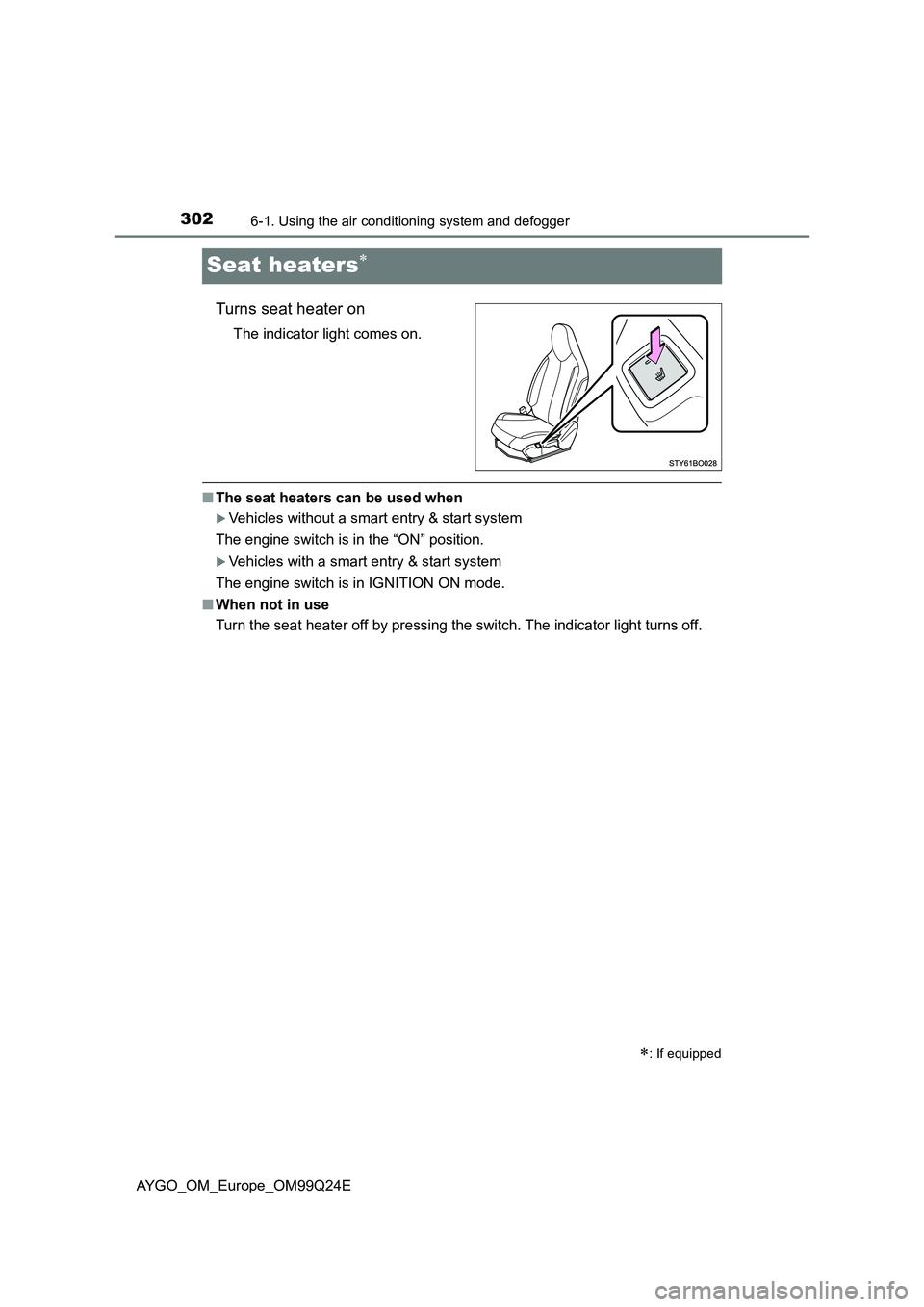
Seat heaters
Turns seat heater on
The indicator light comes on.
■The seat heaters can be used when
Vehicles without a smart entry & start system
The engine switch is in the “ON” position.
Vehicles with a smart entry & start system
The engine switch is in IGNITION ON mode.
■ When not in use
Turn the seat heater off by pressing the switch. The indicator light turns off.
: If equipped
Page 312 of 480
3126-4. Other interior features
AYGO_OM_Europe_OM99Q24E
Vehicles with a multimedia system
Refer to the “Multimedia owner’s manual”.
Vehicles without a multimedia system
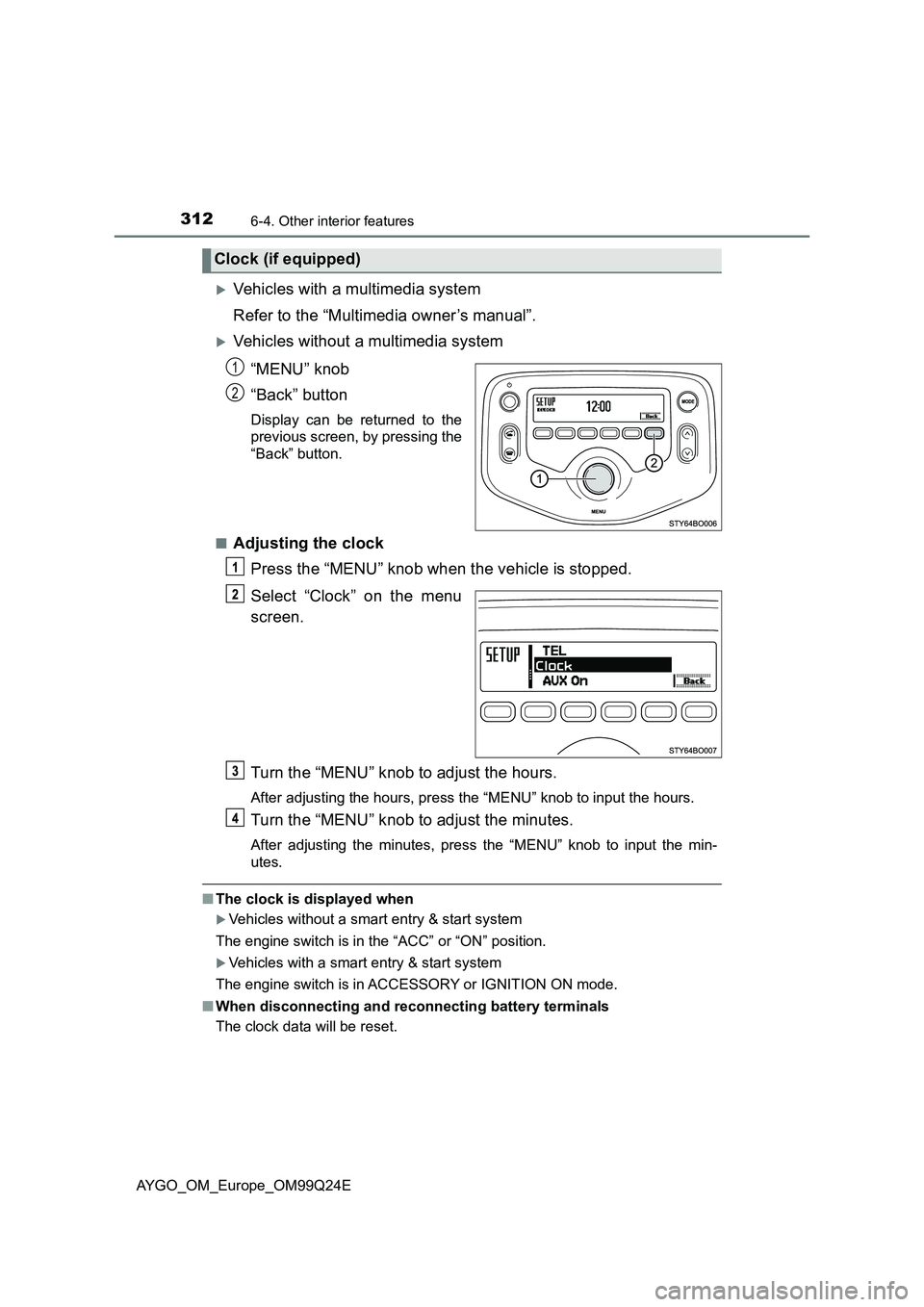
“MENU” knob
“Back” button
Display can be returned to the
previous screen, by pressing the
“Back” button.
■Adjusting the clock
Press the “MENU” knob when the vehicle is stopped.
Select “Clock” on the menu
screen.
Turn the “MENU” knob to adjust the hours.
After adjusting the hours, press the “MENU” knob to input the hours.
Turn the “MENU” knob to adjust the minutes.
After adjusting the minutes, press the “MENU” knob to input the min-
utes.
■ The clock is displayed when
Vehicles without a smart entry & start system
The engine switch is in the “ACC” or “ON” position.
Vehicles with a smart entry & start system
The engine switch is in ACCESSORY or IGNITION ON mode.
■ When disconnecting and reconnecting battery terminals
The clock data will be reset.
Clock (if equipped)
1
2
Page 313 of 480
3136-4. Other interior features
6
Interior features
AYGO_OM_Europe_OM99Q24E
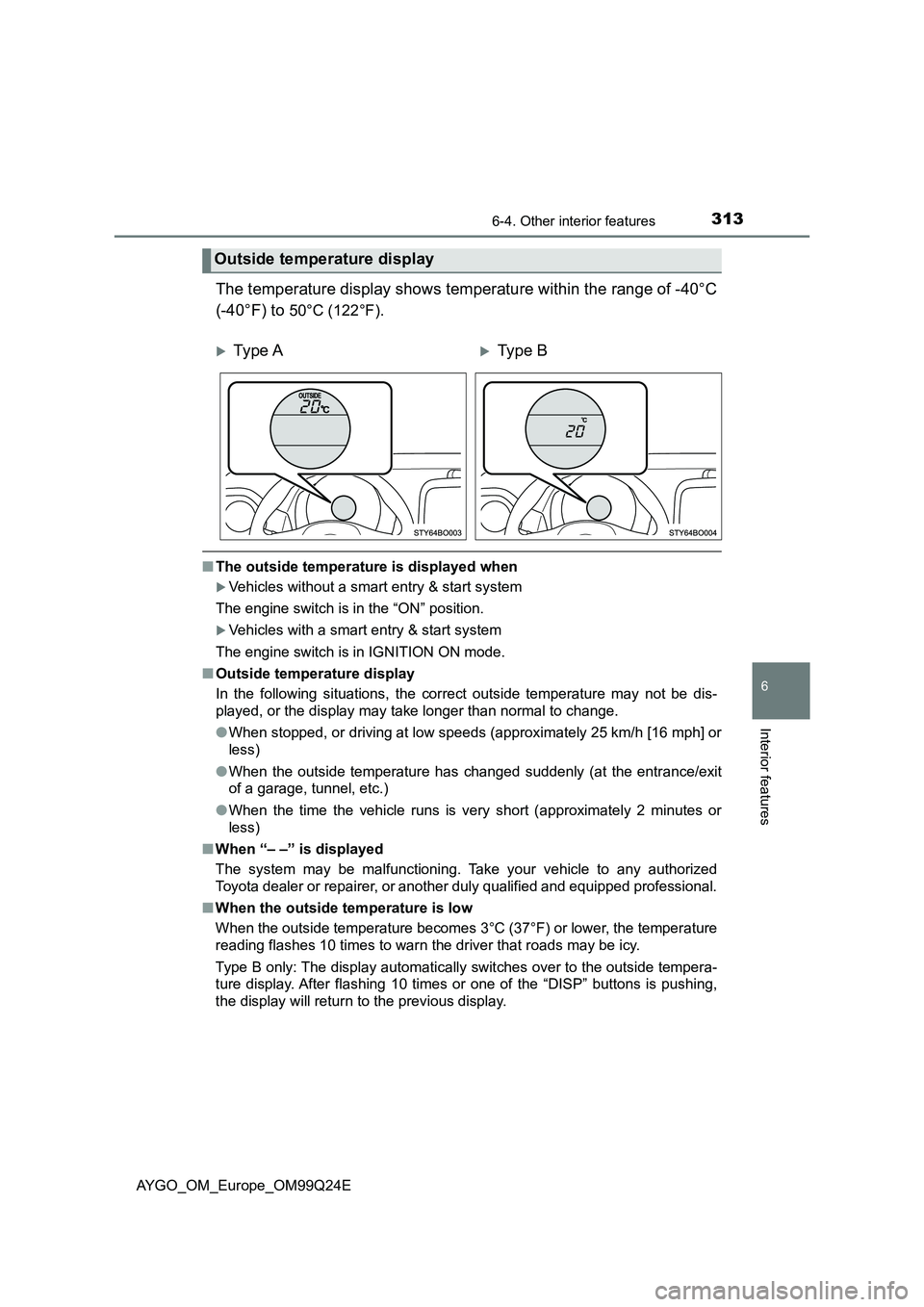
The temperature display shows temperature within the range of -40°C
(-40°F) to 50°C (122°F).
■ The outside temperature is displayed when
Vehicles without a smart entry & start system
The engine switch is in the “ON” position.
Vehicles with a smart entry & start system
The engine switch is in IGNITION ON mode.
■ Outside temperature display
In the following situations, the correct outside temperature may not be dis-
played, or the display may take longer than normal to change.
● When stopped, or driving at low speeds (approximately 25 km/h [16 mph] or
less)
● When the outside temperature has changed suddenly (at the entrance/exit
of a garage, tunnel, etc.)
● When the time the vehicle runs is very short (approximately 2 minutes or
less)
■ When “– –” is displayed
The system may be malfunctioning. Take your vehicle to any authorized
Toyota dealer or repairer, or another duly qualified and equipped professional.
■ When the outside temperature is low
When the outside temperature becomes 3°C (37°F) or lower, the temperature
reading flashes 10 times to warn the driver that roads may be icy.
Type B only: The display automatically switches over to the outside tempera-
ture display. After flashing 10 times or one of the “DISP” buttons is pushing,
the display will return to the previous display.
Outside temperature display
Ty pe AType B
Page 314 of 480
3146-4. Other interior features
AYGO_OM_Europe_OM99Q24E
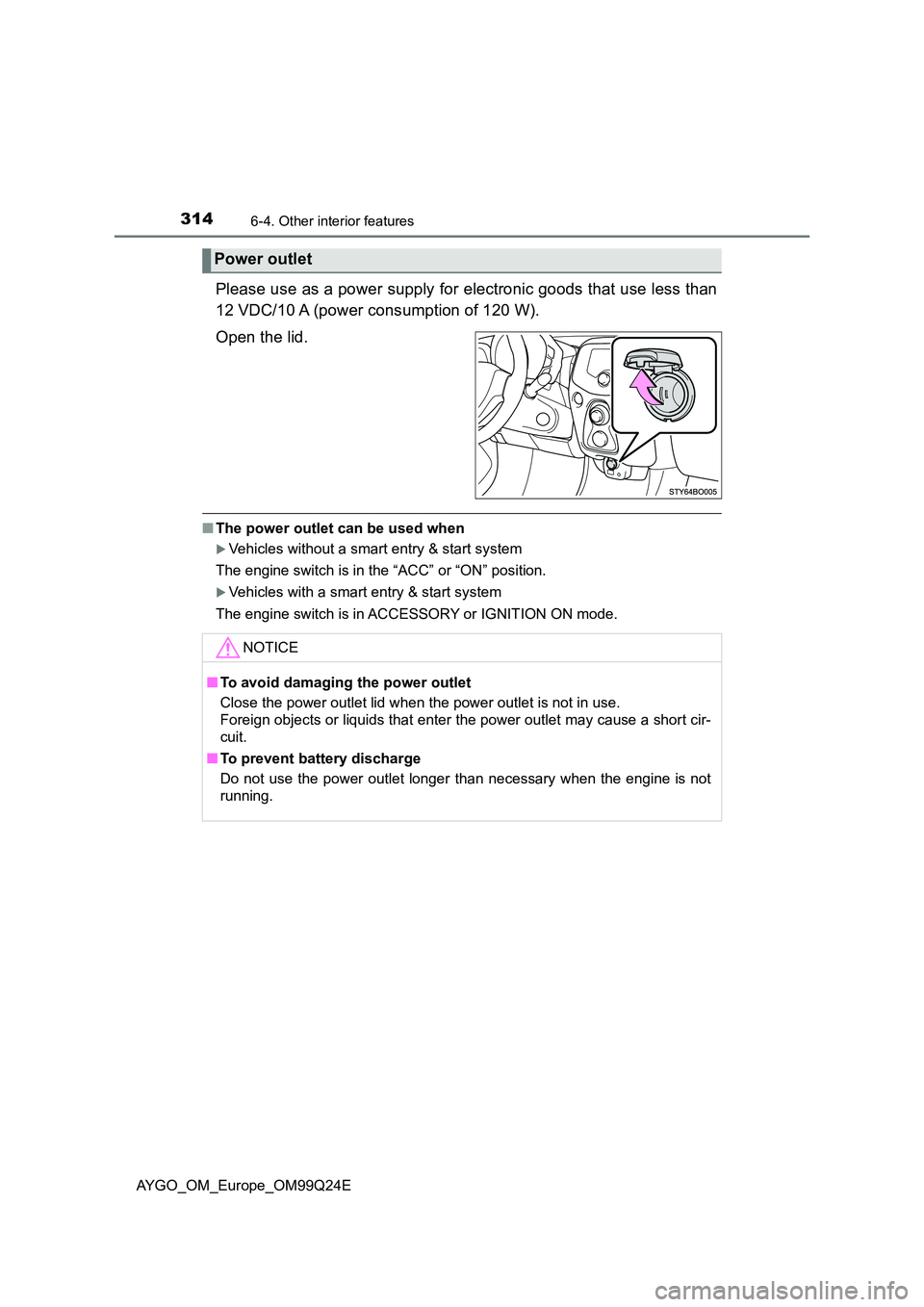
Please use as a power supply for electronic goods that use less than
12 VDC/10 A (power consumption of 120 W).
Open the lid.
■ The power outlet can be used when
Vehicles without a smart entry & start system
The engine switch is in the “ACC” or “ON” position.
Vehicles with a smart entry & start system
The engine switch is in ACCESSORY or IGNITION ON mode.
Power outlet
NOTICE
■ To avoid damaging the power outlet
Close the power outlet lid when the power outlet is not in use.
Foreign objects or liquids that enter the power outlet may cause a short cir-
cuit.
■ To prevent battery discharge
Do not use the power outlet longer than necessary when the engine is not
running.
Page 327 of 480
3277-3. Do-it-yourself maintenance
7
Maintenance and care
AYGO_OM_Europe_OM99Q24E
WARNING
■When working near the electric cooling fans or radiator grille
Vehicles without a smart entry & start system
Be sure the engine switch is off. With the engine switch in the “ON” position,
the electric cooling fan may automatical ly start to run if the air conditioning
is on and/or the coolant temperature is high. ( P. 338)
Vehicles with a smart entry & start system
Be sure the engine switch is off. With the engine switch in IGNITION ON
mode, the electric cooling fan may automatically start to run if the air condi-
tioning is on and/or the coolant temperature is high. ( P. 338)
■ Safety glasses
Wear safety glasses to prevent flying or falling material, fluid spray, etc.,
from getting in your eyes.
NOTICE
■ If you remove the air cleaner filter
Driving with the air cleaner filter removed may cause excessive engine wear
due to dirt in the air.
■ If the fluid level is low or high
It is normal for the brake fluid level to go down slightly as the brake pads
wear or when the fluid level in the accumulator is high.
If the reservoir needs frequent refilling, it may indicate a serious problem.
Page 345 of 480
3457-3. Do-it-yourself maintenance
7
Maintenance and care
AYGO_OM_Europe_OM99Q24E
■How to initialize the tire pressure warning system
Park the vehicle in a safe place and turn the engine switch to the
“LOCK” position (vehicles without a smart entry & start system)
or off (vehicles with a smart entry & start system).
Initialization cannot be performed while the vehicle is moving.
Adjust the tire inflation pressure to the specified cold tire inflation
pressure level. ( P. 454)
Make sure to adjust the tire pressure to the specified cold tire inflation
pressure level. The tire pressure warning system will operate based on
this pressure level.
Turn the engine switch to the “ON” position (vehicles without a
smart entry & start system) or IGNITION ON mode (vehicles with
a smart entry & start system).
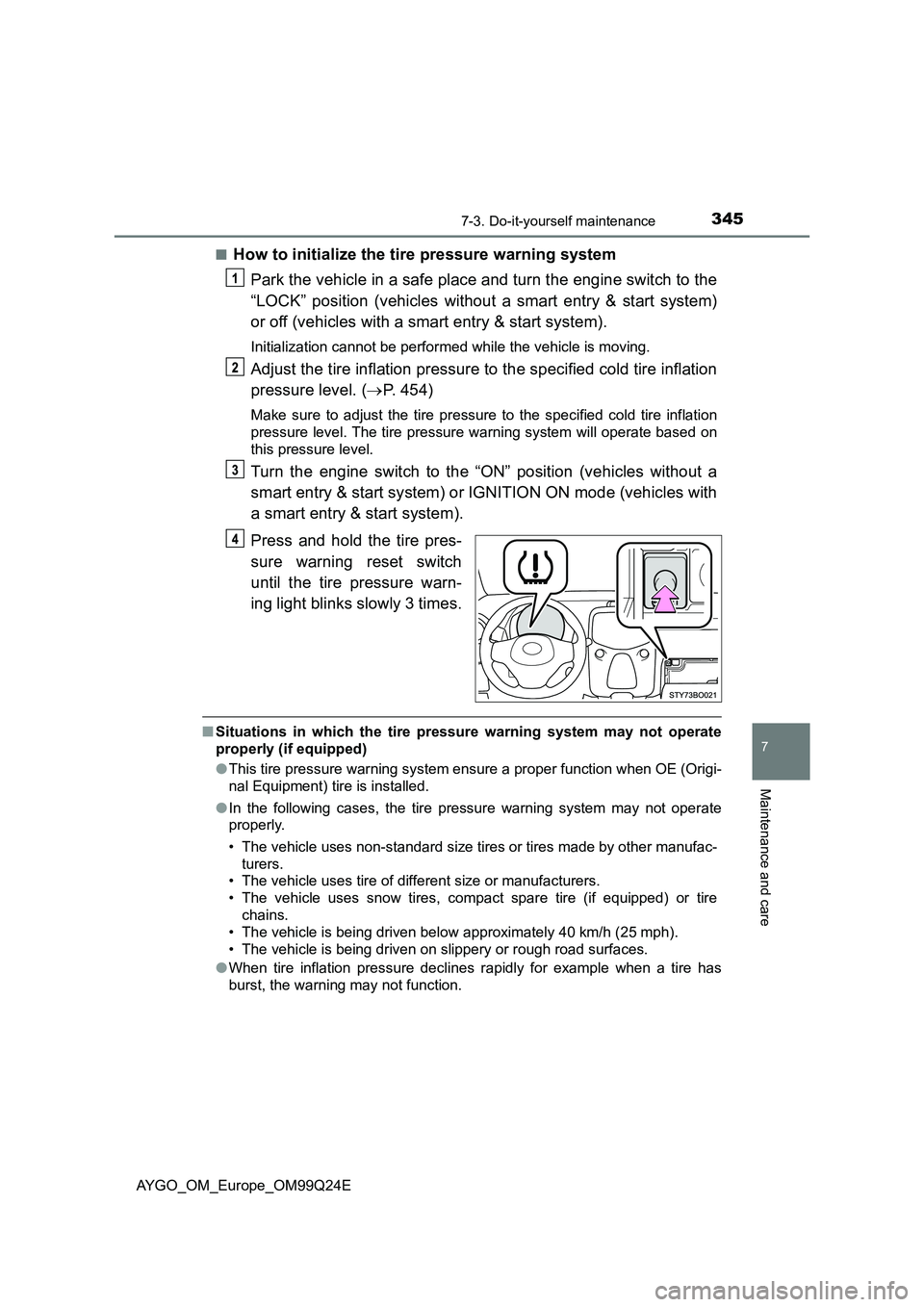
Press and hold the tire pres-
sure warning reset switch
until the tire pressure warn-
ing light blinks slowly 3 times.
■ Situations in which the tire pressure warning system may not operate
properly (if equipped)
● This tire pressure warning system ensure a proper function when OE (Origi-
nal Equipment) tire is installed.
● In the following cases, the tire pressure warning system may not operate
properly.
• The vehicle uses non-standard size tires or tires made by other manufac-
turers.
• The vehicle uses tire of different size or manufacturers.
• The vehicle uses snow tires, compact spare tire (if equipped) or tire
chains.
• The vehicle is being driven below approximately 40 km/h (25 mph).
• The vehicle is being driven on slippery or rough road surfaces.
● When tire inflation pressure declines rapidly for example when a tire has
burst, the warning may not function.
Page 384 of 480
3848-2. Steps to take in an emergency
AYGO_OM_Europe_OM99Q24E
Securely attach a cables or chains to the towing eyelet.
Take care not to damage the vehicle body.
Vehicles without a smart entry & start system: Enter the vehicle
being towed and start the engine.
If the engine does not start, turn the engine switch to the “ON” position.
Vehicles with a smart entry & start system: Enter the vehicle being
towed and start the engine.
If the engine does not start, turn the engine switch to IGNITION ON mode.
Shift the shift lever to N and release the parking brake.
Vehicles with a multi-mode manual transmission: When the shift
lever cannot be shifted. ( P. 428)
■While towing
If the engine is not running, the power assist for the brakes and steering will
not function, making steering and braking more difficult.
■ Wheel bolt wrench
● Vehicles with a wheel bolt wrench: Wheel bolt wrench is installed in luggage
compartment. ( P. 400, 413)
● Vehicles without a wheel bolt wrench: Wheel bolt wrench can be purchased
at any authorized Toyota dealer or repairer, or another duly qualified and
equipped professional.
Page 430 of 480
4308-2. Steps to take in an emergency
AYGO_OM_Europe_OM99Q24E
Ensure that the shift lever is in N and depress the brake pedal
(multi-mode manual transmission) or clutch pedal (manual trans-
mission).
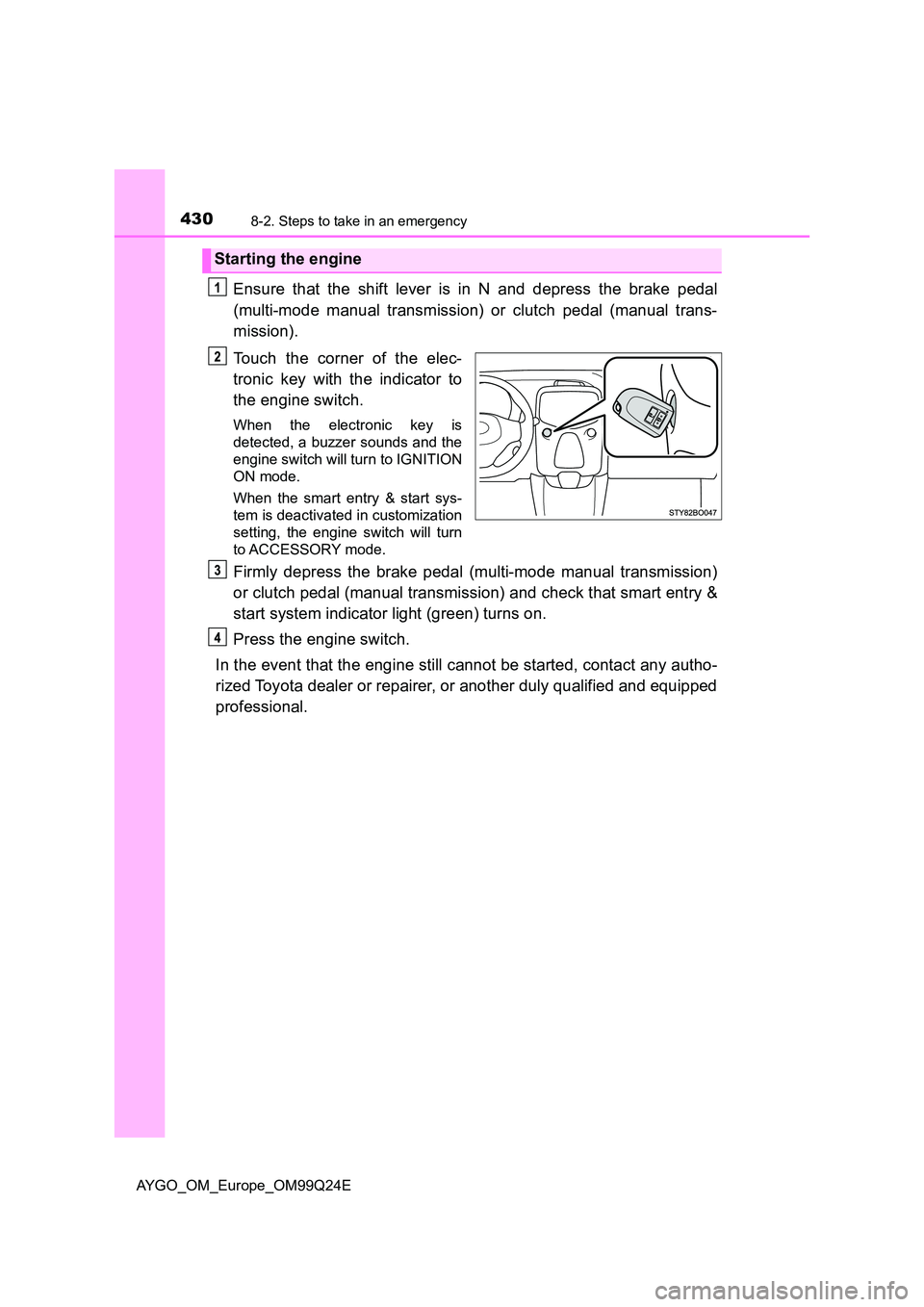
Touch the corner of the elec-
tronic key with the indicator to
the engine switch.
When the electronic key is
detected, a buzzer sounds and the
engine switch will turn to IGNITION
ON mode.
When the smart entry & start sys-
tem is deactivated in customization
setting, the engine switch will turn
to ACCESSORY mode.
Firmly depress the brake pedal (multi-mode manual transmission)
or clutch pedal (manual transmission) and check that smart entry &
start system indicator light (green) turns on.
Press the engine switch.
In the event that the engine still cannot be started, contact any autho-
rized Toyota dealer or repairer, or another duly qualified and equipped
professional.
Starting the engine