light TOYOTA AYGO 2017 (in English) Owner's Guide
[x] Cancel search | Manufacturer: TOYOTA, Model Year: 2017, Model line: AYGO, Model: TOYOTA AYGO 2017Pages: 480, PDF Size: 40.72 MB
Page 91 of 480
91
2
2. Instrument cluster
Instrument cluster
AYGO_OM_Europe_OM99Q24E
Drive monitor display
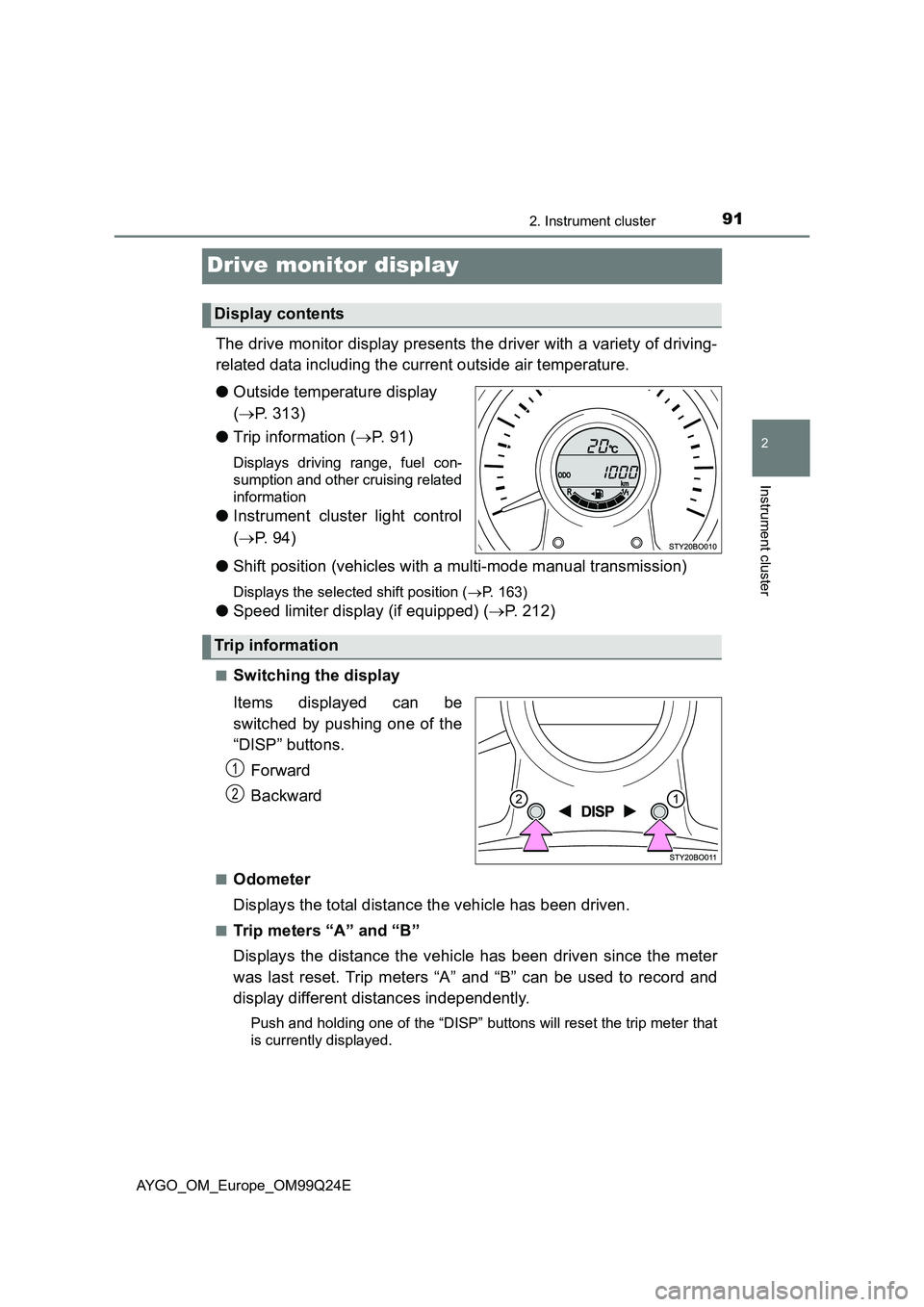
The drive monitor display presents the driver with a variety of driving-
related data including the current outside air temperature.
● Outside temperature display
( P. 313)
● Trip information (P. 91)
Displays driving range, fuel con-
sumption and other cruising related
information
● Instrument cluster light control
( P. 9 4 )
● Shift position (vehicles with a multi-mode manual transmission)
Displays the selected shift position (P. 163)
●Speed limiter display (if equipped) (P. 212)
■Switching the display
Items displayed can be
switched by pushing one of the
“DISP” buttons.
Forward
Backward
■Odometer
Displays the total distance the vehicle has been driven.
■Trip meters “A” and “B”
Displays the distance the vehicle has been driven since the meter
was last reset. Trip meters “A” and “B” can be used to record and
display different distances independently.
Push and holding one of the “DISP” buttons will reset the trip meter that
is currently displayed.
Display contents
Trip information
1
2
Page 93 of 480
932. Instrument cluster
2
Instrument cluster
AYGO_OM_Europe_OM99Q24E
■Driving range
Displays the estimated approximate distance that can be driven
with the quantity of fuel remaining.
• This distance is computed based on your average fuel consumption. As
a result, the actual distance that can be driven may differ from that dis-
played.
• When only a small amount of fuel is added to the tank, the display may
not be updated.
When refueling, turn the engine switch to the “LOCK” position (vehicles
without a smart entry & start system) or off (vehicles with a smart entry
& start system). If the vehicle is refueled without turning the engine
switch to the “LOCK” position or off, the display may not be updated.
• The display shows “LoFUEL” when the remaining is very low.
■Average vehicle speed
Displays the average vehicle speed since the function was reset.
The function can be reset by pushing one of the “DISP” button for longer
than 1 second when the average vehicle speed is displayed.
■Instrument cluster light control
Displays the instrument cluster light control display.
• This screen is only displayed when the tail lights are on.
• The brightness of the instrument cluster light can be adjusted. ( P. 9 4 )
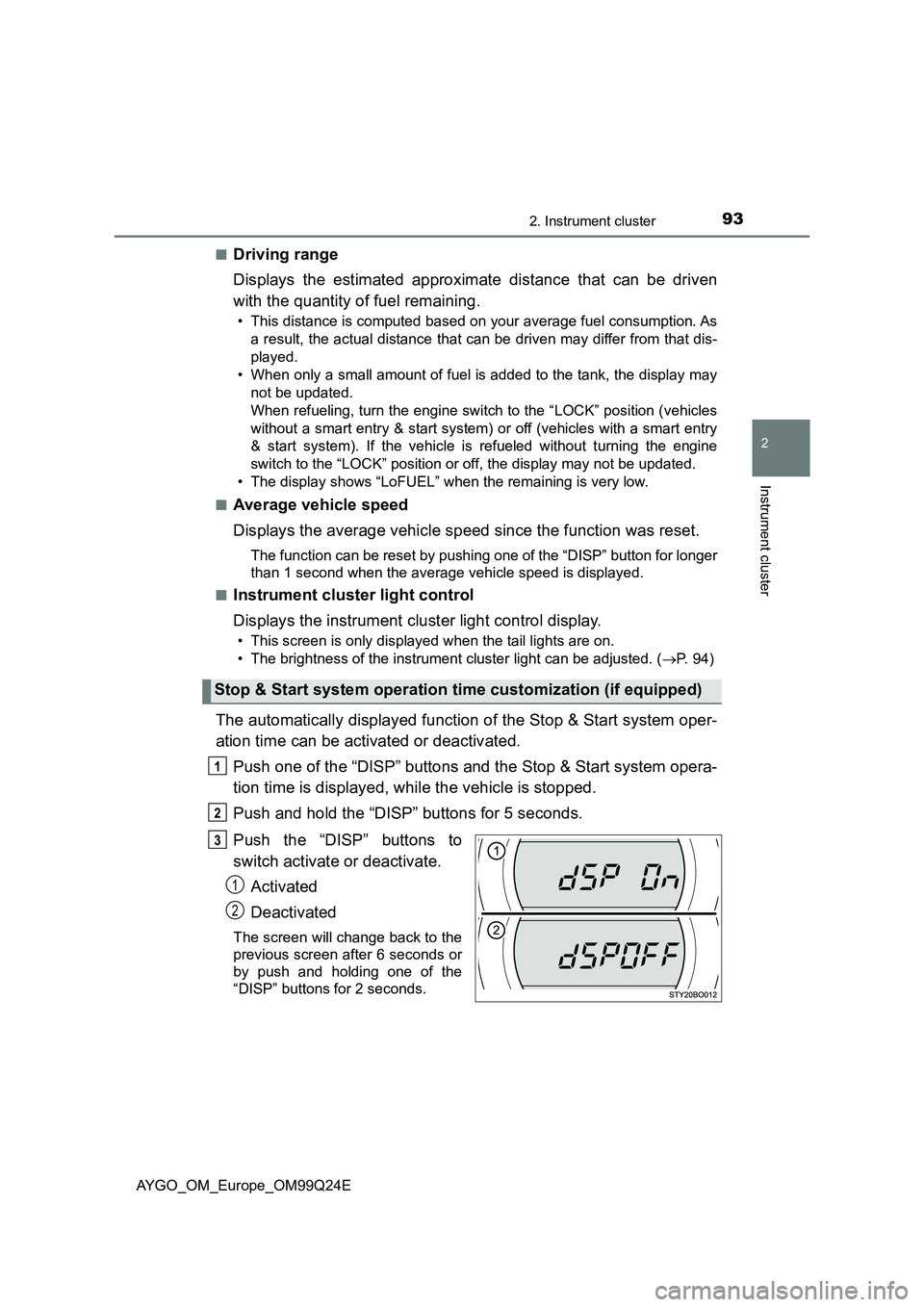
The automatically displayed function of the Stop & Start system oper-
ation time can be activated or deactivated.
Push one of the “DISP” buttons and the Stop & Start system opera-
tion time is displayed, while the vehicle is stopped.
Push and hold the “DISP” buttons for 5 seconds.
Push the “DISP” buttons to
switch activate or deactivate.
Activated
Deactivated
The screen will change back to the
previous screen after 6 seconds or
by push and holding one of the
“DISP” buttons for 2 seconds.
Stop & Start system operation time customization (if equipped)
1
2
Page 94 of 480
942. Instrument cluster
AYGO_OM_Europe_OM99Q24E
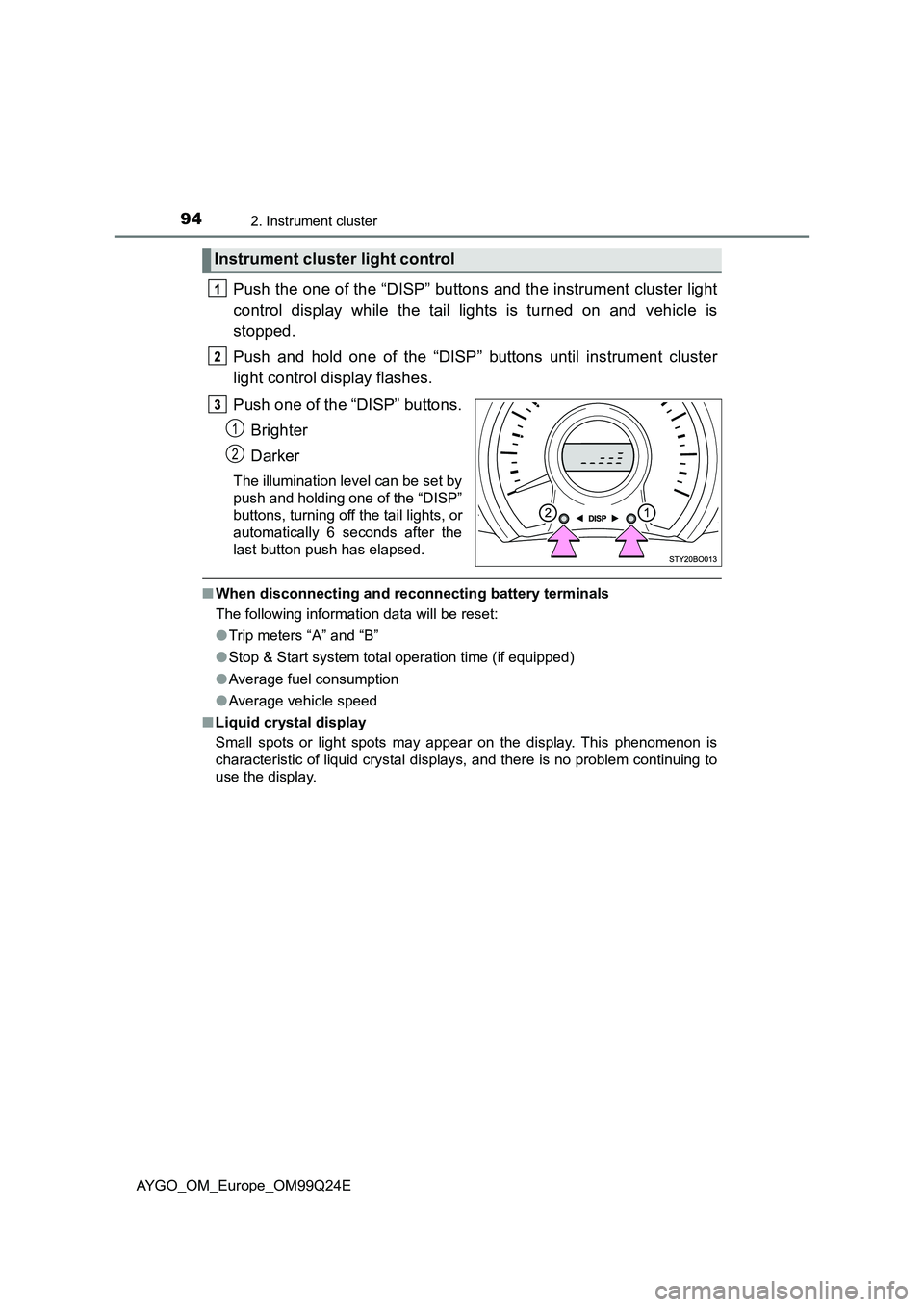
Push the one of the “DISP” buttons and the instrument cluster light
control display while the tail lights is turned on and vehicle is
stopped.
Push and hold one of the “DISP” buttons until instrument cluster
light control display flashes.
Push one of the “DISP” buttons.
Brighter
Darker
The illumination level can be set by
push and holding one of the “DISP”
buttons, turning off the tail lights, or
automatically 6 seconds after the
last button push has elapsed.
■ When disconnecting and reconnecting battery terminals
The following information data will be reset:
● Trip meters “A” and “B”
● Stop & Start system total operation time (if equipped)
● Average fuel consumption
● Average vehicle speed
■ Liquid crystal display
Small spots or light spots may appear on the display. This phenomenon is
characteristic of liquid crystal displays, and there is no problem continuing to
use the display.
Instrument cluster light control
1
2
Page 115 of 480
1153-2. Opening, closing and locking the doors
3
Operation of each component
AYGO_OM_Europe_OM99Q24E
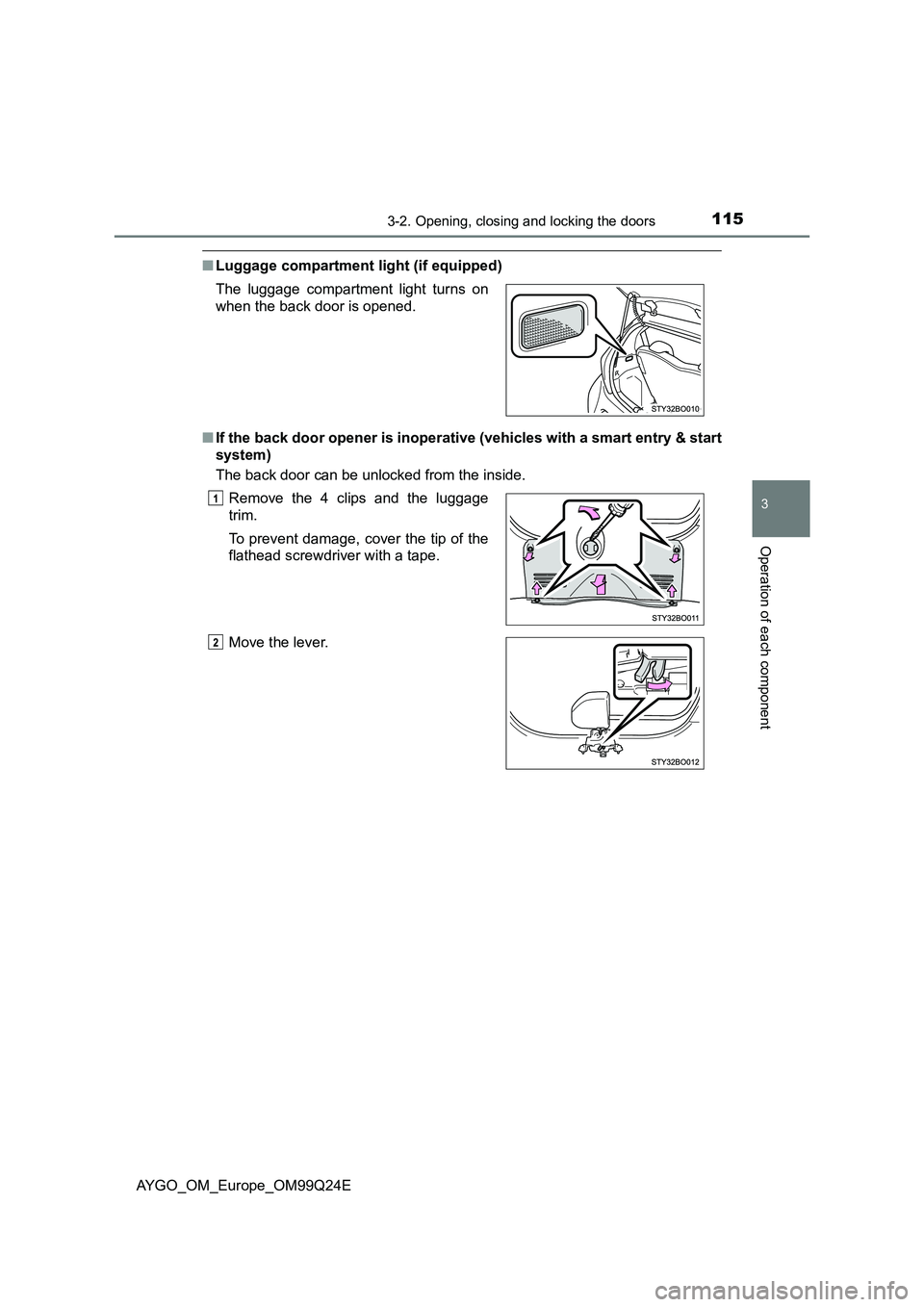
■Luggage compartment light (if equipped)
■ If the back door opener is inoperative (vehicles with a smart entry & start
system)
The back door can be unlocked from the inside.
The luggage compartment light turns on
when the back door is opened.
Remove the 4 clips and the luggage
trim.
To prevent damage, cover the tip of the
flathead screwdriver with a tape.
Move the lever.
Page 120 of 480
1203-2. Opening, closing and locking the doors
AYGO_OM_Europe_OM99Q24E
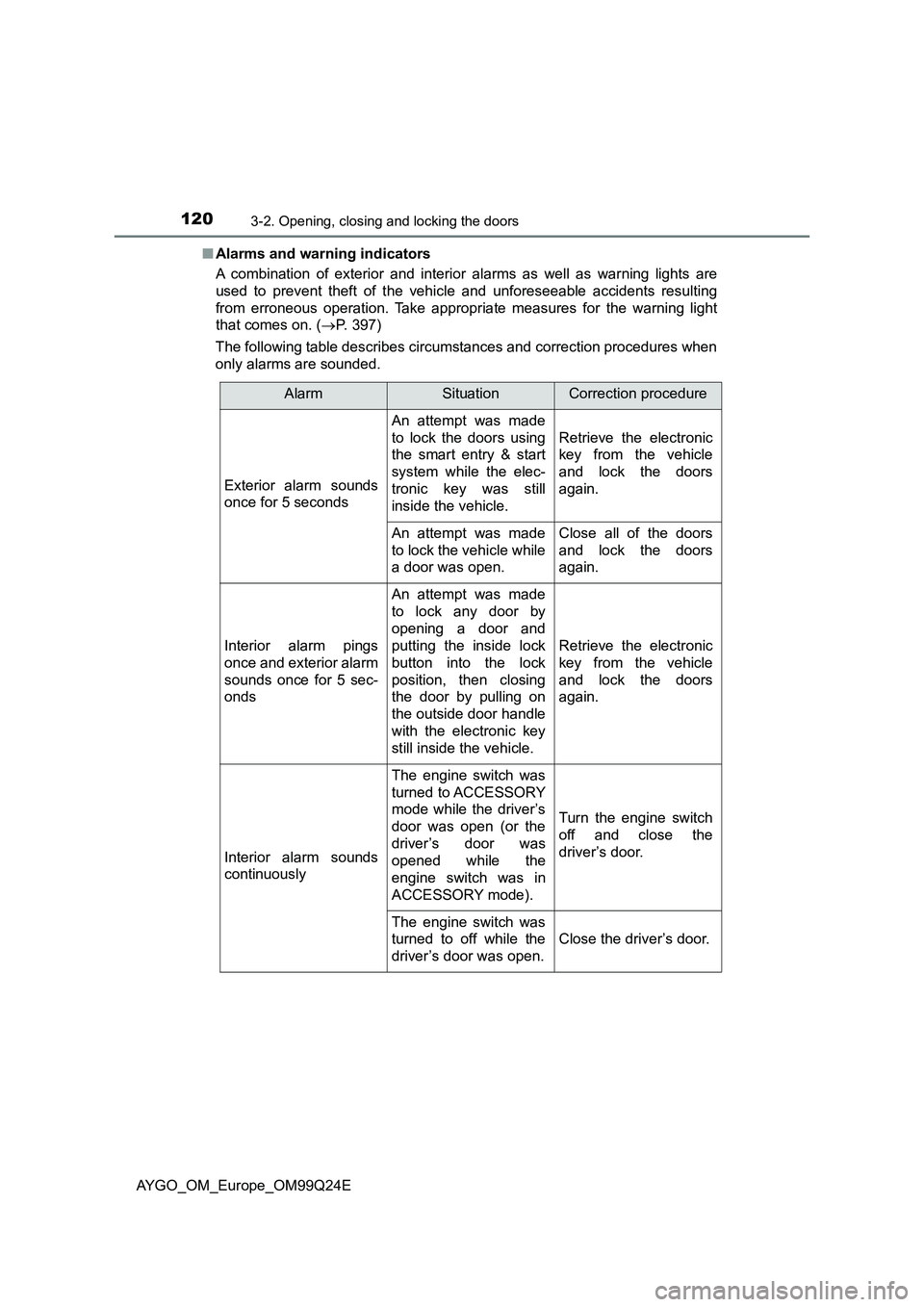
■ Alarms and warning indicators
A combination of exterior and interior alarms as well as warning lights are
used to prevent theft of the vehicle and unforeseeable accidents resulting
from erroneous operation. Take appropria te measures for the warning light
that comes on. ( P. 397)
The following table describes circumstances and correction procedures when
only alarms are sounded.
AlarmSituationCorrection procedure
Exterior alarm sounds
once for 5 seconds
An attempt was made
to lock the doors using
the smart entry & start
system while the elec-
tronic key was still
inside the vehicle.
Retrieve the electronic
key from the vehicle
and lock the doors
again.
An attempt was made
to lock the vehicle while
a door was open.
Close all of the doors
and lock the doors
again.
Interior alarm pings
once and exterior alarm
sounds once for 5 sec-
onds
An attempt was made
to lock any door by
opening a door and
putting the inside lock
button into the lock
position, then closing
the door by pulling on
the outside door handle
with the electronic key
still inside the vehicle.
Retrieve the electronic
key from the vehicle
and lock the doors
again.
Interior alarm sounds
continuously
The engine switch was
turned to ACCESSORY
mode while the driver’s
door was open (or the
driver’s door was
opened while the
engine switch was in
ACCESSORY mode).
Turn the engine switch
off and close the
driver’s door.
The engine switch was
turned to off while the
driver’s door was open.
Close the driver’s door.
Page 122 of 480
1223-2. Opening, closing and locking the doors
AYGO_OM_Europe_OM99Q24E
■ Note for the entry function
● Even when the electronic key is within the effective range (detection areas),
the system may not operate properly in the following cases:
• The electronic key is too close to the window or outside door handle, near
the ground, or in a high place w hen the doors are locked or unlocked.
• The electronic key is on the instrument panel, luggage cover (if equipped)
or floor, or in the door pockets or glove box when the engine is started or
engine switch modes are changed.
● As long as the electronic key is within the effective range, the doors may be
locked or unlocked by anyone. However, only the doors detecting the elec-
tronic key can be used to unlock the vehicle.
Depending on the situation, even when the electronic key in the vicinity of
opposite side door to the door to be unlocked, the electronic key may be
detected and the door unlocks.
● If the wireless remote control is used to lock the doors when the electronic
key is near the vehicle, there is a possibility that the door may not be
unlocked by the entry function. (Use the wireless remote control to unlock
the doors.)
■ Note for the unlocking function
● There are cases when pulling the door handle while pressing the Lock/
Unlock button that the door will not unlock. In those cases, after returning
the door handle to the original position, press the Lock/Unlock button once
again and check that the doors unlock before pulling the door handle.
● If there is another electronic key in the detection area, it may take slightly
longer for the doors to unlock after the Lock/Unlock button is pressed.
■ When the vehicle is not driven for extended periods
● To prevent theft of the vehicle, do not leave the electronic key within 2 m
(6 ft.) of the vehicle.
● The smart entry & start system can be deactivated in advance. (P. 459)
■ To operate the system properly
Make sure to carry the electronic key when operating the system. Do not get
the electronic key too close to the vehicle when operating the system from the
outside of the vehicle.
Depending on the position and holding condition of the electronic key, the key
may not be detected correctly and the system may not operate properly. (The
alarm may go off accidentally, or the door lock prevention function may not
operate.)
■ If the smart entry & start system does not operate properly
● Locking and unlocking the doors: Use the mechanical key. (P. 429)
● Starting the engine: P. 430
Page 134 of 480
1343-4. Adjusting the steering wheel and mirrors
AYGO_OM_Europe_OM99Q24E
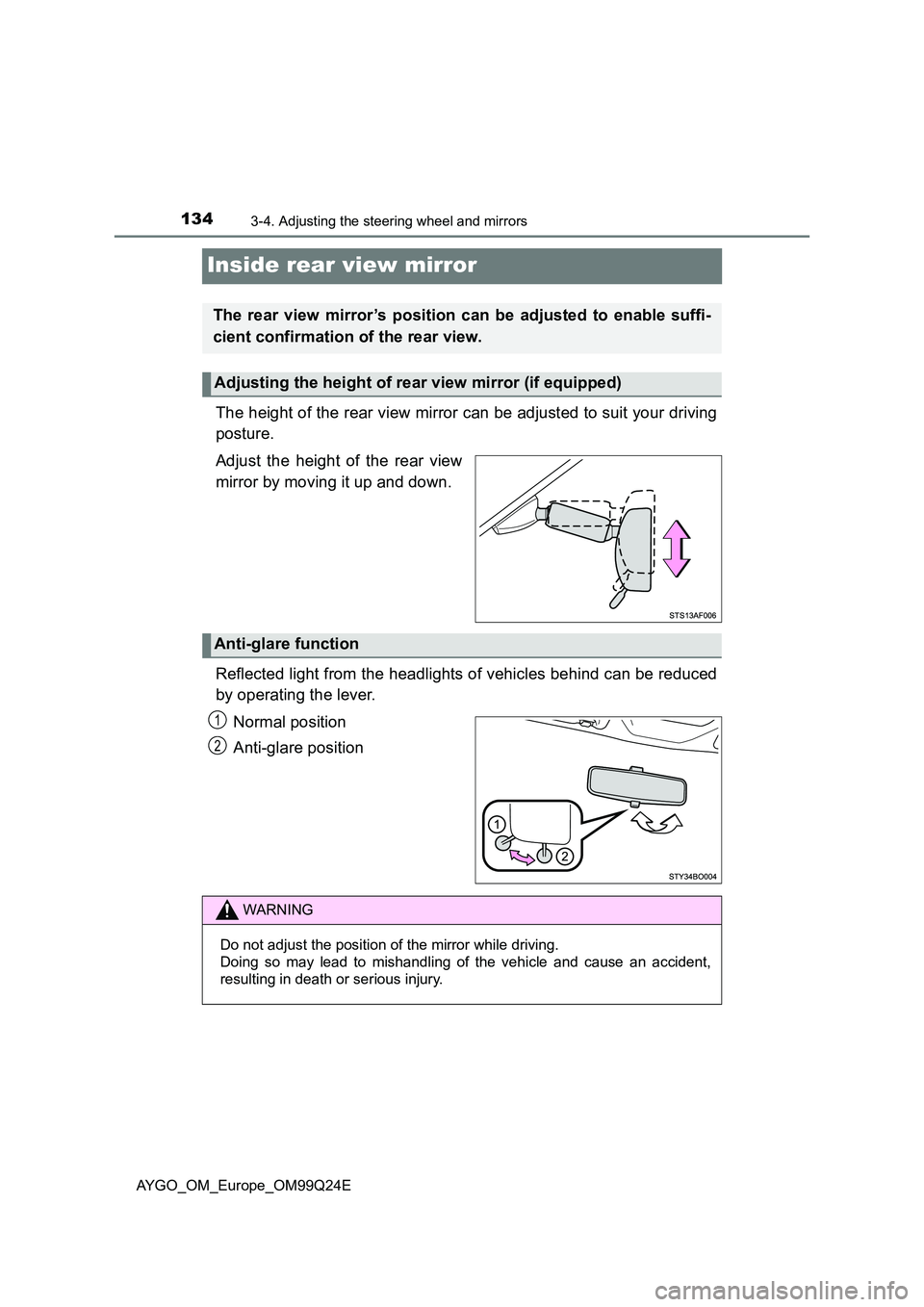
Inside rear view mirror
The height of the rear view mirror can be adjusted to suit your driving
posture.
Adjust the height of the rear view
mirror by moving it up and down.
Reflected light from the headlights of vehicles behind can be reduced
by operating the lever.
Normal position
Anti-glare position
The rear view mirror’s position can be adjusted to enable suffi-
cient confirmation of the rear view.
Adjusting the height of rear view mirror (if equipped)
Anti-glare function
1
2
WARNING
Do not adjust the position of the mirror while driving.
Doing so may lead to mishandling of the vehicle and cause an accident,
resulting in death or serious injury.
Page 140 of 480
1403-5. Opening, closing the windows and canvas top
AYGO_OM_Europe_OM99Q24E
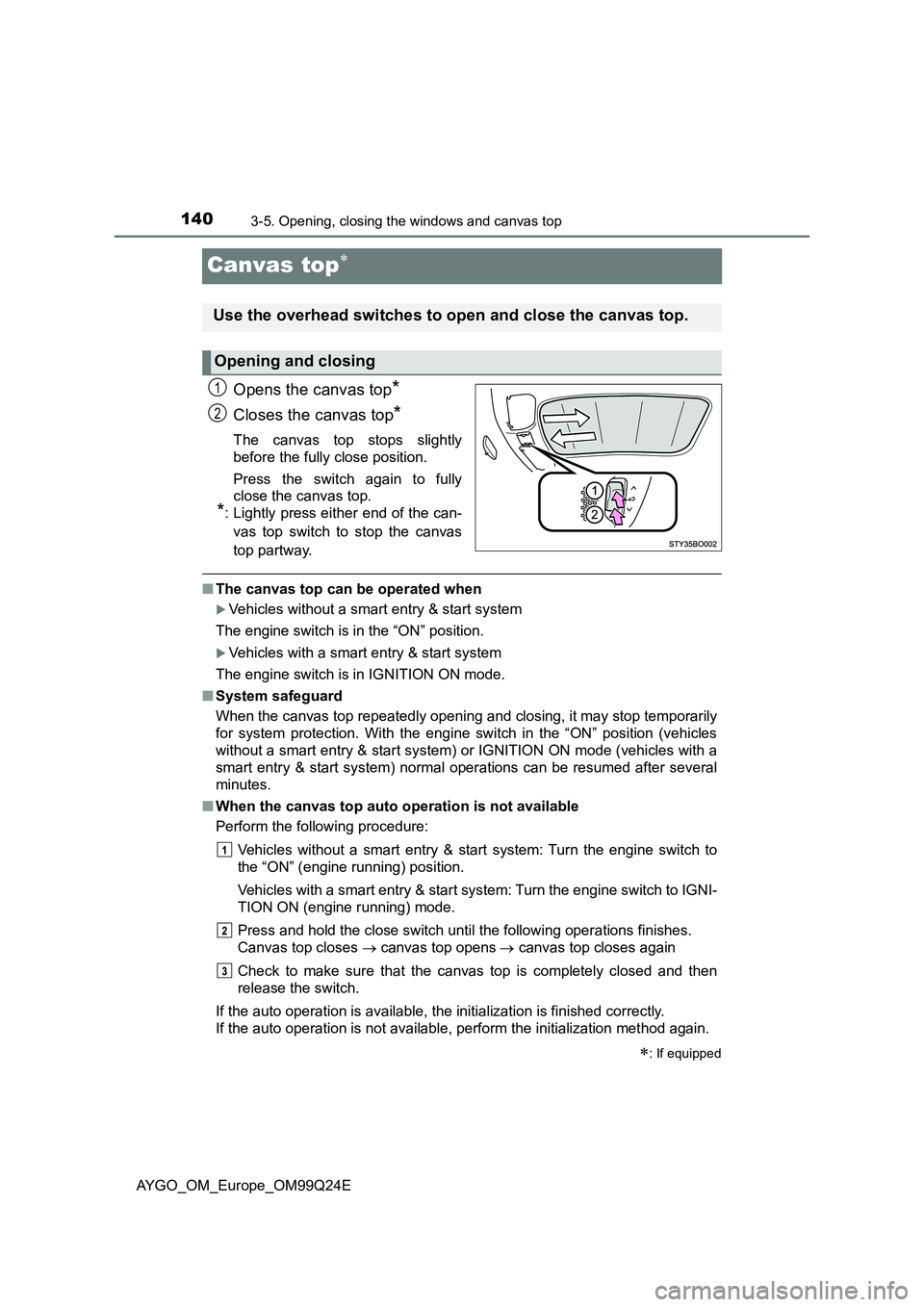
Canvas top
Opens the canvas top*
Closes the canvas top*
The canvas top stops slightly
before the fully close position.
Press the switch again to fully
close the canvas top.
*: Lightly press either end of the can-
vas top switch to stop the canvas
top partway.
■ The canvas top can be operated when
Vehicles without a smart entry & start system
The engine switch is in the “ON” position.
Vehicles with a smart entry & start system
The engine switch is in IGNITION ON mode.
■ System safeguard
When the canvas top repeatedly opening and closing, it may stop temporarily
for system protection. With the engine switch in the “ON” position (vehicles
without a smart entry & start system) or IGNITION ON mode (vehicles with a
smart entry & start system) normal operations can be resumed after several
minutes.
■ When the canvas top auto operation is not available
Perform the following procedure:
Vehicles without a smart entry & start system: Turn the engine switch to
the “ON” (engine running) position.
Vehicles with a smart entry & start system: Turn the engine switch to IGNI-
TION ON (engine running) mode.
Press and hold the close switch until the following operations finishes.
Canvas top closes canvas top opens canvas top closes again
Check to make sure that the canvas top is completely closed and then
release the switch.
If the auto operation is available, the initialization is finished correctly.
If the auto operation is not available, perform the initialization method again.
: If equipped
Use the overhead switches to open and close the canvas top.
Opening and closing
1
2
Page 143 of 480
143
4Driving
AYGO_OM_Europe_OM99Q24E
4-1. Before driving
Driving the vehicle ............. 144
Cargo and luggage ............ 153
Trailer towing ..................... 154
4-2. Driving procedures
Engine (ignition) switch
(vehicles without a smart
entry & start system)........ 155
Engine (ignition) switch
(vehicles with a smart
entry & start system)........ 158
Multi-mode manual
transmission .................... 163
Manual transmission.......... 168
Turn signal lever ................ 170
Parking brake .................... 171
4-3. Operating the lights
and wipers
Headlight switch................. 172
Fog light switch .................. 176
Windshield wiper
and washer ...................... 178
Rear window wiper
and washer ...................... 180
4-4. Refueling
Opening the fuel tank
cap ................................... 182
4-5. Toyota Safety Sense
Toyota Safety Sense ......... 186
PCS (Pre-Crash Safety
system) ............................ 192
LDA (Lane Departure
Alert) ................................ 206
4-6. Using the driving support
systems
Speed limiter ...................... 212
Stop & Start system ........... 216
Driving assist systems ....... 223
4-7. Driving tips
Winter driving tips .............. 229
Page 146 of 480
1464-1. Before driving
AYGO_OM_Europe_OM99Q24E
Multi-mode manual transmission
With the brake pedal depressed, firmly set the parking brake and
shift the shift lever to E or M.
When shifting the shift lever to E: Make sure that the display of the gear
position indicator shows E.
When shifting the shift lever to M: Make sure that the display of the gear
position indicator shows 1.
Gently depress the accelerator pedal.
Release the parking brake.
Manual transmission
With the parking brake firmly set and the clutch pedal fully
depressed, shift the shift lever to 1.
Lightly depress the accelerator pedal at the same time as gradually
releasing the clutch pedal.
Release the parking brake.
■ When starting off on a uphill (vehicles with a hill-start assist control)
The hill-start assist control will activate. ( P. 223)
■ Driving in the rain
● Drive carefully when it is raining, because visibility will be reduced, the win-
dows may become fogged-up, and the road will be slippery.
● Drive carefully when it starts to rain, because the road surface will be espe-
cially slippery.
● Refrain from high speeds when driving on an expressway in the rain,
because there may be a layer of water between the tires and the road sur-
face, preventing the steering and brakes from operating properly.
■ Breaking in your new Toyota
To extend the life of the vehicle, observing the following precautions is recom-
mended:
● For the first 300 km (200 miles):
Avoid sudden stops.
● For the first 1000 km (600 miles):
• Do not drive at extremely high speeds.
• Avoid sudden acceleration.
• Do not drive continuously in low gears.
• Do not drive at a constant speed for extended periods.
Starting off on a steep uphill