open hood TOYOTA BZ4X 2022 (in English) User Guide
[x] Cancel search | Manufacturer: TOYOTA, Model Year: 2022, Model line: BZ4X, Model: TOYOTA BZ4X 2022Pages: 674, PDF Size: 120.02 MB
Page 430 of 674
428
Owners Manual_Europe_M42D76_en
6-1. Using the air conditioning system and defogger
normal air conditioning operation. Also,
the outside of the windshield may fog up due to the outside temperature, humidity or air conditioning set temperature.
■Security feature
Any unlocked doors will be automatically locked when the system is operating. The emergency flashers flash to indicate
that the doors have been locked.
■Conditions affecting operation
P. 2 0 4
■While the Remote Air Conditioning System is operating
●Depending on the operating condition of the Remote Air Conditioning Sys-
tem, the electric fan may spin and an operating noise may be heard.However, this does not indicate a mal-
function.
●The Remote Air Conditioning System
may stop operating temporarily if other features that use electricity (for example, the seat heater, lights, wind-
shield wipers) are in operation or if the charge level of the 12-volt battery becomes low.
●The headlights, windshield wiper, meter, etc. will not operate.
●The intrusion sensor will automatically be canceled.
■Electronic key battery depletion
P. 1 8 2
■When the electronic key battery is fully depleted
P. 4 9 9
■Customization
Setting (e.g. Operation using “A/C” on the wireless remote control) can be changed. (Customizable features:
P.572)
WARNING
■Precautions for the Remote Air Conditioning System
●Do not use the system if people are in the vehicle.Even when the system is in use, the
internal temperature may still reach a high or low level due to features such as the automatic shut-off. Chil-
dren and pets left inside the vehicle may suffer heatstroke dehydration or hypothermia, or could result in
death or serious injury.
●Depending on the surrounding envi-
ronment, signals from the wireless switch may transmit further than expected. Pay appropriate attention
to the vehicle’s surroundings and use the switch only when neces-sary.
●Do not operate “A/C” if the hood is open. The air conditioning may
operate unintentionally and objects may be drawn into the electrical cooling fan.
NOTICE
■To prevent the traction battery
from being discharged through incorrect operation
Use “A/C” only when necessary.
Page 469 of 674
467
7
Owners Manual_Europe_M42D76_en
7-3. Do-it-yourself maintenance
Maintenance and care
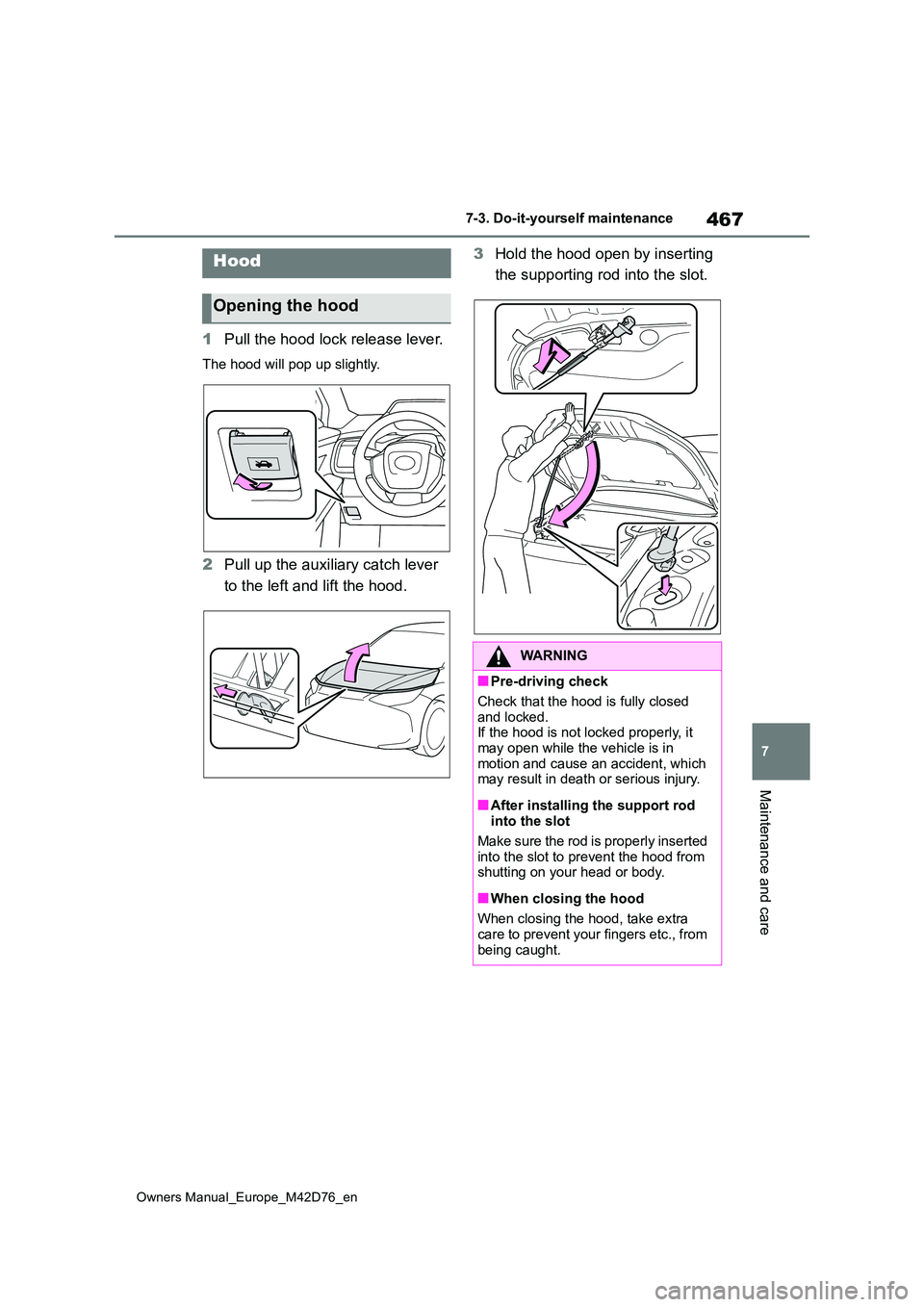
1Pull the hood lock release lever.
The hood will pop up slightly.
2Pull up the auxiliary catch lever
to the left and lift the hood.
3 Hold the hood open by inserting
the supporting rod into the slot.Hood
Opening the hood
WARNING
■Pre-driving check
Check that the hood is fully closed
and locked. If the hood is not locked properly, it may open while the vehicle is in
motion and cause an accident, which may result in death or serious injury.
■After installing the support rod into the slot
Make sure the rod is properly inserted
into the slot to prevent the hood from shutting on your head or body.
■When closing the hood
When closing the hood, take extra care to prevent your fingers etc., from
being caught.
Page 527 of 674
525
8
Owners Manual_Europe_M42D76_en
8-2. Steps to take in an emergency
When trouble arises
equipped)
Follow the following correction methods.
• Check the voltage of the battery
• Remove any dirt or foreign matter from the front/rear side radar sensors
■If “System Stopped Front Camera
Low Visibility See Owner’s Manual” is displayed
Indicates one of the following systems is
disabled.
●PCS (Pre-Collision System)
●LDA (Lane Departure Alert)
●LTA (Lane Tracing Assist)
●AHB (Automatic High Beam) (if
equipped)
●AHS (Adaptive High-beam System) (if
equipped)
●Dynamic radar cruise control
●Speed limiter (if equipped)
●RSA (Road Sign Assist)
Follow the following correction methods.
• Using the windshield wipers, remove the dirt or foreign matter from the windshield.
• Using the air conditioning system, defog the windshield.
• Close the hood, remove any stickers, etc. to clear the obstruction in front of
the front camera.
■If “System Stopped Front Camera Out of Temp. Range Wait until Nor-mal Temperature” is displayed
Indicates one of the following systems is disabled.
●PCS (Pre-Collision System)
●LDA (Lane Departure Alert)
●LTA (Lane Tracing Assist)
●AHB (Automatic High Beam) (if equipped)
●AHS (Adaptive High-beam System) (if equipped)
●Dynamic radar cruise control
●Speed limiter (if equipped)
●RSA (Road Sign Assist)
Follow the following correction methods.
• If the front camera is hot, such as after the vehicle is parked in the sun, use
the air conditioning system to decrease the temperature around the front camera
• If a sunshade was used when the vehicle was parked, depending on its
type, the sunlight reflected from the surface of the sunshade may cause the temperature of the front camera to
become excessively high
• If the front camera is cold, such after
the vehicle is parked in an extremely cold environment, use the air condi-tioning system to increase the tem-
perature around the front camera
■If “System Stopped Front Radar Sensor Blocked Clean Radar Sen-sor” is displayed
Indicates one of the following systems is disabled.
●PCS (Pre-Collision System)
●LDA (Lane Departure Alert)
●LTA (Lane Tracing Assist)
●AHB (Automatic High Beam) (if equipped)
●AHS (Adaptive High-beam System) (if equipped)
●Dynamic radar cruise control
●Speed limiter (if equipped)
●RSA (Road Sign Assist)
Follow the following correction methods.
• Check if there is any foreign matter attached to the radar sensor or radar
sensor cover and clean them if neces- sary ( P.277)
• This message may be displayed when driving in an open area with few nearby vehicles or structures, such as
a desert, grasslands, suburbs, etc.
The message may be cleared by driving
the vehicle in an area with structures,
Page 543 of 674
541
8
Owners Manual_Europe_M42D76_en
8-2. Steps to take in an emergency
When trouble arises
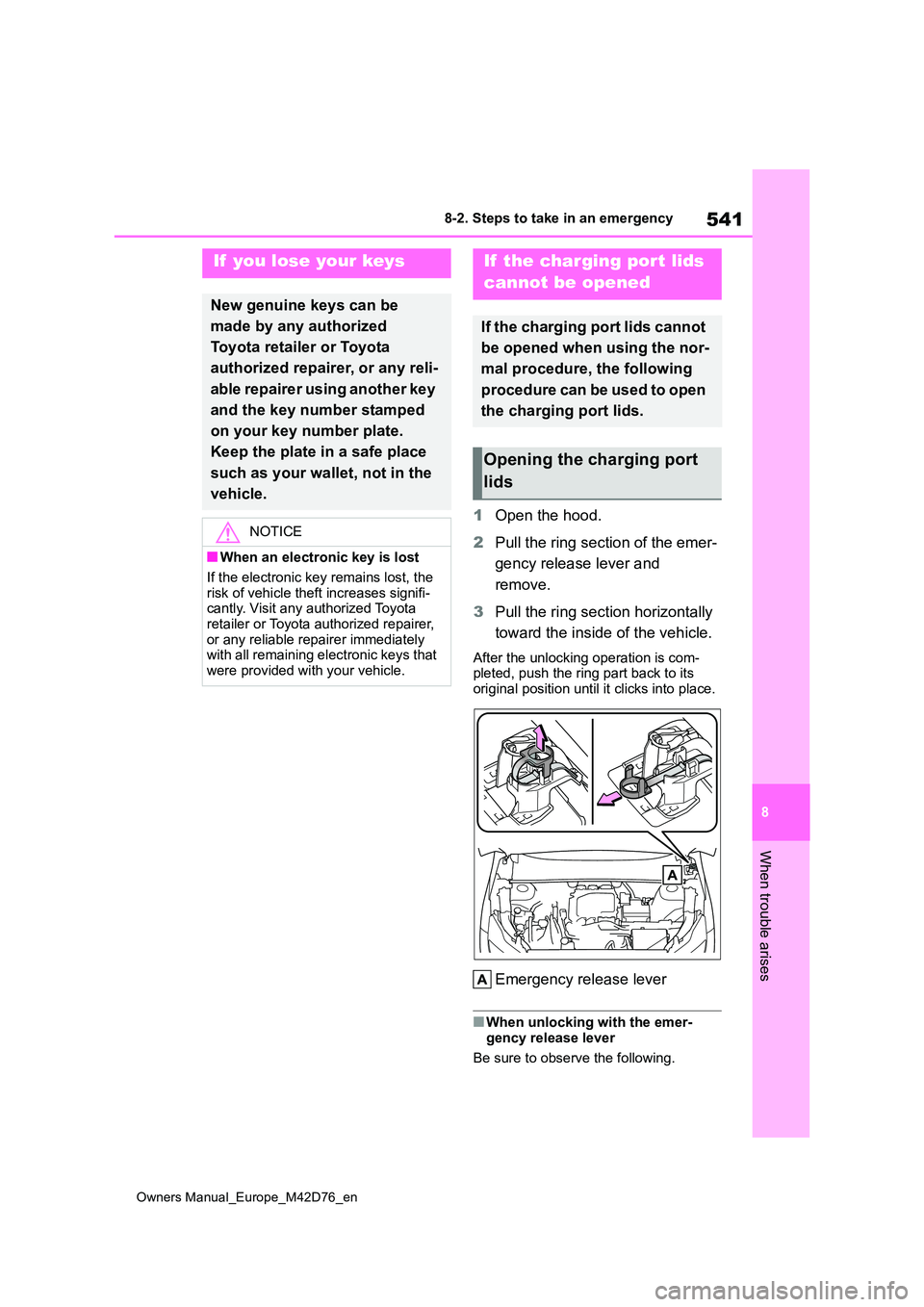
1Open the hood.
2 Pull the ring section of the emer-
gency release lever and
remove.
3 Pull the ring section horizontally
toward the inside of the vehicle.
After the unlocking operation is com- pleted, push the ring part back to its
original position until it clicks into place.
Emergency release lever
■When unlocking with the emer- gency release lever
Be sure to observe the following.
If you lose your keys
New genuine keys can be
made by any authorized
Toyota retailer or Toyota
authorized repairer, or any reli-
able repairer using another key
and the key number stamped
on your key number plate.
Keep the plate in a safe place
such as your wallet, not in the
vehicle.
NOTICE
■When an electronic key is lost
If the electronic key remains lost, the
risk of vehicle theft increases signifi- cantly. Visit any authorized Toyota retailer or Toyota authorized repairer,
or any reliable repairer immediately with all remaining electronic keys that were provided with your vehicle.
If the charging port lids
cannot be opened
If the charging port lids cannot
be opened when using the nor-
mal procedure, the following
procedure can be used to open
the charging port lids.
Opening the charging port
lids
Page 546 of 674
544
Owners Manual_Europe_M42D76_en
8-2. Steps to take in an emergency
■Stopping the EV system
Set the parking brake, shift the shift
position to P and press the power switch as you normally do when stopping the EV system.
■Electronic key battery
As the above procedure is a temporary measure, it is recommended that the electronic key battery be replaced
immediately when the battery is depleted. ( P.499)
■Alarm (if equipped)
Using the mechanical key to lock the
doors will not set the alarm system. If a door is unlocked using the mechani-cal key when the alarm system is set,
the alarm may be triggered. ( P. 7 7 )
■Changing power switch modes
Release the brake pedal and press the power switch in step 3 above.
The EV system does not start and modes will be changed each time the switch is pressed. ( P.246)
If you have a set of jumper (or
booster) cables and a second vehi-
cle with a 12-volt battery, you can
jump start your vehicle by following
the steps below.
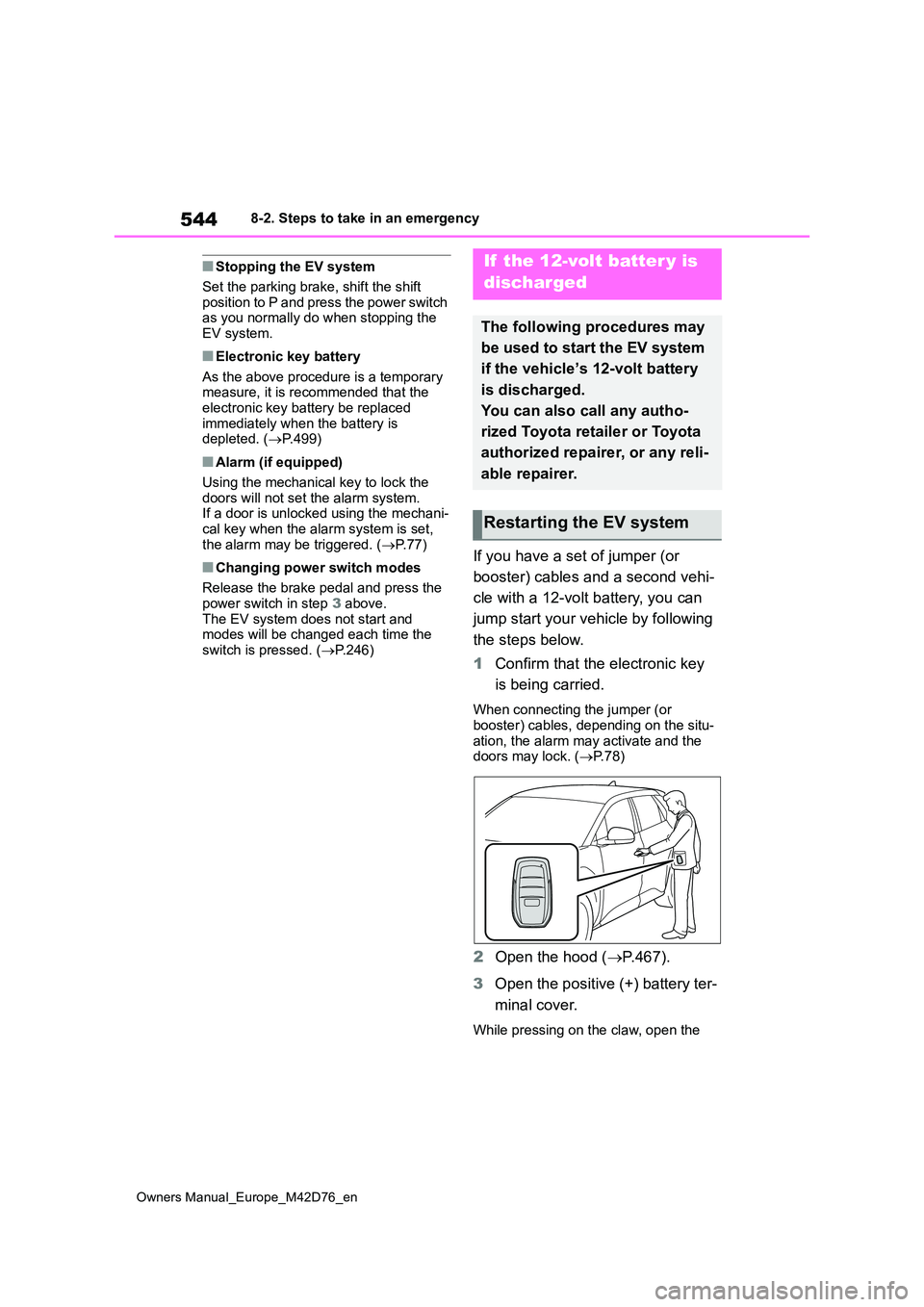
1 Confirm that the electronic key
is being carried.
When connecting the jumper (or
booster) cables, depending on the situ- ation, the alarm may activate and the doors may lock. ( P.78)
2Open the hood (P.467).
3 Open the positive (+) battery ter-
minal cover.
While pressing on the claw, open the
If the 12-volt batter y is
discharged
The following procedures may
be used to start the EV system
if the vehicle’s 12-volt battery
is discharged.
You can also call any autho-
rized Toyota retailer or Toyota
authorized repairer, or any reli-
able repairer.
Restarting the EV system
Page 552 of 674
550
Owners Manual_Europe_M42D76_en
8-2. Steps to take in an emergency
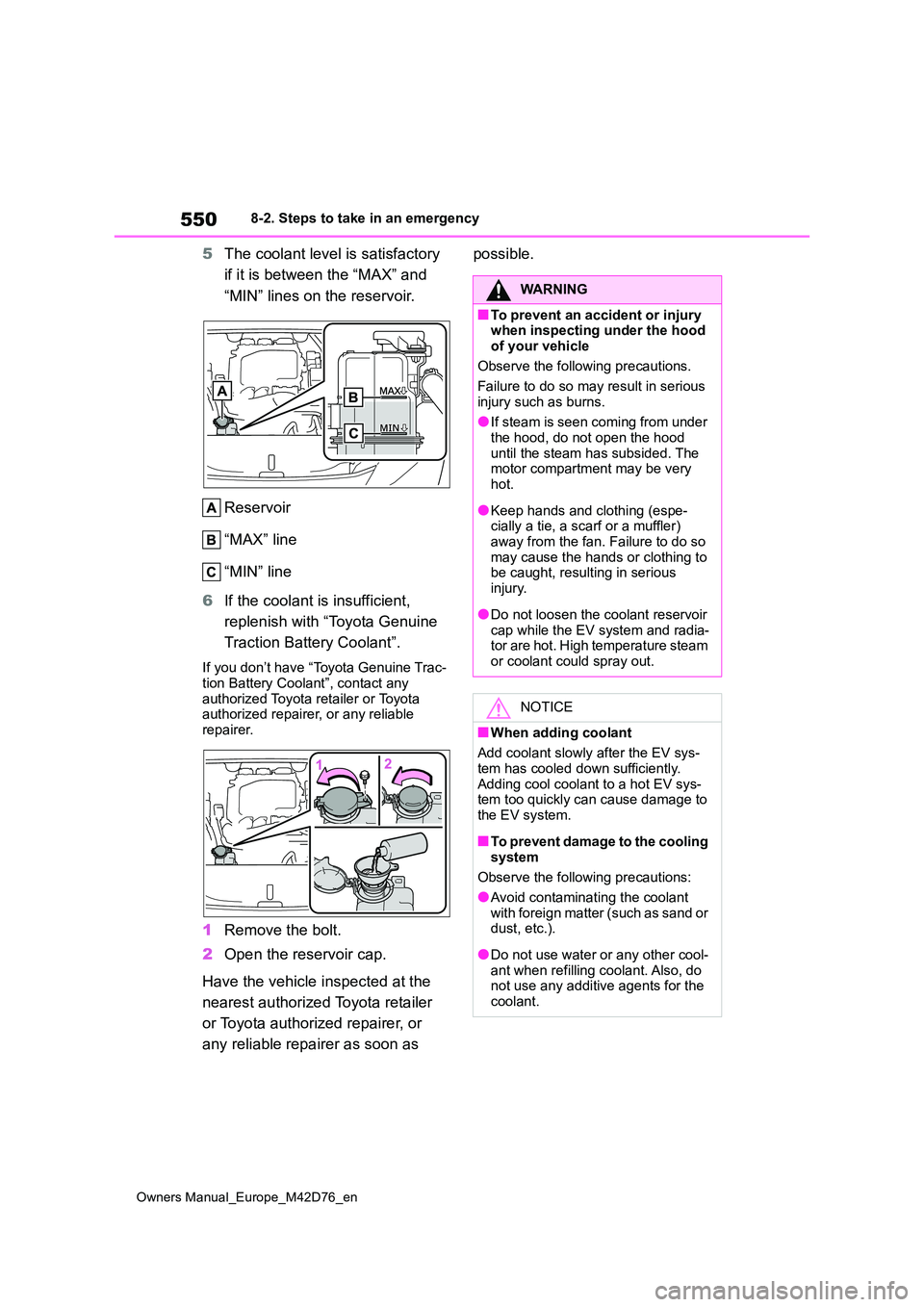
5The coolant level is satisfactory
if it is between the “MAX” and
“MIN” lines on the reservoir.
Reservoir
“MAX” line
“MIN” line
6 If the coolant is insufficient,
replenish with “Toyota Genuine
Traction Battery Coolant”.
If you don’t have “Toyota Genuine Trac-
tion Battery Coolant”, contact any authorized Toyota retailer or Toyota authorized repairer, or any reliable
repairer.
1 Remove the bolt.
2 Open the reservoir cap.
Have the vehicle inspected at the
nearest authorized Toyota retailer
or Toyota authorized repairer, or
any reliable repairer as soon as
possible.
WARNING
■To prevent an accident or injury when inspecting under the hood of your vehicle
Observe the following precautions.
Failure to do so may result in serious injury such as burns.
●If steam is seen coming from under the hood, do not open the hood
until the steam has subsided. The motor compartment may be very hot.
●Keep hands and clothing (espe-cially a tie, a scarf or a muffler)
away from the fan. Failure to do so may cause the hands or clothing to be caught, resulting in serious
injury.
●Do not loosen the coolant reservoir
cap while the EV system and radia- tor are hot. High temperature steam or coolant could spray out.
NOTICE
■When adding coolant
Add coolant slowly after the EV sys-
tem has cooled down sufficiently. Adding cool coolant to a hot EV sys-tem too quickly can cause damage to
the EV system.
■To prevent damage to the cooling
system
Observe the following precautions:
●Avoid contaminating the coolant
with foreign matter (such as sand or dust, etc.).
●Do not use water or any other cool-ant when refilling coolant. Also, do not use any additive agents for the
coolant.
Page 587 of 674
585
Owners Manual_Europe_M42D76_en
Alphabetical Index
Retaining hooks (floor mat) .......... 32
Horn ............................................... 215
I
Identification
Electric motor (traction motor).... 555
Vehicle ....................................... 554
If the charging port lids cannot be
opened ........................................ 541
If your vehicle overheats ............. 549
Ignition switch (Power switch) .... 243
Auto power off function .............. 246
Changing power switch modes .. 246
If your vehicle has to be stopped in
an emergency .......................... 506
Starting the EV system .............. 243
Illuminated entry system ............. 431
Immobilizer system ........................ 75
Indicators ...................................... 169
Charging cable ........................... 102
Charging indicator ........................ 97
Charging indicator (CCID).......... 102
Error warning indicator ............... 102
Power indicator .......................... 102
Initialization
Electronic sunshade................... 442
Items to initialize ........................ 574
Parking Support Brake ............... 356
Power back door ........................ 198
Power window ............................ 219
Inside door handle lights ............. 431
Inside rear view mirror ................. 216
Interior lights ................................ 431
Intrusion sensor ............................. 78
Intrusion sensor and tilt sensor.... 78
ISOFIX lower anchorage ................ 62
J
Jack
Positioning a floor jack ............... 468
Vehicle-equipped jack ................ 489
Jack handle ...................................489
Jam protection function
Power back door ........................ 196
Power windows .......................... 219
K
Keyless entry ................................ 203
Smart entry & start system ......... 203
Wireless remote control ............. 183
Keys ............................................... 182
Battery-saving function............... 204
Electronic key .............................182
If the electronic key does not operate
properly .................................... 542
If you lose your keys ..................541
Key number plate .......................182
Keyless entry...................... 183, 203
Mechanical key .................. 182, 184
Power switch .............................. 243
Replacing the battery ................. 499
Warning buzzer .......................... 203
Wireless remote control ............. 183
L
Lane Departure Alert (LDA) ......... 299
Operation ...................................299
Warning lights.............................518
Lane Tracing Assist (LTA) ............294
Operation ...................................294
Warning lights.............................518
Language (multi-information dis-
play) ............................................. 178
LDA (Lane Departure Alert).......... 299
Operation ...................................299
Warning lights.............................518
Lever
Auxiliary catch lever ................... 467
Hood lock release lever.............. 467
Turn signal lever ......................... 253
Page 589 of 674
587
Owners Manual_Europe_M42D76_en
Alphabetical Index
N
Navigation system-linked display177
O
Odometer ...................................... 174
Odometer and trip meter display
Display items.............................. 174
Open tray ....................................... 437
Opener
Back door ................................... 191
Hood .......................................... 467
Outer foot lights............................ 431
Outside rear view mirrors ............ 217
Adjustment ................................. 217
BSM (Blind Spot Monitor) .......... 324
Folding and extending................ 218
Linked mirror function when revers-
ing ............................................ 218
Mirror position memory .............. 222
Outside rear view mirror defoggers
................................................. 422
RCTA (Rear Crossing Traffic Alert)
................................................. 343
SEA (Safe Exit Assist) ................ 328
Outside temperature .................... 172
P
Parking assist sensors (Toyota park-
ing assist-sensor) ...................... 333
Parking brake ................................ 254
Operation ................................... 254
Parking brake engaged warning
buzzer ...................................... 256
Warning light .............................. 521
Warning message ...................... 256
Parking Support Brake (PKSB) ... 352
Enabling/disabling the system ... 354
PCS (Pre-Collision System) ......... 283
Enabling/disabling the system ... 293
Function ..................................... 283
Warning light .............................. 520
Personal lights ...................... 431, 433
Switch......................................... 433
PKSB (Parking Support Brake) ... 352
Enabling/disabling the system.... 354
Moving Vehicle Rear of the Vehicle
................................................. 359
Pedestrians Rear of the Vehicle .361
Static Objects Around the Vehicle
................................................. 363
Static Objects Front and Rear of the
vehicle ...................................... 357
Power back door ........................... 192
Power back door switch ............. 193
Power back door opener and closer
..................................................... 193
Power back door switch............... 193
Power consumption ..................... 176
Average power consumption...... 176
Current power consumption ....... 176
Power control unit coolant
Checking .................................... 470
Preparing and checking before win-
ter ............................................. 411
Radiator...................................... 471
Power easy access system.......... 222
Power meter .................................. 172
Power outlet .................................. 444
Power sources that can be used . 112
Power steering (Electric Power
Steering system) ........................ 406
Power steering (Electric power
steering system)
Warning light .............................. 517
Power switch ................................. 243
Auto power off function .............. 246
Changing power switch modes .. 246
If your vehicle has to be stopped in
an emergency .......................... 506
Starting the EV system............... 243