outside temperature TOYOTA BZ4X 2022 (in English) User Guide
[x] Cancel search | Manufacturer: TOYOTA, Model Year: 2022, Model line: BZ4X, Model: TOYOTA BZ4X 2022Pages: 674, PDF Size: 120.02 MB
Page 175 of 674
173
3
Owners Manual_Europe_M42D76_en
3-1. Instrument cluster
Vehicle status information and indicators
Displays the amount of charge remaining in the traction battery.
Driving range
Displays driving range with remaining charge. (P.247)
When the air conditioning system is operating, and the driving range with the
air conditioning system on are displayed.
Odometer and trip meter display ( P.174)
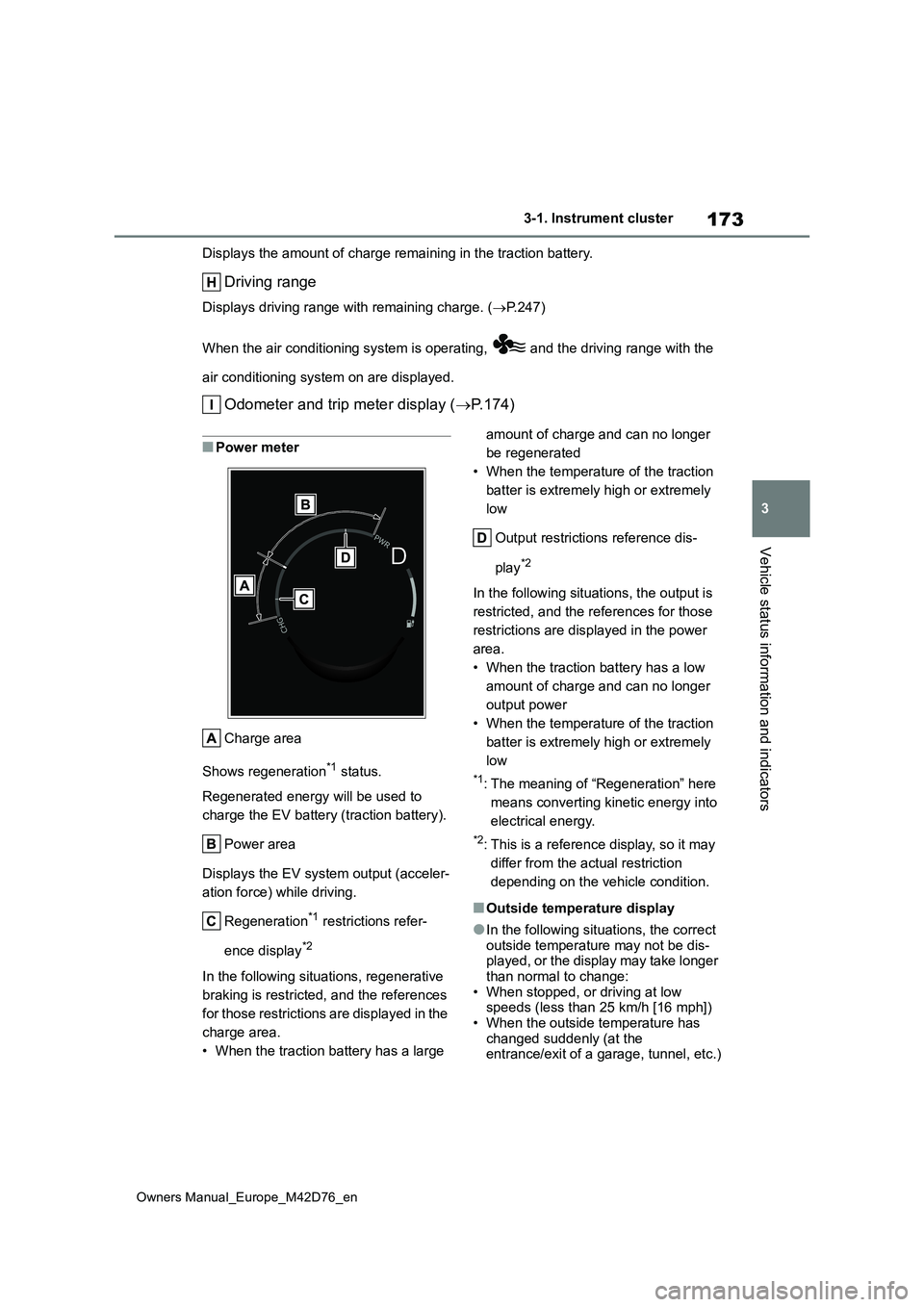
■Power meter
Charge area
Shows regeneration*1 status.
Regenerated energy will be used to
charge the EV battery (traction battery).
Power area
Displays the EV system output (acceler-
ation force) while driving.
Regeneration*1 restrictions refer-
ence display*2
In the following situations, regenerative
braking is restricted, and the references
for those restrictions are displayed in the
charge area.
• When the traction battery has a large
amount of charge and can no longer
be regenerated
• When the temperature of the traction
batter is extremely high or extremely
low
Output restrictions reference dis-
play*2
In the following situations, the output is
restricted, and the references for those
restrictions are displayed in the power
area.
• When the traction battery has a low
amount of charge and can no longer
output power
• When the temperature of the traction
batter is extremely high or extremely
low
*1: The meaning of “Regeneration” here
means converting kinetic energy into
electrical energy.
*2: This is a reference display, so it may
differ from the actual restriction
depending on the vehicle condition.
■Outside temperature display
●In the following situations, the correct outside temperature may not be dis-played, or the display may take longer
than normal to change: • When stopped, or driving at low speeds (less than 25 km/h [16 mph])
• When the outside temperature has changed suddenly (at the entrance/exit of a garage, tunnel, etc.)
Page 176 of 674
174
Owners Manual_Europe_M42D76_en
3-1. Instrument cluster
●When “--” is displayed, the system
may be malfunctioning. Take your vehicle to any authorized Toyota retailer or Toyota authorized repairer,
or any reliable repairer.
●When the outside temperature is
approximately 3°C (37°F) or lower, the
indicator will flash for approxi-
mately 10 seconds, then stay on.
■Liquid crystal display
P. 1 7 6
■Customization
The gauges and meters can be custom-
ized in of the multi-information dis-
play. ( P.561)
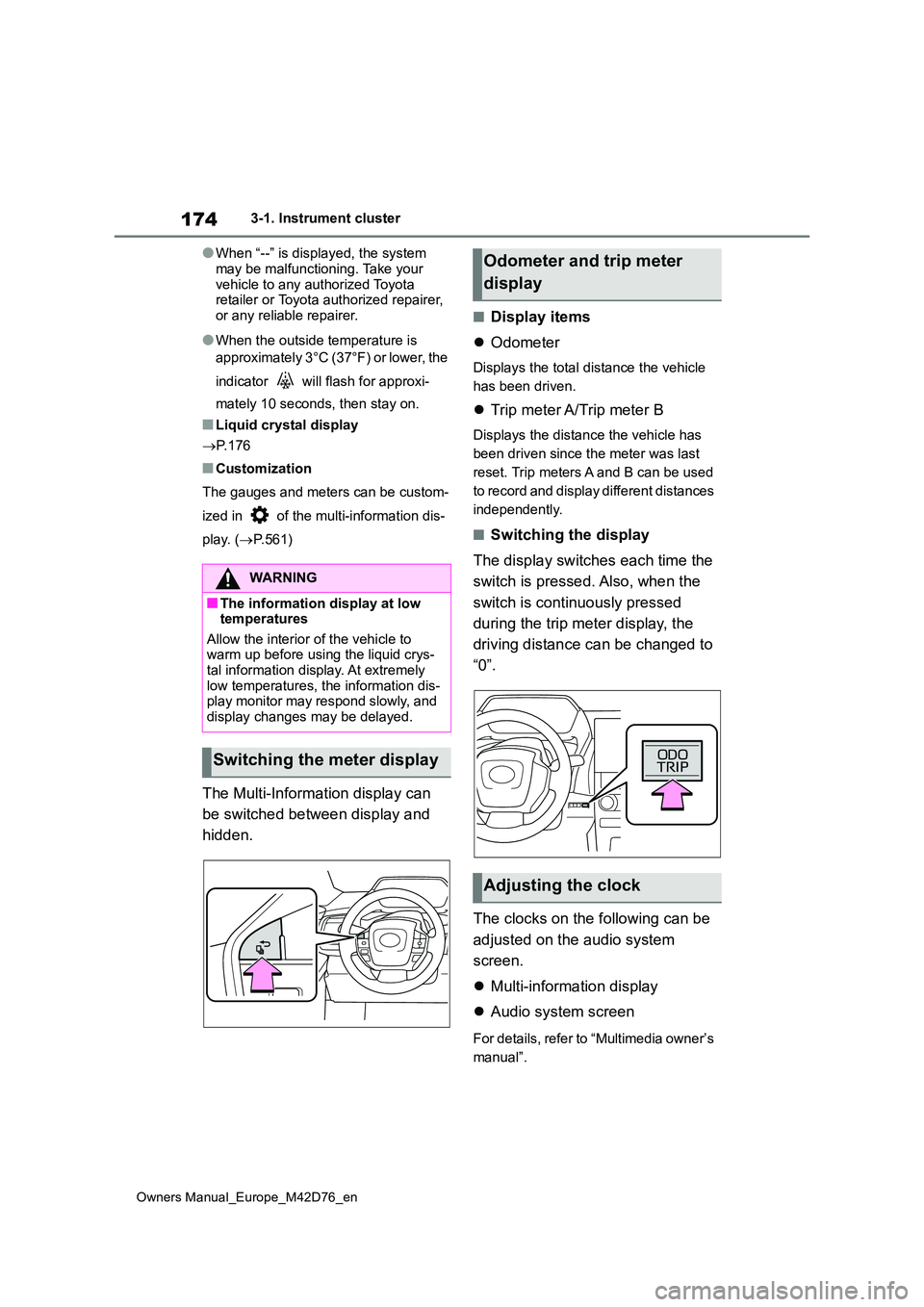
The Multi-Information display can
be switched between display and
hidden.
■Display items
Odometer
Displays the total distance the vehicle
has been driven.
Trip meter A/Trip meter B
Displays the distance the vehicle has
been driven since the meter was last
reset. Trip meters A and B can be used
to record and display different distances
independently.
■Switching the display
The display switches each time the
switch is pressed. Also, when the
switch is continuously pressed
during the trip meter display, the
driving distance can be changed to
“0”.
The clocks on the following can be
adjusted on the audio system
screen.
Multi-information display
Audio system screen
For details, refer to “Multimedia owner’s
manual”.
WARNING
■The information display at low temperatures
Allow the interior of the vehicle to warm up before using the liquid crys-tal information display. At extremely
low temperatures, the information dis- play monitor may respond slowly, and display changes may be delayed.
Switching the meter display
Odometer and trip meter
display
Adjusting the clock
Page 185 of 674
183
4
Owners Manual_Europe_M42D76_en
4-1. Key information
Before driving
■If “A New Key has been Registered
Contact Your Dealer for Details” is shown on the multi-information display
This message will be displayed each time the driver’s door is opened when the doors are unlocked from the outside
for approximately 10 days after a new electronic key has been registered.
If this message is displayed but you
have not had a new electronic key regis- tered, ask any authorized Toyota retailer or Toyota authorized repairer, or any reli-
able repairer to check if an unknown electronic key (other than those in your possession) has been registered.
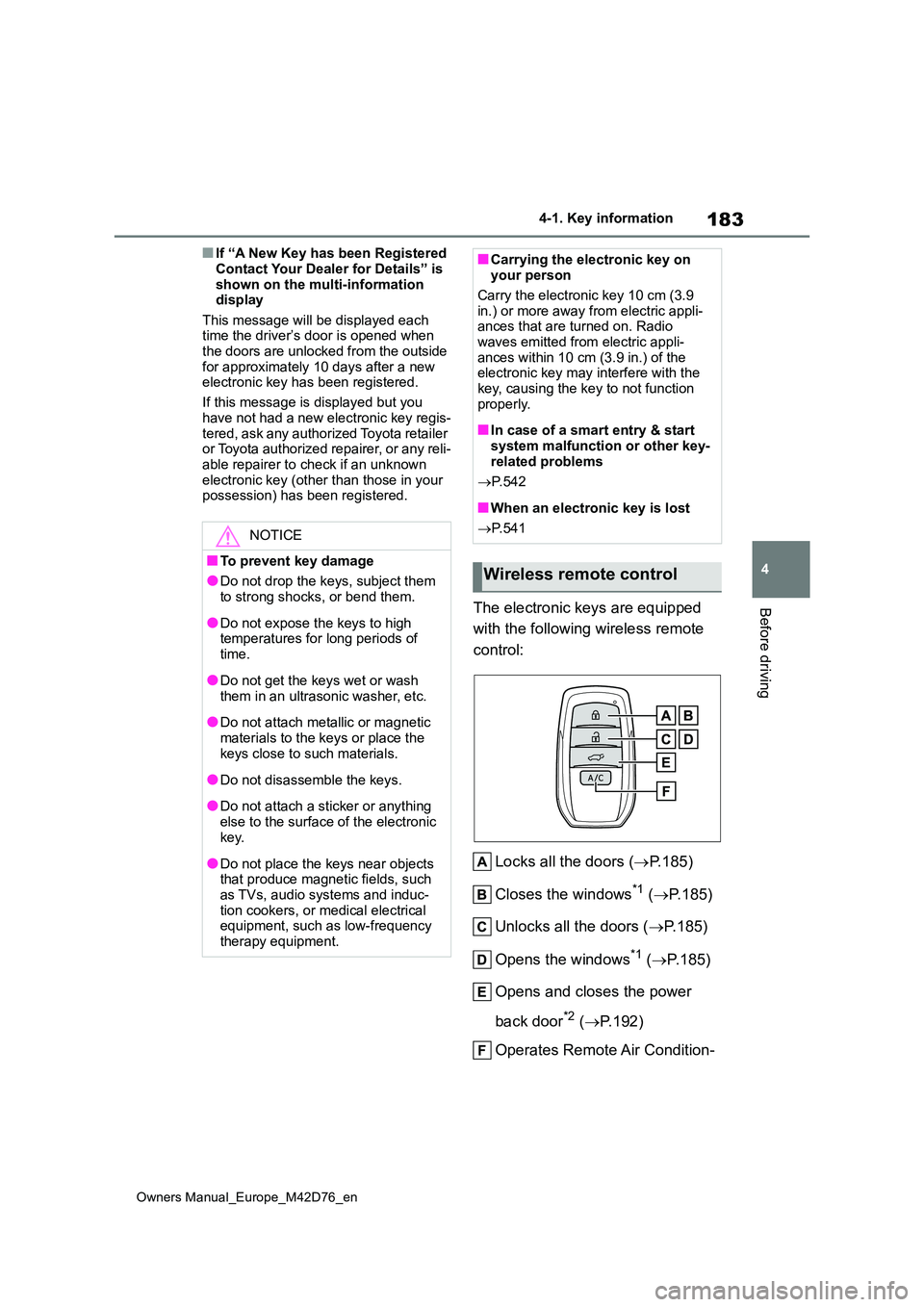
The electronic keys are equipped
with the following wireless remote
control:
Locks all the doors ( P.185)
Closes the windows*1 ( P.185)
Unlocks all the doors ( P.185)
Opens the windows*1 ( P.185)
Opens and closes the power
back door*2 ( P.192)
Operates Remote Air Condition-
NOTICE
■To prevent key damage
●Do not drop the keys, subject them to strong shocks, or bend them.
●Do not expose the keys to high temperatures for long periods of
time.
●Do not get the keys wet or wash
them in an ultrasonic washer, etc.
●Do not attach metallic or magnetic
materials to the keys or place the keys close to such materials.
●Do not disassemble the keys.
●Do not attach a sticker or anything
else to the surface of the electronic key.
●Do not place the keys near objects that produce magnetic fields, such as TVs, audio systems and induc-
tion cookers, or medical electrical equipment, such as low-frequency therapy equipment.
■Carrying the electronic key on your person
Carry the electronic key 10 cm (3.9
in.) or more away from electric appli- ances that are turned on. Radio waves emitted from electric appli-
ances within 10 cm (3.9 in.) of the electronic key may interfere with the key, causing the key to not function
properly.
■In case of a smart entry & start
system malfunction or other key- related problems
P. 5 4 2
■When an electronic key is lost
P. 5 4 1
Wireless remote control
Page 246 of 674
244
Owners Manual_Europe_M42D76_en
5-2. Driving procedures
mechanical key, the EV system can-
not be started using the smart entry & start system. However, if the elec-tronic key is carried inside the vehicle
and the doors are locked ( P.188), the EV system can be started.
■When the ambient temperature is low, such as during winter driving
conditions
●When starting the EV system, the
flashing time of the “READY” indicator may be long. Leave the vehicle as it is until the “READY” indicator is steady
on, as steady means the vehicle is able to move.
●When the traction battery is extremely cold (below approximately -30°C [-22°F]) under the influence of the out-
side temperature, it may not be possi- ble to start the EV system. In this case, try to start the EV system again
after the temperature of the traction battery increases due to the outside temperature increase, etc.
■Sounds and vibrations specific to
an battery electric vehicle
P. 8 4
■If the 12-volt battery is discharged
The EV system cannot be started using
the smart entry & start system. Refer to P.544 to restart the EV system.
■Electronic key battery depletion
P. 1 8 2
■Conditions affecting operation
P. 2 0 4
■Note for the entry function
P. 2 0 5
■Steering lock function (if equipped)
●After turning the power switch off and opening and closing the doors, the steering wheel will be locked due to
the steering lock function. Operating the power switch again automatically cancels the steering lock.
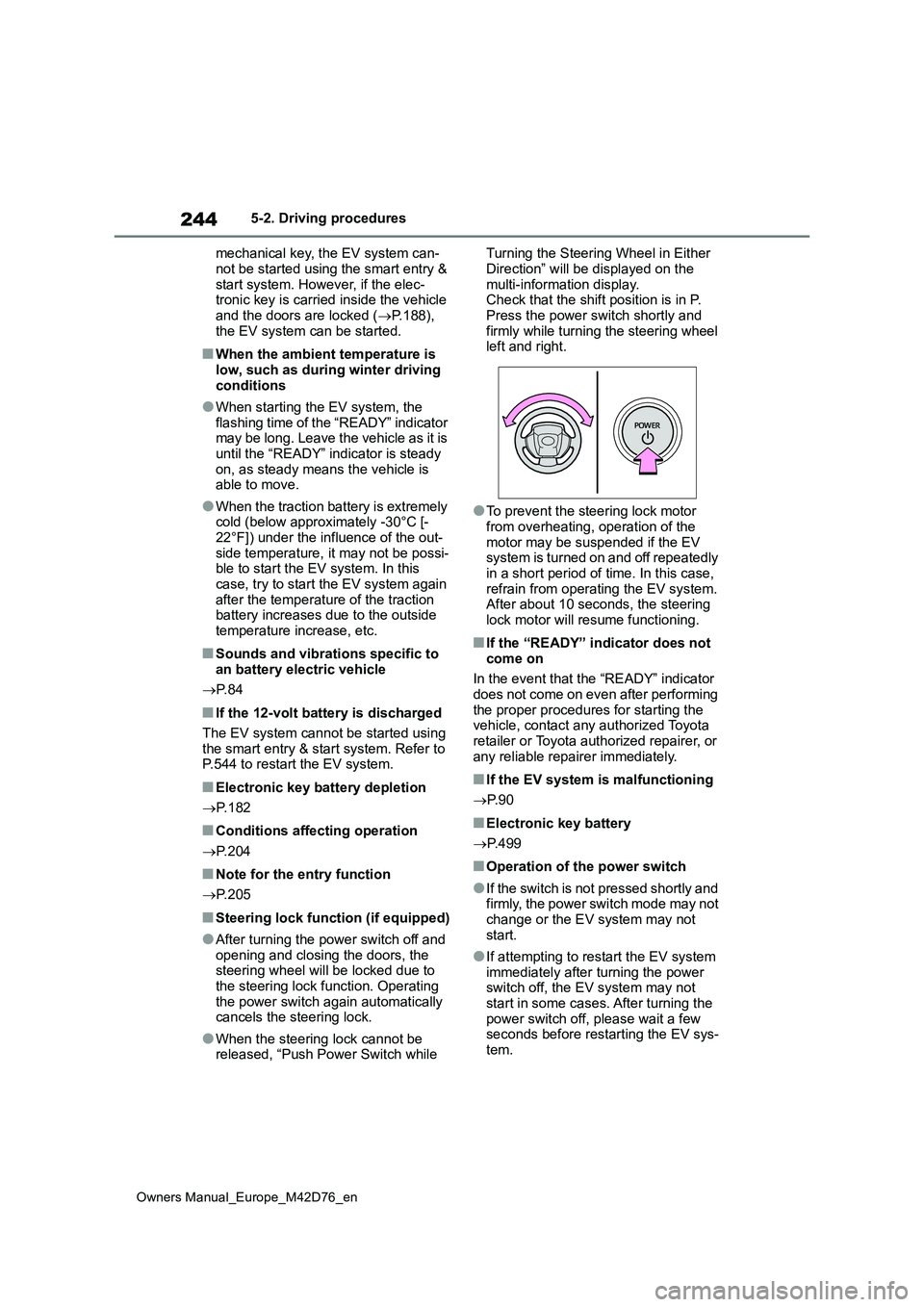
●When the steering lock cannot be released, “Push Power Switch while
Turning the Steering Wheel in Either
Direction” will be displayed on the multi-information display.Check that the shift position is in P.
Press the power switch shortly and firmly while turning the steering wheel left and right.
●To prevent the steering lock motor from overheating, operation of the
motor may be suspended if the EV system is turned on and off repeatedly in a short period of time. In this case,
refrain from operating the EV system. After about 10 seconds, the steering lock motor will resume functioning.
■If the “READY” indicator does not
come on
In the event that the “READY” indicator does not come on even after performing
the proper procedures for starting the vehicle, contact any authorized Toyota retailer or Toyota authorized repairer, or
any reliable repairer immediately.
■If the EV system is malfunctioning
P. 9 0
■Electronic key battery
P. 4 9 9
■Operation of the power switch
●If the switch is not pressed shortly and firmly, the power switch mode may not
change or the EV system may not start.
●If attempting to restart the EV system immediately after turning the power switch off, the EV system may not
start in some cases. After turning the power switch off, please wait a few seconds before restarting the EV sys-
tem.
Page 420 of 674
418
Owners Manual_Europe_M42D76_en
6-1. Using the air conditioning system and defogger
6-1.Using the a ir c onditioning sys te m and de fog ger
*: If equipped
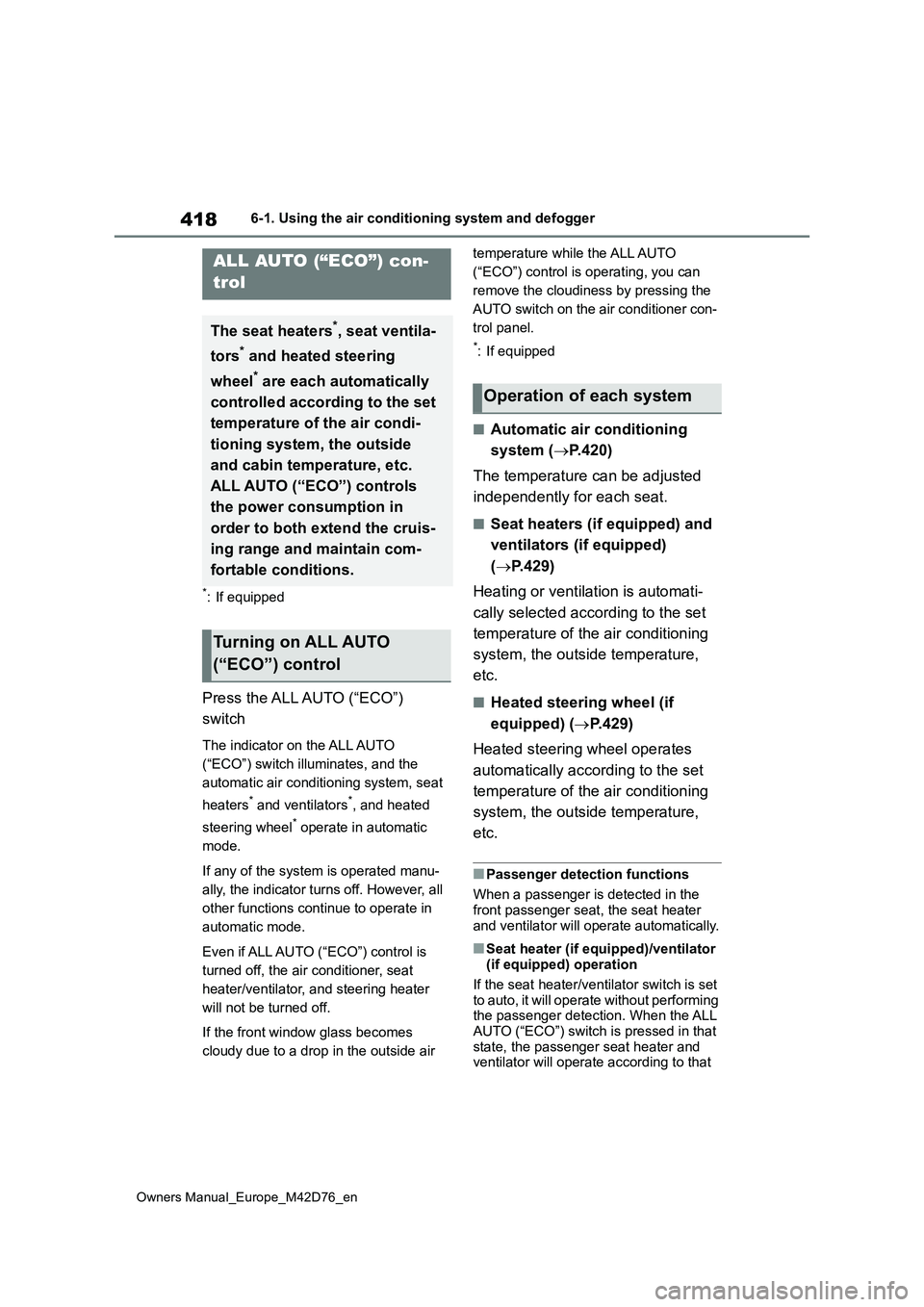
Press the ALL AUTO (“ECO”)
switch
The indicator on the ALL AUTO
(“ECO”) switch illuminates, and the
automatic air conditioning system, seat
heaters* and ventilators*, and heated
steering wheel* operate in automatic
mode.
If any of the system is operated manu-
ally, the indicator turns off. However, all
other functions continue to operate in
automatic mode.
Even if ALL AUTO (“ECO”) control is
turned off, the air conditioner, seat
heater/ventilator, and steering heater
will not be turned off.
If the front window glass becomes
cloudy due to a drop in the outside air
temperature while the ALL AUTO
(“ECO”) control is operating, you can
remove the cloudiness by pressing the
AUTO switch on the air conditioner con-
trol panel.
*: If equipped
■Automatic air conditioning
system ( P.420)
The temperature can be adjusted
independently for each seat.
■Seat heaters (if equipped) and
ventilators (if equipped)
( P.429)
Heating or ventilation is automati-
cally selected according to the set
temperature of the air conditioning
system, the outside temperature,
etc.
■Heated steering wheel (if
equipped) ( P.429)
Heated steering wheel operates
automatically according to the set
temperature of the air conditioning
system, the outside temperature,
etc.
■Passenger detection functions
When a passenger is detected in the front passenger seat, the seat heater
and ventilator will operate automatically.
■Seat heater (if equipped)/ventilator (if equipped) operation
If the seat heater/ventilator switch is set
to auto, it will operate without performing the passenger detection. When the ALL AUTO (“ECO”) switch is pressed in that
state, the passenger seat heater and ventilator will operate according to that
ALL AUTO (“ECO”) con-
trol
The seat heaters*, seat ventila-
tors* and heated steering
wheel* are each automatically
controlled according to the set
temperature of the air condi-
tioning system, the outside
and cabin temperature, etc.
ALL AUTO (“ECO”) controls
the power consumption in
order to both extend the cruis-
ing range and maintain com-
fortable conditions.
Turning on ALL AUTO
(“ECO”) control
Operation of each system
Page 422 of 674
420
Owners Manual_Europe_M42D76_en
6-1. Using the air conditioning system and defogger
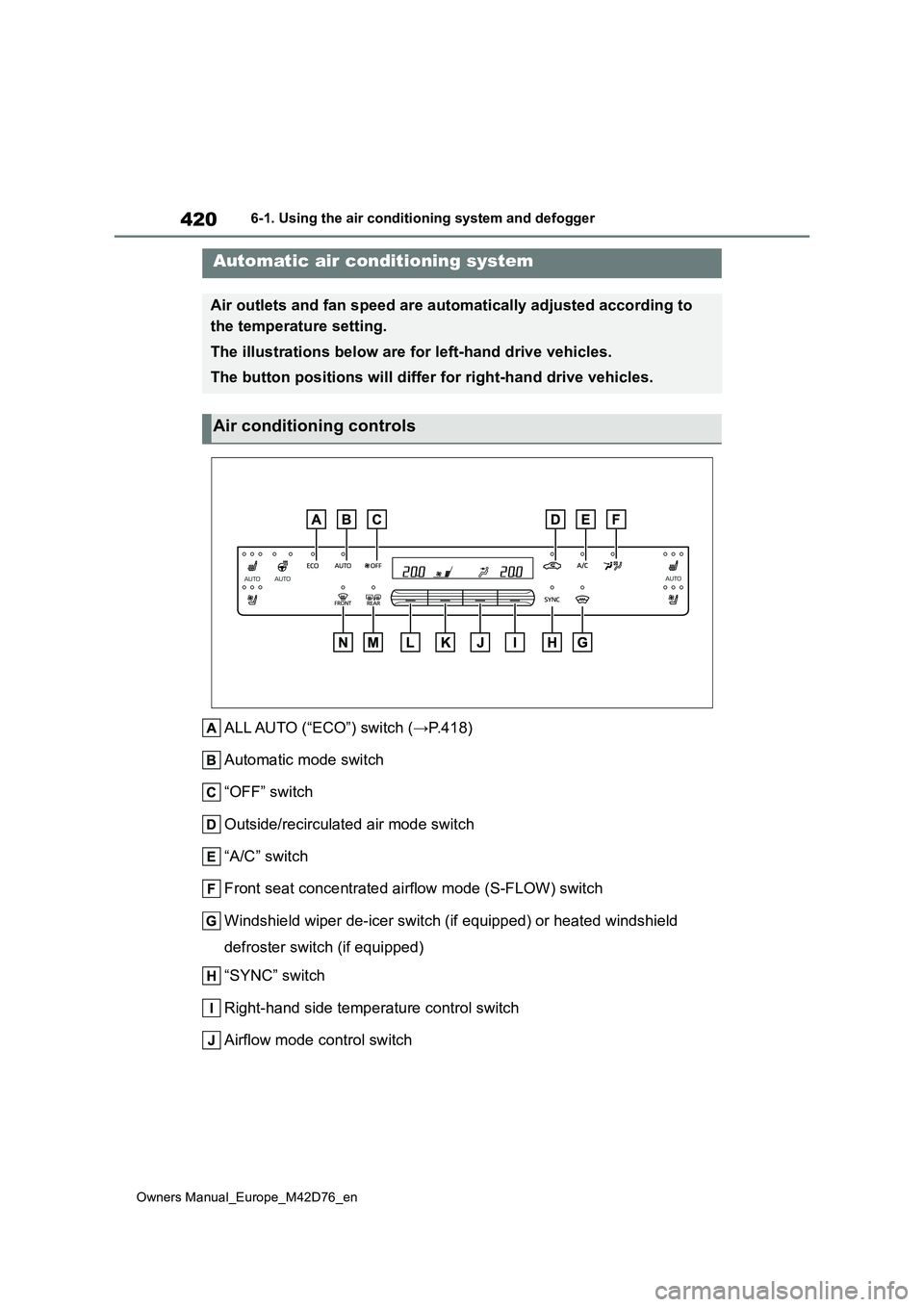
ALL AUTO (“ECO”) switch (→P.418)
Automatic mode switch
“OFF” switch
Outside/recirculated air mode switch
“A/C” switch
Front seat concentrated airflow mode (S-FLOW) switch
Windshield wiper de-icer switch (if equipped) or heated windshi eld
defroster switch (if equipped)
“SYNC” switch
Right-hand side temperature control switch
Airflow mode control switch
Automatic air conditioning system
Air outlets and fan speed are au tomatically adjusted according to
the temperature setting.
The illustrations below are for left-hand drive vehicles.
The button positions will differ for right-hand drive vehicles.
Air conditioning controls
Page 423 of 674
421
6
Owners Manual_Europe_M42D76_en
6-1. Using the air conditioning system and defogger
Interior features
Fan speed control switch
Left-hand side temperature control switch
Rear window and outside rear view mirror defogger switch
Windshield defogger switch
■Adjusting the temperature set-
ting
Operate the temperature control
switch upwards to increase the
temperature and downwards to
decrease the temperature.
If “A/C” is not pressed, the system
will blow ambient temperature air or
heated air.
■Adjusting the fan speed set-
ting
Operate the fan speed control
switch upwards to increase the fan
speed and downwards to decrease
the fan speed.
Press the “OFF” switch to turn off the
fan.
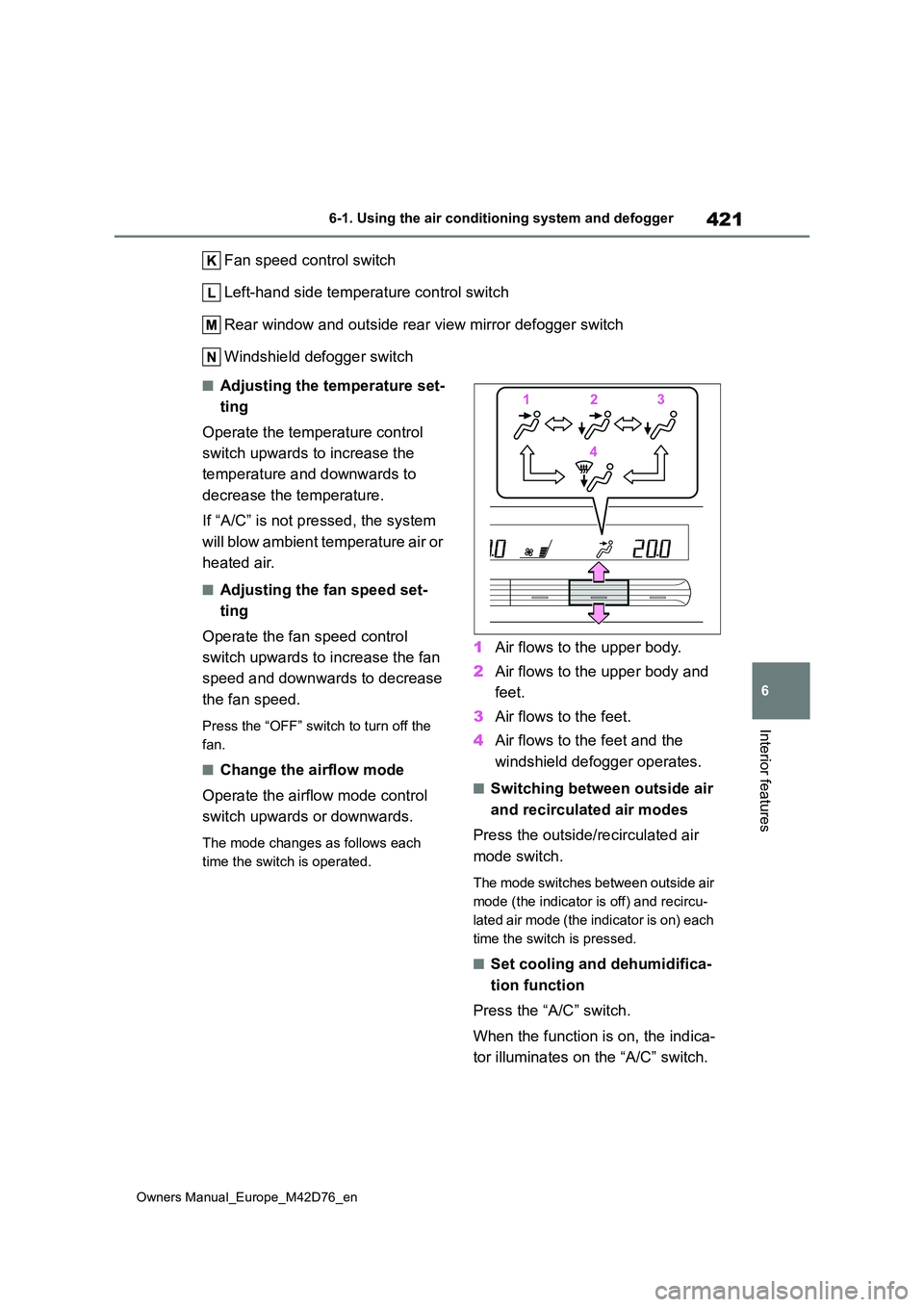
■Change the airflow mode
Operate the airflow mode control
switch upwards or downwards.
The mode changes as follows each
time the switch is operated.
1 Air flows to the upper body.
2 Air flows to the upper body and
feet.
3 Air flows to the feet.
4 Air flows to the feet and the
windshield defogger operates.
■Switching between outside air
and recirculated air modes
Press the outside/recirculated air
mode switch.
The mode switches between outside air
mode (the indicator is off) and recircu-
lated air mode (the indicator is on) each
time the switch is pressed.
■Set cooling and dehumidifica-
tion function
Press the “A/C” switch.
When the function is on, the indica-
tor illuminates on the “A/C” switch.
Page 424 of 674
422
Owners Manual_Europe_M42D76_en
6-1. Using the air conditioning system and defogger
■Defogging the windshield
Defoggers are used to defog the
windshield and front side windows.
Press the windshield defogger
switch.
Set the outside/recirculated air mode
switch to outside air mode if the recircu-
lated air mode is used. (It may switch
automatically.)
To defog the windshield and the side
windows early, turn the air flow and
temperature up.
To return to the previous mode, press
the windshield defogger switch again
when the windshield is defogged.
When the windshield defogger switch is
on, the indicator illuminates on the
windshield defogger switch.
■Defogging the rear window
and outside rear view mirrors
Defoggers are used to defog the
rear window and to remove rain-
drops, dew and frost from the out-
side rear view mirrors.
Press the rear window and outside
rear view mirror defogger switch.
The defoggers will automatically turn off
after a period of time.
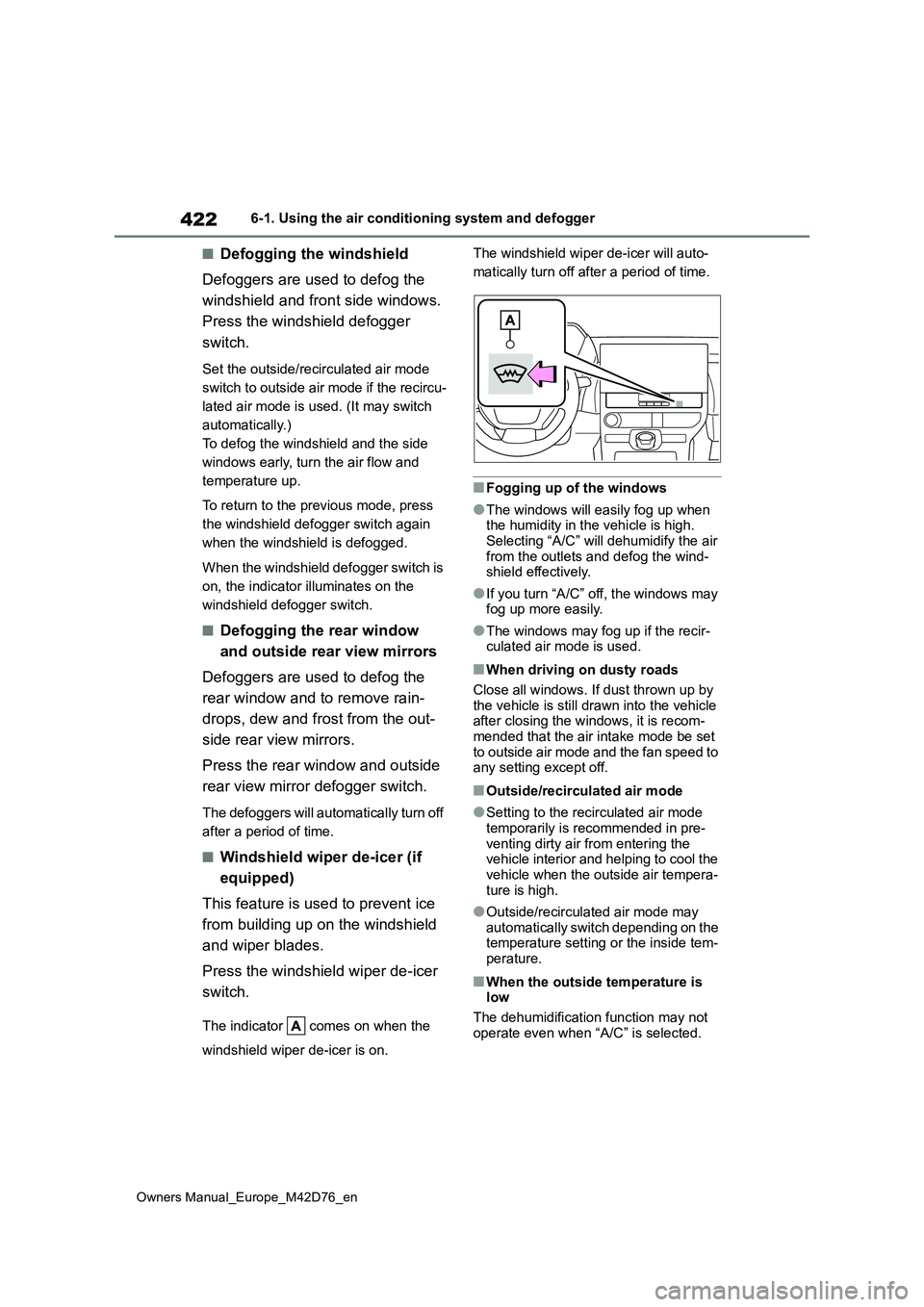
■Windshield wiper de-icer (if
equipped)
This feature is used to prevent ice
from building up on the windshield
and wiper blades.
Press the windshield wiper de-icer
switch.
The indicator comes on when the
windshield wiper de-icer is on.
The windshield wiper de-icer will auto-
matically turn off after a period of time.
■Fogging up of the windows
●The windows will easily fog up when the humidity in the vehicle is high.
Selecting “A/C” will dehumidify the air from the outlets and defog the wind-shield effectively.
●If you turn “A/C” off, the windows may fog up more easily.
●The windows may fog up if the recir-culated air mode is used.
■When driving on dusty roads
Close all windows. If dust thrown up by the vehicle is still drawn into the vehicle after closing the windows, it is recom-
mended that the air intake mode be set to outside air mode and the fan speed to any setting except off.
■Outside/recirculated air mode
●Setting to the recirculated air mode temporarily is recommended in pre-
venting dirty air from entering the vehicle interior and helping to cool the vehicle when the outside air tempera-
ture is high.
●Outside/recirculated air mode may automatically switch depending on the temperature setting or the inside tem-
perature.
■When the outside temperature is low
The dehumidification function may not
operate even when “A/C” is selected.
Page 425 of 674
423
6
Owners Manual_Europe_M42D76_en
6-1. Using the air conditioning system and defogger
Interior features
■Ventilation and air conditioning
odors
●To let fresh air in, set the air condition-
ing system to the outside air mode.
●During use, various odors from inside
and outside the vehicle may enter into and accumulate in the air conditioning system. This may then cause odor to
be emitted from the vents.
●To reduce potential odors from occur-
ring: • It is recommended that the air condi-tioning system be set to outside air
mode prior to turning the vehicle off. • The start timing of the blower may be delayed for a short period of time
immediately after the air conditioning system is started in automatic mode.
■Air conditioning filter
P. 4 9 6
■Customization
Settings (e.g. A/C automatic mode switch operation) can be changed.(Customizable features: P.571)
1Press the automatic mode
switch.
2 Adjust the temperature setting.
3 To stop the operation, press the
“OFF” switch.
If the fan speed setting or air flow
modes are operated, the automatic
mode indicator goes off. However,
automatic mode for functions other
than that operated is maintained.
■Using automatic mode
Fan speed is adjusted automatically according to the temperature setting and the ambient conditions.
Therefore, the fan may stop for a while until warm or cool air is ready to flow immediately after the automatic mode
switch is pressed.
Cool air may blow around the upper body even when the heater is on due to
sunlight.
To turn on the “SYNC” mode, per-
form any of the following proce-
dures:
Press the “SYNC” mode switch.
WARNING
■To prevent the windshield from fogging up
Do not use the windshield defogger
switch during cool air operation in extremely humid weather. The differ-ence between the temperature of the
outside air and that of the windshield can cause the outer surface of the windshield to fog up, blocking your
vision.
■To prevent burns
●Do not touch the outside rear view mirror surfaces, as they can become very hot and burn you.
●Vehicles with windshield wiper de-icer: Do not touch the glass at lower
part of the windshield or to the side of the front pillars when the wind-shield wiper de-icer is on.
NOTICE
■To prevent 12-volt battery dis-charge
Do not leave the air conditioning sys- tem on longer than necessary when the EV system is off.
Using automatic mode
Adjusting the temperature
for driver and front passen-
ger seats separately
(“SYNC” mode)
Page 426 of 674
424
Owners Manual_Europe_M42D76_en
6-1. Using the air conditioning system and defogger
Adjust the front passenger’s side
temperature setting.
The indicator comes on when the
“SYNC” mode is on.
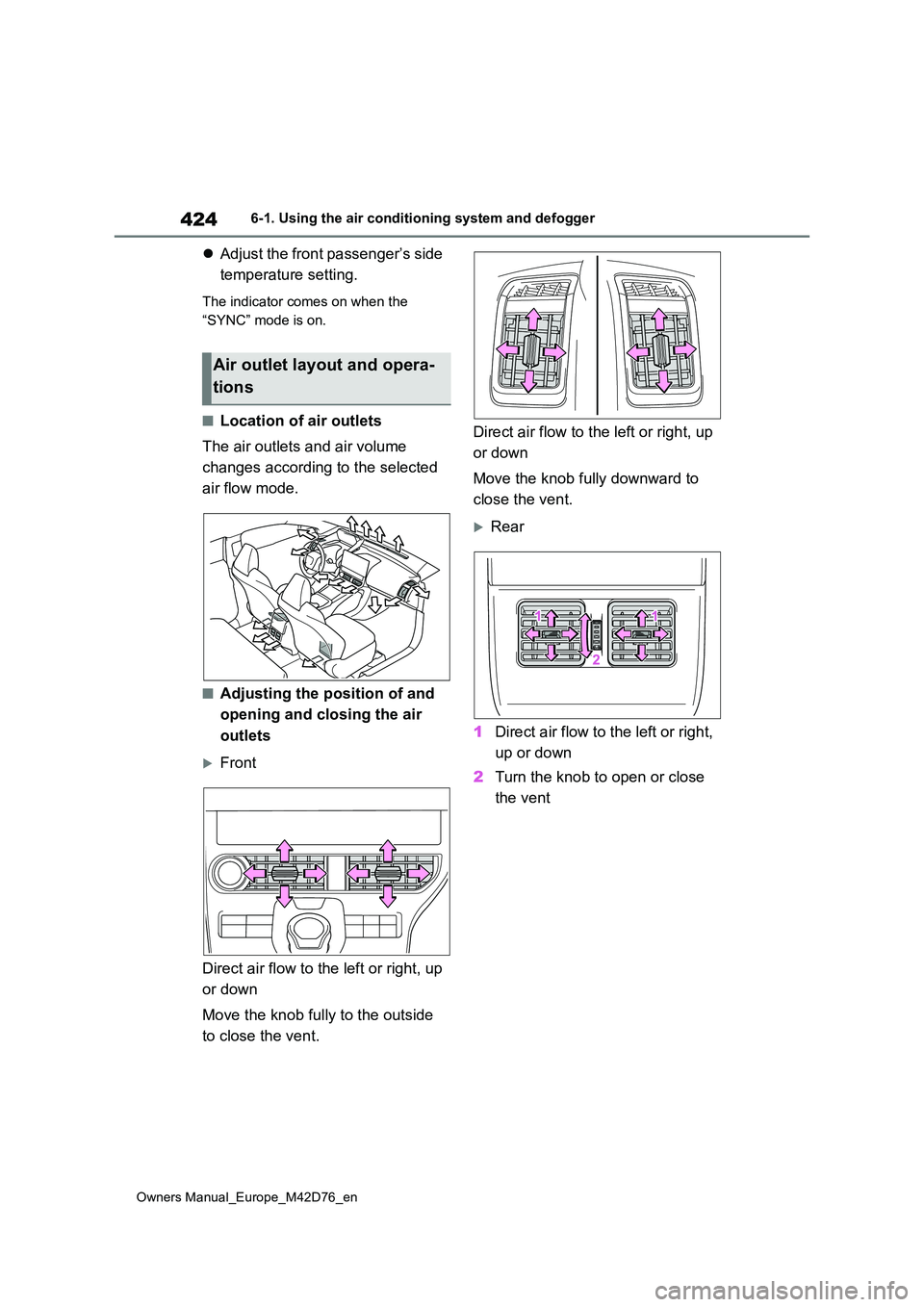
■Location of air outlets
The air outlets and air volume
changes according to the selected
air flow mode.
■Adjusting the position of and
opening and closing the air
outlets
Front
Direct air flow to the left or right, up
or down
Move the knob fully to the outside
to close the vent.
Direct air flow to the left or right, up
or down
Move the knob fully downward to
close the vent.
Rear
1 Direct air flow to the left or right,
up or down
2 Turn the knob to open or close
the vent
Air outlet layout and opera-
tions