park assist TOYOTA BZ4X 2022 (in English) User Guide
[x] Cancel search | Manufacturer: TOYOTA, Model Year: 2022, Model line: BZ4X, Model: TOYOTA BZ4X 2022Pages: 674, PDF Size: 120.02 MB
Page 324 of 674
322
Owners Manual_Europe_M42D76_en
5-4. Using the driving support systems
Operation of this system is sepa-
rated into 4 control states. Through
control state “warning phase 1” and
“warning phase 2”, the system
determines if the driver is aware
and responsive while outputting a
warning and controlling the vehicle
speed. If the system determines the
driver is not responsive, it will oper-
ate in control state “deceleration
stop phase” and “stop hold phase”
and decelerate and stop the vehi-
cle. It will then operate continuously
in “stop hold phase”.
■Operating conditions
This system operates when all of the fol- lowing conditions are met:
●When the LTA is on
●When the vehicle speed is approxi-
mately 50 km/h (30 mph) or more
■Operation cancelation conditions
In the following situations, system oper- ation will be canceled:
●When LTA control has been canceled
(the LTA switch has been pressed, etc.)
●When the dynamic radar cruise con-trol has been canceled
●When driver operations are detected (the steering wheel is held, the brake pedal, accelerator pedal, parking
brake, hazard light switch, or turn sig- nal lever is operated)
●When the driving assist switch is pressed while in the stop and hold phase
●When the power switch has been turned from ON to OFF
●Situations in which some or all of the
WARNING
●Although the emergency driving stop system is designed to deceler-
ate the vehicle within its lane to help avoid or help reduce the impact of a collision if the system
determines that it is difficult for the driver to continue driving, its effec-tiveness may change according to
various conditions. Therefore, it may not always be able to achieve the same level of performance.
Also, if the operating conditions are not met, this function will not oper-ate.
●After the emergency driving stop system operates, if driving
becomes possible again, immedi- ately begin driving again or, if nec-essary, park the vehicle on the
shoulder of the road and set a warning reflector and flare to warn other drivers of your stopped vehi-
cle.
●After this system operates, passen-
gers should attend to the driver as necessary and take appropriate hazard prevention measures, such
as moving to a place where safety can be ensured, such as the shoul-der of the road or behind a guard-
rail.
●T h i s s y s t e m d e t e c t s t h e c o n d i t i o n o f
the driver through the operation of the steering wheel. This system may operate if the driver is aware
but intentionally and continuously does not operate the vehicle. Also, the system may not operate if it
cannot determine that the driver is not responsive, such as if they are leaning on the steering wheel.
●Vehicles with a driver monitor cam-era: Situations in which the driver
monitor may not operate properly: P. 2 8 1
Summary of the system
Page 334 of 674
332
Owners Manual_Europe_M42D76_en
5-4. Using the driving support systems
■Conditions under which the system
will not detect a vehicle
●Safe Exit Assist does not detect the
following objects, vehicles, and bicy- cles:• Vehicles or bicycles which are
approaching slowly • Vehicles or bicycles which are deter-mined to have a low possibility of col-
liding with a door (other than the back door) when opened• Vehicles or bicycles which are deter-
mined to have a low possibility of col- liding with a door when opened• Vehicles or bicycles which are
approaching from directly behind • Vehicles or bicycles which are approaching from the front
• Guardrails, walls, signs, parked vehi- cles, and other stationary objects• Animals, etc.
●In situations such as the following, Safe Exit Assist will not operate:
• When 3 minutes or more have elapsed since the EV system off (the time which operation is possible may
be extended if a door is opened and closed)• When your vehicle is not completely
stopped
■Conditions under which the system may not function correctly
●Vehicles and bicycles may not be effectively detected in the following situations:
• When the sensor is misaligned due to a strong impact to the sensor or its surrounding area
• When mud, snow, ice, a sticker, etc., is covering the sensor or surrounding area on the rear bumper
• When driving on a road surface that is wet with standing water during bad weather, such as heavy rain, snow, or
fog • When a vehicle or bicycle approaches from behind a nearby parked vehicle
• When an approaching vehicle or bicy- cle suddenly changes direction• Immediately after a vehicle or bicycle
starts moving
• When the back door is open
• When a bicycle carrier, ramp, or other accessory is installed to the back of the vehicle
• When a parked vehicle, wall, sign, person or other stationary object is behind the vehicle
• When the vehicle is stopped at an angle to the road• When a vehicle is traveling near an
approaching vehicle or bicycle • When an approaching vehicle or bicy-cle is traveling along a stationary
object, such a wall or sign • When a vehicle or bicycle is approaching at high speed
• When towing with the vehicle • When stopped on a steep incline• When stopped on a curve or at the
exit of a curve
●Instances of the Safe Exit Assist
unnecessarily detecting a vehicle and/or object may increase in the fol-lowing situations:
• When the sensor is misaligned due to a strong impact to the sensor or its surrounding area
• When a vehicle or bicycle approaches from behind your vehicle at an angle• When the vehicle is stopped at an
angle to the road • When a vehicle or bicycle approaches from behind a parked vehicle at an
angle • When a parked vehicle, wall, sign, person or other stationary object is
behind the vehicle • When an approaching vehicle or bicy-cle suddenly changes direction
• When an approaching vehicle or bicy- cle is traveling along a stationary object, such a wall or sign
• When the back door is open • When a bicycle carrier, ramp, or other accessory is installed to the back of
the vehicle • When a vehicle or bicycle is approaching at high speed
• When towing with the vehicle • When stopped on a steep incline• When stopped on a curve or at the
exit of a curve
Page 335 of 674
333
5
Owners Manual_Europe_M42D76_en
5-4. Using the driving support systems
Driving
*: If equipped
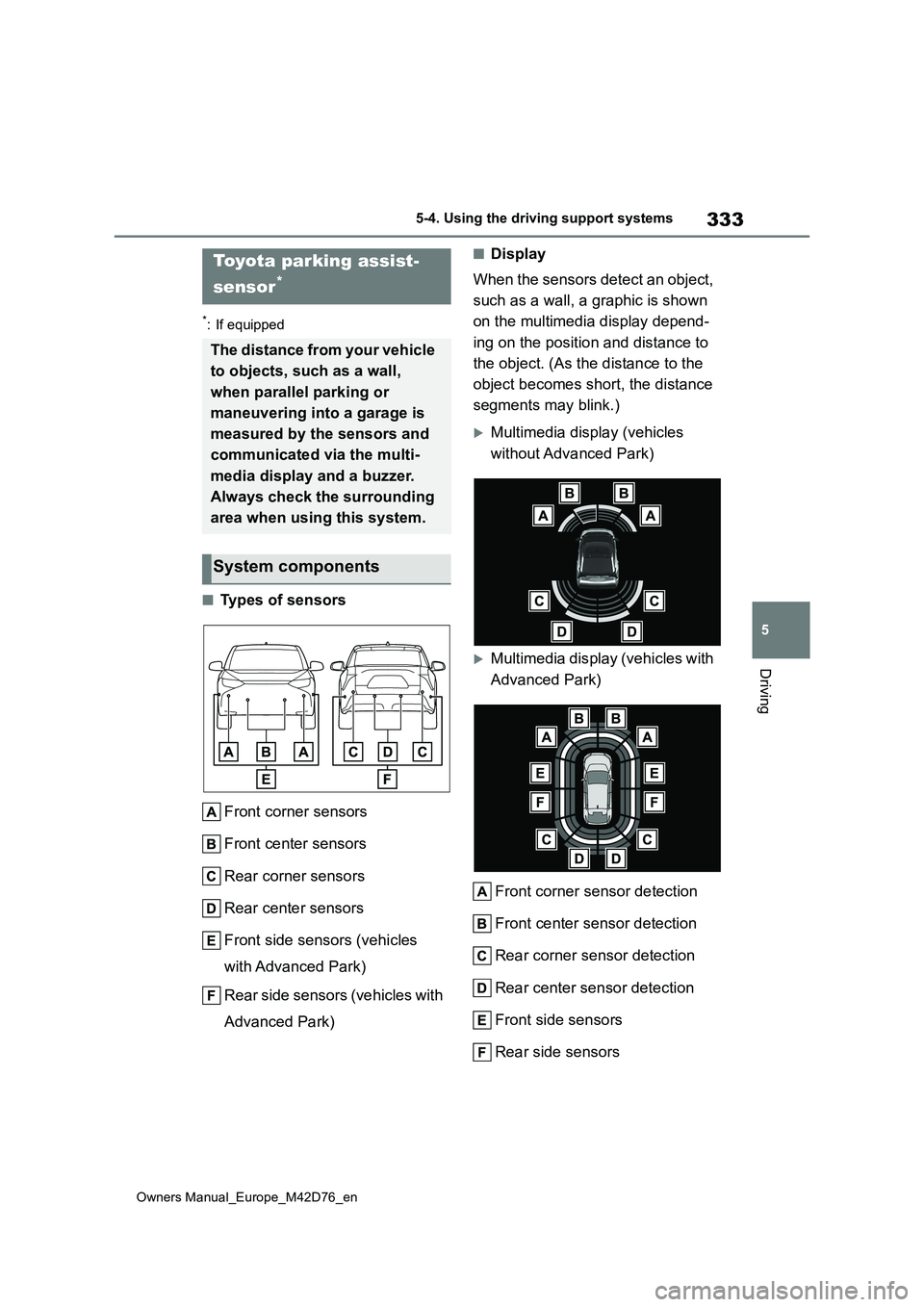
■Types of sensors
Front corner sensors
Front center sensors
Rear corner sensors
Rear center sensors
Front side sensors (vehicles
with Advanced Park)
Rear side sensors (vehicles with
Advanced Park)
■Display
When the sensors detect an object,
such as a wall, a graphic is shown
on the multimedia display depend-
ing on the position and distance to
the object. (As the distance to the
object becomes short, the distance
segments may blink.)
Multimedia display (vehicles
without Advanced Park)
Multimedia display (vehicles with
Advanced Park)
Front corner sensor detection
Front center sensor detection
Rear corner sensor detection
Rear center sensor detection
Front side sensors
Rear side sensors
Toyota parking assist-
sensor*
The distance from your vehicle
to objects, such as a wall,
when parallel parking or
maneuvering into a garage is
measured by the sensors and
communicated via the multi-
media display and a buzzer.
Always check the surrounding
area when using this system.
System components
Page 336 of 674
334
Owners Manual_Europe_M42D76_en
5-4. Using the driving support systems
Use the meter control switches to
enable/disable the Toyota parking
assist-sensor. ( P. 1 7 6 )
1 Press or to select .
2 Press or to select
and then press .
When the Toyota parking assist-sensor
function is disabled, the Toyota parking
assist-sensor OFF indicator ( P.169)
illuminates.
To re-enable the system when it was
disabled, select on the multi-infor-
mation display, select and then
On. If disabled using this method, the
system will not be re-enabled by turning
the power switch off and then to ON.
Turning Toyota parking
assist-sensor on/off
WARNING
■Cautions regarding the use of
the system
There is a limit to the degree of recog- nition accuracy and control perfor-
mance that this system can provide, do not overly rely on this system. The driver is always responsible for paying
attention to the vehicle’s surroundings and driving safely.
■To ensure the system can oper-ate properly
Observe the following precautions.
Failing to do so may result in the vehi- cle being unable to be driven safely and possibly cause an accident.
●Do not damage the sensors, and always keep them clean.
●Do not attach a sticker or install an electronic component, such as a backlit license plate (especially fluo-
rescent type), fog lights, fender pole or wireless antenna near a radar sensor.
●Do not subject the surrounding area of the sensor to a strong impact. If
subjected to an impact, have the vehicle inspected by any authorized Toyota retailer or Toyota authorized
repairer, or any reliable repairer. If the front or rear bumper needs to be removed/installed or replaced,
contact any authorized Toyota retailer or Toyota authorized repairer, or any reliable repairer.
●Do n ot m od i fy, d is a sse mb l e o r p ai n t the sensors.
●Do not attach a license plate cover.
●Keep your tires properly inflated.
■When to disable the function
In the following situations, disable the function as it may operate even though there is no possibility of a colli-
sion.
●Failing to observe the warnings
above.
●A non-genuine Toyota suspension
(lowered suspension, etc.) is installed.
■Notes when washing the vehicle
Do not apply intensive bursts of water or steam to the sensor area.
Doing so may result in the sensor malfunctioning.
●When using a high pressure washer to wash the vehicle, do not spray the sensors directly, as doing
so may cause a sensor to malfunc- tion.
Page 337 of 674
335
5
Owners Manual_Europe_M42D76_en
5-4. Using the driving support systems
Driving
■The system can be operated when
●The power switch is in ON.
●Toyota parking assist-sensor function is on.
●The vehicle speed is less than about 10 km/h (6 mph).
●A shift position other than P is selected.
■Sensor detection information
●The sensor’s detection areas are lim-ited to the areas around the vehicle’s
front and rear bumpers.
●The following situations may occur
during use. • Depending on the shape of the object and other factors, the detection dis-
tance may shorten, or detection may be impossible.• Detection may be impossible if static
objects draw too close to the sensor. • There will be a short delay between static object detection and display
(warning buzzer sounds). Even at low speeds, there is a possibility that the object will come within 30 cm before
the display is shown and the warning buzzer sounds.• It might be difficult to hear the buzzer
due to the volume of the audio system or air flow noise of the air conditioning system.
• It may be difficult to hear the sound of this system due to the buzzers of other systems.
■Objects which the system may not
be properly detected
The shape of the object may prevent the sensor from detecting it. Pay particular
attention to the following objects:
●Wires, fences, ropes, etc.
●Cotton, snow and other materials that
absorb sound waves
●Sharply-angled objects
●Low objects
●Tall objects with upper sections pro- jecting outwards in the direction of your vehicle
People may not be detected if they are wearing certain types of clothing.
■Situations in which the system may not operate properly
Certain vehicle conditions and the sur- rounding environment may affect the ability of a sensor to correctly detect
objects. Particular instances where this may occur are listed below.
●There is dirt, snow, water drops or ice on a sensor. (Cleaning the sensors will resolve this problem.)
●A sensor is frozen. (Thawing the area will resolve this problem.)
In especially cold weather, if a sensor is frozen the sensor display may be displayed abnormally, or objects, such
as a wall, may not be detected.
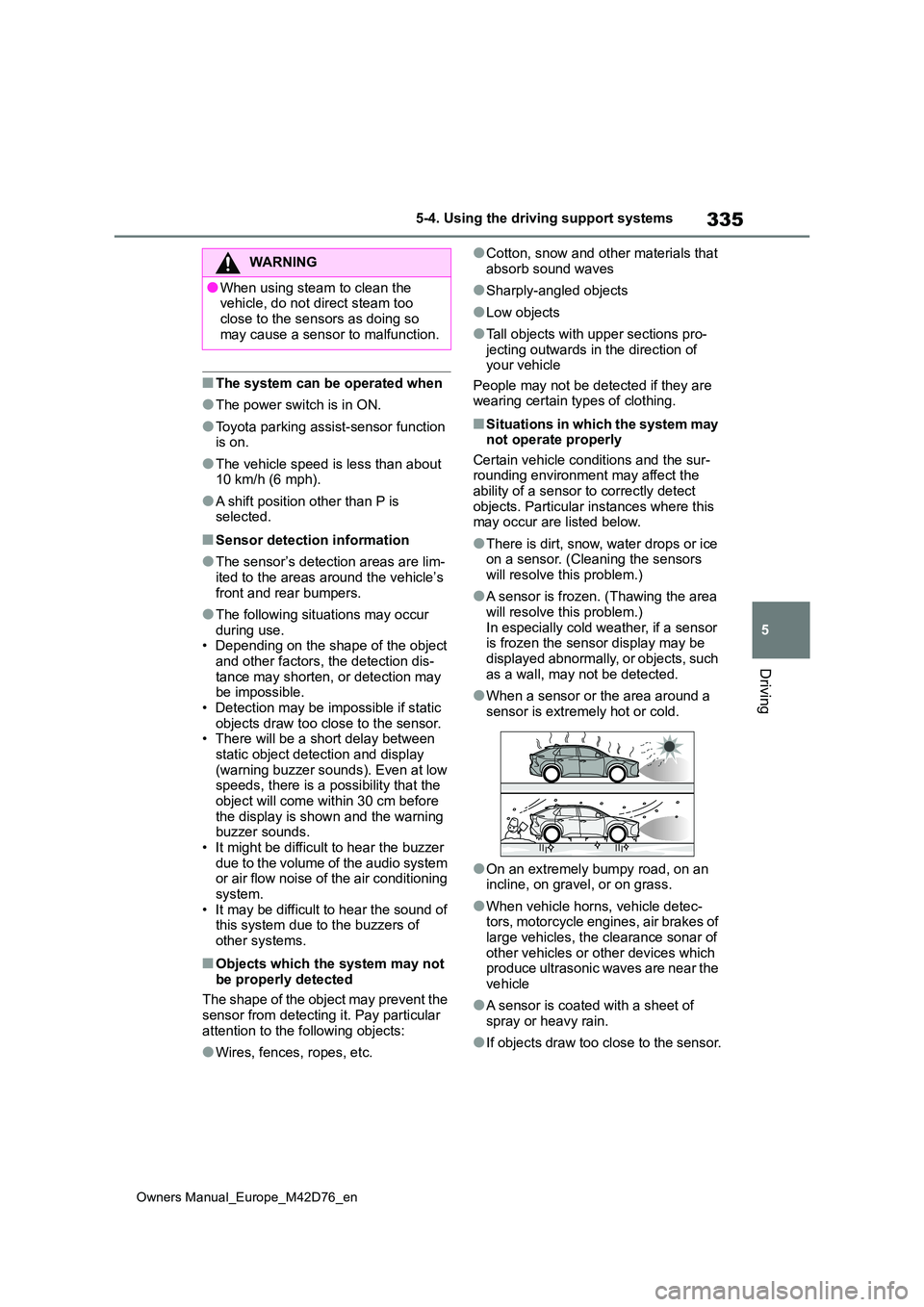
●When a sensor or the area around a
sensor is extremely hot or cold.
●On an extremely bumpy road, on an incline, on gravel, or on grass.
●When vehicle horns, vehicle detec-tors, motorcycle engines, air brakes of large vehicles, the clearance sonar of
other vehicles or other devices which produce ultrasonic waves are near the vehicle
●A sensor is coated with a sheet of spray or heavy rain.
●If objects draw too close to the sensor.
WARNING
●When using steam to clean the vehicle, do not direct steam too
close to the sensors as doing so may cause a sensor to malfunction.
Page 342 of 674
340
Owners Manual_Europe_M42D76_en
5-4. Using the driving support systems
■Buzzer operation and dis-
tance to an object
A buzzer sounds when the sensors
are operating.
The buzzer beeps faster as the
vehicle approaches an object.
When the vehicle comes within
approximately 30 cm (1.0 ft.) of
the object, the buzzer sounds
continuously.
When 2 or more sensors simulta-
neously detect a static object,
the buzzer sounds for the near-
est object.
Even when the sensors are oper-
ating, the buzzer will be muted in
some situations. (automatic
buzzer mute function)
■Adjusting the buzzer volume
The buzzer volume can be adjusted
on the multi-information display.
Use the meter control switches to
change settings. ( P.176)
1 Press or of the meter
control switch to select .
2 Press or of the meter
control switch to select and
then press and hold .
3 Select the volume and then
press .
Each time the switch is pressed, the volume level will change between 1, 2, and 3.
■Muting a buzzer temporarily
When an object is detected, the
temporary mute switch is displayed
on the multimedia display system.
Select to mute a buzzer of the
Toyota parking assist-sensor,
RCTA, and RCD all together.
Mute will be canceled automatically
in the following situations:
When the shift position is
changed.
When the vehicle speed exceeds
a certain speed.
When there is a malfunction in a
sensor or the system is tempo-
rarily unavailable.
When the operating function is
disabled manually.
When the power switch is turned
off.
The object warning function informs
the driver of the existence of
objects along the side of the vehi-
cle, using a display and buzzer, if
the objects are within the estimated
path of the vehicle.
Object warning function
(vehicles with Advanced
Park)
Page 347 of 674
345
5
Owners Manual_Europe_M42D76_en
5-4. Using the driving support systems
Driving
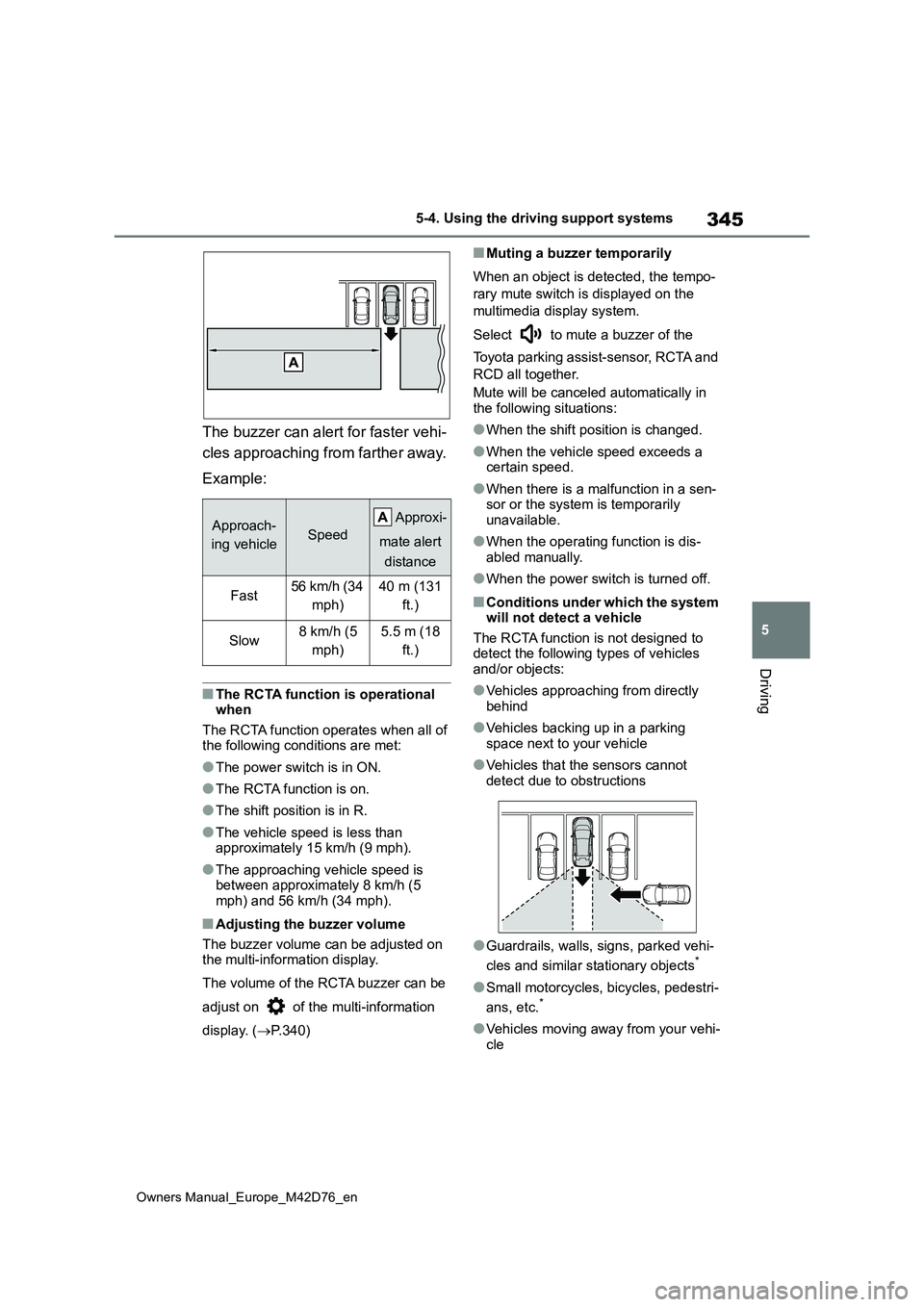
The buzzer can alert for faster vehi-
cles approaching from farther away.
Example:
■The RCTA function is operational when
The RCTA function operates when all of the following conditions are met:
●The power switch is in ON.
●The RCTA function is on.
●The shift position is in R.
●The vehicle speed is less than approximately 15 km/h (9 mph).
●The approaching vehicle speed is between approximately 8 km/h (5 mph) and 56 km/h (34 mph).
■Adjusting the buzzer volume
The buzzer volume can be adjusted on the multi-information display.
The volume of the RCTA buzzer can be
adjust on of the multi-information
display. ( P.340)
■Muting a buzzer temporarily
When an object is detected, the tempo-
rary mute switch is displayed on the
multimedia display system.
Select to mute a buzzer of the
Toyota parking assist-sensor, RCTA and
RCD all together.
Mute will be canceled automatically in the following situations:
●When the shift position is changed.
●When the vehicle speed exceeds a certain speed.
●When there is a malfunction in a sen-sor or the system is temporarily unavailable.
●When the operating function is dis-abled manually.
●When the power switch is turned off.
■Conditions under which the system will not detect a vehicle
The RCTA function is not designed to detect the following types of vehicles and/or objects:
●Vehicles approaching from directly behind
●Vehicles backing up in a parking space next to your vehicle
●Vehicles that the sensors cannot detect due to obstructions
●Guardrails, walls, signs, parked vehi-
cles and similar stationary objects*
●Small motorcycles, bicycles, pedestri-
ans, etc.*
●Vehicles moving away from your vehi- cle
Approach-
ing vehicleSpeed
A pp r ox i -
mate alert
distance
Fast56 km/h (34
mph)
40 m (131
ft.)
Slow8 km/h (5
mph)
5.5 m (18
ft.)
Page 352 of 674
350
Owners Manual_Europe_M42D76_en
5-4. Using the driving support systems
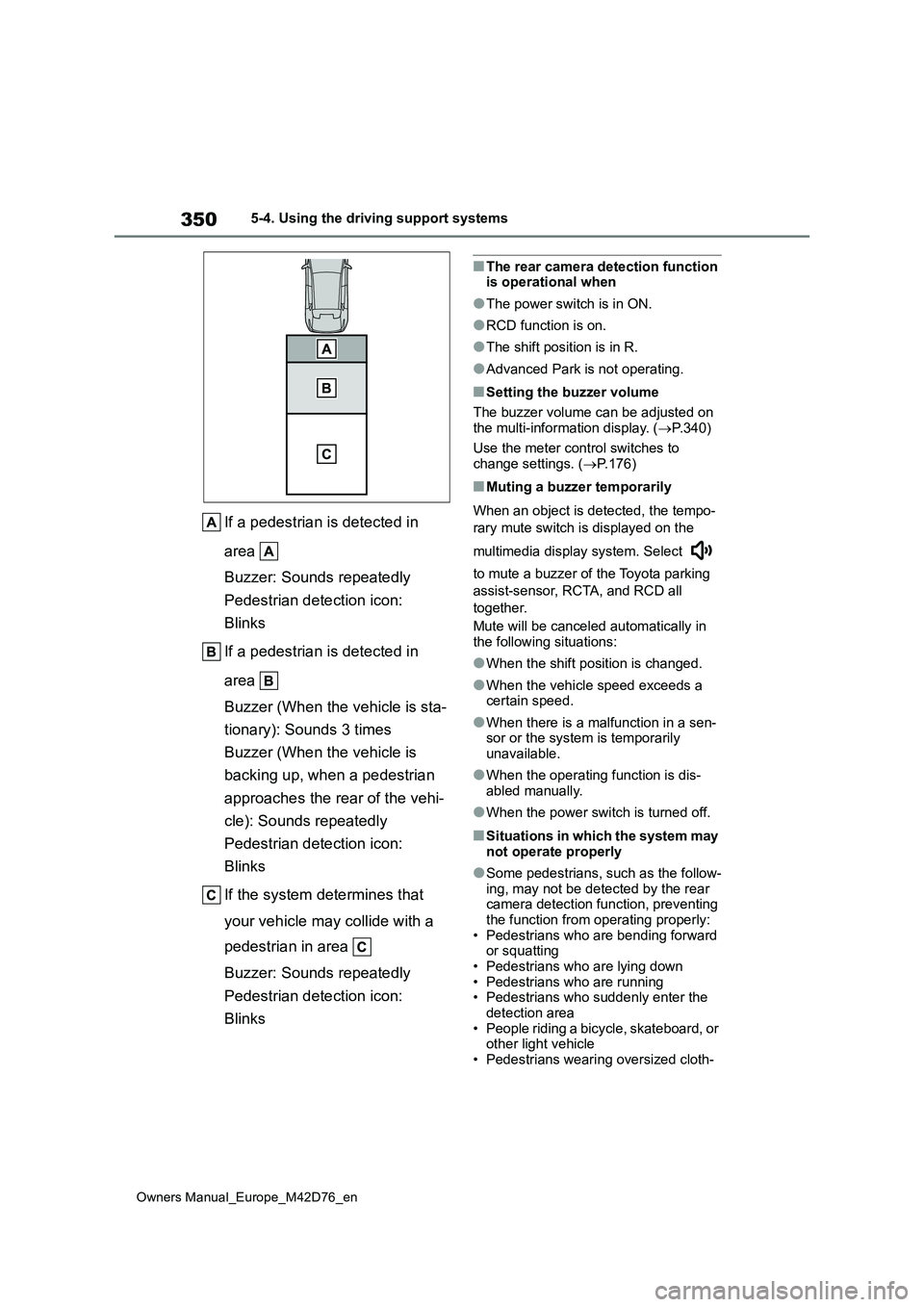
If a pedestrian is detected in
area
Buzzer: Sounds repeatedly
Pedestrian detection icon:
Blinks
If a pedestrian is detected in
area
Buzzer (When the vehicle is sta-
tionary): Sounds 3 times
Buzzer (When the vehicle is
backing up, when a pedestrian
approaches the rear of the vehi-
cle): Sounds repeatedly
Pedestrian detection icon:
Blinks
If the system determines that
your vehicle may collide with a
pedestrian in area
Buzzer: Sounds repeatedly
Pedestrian detection icon:
Blinks
■The rear camera detection function is operational when
●The power switch is in ON.
●RCD function is on.
●The shift position is in R.
●Advanced Park is not operating.
■Setting the buzzer volume
The buzzer volume can be adjusted on
the multi-information display. ( P.340)
Use the meter control switches to change settings. ( P.176)
■Muting a buzzer temporarily
When an object is detected, the tempo-
rary mute switch is displayed on the
multimedia display system. Select
to mute a buzzer of the Toyota parking
assist-sensor, RCTA, and RCD all
together.
Mute will be canceled automatically in
the following situations:
●When the shift position is changed.
●When the vehicle speed exceeds a certain speed.
●When there is a malfunction in a sen-sor or the system is temporarily
unavailable.
●When the operating function is dis-
abled manually.
●When the power switch is turned off.
■Situations in which the system may
not operate properly
●Some pedestrians, such as the follow-
ing, may not be detected by the rear camera detection function, preventing the function from operating properly:
• Pedestrians who are bending forward or squatting• Pedestrians who are lying down
• Pedestrians who are running • Pedestrians who suddenly enter the detection area
• People riding a bicycle, skateboard, or other light vehicle• Pedestrians wearing oversized cloth-
Page 356 of 674
354
Owners Manual_Europe_M42D76_en
5-4. Using the driving support systems
The Parking Support Brake can be
enabled/disabled on the multi-infor-
mation display. All of the Parking
Support Brake functions (static
objects front and rear of the vehicle,
moving vehicles rear of the vehicle,
pedestrians rear of the vehicle and
static objects around the vehicle)
are enabled/disabled simultane-
ously.
Use the meter control switches to
enable/disable the parking support
brake. ( P.176)
1 Press or to select .
2 Press or to select “
PKSB” and then press .
When the Parking Support Brake is dis- abled, the driving assist information
indicator ( P.169) illuminates.
To re-enable the system when it was
disabled, select on the multi-infor-
mation display, select “ PKSB” and
then On. If disabled using this method,
the system will not be re-enabled by
turning the power switch off and then to
ON.
If the EV system output restriction con-
trol or brake control operates, a buzzer
will sound and a message will be dis-
played on the multi-information display
and multimedia system screen, to alert
the driver.
Depending on the situation, EV system
output restriction control will operate to
either limit acceleration or restrict out-
put as much as possible.
EV system output restriction con-
trol is operating (acceleration
restriction)
Acceleration greater than a certain
amount is restricted by the system.
Multimedia display: No warning dis-
played
Multi-information display: “Object
Detected Acceleration Reduced”
Driving assist information indicator: Not
illuminated
Buzzer: Does not sound
EV system output restriction con-
trol is operating (output restricted
as much as possible)
The system has determined that stron-
ger-than-normal brake operation is nec-
essary.
Multimedia display: “BRAKE!”
Multi-information display: “BRAKE!”
Driving assist information indicator: Not
illuminated
Buzzer: Short beep
Brake control is operating
The system determined that emer-
gency braking is necessary.
Multimedia display: “BRAKE!”
Multi-information display: “BRAKE!”
Driving assist information indicator: Not
illuminated
Buzzer: Short beep
Vehicle stopped by system oper-
Enabling/Disabling the Park-
ing Support Brake
Display and buzzer for EV
system output restriction
control and brake control
Page 357 of 674
355
5
Owners Manual_Europe_M42D76_en
5-4. Using the driving support systems
Driving
ation
The vehicle has been stopped by brake
control operation.
Multimedia display: “Press Brake
Pedal”
Multi-information display: “Accelerator
Pedal is Pressed Press Brake Pedal” (If
the accelerator pedal is not depressed,
“Press Brake Pedal” will be displayed.)
Driving assist information indicator: Illu-
minated
Buzzer: Sounds repeatedly
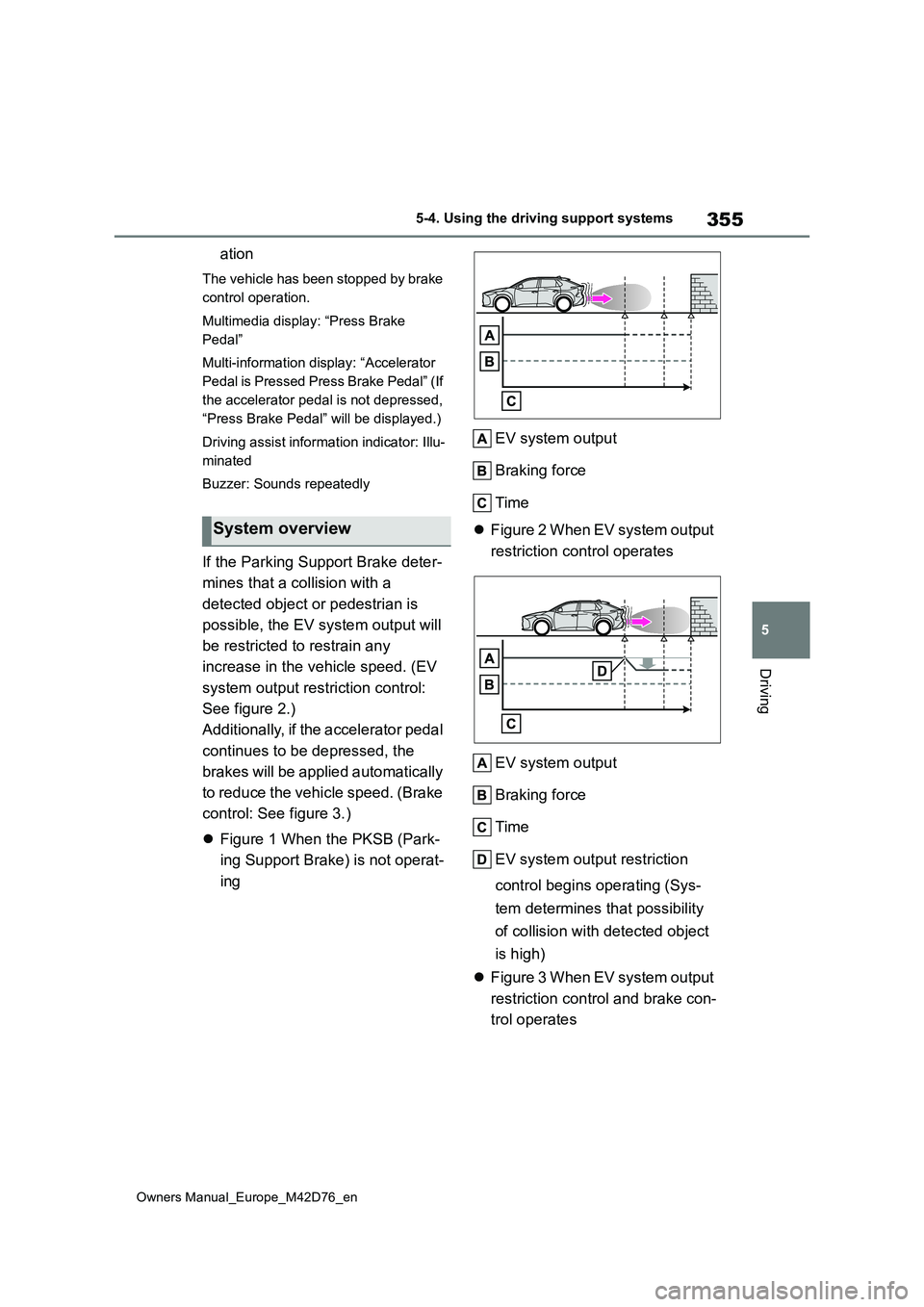
If the Parking Support Brake deter-
mines that a collision with a
detected object or pedestrian is
possible, the EV system output will
be restricted to restrain any
increase in the vehicle speed. (EV
system output restriction control:
See figure 2.)
Additionally, if the accelerator pedal
continues to be depressed, the
brakes will be applied automatically
to reduce the vehicle speed. (Brake
control: See figure 3.)
Figure 1 When the PKSB (Park-
ing Support Brake) is not operat-
ing
EV system output
Braking force
Time
Figure 2 When EV system output
restriction control operates
EV system output
Braking force
Time
EV system output restriction
control begins operating (Sys-
tem determines that possibility
of collision with detected object
is high)
Figure 3 When EV system output
restriction control and brake con-
trol operates
System overview