towing TOYOTA BZ4X 2022 (in English) User Guide
[x] Cancel search | Manufacturer: TOYOTA, Model Year: 2022, Model line: BZ4X, Model: TOYOTA BZ4X 2022Pages: 674, PDF Size: 120.02 MB
Page 243 of 674
241
5
Owners Manual_Europe_M42D76_en
5-1. Before driving
Driving
is especially true when driving on
wet or slippery road surfaces.
■Sudden acceleration/steering
input/cornering
Executing sharp turns when towing
may result in the trailer colliding
with your vehicle. Decelerate well in
advance when approaching turns
and take them slowly and carefully
to avoid sudden braking.
■Important points regarding
turning
The wheels of the trailer will travel
closer to the inside of the curve
than the wheels of the vehicle. To
make allowance for this, take the
turns wider than you would nor-
mally do.
■Important points regarding
stability
Vehicle movement resulting from
uneven road surfaces and strong
crosswinds will affect handling. The
vehicle may also be rocked by
passing buses or large trucks. Fre-
quently check behind when moving
alongside such vehicles. As soon
as such vehicle movement occurs,
immediately start to decelerate
smoothly by slowly applying the
brakes. Always steer the vehicle
straight ahead while braking.
■Passing other vehicles
Consider the total combined length
of your vehicle and trailer and
ensure that the vehicle-to-vehicle
distance is sufficient before execut-
ing lane changes.
■If the EV system overheats
Towing a loaded trailer up a long,
steep incline in temperatures
exceeding 30°C (85°F) may result
in the EV system overheating. If the
EV system coolant temperature
gauge indicates that the EV system
is overheating, turn the air condi-
tioning off immediately, leave the
road and stop the vehicle in a safe
place. ( P.549)
■When parking the vehicle
Always place wheel chocks under
the wheels of both the vehicle and
trailer. Firmly set the parking brake
and shift the shift position to P.
WARNING
F o l l o w a l l t h e i n s t r u c t i o n s d e s c r i b e d i n this section. Failure to do so could cause an accident resulting in death
or serious injury.
■Trailer towing precautions
When towing, make sure that none of the weight limits are exceeded. ( P.554)
■Vehicle speed in towing
Observe the legal maximum speeds
for trailer towing.
■Before descending hills or long
declines
Reduce speed and downshift. How- ever, never downshift suddenly while
descending steep or long downhill grades.
Page 244 of 674
242
Owners Manual_Europe_M42D76_en
5-1. Before driving
WARNING
■Operation of the brake pedal
Do not hold the brake pedal
depressed often or for long periods of time. Doing so may result in the brake overheating or reduce braking effects.
■To avoid accident or injury
●Do not tow a trailer when the tire
installed is repaired with the emer- gency tire puncture repair kit.
●Do not use the following systems when trailer towing.
• PCS (Pre-Collision System)
• LTA (Lane Tracing Assist)
• LDA (Lane Departure Alert)
• Dynamic radar cruise control
• Cruise control
• BSM (Blind Spot Monitor)
Page 277 of 674
275
5
Owners Manual_Europe_M42D76_en
5-4. Using the driving support systems
Driving
Toyota Safety Sense
The Toyota Safety Sense con-
sists of the driving assist sys-
tems and contributes to a safe
and comfortable driving expe-
rience:
WARNING
■Toyota Safety Sense
The Toyota Safety Sense operates under the assumption that the driver will drive safely, and is designed to
help reduce the impact to the occu- pants in a collision and assist the driver under normal driving condi-
tions. As there is a limit to the degree of recognition accuracy and control performance that this system can pro-
vide, do not overly rely on this sys- tem. The driver is solely responsible for paying attention to the vehicle’s
surroundings and driving safely.
■For safe use
●Do not overly rely on this system. The driver is solely responsible for paying attention to the vehicle’s sur-
roundings and driving safely. This system may not operate in all situa-tions and provided assistance is
limited. Over-reliance on this sys- tem to drive the vehicle safely may lead to an accident resulting in
death or serious injury.
●Do not attempt to test the operation
of the system, as it may not operate properly, possibly leading to an accident.
●If attention is necessary while per-forming driving operations or a sys-
tem malfunction occurs, a warning message or warning buzzer will be operated. If a warning message is
displayed on the display, follow the instructions displayed.
●Depending on external noise, the volume of the audio system, etc., it may be difficult to hear the warning
buzzer. Also, depending on the road conditions, it may be difficult to recognize the operation of the sys-
tem.
■When it is necessary to disable
the system
In the following situations, make sure to disable the system.
Failure to do so may lead to the sys- tem not operating properly, possibly leading to an accident resulting in
death or serious injury.
●When the vehicle is tilted due to
being overloaded or having a flat tire
●When driving at extremely high speeds
●When towing another vehicle
●When the vehicle is being trans-
ported by a truck, ship, train, etc.
●When the vehicle is raised on a lift
and the tires are allowed to rotate freely
●When inspecting the vehicle using a drum tester such as a chassis dynamometer or speedometer tes-
ter, or when using an on vehicle wheel balancer
●When the vehicle is driven in a sporty manner or off-road
●When using an automatic car wash
●When a sensor is misaligned or
deformed due to a strong impact being applied to the sensor or the area around the sensor
●When accessories which obstruct a sensor or light are temporarily
installed to the vehicle
Page 330 of 674
328
Owners Manual_Europe_M42D76_en
5-4. Using the driving support systems
in the road, etc.
• When driving on roads with sharp bends, consecutive curves, or uneven surfaces
• When vehicle lanes are wide, or when driving on the edge of a lane, and the vehicle in an adjacent lane is far away
from your vehicle • When an accessory (such as a bicycle carrier) is installed to the rear of the
vehicle • When there is a significant difference in height between your vehicle and
the vehicle that enters the detection area• Immediately after the Blind Spot Moni-
tor is turned on • When towing with the vehicle
●Instances of the Blind Spot Monitor unnecessarily detecting a vehicle and/or object may increase in the fol-
lowing situations: • When the sensor is misaligned due to a strong impact to the sensor or its
surrounding area • When the distance between your vehi-cle and a guardrail, wall, etc., that
enters the detection area is short • When driving up and down consecu-tive steep inclines, such as hills, dips
in the road, etc. • When vehicle lanes are narrow, or when driving on the edge of a lane,
and a vehicle traveling in a lane other than the adjacent lanes enters the detection area
• When driving on roads with sharp bends, consecutive curves, or uneven surfaces
• When the tires are slipping or spinning • When the distance between your vehi-cle and a following vehicle is short
• When an accessory (such as a bicycle carrier) is installed to the rear of the vehicle
• When towing with the vehicle
*: If equipped
SEA (Safe Exit Assist)*
The Safe Exit Assist is a sys-
tem that uses radar sensors
installed on the inner side of
the rear bumper to help occu-
pants judge if an approaching
vehicle or bicycle may collide
with a door to reduce the pos-
sibility of a collision.
WARNING
■Cautions regarding the use of
the system
●The driver is solely responsible for safe driving. Always drive safely,
taking care to observe your sur- roundings.
●Safe Exit Assist is a supplementary system that, when the vehicle is stopped, informs occupants of the
existence of approaching vehicles and bicycles. As this system alone cannot be used to judge safety,
over-reliance on this system may lead to an accident resulting in death or serious injury.
As the system may not function cor- rectly under certain conditions, visual confirmation of safety with
the passengers’ own eyes and mir- rors is necessary.
Page 334 of 674
332
Owners Manual_Europe_M42D76_en
5-4. Using the driving support systems
■Conditions under which the system
will not detect a vehicle
●Safe Exit Assist does not detect the
following objects, vehicles, and bicy- cles:• Vehicles or bicycles which are
approaching slowly • Vehicles or bicycles which are deter-mined to have a low possibility of col-
liding with a door (other than the back door) when opened• Vehicles or bicycles which are deter-
mined to have a low possibility of col- liding with a door when opened• Vehicles or bicycles which are
approaching from directly behind • Vehicles or bicycles which are approaching from the front
• Guardrails, walls, signs, parked vehi- cles, and other stationary objects• Animals, etc.
●In situations such as the following, Safe Exit Assist will not operate:
• When 3 minutes or more have elapsed since the EV system off (the time which operation is possible may
be extended if a door is opened and closed)• When your vehicle is not completely
stopped
■Conditions under which the system may not function correctly
●Vehicles and bicycles may not be effectively detected in the following situations:
• When the sensor is misaligned due to a strong impact to the sensor or its surrounding area
• When mud, snow, ice, a sticker, etc., is covering the sensor or surrounding area on the rear bumper
• When driving on a road surface that is wet with standing water during bad weather, such as heavy rain, snow, or
fog • When a vehicle or bicycle approaches from behind a nearby parked vehicle
• When an approaching vehicle or bicy- cle suddenly changes direction• Immediately after a vehicle or bicycle
starts moving
• When the back door is open
• When a bicycle carrier, ramp, or other accessory is installed to the back of the vehicle
• When a parked vehicle, wall, sign, person or other stationary object is behind the vehicle
• When the vehicle is stopped at an angle to the road• When a vehicle is traveling near an
approaching vehicle or bicycle • When an approaching vehicle or bicy-cle is traveling along a stationary
object, such a wall or sign • When a vehicle or bicycle is approaching at high speed
• When towing with the vehicle • When stopped on a steep incline• When stopped on a curve or at the
exit of a curve
●Instances of the Safe Exit Assist
unnecessarily detecting a vehicle and/or object may increase in the fol-lowing situations:
• When the sensor is misaligned due to a strong impact to the sensor or its surrounding area
• When a vehicle or bicycle approaches from behind your vehicle at an angle• When the vehicle is stopped at an
angle to the road • When a vehicle or bicycle approaches from behind a parked vehicle at an
angle • When a parked vehicle, wall, sign, person or other stationary object is
behind the vehicle • When an approaching vehicle or bicy-cle suddenly changes direction
• When an approaching vehicle or bicy- cle is traveling along a stationary object, such a wall or sign
• When the back door is open • When a bicycle carrier, ramp, or other accessory is installed to the back of
the vehicle • When a vehicle or bicycle is approaching at high speed
• When towing with the vehicle • When stopped on a steep incline• When stopped on a curve or at the
exit of a curve
Page 338 of 674
336
Owners Manual_Europe_M42D76_en
5-4. Using the driving support systems
●When a pedestrian is wearing clothing
that does not reflect ultrasonic waves (ex. skirts with gathers or frills).
●When objects that are not perpendicu-lar to the ground, not perpendicular to the vehicle traveling direction,
uneven, or waving are in the detection range.
●Strong wind is blowing
●When driving in inclement weather
such as fog, snow or a sandstorm
●When an object that cannot be
detected is between the vehicle and a detected object
●If an object such as a vehicle, motor-cycle, bicycle or pedestrian cuts in front of the vehicle or runs out from
the side of the vehicle
●If the orientation of a sensor has been
changed due to a collision or other impact
●When equipment that may obstruct a sensor is installed, such as a towing eyelet, bumper protector (an addi-
tional trim strip, etc.), bicycle carrier, or snow plow
●If the front of the vehicle is raised or lowered due to the carried load
●If the vehicle cannot be driven in a stable manner, such as when the vehicle has been in an accident or is
malfunctioning
●When a tire chains, compact spare tire
or an emergency tire puncture repair kit is used
■Situations in which the system may operate even if there is no possibil-
ity of a collision
In some situations, such as the follow- ing, the system may operate even
though there is no possibility of a colli- sion.
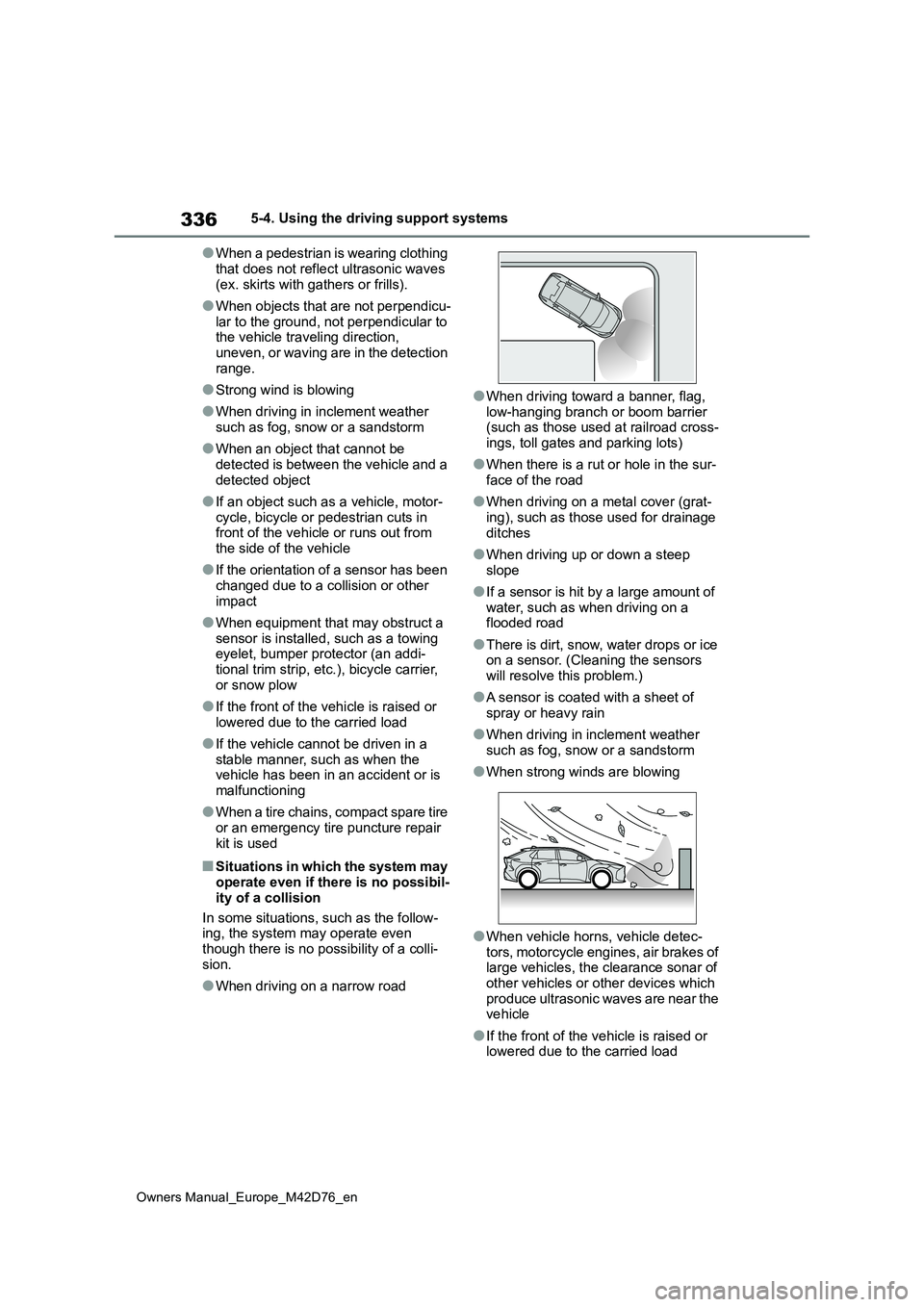
●When driving on a narrow road
●When driving toward a banner, flag,
low-hanging branch or boom barrier (such as those used at railroad cross-ings, toll gates and parking lots)
●When there is a rut or hole in the sur-face of the road
●When driving on a metal cover (grat-ing), such as those used for drainage
ditches
●When driving up or down a steep
slope
●If a sensor is hit by a large amount of
water, such as when driving on a flooded road
●There is dirt, snow, water drops or ice on a sensor. (Cleaning the sensors will resolve this problem.)
●A sensor is coated with a sheet of spray or heavy rain
●When driving in inclement weather such as fog, snow or a sandstorm
●When strong winds are blowing
●When vehicle horns, vehicle detec-tors, motorcycle engines, air brakes of large vehicles, the clearance sonar of
other vehicles or other devices which produce ultrasonic waves are near the vehicle
●If the front of the vehicle is raised or lowered due to the carried load
Page 348 of 674
346
Owners Manual_Europe_M42D76_en
5-4. Using the driving support systems
●Vehicles approaching from the park-
ing spaces next to your vehicle*
●The distance between the sensor and
approaching vehicle gets too close*: Depending on conditions, detection of
a vehicle and/or object may occur.
■Situations in which the system may not operate properly
The RCTA function may not detect vehi-
cles correctly in the following situations:
●When the sensor is misaligned due to
a strong impact to the sensor or its surrounding area
●When mud, snow, ice, a sticker, etc.,is covering the sensor or surrounding area on the position above the rear
bumper
●When driving on a road surface that is
wet with standing water during bad weather, such as heavy rain, snow, or fog
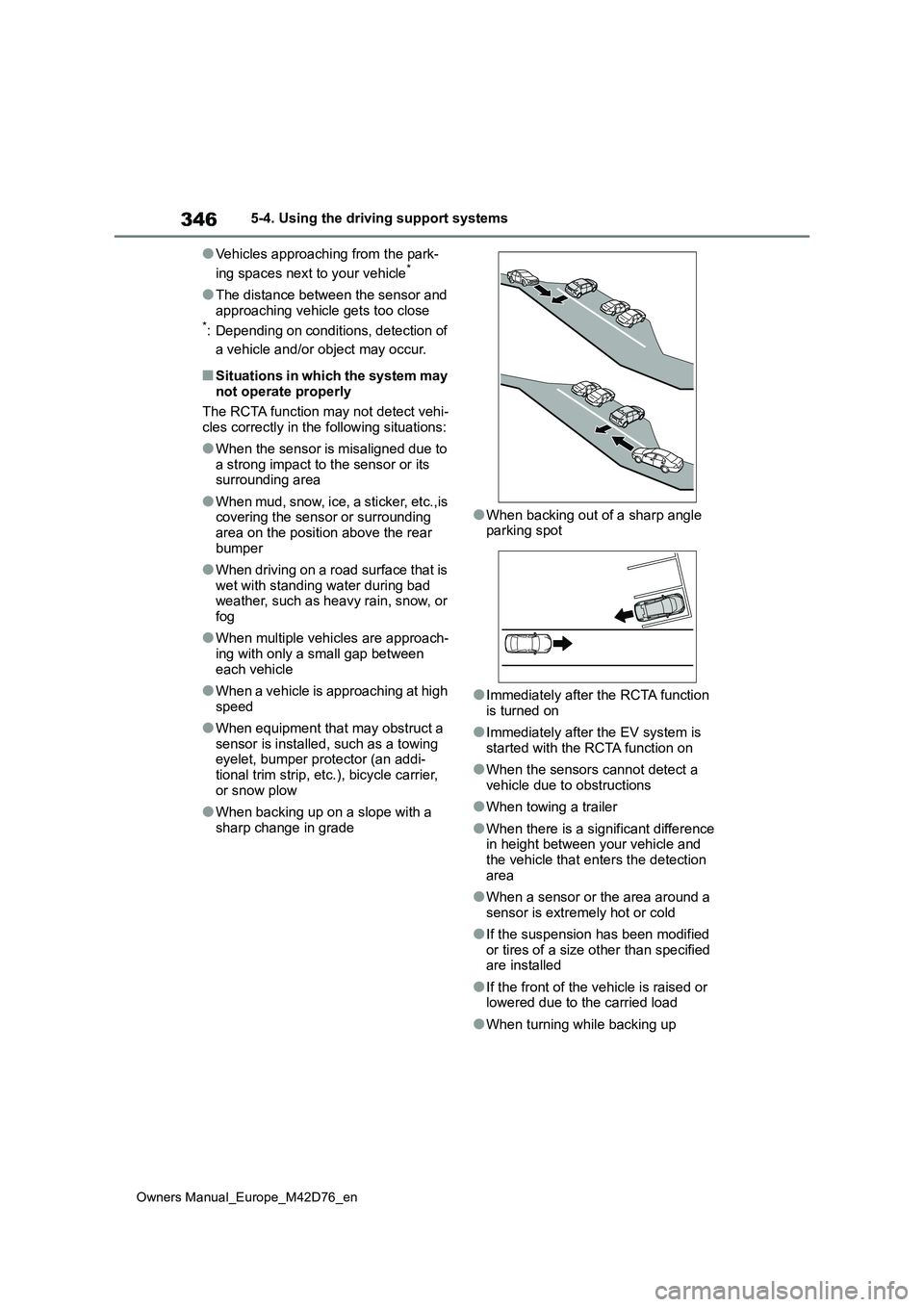
●When multiple vehicles are approach-ing with only a small gap between
each vehicle
●When a vehicle is approaching at high
speed
●When equipment that may obstruct a
sensor is installed, such as a towing eyelet, bumper protector (an addi-tional trim strip, etc.), bicycle carrier,
or snow plow
●When backing up on a slope with a
sharp change in grade
●When backing out of a sharp angle parking spot
●Immediately after the RCTA function is turned on
●Immediately after the EV system is started with the RCTA function on
●When the sensors cannot detect a vehicle due to obstructions
●When towing a trailer
●When there is a significant difference in height between your vehicle and the vehicle that enters the detection
area
●When a sensor or the area around a
sensor is extremely hot or cold
●If the suspension has been modified
or tires of a size other than specified are installed
●If the front of the vehicle is raised or lowered due to the carried load
●When turning while backing up
Page 349 of 674
347
5
Owners Manual_Europe_M42D76_en
5-4. Using the driving support systems
Driving
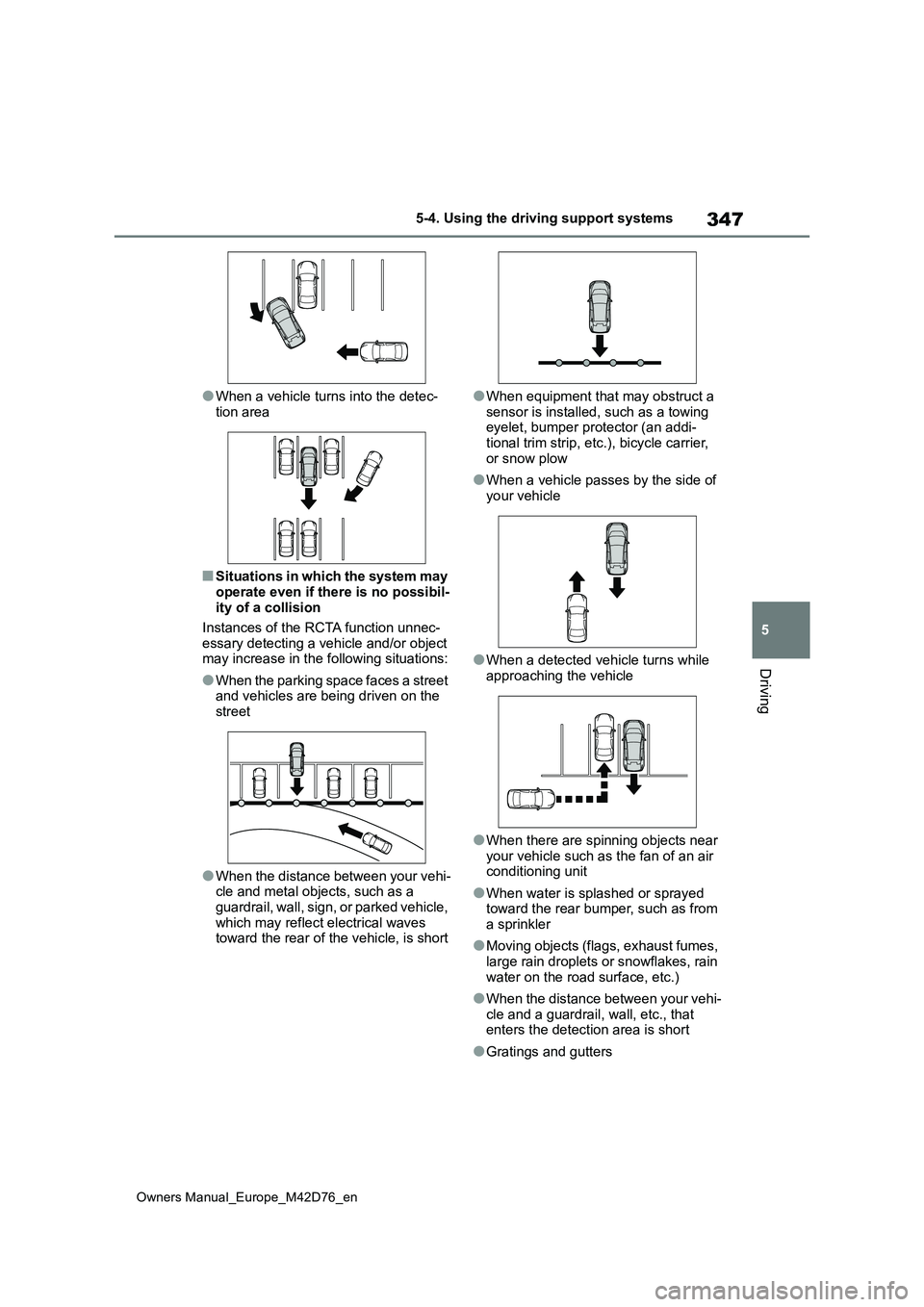
●When a vehicle turns into the detec-
tion area
■Situations in which the system may
operate even if there is no possibil- ity of a collision
Instances of the RCTA function unnec-
essary detecting a vehicle and/or object may increase in the following situations:
●When the parking space faces a street and vehicles are being driven on the street
●When the distance between your vehi-cle and metal objects, such as a
guardrail, wall, sign, or parked vehicle, which may reflect electrical waves toward the rear of the vehicle, is short
●When equipment that may obstruct a
sensor is installed, such as a towing eyelet, bumper protector (an addi-tional trim strip, etc.), bicycle carrier,
or snow plow
●When a vehicle passes by the side of
your vehicle
●When a detected vehicle turns while
approaching the vehicle
●When there are spinning objects near
your vehicle such as the fan of an air conditioning unit
●When water is splashed or sprayed toward the rear bumper, such as from a sprinkler
●Moving objects (flags, exhaust fumes, large rain droplets or snowflakes, rain
water on the road surface, etc.)
●When the distance between your vehi-
cle and a guardrail, wall, etc., that enters the detection area is short
●Gratings and gutters
Page 353 of 674
351
5
Owners Manual_Europe_M42D76_en
5-4. Using the driving support systems
Driving
ing such as a rain coat, long skirt, etc.,
making their silhouette obscure • Pedestrians whose body is partially hidden by an object, such as a cart or
umbrella • Pedestrians which are obscured by darkness, such as at night
●In some situations, such as the follow-ing, pedestrians may not be detected
by the rear camera detection function, preventing the function from operating properly:
• When backing up in inclement weather (rain, snow, fog, etc.)• When the rear camera is obscured
(dirt, snow, ice, etc., are attached) or scratched• When a very bright light, such as the
sun, or the headlights of another vehi- cle, shines directly into the rear cam-era
• When backing up in a place where the surrounding brightness changes sud-denly, such as at the entrance or exit
of a garage or underground parking lot• When backing up in a dim environ-
ment such as during dusk or in an underground parking lot• When the camera position and direc-
tion are deviated • When a towing hook is attached• When water droplets are flowing on
the camera lens • When the vehicle height is extremely changed (nose up, nose down)
• When tire chains or an emergency tire puncture repair kit is used• When the rear washer is operating
• If the suspension has been modified or tires of a size other than specified are installed.
• If an electronic component, such as a backlit license plate or rear fog light, is installed near the rear camera
• If a bumper protector, such as an additional trim strip, is installed to the rear bumper
■Situations in which the system may
operate unexpectedly
●Even though there are no pedestrians
in the detection area, some objects,
such as the following, may be detected, possibly causing the rear camera detection function to operate.
• Three dimensional objects, such as a pole, traffic cone, fence, or parked vehicle
• Moving objects, such as a car or motorcycle• Objects moving toward your vehicle
when backing up, such as flags or puddles (or airborne matter, such as smoke, steam, rain, or snow)
• Cobblestone or gravel roads, tram rails, road repairs, white lines, pedes-trian crossings or fallen leaves on the
road • Metal covers (gratings), such as those used for drainage ditches
• Objects reflected in a puddle or on a wet road surface• Shadows on the road
●In some situations, such as the follow-ing, the rear camera detection func-
tion may operate even though there are no pedestrians in the detection area.
• When backing up toward the roadside or a bump on the road• When backing up toward an
incline/decline • If the rear of the vehicle is raised or lowered due to the carried load
• If a bumper protector, such as an additional trim strip, is installed to the rear bumper
• If the orientation of the rear camera has been changed• If a towing eyelet is installed to the
rear of the vehicle • When water is flowing over the rear camera lens
• When the rear camera is obscured (dirt, snow, ice, etc., are attached) or scratched
• If there is a flashing light in the detec- tion area, such as the emergency flashers of another vehicle
• When a tire chains or an emergency tire puncture repair kit is used
●Situations in which the rear camera detection function may be difficult to
Page 442 of 674
440
Owners Manual_Europe_M42D76_en
6-3. Using the storage features
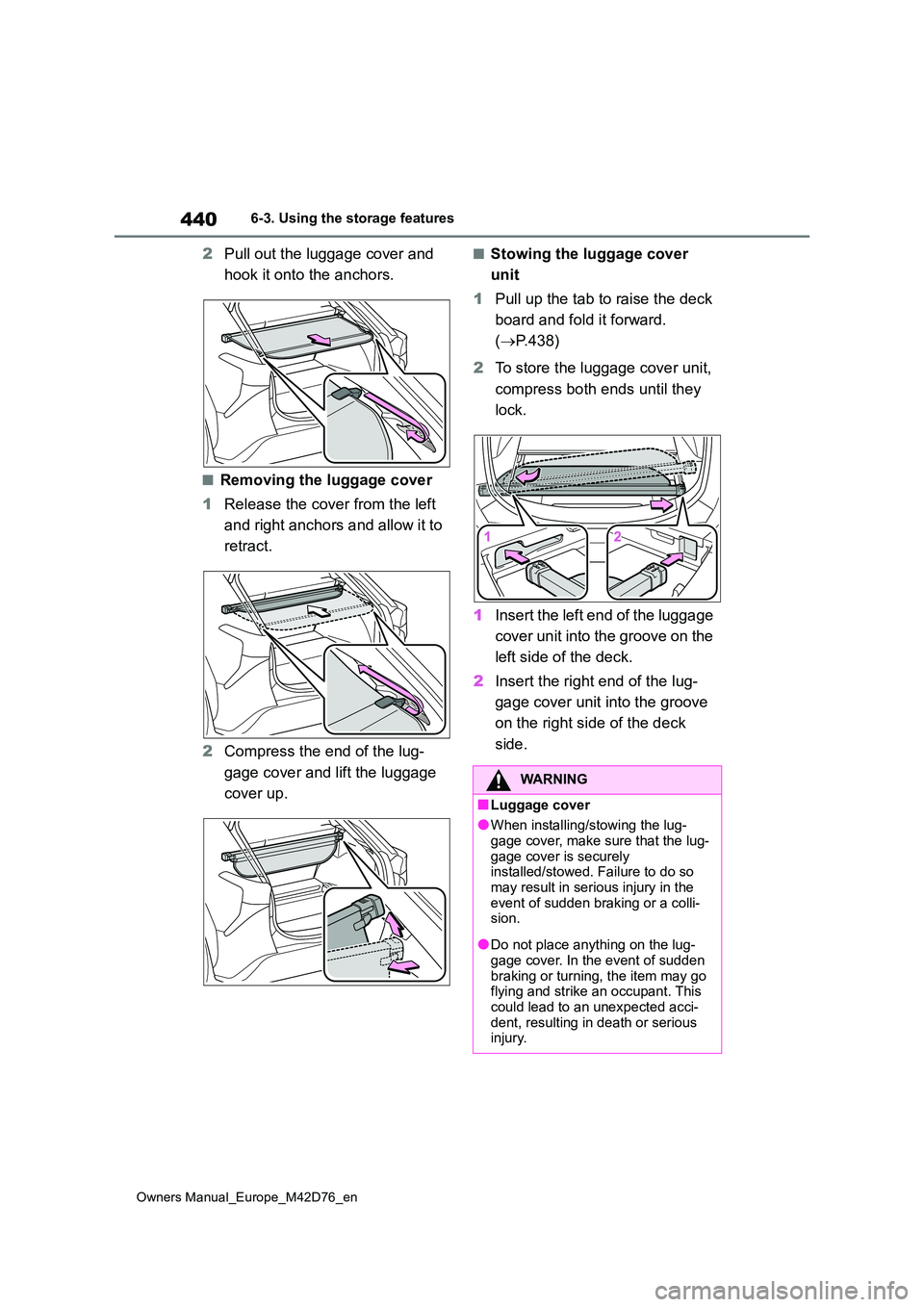
2Pull out the luggage cover and
hook it onto the anchors.
■Removing the luggage cover
1 Release the cover from the left
and right anchors and allow it to
retract.
2 Compress the end of the lug-
gage cover and lift the luggage
cover up.
■Stowing the luggage cover
unit
1 Pull up the tab to raise the deck
board and fold it forward.
( P.438)
2 To store the luggage cover unit,
compress both ends until they
lock.
1 Insert the left end of the luggage
cover unit into the groove on the
left side of the deck.
2 Insert the right end of the lug-
gage cover unit into the groove
on the right side of the deck
side.
WARNING
■Luggage cover
●When installing/stowing the lug-
gage cover, make sure that the lug- gage cover is securely installed/stowed. Failure to do so
may result in serious injury in the event of sudden braking or a colli-sion.
●Do not place anything on the lug-gage cover. In the event of sudden
braking or turning, the item may go flying and strike an occupant. This could lead to an unexpected acci-
dent, resulting in death or serious injury.