battery TOYOTA BZ4X 2022 (in English) Workshop Manual
[x] Cancel search | Manufacturer: TOYOTA, Model Year: 2022, Model line: BZ4X, Model: TOYOTA BZ4X 2022Pages: 674, PDF Size: 120.02 MB
Page 163 of 674
161
2
Owners Manual_Europe_M42D76_en
2-2. Charging
Electric Vehicle system
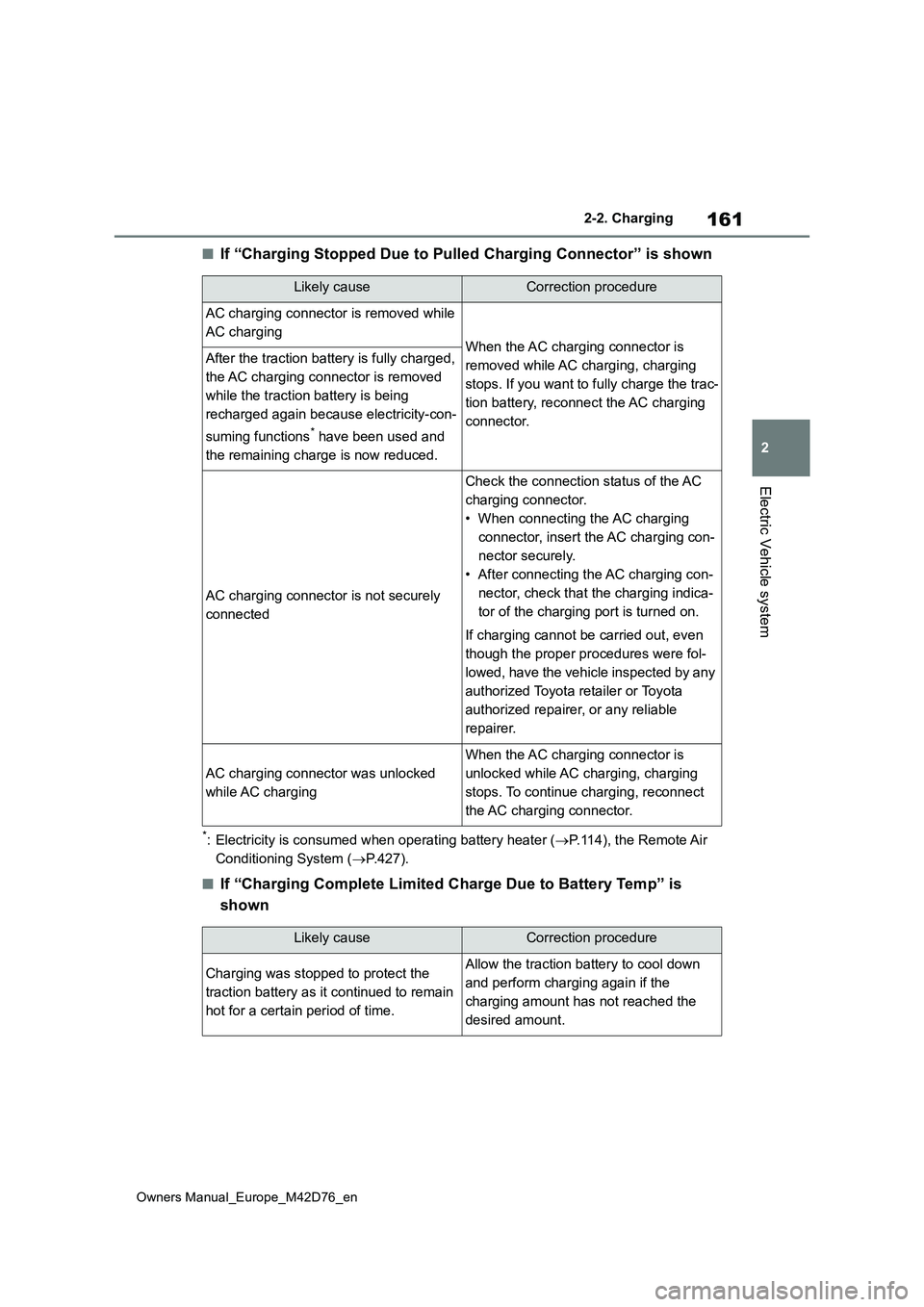
■If “Charging Stopped Due to Pulled Charging Connector” is shown
*: Electricity is consumed when operating battery heater (P.114), the Remote Air
Conditioning System ( P.427).
■If “Charging Complete Limited Charge Due to Battery Temp” is
shown
Likely causeCorrection procedure
AC charging connector is removed while
AC chargingWhen the AC charging connector is
removed while AC charging, charging
stops. If you want to fully charge the trac-
tion battery, reconnect the AC charging
connector.
After the traction battery is fully charged,
the AC charging connector is removed
while the traction battery is being
recharged again because electricity-con-
suming functions* have been used and
the remaining charge is now reduced.
AC charging connector is not securely
connected
Check the connection status of the AC
charging connector.
• When connecting the AC charging
connector, insert the AC charging con-
nector securely.
• After connecting the AC charging con-
nector, check that the charging indica-
tor of the charging port is turned on.
If charging cannot be carried out, even
though the proper procedures were fol-
lowed, have the vehicle inspected by any
authorized Toyota retailer or Toyota
authorized repairer, or any reliable
repairer.
AC charging connector was unlocked
while AC charging
When the AC charging connector is
unlocked while AC charging, charging
stops. To continue charging, reconnect
the AC charging connector.
Likely causeCorrection procedure
Charging was stopped to protect the
traction battery as it continued to remain
hot for a certain period of time.
Allow the traction battery to cool down
and perform charging again if the
charging amount has not reached the
desired amount.
Page 165 of 674
163
2
Owners Manual_Europe_M42D76_en
2-2. Charging
Electric Vehicle system
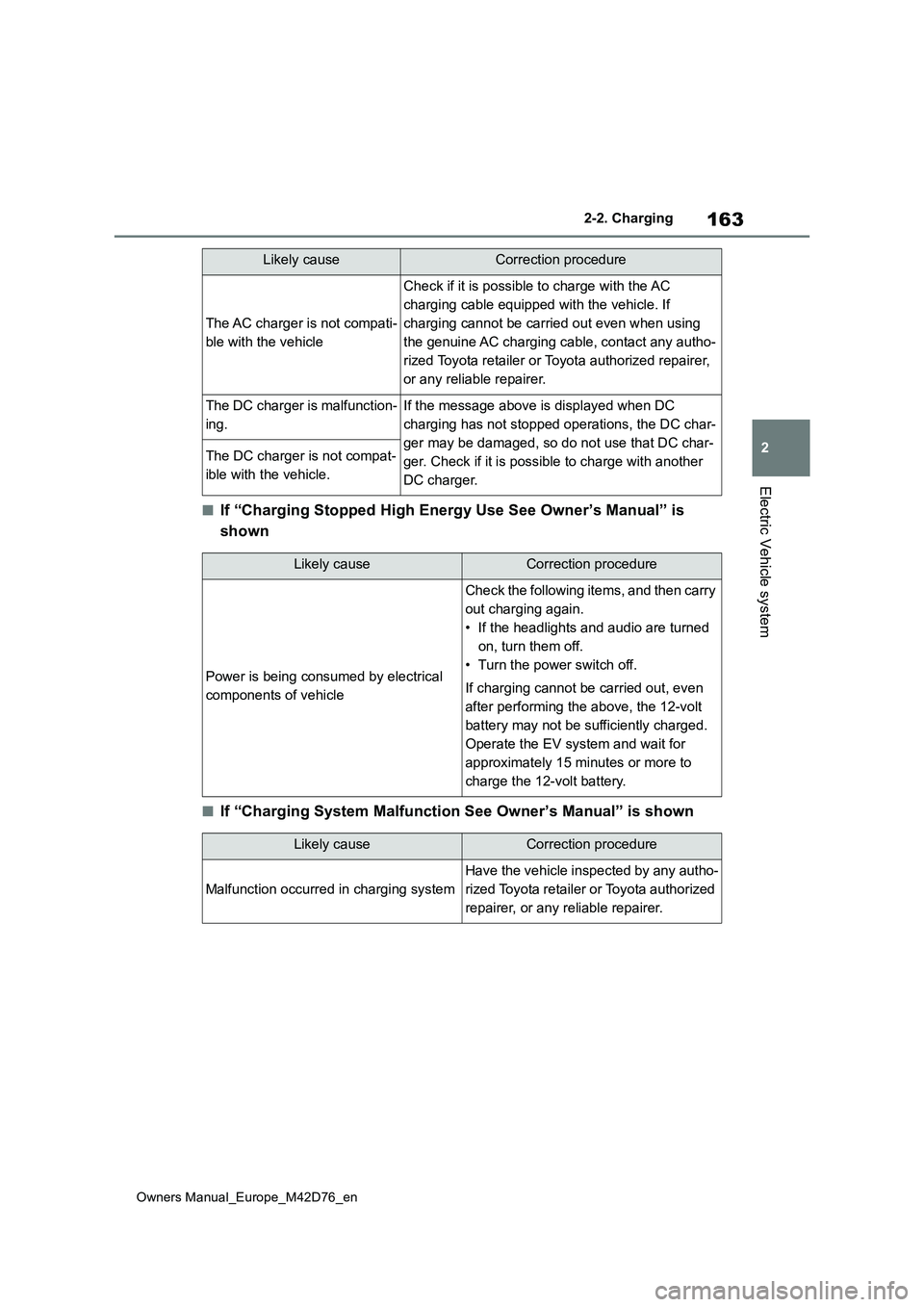
■If “Charging Stopped High Energy Use See Owner’s Manual” is
shown
■If “Charging System Malfunction See Owner’s Manual” is shown
The AC charger is not compati-
ble with the vehicle
Check if it is possible to charge with the AC
charging cable equipped with the vehicle. If
charging cannot be carried out even when using
the genuine AC charging cable, contact any autho-
rized Toyota retailer or Toyota authorized repairer,
or any reliable repairer.
The DC charger is malfunction-
ing.
If the message above is displayed when DC
charging has not stopped operations, the DC char-
ger may be damaged, so do not use that DC char-
ger. Check if it is possible to charge with another
DC charger.
The DC charger is not compat-
ible with the vehicle.
Likely causeCorrection procedure
Likely causeCorrection procedure
Power is being consumed by electrical
components of vehicle
Check the following items, and then carry
out charging again.
• If the headlights and audio are turned
on, turn them off.
• Turn the power switch off.
If charging cannot be carried out, even
after performing the above, the 12-volt
battery may not be sufficiently charged.
Operate the EV system and wait for
approximately 15 minutes or more to
charge the 12-volt battery.
Likely causeCorrection procedure
Malfunction occurred in charging system
Have the vehicle inspected by any autho-
rized Toyota retailer or Toyota authorized
repairer, or any reliable repairer.
Page 166 of 674
164
Owners Manual_Europe_M42D76_en
2-2. Charging
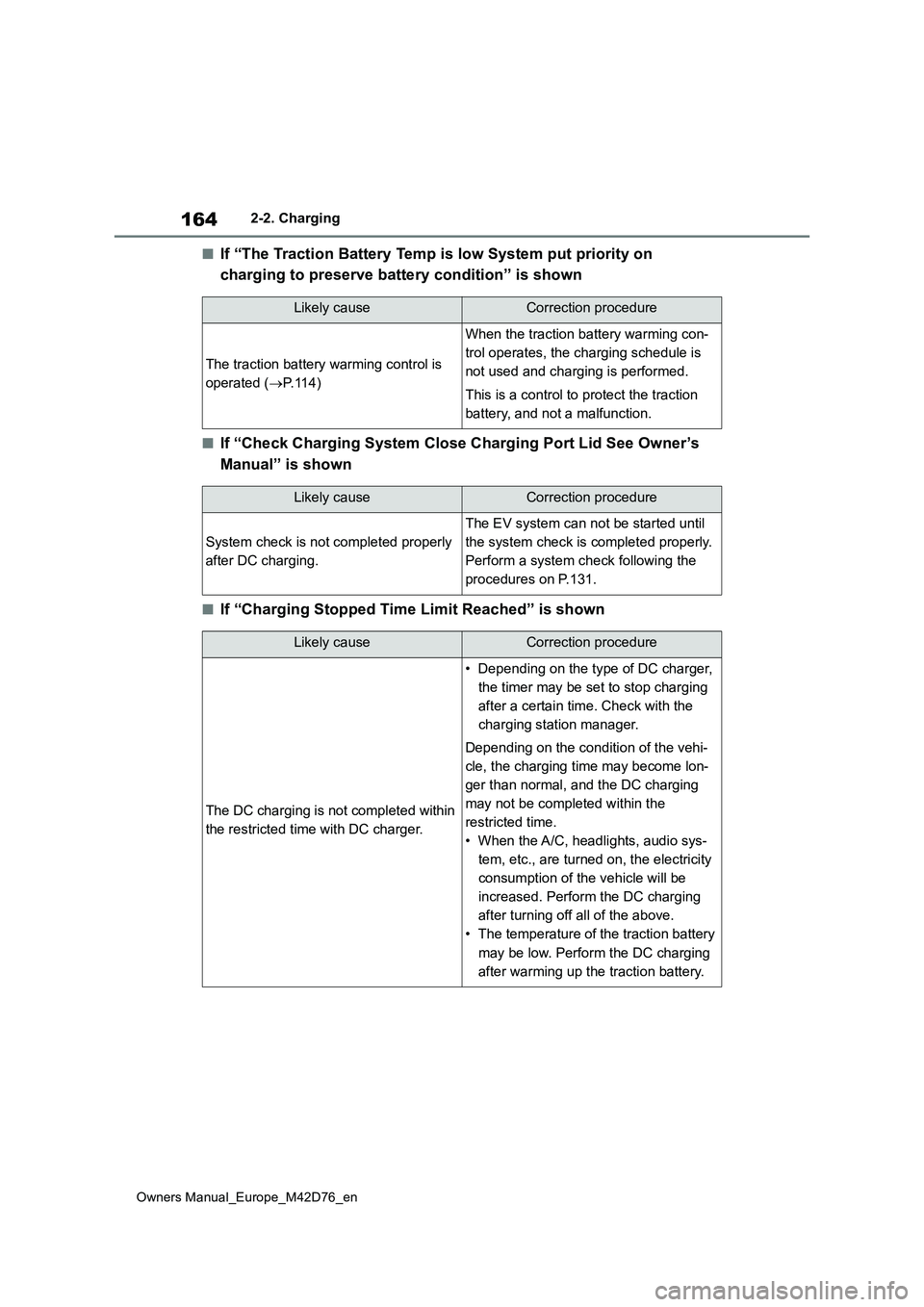
■If “The Traction Battery Temp is low System put priority on
charging to preserve battery condition” is shown
■If “Check Charging System Close Charging Port Lid See Owner’s
Manual” is shown
■If “Charging Stopped Time Limit Reached” is shown
Likely causeCorrection procedure
The traction battery warming control is
operated ( P.114)
When the traction battery warming con-
trol operates, the charging schedule is
not used and charging is performed.
This is a control to protect the traction
battery, and not a malfunction.
Likely causeCorrection procedure
System check is not completed properly
after DC charging.
The EV system can not be started until
the system check is completed properly.
Perform a system check following the
procedures on P.131.
Likely causeCorrection procedure
The DC charging is not completed within
the restricted time with DC charger.
• Depending on the type of DC charger,
the timer may be set to stop charging
after a certain time. Check with the
charging station manager.
Depending on the condition of the vehi-
cle, the charging time may become lon-
ger than normal, and the DC charging
may not be completed within the
restricted time.
• When the A/C, headlights, audio sys-
tem, etc., are turned on, the electricity
consumption of the vehicle will be
increased. Perform the DC charging
after turning off all of the above.
• The temperature of the traction battery
may be low. Perform the DC charging
after warming up the traction battery.
Page 170 of 674
168
Owners Manual_Europe_M42D76_en
3-1. Instrument cluster
3-1.In strument clu ste r
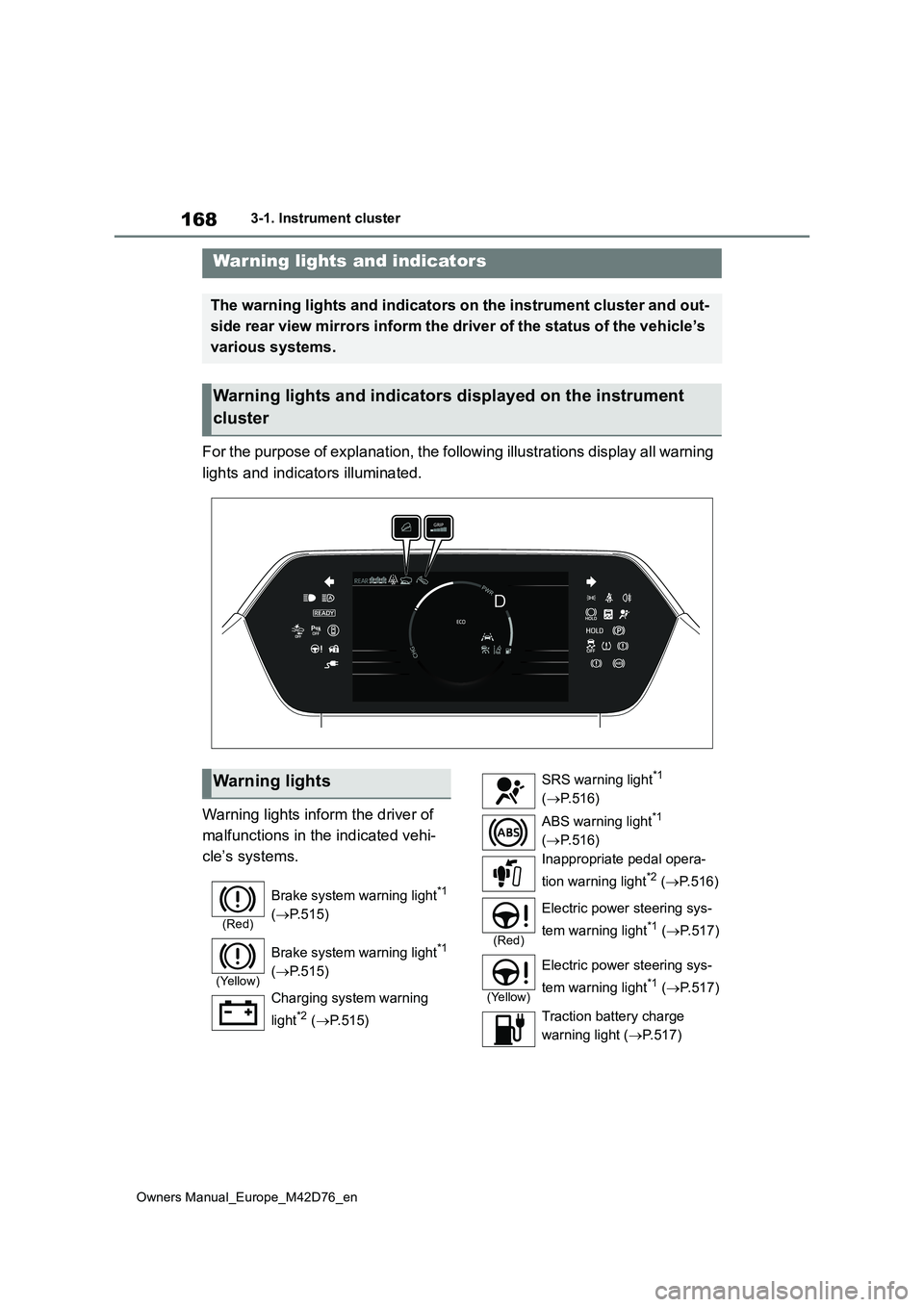
For the purpose of explanation, the following illustrations display all warning
lights and indicators illuminated.
Warning lights inform the driver of
malfunctions in the indicated vehi-
cle’s systems.
Warning lights and indicators
The warning lights and indicators on the instrument cluster and out-
side rear view mirrors inform the driver of the status of the v ehicle’s
various systems.
Warning lights and indicators displayed on the instrument
cluster
Warning lights
(Red)
Brake system warning light*1
( P.515)
(Yellow)
Brake system warning light*1
( P.515)
Charging system warning
light*2 ( P.515)
SRS warning light*1
( P.516)
ABS warning light*1
( P.516)
Inappropriate pedal opera-
tion warning light*2 ( P. 5 1 6 )
(Red)
Electric power steering sys-
tem warning light*1 ( P.517)
(Yellow)
Electric power steering sys-
tem warning light*1 ( P.517)
Traction battery charge
warning light ( P.517)
Page 175 of 674
173
3
Owners Manual_Europe_M42D76_en
3-1. Instrument cluster
Vehicle status information and indicators
Displays the amount of charge remaining in the traction battery.
Driving range
Displays driving range with remaining charge. (P.247)
When the air conditioning system is operating, and the driving range with the
air conditioning system on are displayed.
Odometer and trip meter display ( P.174)
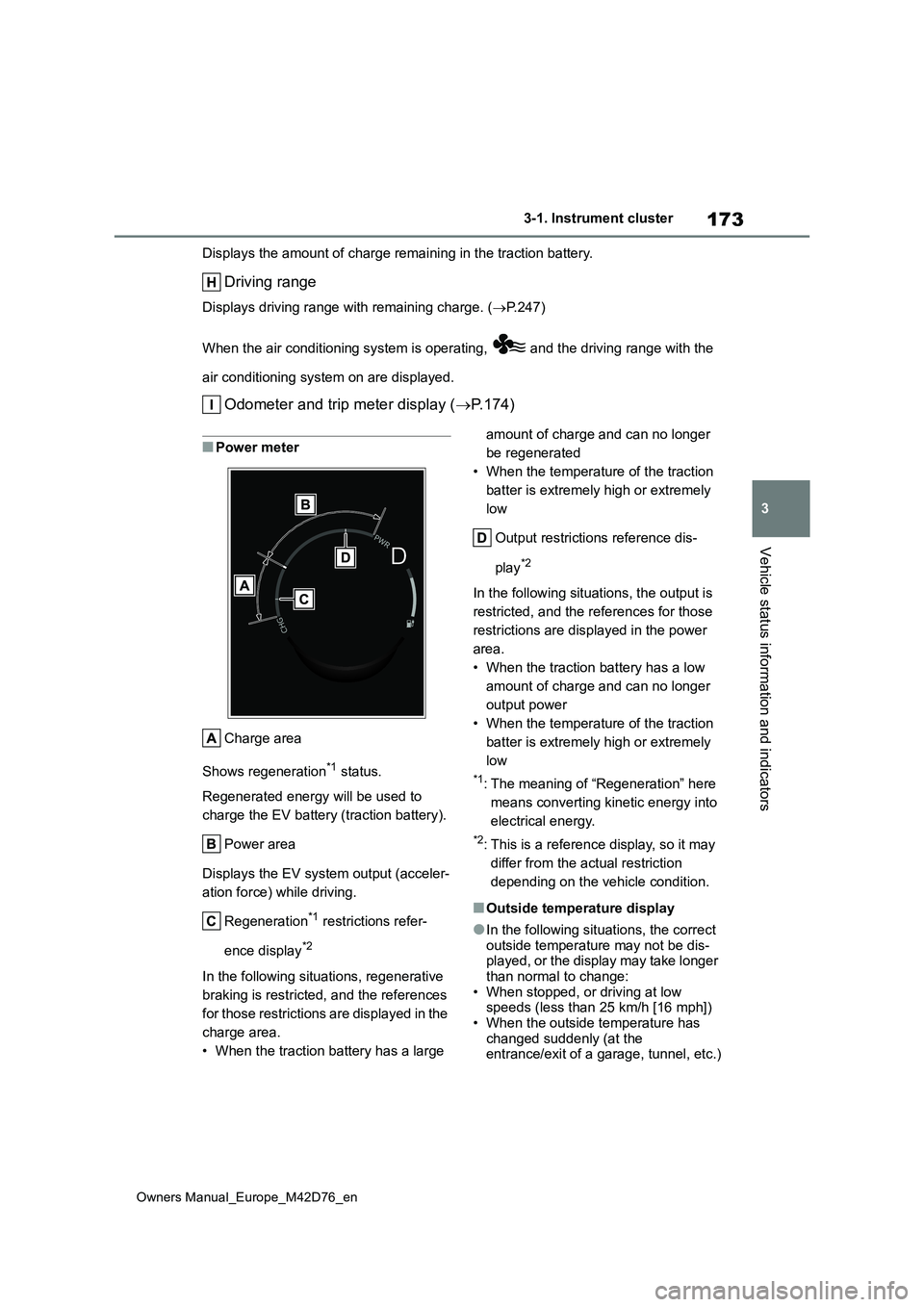
■Power meter
Charge area
Shows regeneration*1 status.
Regenerated energy will be used to
charge the EV battery (traction battery).
Power area
Displays the EV system output (acceler-
ation force) while driving.
Regeneration*1 restrictions refer-
ence display*2
In the following situations, regenerative
braking is restricted, and the references
for those restrictions are displayed in the
charge area.
• When the traction battery has a large
amount of charge and can no longer
be regenerated
• When the temperature of the traction
batter is extremely high or extremely
low
Output restrictions reference dis-
play*2
In the following situations, the output is
restricted, and the references for those
restrictions are displayed in the power
area.
• When the traction battery has a low
amount of charge and can no longer
output power
• When the temperature of the traction
batter is extremely high or extremely
low
*1: The meaning of “Regeneration” here
means converting kinetic energy into
electrical energy.
*2: This is a reference display, so it may
differ from the actual restriction
depending on the vehicle condition.
■Outside temperature display
●In the following situations, the correct outside temperature may not be dis-played, or the display may take longer
than normal to change: • When stopped, or driving at low speeds (less than 25 km/h [16 mph])
• When the outside temperature has changed suddenly (at the entrance/exit of a garage, tunnel, etc.)
Page 181 of 674
179
3
Owners Manual_Europe_M42D76_en
3-1. Instrument cluster
Vehicle status information and indicators
• Display contents (AWD models only)
Select to display/not display the torque
distribution display.
• Drive information type
Select to change the drive information
type display between after start/after
reset.
• Drive information items
Select to set the first and second items
of the drive information display to any of
the following: average vehicle
speed/distance/elapsed time.
Closing Display
Select to set the items displayed when
the power switch is turned off.
Pop-up display
Select to enable/disable pop-up dis-
plays for each relevant system.
Calendar
The year, month, and day can be set.
Default setting
Select to reset the meter display set-
tings to the default setting.
■Vehicle functions and settings
that can be changed
P. 5 6 1
■Suspension of the settings display
●Some settings cannot be changed
while driving. When changing set- tings, park the vehicle in a safe place.
●If a warning message is displayed, operation of the settings display will be suspended.
Displays suggestions to the driver
in the following situations. To select
a response to a displayed sugges-
tion, use the meter control
switches.
■Suggestion to turn on the
headlights
If the headlight switch is in other
than or , and the vehicle
speed is 5 km/h (3 mph) or higher
for a certain amount of time when
the surroundings are dark, a sug-
gestion message will be displayed.
■Suggestion to turn off the
headlights
If the headlights are left on for a
certain amount of time after the
power switch has been turned off, a
suggestion message will be dis-
played.
When the headlight switch is in the
AUTO position: The message ask-
ing if you wish to turn the headlights
off is displayed. To turn the head-
lights off, select “Yes”.
If the driver’s door is opened after the
power switch is turned off, this sugges-
tion message will not be displayed.
NOTICE
■During setting up the display
To prevent 12-volt battery discharge,
ensure that the EV system is operat- ing while setting up the display fea-tures.
Suggestion function
Page 184 of 674
182
Owners Manual_Europe_M42D76_en
4-1. Key information
4-1.Key info rmation
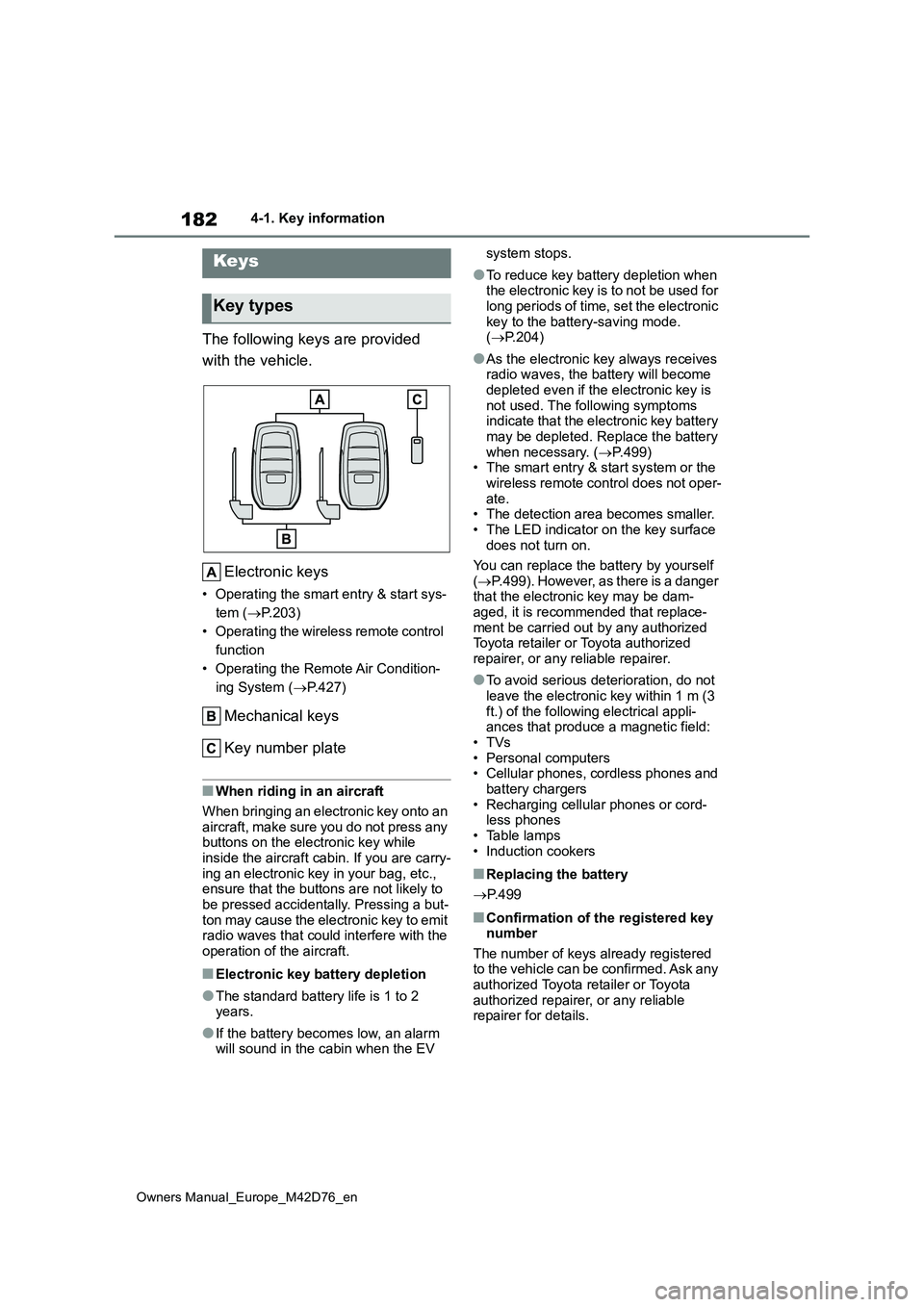
The following keys are provided
with the vehicle.
Electronic keys
• Operating the smart entry & start sys-
tem ( P.203)
• Operating the wireless remote control
function
• Operating the Remote Air Condition-
ing System ( P.427)
Mechanical keys
Key number plate
■When riding in an aircraft
When bringing an electronic key onto an
aircraft, make sure you do not press any buttons on the electronic key while inside the aircraft cabin. If you are carry-
ing an electronic key in your bag, etc., ensure that the buttons are not likely to be pressed accidentally. Pressing a but-
ton may cause the electronic key to emit radio waves that could interfere with the operation of the aircraft.
■Electronic key battery depletion
●The standard battery life is 1 to 2 years.
●If the battery becomes low, an alarm will sound in the cabin when the EV
system stops.
●To reduce key battery depletion when the electronic key is to not be used for
long periods of time, set the electronic key to the battery-saving mode. ( P.204)
●As the electronic key always receives radio waves, the battery will become
depleted even if the electronic key is not used. The following symptoms indicate that the electronic key battery
may be depleted. Replace the battery when necessary. ( P.499) • The smart entry & start system or the
wireless remote control does not oper- ate.• The detection area becomes smaller.
• The LED indicator on the key surface does not turn on.
You can replace the battery by yourself
( P.499). However, as there is a danger that the electronic key may be dam-aged, it is recommended that replace-
ment be carried out by any authorized Toyota retailer or Toyota authorized repairer, or any reliable repairer.
●To avoid serious deterioration, do not leave the electronic key within 1 m (3
ft.) of the following electrical appli- ances that produce a magnetic field:•TVs
• Personal computers • Cellular phones, cordless phones and battery chargers
• Recharging cellular phones or cord- less phones• Table lamps
• Induction cookers
■Replacing the battery
P. 4 9 9
■Confirmation of the registered key number
The number of keys already registered to the vehicle can be confirmed. Ask any authorized Toyota retailer or Toyota
authorized repairer, or any reliable repairer for details.
Keys
Key types
Page 186 of 674
184
Owners Manual_Europe_M42D76_en
4-1. Key information
ing System (P.427)
*1: These settings must be customized
at any authorized Toyota retailer or
Toyota authorized repairer, or any
reliable repairer.
*2: If equipped
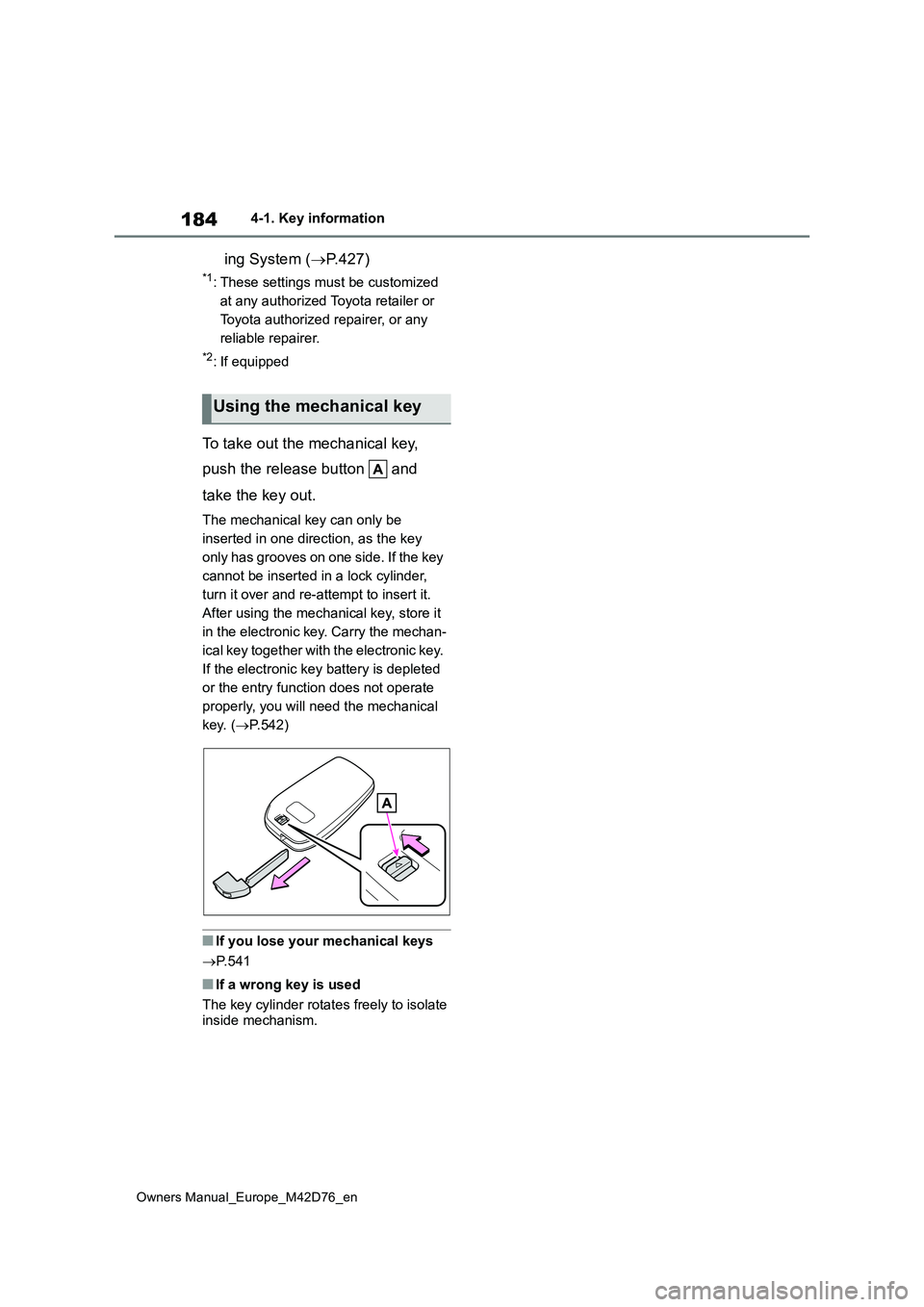
To take out the mechanical key,
push the release button and
take the key out.
The mechanical key can only be
inserted in one direction, as the key
only has grooves on one side. If the key
cannot be inserted in a lock cylinder,
turn it over and re-attempt to insert it.
After using the mechanical key, store it
in the electronic key. Carry the mechan-
ical key together with the electronic key.
If the electronic key battery is depleted
or the entry function does not operate
properly, you will need the mechanical
key. ( P.542)
■If you lose your mechanical keys
P. 5 4 1
■If a wrong key is used
The key cylinder rotates freely to isolate inside mechanism.
Using the mechanical key
Page 189 of 674
187
4
Owners Manual_Europe_M42D76_en
4-2. Opening, closing and locking the doors
Before driving
■Conditions affecting the operation
of the smart entry & start system or wireless remote control
P. 2 0 4
■If the smart entry & start system or
the wireless remote control does not operate properly
●Use the mechanical key to lock and unlock the doors. ( P.542)
●Replace the key battery with a new one if it is depleted. ( P.499)
■If the 12-volt battery is discharged
The doors cannot be locked and
unlocked using the smart entry & start system or wireless remote control. Lock or unlock the doors using the mechani-
cal key. ( P.542)
■Rear seat reminder function
●In order to remind you not to forget
luggage, etc., on the rear seat, when the power switch is turned off after any of the following conditions is met,
a buzzer will sound and a message will be displayed on the multi-informa-tion display for approximately 6 sec-
onds. • The EV system is started within 10 minutes after opening and closing a
rear door. • A rear door has been opened and closed after the EV system was
started.
However, if a rear door is opened and then closed within approximately 2 sec-
onds, the rear seat reminder function may not operate.
●The rear seat reminder function deter-mines that luggage, etc., has been placed on a rear seat based on open-
ing and closing of a rear door. There- fore, depending on the situation, the rear seat reminder function may not
operate and you may still forget lug- gage, etc., on the rear seat, or it may operate unnecessarily.
●The rear seat reminder function can be enabled/disabled. ( P.561)
■Customization
Settings (e.g. unlocking function using a key) can be changed. (Customizable features: P.564)
WARNING
■To prevent an accident
Observe the following precautions while driving the vehicle.
Failure to do so may result in a door opening and an occupant falling out, resulting in death or serious injury.
●Ensure that all doors are properly closed and locked.
●Do not pull the inside handle of the doors while driving.Be especially careful for the front
doors, as the doors may be opened even if the inside lock buttons are in locked position.
●Set the rear door child-protector locks when children are seated in
the rear seats.
■When opening or closing a door
Check the surroundings of the vehicle such as whether the vehicle is on an incline, whether there is enough
space for a door to open and whether a strong wind is blowing. When open-ing or closing the door, hold the door
handle tightly to prepare for any unpredictable movement.
■When using the wireless remote control and operating the power windows
Operate the power window after checking to make sure that there is no possibility of any passenger having
any of their body parts caught in the window. Also, do not allow children to operate the wireless remote control. It
is possible for children and other pas- sengers to get caught in the power window.
Page 201 of 674
199
4
Owners Manual_Europe_M42D76_en
4-2. Opening, closing and locking the doors
Before driving
WARNING
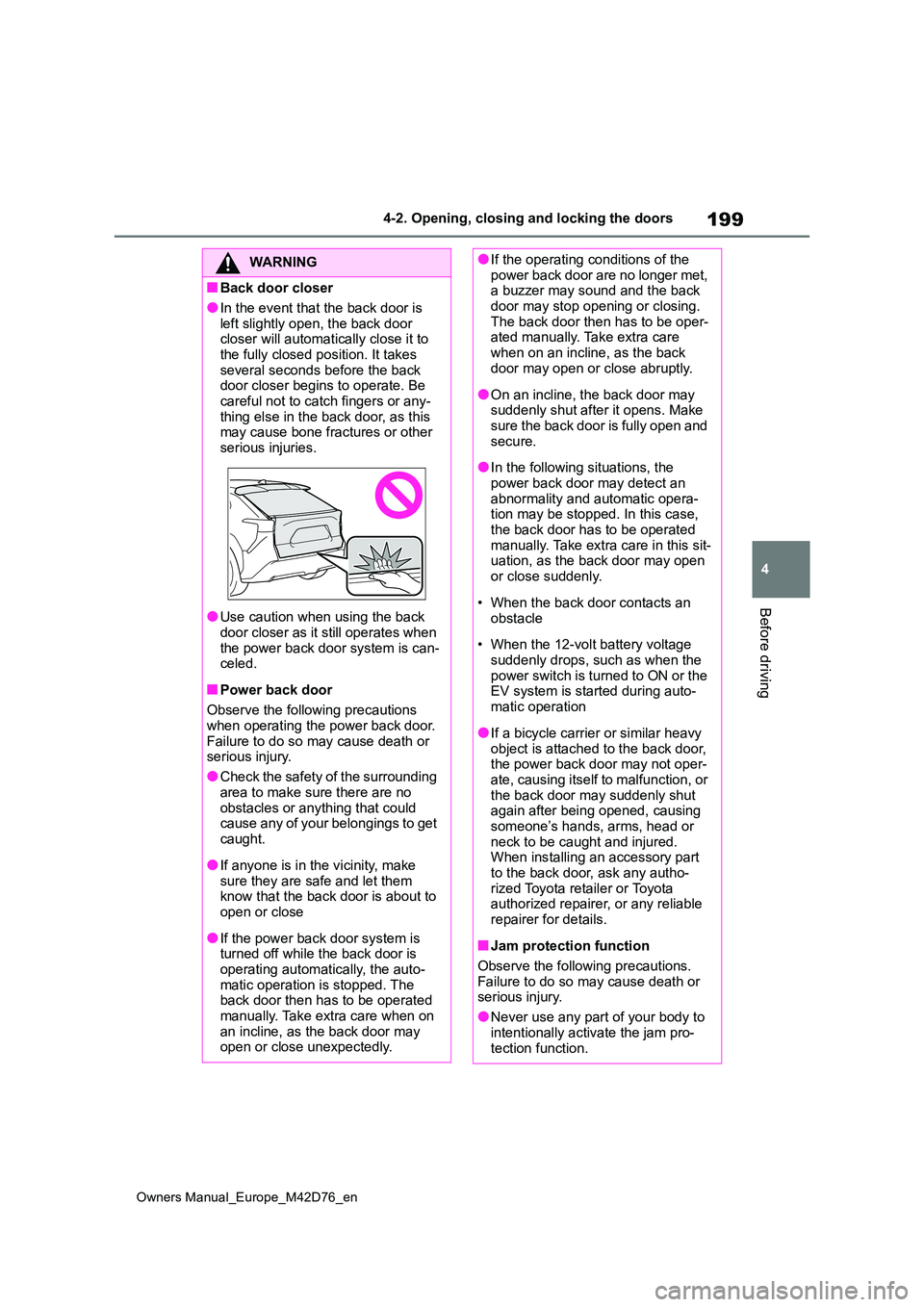
■Back door closer
●In the event that the back door is
left slightly open, the back door closer will automatically close it to the fully closed position. It takes
several seconds before the back door closer begins to operate. Be careful not to catch fingers or any-
thing else in the back door, as this may cause bone fractures or other serious injuries.
●Use caution when using the back door closer as it still operates when
the power back door system is can- celed.
■Power back door
Observe the following precautions when operating the power back door.
Failure to do so may cause death or serious injury.
●Check the safety of the surrounding
area to make sure there are no obstacles or anything that could cause any of your belongings to get
caught.
●If anyone is in the vicinity, make
sure they are safe and let them know that the back door is about to open or close
●If the power back door system is turned off while the back door is
operating automatically, the auto- matic operation is stopped. The back door then has to be operated
manually. Take extra care when on an incline, as the back door may open or close unexpectedly.
●If the operating conditions of the power back door are no longer met, a buzzer may sound and the back
door may stop opening or closing. The back door then has to be oper-ated manually. Take extra care
when on an incline, as the back door may open or close abruptly.
●On an incline, the back door may suddenly shut after it opens. Make sure the back door is fully open and
secure.
●In the following situations, the
power back door may detect an abnormality and automatic opera-tion may be stopped. In this case,
the back door has to be operated manually. Take extra care in this sit-uation, as the back door may open
or close suddenly.
• When the back door contacts an
obstacle
• When the 12-volt battery voltage
suddenly drops, such as when the power switch is turned to ON or the EV system is started during auto-
matic operation
●If a bicycle carrier or similar heavy
object is attached to the back door, the power back door may not oper-ate, causing itself to malfunction, or
the back door may suddenly shut again after being opened, causing someone’s hands, arms, head or
neck to be caught and injured. When installing an accessory part to the back door, ask any autho-
rized Toyota retailer or Toyota authorized repairer, or any reliable repairer for details.
■Jam protection function
Observe the following precautions.
Failure to do so may cause death or serious injury.
●Never use any part of your body to
intentionally activate the jam pro- tection function.