headlights TOYOTA BZ4X 2022 Owners Manual (in English)
[x] Cancel search | Manufacturer: TOYOTA, Model Year: 2022, Model line: BZ4X, Model: TOYOTA BZ4X 2022Pages: 674, PDF Size: 120.02 MB
Page 14 of 674
12
Owners Manual_Europe_M42D76_en
Pictorial index
Pictorial index
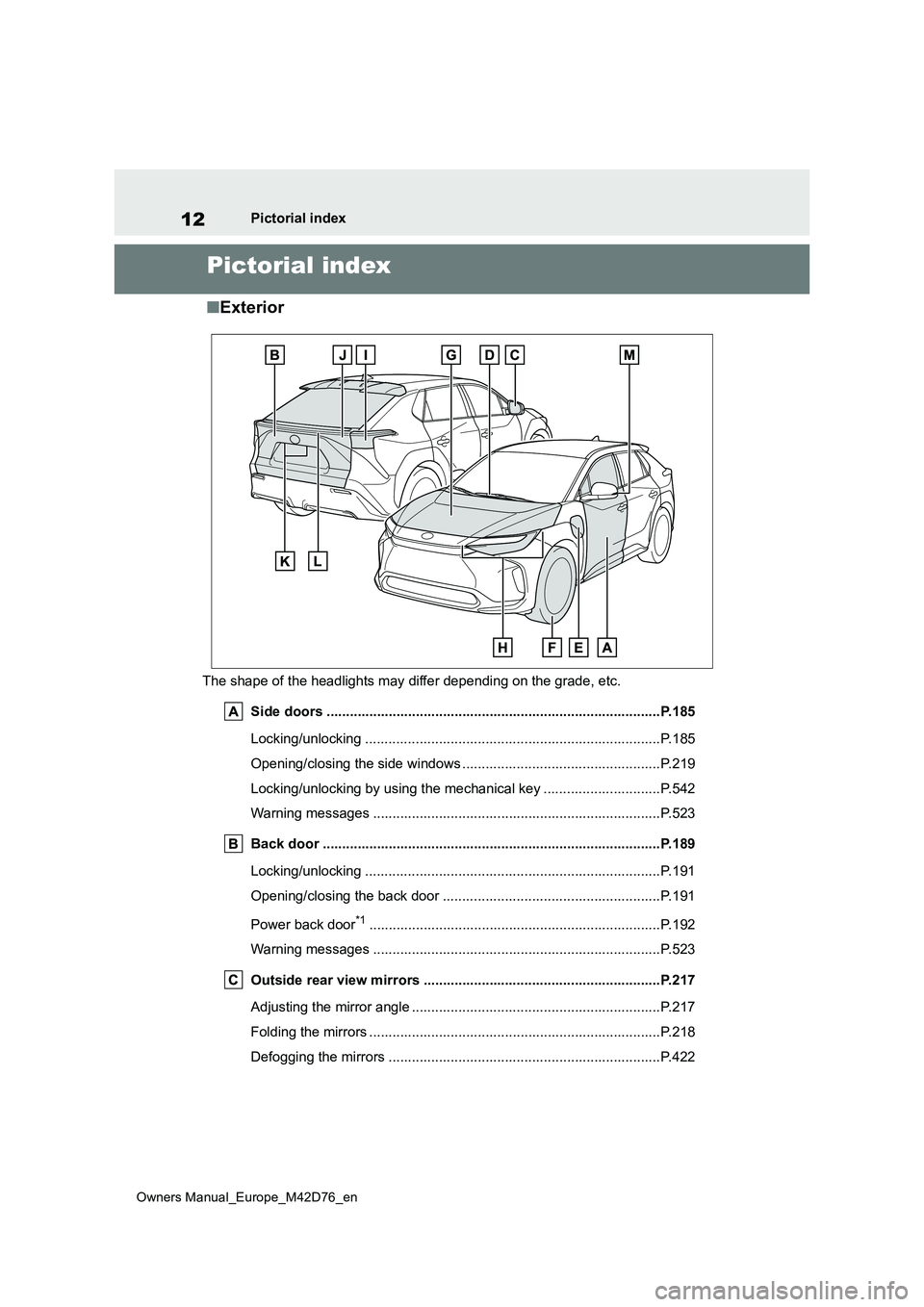
■Exterior
The shape of the headlights may differ depending on the grade, etc.
Side doors ..................................................... .................................P.185
Locking/unlocking .............................................. ..............................P.185
Opening/closing the side windows ............................... ....................P.219
Locking/unlocking by using the mechanical key .................. ............P.542
Warning messages ............................................... ...........................P.523
Back door ...................................................... .................................P.189
Locking/unlocking .............................................. ..............................P.191
Opening/closing the back door .................................. ......................P.191
Power back door*1............................................................... ............P.192
Warning messages ............................................... ...........................P.523
Outside rear view mirrors ...................................... .......................P.217
Adjusting the mirror angle ..................................... ...........................P.217
Folding the mirrors ............................................ ...............................P.218
Defogging the mirrors .......................................... ............................P.422
Page 15 of 674
13
Owners Manual_Europe_M42D76_en
Pictorial index
Windshield wipers .........................................................................P.269
Precautions against winter season .............................. .................... P.411
To prevent freezing (windshield wiper de-icer)*1..............................P.422
Precautions against car wash (rain-sensing windshield wipers)*1...P.457
Charging port lids ............................................. ...............................P.95
Charging methods............................................... ............................. P.114
Tires .......................................................... ......................................P.476
Tire size/inflation pressure ................................... ............................P.559
Winter tires/tire chain ........................................ ............................... P.411
Checking/rotation/tire pressure warning system ................. .............P.476
Coping with flat tires......................................... ................................P.528
Hood ........................................................... .....................................P.467
Opening ........................................................ ...................................P.467
Coping with overheat ........................................... ............................P.549
Warning messages ............................................... ...........................P.523
Headlights/front position lights/daytime running lights ........ ....P.259
Turn signal lights ............................................. ..............................P.253
Tail lights .................................................... ....................................P.259
Turn signal lights ............................................. ..............................P.253
Stop lights
Emergency brake signal ......................................... .........................P.406
Tail lights .................................................... ....................................P.259
Rear fog light*1, 2............................................................... .............P.268
Back-up light
Shifting the shift position to R ............................... ...........................P.247
License plate lights........................................... .............................P.259
Light bulbs of the exterior lights for driving
(Replacing method: P.504)
Page 18 of 674
16
Owners Manual_Europe_M42D76_en
Pictorial index
When the warning messages are displayed ........................ ............P.523
Turn signal lever .............................................. ..............................P.253
Headlight switch ............................................... .............................P.259
Headlights/front position lights/tail lights/license plate ligh ts/
daytime running lights ......................................... .............................P.259
Rear fog light................................................. ...................................P.268
Windshield wiper and washer switch ............................. .............P.269
Usage.......................................................... .....................................P.269
Adding washer fluid............................................ ..............................P.475
Headlight cleaners*1............................................................... .........P.269
Warning messages ............................................... ...........................P.523
Emergency flasher switch....................................... ......................P.506
Hood lock release lever ........................................ .........................P.467
Tilt and telescopic steering lock release lever................ ............P.215
Adjustment ..................................................... ..................................P.215
Air conditioning system ........................................ ........................P.420
Usage.......................................................... .....................................P.420
Rear window defogger ........................................... ..........................P.422
Multimedia system*2
*1: If equipped
*2: Refer to “Multimedia owner’s manual”.
Page 26 of 674
24
Owners Manual_Europe_M42D76_en
Pictorial index
When the warning messages are displayed ........................ ............P.523
Turn signal lever .............................................. ..............................P.253
Headlight switch ............................................... .............................P.259
Headlights/front position lights/tail lights/license plate ligh ts/
daytime running lights ......................................... .............................P.259
Rear fog light................................................. ...................................P.268
Windshield wiper and washer switch ............................. .............P.269
Usage.......................................................... .....................................P.269
Adding washer fluid............................................ ..............................P.475
Headlight cleaners ............................................. ..............................P.269
Warning messages ............................................... ...........................P.523
Emergency flasher switch....................................... ......................P.506
Hood lock release lever ........................................ .........................P.467
Tilt and telescopic steering lock release lever................ ............P.215
Adjustment ..................................................... ..................................P.215
Air conditioning system ........................................ ........................P.420
Usage.......................................................... .....................................P.420
Rear window defogger ........................................... ..........................P.422
Multimedia system*
*: Refer to “Multimedia owner’s manual”.
Page 85 of 674
83
2
Owners Manual_Europe_M42D76_en
2-1. Electric vehicle system
Electric Vehicle system
12-volt battery
Provides electricity to various vehicle systems such as the SRS airbags, headlights,
wipers, etc.
*: AWD models only
■When braking (regenerative
braking)
The battery electric motor (traction
motor) charges the traction battery.
The driving range can be extended
by actively using this regenerative
braking to store electricity in the
traction battery.
The battery electric vehicle is
driven using electricity, which is
received from an external power
source and stored in the traction
battery. Not only public charging
stations, but also household sock-
ets can be used for charging. Pro-
cedures are different from refueling
a conventional vehicle. Therefore,
make sure to read the following
thoroughly.
Charging equipment (P.95)
AC charging cable (P. 9 8 )
Power sources that can be used
( P.112)
Things to know before charging
( P.118)
How to charge your vehicle
( P.121, 129)
When charging cannot be per-
formed normally ( P.152)
■Regenerative braking
In the following situations, kinetic energy
is converted to electric energy and deceleration force can be obtained in conjunction with the recharging of the
traction battery.
●The accelerator pedal is released
while driving with the shift position in D.
●The brake pedal is depressed while driving with the shift position in D.
■Charging the 12-volt battery
The 12-volt battery is charged from the
traction battery when the EV system is operated or while the traction battery is being charged.
If the vehicle has not been used for a long time, the 12-volt battery may become low due to self-discharge. If this
occurs, follow the correct procedures. ( P.544)
■When not using the vehicle for an
extended period of time
●When the vehicle will not be used for
an extended period of time, charge the traction battery once a month. This protects the traction battery from
extreme voltage decline due to self discharging.
●When the vehicle will not be used for an extended period of time, the 12-volt battery will be charged from the
traction battery to reduce the risk of the 12-volt battery discharged. In this case, the cooling fan may operate,
however it is not a malfunction.
●To prevent the 12-volt battery from
being discharged, do not leave the charging port lid open or the charging cable connected to the vehicle.
Charging
Page 121 of 674
119
2
Owners Manual_Europe_M42D76_en
2-2. Charging
Electric Vehicle system
Before charging, always check the
following items.
The parking brake is applied.
( P.254)
The power switch is turned to
OFF. ( P.243)
Lights such as the headlights,
emergency flashers and interior
lights, etc., are turned off.
If these light switches are turned on,
then these features will consume elec-
tricity, and charging time will increase.
Before charging, make sure that
each part of the AC charging cable
is in good condition. ( P.106)
■During charging
●The charging starting time may differ
depending on the state of the vehicle, but this does not indicate a malfunc-
tion.
●During charging, sounds may be
heard from near the traction battery in accordance with the operation of the air conditioning system or “Battery
Cooler” ( P.115).
●During and after charging, the motor
compartment and its surrounding area in which the onboard traction battery charger is installed may get warm.
●The surface of the CCID (Charging Circuit Interrupting Device) may
become hot, but this does not indicate a malfunction.
●Depending on radio wave conditions,
interference may be heard on the
radio.
■When charging using a public charging facility
●When charging using a public charging facility, check the setting of the charging schedule function.
• When the charging schedule is regis- tered, temporarily turn off the function or turn “Charge Now” on. ( P.134)
• When the charging schedule is set to on, charging will not start even if the AC charging cable is connected. Also,
charging fee may occur due to con- nection of the AC charging cable.
■Capacity reduction of the traction battery
The capacity of the traction battery will decline gradually when the traction bat-tery is in use. The rate at which it
declines will differ in accordance with environmental conditions and the way in which the vehicle is used. Observing the
following can help suppress the decline in the traction battery capacity.
●Avoid parking the vehicle in high tem-perature areas, under direct sunlight when the traction battery is fully
charged.
●Avoid accelerating and decelerating
frequently and suddenly.
●Avoid frequent driving at high speed.
●Use the charging schedule function as much as possible in order to fully
charged the traction battery before starting off. ( P.134)
●Avoid frequent DC charging
Also, if the capacity of the traction bat-
tery capacity reduces, the distance that
can be driven decreases. However,
vehicle performance does not signifi-
cantly become worse.
■When the remaining charge of the traction battery is low after charging
In the following situations, the remaining charge of the traction battery after
Confirm the following before
charging
Inspecting the AC charging
cable
Page 165 of 674
163
2
Owners Manual_Europe_M42D76_en
2-2. Charging
Electric Vehicle system
■If “Charging Stopped High Energy Use See Owner’s Manual” is
shown
■If “Charging System Malfunction See Owner’s Manual” is shown
The AC charger is not compati-
ble with the vehicle
Check if it is possible to charge with the AC
charging cable equipped with the vehicle. If
charging cannot be carried out even when using
the genuine AC charging cable, contact any autho-
rized Toyota retailer or Toyota authorized repairer,
or any reliable repairer.
The DC charger is malfunction-
ing.
If the message above is displayed when DC
charging has not stopped operations, the DC char-
ger may be damaged, so do not use that DC char-
ger. Check if it is possible to charge with another
DC charger.
The DC charger is not compat-
ible with the vehicle.
Likely causeCorrection procedure
Likely causeCorrection procedure
Power is being consumed by electrical
components of vehicle
Check the following items, and then carry
out charging again.
• If the headlights and audio are turned
on, turn them off.
• Turn the power switch off.
If charging cannot be carried out, even
after performing the above, the 12-volt
battery may not be sufficiently charged.
Operate the EV system and wait for
approximately 15 minutes or more to
charge the 12-volt battery.
Likely causeCorrection procedure
Malfunction occurred in charging system
Have the vehicle inspected by any autho-
rized Toyota retailer or Toyota authorized
repairer, or any reliable repairer.
Page 166 of 674
164
Owners Manual_Europe_M42D76_en
2-2. Charging
■If “The Traction Battery Temp is low System put priority on
charging to preserve battery condition” is shown
■If “Check Charging System Close Charging Port Lid See Owner’s
Manual” is shown
■If “Charging Stopped Time Limit Reached” is shown
Likely causeCorrection procedure
The traction battery warming control is
operated ( P.114)
When the traction battery warming con-
trol operates, the charging schedule is
not used and charging is performed.
This is a control to protect the traction
battery, and not a malfunction.
Likely causeCorrection procedure
System check is not completed properly
after DC charging.
The EV system can not be started until
the system check is completed properly.
Perform a system check following the
procedures on P.131.
Likely causeCorrection procedure
The DC charging is not completed within
the restricted time with DC charger.
• Depending on the type of DC charger,
the timer may be set to stop charging
after a certain time. Check with the
charging station manager.
Depending on the condition of the vehi-
cle, the charging time may become lon-
ger than normal, and the DC charging
may not be completed within the
restricted time.
• When the A/C, headlights, audio sys-
tem, etc., are turned on, the electricity
consumption of the vehicle will be
increased. Perform the DC charging
after turning off all of the above.
• The temperature of the traction battery
may be low. Perform the DC charging
after warming up the traction battery.
Page 181 of 674
179
3
Owners Manual_Europe_M42D76_en
3-1. Instrument cluster
Vehicle status information and indicators
• Display contents (AWD models only)
Select to display/not display the torque
distribution display.
• Drive information type
Select to change the drive information
type display between after start/after
reset.
• Drive information items
Select to set the first and second items
of the drive information display to any of
the following: average vehicle
speed/distance/elapsed time.
Closing Display
Select to set the items displayed when
the power switch is turned off.
Pop-up display
Select to enable/disable pop-up dis-
plays for each relevant system.
Calendar
The year, month, and day can be set.
Default setting
Select to reset the meter display set-
tings to the default setting.
■Vehicle functions and settings
that can be changed
P. 5 6 1
■Suspension of the settings display
●Some settings cannot be changed
while driving. When changing set- tings, park the vehicle in a safe place.
●If a warning message is displayed, operation of the settings display will be suspended.
Displays suggestions to the driver
in the following situations. To select
a response to a displayed sugges-
tion, use the meter control
switches.
■Suggestion to turn on the
headlights
If the headlight switch is in other
than or , and the vehicle
speed is 5 km/h (3 mph) or higher
for a certain amount of time when
the surroundings are dark, a sug-
gestion message will be displayed.
■Suggestion to turn off the
headlights
If the headlights are left on for a
certain amount of time after the
power switch has been turned off, a
suggestion message will be dis-
played.
When the headlight switch is in the
AUTO position: The message ask-
ing if you wish to turn the headlights
off is displayed. To turn the head-
lights off, select “Yes”.
If the driver’s door is opened after the
power switch is turned off, this sugges-
tion message will not be displayed.
NOTICE
■During setting up the display
To prevent 12-volt battery discharge,
ensure that the EV system is operat- ing while setting up the display fea-tures.
Suggestion function
Page 218 of 674
216
Owners Manual_Europe_M42D76_en
4-4. Adjusting the steering wheel and mirrors
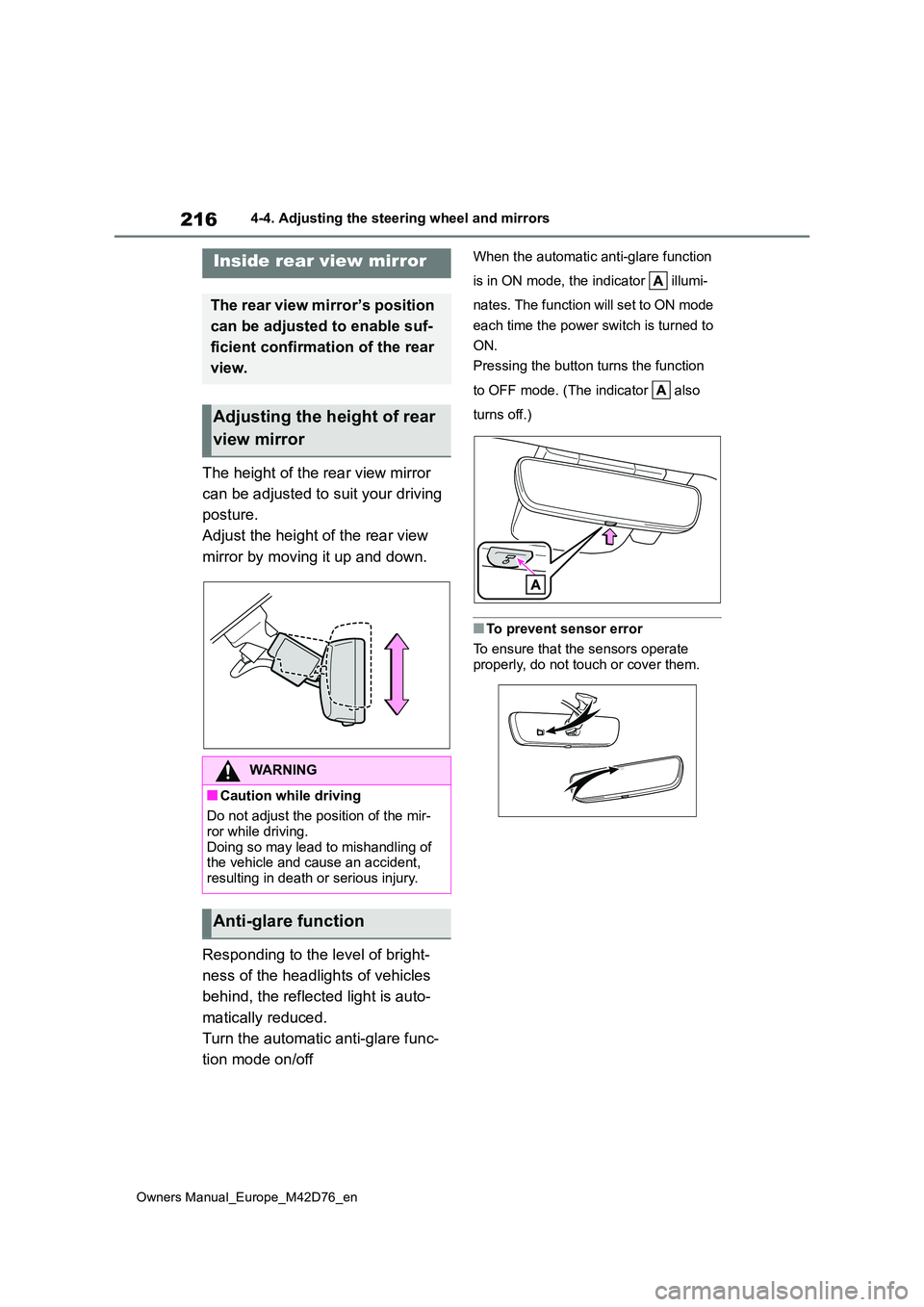
The height of the rear view mirror
can be adjusted to suit your driving
posture.
Adjust the height of the rear view
mirror by moving it up and down.
Responding to the level of bright-
ness of the headlights of vehicles
behind, the reflected light is auto-
matically reduced.
Turn the automatic anti-glare func-
tion mode on/off
When the automatic anti-glare function
is in ON mode, the indicator illumi-
nates. The function will set to ON mode
each time the power switch is turned to
ON.
Pressing the button turns the function
to OFF mode. (The indicator also
turns off.)
■To prevent sensor error
To ensure that the sensors operate
properly, do not touch or cover them.
Inside rear view mirror
The rear view mirror’s position
can be adjusted to enable suf-
ficient confirmation of the rear
view.
Adjusting the height of rear
view mirror
WARNING
■Caution while driving
Do not adjust the position of the mir-
ror while driving. Doing so may lead to mishandling of the vehicle and cause an accident,
resulting in death or serious injury.
Anti-glare function