second wheel TOYOTA BZ4X 2022 Owners Manual (in English)
[x] Cancel search | Manufacturer: TOYOTA, Model Year: 2022, Model line: BZ4X, Model: TOYOTA BZ4X 2022Pages: 674, PDF Size: 120.02 MB
Page 226 of 674
224
Owners Manual_Europe_M42D76_en
4-6. Favorite settings
shift position is in P)
For details, refer to the “Multimedia owner’s manual”.
■Seat positions that can be memo-rized ( P.208)
The adjusted positions other than the position adjusted by lumbar support switch can be recorded.
■Operating the driving position
memory after turning the power switch to OFF
Recorded seat positions can be acti-
vated up to 180 seconds after the driver’s door is opened and another 60 seconds after it is closed again.
■In order to correctly use the driving
position memory function
If a seat position is already in the fur- thest possible position and the seat is
operated in the same direction, the recorded position may be slightly differ-ent when it is recalled.
■When recalling the driving position
Take care so that a head restraint does not contact the ceiling or a sun visor.
■If the 12-volt battery is discon-nected
The memorized positions are erased.
■When the recorded seat position cannot be recalled
The seat position may not be recalled in
some situations when the seat position is recorded in a certain range. For details, contact any authorized Toyota
retailer or Toyota authorized repairer, or any reliable repairer.
■Jam protection function
While the driving position is recalled or
the power easy access system is oper- ating, if an object is stuck behind the front seat, the front seat will stop and
then slightly move forward. When the jam protection function operates, the seat stops at a position other than the
set seat position. Check the seat posi- tion.
■Registering procedure
Record your driving position to but-
ton “1” or “2” before performing the
following:
Carry only the key you want to reg-
ister, and then close the driver’s
door.
If 2 or more keys are in the vehicle,
the driving position cannot be
recorded properly.
1 Check that the shift position is in
P.
2 Turn the power switch to ON.
3 Recall the driving position that
you want to record.
4 While pressing the recalled but-
ton, press and hold the door
lock switch (either lock or
unlock) until the buzzer sounds.
If the driving position could not be regis-
tered, the buzzer sounds continuously
WARNING
■Seat adjustment caution
Take care during seat adjustment so
that the seat does not strike the rear passenger or squeeze your body against the steering wheel.
Registering/recall/canceling
an electronic key to driving
position (memory recall
function)
Page 246 of 674
244
Owners Manual_Europe_M42D76_en
5-2. Driving procedures
mechanical key, the EV system can-
not be started using the smart entry & start system. However, if the elec-tronic key is carried inside the vehicle
and the doors are locked ( P.188), the EV system can be started.
■When the ambient temperature is low, such as during winter driving
conditions
●When starting the EV system, the
flashing time of the “READY” indicator may be long. Leave the vehicle as it is until the “READY” indicator is steady
on, as steady means the vehicle is able to move.
●When the traction battery is extremely cold (below approximately -30°C [-22°F]) under the influence of the out-
side temperature, it may not be possi- ble to start the EV system. In this case, try to start the EV system again
after the temperature of the traction battery increases due to the outside temperature increase, etc.
■Sounds and vibrations specific to
an battery electric vehicle
P. 8 4
■If the 12-volt battery is discharged
The EV system cannot be started using
the smart entry & start system. Refer to P.544 to restart the EV system.
■Electronic key battery depletion
P. 1 8 2
■Conditions affecting operation
P. 2 0 4
■Note for the entry function
P. 2 0 5
■Steering lock function (if equipped)
●After turning the power switch off and opening and closing the doors, the steering wheel will be locked due to
the steering lock function. Operating the power switch again automatically cancels the steering lock.
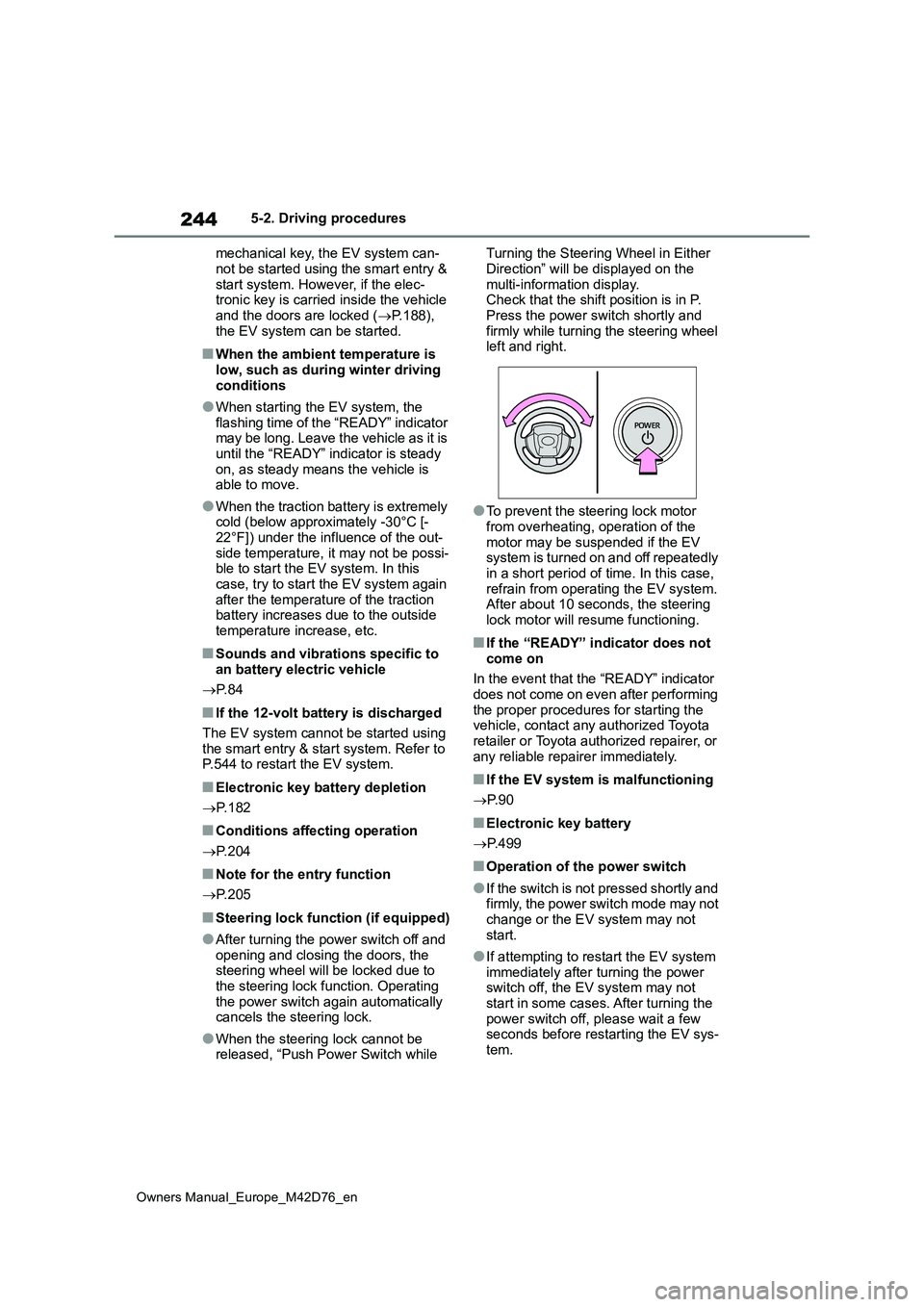
●When the steering lock cannot be released, “Push Power Switch while
Turning the Steering Wheel in Either
Direction” will be displayed on the multi-information display.Check that the shift position is in P.
Press the power switch shortly and firmly while turning the steering wheel left and right.
●To prevent the steering lock motor from overheating, operation of the
motor may be suspended if the EV system is turned on and off repeatedly in a short period of time. In this case,
refrain from operating the EV system. After about 10 seconds, the steering lock motor will resume functioning.
■If the “READY” indicator does not
come on
In the event that the “READY” indicator does not come on even after performing
the proper procedures for starting the vehicle, contact any authorized Toyota retailer or Toyota authorized repairer, or
any reliable repairer immediately.
■If the EV system is malfunctioning
P. 9 0
■Electronic key battery
P. 4 9 9
■Operation of the power switch
●If the switch is not pressed shortly and firmly, the power switch mode may not
change or the EV system may not start.
●If attempting to restart the EV system immediately after turning the power switch off, the EV system may not
start in some cases. After turning the power switch off, please wait a few seconds before restarting the EV sys-
tem.
Page 294 of 674
292
Owners Manual_Europe_M42D76_en
5-4. Using the driving support systems
cle
■Situations in which the system may
not operate properly
●In certain situations, such as the fol-
lowing, a detectable object may not be detected by the front sensors, and the system may not operate properly:
• When a detectable object is approaching your vehicle• When your vehicle or a detectable
object is wandering • When a detectable object makes an abrupt maneuver (such as sudden
swerving, acceleration or decelera- tion)• When suddenly approaching a detect-
able object • When the detectable object is near a wall, fence, guardrail, manhole cover,
steel plate on the road surface, or another vehicle• When there is a structure above a
detectable object • When part of a detectable object is hidden by another object (large lug-
gage, umbrella, guardrail, etc.) • When multiple detectable objects are overlapping
• When a bright light, such as the sun, is reflecting off of a detectable object• When a detectable object is white and
looks extremely bright • When the color or brightness of a detectable object causes it to blend in
with its surroundings • When a detectable object cuts in front of or suddenly emerges in front of
your vehicle • When approaching a vehicle which is diagonal
• If a vehicle ahead is a child sized bicy- cle, is carrying a large load, is carrying an extra passenger, or has an unusual
shape (bicycles equipped with a child seat, tandem bicycles, etc.)• If a pedestrian or bicycle is shorter
than approximately 1 m (3.2 ft.) or taller than approximately 2 m (6.5 ft.).• When the silhouette of a pedestrian or
bicycle is unclear (such as when they are wearing a raincoat, long skirt, etc.)• When a pedestrian or bicycle is bend-
ing forward or squatting
• When a pedestrian or bicycle is mov- ing at high speed• When a pedestrian is pushing a
stroller, wheelchair, bicycle or other vehicle• When a detectable object blends in
with the surrounding area, such as when it is dim (at dawn or dusk) or dark (at night or in a tunnel)
• When the vehicle has not been driven for a certain amount of time after the EV system was started
• While turning left/right or a few sec- onds after turning left/right• While driving around a curve and a
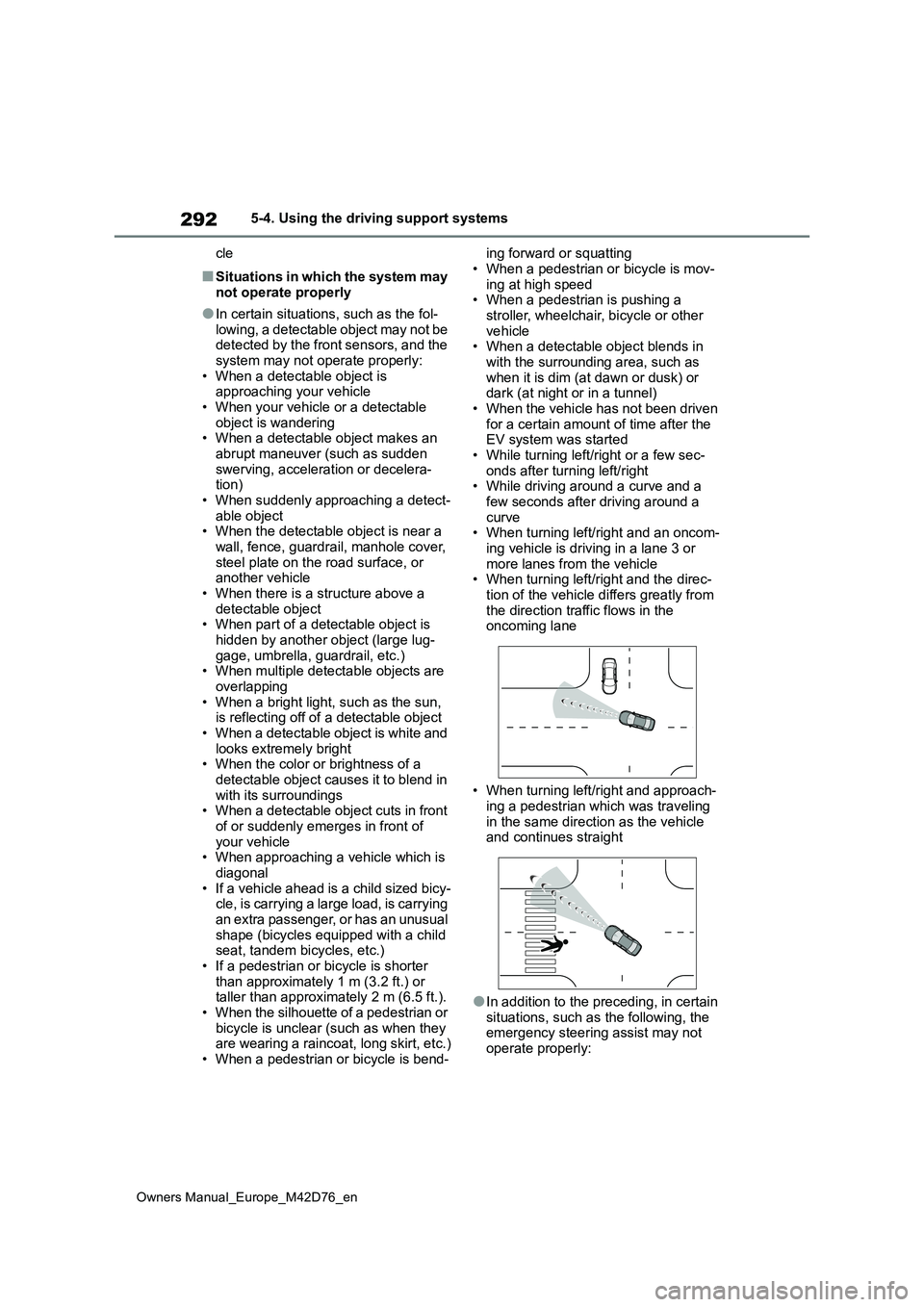
few seconds after driving around a curve• When turning left/right and an oncom-
ing vehicle is driving in a lane 3 or more lanes from the vehicle• When turning left/right and the direc-
tion of the vehicle differs greatly from the direction traffic flows in the oncoming lane
• When turning left/right and approach- ing a pedestrian which was traveling
in the same direction as the vehicle and continues straight
●In addition to the preceding, in certain situations, such as the following, the emergency steering assist may not
operate properly:
Page 408 of 674
406
Owners Manual_Europe_M42D76_en
5-4. Using the driving support systems
■ECB (Electronically Con-
trolled Brake System)
The electronically controlled sys-
tem generates braking force corre-
sponding to the brake operation
■ABS (Anti-lock Brake System)
Helps to prevent wheel lock when
the brakes are applied suddenly, or
if the brakes are applied while driv-
ing on a slippery road surface
■Brake assist
Generates an increased level of
braking force after the brake pedal
is depressed when the system
detects a panic stop situation
■VSC (Vehicle Stability Control)
Helps the driver to control skidding
when swerving suddenly or turning
on slippery road surfaces.
■Trailer Sway Control
Helps the driver to control trailer
sway by selectively applying brake
pressure for individual wheels and
reducing driving torque when trailer
sway is detected.
■TRC (Traction Control)
Helps to maintain drive power and
prevent the drive wheels from spin-
ning when starting the vehicle or
accelerating on slippery roads
■Active Cornering Assist (ACA)
Helps to prevent the vehicle from
drifting to the outer side by perform-
ing inner wheel brake control when
attempting to accelerate while turn-
ing
■Hill-start assist control
Helps to reduce the backward
movement of the vehicle when
starting on an uphill
■EPS (Electric Power Steering)
Employs an electric motor to
reduce the amount of effort needed
to turn the steering wheel
■Emergency brake signal
When the brakes are applied sud-
denly, the stop lights automatically
flash to alert the vehicle behind.
■The Secondary Collision
Brake
When the SRS airbag sensor
detects a collision and the system
operates, the brakes and brake
lights are automatically controlled
to reduce the vehicle speed and
help reduce the possibility of further
damage due to a secondary colli-
Driving assist systems
To keep driving safety and per-
formance, the f ollowing sys-
tems operate automatically in
response to various driving
situations. Be aware, however,
that these systems are supple-
mentary and should not be
relied upon too heavily when
operating the vehicle.
Summary of the driving
assist systems
Page 409 of 674
407
5
Owners Manual_Europe_M42D76_en
5-4. Using the driving support systems
Driving
sion.
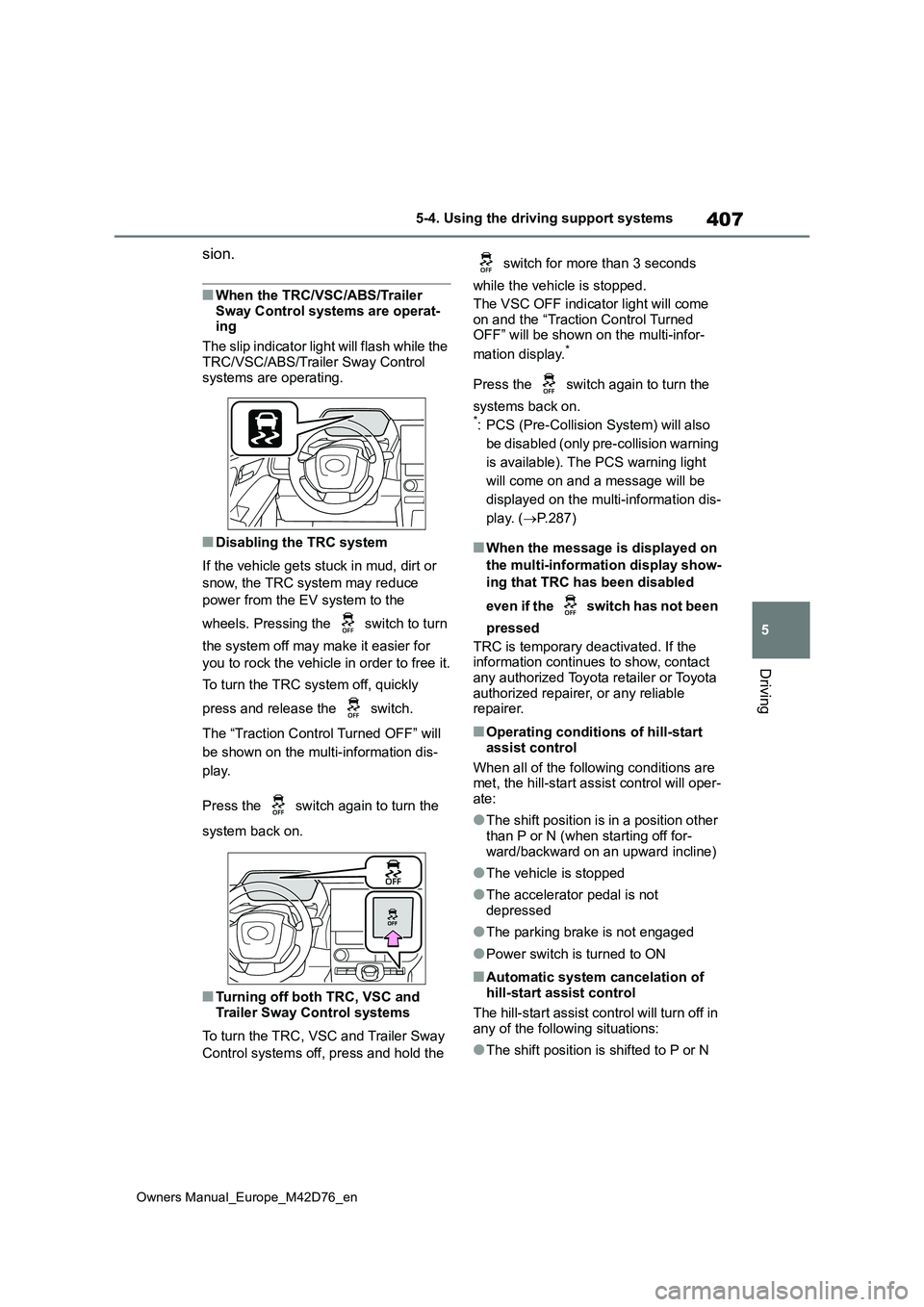
■When the TRC/VSC/ABS/Trailer
Sway Control systems are operat- ing
The slip indicator light will flash while the
TRC/VSC/ABS/Trailer Sway Control systems are operating.
■Disabling the TRC system
If the vehicle gets stuck in mud, dirt or
snow, the TRC system may reduce
power from the EV system to the
wheels. Pressing the switch to turn
the system off may make it easier for
you to rock the vehicle in order to free it.
To turn the TRC system off, quickly
press and release the switch.
The “Traction Control Turned OFF” will
be shown on the multi-information dis-
play.
Press the switch again to turn the
system back on.
■Turning off both TRC, VSC and Trailer Sway Control systems
To turn the TRC, VSC and Trailer Sway
Control systems off, press and hold the
switch for more than 3 seconds
while the vehicle is stopped.
The VSC OFF indicator light will come on and the “Traction Control Turned OFF” will be shown on the multi-infor-
mation display.*
Press the switch again to turn the
systems back on.*: PCS (Pre-Collision System) will also
be disabled (only pre-collision warning
is available). The PCS warning light
will come on and a message will be
displayed on the multi-information dis-
play. ( P.287)
■When the message is displayed on
the multi-information display show-
ing that TRC has been disabled
even if the switch has not been
pressed
TRC is temporary deactivated. If the information continues to show, contact
any authorized Toyota retailer or Toyota authorized repairer, or any reliable repairer.
■Operating conditions of hill-start
assist control
When all of the following conditions are met, the hill-start assist control will oper-
ate:
●The shift position is in a position other
than P or N (when starting off for- ward/backward on an upward incline)
●The vehicle is stopped
●The accelerator pedal is not
depressed
●The parking brake is not engaged
●Power switch is turned to ON
■Automatic system cancelation of hill-start assist control
The hill-start assist control will turn off in any of the following situations:
●The shift position is shifted to P or N
Page 410 of 674
408
Owners Manual_Europe_M42D76_en
5-4. Using the driving support systems
●The accelerator pedal is depressed
●The parking brake is engaged
●2 seconds at maximum elapsed after the brake pedal is released
●Power switch is turned to OFF
■Sounds and vibrations caused by the ABS, brake assist, VSC, Trailer Sway Control, TRC and hill-start
assist control systems
●A sound may be heard from the motor
compartment when the brake pedal is depressed repeatedly, when the EV system is started or just after the vehi-
cle begins to move. This sound does not indicate that a malfunction has occurred in any of these systems.
●Any of the following conditions may occur when the above systems are
operating. None of these indicates that a malfunction has occurred.• Vibrations may be felt through the
vehicle body and steering. • A motor sound may be heard also after the vehicle comes to a stop.
■ECB operating sound
ECB operating sound may be heard in the following cases, but it does not indi-cate that a malfunction has occurred.
●Operating sound heard from the motor compartment when the brake pedal is
operated.
●Operating sound heard from the motor
compartment when one or two min- utes passed after the stop of the EV system.
■Active Cornering Assist operation
sounds and vibrations
When Active Cornering Assist is oper- ated, operation sounds and vibrations
may be generated from the brake sys- tem, but this is not a malfunction.
■EPS operation sound
When the steering wheel is operated, a
motor sound (whirring sound) may be heard. This does not indicate a malfunc-tion.
■Automatic reactivation of TRC,
Trailer Sway Control and VSC sys- tems
After turning the TRC, Trailer Sway Con-
trol and VSC systems off, the systems will be automatically re-enabled in the following situations:
●When the power switch is turned off
●If only the TRC system is turned off, the TRC will turn on when vehicle speed increases. If both the TRC and
VSC systems are turned off, auto- matic re-enabling will not occur when vehicle speed increases.
■Operating conditions of Active Cor-
nering Assist
The system operates when the following occurs.
●TRC/VSC can operate
●The driver is attempting to accelerate while turning
●The system detects that the vehicle is drifting to the outer side
●The brake pedal is released
■Reduced effectiveness of the EPS system
The effectiveness of the EPS system is
reduced to prevent the system from overheating when there is frequent steering input over an extended period
of time. The steering wheel may feel heavy as a result. Should this occur, refrain from excessive steering input or
stop the vehicle and turn the EV system off. The EPS system should return to normal within 10 minutes.
■Operating conditions of emergency
brake signal
When the following conditions are met, the emergency brake signal will operate:
●The emergency flashers are off.
●Actual vehicle speed is over 55 km/h (35 mph).
●The system judges from the vehicle deceleration that it is a sudden brak-ing operation.
Page 412 of 674
410
Owners Manual_Europe_M42D76_en
5-4. Using the driving support systems
WARNING
●Unlike the parking brake, hill-start assist control is not intended to hold
the vehicle stationary for an extended period of time. Do not attempt to use hill-start assist con-
trol to hold the vehicle on an incline, as doing so may lead to an acci-dent.
■When the TRC/ABS/VSC/Trailer Sway Control is activated
The slip indicator light flashes. Always drive carefully. Reckless driving may cause an accident. Exercise particular
care when the indicator light flashes.
■When the TRC/VSC/Trailer Sway
Control systems are turned off
Be especially careful and drive at a speed appropriate to the road condi-
tions. As these are the systems to help ensure vehicle stability and driv-ing force, do not turn the
TRC/VSC/Trailer Sway Control sys- tems off unless necessary.Trailer Sway Control is part of the
VSC system and will not operate if VSC is turned off or experiences a malfunction.
■Replacing tires
Make sure that all tires are of the
specified size, brand, tread pattern and total load capacity. In addition, make sure that the tires are inflated to
the recommended tire inflation pres- sure level.The ABS, TRC, VSC and Trailer
Sway Control systems will not func- tion correctly if different tires are installed on the vehicle.
Contact any authorized Toyota retailer or Toyota authorized repairer, or any reliable repairer for further information
when replacing tires or wheels.
■Handling of tires and the suspen- sion
Using tires with any kind of problem
or modifying the suspension will affect the driving assist systems, and may cause a system to malfunction.
■Trailer Sway Control precaution
The Trailer Sway Control system is
not able to reduce trailer sway in all situations. Depending on many fac-tors such as the conditions of the
vehicle, trailer, road surface and driv- ing environment, the Trailer Sway Control system may not be effective.
Refer to your trailer owner’s manual for information on how to tow your trailer properly.
■If trailer sway occurs
Observe the following precautions.
Failing to do so may cause death or serious injury.
●Firmly grip the steering wheel. Steer straight ahead. Do not try to control trailer swaying by turning
the steering wheel.
●Begin releasing the accelerator
pedal immediately but very gradu- ally to reduce speed. Do not increase speed. Do not apply vehi-
cle brakes. If you make no extreme correction with the steering or brakes, your
vehicle and trailer should stabilize. ( P.237)
■Secondary Collision Brake
Do not rely solely upon the Secondary Collision Brake. This system is
designed to help reduce the possibil- ity of further damage due to a second-ary collision, however, that effect
changes according to various condi- tions. Overly relying on the system may result in death or serious injury.
Page 488 of 674
486
Owners Manual_Europe_M42D76_en
7-3. Do-it-yourself maintenance
●ID codes can be registered by your-
self, but depending on the driving con- ditions and driving environment, registration may take some time to
complete.
●When using a wheel set which all of
the ID codes have already been regis- tered, the wheel set can be changed in a short amount of time.
■If ID codes are not registered prop-
erly
●In the following situations, ID code
registration may take longer than usual to be completed or may not be possible.
• When the vehicle has not been parked for approximately 15 minutes or more before being driven
• Vehicle is not driven at approximately 40 km/h (25 mph) or more• Vehicle is driven on unpaved roads
• Vehicle is driven near other vehicles and system cannot recognize tire pressure warning valves and transmit-
ters of your vehicle over those of other vehicles• Wheel with tire pressure warning
valve and transmitter installed is inside or near the vehicle
●If the vehicle is reversed during regis-tration, all data collected until then will be cleared. Perform driving again.
●If registration does not complete after driving for 1 hour or more, perform the
ID code registration procedure again from the beginning.
●If the tire pressure warning light does not blink 3 times when starting ID code registration procedure, the pro-
cedure may not have started. Perform the procedure again from the begin-ning.
●If ID codes cannot be registered even when performing the above proce-
dure, contact any authorized Toyota retailer or Toyota authorized repairer, or any reliable repairer.
To cancel ID code registration after
it has been started, select “Register
New Valve/ID” again on the multi-
information display.
If ID code registration has been
canceled, the tire pressure warning
light will turn off.
If the warning light does not turn off,
ID code registration may not have
been cancelled correctly. To cancel
registration, select “Register New
Valve/ID” again on the multi-infor-
mation display.
Your vehicle is equipped with a tire
pressure warning system with a
function to register two sets of ID
codes. This allows for registration
of a second wheel set, for example
a winter set.
The wheel set can be changed
only if a second wheel set has
been registered to the system. If
a second wheel set has not been
registered, message will be dis-
played and it will not be possible
to change to the selected wheel
set.
ID codes can be registered by
yourself.
Only a change between both
registered wheel set is possible,
mixing between these wheel sets
Canceling ID code registra-
tion
Selecting wheel set
Page 539 of 674
537
8
Owners Manual_Europe_M42D76_en
8-2. Steps to take in an emergency
When trouble arises
may get dirty.
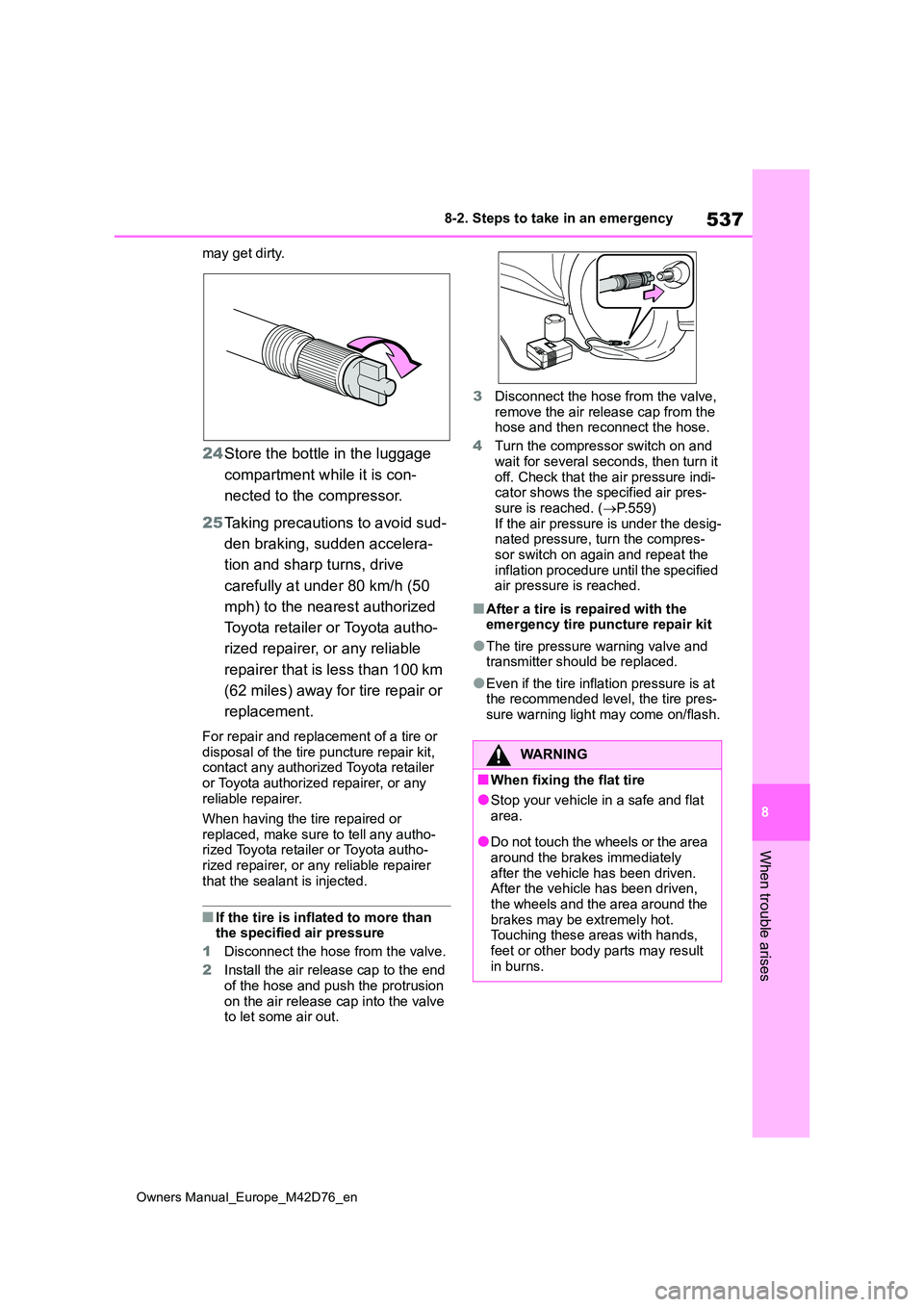
24Store the bottle in the luggage
compartment while it is con-
nected to the compressor.
25 Taking precautions to avoid sud-
den braking, sudden accelera-
tion and sharp turns, drive
carefully at under 80 km/h (50
mph) to the nearest authorized
Toyota retailer or Toyota autho-
rized repairer, or any reliable
repairer that is less than 100 km
(62 miles) away for tire repair or
replacement.
For repair and replacement of a tire or disposal of the tire puncture repair kit, contact any authorized Toyota retailer
or Toyota authorized repairer, or any reliable repairer.
When having the tire repaired or
replaced, make sure to tell any autho- rized Toyota retailer or Toyota autho-rized repairer, or any reliable repairer
that the sealant is injected.
■If the tire is inflated to more than the specified air pressure
1 Disconnect the hose from the valve.
2 Install the air release cap to the end of the hose and push the protrusion
on the air release cap into the valve to let some air out.
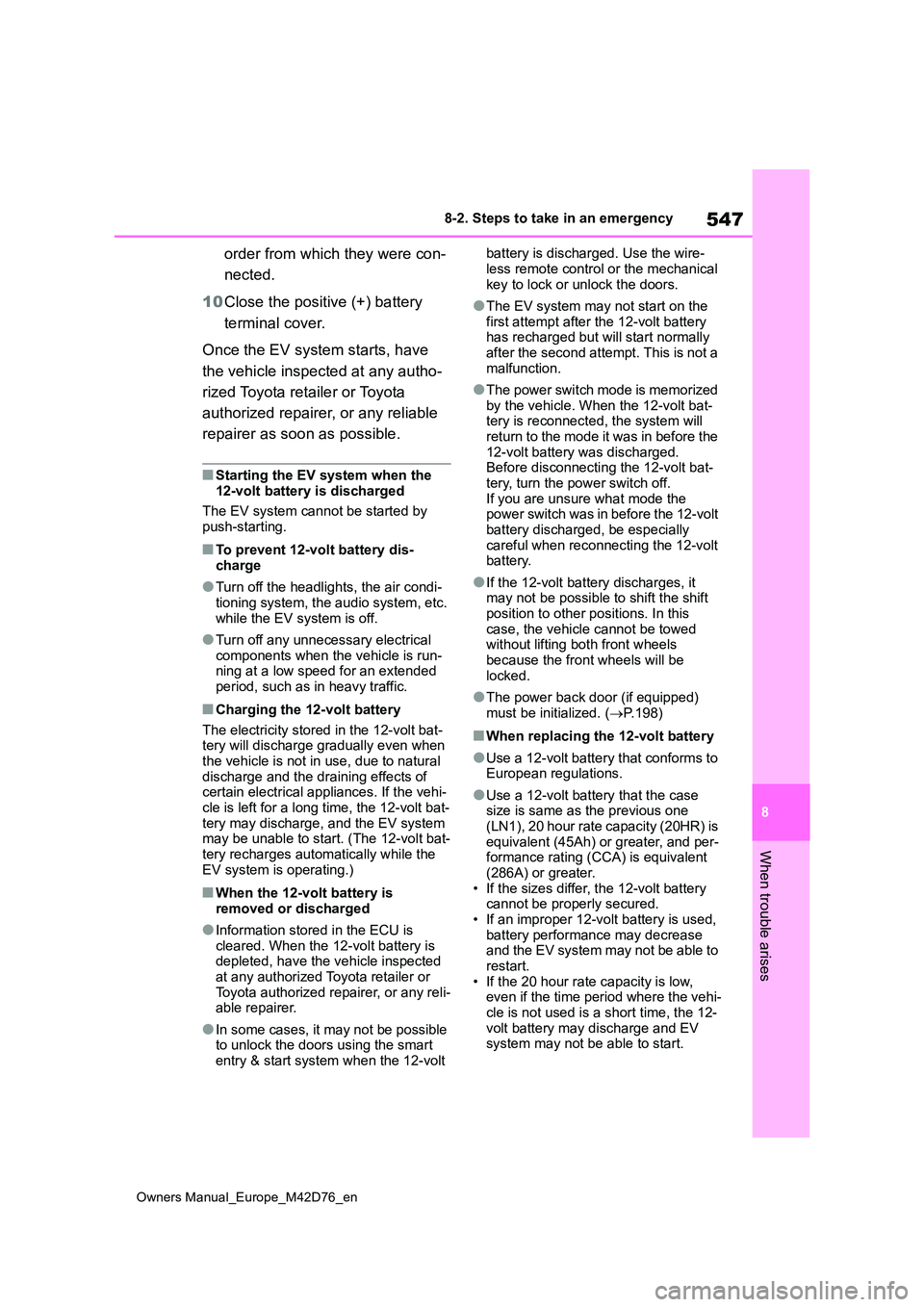
3 Disconnect the hose from the valve,
remove the air release cap from the hose and then reconnect the hose.
4 Turn the compressor switch on and wait for several seconds, then turn it
off. Check that the air pressure indi- cator shows the specified air pres-sure is reached. ( P.559)
If the air pressure is under the desig- nated pressure, turn the compres-sor switch on again and repeat the
inflation procedure until the specified air pressure is reached.
■After a tire is repaired with the emergency tire puncture repair kit
●The tire pressure warning valve and transmitter should be replaced.
●Even if the tire inflation pressure is at the recommended level, the tire pres-
sure warning light may come on/flash.
WARNING
■When fixing the flat tire
●Stop your vehicle in a safe and flat
area.
●Do not touch the wheels or the area
around the brakes immediately after the vehicle has been driven. After the vehicle has been driven,
the wheels and the area around the brakes may be extremely hot. Touching these areas with hands,
feet or other body parts may result in burns.
Page 549 of 674
547
8
Owners Manual_Europe_M42D76_en
8-2. Steps to take in an emergency
When trouble arises
order from which they were con-
nected.
10 Close the positive (+) battery
terminal cover.
Once the EV system starts, have
the vehicle inspected at any autho-
rized Toyota retailer or Toyota
authorized repairer, or any reliable
repairer as soon as possible.
■Starting the EV system when the 12-volt battery is discharged
The EV system cannot be started by push-starting.
■To prevent 12-volt battery dis-charge
●Turn off the headlights, the air condi-tioning system, the audio system, etc.
while the EV system is off.
●Turn off any unnecessary electrical
components when the vehicle is run- ning at a low speed for an extended period, such as in heavy traffic.
■Charging the 12-volt battery
The electricity stored in the 12-volt bat- tery will discharge gradually even when the vehicle is not in use, due to natural
discharge and the draining effects of certain electrical appliances. If the vehi-cle is left for a long time, the 12-volt bat-
tery may discharge, and the EV system may be unable to start. (The 12-volt bat-tery recharges automatically while the
EV system is operating.)
■When the 12-volt battery is removed or discharged
●Information stored in the ECU is cleared. When the 12-volt battery is depleted, have the vehicle inspected
at any authorized Toyota retailer or Toyota authorized repairer, or any reli-able repairer.
●In some cases, it may not be possible to unlock the doors using the smart
entry & start system when the 12-volt
battery is discharged. Use the wire-
less remote control or the mechanical key to lock or unlock the doors.
●The EV system may not start on the first attempt after the 12-volt battery has recharged but will start normally
after the second attempt. This is not a malfunction.
●The power switch mode is memorized by the vehicle. When the 12-volt bat-tery is reconnected, the system will
return to the mode it was in before the 12-volt battery was discharged. Before disconnecting the 12-volt bat-
tery, turn the power switch off. If you are unsure what mode the power switch was in before the 12-volt
battery discharged, be especially careful when reconnecting the 12-volt battery.
●If the 12-volt battery discharges, it may not be possible to shift the shift
position to other positions. In this case, the vehicle cannot be towed without lifting both front wheels
because the front wheels will be locked.
●The power back door (if equipped) must be initialized. ( P.198)
■When replacing the 12-volt battery
●Use a 12-volt battery that conforms to European regulations.
●Use a 12-volt battery that the case size is same as the previous one (LN1), 20 hour rate capacity (20HR) is
equivalent (45Ah) or greater, and per- formance rating (CCA) is equivalent (286A) or greater.
• If the sizes differ, the 12-volt battery cannot be properly secured.• If an improper 12-volt battery is used,
battery performance may decrease and the EV system may not be able to restart.
• If the 20 hour rate capacity is low, even if the time period where the vehi-cle is not used is a short time, the 12-
volt battery may discharge and EV system may not be able to start.