lock TOYOTA BZ4X 2023 Owners Manual
[x] Cancel search | Manufacturer: TOYOTA, Model Year: 2023, Model line: BZ4X, Model: TOYOTA BZ4X 2023Pages: 628, PDF Size: 11.91 MB
Page 376 of 628
3765-4. Using the driving support systems
Owners Manual_USA_M42C01_en
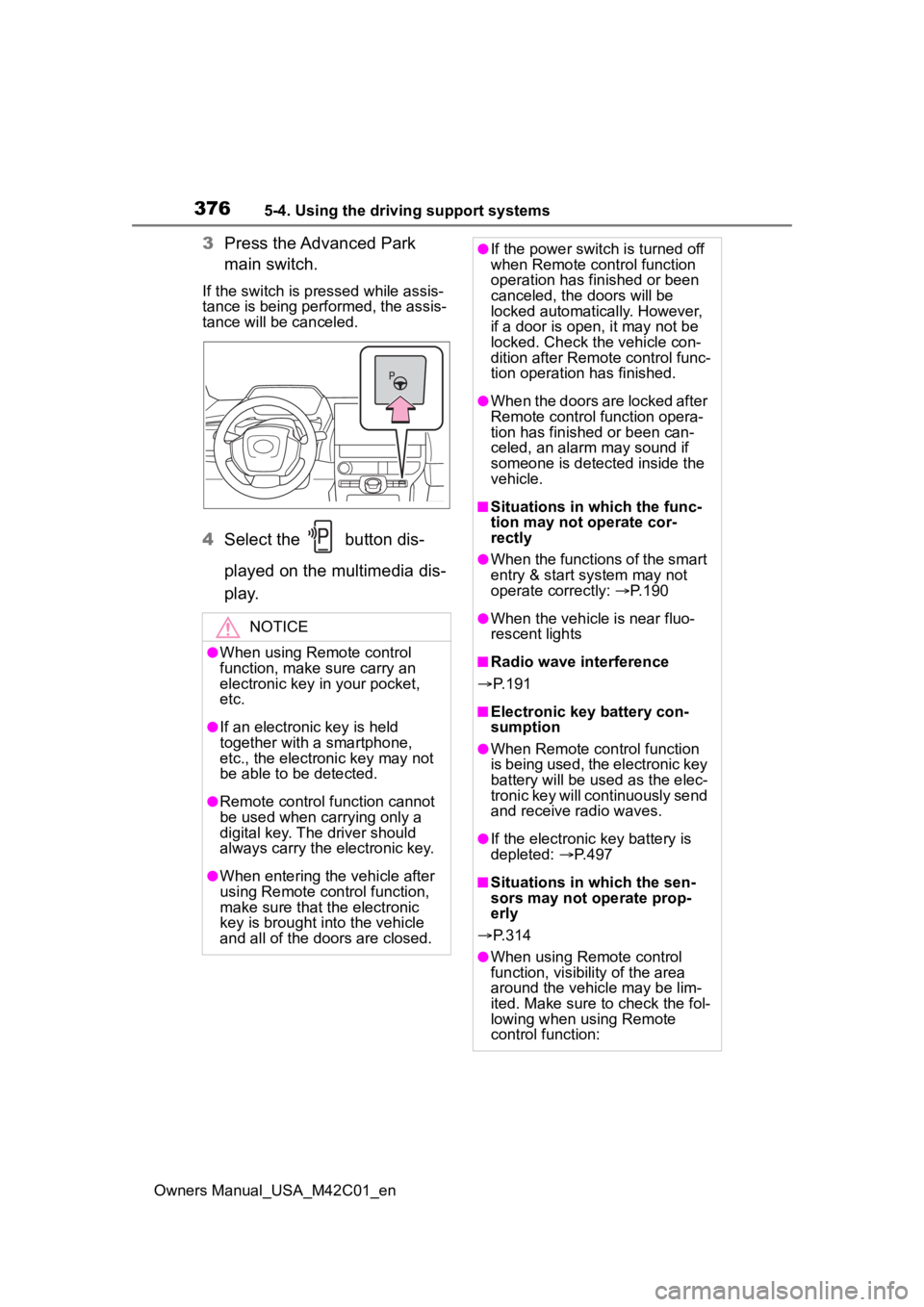
3Press the Advanced Park
main switch.
If the switch is pressed while assis-
tance is being performed, the assis-
tance will be canceled.
4Select the button dis-
played on the multimedia dis-
p l a y.
NOTICE
●When using Remote control
function, make sure carry an
electronic key in your pocket,
etc.
●If an electronic key is held
together with a smartphone,
etc., the electronic key may not
be able to be detected.
●Remote control function cannot
be used when carrying only a
digital key. The driver should
always carry the electronic key.
●When entering the vehicle after
using Remote control function,
make sure that the electronic
key is brought i nto the vehicle
and all of the doors are closed.
●If the power switch is turned off
when Remote control function
operation has finished or been
canceled, the doors will be
locked automatica lly. However,
if a door is open , it may not be
locked. Check the vehicle con-
dition after Remote control func-
tion operation has finished.
●When the doors are locked after
Remote control function opera-
tion has finished or been can-
celed, an alarm may sound if
someone is detected inside the
vehicle.
■Situations in which the func-
tion may not operate cor-
rectly
●When the functions of the smart
entry & start system may not
operate correctly: P. 1 9 0
●When the vehicle is near fluo-
rescent lights
■Radio wave interference
P. 1 9 1
■Electronic key battery con-
sumption
●When Remote control function
is being used, the electronic key
battery will be used as the elec-
tronic key will continuously send
and receive radio waves.
●If the electronic key battery is
depleted: P. 4 9 7
■Situations in which the sen-
sors may not operate prop-
erly
P. 3 1 4
●When using Remote control
function, visibility of the area
around the vehicle may be lim-
ited. Make sure to check the fol-
lowing when using Remote
control function:
Page 379 of 628
3795-4. Using the driving support systems
Owners Manual_USA_M42C01_en
5
Driving
When there is an obstruction
in the movement direction of
the vehicle
When the vehicle is operated
while it is being driven by
assistance
When the smart key is oper-
ated while it is being driven by
assistance
When the door is unlocked
while it is being driven by
assistance
When a door is opened while
the vehicle is being driven
Select on the multimedia
display, and then select
“Advanced Park”.
■Remote Park
Remote control function can be
turned on/off.
■Speed Profile
The vehicle speed for when
assistance is performed can be
set.
This setting cannot be changed
when registering a parking space to
the memory function.
■Detect. range
The distance from which obsta-
cles will be avoided while assis-
tance is being performed can be
set.
■Prk. Method
The preferred parking direction
displayed when at a parking
space which perpendicular (for-
ward/reverse) or parallel parking
is possible can be set.
■Prk. direction
The preferred parking direction
displayed when it is possible to
pull perpendicular forward or
reverse into a parking space can
be selected.
■Exit dir .: Per.
The preferred exit direction dis-
played when it is possible to pull
forward or reverse to the left or
right out of a parking space can
be selected.
■Exit dir .: Par.
The preferred exit direction dis-
played when it is possible to exit
to the left or right from a parallel
parking space can be selected.
■Parking view
The display angle of the camera
image when using the perpen-
dicular parking (for-
ward/reverse) function or
parallel parking function can be
set.
■Exit view
The display angle of the camera
image when using the perpen-
dicular exiting (forward/reverse)
function or parallel parking exit
function can be set.
Changing the Advanced
Park settings
Page 387 of 628
3875-4. Using the driving support systems
Owners Manual_USA_M42C01_en
5
Driving
■ECB (Electronically Con-
trolled Brake System)
The electronically controlled
system generates braking force
corresponding to the brake
operation
■ABS (Anti-lock Brake Sys-
tem)
Helps to prevent wheel lock
when the brakes are applied
suddenly, or if the brakes are
applied while driving on a slip-
pery road surface
■Brake assist
Generates an increased level of
braking force after the brake
pedal is depressed when the
system detects a panic stop sit-
uation
■VSC (Vehicle Stability Con-
trol)
Helps the driver to control skid-
ding when swerving suddenly or
turning on slippery road sur-
faces.
■Trailer Sway Control
Helps the driver to control trailer
sway by selectively applying
brake pressure for individual
wheels and reducing driving
torque when trailer sway is
detected.
■TRAC (Traction Control)
Helps to maintain drive power
and prevent the drive wheels
from spinning when starting the
vehicle or accelerating on slip-
pery roads
■Active Cornering Assist
(ACA)
Helps to prevent the vehicle
from drifting to the outer side by
performing inner wheel brake
control when attempting to
accelerate while turning
■Hill-start assist control
Helps to reduce the backward
movement of the vehicle when
starting on an uphill
■EPS (Electric Power Steer-
ing)
Employs an electric motor to
reduce the amount of effort
needed to turn the steering
wheel.
Driving assist systems
To keep driving safety and
performance, the following
systems operate automati-
cally in response to various
driving situations. Be
aware, however, that these
systems are supplementary
and should not be relied
upon too heavily when
operating the vehicle.
Summary of the driving
assist systems
Page 394 of 628
3945-5. Driving tips
Owners Manual_USA_M42C01_en
to the driving conditions:
Do not try to forcibly open a
window or move a wiper that
is frozen. Pour warm water
over the frozen area to melt
the ice. Wipe away the water
immediately to prevent it from
freezing.
To ensure proper operation of
the climate control system
fan, remove any snow that
has accumulated on the air
inlet vents in front of the wind-
shield.
Check for and remove any
excess ice or snow that may
have accumulated on the
exterior lights, vehicle’s roof,
chassis, around the tires or on
the brakes.
Remove any snow or mud
from the bottom of your shoes
before getting in the vehicle.
Accelerate the vehicle slowly,
keep a safe distance between
you and the vehicle ahead, and
drive at a reduced speed suit-
able to road conditions.
Turn automatic mode of the
parking brake off. Otherwise,
the parking brake may freeze
and not be able to be
released automatically. Also, avoid using the following
as the parking brake may
operate automatically, even if
automatic mode is off.
• Brake hold system
• Remote parking function
Park the vehicle and shift the
shift position to P without set-
ting the parking brake. The
parking brake may freeze up,
preventing it from being
released. If the vehicle is
parked without setting the
parking brake, make sure to
block the wheels.
Failure to do so may be dan-
gerous because it may cause
the vehicle to move unexpect-
edly, possibly leading to an
accident.
When the parking brake is in
automatic mode, release the
parking brake after shifting
the shift position to P.
( P.244)
If the vehicle is parked without
setting the parking brake,
confirm that the shift position
cannot be moved out of P.
If the vehicle is left parked
with the brakes damp in cold
temperatures, there is a pos-
sibility of the brakes freezing.
When driving the vehicle
When parking the vehicle
Page 406 of 628
4066-1. Using the air conditioning system and defogger
Owners Manual_USA_M42C01_en
1Press the automatic mode
switch.
The dehumidification function begins to operate. Air outlets and
fan speed are automatically
adjusted according to the tempera-
ture setting and humidity.
2
Adjust the temperature set-
ting.
3 To stop the operation, press
the “OFF” switch.
If the fan speed setting or air
flow modes are operated, the
automatic mode indicator goes
off. However, automatic mode
for functions other than that
operated is maintained.
■Using automatic mode
Fan speed is adjusted automati-
cally according to the temperature
setting and the ambient conditions.
Therefore, the fan may stop for a
while until warm or cool air is ready
to flow immediately after the auto-
matic mode switch is pressed.
To turn on the “SYNC” mode,
perform any of the following pro-
cedures:
Press the “SYNC” mode
switch.
Adjust the front passenger’s
side temperature setting.
The indicator comes on when the
“SYNC” mode is on.
WARNING
■To prevent the windshield
from fogging up
Do not use the windshield defog-
ger switch during cool air opera-
tion in extremely humid weather.
The difference between the tem-
perature of the outside air and
that of the windshield can cause
the outer surface of the wind-
shield to fog up, blocking your
vision.
■To prevent burns
●Do not touch the rear view mir-
ror surfaces when the outside
rear view mirror defoggers are
on.
●Vehicles with windshield wiper
de-icer: Do not touch the glass
at lower part of the windshield
or to the side of the front pillars
when the windshield wiper de-
icer is on.
NOTICE
■To prevent 12-volt battery dis-
charge
Do not leave the air conditioning
system on longer than necessary
when the EV system is off.
■When repairing/replacing
parts of the air conditioning
system
Have repair/replacement per-
formed by your Toyota dealer.
When a part of the air conditioning
system, such as the evaporator, is
to be replaced, it must be
replaced with a new one.
Using automatic mode
Adjusting the temperature
for driver and front pas-
senger seats separately
(“SYNC” mode)
Page 410 of 628
4106-1. Using the air conditioning system and defogger
Owners Manual_USA_M42C01_en
System.
The system will shut off if a door is
opened.
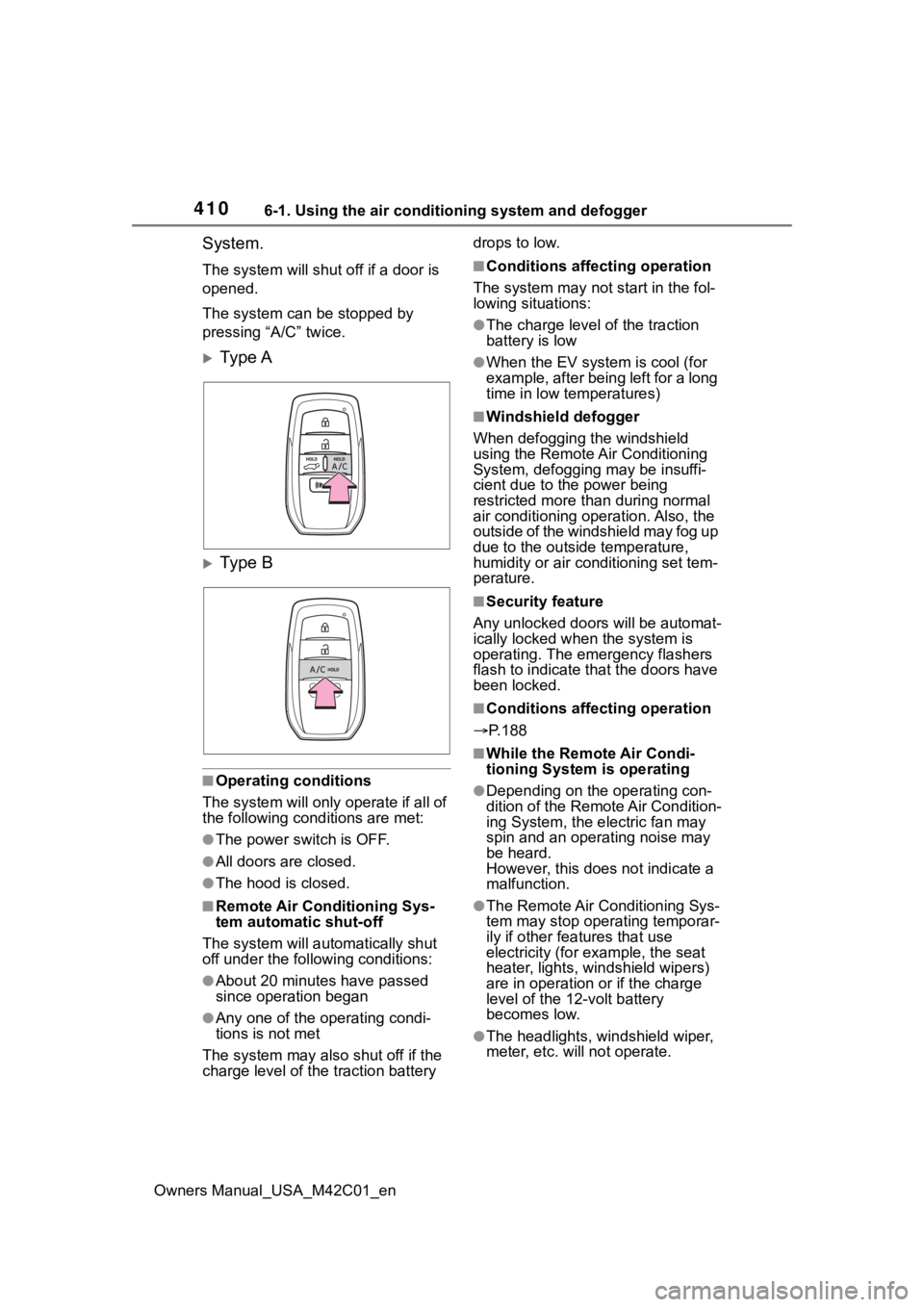
The system can be stopped by
pressing “A/C” twice.
Ty p e A
Ty p e B
■Operating conditions
The system will only operate if all of
the following cond itions are met:
●The power switch is OFF.
●All doors are closed.
●The hood is closed.
■Remote Air Conditioning Sys-
tem automatic shut-off
The system will auto matically shut
off under the following conditions:
●About 20 minutes have passed
since operation began
●Any one of the operating condi-
tions is not met
The system may also shut off if the
charge level of the traction battery drops to low.
■Conditions affecting operation
The system may not start in the fol-
lowing situations:
●The charge level of the traction
battery is low
●When the EV system is cool (for
example, after being left for a long
time in low temperatures)
■Windshield defogger
When defogging the windshield
using the Remote Air Conditioning
System, defogging may be insuffi-
cient due to the power being
restricted more than during normal
air conditioning operation. Also, the
outside of the windshield may fog up
due to the outsi de temperature,
humidity or air conditioning set tem-
perature.
■Security feature
Any unlocked doors will be automat-
ically locked when the system is
operating. The emergency flashers
flash to indicate that the doors have
been locked.
■Conditions affecting operation
P.188
■While the Remote Air Condi-
tioning System is operating
●Depending on the operating con-
dition of the Remote Air Condition-
ing System, the e lectric fan may
spin and an operating noise may
be heard.
However, this does not indicate a
malfunction.
●The Remote Air Conditioning Sys-
tem may stop operating temporar-
ily if other features that use
electricity (for example, the seat
heater, lights, windshield wipers)
are in operation or if the charge
level of the 12-volt battery
becomes low.
●The headlights, windshield wiper,
meter, etc. will not operate.
Page 415 of 628
4156-2. Using the interior lights
Owners Manual_USA_M42C01_en
6
Interior features
6-2.Using the interior lights
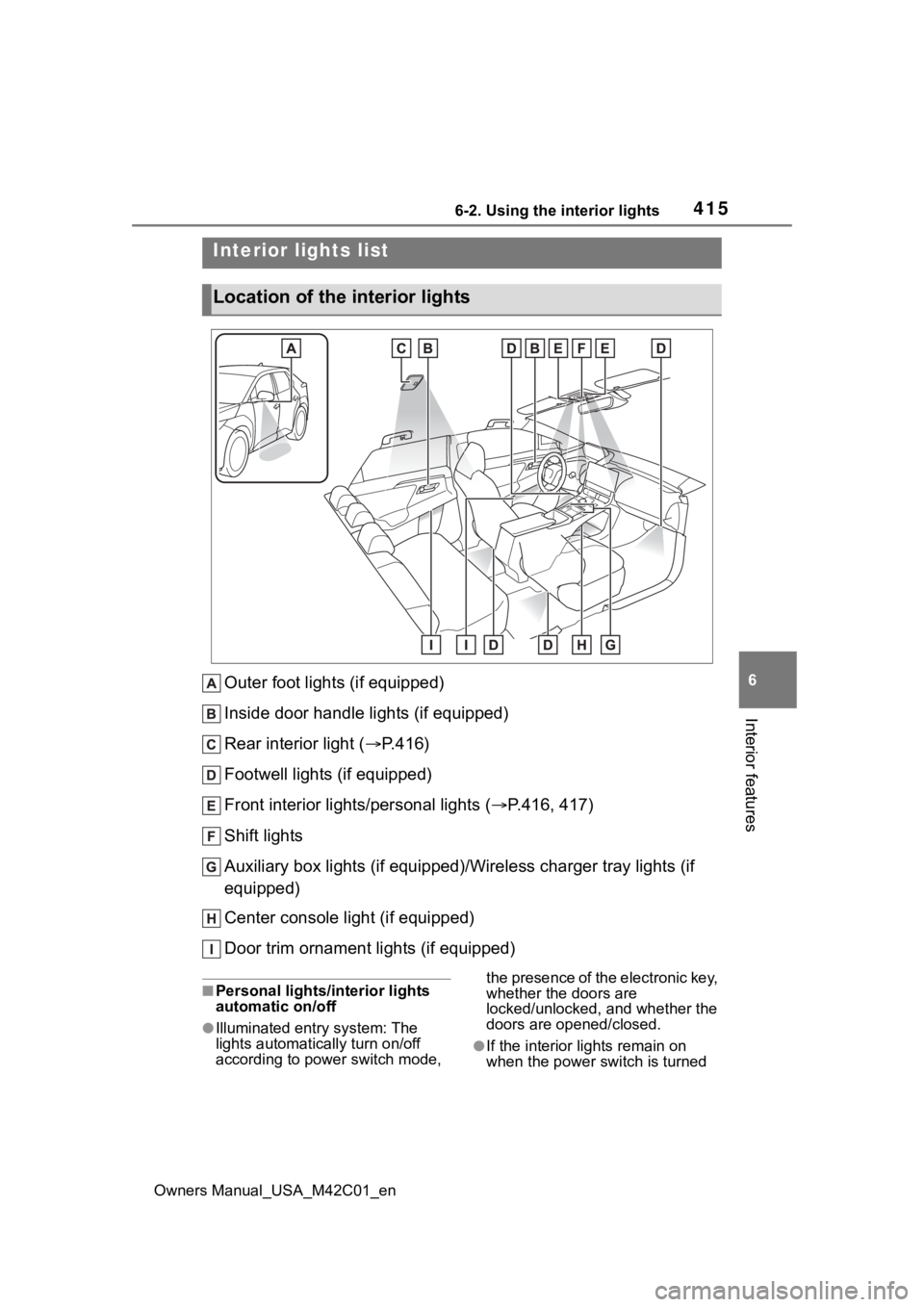
Outer foot lights (if equipped)
Inside door handle lights (if equipped)
Rear interior light ( P.416)
Footwell lights (if equipped)
Front interior lights/personal lights ( P.416, 417)
Shift lights
Auxiliary box lights (if equipped)/Wireless charger tray lights (if
equipped)
Center console light (if equipped)
Door trim ornament lights (if equipped)
■Personal lights/interior lights
automatic on/off
●Illuminated entry system: The
lights automatically turn on/off
according to power switch mode, the presence of the electronic key,
whether the doors are
locked/unlocked, and whether the
doors are opened/closed.
●If the interior
lights remain on
when the power switch is turned
Interior lights list
Location of the i nterior lights
Page 419 of 628
4196-3. Using the storage features
Owners Manual_USA_M42C01_en
6
Interior features
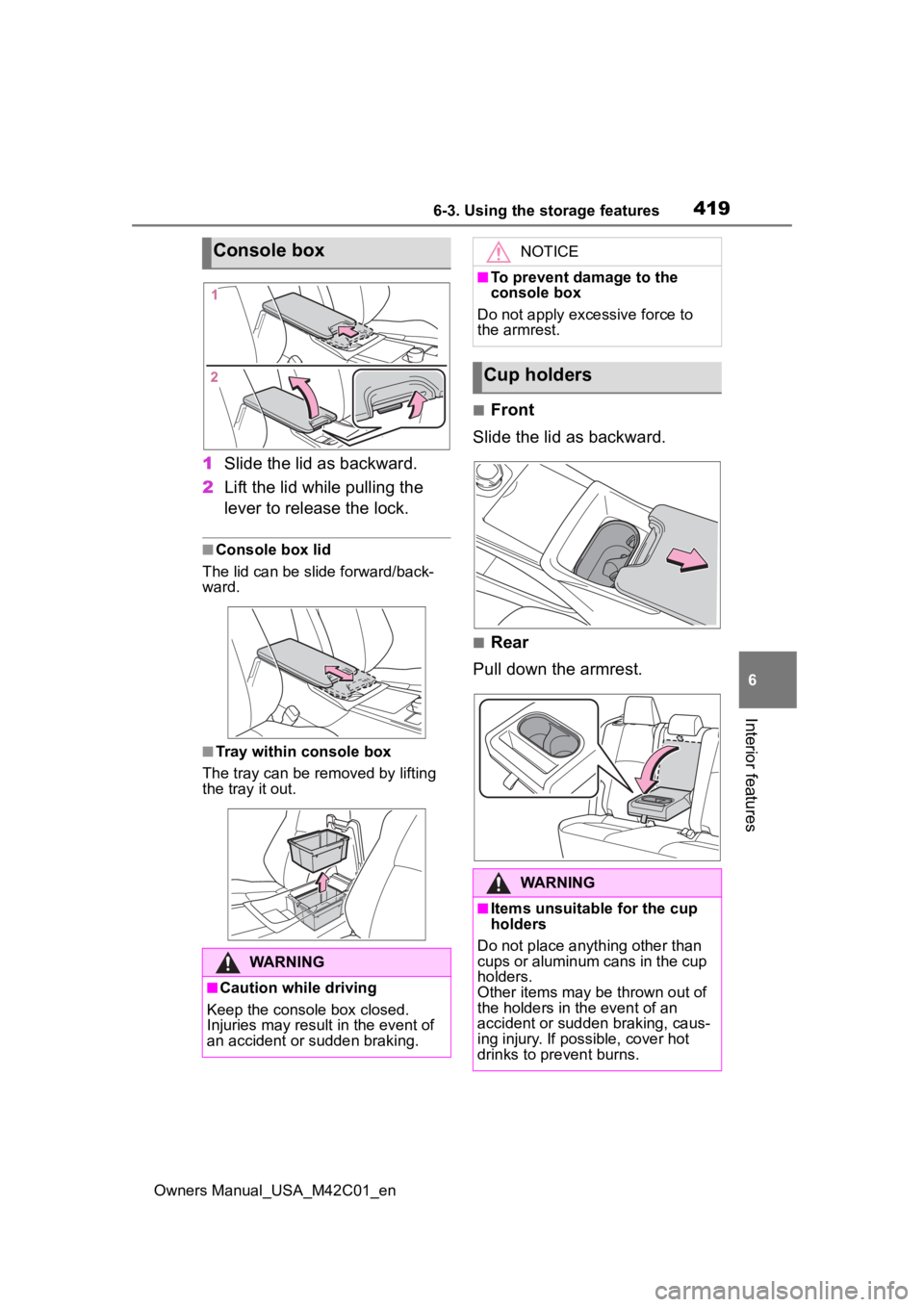
1 Slide the lid as backward.
2 Lift the lid while pulling the
lever to release the lock.
■Console box lid
The lid can be slide forward/back-
ward.
■Tray within console box
The tray can be removed by lifting
the tray it out.
■Front
Slide the lid as backward.
■Rear
Pull down the armrest.
Console box
WARNING
■Caution while driving
Keep the console box closed.
Injuries may result in the event of
an accident or sudden braking.
NOTICE
■To prevent damage to the
console box
Do not apply excessive force to
the armrest.
Cup holders
WARNING
■Items unsuitable for the cup
holders
Do not place anyth ing other than
cups or aluminum cans in the cup
holders.
Other items may be thrown out of
the holders in the event of an
accident or sudden braking, caus-
ing injury. If possible, cover hot
drinks to pre vent burns.
Page 424 of 628
4246-3. Using the storage features
Owners Manual_USA_M42C01_en
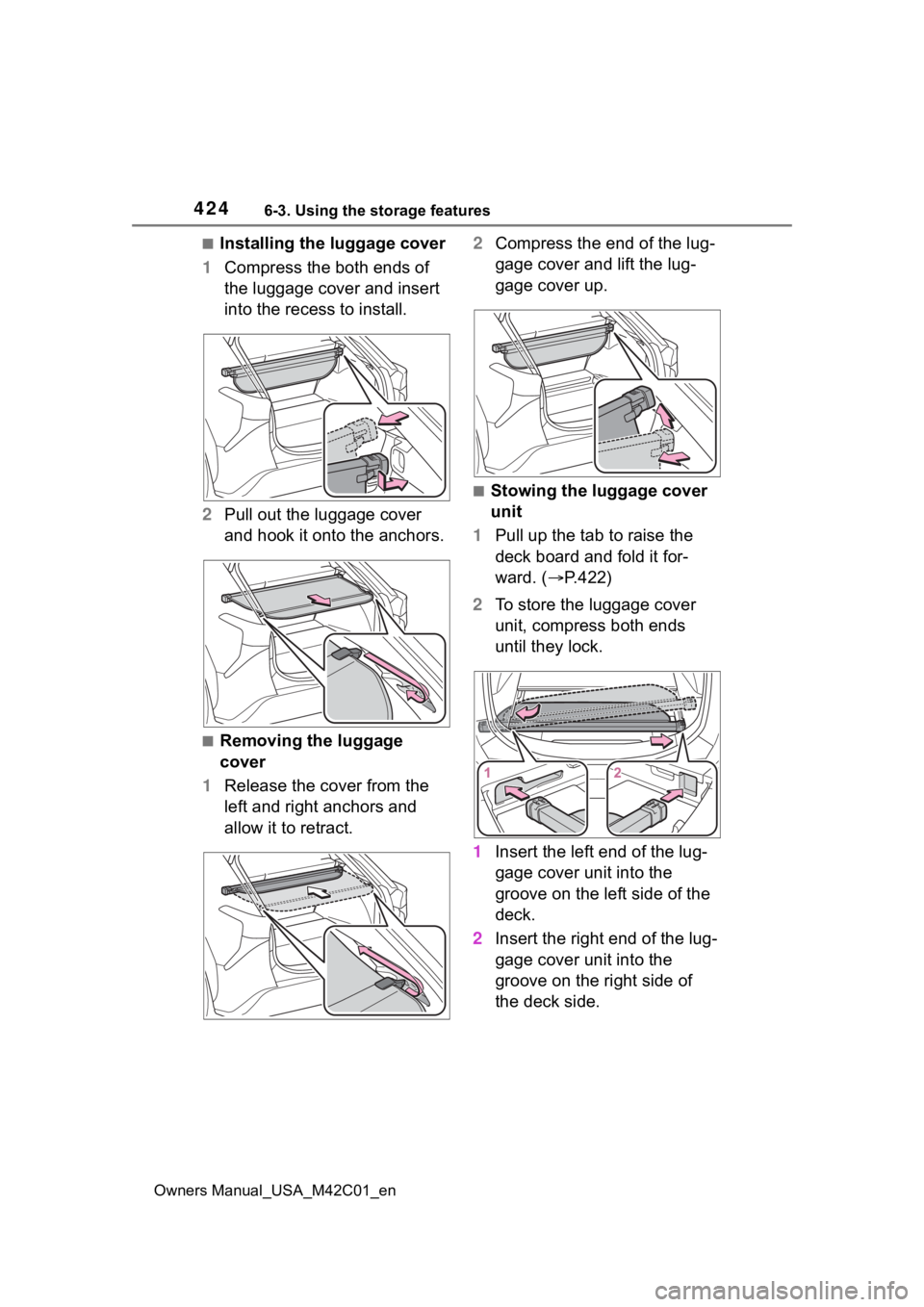
■Installing the luggage cover
1 Compress the both ends of
the luggage cover and insert
into the recess to install.
2 Pull out the luggage cover
and hook it onto the anchors.
■Removing the luggage
cover
1 Release the cover from the
left and right anchors and
allow it to retract. 2
Compress the end of the lug-
gage cover and lift the lug-
gage cover up.
■Stowing the luggage cover
unit
1 Pull up the tab to raise the
deck board and fold it for-
ward. ( P.422)
2 To store the luggage cover
unit, compress both ends
until they lock.
1 Insert the left end of the lug-
gage cover unit into the
groove on the left side of the
deck.
2 Insert the right end of the lug-
gage cover unit into the
groove on the right side of
the deck side.
Page 429 of 628
4296-4. Using the other interior features
Owners Manual_USA_M42C01_en
6
Interior features
The USB Type-C charging ports
are used to supply 3 A of elec-
tricity at 5 V to external devices.
The USB Type-C charging ports
are for charging only. They are
not designed for data transfer or
other purposes. Depending on the external
device, it may not charge prop-
erly. Refer to the manual
included with the device before
using a USB charging port.
Refer to “MULTIMEDIA
OWNER’S MANUAL” for USB
Type-A information.
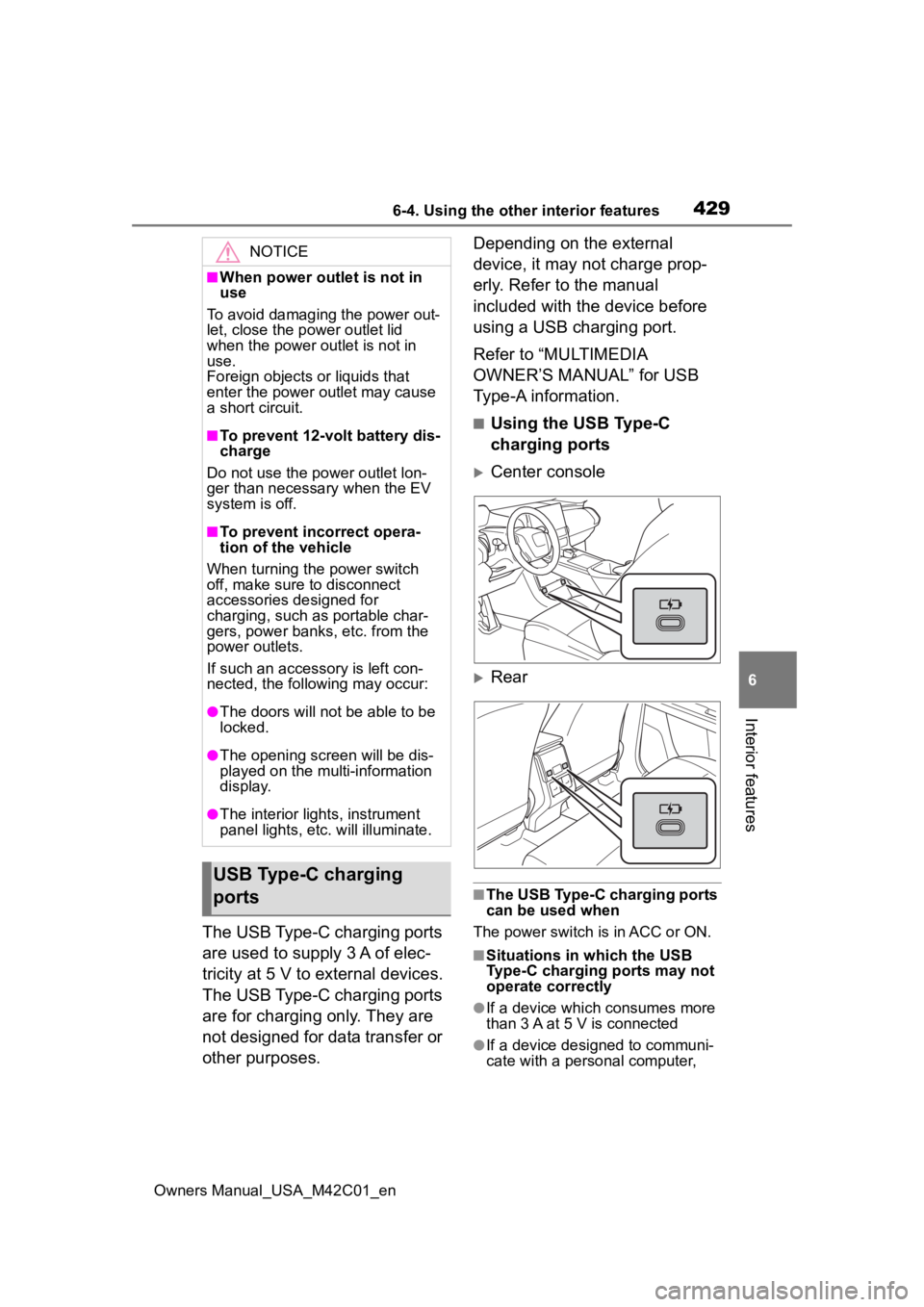
■Using the USB Type-C
charging ports
Center console
Rear
■The USB Type-C charging ports
can be used when
The power switch is in ACC or ON.
■Situations in which the USB
Type-C charging ports may not
operate correctly
●If a device which consumes more
than 3 A at 5 V is connected
●If a device designed to communi-
cate with a personal computer,
NOTICE
■When power outlet is not in
use
To avoid damaging the power out-
let, close the p ower outlet lid
when the power outlet is not in
use.
Foreign objects or liquids that
enter the power outlet may cause
a short circuit.
■To prevent 12-volt battery dis-
charge
Do not use the power outlet lon-
ger than necessary when the EV
system is off.
■To prevent incorrect opera-
tion of the vehicle
When turning the power switch
off, make sure to disconnect
accessories designed for
charging, such as portable char-
gers, power banks, etc. from the
power outlets.
If such an accessory is left con-
nected, the following may occur:
●The doors will not be able to be
locked.
●The opening scr een will be dis-
played on the multi-information
display.
●The interior lights, instrument
panel lights, etc. will illuminate.
USB Type-C charging
ports