charging TOYOTA BZ4X 2023 User Guide
[x] Cancel search | Manufacturer: TOYOTA, Model Year: 2023, Model line: BZ4X, Model: TOYOTA BZ4X 2023Pages: 628, PDF Size: 11.91 MB
Page 80 of 628
802-1. Electric vehicle system
Owners Manual_USA_M42C01_en
When a certain level of impact is
detected by the impact sensors,
the emergency shut off system turns off the EV system and
blocks the high voltage current.
If the emergency shut off system
activates, your vehicle will not
restart. To restart the EV sys-
tem, contact your Toyota dealer.
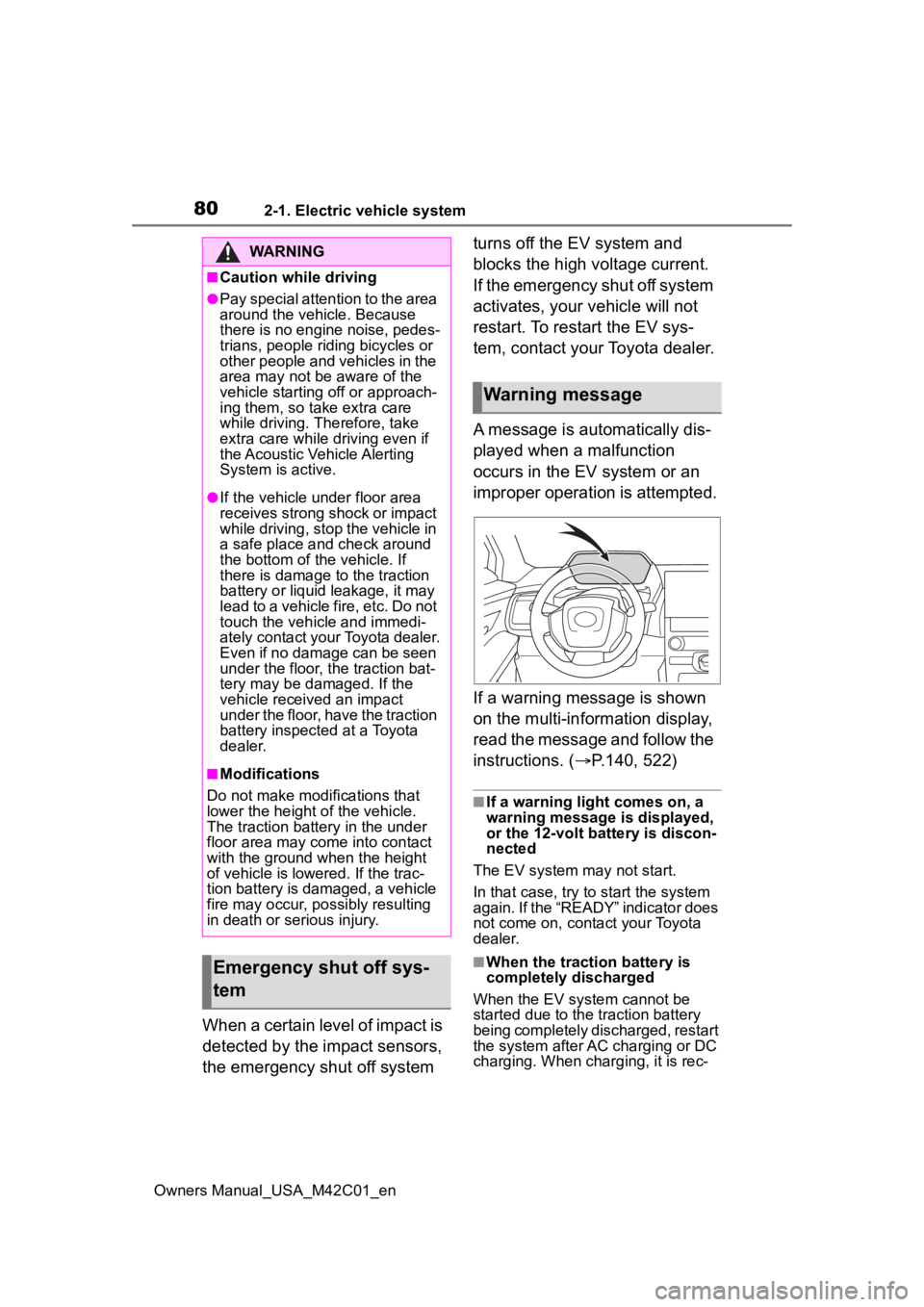
A message is automatically dis-
played when a malfunction
occurs in the EV system or an
improper operation is attempted.
If a warning message is shown
on the multi-information display,
read the message and follow the
instructions. (
P.140, 522)
■If a warning light comes on, a
warning message is displayed,
or the 12-volt battery is discon-
nected
The EV system may not start.
In that case, try to start the system
again. If the “READY” indicator does
not come on, contact your Toyota
dealer.
■When the traction battery is
completely discharged
When the EV system cannot be
started due to the traction battery
being completely discharged, restart
the system after AC charging or DC
charging. When charging, it is rec-
WARNING
■Caution while driving
●Pay special attention to the area
around the vehicle. Because
there is no engine noise, pedes-
trians, people riding bicycles or
other people and vehicles in the
area may not be aware of the
vehicle starting off or approach-
ing them, so take extra care
while driving. Therefore, take
extra care while driving even if
the Acoustic Vehicle Alerting
System is active.
●If the vehicle under floor area
receives strong shock or impact
while driving, stop the vehicle in
a safe place and check around
the bottom of the vehicle. If
there is damage to the traction
battery or liquid leakage, it may
lead to a vehicle fire, etc. Do not
touch the vehicle and immedi-
ately contact your Toyota dealer.
Even if no damage can be seen
under the floor, the traction bat-
tery may be damaged. If the
vehicle received an impact
under the floor, have the traction
battery inspected at a Toyota
dealer.
■Modifications
Do not make modifications that
lower the height of the vehicle.
The traction battery in the under
floor area may come into contact
with the ground when the height
of vehicle is lowered. If the trac-
tion battery is damaged, a vehicle
fire may occur, possibly resulting
in death or serious injury.
Emergency shut off sys-
tem
Warning message
Page 82 of 628
822-1. Electric vehicle system
Owners Manual_USA_M42C01_en
battery cannot be charged. Also,
when using the air conditioning
system, etc., the traction battery
electricity is consumed.
(P.237)
Repeated acceleration and
deceleration due to traffic con-
gestion, long waits at traffic
lights, and driving on steep
inclines will lead to poor electric-
ity consumption. In order to
avoid those situations as much
as possible, check traffic reports
before leaving. If the vehicle is
driven in traffic congestion, gen-
tly release the brake pedal to
allow the vehicle to move for-
ward slightly, avoid overuse of
the accelerator pedal. Doing so
can help minimize unnecessary
electricity consumption.
Make sure to operate the brakes
gently and a timely manner. A
greater amount of electrical
energy can be regenerated
when slowing down.
Control and maintain the vehicle
at a constant speed. Before
stopping at a toll booth or simi-
lar, allow plenty of time to release the accelerator and gen-
tly apply the brakes. A greater
amount of electrical energy can
be regenerated when slowing
down.
Use the air conditioning only
when necessary. Doing so
can help reduce excessive
electricity consumption.
In summer: When the ambient tem-
perature is high, use the recircu-
lated air mode. Doing so will help to
reduce the burden on the air condi-
tioning system and reduce electric-
ity consumption as well.
In winter: Exce ssive or unneces-
sary heating should be avoided.
Also, electricity consumption can
be improved by avoiding overuse of
the heater.
When using the Remote Air
Conditioning System
( P.409) while the AC
charging cable is connected
to the vehicle, electricity con-
sumption immediately after
starting off will be reduced
because air conditioning is
operated mainly using elec-
tricity from an external power
source.
Make sure to check the tire infla-
tion pressure frequently.
Delays
When braking
Highway (or freeways)
driving
Air conditioning
Checking tire inflation
pressure
Page 84 of 628
842-1. Electric vehicle system
Owners Manual_USA_M42C01_en
number of occupants.
Possible driving distance could
be extended if the followings are
performed:
Maintain a safe distance from
the vehicle in front and avoid
unnecessary acceleration and
deceleration
Accelerate and decelerate the
vehicle as smoothly as possi-
ble
Drive at moderate speeds as
much as possible and main-
tain a constant speed
Set the air conditioning sys-
tem to a moderate tempera-
ture and avoid using the
heating and cooling functions
excessively.
Use tires of the specified size
and maintain the specified tire
pressure
Do not add unnecessary
weight to the vehicle
The followings indicate that
charging has been carried out
properly.
The AC charging indicator
turns off
“Charging complete” is dis-
played on the multi-informa-
tion display when a door is
opened while the power switch is off. (
P.101)
Regardless of the type of power
source or whether the charging
schedule function is used,
charging is completed if the
above can be confirmed.
Charging-related messages:
P.140
Display when charging is
completed
Page 85 of 628
852-2. Charging
Owners Manual_USA_M42C01_en
2
Electric Vehicle system
2-2.Charging
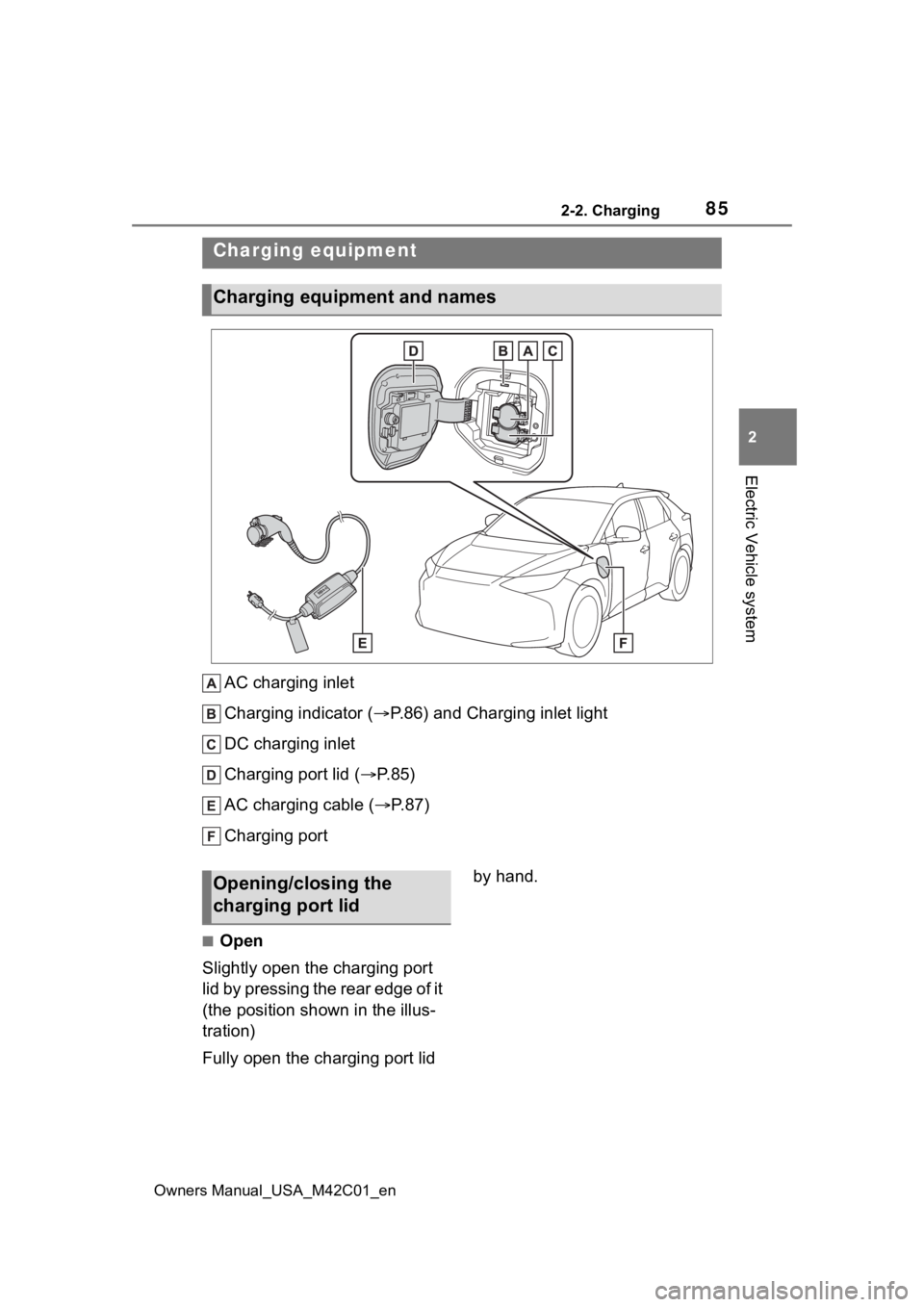
AC charging inlet
Charging indicator ( P.86) and Charging inlet light
DC charging inlet
Charging port lid ( P.85)
AC charging cable ( P. 8 7 )
Charging port
■Open
Slightly open the charging port
lid by pressing the rear edge of it
(the position shown in the illus-
tration)
Fully open the charging port lid by hand.
Charging equipment
Charging equipment and names
Opening/closing the
charging port lid
Page 86 of 628
862-2. Charging
Owners Manual_USA_M42C01_en
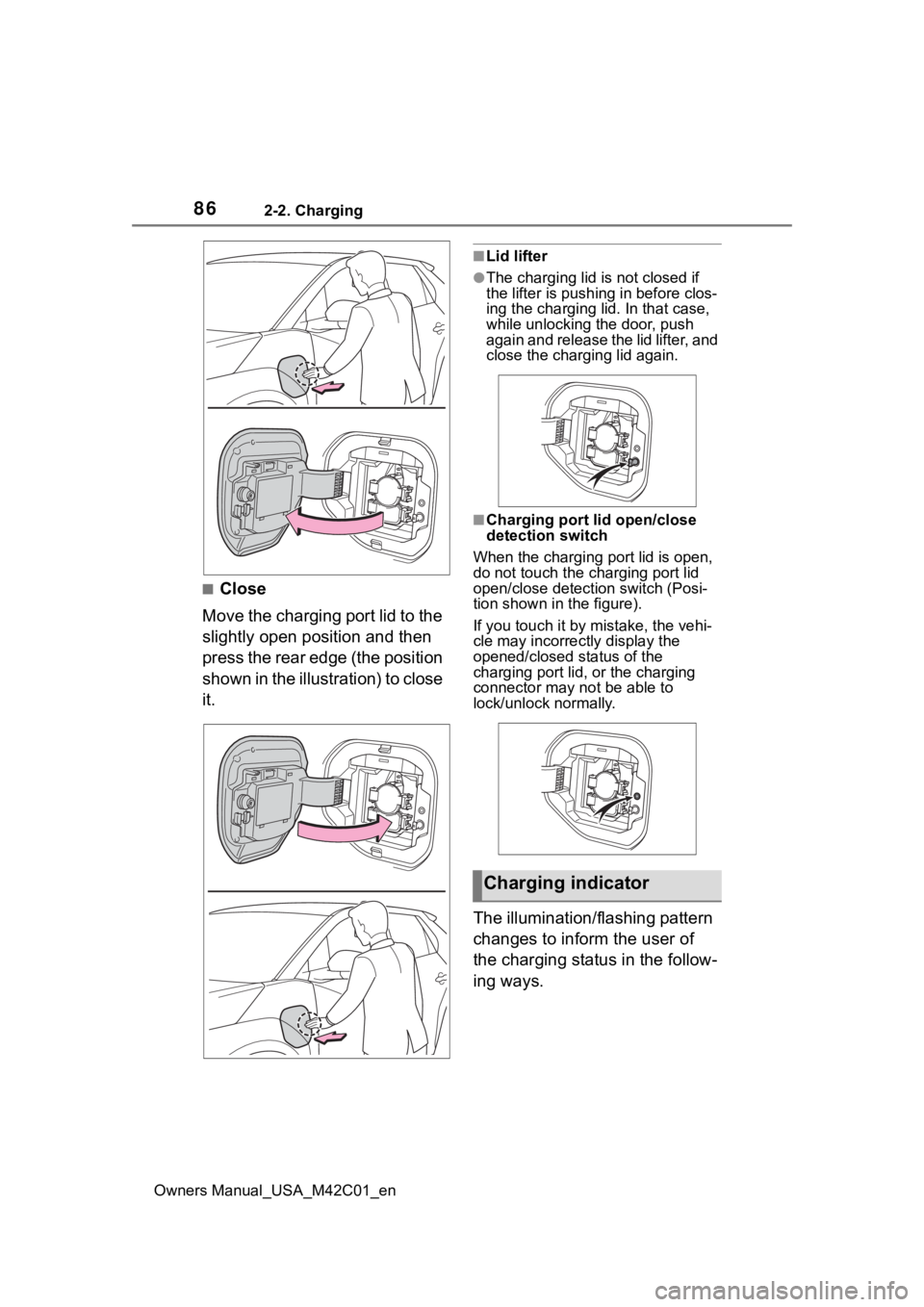
■Close
Move the charging port lid to the
slightly open position and then
press the rear edge (the position
shown in the illustration) to close
it.
■Lid lifter
●The charging lid is not closed if
the lifter is pushing in before clos-
ing the charging lid. In that case,
while unlocking the door, push
again and release the lid lifter, and
close the charging lid again.
■Charging port lid open/close
detection switch
When the charging port lid is open,
do not touch the charging port lid
open/close detection switch (Posi-
tion shown in the figure).
If you touch it by mistake, the vehi-
cle may incorrectly display the
opened/closed status of the
charging port lid, or the charging
connector may not be able to
lock/unlock normally.
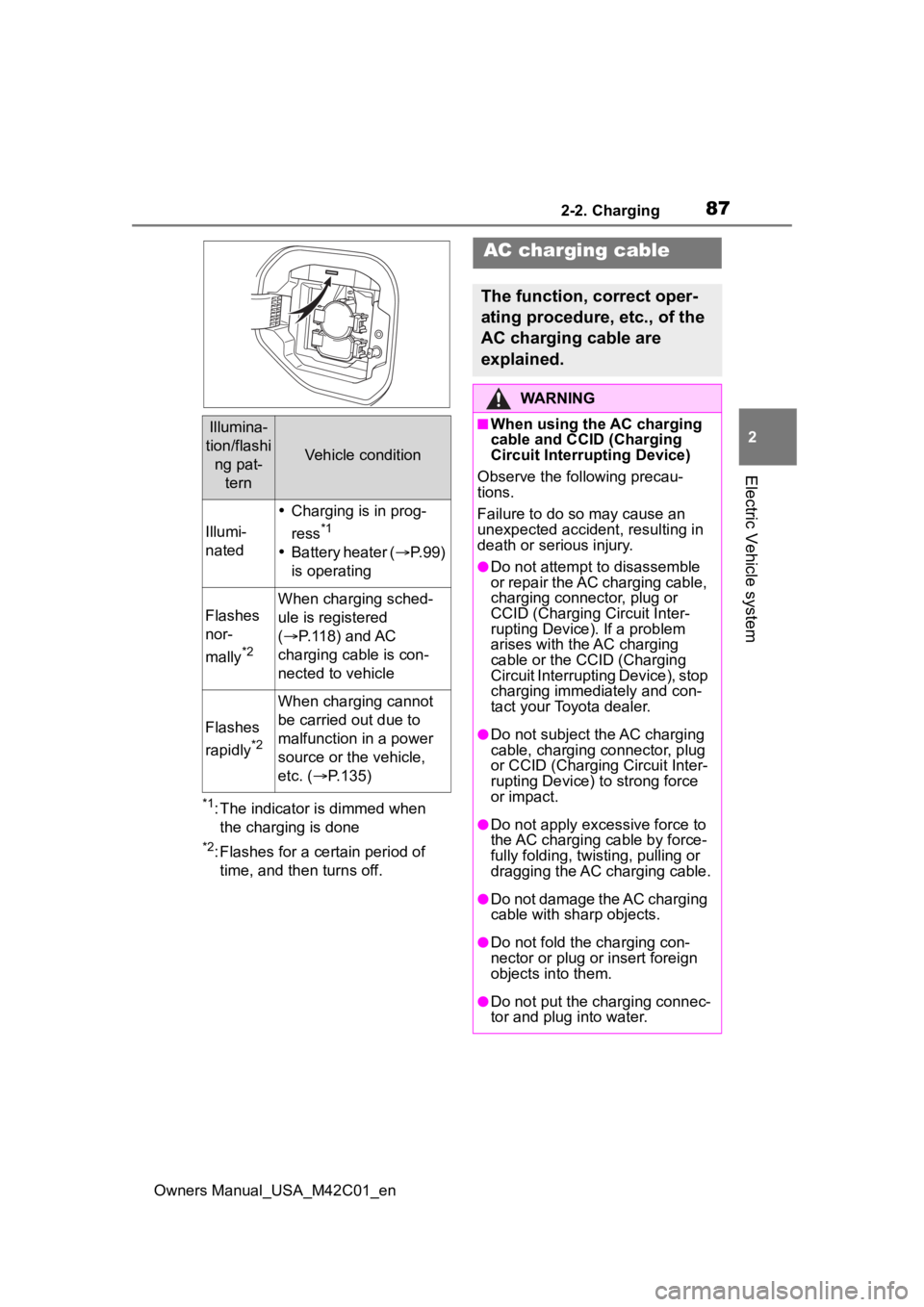
The illumination/flashing pattern
changes to inform the user of
the charging status in the follow-
ing ways.
Charging indicator
Page 87 of 628
872-2. Charging
Owners Manual_USA_M42C01_en
2
Electric Vehicle system
*1: The indicator is dimmed when the charging is done
*2: Flashes for a certain period of time, and then turns off.
Illumina-
tion/flashi ng pat- tern
Vehicle condition
Illumi-
nated
Charging is in prog-
ress
*1
Battery heater ( P.99)
is operating
Flashes
nor-
mally
*2
When charging sched-
ule is registered
( P.118) and AC
charging cable is con-
nected to vehicle
Flashes
rapidly
*2
When charging cannot
be carried out due to
malfunction in a power
source or the vehicle,
etc. ( P.135)
AC charging cable
The function, correct oper-
ating procedure, etc., of the
AC charging cable are
explained.
WARNING
■When using the AC charging
cable and CCID (Charging
Circuit Interrupting Device)
Observe the following precau-
tions.
Failure to do so may cause an
unexpected accident, resulting in
death or serious injury.
●Do not attempt to disassemble
or repair the AC charging cable,
charging connector, plug or
CCID (Charging Circuit Inter-
rupting Device). If a problem
arises with the AC charging
cable or the CCID (Charging
Circuit Interruptin g Device), stop
charging immediately and con-
tact your Toyota dealer.
●Do not subject the AC charging
cable, charging connector, plug
or CCID (Charging Circuit Inter-
rupting Device) to strong force
or impact.
●Do not apply excessive force to
the AC charging cable by force-
fully folding, twisting, pulling or
dragging the AC charging cable.
●Do not damage the AC charging
cable with sharp objects.
●Do not fold the charging con-
nector or plug or insert foreign
objects into them.
●Do not put the charging connec-
tor and plug into water.
Page 88 of 628
882-2. Charging
Owners Manual_USA_M42C01_en
WARNING
●Do not bring the AC charging
cable to a high-temperature
item such as a heating device.
●Do not apply a load to the AC
charging cable and plug-cord
(such as wrapping the AC
charging cable around the CCID
(Charging Circuit Interrupting
Device) and the charging con-
nector).
●Do not use or leave the AC
charging cable in situations
where a load is applied to the
outlet and the plug (such as
when the CCID (Charging Cir-
cuit Interrupting Device) is
hanging in the air without con-
tacting the ground).
NOTICE
■Precautions when handling
AC charging cable
Make sure to observe the follow-
ing precautions. Failure to
observe these precautions may
result in damage to the AC
charging cable and AC charging
inlet.
●Insert the charging connector
straight into the AC charging
inlet.
●After inserting the charging con-
nector, do not apply excessive
force to or twist the connector.
Also, do not lean on the connec-
tor or hang any objects from it.
●Do not step on or trip over the
AC charging cable.
●Before removing the charging
connector, make sure that it is
unlocked. ( P. 9 3 )
●After removing the AC charging
cable, promptly return it to its
proper location.
●After removing the charging
connector, securely install the
AC charging inlet cap.
■When using the AC charging
cable and related parts
P. 1 0 5
■Precautions for low tempera-
tures
In low temperatures, the AC
charging cable and plug-cord may
become hard. Therefore, make
sure to not apply excessive force
when they are hard. If excessive
force is applied to the hardened
AC charging cable and plug-cord,
they may be damaged.
Page 89 of 628
892-2. Charging
Owners Manual_USA_M42C01_en
2
Electric Vehicle system
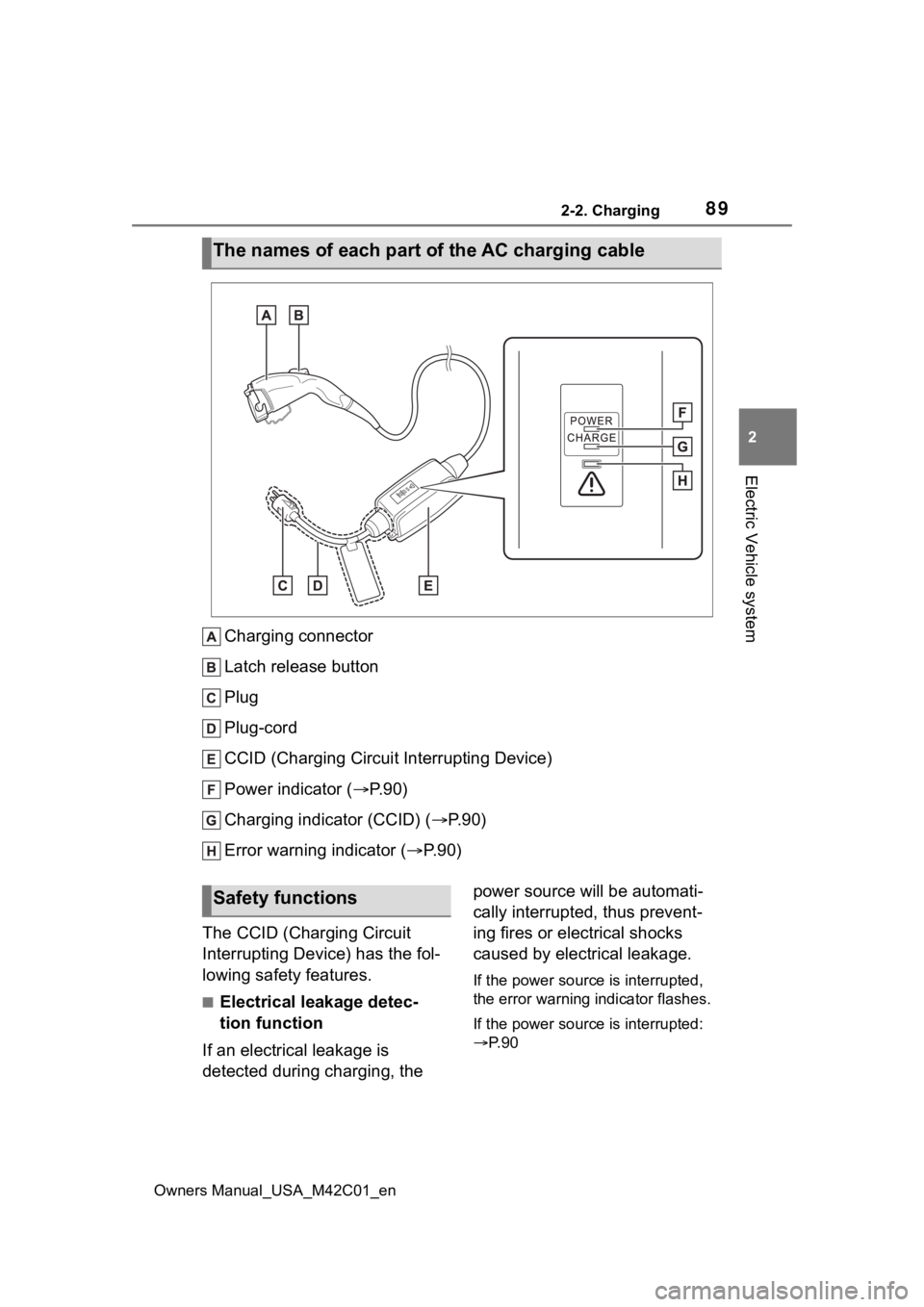
Charging connector
Latch release button
Plug
Plug-cord
CCID (Charging Circuit Interrupting Device)
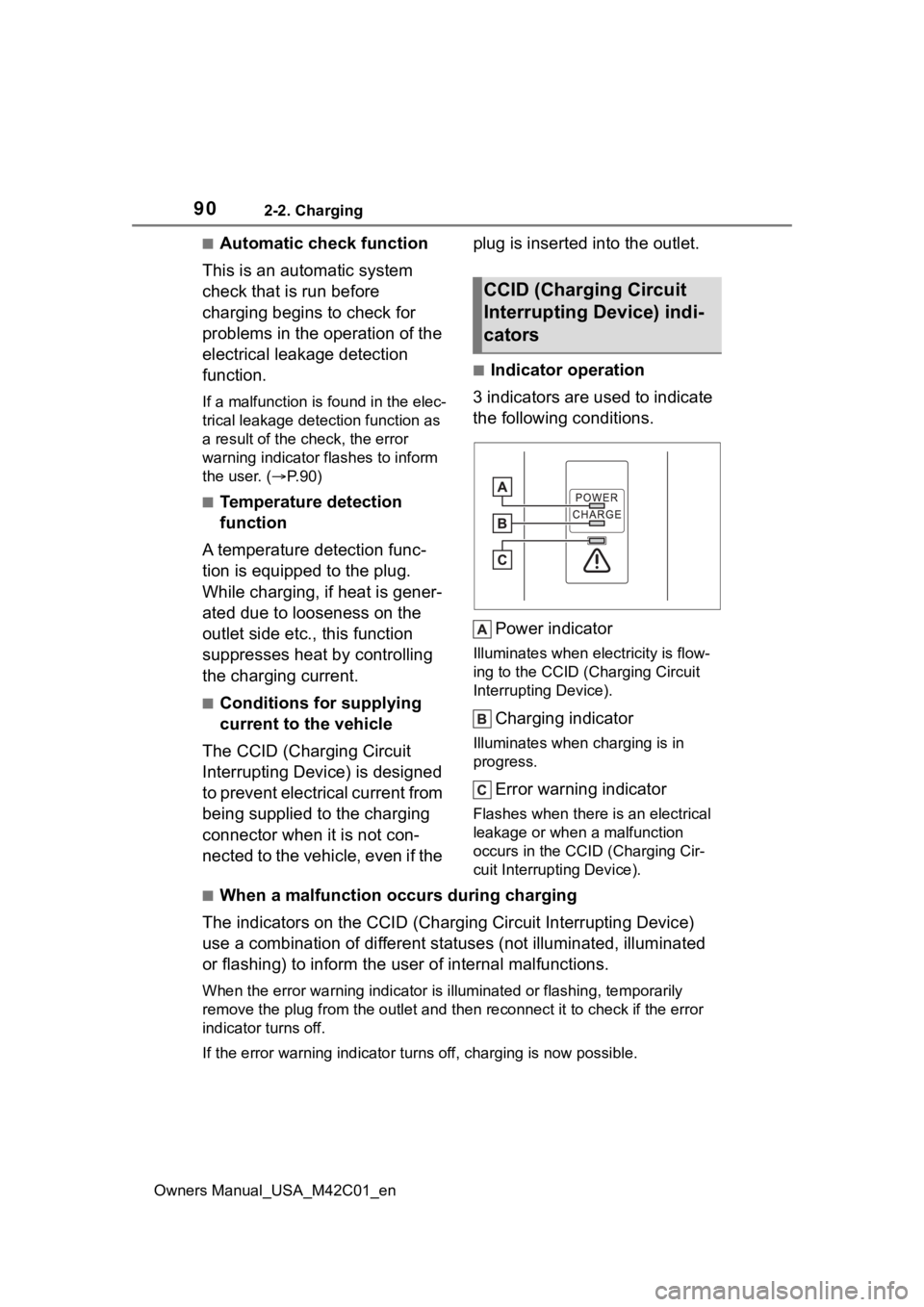
Power indicator ( P. 9 0 )
Charging indicator (CCID) ( P.90)
Error warning indicator (P.90)
The CCID (Charging Circuit
Interrupting Device) has the fol-
lowing safety features.
■Electrical leakage detec-
tion function
If an electrical leakage is
detected during charging, the power source will be automati-
cally interrupted, thus prevent-
ing fires or electrical shocks
caused by electrical leakage.
If the power source is interrupted,
the error warning
indicator flashes.
If the power source is interrupted:
P. 9 0
The names of each part of the AC charging cable
Safety functions
Page 90 of 628
902-2. Charging
Owners Manual_USA_M42C01_en
■Automatic check function
This is an automatic system
check that is run before
charging begins to check for
problems in the operation of the
electrical leakage detection
function.
If a malfunction is found in the elec-
trical leakage detection function as
a result of the c heck, the error
warning indicator flashes to inform
the user. ( P. 9 0 )
■Temperature detection
function
A temperature detection func-
tion is equipped to the plug.
While charging, if heat is gener-
ated due to looseness on the
outlet side etc., this function
suppresses heat by controlling
the charging current.
■Conditions for supplying
current to the vehicle
The CCID (Charging Circuit
Interrupting Device) is designed
to prevent electrical current from
being supplied to the charging
connector when it is not con-
nected to the vehicle, even if the plug is inserted into the outlet.
■Indicator operation
3 indicators are used to indicate
the following conditions.
Power indicator
Illuminates when electricity is flow-
ing to the CCID (C harging Circuit
Interrupting Device).
Charging indicator
Illuminates when charging is in
progress.
Error warning indicator
Flashes when there is an electrical
leakage or when a malfunction
occurs in the CCI D (Charging Cir-
cuit Interrupting Device).
■When a malfunction occurs during charging
The indicators on the CCID (Charging Circuit Interrupting Devic e)
use a combination of different statuses (not illuminated, illum inated
or flashing) to inform the user of internal malfunctions.
When the error wa rning indicator is illuminated or flashing, te mporarily
remove the plug from the outlet and then reconnect it to check if the error
indicator turns off.
If the error warning indicator turns off, charging is now possi ble.
CCID (Charging Circuit
Interrupting Device) indi-
cators
Page 91 of 628
912-2. Charging
Owners Manual_USA_M42C01_en
2
Electric Vehicle system
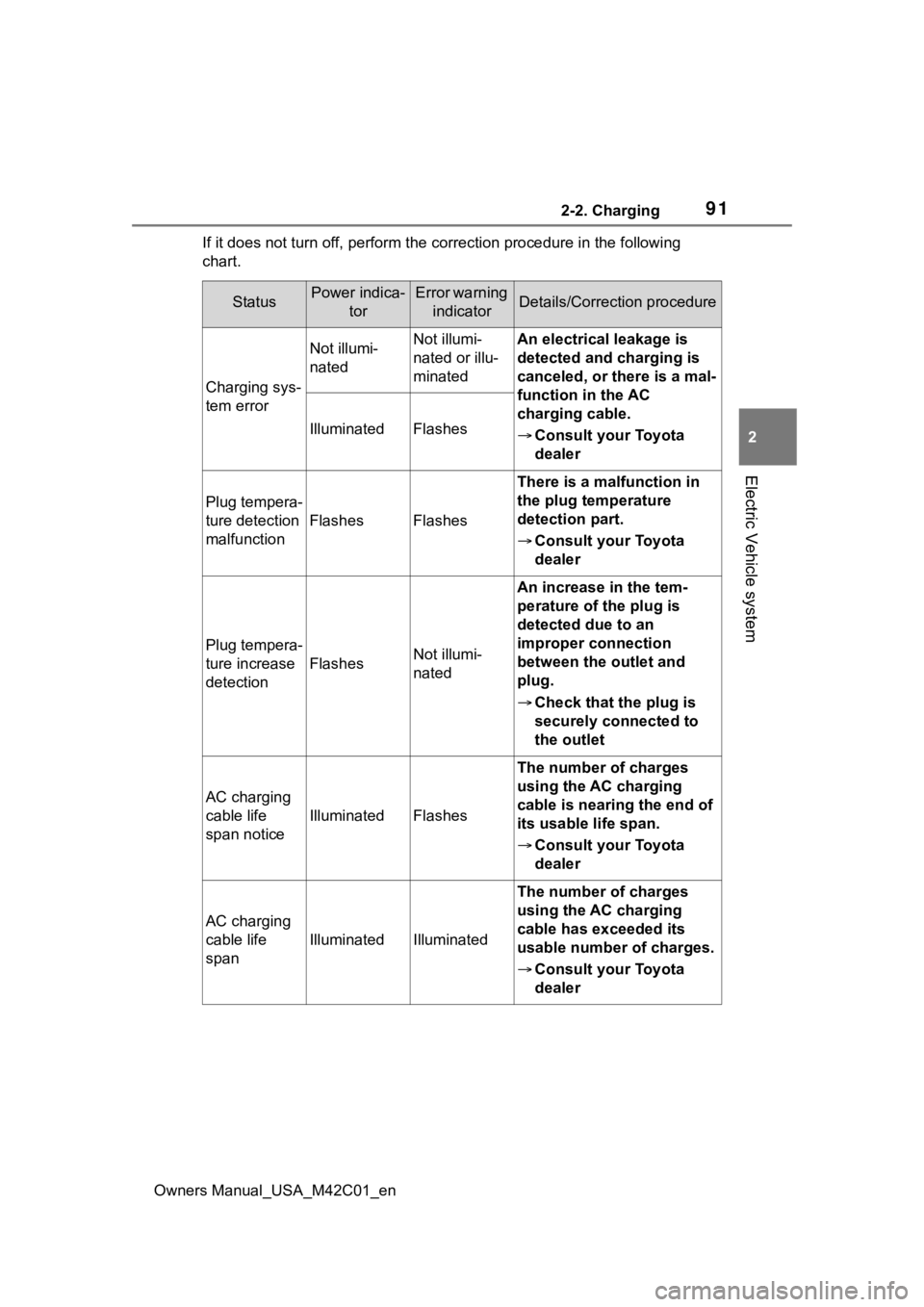
If it does not turn off, perform t he correction procedure in the following
chart.
StatusPower indica- torError warning indicatorDetails/Correction procedure
Charging sys-
tem error
Not illumi-
natedNot illumi-
nated or illu-
minatedAn electrical leakage is
detected and charging is
canceled, or there is a mal-
function in the AC
charging cable.
Consult your Toyota
dealer
IlluminatedFlashes
Plug tempera-
ture detection
malfunction
FlashesFlashes
There is a malfunction in
the plug temperature
detection part.
Consult your Toyota
dealer
Plug tempera-
ture increase
detection
FlashesNot illumi-
nated
An increase in the tem-
perature of the plug is
detected due to an
improper connection
between the outlet and
plug.
Check that the plug is
securely connected to
the outlet
AC charging
cable life
span notice
IlluminatedFlashes
The number of charges
using the AC charging
cable is nearing the end of
its usable life span.
Consult your Toyota
dealer
AC charging
cable life
span
IlluminatedIlluminated
The number of charges
using the AC charging
cable has exceeded its
usable number of charges.
Consult your Toyota
dealer