engine TOYOTA C-HR 2018 1.G Owners Manual
[x] Cancel search | Manufacturer: TOYOTA, Model Year: 2018, Model line: C-HR, Model: TOYOTA C-HR 2018 1.GPages: 516, PDF Size: 9.32 MB
Page 423 of 516
4237-2. Steps to take in an emergency
C-HR_OM_USA_OM10526U
7
When trouble arises
If you have a flat tire
●Stop the vehicle in a safe pl ace on a hard, flat surface.
● Set the parking brake.
● Shift the shift lever to P.
● Stop the engine.
● Turn on the emergency flashers. ( →P. 396)
Your vehicle is equipped with a spare tire. The flat tire can be
replaced with the spare tire.
For details about tires: →P. 353
WARNING
■If you have a flat tire
Do not continue driving with a flat tire.
Driving even a short dist ance with a flat tire can damage the tire and the
wheel beyond repair, which could result in an accident.
Before jacking up the vehicle
Page 425 of 516
4257-2. Steps to take in an emergency
7
When trouble arises
C-HR_OM_USA_OM10526U
WARNING
■Using the tire jack
Observe the following precautions.
Improper use of the tire jack may cause the vehicle to suddenly fall off
the jack, leading to death or serious injury.
●Do not use the tire jack for any purpose other than replacing tires or
installing and removing tire chains.
●Only use the tire jack that comes with this vehicle for replacing a flat
tire.
Do not use it on other vehicles, and do not use other tire jacks for
replacing tires on this vehicle.
●Do not put any part of your body under the vehicle while it is supported
by the jack.
●Do not start the engine or drive the vehicle while the vehicle is sup-
ported by the jack.
●Do not raise the vehicle while someone is inside.
●When raising the vehicle, do not put an object on or under the jack.
●Do not raise the vehicle to a height greater than that required to
replace the tire.
●Use a jack stand if it is necessary to get under the vehicle.
●When lowering the vehicle, make su re that there is no-one near the
vehicle. If there are people nearby, warn them vocally before lowering.
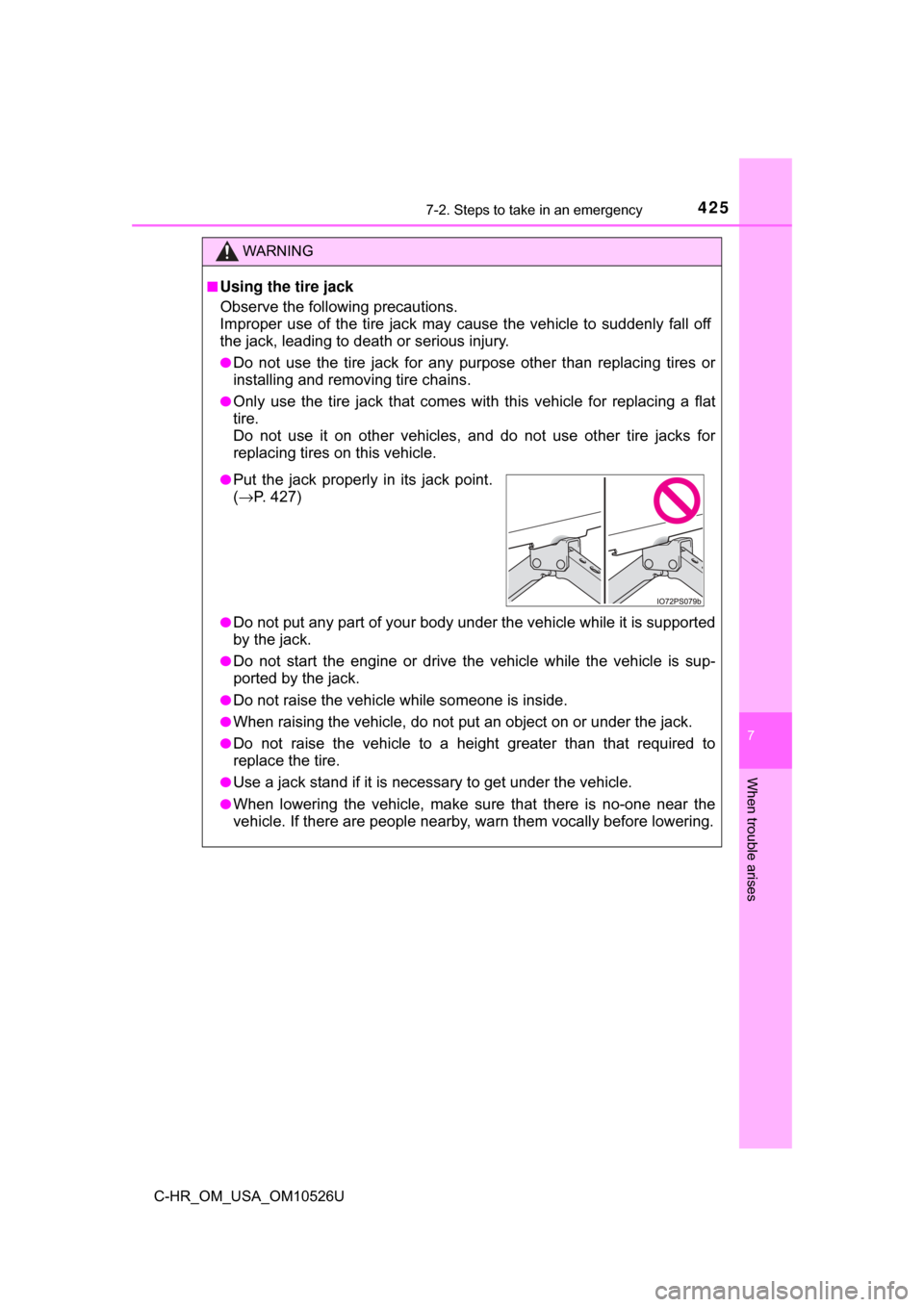
●Put the jack properly in its jack point.
(→ P. 427)
Page 432 of 516
4327-2. Steps to take in an emergency
C-HR_OM_USA_OM10526U
WARNING
■When using the compact spare tire
●Remember that the compact spare tire provided is specifically
designed for use with your vehicle. Do not use your compact spare tire
on another vehicle.
●Do not use more than one compact spare tires simultaneously.
●Replace the compact spare tire with a standard tire as soon as possi-
ble.
●Avoid sudden acceleration, abrupt steering, sudden braking and shift-
ing operations that cause sudden engine braking.
■When the compact spare tire is attached
The vehicle speed may not be correctly detected, and the following sys-
tems may not operate correctly:
■Speed limit when using the compact spare tire
Do not drive at speeds in excess of 50 mph (80 km/h) when a compact
spare tire is installed on the vehicle.
The compact spare tire is not designed for driving at high speeds. Fail-
ure to observe this precaution may lead to an accident causing death or
serious injury.
■After using the tools and jack
Before driving, make sure all the tools and jack are securely in place in
their storage location to reduce the po ssibility of personal injury during a
collision or sudden braking.
• ABS & Brake assist
• VSC
•TRAC
• EPS
• Automatic High Beam
• PCS (Pre-Collision System)
*: If equipped • LDA (Lane Departure Alert with
steering control)
• Dynamic radar cruise control with full-speed range
• BSM (Blind Spot Monitor)
*
• Rear view monitor system
Page 434 of 516
4347-2. Steps to take in an emergency
C-HR_OM_USA_OM10526U
If the engine will not start
One of the following may be the cause of the problem:
●There may not be sufficient fuel in the vehicle’s tank.
Refuel the vehicle.
● The engine may be flooded.
Try to restart the engine again following correct starting procedures.
(→ P. 162, 165)
● There may be a malfunction in the engine immobilizer system.
(→ P. 74)
One of the following may be the cause of the problem:
● The battery may be discharged. ( →P. 439)
● The battery terminal connections may be loose or corroded.
The engine starting system may be malfunctioning due to an electrical
problem such as electronic key battery depletion or a blown fuse.
However, an interim measure is available to start the engine.
( → P. 435)
If the engine will not start eve n though correct starting proce-
dures are being followed ( →P. 162, 165), consider each of the fol-
lowing points:
The engine will not start even though the starter motor operates
normally.
The starter motor turns over slowly, the interior lights and head-
lights are dim, or the horn does not sound or sounds at a low
volume.
The starter motor does not turn over (vehicles with a smart key
system)
Page 435 of 516
4357-2. Steps to take in an emergency
7
When trouble arises
C-HR_OM_USA_OM10526U
One of the following may be the cause of the problem:
●One or both of the battery terminals may be disconnected.
● The battery may be discharged. ( →P. 439)
● There may be a malfunction in th e steering lock system. (vehicles
with a smart key system)
Contact your Toyota dealer if the problem cannot be repaired, or if repair
procedures are unknown.
When the engine does not start, the following steps can be used as an
interim measure to start the engine if the engine switch is functioning
normally:
Set the parking brake.
Shift the shift lever to P.
Turn the engine switch to ACCESSORY mode.
Press and hold the engine switch for about 15 seconds while
depressing the brake pedal firmly.
Even if the engine can be started using the above steps, the system
may be malfunctioning. Have the ve hicle inspected by your Toyota
dealer.
The starter motor does not turn over, the interior lights and head-
lights do not turn on, or the horn does not sound.
Emergency start function (vehicles with a smart key system)
1
2
3
4
Page 436 of 516
4367-2. Steps to take in an emergency
C-HR_OM_USA_OM10526U
If the electronic key does not operate
properly (vehicles with a smart key system)
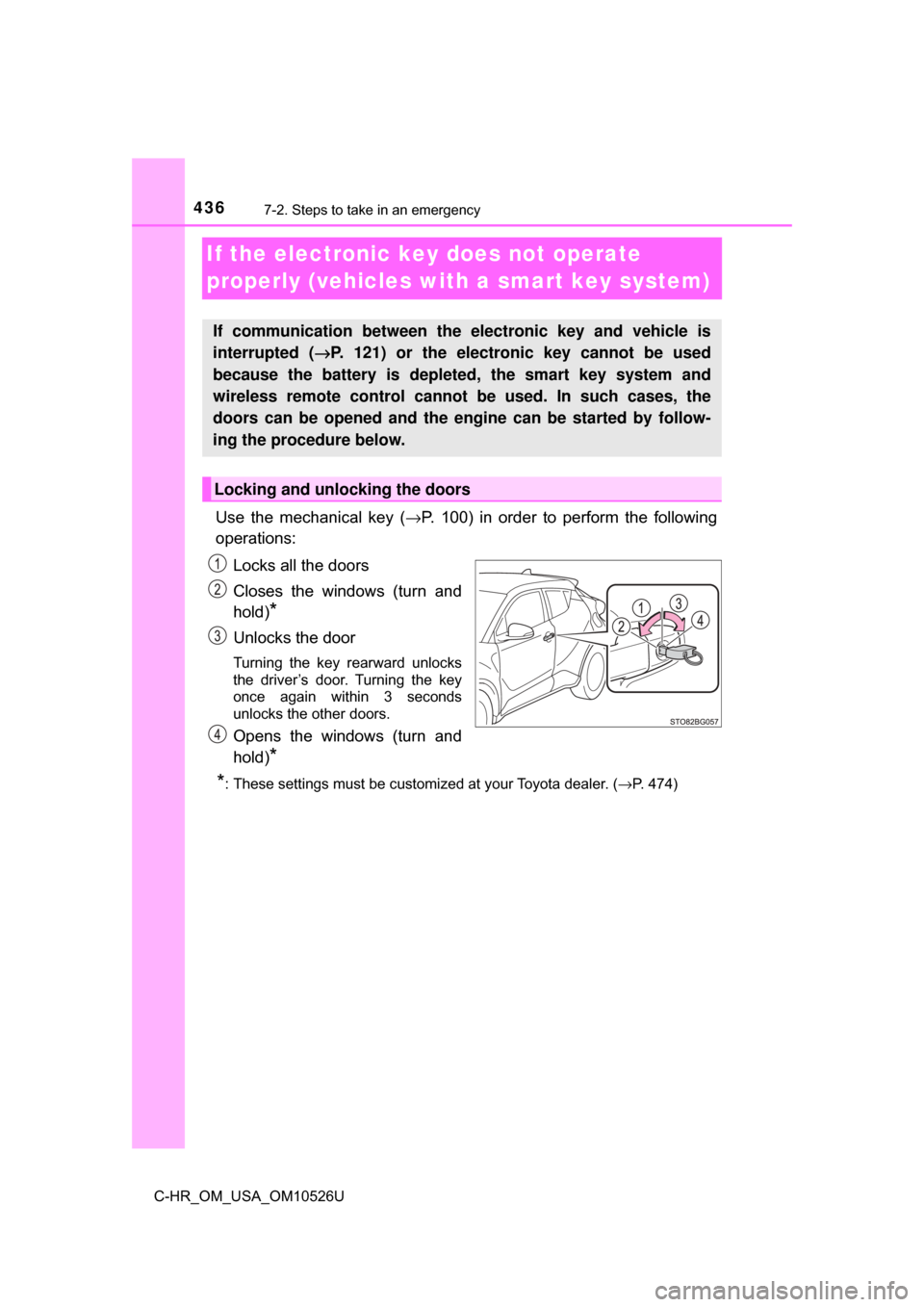
Use the mechanical key (→P. 100) in order to perform the following
operations:
Locks all the doors
Closes the windows (turn and
hold)
*
Unlocks the door
Turning the key rearward unlocks
the driver’s door. Turning the key
once again within 3 seconds
unlocks the other doors.
Opens the windows (turn and
hold)
*
*
: These settings must be customized at your Toyota dealer. ( →P. 474)
If communication between the electronic key and vehicle is
interrupted ( →P. 121) or the electronic key cannot be used
because the battery is depleted, the smart key system and
wireless remote control cannot be used. In such cases, the
doors can be opened and the engine can be started by follow-
ing the procedure below.
Locking and unlocking the doors
Page 437 of 516
4377-2. Steps to take in an emergency
7
When trouble arises
C-HR_OM_USA_OM10526U
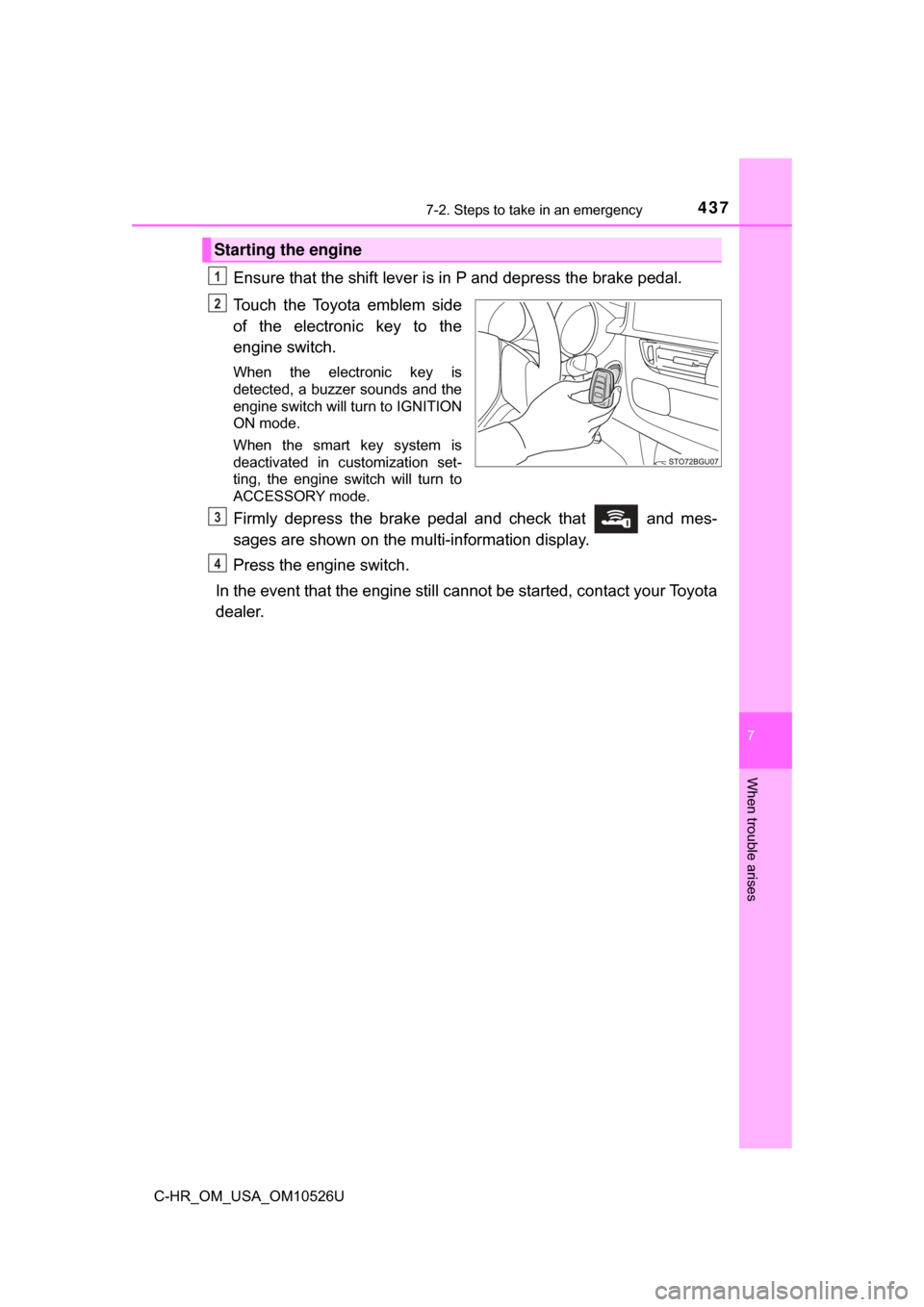
Ensure that the shift lever is in P and depress the brake pedal.
Touch the Toyota emblem side
of the electronic key to the
engine switch.
When the electronic key is
detected, a buzzer sounds and the
engine switch will turn to IGNITION
ON mode.
When the smart key system is
deactivated in customization set-
ting, the engine switch will turn to
ACCESSORY mode.
Firmly depress the brake pedal and check that and mes-
sages are shown on the multi-information display.
Press the engine switch.
In the event that the engine still ca nnot be started, contact your Toyota
dealer.
Starting the engine
1
2
3
4
Page 438 of 516

4387-2. Steps to take in an emergency
C-HR_OM_USA_OM10526U
■Stopping the engine
Set the parking brake, shift the shift lever to P and press the engine switch as
you normally do when stopping the engine.
■ Replacing the key battery
As the above procedure is a temporary measure, it is recommended that the
electronic key battery be replaced immediately when the battery is depleted.
(→P. 373)
■ Changing engine switch modes
Release the brake pedal and press the engine switch in step above. The
engine does not start and modes will be changed each time the switch is
pressed. ( →P. 166)
■ When the electronic key does not work properly
●Make sure that the smart key system and push button start has not been
deactivated in the customization setting. If it is off, turn the function on.
(Customizable features: →P. 474)
● Check if battery-saving mode is set. If it is set, cancel the function.
(→P. 120)
WARNING
■ When using the mechanical key and operating the power windows
Operate the power window after checking to make sure that there is no pos-\
sibility of any passenger having any of their body parts caught in the side
window.
Also, do not allow children to operate the mechanical key. It is possible for
children and other passengers to get caught in the power window.
3
Page 439 of 516
4397-2. Steps to take in an emergency
C-HR_OM_USA_OM10526U
7
When trouble arises
If the vehicle battery is discharged
If you have a set of jumper (or booster) cables and a second vehicle
with a 12-volt battery, you can jump start your vehicle by following the
steps below.
Open the hood. ( →P. 338)
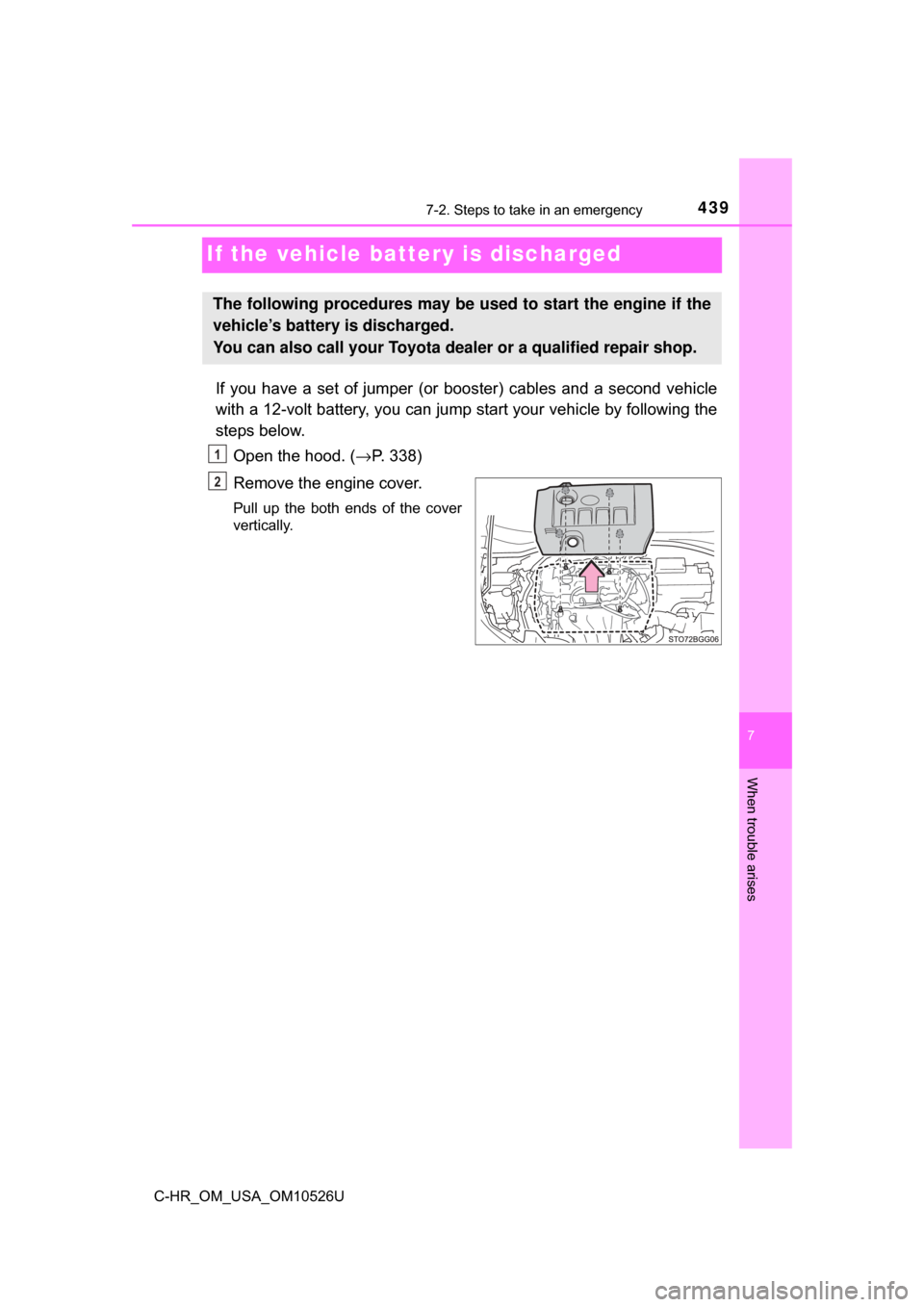
Remove the engine cover.
Pull up the both ends of the cover
vertically.
The following procedures may be used to start the engine if the
vehicle’s battery is discharged.
You can also call your Toyota de aler or a qualified repair shop.
1
2
Page 440 of 516
4407-2. Steps to take in an emergency
C-HR_OM_USA_OM10526U
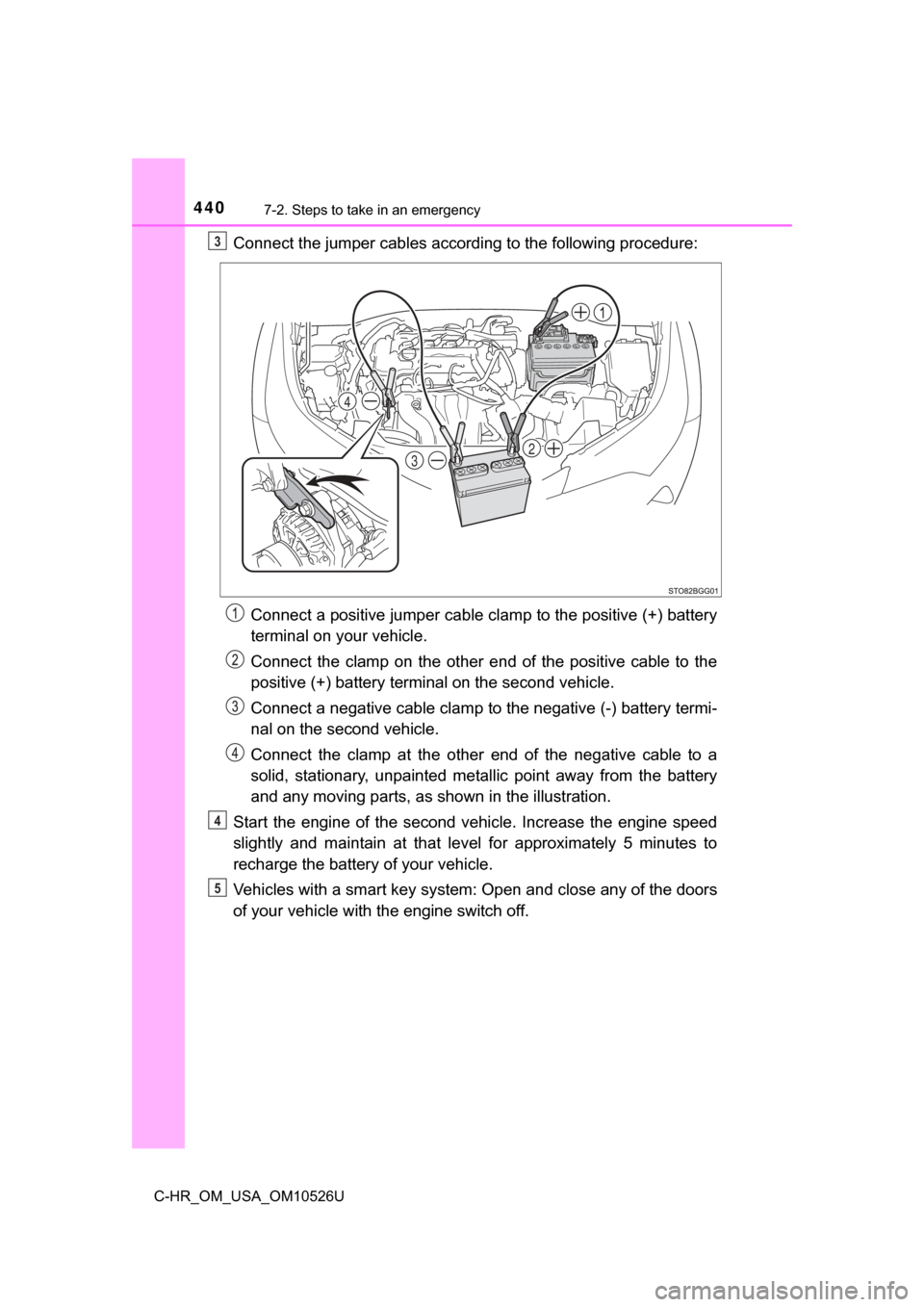
Connect the jumper cables according to the following procedure:Connect a positive jumper cable clamp to the positive (+) battery
terminal on your vehicle.
Connect the clamp on the other e nd of the positive cable to the
positive (+) battery terminal on the second vehicle.
Connect a negative cable clamp to the negative (-) battery termi-
nal on the second vehicle.
Connect the clamp at the other end of the negative cable to a
solid, stationary, unpainted metallic point away from the battery
and any moving parts, as shown in the illustration.
Start the engine of the second v ehicle. Increase the engine speed
slightly and maintain at that level for approximately 5 minutes to
recharge the batter y of your vehicle.
Vehicles with a smart key system: Open and close any of the doors
of your vehicle with the engine switch off.3
32
4
4
5