key TOYOTA C-HR 2020 Owners Manual (in English)
[x] Cancel search | Manufacturer: TOYOTA, Model Year: 2020, Model line: C-HR, Model: TOYOTA C-HR 2020Pages: 48, PDF Size: 3.81 MB
Page 3 of 48
1
OVERVIEW
FEATURES & OPERATIONS
TOYOTA SAFETY SENSE
SAFETY & EMERGENCY FEATURES
1 Visit your Toyota dealer for information on customizing this feature.2 Programmable by customer. Refer to the Owner’s Manual for instructio\
ns and more information.
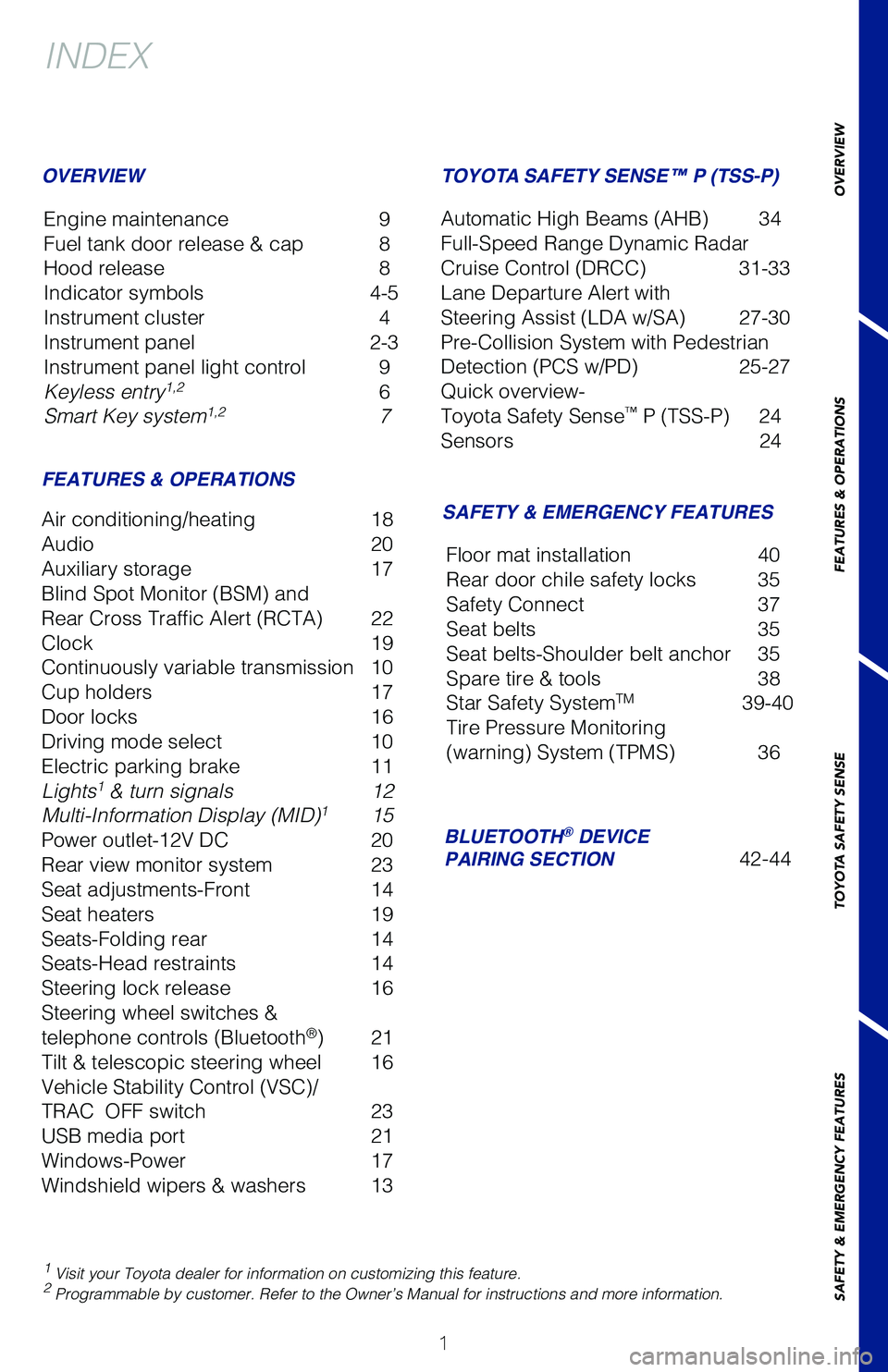
INDEX
Engine maintenance 9
Fuel tank door release & cap 8
Hood release 8
Indicator symbols 4-5
Instrument cluster 4
Instrument panel 2-3
Instrument panel light control 9
Keyless entry
1,2 6
Smart Key system1,2 7
OVERVIEW
FEATURES & OPERATIONS
Air conditioning/heating 18
Audio 20
Auxiliary storage 17
Blind Spot Monitor (BSM) and
Rear Cross Traffic Alert (RCTA) 22
Clock 19
Continuously variable transmission 10
Cup holders 17
Door locks 16
Driving mode select 10
Electric parking brake 11
Lights
1 & turn signals 12
Multi-Information Display (MID)1 15
Power outlet-12V DC 20
Rear view monitor system 23
Seat adjustments-Front 14
Seat heaters 19
Seats-Folding rear 14
Seats-Head restraints 14
Steering lock release 16
Steering wheel switches &
telephone controls (Bluetooth
®) 21
Tilt & telescopic steering wheel 16
Vehicle Stability Control (VSC)/
TRAC OFF switch 23
USB media port 21
Windows-Power 17
Windshield wipers & washers 13
SAFETY & EMERGENCY FEATURES
TOYOTA SAFETY SENSE™ P (TSS-P)
Automatic High Beams (AHB) 34
Full-Speed Range Dynamic Radar
Cruise Control (DRCC) 31-33
Lane Departure Alert with
Steering Assist (LDA w/SA) 27-30
Pre-Collision System with Pedestrian
Detection (PCS w/PD) 25-27
Quick overview-
Toyota Safety Sense
™ P (TSS-P) 24
Sensors 24
BLUETOOTH® DEVICE
PAIRING SECTION 42-44
Floor mat installation
40
Rear door chile safety locks 35
Safety Connect 37
Seat belts 35
Seat belts-Shoulder belt anchor 35
Spare tire & tools 38
Star Safety System
TM 39-40
Tire Pressure Monitoring
(warning) System (TPMS) 36
Page 7 of 48
5
OVERVIEW
FEATURES & OPERATIONS
TOYOTA SAFETY SENSE
SAFETY & EMERGENCY FEATURES
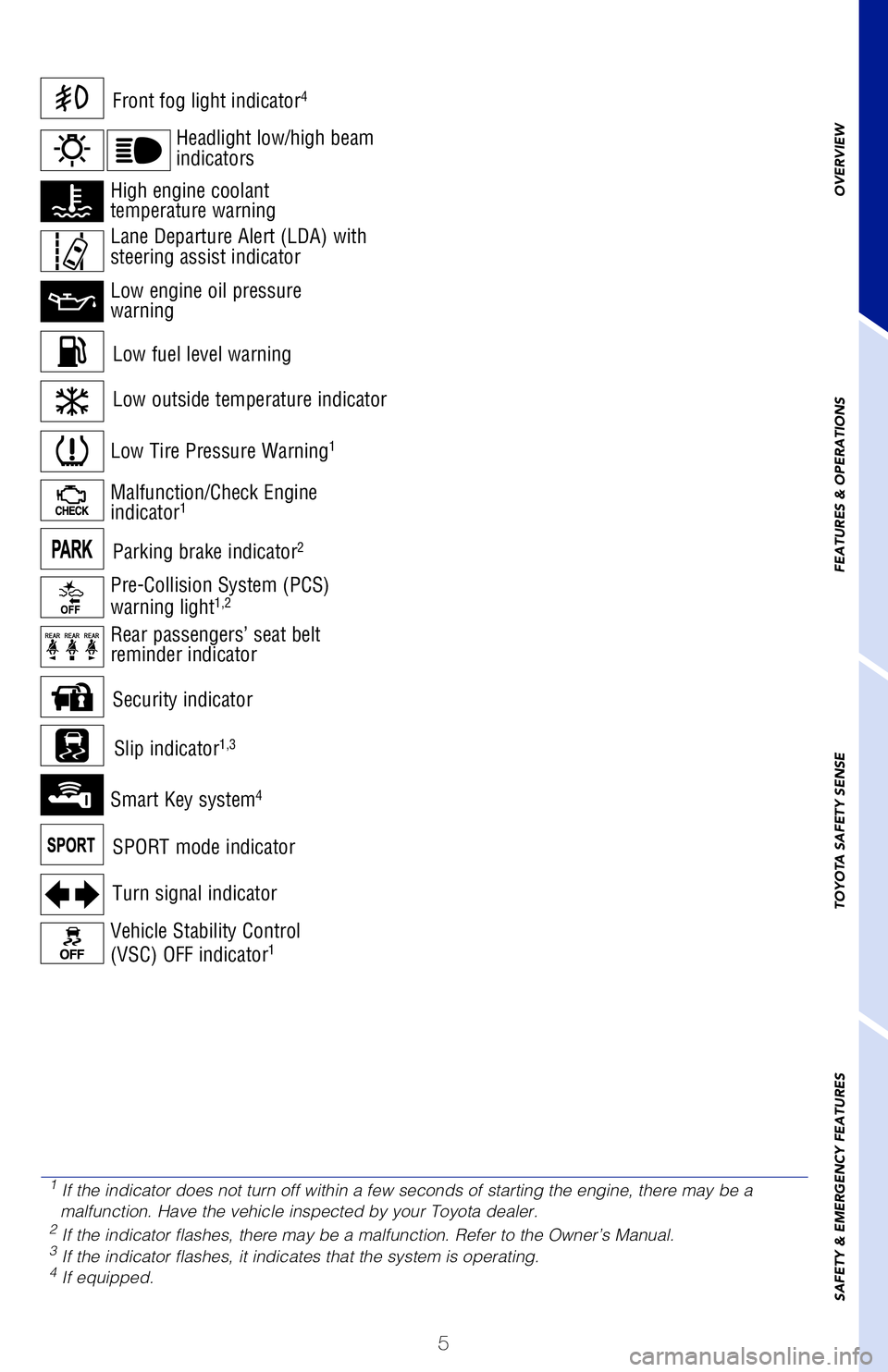
Low fuel level warning
Front fog light indicator4
Turn signal indicator
Low Tire Pressure Warning1
Vehicle Stability Control
(VSC) OFF indicator1
Malfunction/Check Engine
indicator1
Low engine oil pressure
warning
High engine coolant
temperature warning
Smart Key system4
ECO MODE indicator
SPORT mode indicator
Parking brake indicator2
Headlight low/high beam
indicators
Pre-Collision System (PCS)
warning light1,2
Rear passengers’ seat belt
reminder indicator Lane Departure Alert (LDA) with
steering assist indicator
Slip indicator1,3
Security indicator
Low outside temperature indicator
1
If the indicator does not turn off within a few seconds of starting the en\
gine, there may be a
malfunction. Have the vehicle inspected by your Toyota dealer.
2 If the indicator flashes, there may be a malfunction. Refer to the Owne\
r’s Manual.3 If the indicator flashes, it indicates that the system is operating.4 If equipped.
Page 8 of 48
6
OVERVIEW
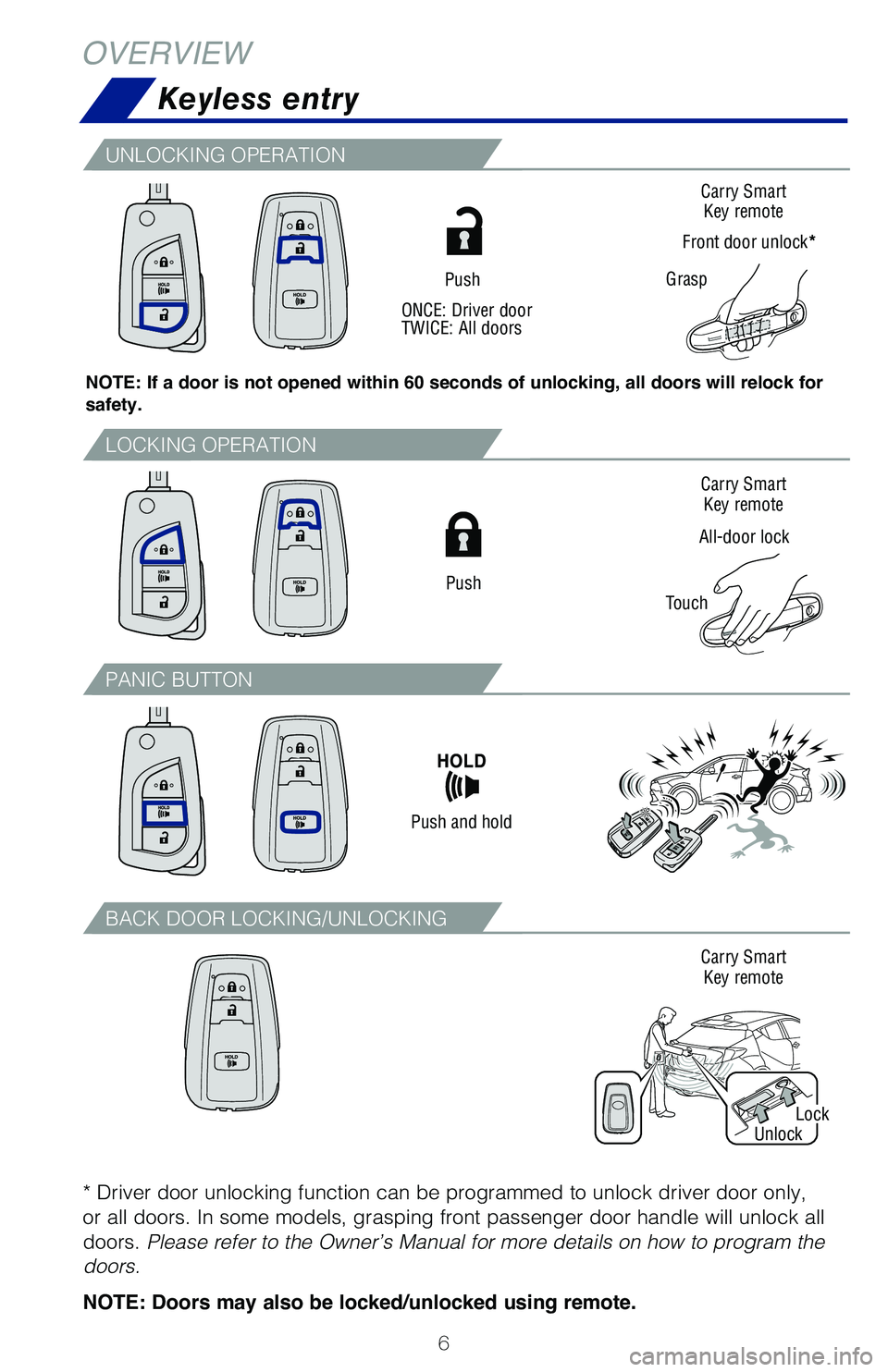
Keyless entry
Push
All-door lock
TouchCarry Smart
Key remote
Carry Smart Key remote
Carry Smart Key remote
Grasp
Front door unlock*
Push
Push and hold
ONCE: Driver door
TWICE: All doors
Lock
Unlock
NOTE: If a door is not opened within 60 seconds of unlocking, all doors will relock for
safety.
LOCKING OPERATION
PANIC BUTTON
BACK DOOR LOCKING/UNLOCKING
UNLOCKING OPERATION
* Driver door unlocking function can be programmed to unlock driver door \
only,
or all doors. In some models, grasping front passenger door handle will un\
lock all
doors.
Please refer to the Owner’s Manual for more details on how to program the
doors.
NOTE: Doors may also be locked/unlocked using remote.
Page 9 of 48
7
OVERVIEW
FEATURES & OPERATIONS
TOYOTA SAFETY SENSE
SAFETY & EMERGENCY FEATURES
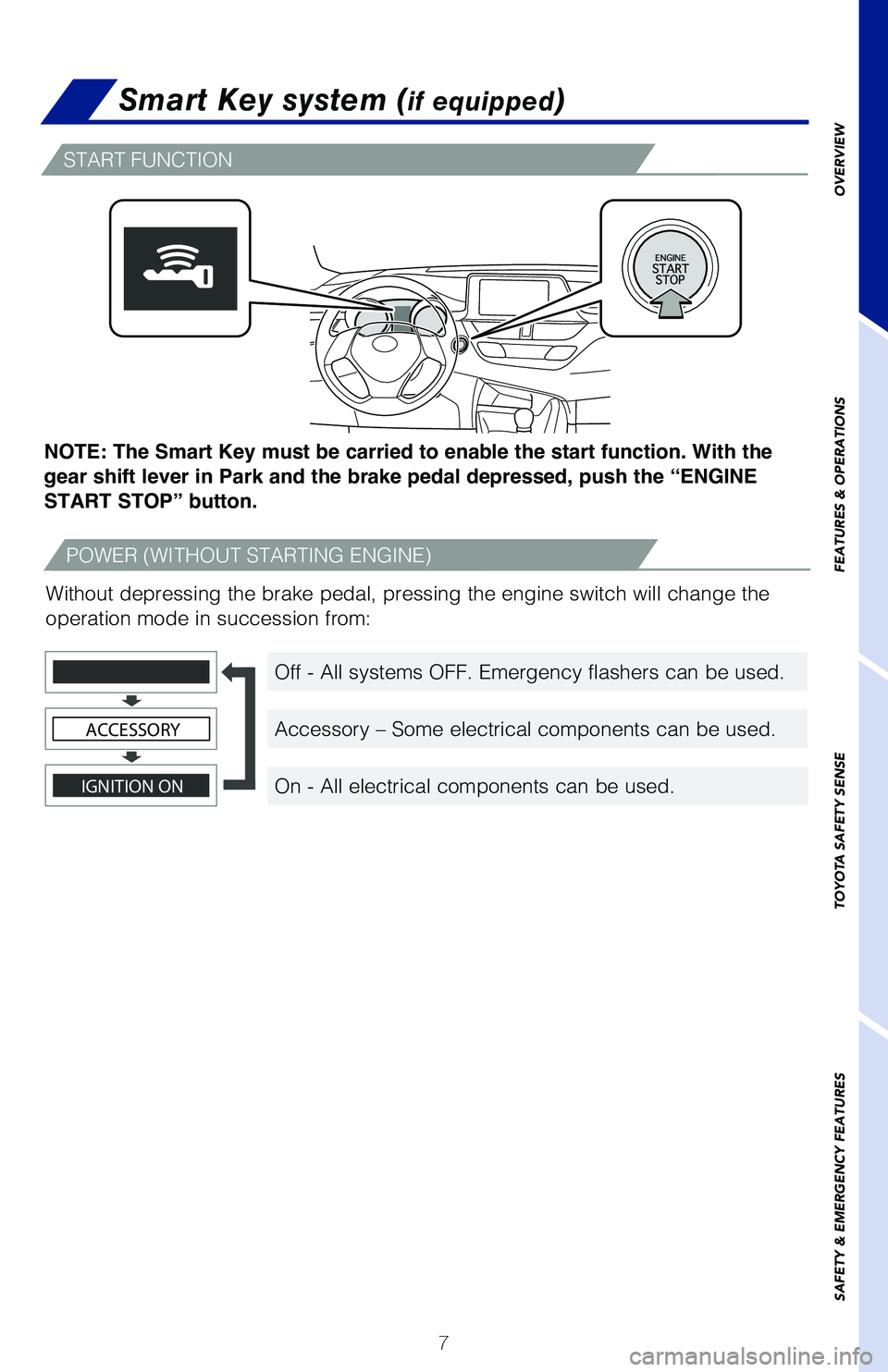
Smart Key system (if equipped)
START FUNCTION
POWER (WITHOUT STARTING ENGINE)
Off - All systems OFF. Emergency flashers can be used.
Accessory – Some electrical components can be used.
On - All electrical components can be used.
NOTE: The Smart Key must be carried to enable the start function. With the
gear shift lever in Park and the brake pedal depressed, push the “ENGINE
START STOP” button.
Without depressing the brake pedal, pressing the engine switch will change the
operation mode in succession from:
IGNITION ON
ACCESSORY
Page 12 of 48
 10
Continuously variable transmission
* The engine switch must be in the “ON” position (without Smart Ke\
y) / “IGNITION ON” mode (with Smart Key) and the brake pedal depressed to shift from P")
10
Continuously variable transmission
* The engine switch must be in the “ON” position (without Smart Ke\
y) / “IGNITION ON” mode (with Smart Key) and the brake pedal depressed to shift from Par\
k.
Shift the shift lever to “M” position from “D” position.
+: Upshifting (push and release)
-: Downshifting (pull and release)
Downshifting increases power going uphill, or provides engine braking downhill. For
best fuel economy during normal driving conditions, always drive with the sh\
ift lever
in the “D” position.
Refer to the Owner’s Manual for more details.
FEATURES & OPERATIONS
7-SPEED SPORT SEQUENTIAL SHIFTMATIC MODE (M POSITION)
M
P
R
N
D
Park*
Reverse
Neutral
Drive
“M” position
+ (M position)
- (M position)
Use the the steering wheel meter control switches to operate the MID. See
above.
Driving mode select
“NORMAL” - Suitable for city driving.
“SPORT” - Suitable for roads with many curves needing improved driving response\
.
“ECO” - Suitable for improved fuel economy and energy saving controlled air/
heating.
(1) Press steering wheel switches “
” to find and select in the MID.
(2) Press steering wheel switches “
” switches and select “Drive Mode” in the MID.
(3) Select a driving mode:
The “SPORT” and “ECO” indicators display in the Multi-Informati\
on Display (MID).
Note: Operation of the LDA system and setting adjustments continues in the same
condition regardless of Ignition cycle until changed by the driver or the system is reset.
Page 18 of 48
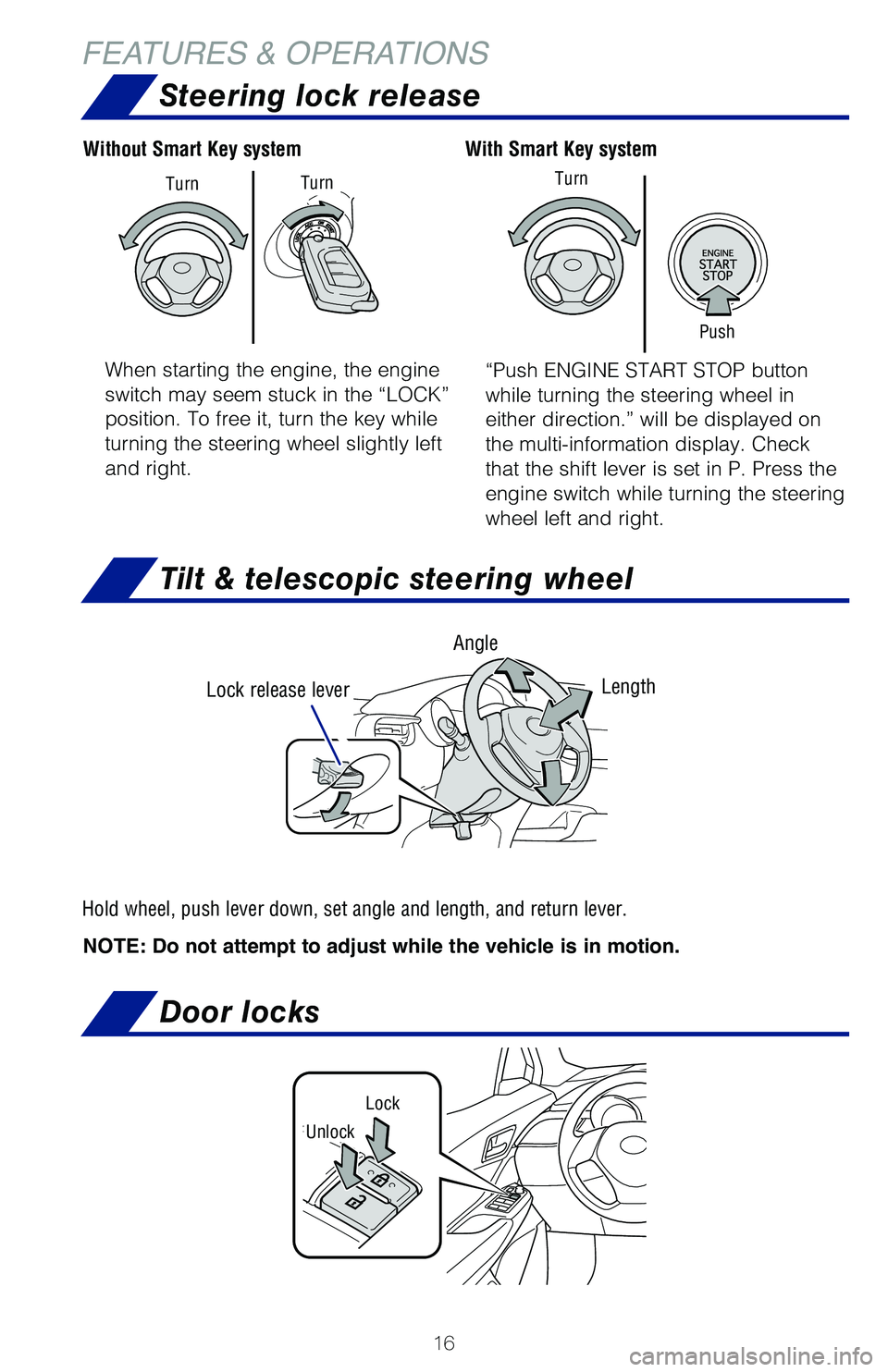
16
FEATURES & OPERATIONSTilt & telescopic steering wheel
NOTE: Do not attempt to adjust while the vehicle is in motion. Lock release lever
Angle
Length
Hold wheel, push lever down, set angle and length, and return lever.
When starting the engine, the engine
switch may seem stuck in the “LOCK”
position. To free it, turn the key while
turning the steering wheel slightly left
and right. “Push ENGINE START STOP button
while turning the steering wheel in
either direction.” will be displayed on
the multi-information display. Check
that the shift lever is set in P. Press the
engine switch while turning the steering
wheel left and right.
With Smart Key system
Without Smart Key system
Push
Turn
Turn
Turn
Steering lock release
Door locks
Lock
Unlock
Page 21 of 48
19
OVERVIEW
FEATURES & OPERATIONS
TOYOTA SAFETY SENSE
SAFETY & EMERGENCY FEATURES
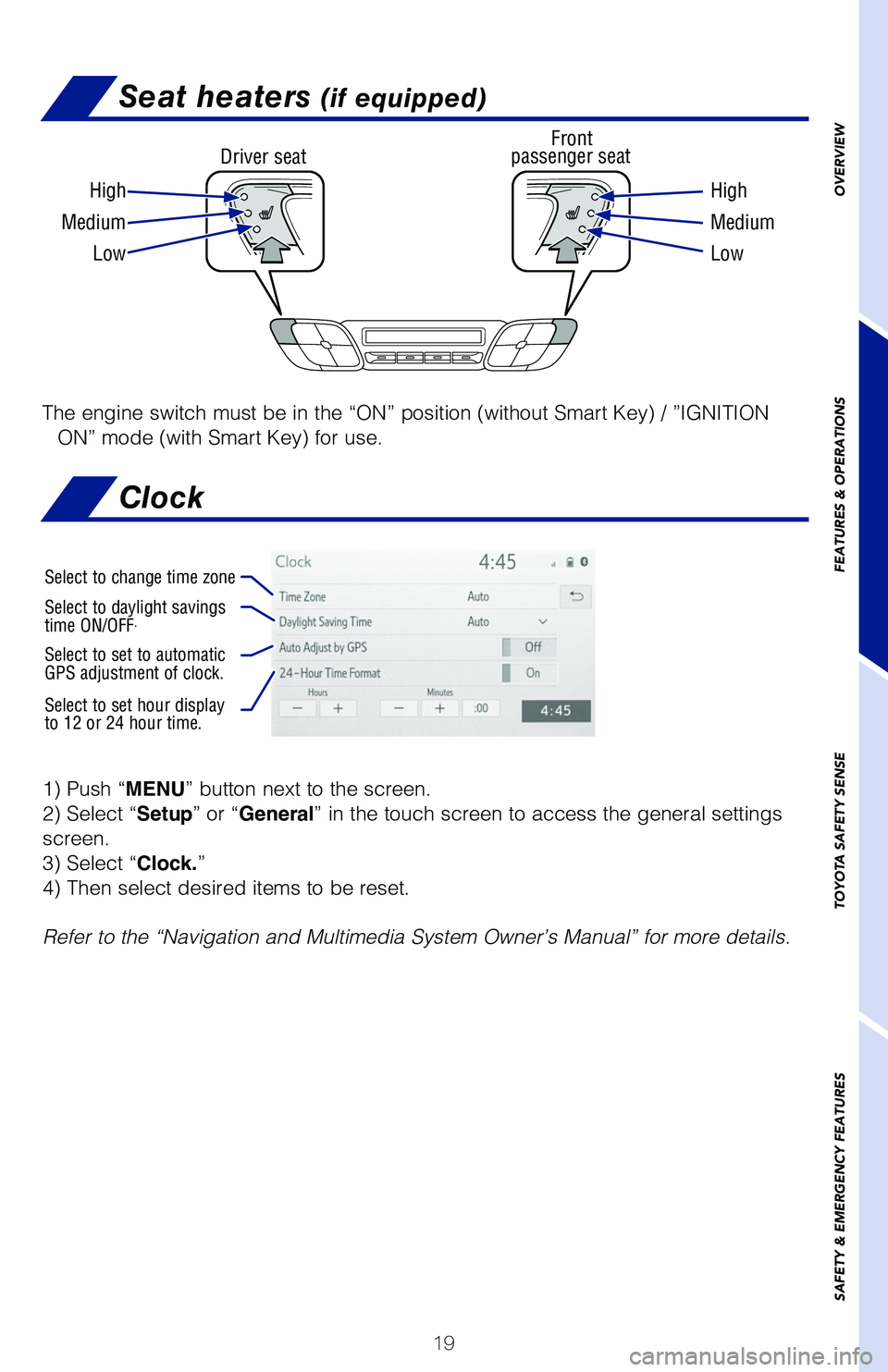
Seat heaters (if equipped)
Driver seat Front
passenger seat
High High
Medium Medium
Low Low
The engine switch must be in the “ON” position (without Smart Key) \
/ ”IGNITION
ON” mode (with Smart Key) for use.
1) Push “MENU” button next to the screen.
2) Select “Setup” or “General” in the touch screen to access the general settings
screen.
3) Select “Clock.”
4) Then select desired items to be reset.
Refer to the “Navigation and Multimedia System Owner’s Manual” for m\
ore details.
Select to change time zone
Select to daylight savings
time ON/OFF.
Select to set to automatic
GPS adjustment of clock.
Select to set hour display
to 12 or 24 hour time.
Clock
Page 22 of 48
 20
FEATURES & OPERATIONS
The engine switch must be in the “ACC” or “ON” position (witho\
ut Smart Key) /
“ACCESSORY” or ”IGNITION ON” mode (with Smart Key) for use.
(1)(2)
Pull
Pull
P")
20
FEATURES & OPERATIONS
The engine switch must be in the “ACC” or “ON” position (witho\
ut Smart Key) /
“ACCESSORY” or ”IGNITION ON” mode (with Smart Key) for use.
(1)(2)
Pull
Pull
Power outlet-12V DC
Audio
NOTE: Concentrating on the road should always be your first priority while
driving. Do not use the Audio Multimedia System if it will distract you.
Refer to the “Navigation and Multimedia System Owner’s Manual” or vi\
sit www.
toyota.com/audio-multimedia for additional resources.
Touch screen display
Access
AUDIO screen
Push to turn ON/OFF or
turn to adjust volume Turn to tune radio stations
manually or select tracks or filesAccess Bluetooth
hands-free
system
Seek station/
track/file
select
Access
HOME screen
Access
MENU screen
Access
Toyota apps
screen
Access
MAP screen