battery TOYOTA C-HR 2020 (in English) User Guide
[x] Cancel search | Manufacturer: TOYOTA, Model Year: 2020, Model line: C-HR, Model: TOYOTA C-HR 2020Pages: 536, PDF Size: 11.99 MB
Page 180 of 536

1804-2. Driving procedures
C-HR_OM_USA_OM10634U
WARNING
■When starting the engine
Always start the engine while sitting in the driver’s seat. Do not depress the
accelerator pedal while starting the engine under any circumsta nces.
Doing so may cause an accident resulting in death or serious in jury.
■ Caution when driving
Do not turn the engine switch to the “LOCK” position while driving. If, in an
emergency, you must turn the engine off while the vehicle is mo ving, turn
the engine switch only to the “ACC” position to stop the engine. An accident
may result if the engine is stopped while driving. ( P. 409)
NOTICE
■To prevent battery discharge
Do not leave the engine switch in the “ACC” or “ON” position fo r long peri-
ods of time without the engine running.
■ When starting the engine
● Do not crank the engine for more than 30 seconds at a time. This may
overheat the starter and wiring system.
● Do not race a cold engine.
● If the engine becomes difficult to start or stalls frequently, have your vehi-
cle checked by your Toyota dealer immediately.
Page 184 of 536
1844-2. Driving procedures
C-HR_OM_USA_OM10634U■
Auto power off function
If the vehicle is left in ACCESSORY mode for more than 20 minut es or IGNI-
TION ON mode (the engine is not running) for more than an hour with the
shift lever in P, the engine switch will automatically turn off .
However, this function cannot entirely prevent battery discharge. Do not leave
the vehicle with the engine switch in ACCESSORY or IGNITION ON mode for
long periods of time when the engine is not running.
■ Electronic key battery depletion
P. 114
■ Conditions affecting operation
P. 134
■ Notes for the entry function
P. 135
■ If the engine does not start
●The engine immobilizer system may not have been deactivated. ( P. 81)
Contact your Toyota dealer.
● Check that the shift lever is securely set in P. The engine may not start if the
shift lever is displaced out of P.
■ Steering lock
After turning the engine switch off and opening and closing the doors, the
steering wheel will be locked due to the steering lock function. Operating the
engine switch again automatically cancels the steering lock.
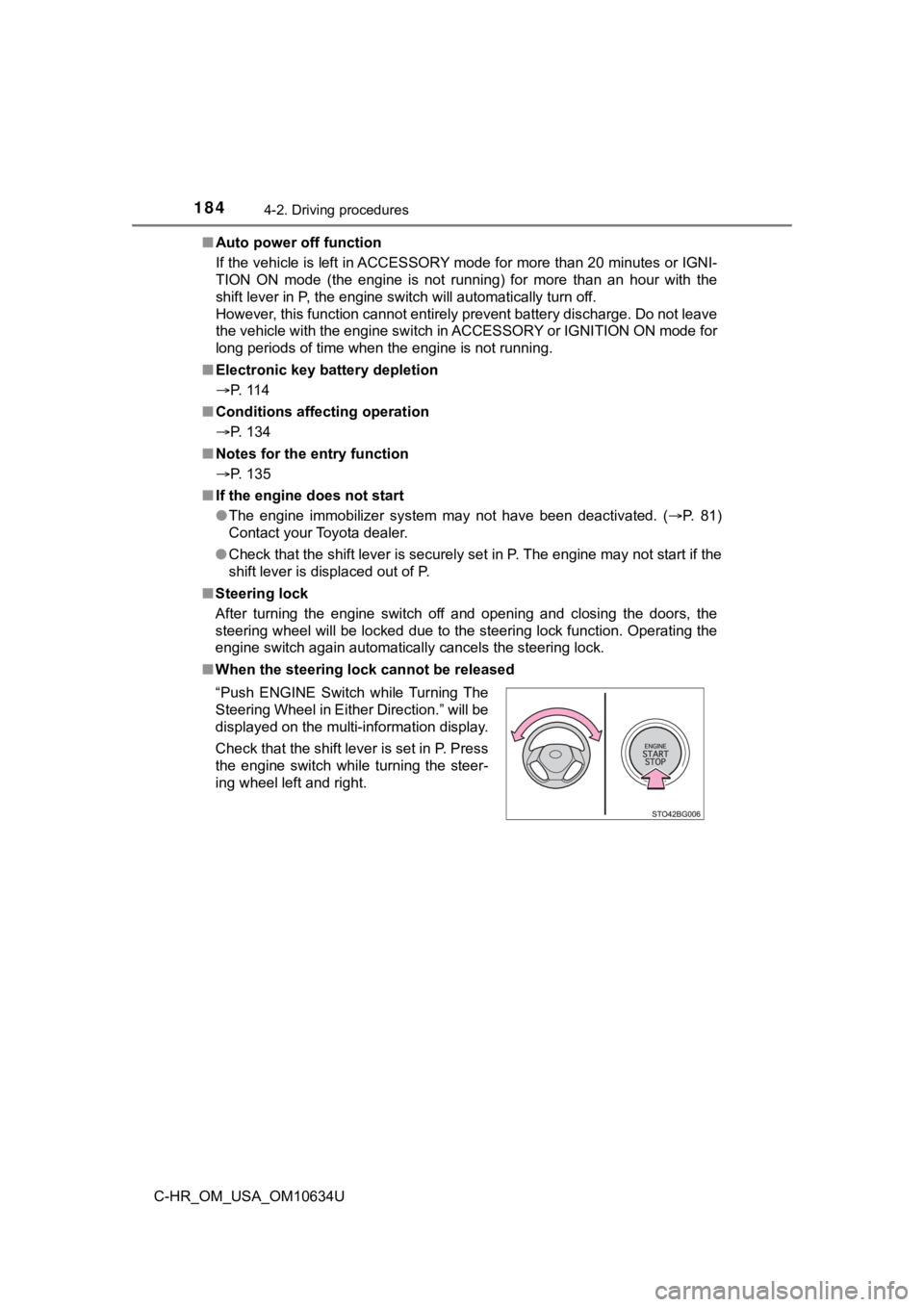
■ When the steering lock cannot be released
“Push ENGINE Switch while Turning The
Steering Wheel in Either Direction.” will be
displayed on the multi-information display.
Check that the shift lever is set in P. Press
the engine switch while turning the steer-
ing wheel left and right.
Page 185 of 536

1854-2. Driving procedures
4
Driving
C-HR_OM_USA_OM10634U■
Steering lock motor overheating prevention
To prevent the steering lock motor from overheating, the motor may be sus-
pended if the engine is turned on and off repeatedly in a short period of time.
In this case, refrain from operating the engine. After about 10 seconds, the
steering lock motor will resume functioning.
■ When the “Smart Key System Malfu nction. See Owner’s Manual.” is dis-
played on the multi-information display
The system may be malfunctioning. Have the vehicle inspected by your
Toyota dealer immediately.
■ If the electronic key battery is depleted
P. 383
■ Operation of the engine switch
●If the switch is not pressed shortly and firmly, the engine swi tch mode may
not change or the engine may not start.
● If attempting to restart the engine immediately after turning t he engine
switch off, the engine may not start in some cases. After turni ng the engine
switch off, please wait a few seconds before restarting the eng ine.
■ If the smart key system has been d eactivated in a customized setting
P. 449
WARNING
■ When starting the engine
Always start the engine while sitting in the driver’s seat. Do not depress the
accelerator pedal while starting the engine under any circumsta nces.
Doing so may cause an accident resulting in death or serious in jury.
■ Caution while driving
If engine failure occurs while the vehicle is moving, do not lo ck or open the
doors until the vehicle reaches a safe and complete stop. Activ ation of the
steering lock in this circumstance may lead to an accident, res ulting in
death or serious injury.
Page 187 of 536
1874-2. Driving procedures
4
Driving
C-HR_OM_USA_OM10634U
NOTICE
■To prevent battery discharge
● Do not leave the engine switch in ACCESSORY or IGNITION ON mode
for long periods of time without the engine running.
● If “ACCESSORY” or “IGNITION ON” is displayed on the multi-infor mation
display, the engine switch is not off. When exiting the vehicle , always
check that the engine switch is off.
● Do not stop the engine when the shift lever is in a position ot her than P. If
the engine is stopped in another shift lever position, the engi ne switch will
not be turned off but instead be turned to ACCESSORY mode. If t he vehi-
cle is left in ACCESSORY mode, battery discharge may occur.
■ When starting the engine
● Do not race a cold engine.
● If the engine becomes difficult to start or stalls frequently, have your vehi-
cle checked by your Toyota dealer immediately.
■ Symptoms indicating a malf unction with the engine switch
If the engine switch seems to be operating somewhat differently than usual,
such as the switch sticking slightly, there may be a malfunctio n. Contact
your Toyota dealer immediately.
Page 206 of 536
2064-3. Operating the lights and wipers
C-HR_OM_USA_OM10634U■
Battery-saving function
In the following conditions, the headlights and the other remai ning lights will
go off automatically after 20 minutes in order to prevent the v ehicle battery
from being discharged:
● The headlights and/or tail lights are on.
● Vehicles without a smart key system: The engine switch is turne d to the
“ACC” position or turned off.
Vehicles with a smart key system: The engine switch is turned t o ACCES-
SORY mode or turned off.
● The light switch is in or .
This function will be canceled in any of the following situatio ns:
● Vehicles without a smart key system: The engine switch is turne d to the
“ON” position.
Vehicles with a smart key system: The engine switch is turned t o IGNITION
ON.
● When the light switch is operated.
● When the door is opened or closed.
■ If “Headlight System Malfunction. Visit Your Dealer.” is displayed on the
multi-information display
The system may be malfunctioning. Have the vehicle inspected by your
Toyota dealer.
■ Customization
Settings (e.g. light sensor sensitivity) can be changed.
(Customizable features: P. 495)
NOTICE
■To prevent battery discharge
Do not leave the lights on longer than necessary when the engin e is not
running.
Page 234 of 536

2344-5. Using the driving support systems
C-HR_OM_USA_OM10634U
■Operational conditions
The pre-collision system is enabled and the system determines that the pos-
sibility of a frontal collision with a vehicle or pedestrian is high.
Each function is operational at the following speeds:
● Pre-collision warning:
• Vehicle speed is between approximately 7 and 110 mph (10 and 18 0 km/h).
(For detecting a pedestrian, vehicle speed is between approxima tely 7 and
50 mph [10 and 80 km/h].)
• The relative speed between your vehicle and the vehicle or ped estrian
ahead is approximately 7 mph (10 km/h) or more.
● Pre-collision brake assist:
• Vehicle speed is between approximately 20 and 110 mph (30 and
180 km/h). (For detecting a pedestrian, vehicle speed is between approx-
imately 20 and 50 mph [30 and 80 km/h].)
• The relative speed between your vehicle and the vehicle or ped estrian
ahead is approximately 20 mph (30 km/h) or more.
● Pre-collision braking:
• Vehicle speed is between approximately 7 and 110 mph (10 and 18 0 km/h).
(For detecting a pedestrian, vehicle speed is between approxima tely 7 and
50 mph [10 and 80 km/h].)
• The relative speed between your vehicle and the vehicle or ped estrian
ahead is approximately 7 mph (10 km/h) or more.
The system may not operate in the following situations:
● If a battery terminal has been disconnected and reconnected and then the
vehicle has not been driven for a certain amount of time
● If the shift lever is in R
● If VSC is disabled (only the pre-collision warning function wil l be opera-
tional)
Page 292 of 536
2924-6. Driving tips
C-HR_OM_USA_OM10634U
Winter driving tips
●Use fluids that are appropriate t o the prevailing outside tempera-
tures. • Engine oil
• Engine coolant
• Washer fluid
● Have a service technician inspec t the condition of the battery.
● Have the vehicle fitted with four snow tires or purchase a set of tire
chains for the front tires
*.
Ensure that all tires are the same size and brand, and that chains match
the size of the tires.
*: Tire chains cannot be mounted on 18-inch tires.
Perform the following according to the driving conditions:
● Do not try to forcibly open a window or move a wiper that is fr ozen.
Pour warm water over the frozen area to melt the ice. Wipe away
the water immediately to p revent it from freezing.
● To ensure proper operation of the climate control system fan,
remove any snow that has accumulated on the air inlet vents in
front of the windshield.
● Check for and remove any excess ic e or snow that may have accu-
mulated on the exterior lights, vehicle’s roof, chassis, around the
tires or on the brakes.
● Remove any snow or mud from the bottom of your shoes before
getting in the vehicle.
Carry out the necessary preparations and inspections before
driving the vehicle in winter. Always drive the vehicle in a ma n-
ner appropriate to the prevailing weather conditions.
Preparation for winter
Before driving the vehicle
Page 305 of 536
3055-1. Using the air conditioning system and defogger
5
Interior features
C-HR_OM_USA_OM10634U
WARNING
■To prevent the windshield from fogging up
● Do not use during cool air operation in extremely humid weathe r.
The difference between the temperature of the outside air and t hat of the
windshield can cause the outer surface of the windshield to fog up, block-
ing your vision.
■ To prevent burns
● Do not touch the rear view mirror surfaces when the outside rear view mir-
ror defoggers are on.
● Do not touch the glass at the lower part of the windshield or t o the side of
the front pillars when the windshield wiper de-icer is on.
NOTICE
■ To prevent battery discharge
Do not leave the air conditioning system on longer than necessa ry when the
engine is stopped.
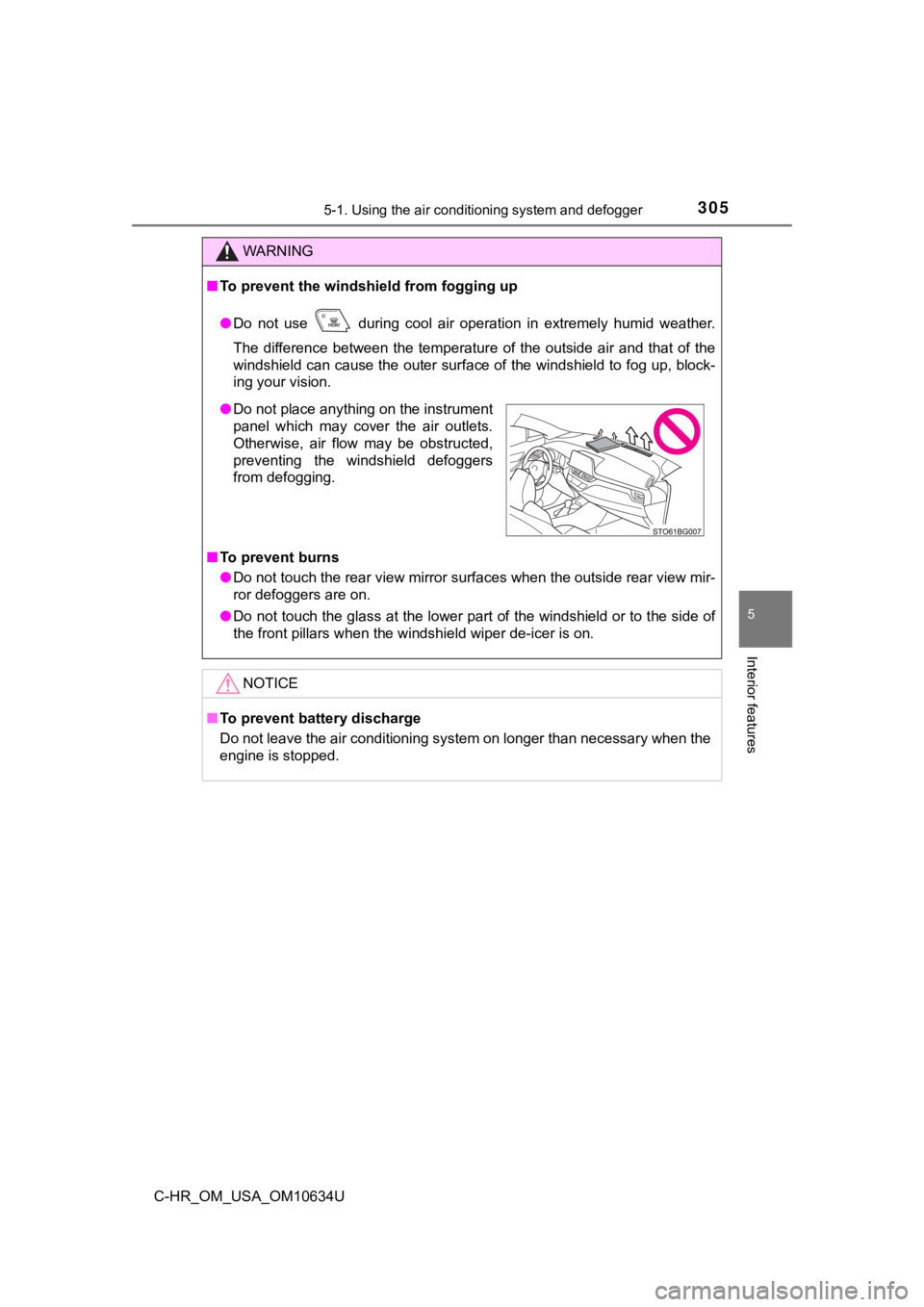
● Do not place anything on the instrument
panel which may cover the air outlets.
Otherwise, air flow may be obstructed,
preventing the windshield defoggers
from defogging.
Page 306 of 536
3065-1. Using the air conditioning system and defogger
C-HR_OM_USA_OM10634U
Heated steering wheel/seat heaters
: If equipped
Seat heaters heat the front seats.
WARNING
●Care should be taken to prevent injury if anyone in the following categories
comes in contact with the steering wheel and seats when the hea ter is on:
• Babies, small children, the elderly, the sick and the physical ly chal-
lenged
• Persons with sensitive skin
• Persons who are fatigued
• Persons who have taken alcohol or drugs that induce sleep (sle eping
drugs, cold remedies, etc.)
● Observe the following precautions to prevent minor burns or ove rheating:
• Do not cover the seat with a blanket or cushion when using the seat
heater.
• Do not use seat heater more than necessary.
NOTICE
● Do not put heavy objects that have an uneven surface on the sea t and do
not stick sharp objects (needles, nails, etc.) into the seat.
● To prevent battery discharge, do not use the functions when the engine is
not running.
Page 310 of 536
3105-2. Using the interior lights
C-HR_OM_USA_OM10634U
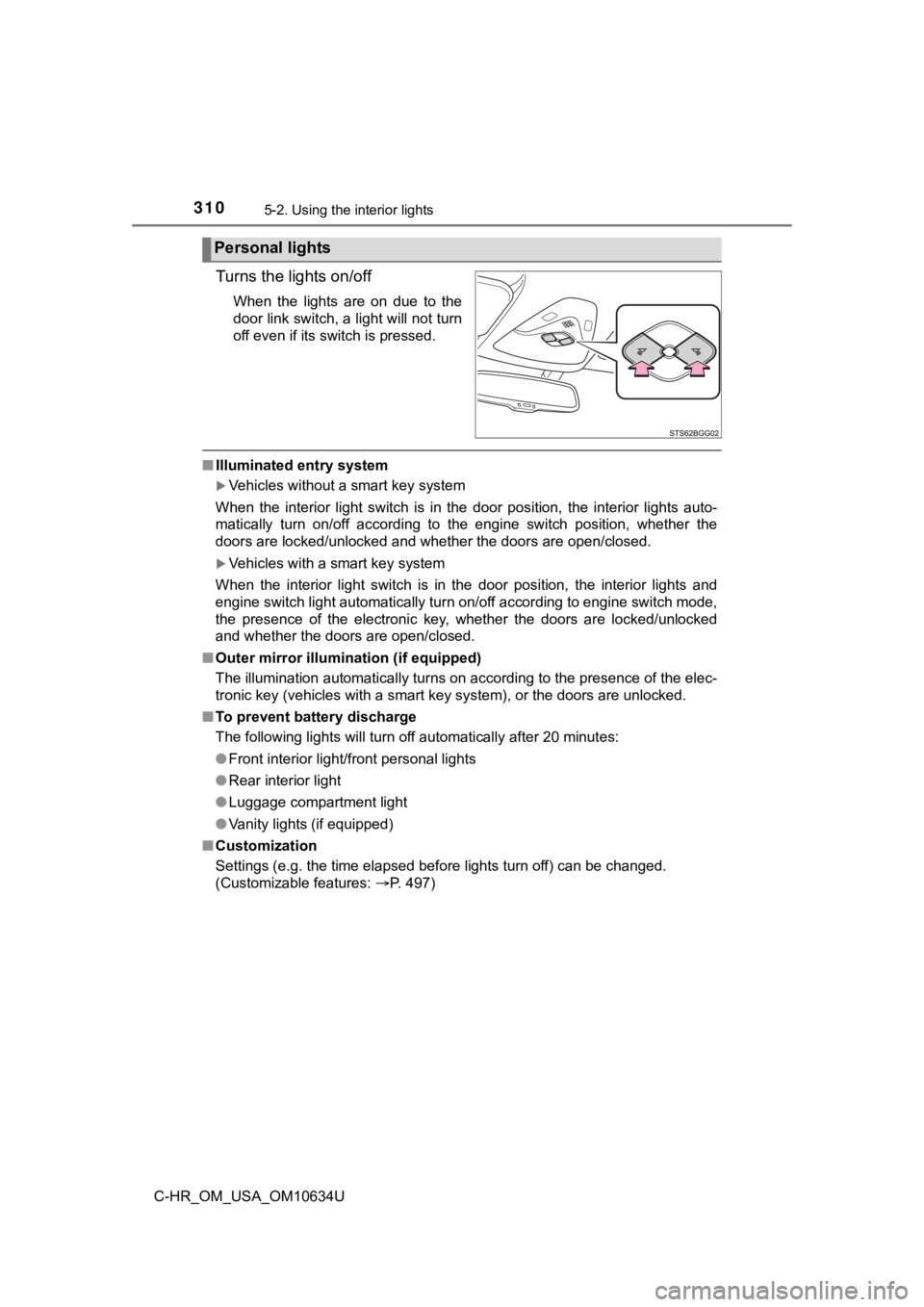
Turns the lights on/off
When the lights are on due to the
door link switch, a light will not turn
off even if its switch is pressed.
■Illuminated entry system
Vehicles without a smart key system
When the interior light switch is in the door position, the int erior lights auto-
matically turn on/off according to the engine switch position, whether the
doors are locked/unlocked and whether the doors are open/closed .
Vehicles with a smart key system
When the interior light switch is in the door position, the int erior lights and
engine switch light automatically turn on/off according to engine switch mode,
the presence of the electronic key, whether the doors are locke d/unlocked
and whether the doors are open/closed.
■ Outer mirror illumination (if equipped)
The illumination automatically turns on according to the presen ce of the elec-
tronic key (vehicles with a smart key system), or the doors are unlocked.
■ To prevent battery discharge
The following lights will turn off automatically after 20 minut es:
● Front interior light/front personal lights
● Rear interior light
● Luggage compartment light
● Vanity lights (if equipped)
■ Customization
Settings (e.g. the time elapsed before lights turn off) can be changed.
(Customizable features: P. 497)
Personal lights