remote control TOYOTA C-HR 2020 (in English) Owner's Manual
[x] Cancel search | Manufacturer: TOYOTA, Model Year: 2020, Model line: C-HR, Model: TOYOTA C-HR 2020Pages: 536, PDF Size: 11.99 MB
Page 325 of 536
325
6Maintenance and care
C-HR_OM_USA_OM10634U6-1. Maintenance and care
Cleaning and protecting the vehicle exterior .......... 326
Cleaning and protecting the vehicle interior ........... 330 6-2. Maintenance
Maintenance requirements ................... 333
General maintenance........ 336
Emission inspection and maintenance (I/M)
programs......................... 340
6-3. Do-it-yourself maintenance
Do-it-yourself service precautions ..................... 341
Hood ................................. 344
Positioning a floor jack ...... 346
Engine compartment ......... 347
Tires .................................. 362
Tire inflation pressure ....... 372
Wheels .............................. 376
Air conditioning filter.......... 379
Wireless remote control/electronic key
battery ............................. 383
Checking and replacing fuses ............................... 387
Headlight aim (vehicles with front fog lights) ......... 391
Light bulbs......................... 393
Page 357 of 536
3576-3. Do-it-yourself maintenance
6
Maintenance and care
C-HR_OM_USA_OM10634U
■Before recharging
When recharging, the battery produces hydrogen gas which is flammable and
explosive. Therefore, observe the following before recharging:
●If recharging with the battery installed on the vehicle, be sur e to disconnect
the ground cable.
● Make sure the power switch on the charger is off when connectin g and dis-
connecting the charger cables to the battery.
■ After recharging/reconnecting the battery (vehicles with a smar t key sys-
tem)
● The engine may not start. Follow the procedure below to initial ize the sys-
tem.
Shift the shift lever to P.
Open and close any of the doors.
Restart the engine.
● Unlocking the doors using the smart key system may not be possi ble imme-
diately after reconnecting the battery. If this happens, use the wireless
remote control or the mechanical key to lock/unlock the doors.
● Start the engine with the engine switch in ACCESSORY mode. The engine
may not start with the engine switch turned off. However, the e ngine will
operate normally from the second attempt.
● The engine switch mode is recorded by the vehicle. If the batte ry is recon-
nected, the vehicle will return the engine switch mode to the s tatus it was in
before the battery was disconnected. Make sure to turn off the engine switch
before disconnecting the battery. Take extra care when connecti ng the bat-
tery if the engine switch mode prior to discharge is unknown.
If the system will not start even after multiple attempts at al l methods above,
contact your Toyota dealer.
1
2
3
Page 383 of 536
3836-3. Do-it-yourself maintenance
6
Maintenance and care
C-HR_OM_USA_OM10634U
Wireless remote control/electronic key bat-
ter y
●Flathead screwdriver
● Small flathead screwdriver
● Lithium battery CR2032
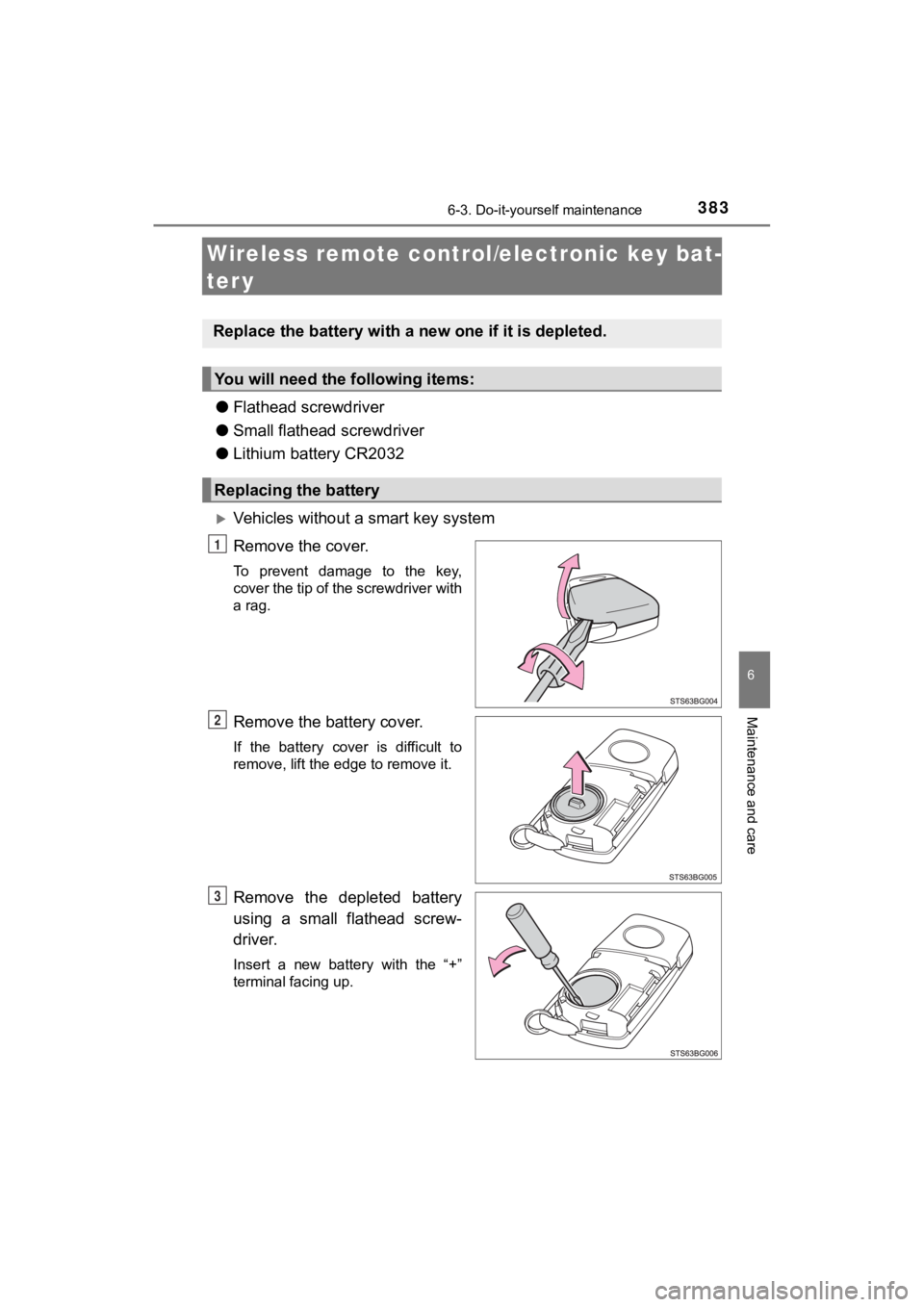
Vehicles without a smart key system
Remove the cover.
To prevent damage to the key,
cover the tip of the screwdriver with
a rag.
Remove the battery cover.
If the battery cover is difficult to
remove, lift the edge to remove it.
Remove the depleted battery
using a small flathead screw-
driver.
Insert a new battery with the “+”
terminal facing up.
Replace the battery with a n ew one if it is depleted.
You will need the following items:
Replacing the battery
1
2
3
Page 385 of 536
3856-3. Do-it-yourself maintenance
6
Maintenance and care
C-HR_OM_USA_OM10634U
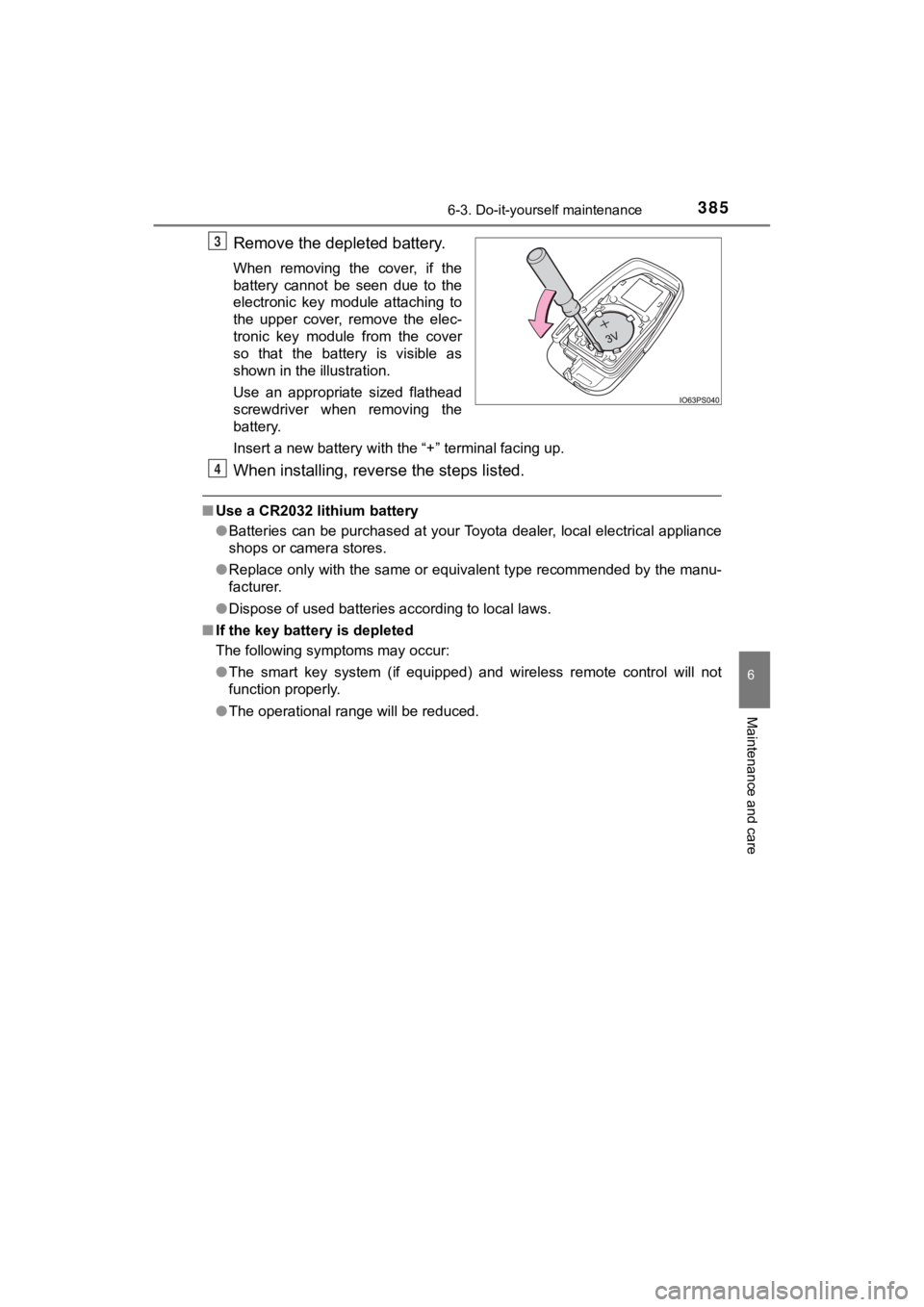
Remove the depleted battery.
When removing the cover, if the
battery cannot be seen due to the
electronic key module attaching to
the upper cover, remove the elec-
tronic key module from the cover
so that the battery is visible as
shown in the illustration.
Use an appropriate sized flathead
screwdriver when removing the
battery.
Insert a new battery with the “+” terminal facing up.
When installing, reverse the steps listed.
■Use a CR2032 lithium battery
●Batteries can be purchased at your Toyota dealer, local electri cal appliance
shops or camera stores.
● Replace only with the same or equivalent type recommended by the manu-
facturer.
● Dispose of used batteries according to local laws.
■ If the key battery is depleted
The following symptoms may occur:
●The smart key system (if equipped) and wireless remote control will not
function properly.
● The operational range will be reduced.
3
4
Page 449 of 536
4497-2. Steps to take in an emergency
C-HR_OM_USA_OM10634U
7
When trouble arises
If the electronic key does not operate
properly (vehicles with a smar t key system)
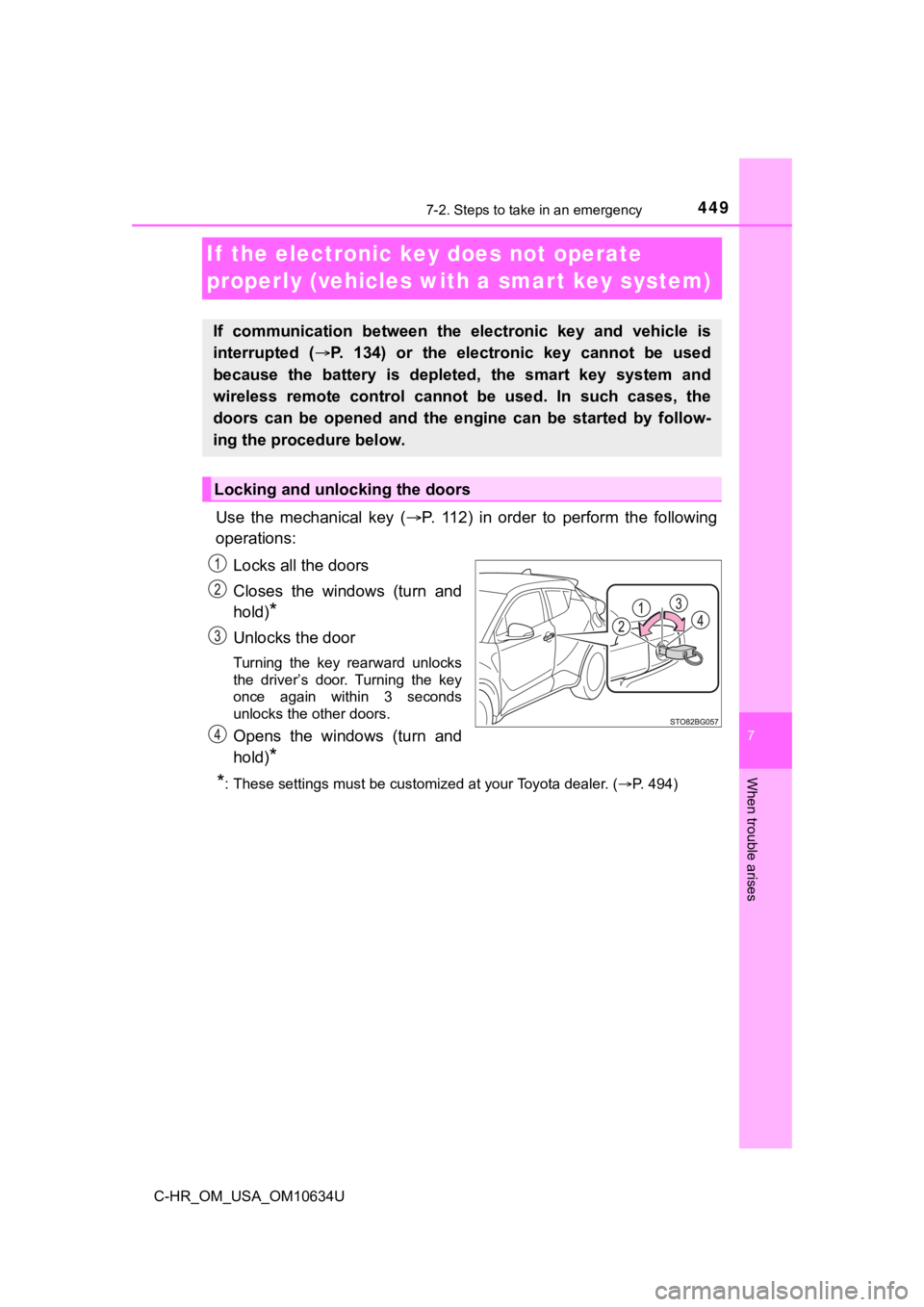
Use the mechanical key (P. 112) in order to perform the following
operations:
Locks all the doors
Closes the windows (turn and
hold)
*
Unlocks the door
Turning the key rearward unlocks
the driver’s door. Turning the key
once again within 3 seconds
unlocks the other doors.
Opens the windows (turn and
hold)
*
*
: These settings must be customized at your Toyota dealer. ( P. 494)
If communication between the electronic key and vehicle is
interrupted ( P. 134) or the electronic key cannot be used
because the battery is depleted, the smart key system and
wireless remote control can not be used. In such cases, the
doors can be opened and the engine can be started by follow-
ing the procedure below.
Locking and unlocking the doors
Page 454 of 536
4547-2. Steps to take in an emergency
C-HR_OM_USA_OM10634U
Vehicles without a smart key system:
Maintain the engine speed of the second vehicle and turn the
engine switch to the “ON” position, then start the vehicle’s engine.
Vehicles with a smart key system:
Maintain the engine speed of the second vehicle and turn the
engine switch to IGNITION ON m ode, then start the vehicle’s
engine.
Once the vehicle’s engine has st arted, remove the jumper cables in
the exact reverse order from which they were connected.
To install the engine cover, conduct the removal procedure in
reverse. After installing, check that the fixed pins are inserted
securely.
Once the engine starts, have the vehicle inspected at your Toyota
dealer as soon as possible.
■ Starting the engine when t he battery is discharged
The engine cannot be started by push-starting.
■ To prevent battery discharge
●Turn off the headlights and the air conditioning system while the engine is
stopped.
● Turn off any unnecessary electrical components when the vehicle is running
at a low speed for an extended period, such as in heavy traffic .
■ Charging the battery
The electricity stored in the battery will discharge gradually even when the
vehicle is not in use, due to natural discharge and the draining effects of cer-
tain electrical appliances. If the vehicle is left for a long t ime, the battery may
discharge, and the engine may be unable to start. (The battery recharges
automatically during driving.)
■ Precautions when the battery is discharged (vehicles with a sma rt key
system)
● In some cases, it may not be possible to unlock the doors using the smart
entry & start system when the battery is discharged. Use the wi reless
remote control or the mechanical key to lock or unlock the door s.
● The engine may not start on the first attempt after the battery has recharged
but will start normally after the second attempt. This is not a malfunction.
● The engine switch mode is memorized by the vehicle. When the ba ttery is
reconnected, the system will return to the mode it was in befor e the battery
was discharged. Before disconnecting the battery, turn the engine switch off.
If you are unsure what mode the engine switch was in before the battery dis-
charged, be especially careful when reconnecting the battery.
6
7
8
Page 492 of 536
4928-2. Customization
C-HR_OM_USA_OM10634U■
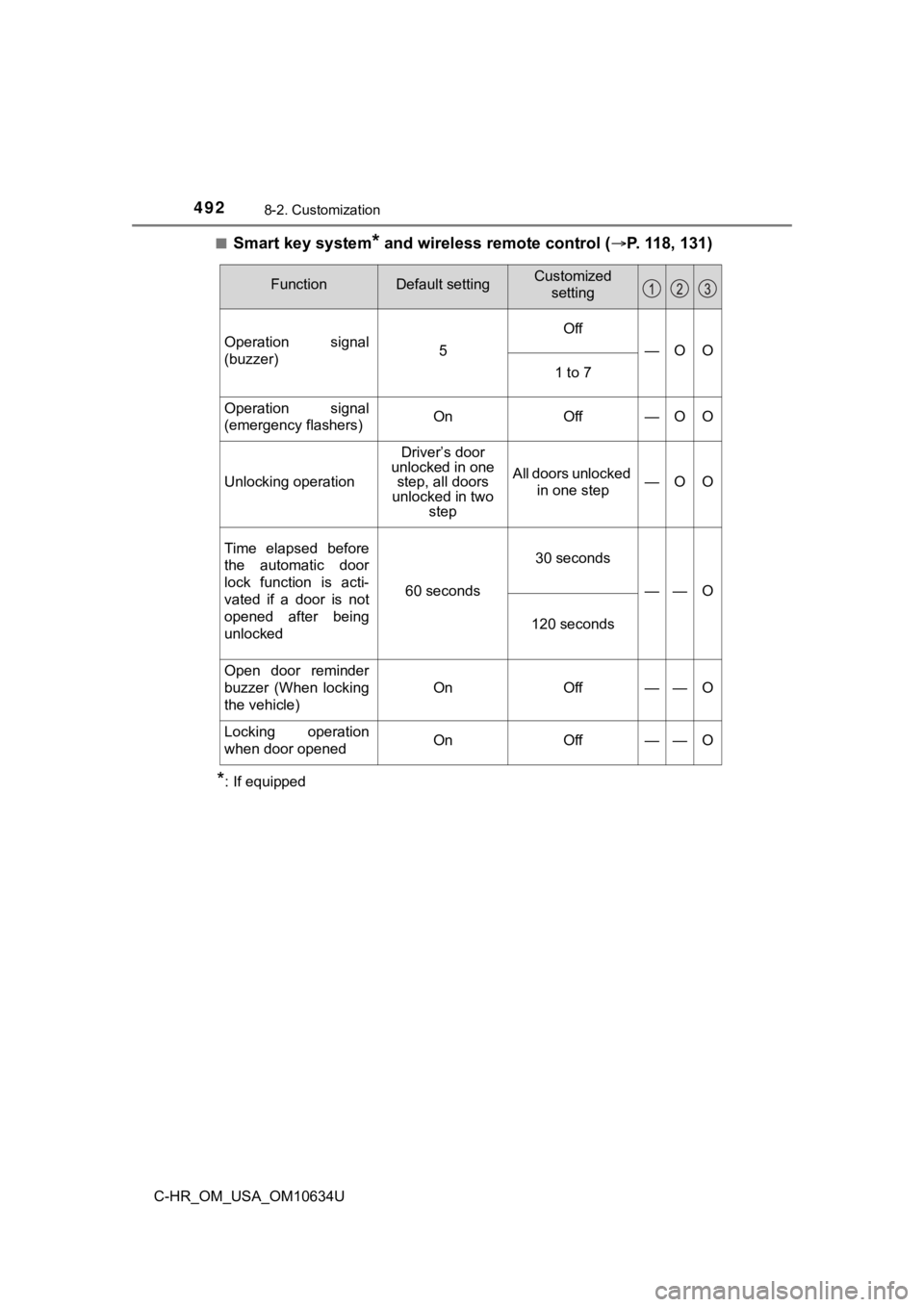
Smart key system* and wireless remote control (
P. 118, 131)
*: If equipped
FunctionDefault settingCustomized
setting
Operation signal
(buzzer)5
Off
—OO
1 to 7
Operation signal
(emergency flashers)OnOff—OO
Unlocking operation
Driver’s door
unlocked in one step, all doors
unlocked in two step
All doors unlocked
in one step—OO
Time elapsed before
the automatic door
lock function is acti-
vated if a door is not
opened after being
unlocked
60 seconds
30 seconds
——O
120 seconds
Open door reminder
buzzer (When locking
the vehicle)
OnOff——O
Locking operation
when door openedOnOff——O
Page 493 of 536
4938-2. Customization
8
Vehicle specifications
C-HR_OM_USA_OM10634U■
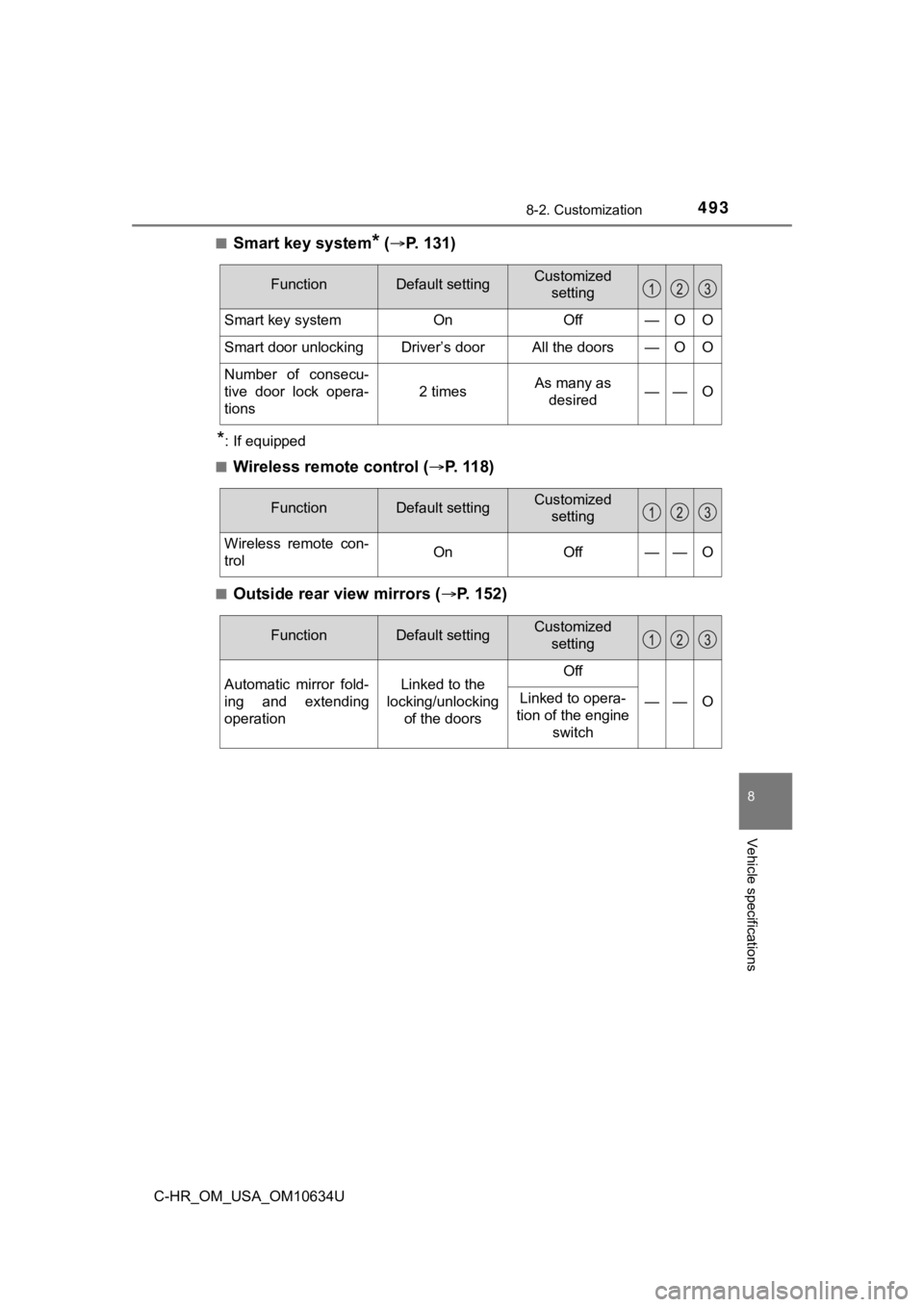
Smart key system* (
P. 131)
*: If equipped
■
Wireless remote control ( P. 118)
■Outside rear view mirrors ( P. 1 5 2 )
FunctionDefault settingCustomized
setting
Smart key systemOnOff—OO
Smart door unlockingDriver’s doorAll the doors—OO
Number of consecu-
tive door lock opera-
tions
2 timesAs many as desired——O
FunctionDefault settingCustomized setting
Wireless remote con-
trolOnOff——O
FunctionDefault settingCustomized
setting
Automatic mirror fold-
ing and extending
operationLinked to the
locking/unlocking of the doorsOff
——OLinked to opera-
tion of the engine switch
Page 494 of 536
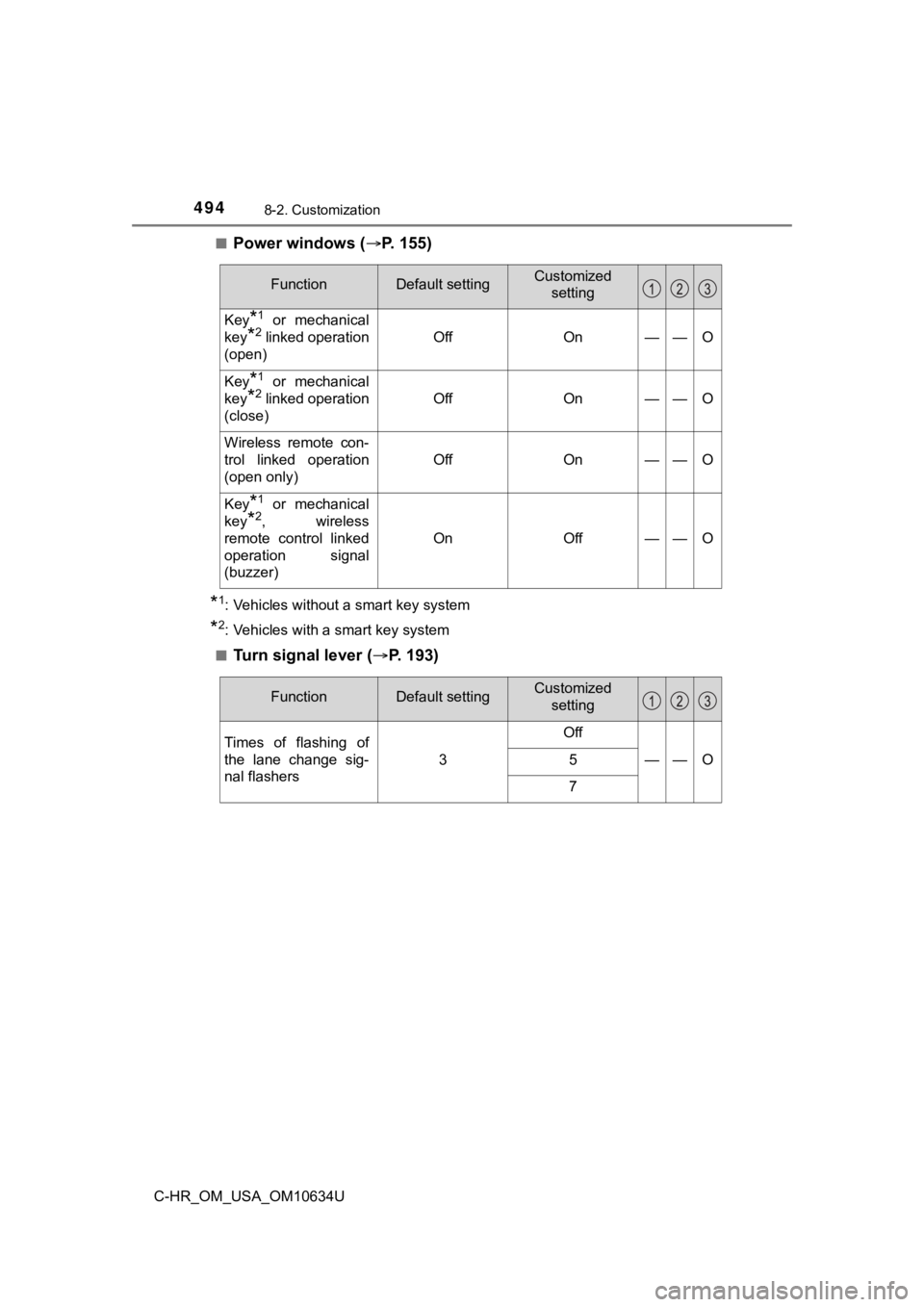
4948-2. Customization
C-HR_OM_USA_OM10634U■
Power windows (
P. 155)
*1: Vehicles without a smart key system
*2: Vehicles with a smart key system
■
Turn signal lever ( P. 193)
FunctionDefault settingCustomized
setting
Key*1 or mechanical
key
*2 linked operation
(open)OffOn——O
Key*1 or mechanical
key
*2 linked operation
(close)OffOn——O
Wireless remote con-
trol linked operation
(open only)
OffOn——O
Key*1 or mechanical
key
*2, wireless
remote control linked
operation signal
(buzzer)
OnOff——O
FunctionDefault settingCustomized setting
Times of flashing of
the lane change sig-
nal flashers
3
Off
——O5
7
Page 520 of 536

520Alphabetical index
C-HR_OM_USA_OM10634U
Alphabetical index
A/C ............................................ 298Air conditioning filter ............. 379
ABS (Anti-lock Brake System)...... 286
Warning light ......................... 422
ACA (Active Cornering Assist) ..... 286
Active Cornering Assist
(ACA) ...................................... 286
Air conditioning filter .............. 379
Air conditioning system .................................... 298 Air conditioning filter ............. 379
Airbags ....................................... 32
Airbag operating conditions .... 41
Airbag preca utions for
your child .............................. 35
Correct driving posture ........... 24
Curtain shield airbag operating conditions ............. 42
Curtain shield airbag precautions ........................... 35
General airbag precautions .... 35
Locations of airbags................ 32
Modification and
disposal of airbags ............... 40
Side airbag operating
conditions ............................. 42
Side airbag precautions .......... 35
Side and curtain shield airbags operating conditions ............. 42
Side and curtain shield airbags precautions ........................... 35
SRS airbags............................ 32
SRS warning light ................. 422 Anchor brackets ........................ 57
Anti-lock Brake System
(ABS) ...................................... 286 Warning light......................... 422
Assist grips .............................. 323
Audio input
*
Audio remote control switches*
Audio system*
Automatic High Beam ............. 207
Automatic light control system.................................... 202
Auxiliary boxes ........................ 316
A