wheel TOYOTA C-HR 2020 (in English) Service Manual
[x] Cancel search | Manufacturer: TOYOTA, Model Year: 2020, Model line: C-HR, Model: TOYOTA C-HR 2020Pages: 536, PDF Size: 11.99 MB
Page 288 of 536

2884-5. Using the driving support systems
C-HR_OM_USA_OM10634U
■Turning off both TRAC and VSC systems
To turn the TRAC and VSC systems off, press and hold for more than 3
seconds while the vehicle is stopped.
The VSC off indicator light will come on and the message will b e shown on
the multi-information display.
*
*
: On vehicles with pre-collision system, pre-collision brake assist and pre-
collision braking will also be disabled. The PCS warning light will come on
and the message will be shown on the multi-information display. (P. 241)
Press again to turn the systems back on.
■ When the message is displayed on the multi-information display show-
ing that TRAC has been disab led even if has not been pressed
TRAC is temporary deactivated. If the information continues to show, contact
your Toyota dealer.
■ Sounds and vibrations caused by the ABS, brake assist, VSC, TRAC and
hill-start assist control systems
●A sound may be heard from the engine compartment when the brake pedal
is depressed repeatedly, when the engine is started or just aft er the vehicle
begins to move. This sound does not indicate that a malfunction has
occurred in any of these systems.
● Any of the following conditions may occur when the above system s are
operating. None of these indicates that a malfunction has occur red.
• Vibrations may be felt through the vehicle body and steering.
• A motor sound may be heard also after the vehicle comes to a s top.
• The brake pedal may pulsate slightly after the ABS is activate d.
• The brake pedal may move down sli ghtly after the ABS is activated.
■ Active Cornering Assist operation sounds and vibrations
When the Active Cornering Assist is operated, operation sounds and vibra-
tions may be generated from the brake system, but this is not a malfunction.
■ EPS operation sound
When the steering wheel is operated, a motor sound (whirring so und) may be
heard. This does not indicate a malfunction.
Page 289 of 536

2894-5. Using the driving support systems
4
Driving
C-HR_OM_USA_OM10634U■
Automatic reactivation of TRAC and VSC systems
After turning the TRAC and VSC systems off, the systems will be automati-
cally re-enabled in the following situations:
● Vehicles without a smart key system: When the engine switch is turned to
the “LOCK” position
Vehicles with a smart key system: When the engine switch is tur ned off
● If only the TRAC system is turned off, the TRAC will turn on wh en vehicle
speed increases
If both the TRAC and VSC systems are turned off, automatic re-e nabling will
not occur when vehicle speed increases.
■ Operating conditions of Active Cornering Assist
The system operates when the following occurs:
●TRAC/VSC can operate
● The driver is attempting to accelerate while turning
● The system detects that the vehicle is drifting to the outer si de
● The brake pedal is released
■ Reduced effectiveness of the EPS system
The effectiveness of the EPS system is reduced to prevent the s ystem from
overheating when there is frequent steering input over an exten ded period of
time. The steering wheel may feel heavy as a result. Should thi s occur, refrain
from excessive steering input or stop the vehicle and turn the engine off. The
EPS system should return to normal within 10 minutes.
■ Operating conditions of hill-start assist control
When the following four conditions are met, the hill-start assi st control will
operate:
● The shift lever is in a position other than P or N (when starting off forward/
backward on an upward incline).
● The vehicle is stopped.
● The accelerator pedal is not depressed.
● The parking brake is not engaged.
■ Automatic system cancelation of hill-start assist control
The hill-start assist control will turn off in any of the following situations:
● The shift lever is shifted to P or N.
● The accelerator pedal is depressed.
● The parking brake is engaged.
● 2 seconds at maximum elapsed after the brake pedal is released.
Page 291 of 536

2914-5. Using the driving support systems
4
Driving
C-HR_OM_USA_OM10634U
WARNING
■When the TRAC/VSC is activated
The slip indicator light flashes. Always drive carefully. Reckless driving may
cause an accident. Exercise particular care when the indicator light flashes.
■ When the TRAC/VSC systems are turned off
Be especially careful and drive at a speed appropriate to the r oad condi-
tions. As these are the systems to help ensure vehicle stabilit y and driving
force, do not turn the TRAC/VSC systems off unless necessary.
■ Replacing tires
Make sure that all tires are of the specified size, brand, trea d pattern and
total load capacity. In addition, make sure that the tires are inflated to the
recommended tire inflation pressure level.
The ABS, TRAC and VSC systems will not function correctly if di fferent tires
are installed on the vehicle.
Contact your Toyota dealer for further information when replaci ng tires or
wheels.
■ Handling of tires and the suspension
Using tires with any kind of problem or modifying the suspensio n will affect
the driving assist systems, and may cause a system to malfuncti on.
Page 293 of 536
2934-6. Driving tips
4
Driving
C-HR_OM_USA_OM10634U
Accelerate the vehicle slowly, keep a safe distance between you and
the vehicle ahead, and drive at a reduced speed suitable to roa d con-
ditions.
● Park the vehicle and move the shift lever to P without setting the
parking brake. The parking brake may freeze up, preventing it from
being released. If the vehicle is parked without setting the pa rking
brake, make sure t o block the wheels.
Failure to do so may be dangerou s because it may cause the vehi-
cle to move unexpectedly, pos sibly leading to an accident.
● If the vehicle is parked without setting the parking brake, confirm
that the shift lever c annot be moved out of P
*.
*
: The shift lever will be locked if it is attempted to be shifte d from P to any
other position without depressing the brake pedal. If the shift lever can be
shifted from P, there may be a problem with the shift lock syst em. Have the
vehicle inspected by your Toyota dealer immediately.
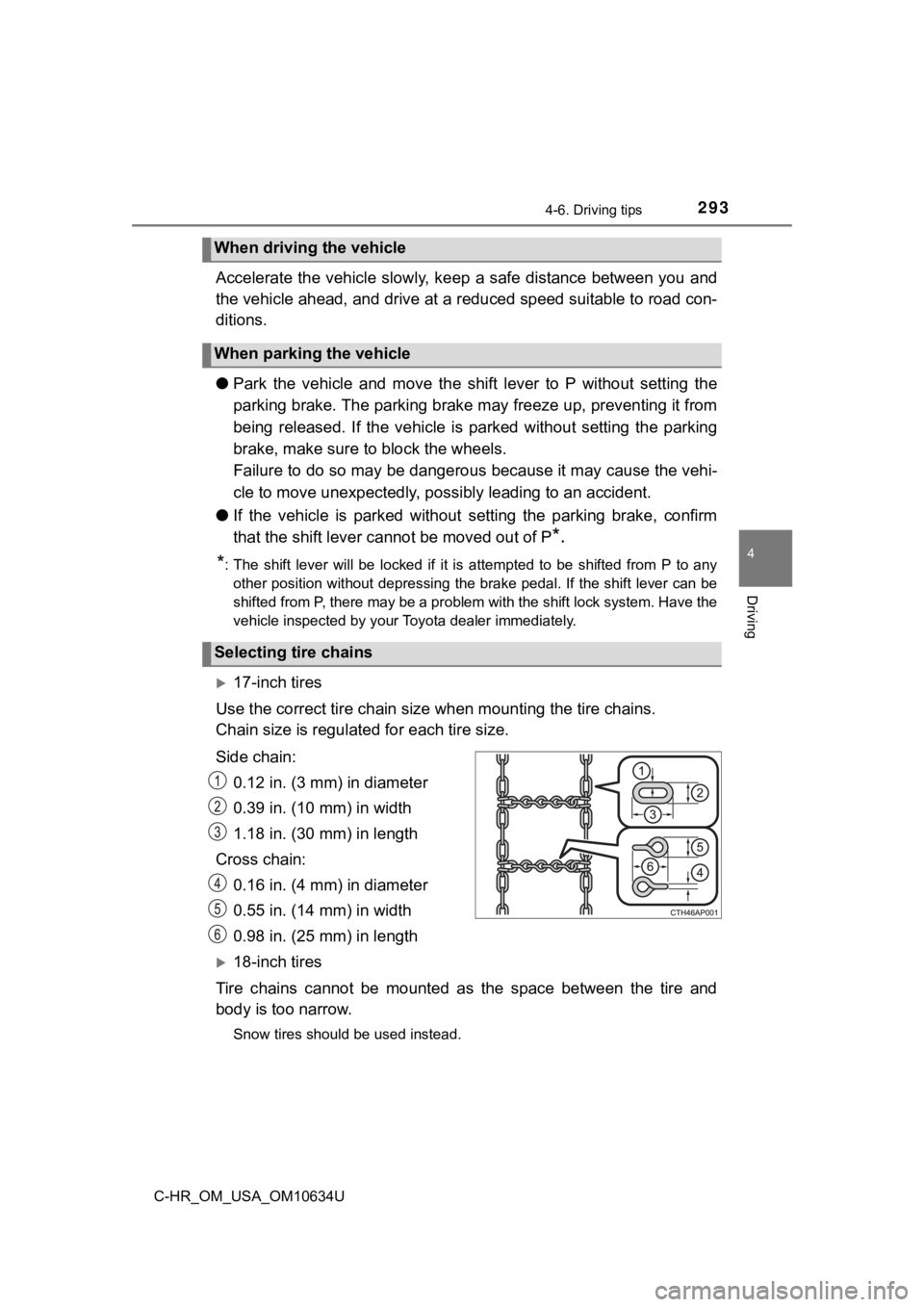
17-inch tires
Use the correct tire chain size when mount ing the tire chains.
Chain size is regulate d for each tire size.
Side chain: 0.12 in. (3 mm) in diameter
0.39 in. (10 mm) in width
1.18 in. (30 mm) in length
Cross chain: 0.16 in. (4 mm) in diameter
0.55 in. (14 mm) in width
0.98 in. (25 mm) in length
18-inch tires
Tire chains cannot be mounted as the space between the tire and
body is too narrow.
Snow tires should be used instead.
When driving the vehicle
When parking the vehicle
Selecting tire chains
Page 295 of 536

2954-6. Driving tips
4
Driving
C-HR_OM_USA_OM10634U
WARNING
■Driving with snow tires
Observe the following precautions to reduce the risk of acciden ts.
Failure to do so may result in a loss of vehicle control and ca use death or
serious injury.
● Use tires of the size specified.
● Maintain the recommended level of air pressure.
● Do not drive in excess of 75 mph (120 km/h), regardless of the type of
snow tires being used.
● Use snow tires on all, not just some wheels.
■ Driving with tire chains
Observe the following precautions to reduce the risk of acciden ts.
Failure to do so may result in the vehicle being unable to be d riven safely,
and may cause death or serious injury.
● Do not drive in excess of the speed limit specified for the tir e chains being
used, or 30 mph (50 km/h), whichever is lower.
● Avoid driving on bumpy road surfaces or over potholes.
● Avoid sudden acceleration, abrupt steering, sudden braking and shifting
operations that cause sudden engine braking.
● Slow down sufficiently before entering a curve to ensure that v ehicle con-
trol is maintained.
NOTICE
■ Repairing or replacing snow tires
Request repairs or replacement of snow tires from Toyota dealer s or legiti-
mate tire retailers.
This is because the removal and attachment of snow tires affect s the opera-
tion of the tire pressure warning valves and transmitters.
■ Fitting tire chains
The tire pressure warning valves and transmitters may not funct ion correctly
when tire chains are fitted
Page 297 of 536

297
5Interior features
C-HR_OM_USA_OM10634U5-1. Using the air conditioning
system and defogger
Air conditioning system ..... 298
Heated steering wheel/ seat heaters .................... 306
5-2. Using the interior lights Interior lights list ................ 308• Interior lights ................. 309
• Personal lights .............. 310
5-3. Using the storage features
List of storage features ..... 311 • Glove box...................... 312
• Console box .................. 312
• Bottle holders ................ 313
• Cup holders .................. 314
Luggage compartment features ........................... 315
5-4. Using the other interior features
Other interior features ....... 321 • Sun visors ..................... 321
• Vanity mirrors................ 321
• Power outlet .................. 322
• Assist grips ................... 323
Page 306 of 536
3065-1. Using the air conditioning system and defogger
C-HR_OM_USA_OM10634U
Heated steering wheel/seat heaters
: If equipped
Seat heaters heat the front seats.
WARNING
●Care should be taken to prevent injury if anyone in the following categories
comes in contact with the steering wheel and seats when the hea ter is on:
• Babies, small children, the elderly, the sick and the physical ly chal-
lenged
• Persons with sensitive skin
• Persons who are fatigued
• Persons who have taken alcohol or drugs that induce sleep (sle eping
drugs, cold remedies, etc.)
● Observe the following precautions to prevent minor burns or ove rheating:
• Do not cover the seat with a blanket or cushion when using the seat
heater.
• Do not use seat heater more than necessary.
NOTICE
● Do not put heavy objects that have an uneven surface on the sea t and do
not stick sharp objects (needles, nails, etc.) into the seat.
● To prevent battery discharge, do not use the functions when the engine is
not running.
Page 307 of 536
3075-1. Using the air conditioning system and defogger
5
Interior features
C-HR_OM_USA_OM10634U
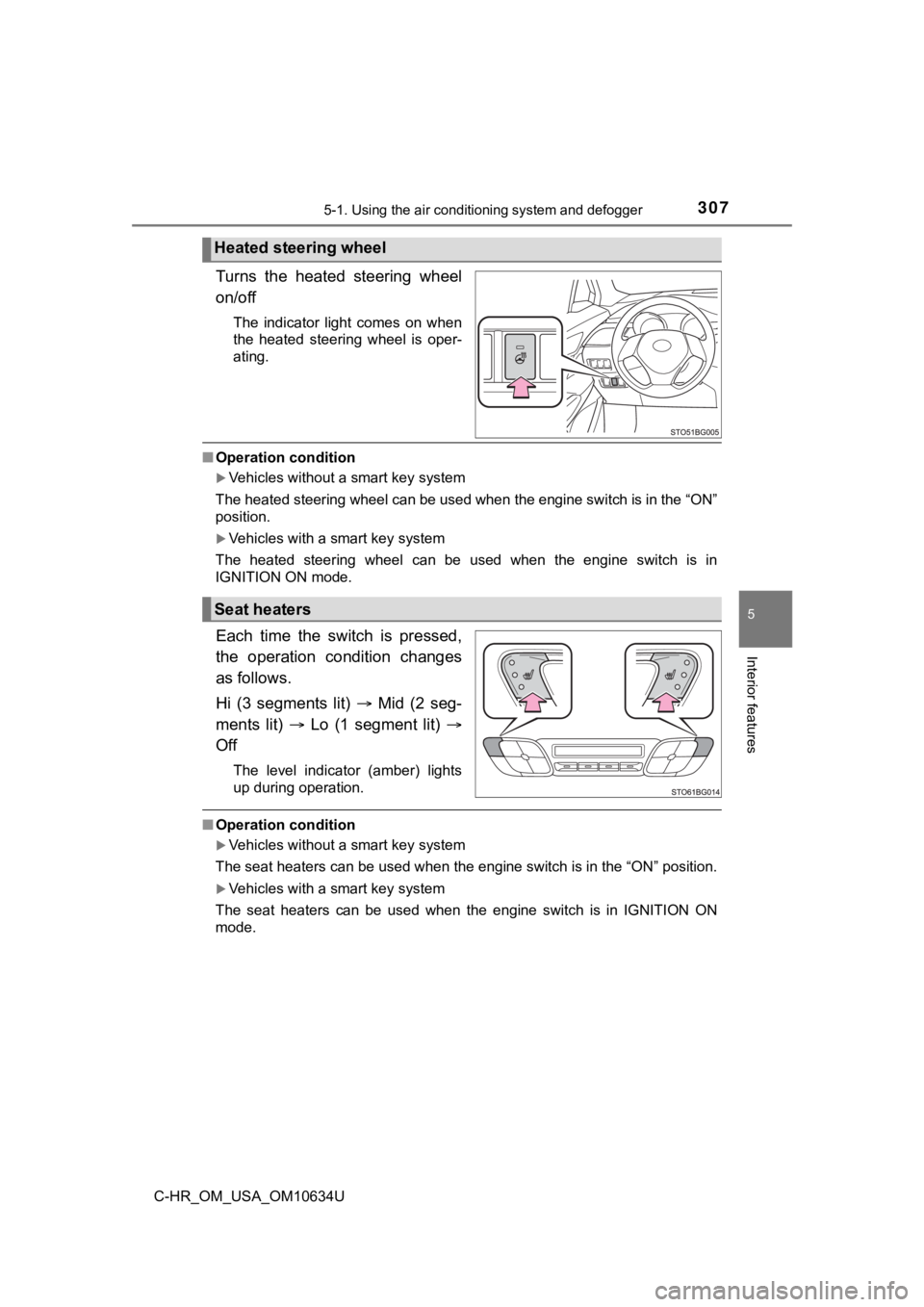
Turns the heated steering wheel
on/off
The indicator light comes on when
the heated steering wheel is oper-
ating.
■Operation condition
Vehicles without a smart key system
The heated steering wheel can be used when the engine switch is in the “ON”
position.
Vehicles with a smart key system
The heated steering wheel can be used when the engine switch is in
IGNITION ON mode.
Each time the switch is pressed,
the operation condition changes
as follows.
Hi (3 segments lit) Mid (2 seg-
ments lit) Lo (1 segment lit)
Off
The level indicator (amber) lights
up during operation.
■ Operation condition
Vehicles without a smart key system
The seat heaters can be used when the engine switch is in the “ ON” position.
Vehicles with a smart key system
The seat heaters can be used when the engine switch is in IGNIT ION ON
mode.
Heated steering wheel
Seat heaters
Page 325 of 536

325
6Maintenance and care
C-HR_OM_USA_OM10634U6-1. Maintenance and care
Cleaning and protecting the vehicle exterior .......... 326
Cleaning and protecting the vehicle interior ........... 330 6-2. Maintenance
Maintenance requirements ................... 333
General maintenance........ 336
Emission inspection and maintenance (I/M)
programs......................... 340
6-3. Do-it-yourself maintenance
Do-it-yourself service precautions ..................... 341
Hood ................................. 344
Positioning a floor jack ...... 346
Engine compartment ......... 347
Tires .................................. 362
Tire inflation pressure ....... 372
Wheels .............................. 376
Air conditioning filter.......... 379
Wireless remote control/electronic key
battery ............................. 383
Checking and replacing fuses ............................... 387
Headlight aim (vehicles with front fog lights) ......... 391
Light bulbs......................... 393
Page 326 of 536

3266-1. Maintenance and care
C-HR_OM_USA_OM10634U
Cleaning and protecting the vehicle exterior
●Working from top to bottom, liberally apply water to the vehicl e
body, wheel wells and underside of the vehicle to remove any di rt
and dust.
● Wash the vehicle body using a sponge or soft cloth, such as a
chamois.
● For hard-to-remove marks, use car wash soap and rinse thoroughl y
with water.
● Wipe away any water.
● Wax the vehicle when the wate rproof coating deteriorates.
If water does not bead on a clean surface, apply wax when the vehicle
body is cool.
■Self-restoring coat (if equipped)
The vehicle body has a self-restoring coating that is resistant to small surface
scratches caused in a car wash, etc.
●The coating lasts for 5 to 8 years from when the vehicle is del ivered from the
plant.
● The restoration time differs depending on the depth of the scra tch and out-
side temperature.
The restoration time may become shorter when the coating is warmed by
applying warm water.
● Deep scratches caused by keys, coins, etc., cannot be restored.
● Do not use wax that contain abrasives.
Perform the following to protect the vehicle and maintain it in
prime condition: