air condition TOYOTA C-HR 2020 Owners Manual (in English)
[x] Cancel search | Manufacturer: TOYOTA, Model Year: 2020, Model line: C-HR, Model: TOYOTA C-HR 2020Pages: 536, PDF Size: 11.99 MB
Page 4 of 536

TABLE OF CONTENTS4
C-HR_OM_USA_OM10634U5-1. Using the air conditioning
system and defogger
Air conditioning system ..... 298
Heated steering wheel/ seat heaters .................... 306
5-2. Using the interior lights Interior lights list ................ 308• Interior lights ................. 309
• Personal lights .............. 310
5-3. Using the storage features
List of storage features...... 311 • Glove box...................... 312
• Console box .................. 312
• Bottle holders ................ 313
• Cup holders .................. 314
Luggage compartment features ........................... 315
5-4. Using the other interior features
Other interior features ....... 321 • Sun visors ..................... 321
• Vanity mirrors................ 321
• Power outlet .................. 322
• Assist grips ................... 323 6-1. Maintenance and care
Cleaning and protecting the vehicle exterior .......... 326
Cleaning and protecting the vehicle interior ........... 330
6-2. Maintenance Maintenance requirements ................... 333
General maintenance ........ 336
Emission inspection and maintenance (I/M)
programs ......................... 340
6-3. Do-it-yourself maintenance Do-it-yourself service precautions ...................... 341
Hood .................................. 344
Positioning a floor jack....... 346
Engine compartment ......... 347
Tires................................... 362
Tire inflation pressure ........ 372
Wheels............................... 376
Air conditioning filter .......... 379
Wireless remote control/electronic key
battery ............................. 383
Checking and replacing fuses ................................ 387
Headlight aim (vehicles with front fog lights) ......... 391
Light bulbs ......................... 393
5Interior features6Maintenance and care
Page 15 of 536
15Pictorial index
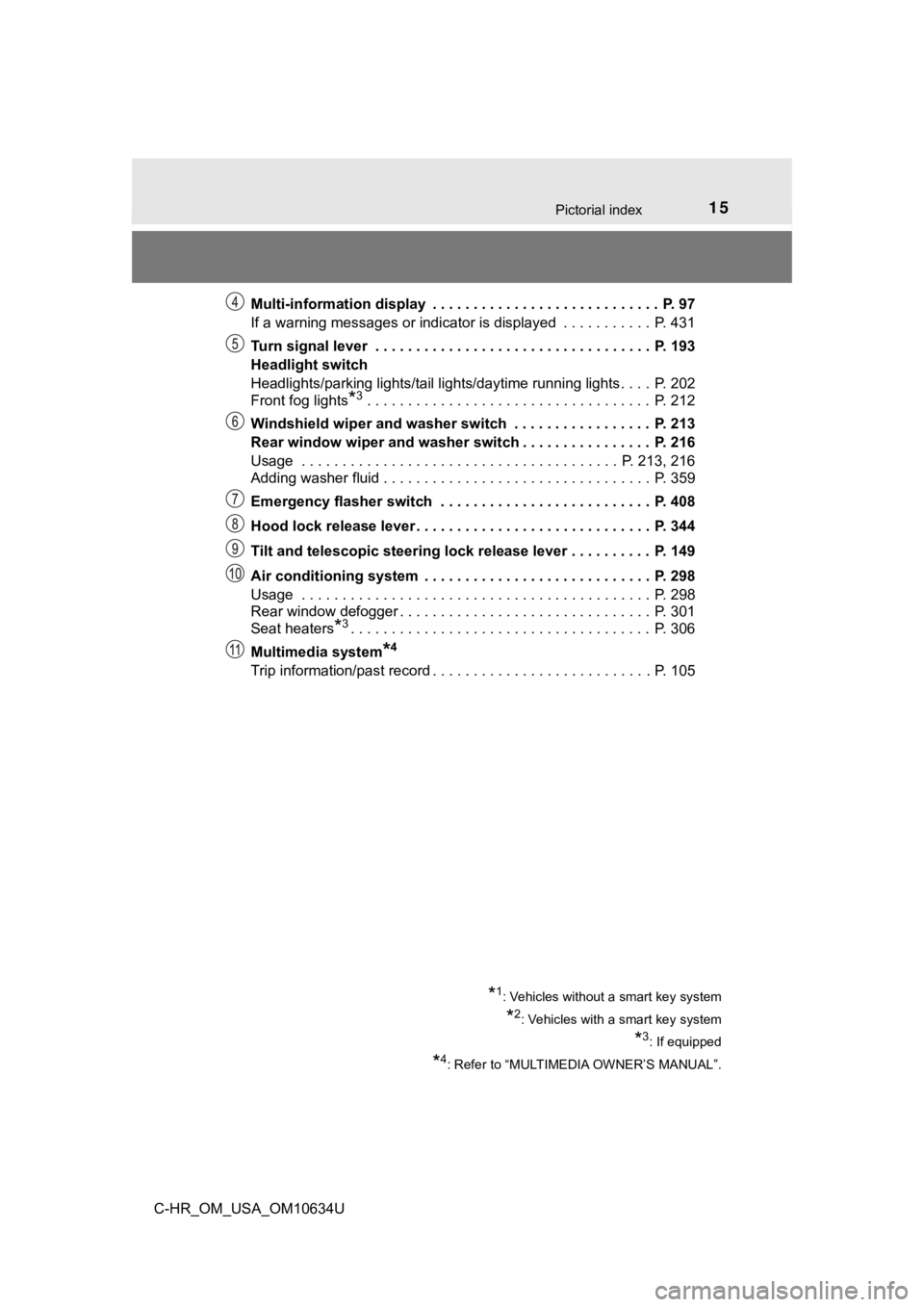
C-HR_OM_USA_OM10634UMulti-information display . . . . . . . . . . . . . . . . . . . . . . . . . . . . P. 97
If a warning messages or indicator is displayed . . . . . . . .
. . . P. 431
Turn signal lever . . . . . . . . . . . . . . . . . . . . . . . . . . . . . . . . . . P. 193
Headlight switch
Headlights/parking lights/tail lights/daytime running lights . . . . P. 202
Front fog lights
*3 . . . . . . . . . . . . . . . . . . . . . . . . . . . . . . . . . . . P. 212
Windshield wiper and washer switch . . . . . . . . . . . . . . . . . P. 213
Rear window wiper and washer switch . . . . . . . . . . . . . . . . P. 216
Usage . . . . . . . . . . . . . . . . . . . . . . . . . . . . . . . . . . . . . . . P. 213, 216
Adding washer fluid . . . . . . . . . . . . . . . . . . . . . . . . . . . . . . . . . P. 359
Emergency flasher switch . . . . . . . . . . . . . . . . . . . . . . . . . . P. 408
Hood lock release lever. . . . . . . . . . . . . . . . . . . . . . . . . . . . . P. 344
Tilt and telescopic steering lock release lever . . . . . . . . . . P. 149
Air conditioning system . . . . . . . . . . . . . . . . . . . . . . . . . . . . P. 298
Usage . . . . . . . . . . . . . . . . . . . . . . . . . . . . . . . . . . . . . . . . . . . P. 298
Rear window defogger . . . . . . . . . . . . . . . . . . . . . . . . . . . . . . . P. 301
Seat heaters
*3. . . . . . . . . . . . . . . . . . . . . . . . . . . . . . . . . . . . . P. 306
Multimedia system
*4
Trip information/past record . . . . . . . . . . . . . . . . . . . . . . . . . . . P. 105
*1: Vehicles without a smart key system
*2: Vehicles with a smart key system
*3: If equipped
*4: Refer to “MULTIMEDIA OWNER’S MANUAL”.
Page 42 of 536
421-1. For safe use
C-HR_OM_USA_OM10634U■
SRS airbag deployment conditions (SRS side and curtain shield a irbags)
● The SRS side and curtain shield airbags will deploy in the even t of an
impact that exceeds the set threshold level (the level of force corresponding
to the impact force produced by an approximately 3300 lb. [1500 kg] vehicle
colliding with the vehicle cabin from a direction perpendicular to the vehicle
orientation at an approximate speed of 12 - 18 mph [20 - 30 km/ h]).
● Both SRS curtain shield airbags may deploy in the event of a severe side
collision.
● Both SRS curtain shield airbags will deploy in the event of veh icle rollover.
● Both SRS curtain shield airbags may also deploy in the event of a severe
frontal collision.
■ Conditions under which the SRS ai rbags may deploy (inflate), other than
a collision
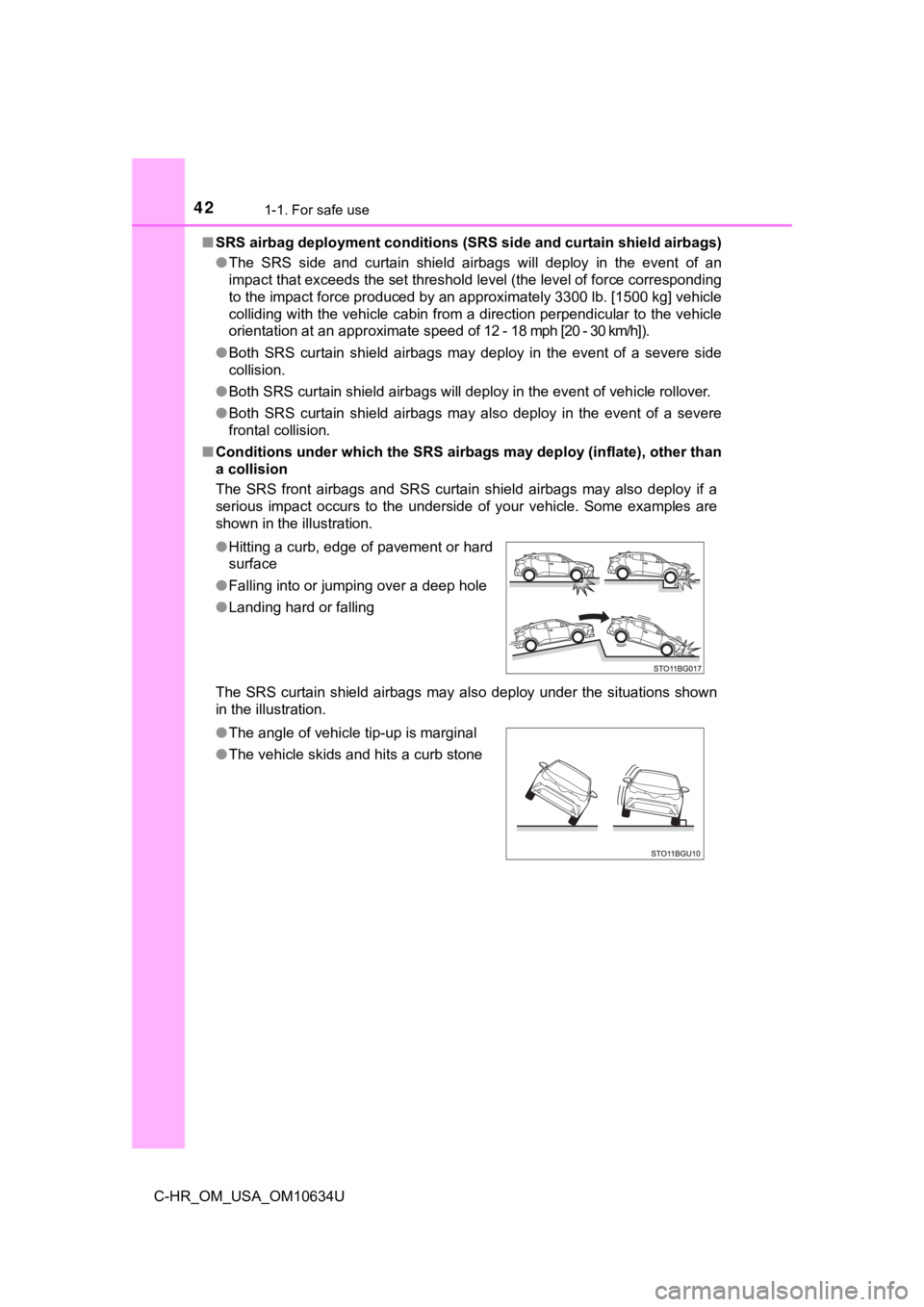
The SRS front airbags and SRS curtain shield airbags may also d eploy if a
serious impact occurs to the underside of your vehicle. Some ex amples are
shown in the illustration.
The SRS curtain shield airbags may also deploy under the situat ions shown
in the illustration. ● Hitting a curb, edge of pavement or hard
surface
● Falling into or jumping over a deep hole
● Landing hard or falling
● The angle of vehicle tip-up is marginal
● The vehicle skids and hits a curb stone
Page 46 of 536
461-1. For safe use
C-HR_OM_USA_OM10634U
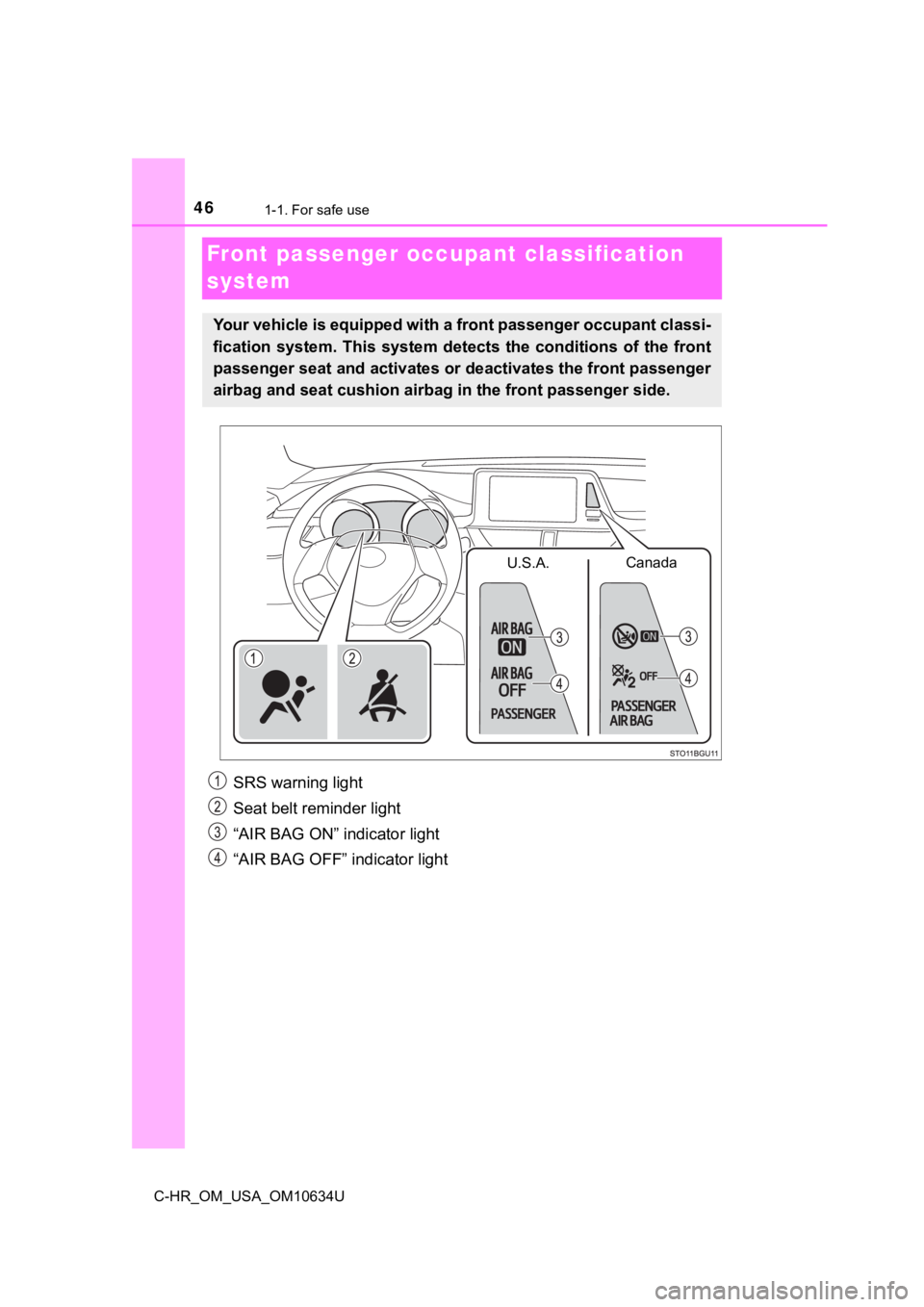
Front passenger occupant classification
system
SRS warning light
Seat belt reminder light
“AIR BAG ON” indicator light
“AIR BAG OFF” indicator light
Your vehicle is equipped with a front passenger occupant classi -
fication system. This system det ects the conditions of the front
passenger seat and activates or deactivates the front passenger
airbag and seat cushion airbag in the front passenger side.
Canada
U.S.A.
Page 47 of 536
471-1. For safe use
1
For safety and security
C-HR_OM_USA_OM10634U■
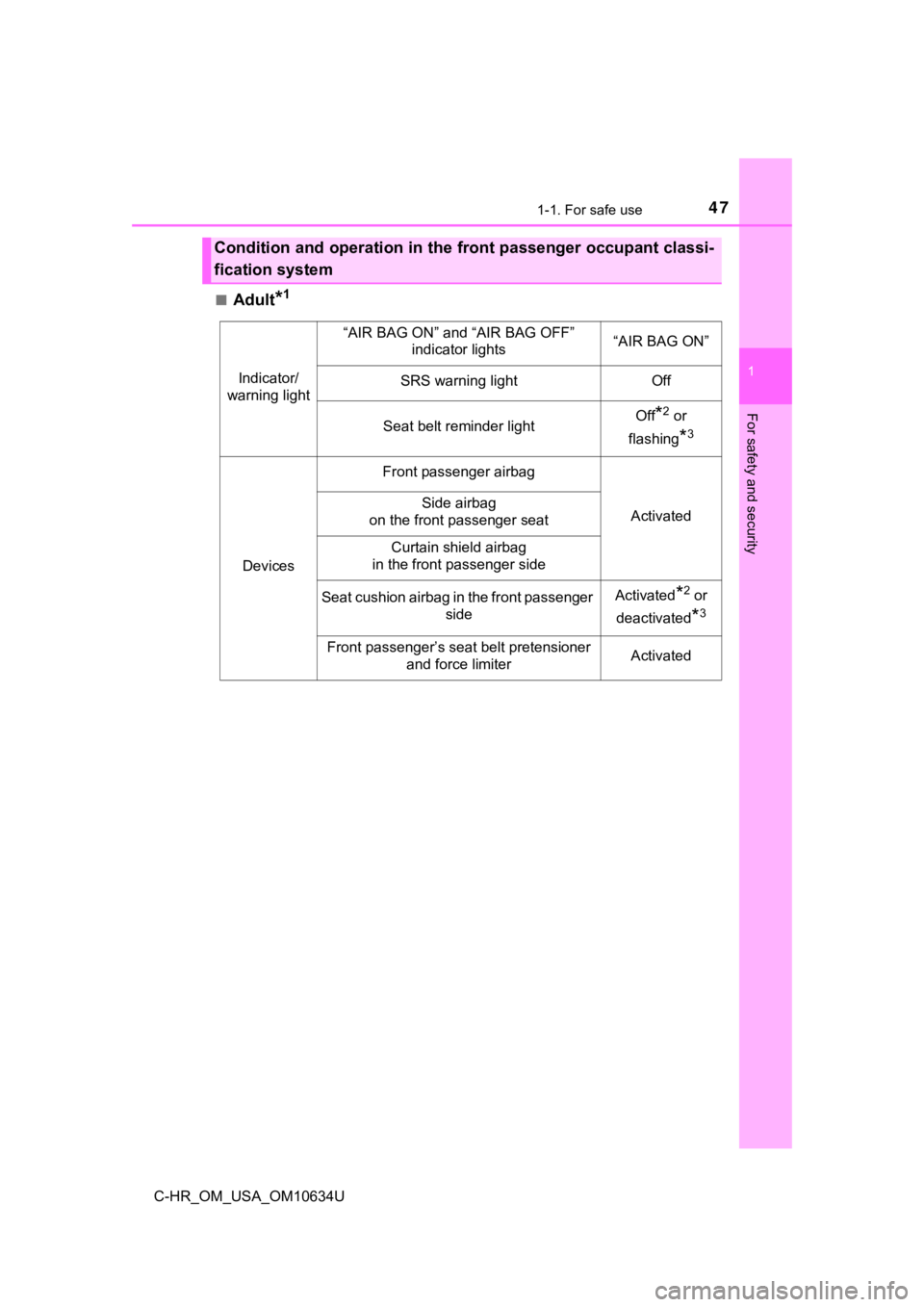
Adult*1
Condition and operation in the front passenger occupant classi-
fication system
Indicator/
warning light
“AIR BAG ON” and “AIR BAG OFF” indicator lights“AIR BAG ON”
SRS warning lightOff
Seat belt reminder lightOff*2 or
flashing
*3
Devices
Front passenger airbag
ActivatedSide airbag
on the front passenger seat
Curtain shield airbag
in the front passenger side
Seat cushion airbag in the front passenger sideActivated*2 or
deactivated
*3
Front passenger’s seat belt pretensioner and force limiterActivated
Page 77 of 536
771-3. Emergency assistance
1
For safety and security
C-HR_OM_USA_OM10634U
When the engine switch is turned to the “ON” position (vehicles with-
out smart key system) or IGNITION ON mode (vehicles with smart
key system), the red indicator light comes on for 2 seconds the n turns
off. Afterward, the green indicator light comes on, indicating that the
service is active.
The following indicator light patterns indicate specific system usage
conditions:
● Green indicator light on = Active service
● Green indicator light flashing = Safety Connect call in process
● Red indicator light (except at vehicle start-up) = System malfunction
(contact your Toyota dealer)
● No indicator light (off) = Saf ety Connect service not active
■Automatic Collision Notification
In case of either airbag deployme nt or severe rear-end collision, the
system is designed to automatically call the response center. T he
responding agent receives the v ehicle’s location and attempts to
speak with the vehicl e occupants to assess the level of emergency.
If the occupants are unable to communicate, the agent automati-
cally treats the call as an emergency, contacts the nearest eme r-
gency services provider to descr ibe the situation, and requests that
assistance be sent to the location.
Safety Connect LED light Indicators
Safety Connect services
Page 113 of 536

1133-1. Key information
3
Operation of each component
C-HR_OM_USA_OM10634U■
When riding in an aircraft
When bringing a key with wireless remote control function onto an aircraft,
make sure you do not press any buttons on the key while inside the aircraft
cabin. If you are carrying the key in your bag, etc., ensure th at the buttons are
not likely to be pressed accidentally. Pressing a button may cause the key to
emit radio waves that could interfere with the operation of the aircraft.
■ Conditions affecting the operation of the smart key system or w ireless
remote control
Vehicles without a smart key system
The wireless remote control function may not operate normally i n the follow-
ing situations:
● When the wireless key battery is depleted
● Near a TV tower, electric power plant, gas station, radio stati on, large dis-
play, airport or other facility that generates strong radio wav es or electrical
noise
● When carrying a portable radio, cellular phone or other wireles s communi-
cation devices
● When multiple wireless keys are in the vicinity
● When the wireless key is in contact with, or is covered by a me tallic object
● When a wireless key (that emits radio waves) is being used near by
● When the wireless key has been left near an electrical applianc e such as a
personal computer
● If window tint with a metallic content or metallic objects are attached to the
rear window
Vehicles with a smart key system
P. 134
Page 134 of 536

1343-2. Opening, closing and locking the doors
C-HR_OM_USA_OM10634U■
Conditions affecting operation
The smart key system uses weak radio waves. In the following si tuations, the
communication between the electronic key and the vehicle may be affected,
preventing the smart key system, wireless remote control and en gine immobi-
lizer system from operating properly. (Ways of coping: P. 449)
● When the electronic key battery is depleted
● Near a TV tower, electric power plant, gas station, radio stati on, large dis-
play, airport or other facility that generates strong radio wav es or electrical
noise
● When carrying a portable radio, cellular phone, cordless phone or other
wireless communication device
● When the electronic key is in contact with, or is covered by the following
metallic objects
• Cards to which aluminum foil is attached
• Cigarette boxes that have aluminum foil inside
• Metallic wallets or bags
• Coins
• Hand warmers made of metal
• Media such as CDs and DVDs
● When other wireless keys (that emit radio waves) are being used nearby
● When carrying the electronic key together with the following devices that
emit radio waves
• Portable radio, cellular phone, cordless phone or other wirele ss commu-
nication devices
• Another electronic key or a wireless key that emits radio wave s
• Personal computers or personal digital assistants (PDAs)
• Digital audio players
• Portable game systems
● If window tint with a metallic content or metallic objects are attached to the
rear window
● When the electronic key is placed near a battery charger or ele ctronic
devices
● When parking at a meter
Page 244 of 536
2444-5. Using the driving support systems
C-HR_OM_USA_OM10634U
WARNING
■Before using LDA system
Do not rely solely upon the LDA system. The LDA system does not auto-
matically drive the vehicle or reduce the amount of attention that must be
paid to the area in front of the vehicle. The driver must always assume full
responsibility for driving safely by paying careful attention to the surround-
ing conditions and operating the steering wheel to correct the path of the
vehicle. Also, the driver must take adequate breaks when fatigu ed, such as
from driving for a long period of time.
Failure to perform appropriate driving operations and pay careful attention
may lead to an accident, resulting in death or serious injury.
■ To avoid operating LDA system by mistake
When not using the LDA system, use the LDA switch to turn the s ystem off.
■ Situations unsuitable for LDA system
Do not use the LDA system in the following situations.
The system may not operate properly and lead to an accident, re sulting in
death or serious injury.
● A compact spare tire, tire chains, etc., are equipped.
● When the tires have been excessively worn, or when the tire inf lation pres-
sure is low.
● Tires which differ by structure, manufacturer, brand or tread p attern are
used.
● Objects or patterns that could be mistaken for white (yellow) l ines are
present on the side of the road (guardrails, curbs, reflective poles, etc.).
● Vehicle is driven on a snow-covered road.
● White (yellow) lines are difficult to see due to rain, snow, fo g, dust, etc.
● Asphalt repair marks, white (yellow) line marks, etc., are present due to
road repair.
● Vehicle is driven in a temporary lane or restricted lane due to construction
work.
● Vehicle is driven on a road surface which is slippery due to rainy weather,
fallen snow, freezing, etc.
● Vehicle is driven in traffic lanes other than on highways and freeways.
● Vehicle is driven in a construction zone.
● During emergency towing.
Page 245 of 536
2454-5. Using the driving support systems
4
Driving
C-HR_OM_USA_OM10634U
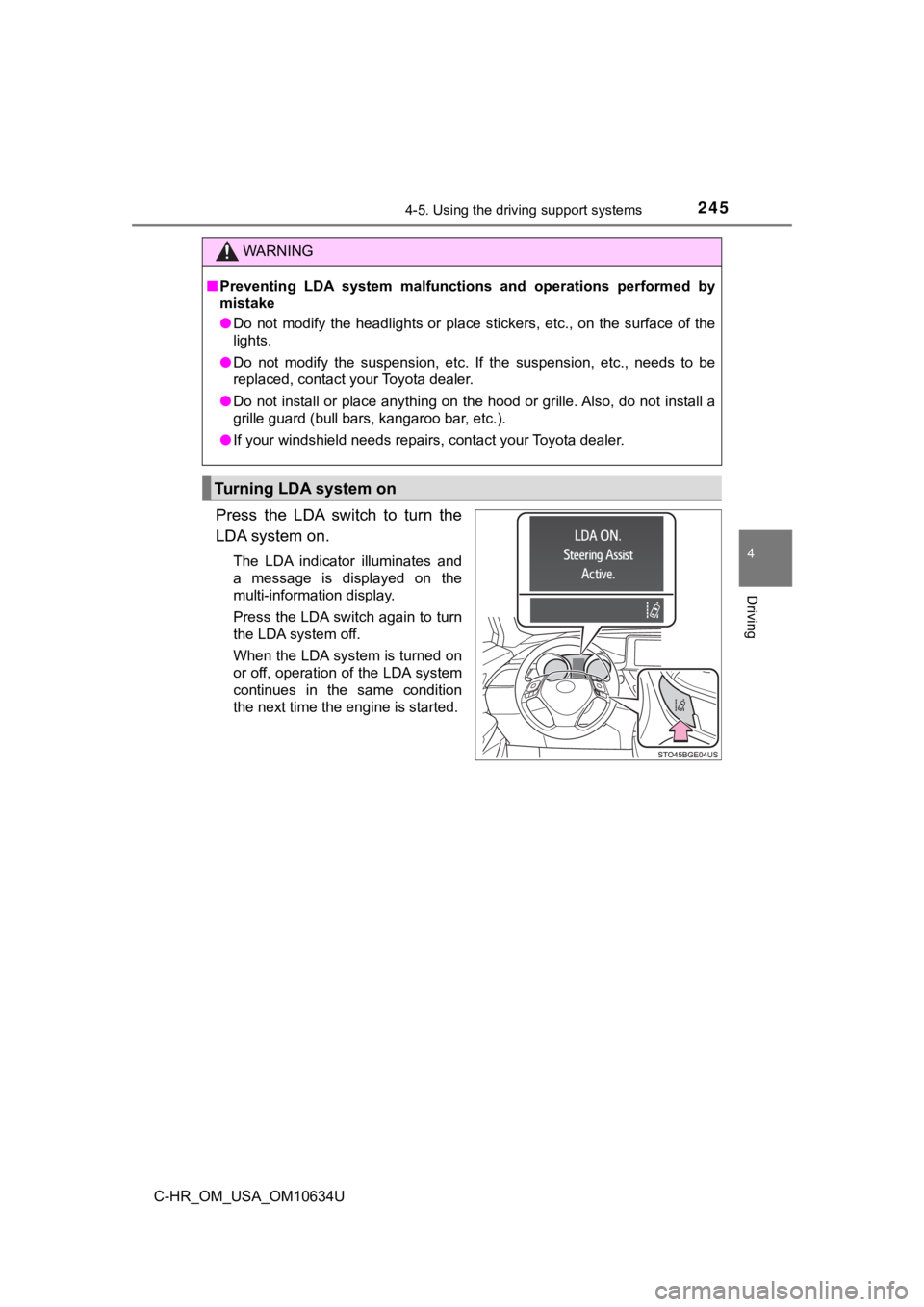
Press the LDA switch to turn the
LDA system on.
The LDA indicator illuminates and
a message is displayed on the
multi-information display.
Press the LDA switch again to turn
the LDA system off.
When the LDA system is turned on
or off, operation of the LDA system
continues in the same condition
the next time the engine is started.
WARNING
■Preventing LDA system malfunctio ns and operations performed by
mistake
● Do not modify the headlights or place stickers, etc., on the su rface of the
lights.
● Do not modify the suspension, etc. If the suspension, etc., needs to be
replaced, contact your Toyota dealer.
● Do not install or place anything on the hood or grille. Also, d o not install a
grille guard (bull bars, kangaroo bar, etc.).
● If your windshield needs repairs, contact your Toyota dealer.
Turning LDA system on