radio TOYOTA C-HR 2020 Owners Manual (in English)
[x] Cancel search | Manufacturer: TOYOTA, Model Year: 2020, Model line: C-HR, Model: TOYOTA C-HR 2020Pages: 536, PDF Size: 11.99 MB
Page 6 of 536
6
C-HR_OM_USA_OM10634U
For your infor mation
Please note that this manual applies to all models and explains all equipment,
including options. Therefore, you may find some explanations fo r equipment
not installed on your vehicle.
All specifications provided in this manual are current at the t ime of printing.
However, because of the Toyota policy of continual product impr ovement, we
reserve the right to make changes at any time without notice.
Depending on specifications, the vehicle shown in the illustrat ions may differ
from your vehicle in terms of color and equipment.
Approximately five hours after the engine is turned off, you ma y hear a sound
coming from under the vehicle for several minutes. This is the sound of a fuel
evaporation leakage check and it does not indicate a malfunctio n.
A wide variety of non-genuine spare parts and accessories for T oyota vehi-
cles are currently available in the market. You should know tha t Toyota does
not warrant these products and is not responsible for their per formance,
repair, or replacement, or for any damage they may cause to, or adverse
effect they may have on, your Toyota vehicle.
This vehicle should not be modified with non-genuine Toyota pro ducts. Modi-
fication with non-genuine Toyota products could affect its perf ormance, safety
or durability, and may even violate governmental regulations. In addition,
damage or performance problems resulting from the modification may not be
covered under warranty.
The installation of a mobile two-way radio system in your vehic le could affect
electronic systems such as:
● Multiport fuel injection system/sequential multiport fuel injection system
● Toyota Safety Sense P
● Dynamic radar cruise control with full-speed range
● Anti-lock brake system
● SRS airbag system
● Seat belt pretensioner system
Be sure to check with your Toyota dealer for precautionary meas ures or spe-
cial instructions regarding instal lation of a mobile two-way radio system.
Main Owner’s Manual
Noise from under the vehicle a fter turning off the engine
Accessories, spare parts and m odification of your Toyota
Installation of a mobile two-way radio system
Page 40 of 536
401-1. For safe use
C-HR_OM_USA_OM10634U
WARNING
■Modification and disposal of SRS airbag system components
Do not dispose of your vehicle or perform any of the following modifications
without consulting your Toyota dealer. The SRS airbags may malfunction or
deploy (inflate) accidentally, causing death or serious injury.
● Installation, removal, disassembly and repair of the SRS airbag s
● Repairs, modifications, removal or replacement of the steering wheel,
instrument panel, dashboard, seats or seat upholstery, front, s ide and rear
pillars or roof side rails or front door panels, trims and spea kers
● Modifications to the front door panel (such as making a hole in it)
● Repairs or modifications of the front fender, front bumper, or side of the
occupant compartment
● Installation of a grille guard (bull bars, kangaroo bar, etc.), snow plows,
winches or roof luggage carrier
● Modifications to the vehicle’s suspension system
● Installation of electronic devices such as mobile two-way radio s and CD
players
● Modifications to your vehicle for a person with a physical disa bility
Page 79 of 536

791-3. Emergency assistance
1
For safety and security
C-HR_OM_USA_OM10634U
Important! Read this information before using Safety Connect.
■Exposure to radio frequency signals
The Safety Connect system installed in your vehicle is a low-po wer
radio transmitter and receiver. I t receives and also sends out radio
frequency (RF) signals.
In August 1996, the Federal Communications Commission (FCC)
adopted RF exposure guidelines with safety levels for mobile wi re-
less phones. Those guidelines are consistent with the safety stan-
dards previously set by the following U.S. and international
standards bodies.
● ANSI (American National Stand ards Institute) C95.1 [1992]
● NCRP (National Council on Radi ation Protection and Measure-
ment) Report 86 [1986]
● ICNIRP (International Commission on Non-Ionizing Radiation
Protection) [1996]
Those standards were based on comprehensive and periodic eval-
uations of the relevant scienti fic literature. Over 120 scientists, engi-
neers, and physicians from unive rsities, and government health
agencies and industries reviewed the available body of research to
develop the ANSI Standard (C95.1).
The design of Safety Connect complies with the FCC guidelines i n
addition to those standards.
Safety information for Safety Connect
Page 113 of 536
1133-1. Key information
3
Operation of each component
C-HR_OM_USA_OM10634U■
When riding in an aircraft
When bringing a key with wireless remote control function onto an aircraft,
make sure you do not press any buttons on the key while inside the aircraft
cabin. If you are carrying the key in your bag, etc., ensure th at the buttons are
not likely to be pressed accidentally. Pressing a button may cause the key to
emit radio waves that could interfere with the operation of the aircraft.
■ Conditions affecting the operation of the smart key system or w ireless
remote control
Vehicles without a smart key system
The wireless remote control function may not operate normally i n the follow-
ing situations:
● When the wireless key battery is depleted
● Near a TV tower, electric power plant, gas station, radio stati on, large dis-
play, airport or other facility that generates strong radio wav es or electrical
noise
● When carrying a portable radio, cellular phone or other wireles s communi-
cation devices
● When multiple wireless keys are in the vicinity
● When the wireless key is in contact with, or is covered by a me tallic object
● When a wireless key (that emits radio waves) is being used near by
● When the wireless key has been left near an electrical applianc e such as a
personal computer
● If window tint with a metallic content or metallic objects are attached to the
rear window
Vehicles with a smart key system
P. 134
Page 114 of 536

1143-1. Key information
C-HR_OM_USA_OM10634U■
Key battery depletion
Vehicles without a smart key system
If the wireless remote control function does not operate, the b attery may be
depleted. Replace the battery when necessary. ( P. 383)
Vehicles with a smart key system
● The standard battery life is 1 to 2 years.
● If the battery becomes low, an alarm will sound in the cabin wh en the engine
stops. ( P. 383)
● As the electronic key always receives radio waves, the battery will become
depleted even if the electronic key is not used. The following symptoms indi-
cate that the electronic key battery may be depleted. Replace the battery
when necessary. ( P. 383)
• The smart key system or the wireless remote control does not o perate.
• The detection area becomes smaller.
• The LED indicator on the key surface does not turn on.
The battery can be exchanged by the users. ( P. 383) However, as there
may be damage to the key when exchanging, it is recommended to have
the battery exchanged at your Toyota Dealer.
● To avoid serious deterioration, do not leave the electronic key within 3 ft.
(1 m) of the following electrical appliances that produce a magnetic field:
•TVs
• Personal computers
• Cellular phones, cordless phones and battery chargers
• Recharging cellular phones or cordless phones
• Table lamps
• Induction cookers
■ When the key battery is fully depleted
P. 383
■ Confirmation of the registered key number (vehicles with a smar t key
system)
The number of keys already registered to the vehicle can be confirmed. Ask
your Toyota dealer for details.
■ Customization
Settings (e.g. wireless remote control system) can be changed.
(Customizable features: P. 492)
Page 117 of 536
1173-1. Key information
3
Operation of each component
C-HR_OM_USA_OM10634U
NOTICE
■To prevent key damage
● Do not drop the keys, subject them to strong shocks, or bend them.
● Do not expose the keys to high temperatures for long periods of time.
● Do not get the keys wet or wash them in an ultrasonic washer, e tc.
● Do not attach metallic or magnetic materials to the keys or pla ce the keys
close to such materials.
● Do not disassemble the keys.
● Do not attach a sticker or anything else to the surface of the electronic key
and key (with a wireless remote control function).
● Vehicles with a smart key system: Do not place the keys near ob jects that
produce magnetic fields, such as TVs, audio systems and inducti on cook-
ers, or medical electrical equipment, such as low-frequency the rapy equip-
ment.
■ Carrying the electronic key on your person (vehicles with a sma rt key
system)
Carry the electronic key 3.9 in. (10 cm) or more away from elec tric appli-
ances that are turned on. Radio waves emitted from electric app liances
within 3.9 in. (10 cm) of the electronic key may interfere with the key, caus-
ing the key to not function properly.
■ In case of a smart key system malfunction or other key-related prob-
lems (vehicles with a smart key system)
Take your vehicle with all the electronic keys provided with yo ur vehicle to
your Toyota dealer.
■ When an electronic key is lost (vehicles with a smart key system)
If the electronic key remains lost, the risk of vehicle theft i ncreases signifi-
cantly. Visit your Toyota dealer immediately with all remaining electronic
keys that were provided with your vehicle.
Page 133 of 536
1333-2. Opening, closing and locking the doors
3
Operation of each component
C-HR_OM_USA_OM10634U■
When “Smart Key System Malfunction. See Owner’s Manual.” is dis -
played on the multi-information display
The system may be malfunctioning. Have the vehicle inspected by your
Toyota dealer immediately.
■ Battery-saving function
The battery-saving function will be activated in order to preve nt the electronic
key battery and the vehicle battery from being discharged while the vehicle is
not in operation for a long time.
● In the following situations, the smart key system may take some time to
unlock the doors.
• The electronic key has been left in an area of approximately 6 ft. (2 m) of
the outside of the vehicle for 10 minutes or longer.
• The smart key system has not been used for 5 days or longer.
● If the smart key system has not been used for 14 days or longer , the doors
cannot be unlocked at any doors except the driver’s door. In th is case, take
hold of the driver’s door handle, or use the wireless remote co ntrol or the
mechanical key, to unlock the doors.
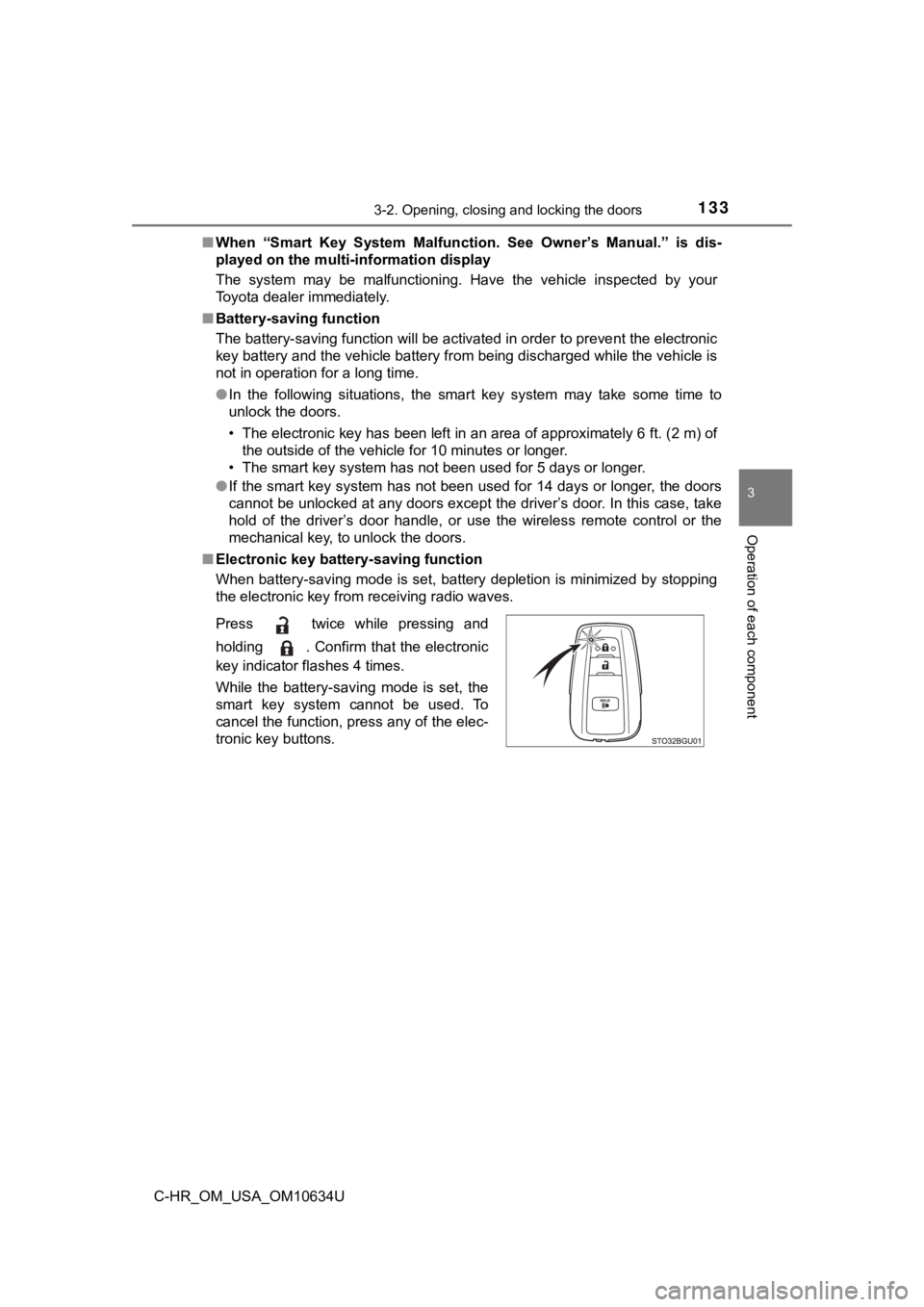
■ Electronic key battery-saving function
When battery-saving mode is set, battery depletion is minimized by stopping
the electronic key from receiving radio waves.
Press twice while pressing and
holding . Confirm that the electronic
key indicator flashes 4 times.
While the battery-saving mode is set, the
smart key system cannot be used. To
cancel the function, press any of the elec-
tronic key buttons.
Page 134 of 536

1343-2. Opening, closing and locking the doors
C-HR_OM_USA_OM10634U■
Conditions affecting operation
The smart key system uses weak radio waves. In the following si tuations, the
communication between the electronic key and the vehicle may be affected,
preventing the smart key system, wireless remote control and en gine immobi-
lizer system from operating properly. (Ways of coping: P. 449)
● When the electronic key battery is depleted
● Near a TV tower, electric power plant, gas station, radio stati on, large dis-
play, airport or other facility that generates strong radio wav es or electrical
noise
● When carrying a portable radio, cellular phone, cordless phone or other
wireless communication device
● When the electronic key is in contact with, or is covered by the following
metallic objects
• Cards to which aluminum foil is attached
• Cigarette boxes that have aluminum foil inside
• Metallic wallets or bags
• Coins
• Hand warmers made of metal
• Media such as CDs and DVDs
● When other wireless keys (that emit radio waves) are being used nearby
● When carrying the electronic key together with the following devices that
emit radio waves
• Portable radio, cellular phone, cordless phone or other wirele ss commu-
nication devices
• Another electronic key or a wireless key that emits radio wave s
• Personal computers or personal digital assistants (PDAs)
• Digital audio players
• Portable game systems
● If window tint with a metallic content or metallic objects are attached to the
rear window
● When the electronic key is placed near a battery charger or ele ctronic
devices
● When parking at a meter
Page 135 of 536
1353-2. Opening, closing and locking the doors
3
Operation of each component
C-HR_OM_USA_OM10634U■
Note for the entry function
●Even when the electronic key is within the effective range (det ection areas),
the system may not operate properly in the following cases:
• The electronic key is too close to the window or outside door handle, near
the ground, or in a high place when the doors are locked or unl ocked.
• The electronic key is near the ground or in a high place, or t oo close to
the rear bumper center when the back door is opened.
• The electronic key is on the instrument panel, luggage cover o r floor, or in
the door pockets or glove box when the engine is started or eng ine switch
modes are changed.
● Do not leave the electronic key on top of the instrument panel or near the
door pockets when exiting the vehicle. Depending on the radio w ave recep-
tion conditions, it may be detected by the antenna outside the cabin and the
door will become lockable from the outside, possibly trapping the electronic
key inside the vehicle.
● As long as the electronic key is within the effective range, th e doors may be
unlocked or locked by anyone.
● Even if the electronic key is not inside the vehicle, it may be possible to start
the engine if the electronic key is near the window.
● The doors may unlock if a large amount of water splashes on the door han-
dle, such as in the rain or in a car wash when the electronic k ey is within the
effective range. (The door will automatically be locked after a pproximately
60 seconds if the doors are not opened and closed.)
● If the wireless remote control is used to lock the doors when t he electronic
key is near the vehicle, there is a possibility that the door m ay not be
unlocked by the entry function. (Use the wireless remote contro l to unlock
the doors.)
Page 140 of 536

1403-2. Opening, closing and locking the doors
C-HR_OM_USA_OM10634U
WARNING
■Caution regarding interfer ence with electronic devices
● People with implantable cardiac pacemakers, cardiac resynchroni zation
therapy-pacemakers or implantable cardioverter defibrillators s hould keep
away from the smart key system antennas. ( P. 131)
The radio waves may affect the operation of such devices. If ne cessary,
the entry function can be disabled. Ask your Toyota dealer for details, such
as the frequency of radio waves and timing of the emitted radio waves.
Then, consult your doctor to see if you should disable the entr y function.
● Users of any electrical medical device other than implantable c ardiac
pacemakers, cardiac resynchronization therapy-pacemakers or implant-
able cardioverter defibrillators should consult the manufacture r of the
device for information about its operation under the influence of radio
waves.
Radio waves could have unexpected effects on the operation of such
medical devices.
Ask your Toyota dealer for details on disabling the entry function.