fuel TOYOTA C-HR 2022 User Guide
[x] Cancel search | Manufacturer: TOYOTA, Model Year: 2022, Model line: C-HR, Model: TOYOTA C-HR 2022Pages: 818, PDF Size: 113.75 MB
Page 129 of 818
1271-4. Hybrid system
1
For safety and security
C-HR_HV_OM_Europe_OM10720E
WARNING
■Road accident cautions
Observe the following precautions to reduce the risk of death o r serious
injury:
● Pull your vehicle off the road, apply the parking brake, shift the shift lever
to P, and turn the hybrid system off.
● Do not touch the high voltage parts, cables and connectors.
● If electric wires are exposed inside or outside your vehicle, an electric
shock may occur. Never touch exposed electric wires.
● 2ZR-FXE engine (for Guadelope, Martinique, F. Guiana and Greenland): If
a fluid leak occurs, do not touch the fluid as it may be strong alkaline elec-
trolyte from the hybrid battery (traction battery). If it comes into contact
with your skin or eyes, wash it off immediately with a large am ount of water
or, if possible, boric acid solution. Seek immediate medical at tention.
● 2ZR-FXE engine (except for Guadelope, Martinique, F. Guiana and
Greenland): Do not touch the batte ry if liquid is leaking from or adhering to
it. If electrolyte (carbonic-based organic electrolyte) from th e hybrid battery
(traction battery) comes into contact with the eyes or skin, it could cause
blindness or skin wounds. In the unlikely event that it comes i nto contact
with the eyes or skin, wash it of f immediately with a large amount of water,
and seek immediate medical attention.
● 2ZR-FXE engine (except for Guadelope, Martinique, F. Guiana and
Greenland): If electrolyte is leaking from the hybrid battery ( traction bat-
tery), do not approach the vehicle. Even in the unlikely event that the
hybrid battery (traction battery) is damaged, the internal cons truction of
the battery will prevent a large amount of electrolyte from lea king out.
However, any electrolyte that does leak out will give off a vap or. This vapor
is an irritant to skin and eyes and could cause acute poisoning if inhaled.
● 2ZR-FXE engine (except for Guadelope, Martinique, F. Guiana and
Greenland): Do not bring burning or high-temperature items close to the
electrolyte. The electrolyte may ignite and cause a fire.
● If a fire occurs in the Hybrid Electric Vehicle, leave the vehicle as soon as
possible. Never use a fire extinguisher that is not meant for e lectric fires.
Using even a small amount of water may be dangerous.
● If your vehicle needs to be towed, do so with front wheels raised. If the
wheels connected to the electric motor (traction motor) are on the ground
when towing, the motor may continue to generate electricity. Th is may
cause a fire. ( P. 674)
● Carefully inspect the ground under the vehicle. If you find that liquid has
leaked onto the ground, the fuel system may have been damaged. Leave
the vehicle as soon as possible.
Page 162 of 818
1602. Instrument cluster
C-HR_HV_OM_Europe_OM10720E
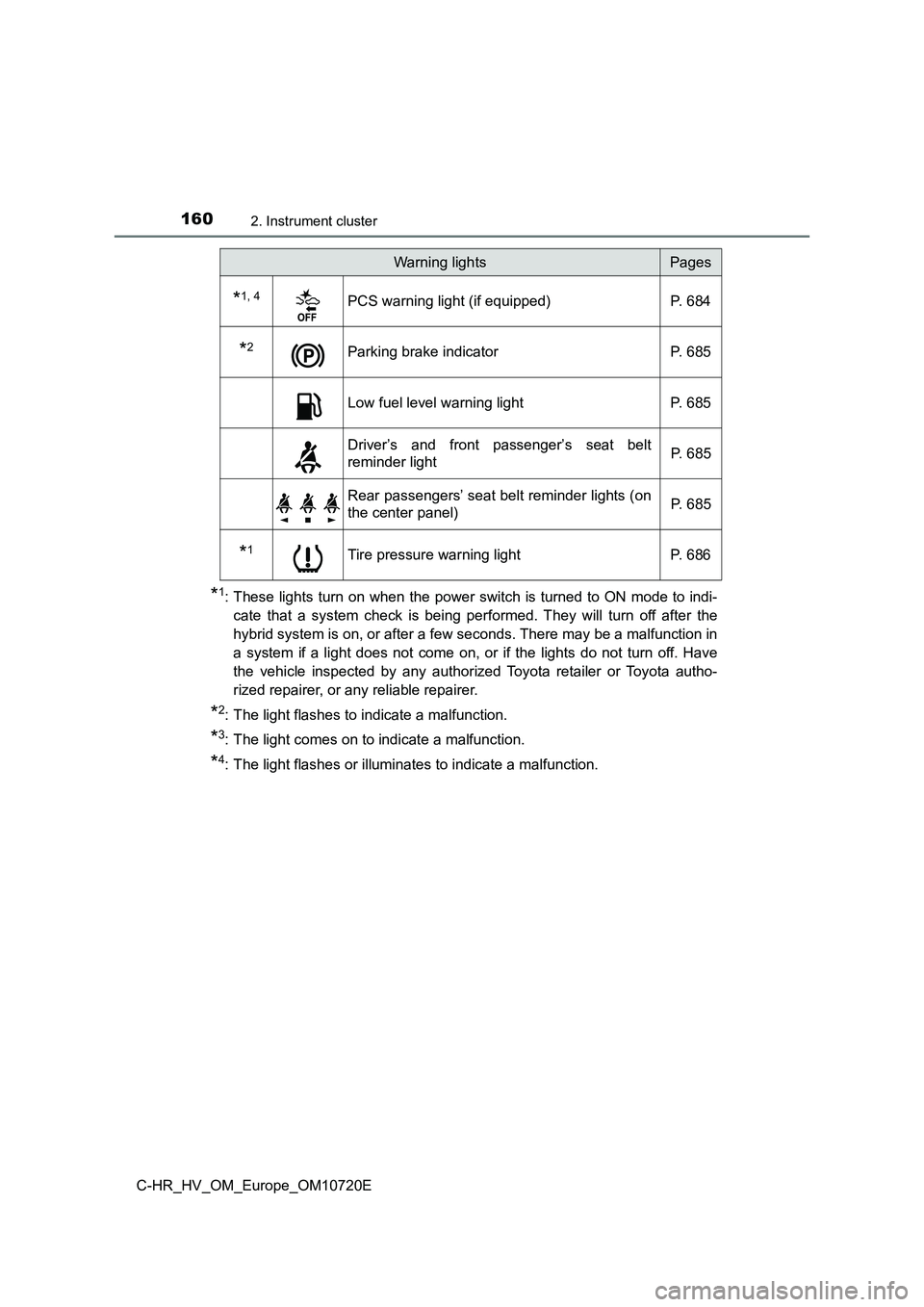
*1: These lights turn on when the power switch is turned to ON mode to indi-
cate that a system check is being performed. They will turn off after the
hybrid system is on, or after a few seconds. There may be a mal function in
a system if a light does not come on, or if the lights do not t urn off. Have
the vehicle inspected by any authorized Toyota retailer or Toyo ta autho-
rized repairer, or any reliable repairer.
*2: The light flashes to indicate a malfunction.
*3: The light comes on to indicate a malfunction.
*4: The light flashes or illuminates to indicate a malfunction.
*1, 4PCS warning light (if equipped) P. 684
*2Parking brake indicator P. 685
Low fuel level warning light P. 685
Driver’s and front passenger’s seat belt
reminder light P. 6 8 5
Rear passengers’ seat belt reminder lights (on
the center panel) P. 6 8 5
*1Tire pressure warning light P. 686
Warning lightsPages
Page 168 of 818
1662. Instrument cluster
C-HR_HV_OM_Europe_OM10720E
Gauges and meters
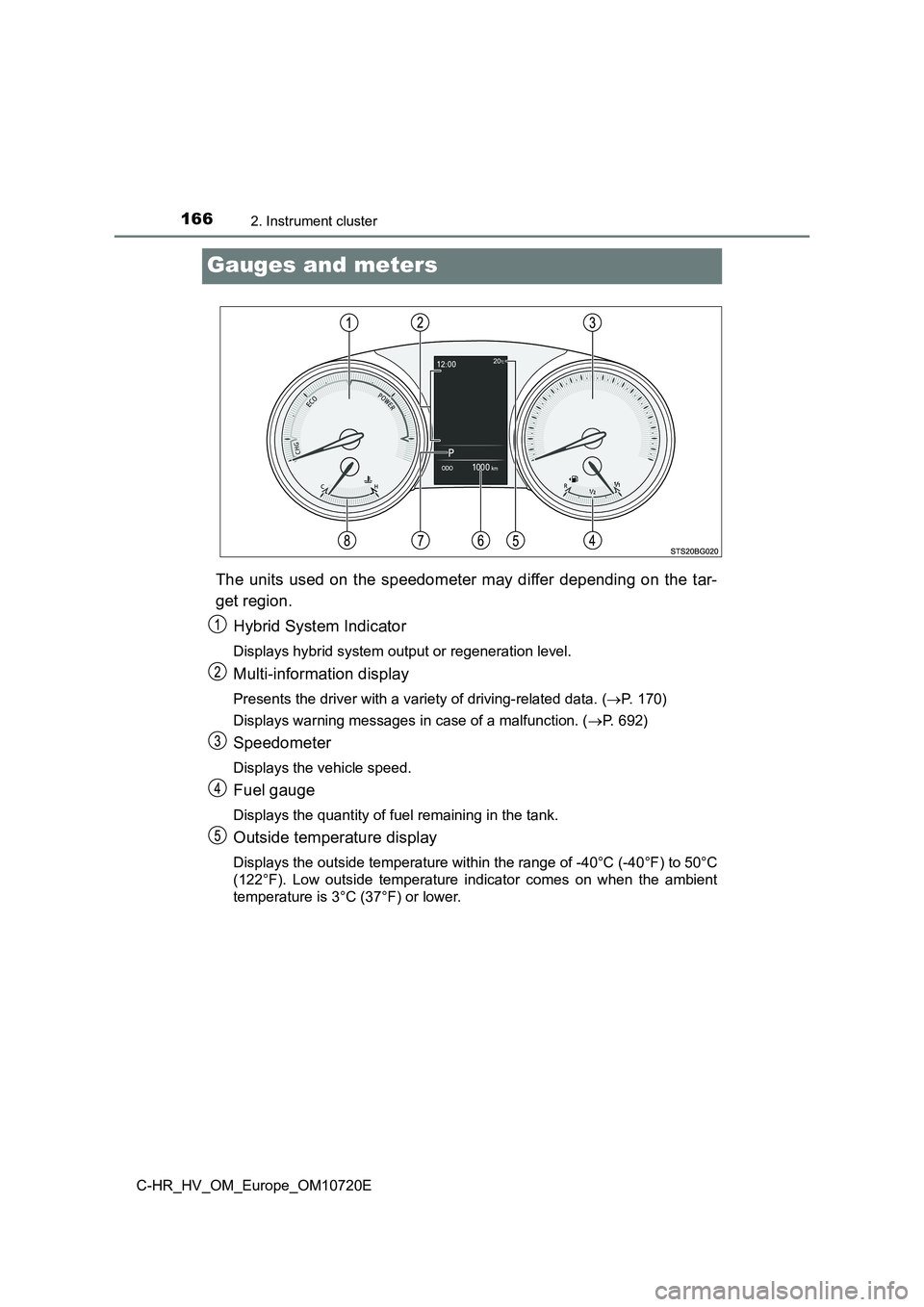
The units used on the speedometer may differ depending on the tar-
get region.
Hybrid System Indicator
Displays hybrid system output or regeneration level.
Multi-information display
Presents the driver with a variety of driving-related data. ( P. 170)
Displays warning messages in case of a malfunction. ( P. 692)
Speedometer
Displays the vehicle speed.
Fuel gauge
Displays the quantity of fuel remaining in the tank.
Outside temperature display
Displays the outside temperature within the range of -40°C (-40°F) to 50°C
(122°F). Low outside temperature indicator comes on when the am bient
temperature is 3°C (37°F) or lower.
Page 171 of 818
1692. Instrument cluster
2
Instrument cluster
C-HR_HV_OM_Europe_OM10720E
■ Engine speed
On Hybrid Electric Vehicles, engine speed is precisely controll ed in order to
help improve fuel efficiency and reduce exhaust emissions, etc.
There are times when the engine speed that is displayed may dif fer even
when vehicle operation and driving conditions are the same.
■ Outside temperature display
● In the following situations, the correct outside temperature may not be dis-
played, or the display may take longer than normal to change.
• When stopped, or driving at low speeds (less than 25 km/h [16 mph])
• When the outside temperature has changed suddenly (at the entr ance/
exit of a garage, tunnel, etc.)
● When “--” is displayed, the system may be malfunctioning.
Take your vehicle to any authorized Toyota retailer or Toyota a uthorized
repairer, or any reliable repairer.
■ Adjusting the clock (if equipped)
The clocks can be adjusted on the multimedia system screen.
Refer to “Navigation and multimedia system Owner’s manual” or “ Multimedia
owner’s manual”.
NOTICE
■ To prevent damage to the engine and its components
The engine may be overheating if the engine coolant temperature gauge is
in the red zone (“H”). In this case, immediately stop the vehic le in a safe
place, and check the engine after it has cooled completely. ( P. 757)
Page 173 of 818
1712. Instrument cluster
2
Instrument cluster
C-HR_HV_OM_Europe_OM10720E
Settings display
Select to change the meter display settings and the operation set-
tings of some vehicle functions. ( P. 173)
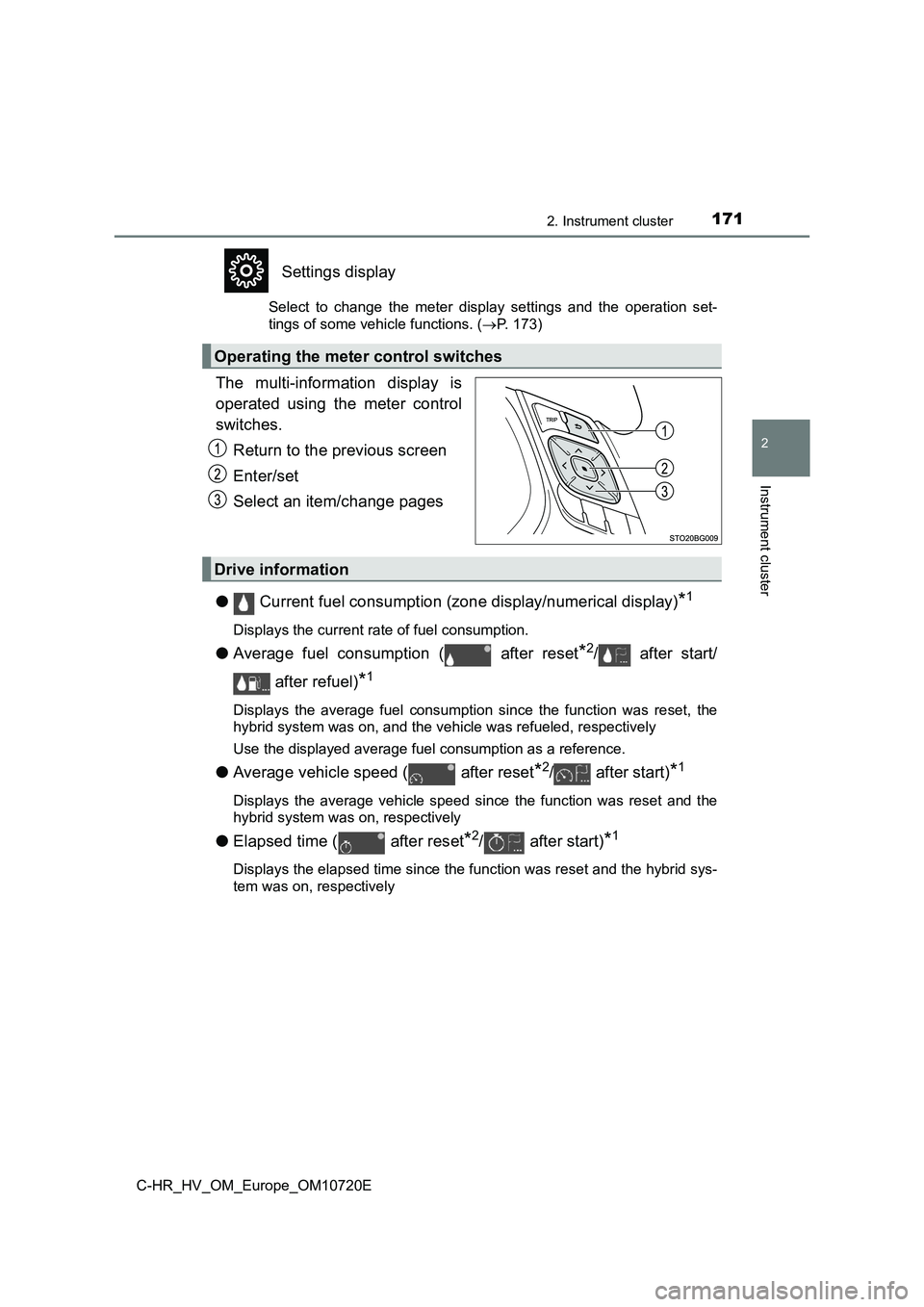
The multi-information display is
operated using the meter control
switches.
Return to the previous screen
Enter/set
Select an item/change pages
● Current fuel consumption (zone display/numerical display)*1
Displays the current rate of fuel consumption.
●Average fuel consumption ( after reset*2/ after start/
after refuel)*1
Displays the average fuel consumption since the function was re set, the
hybrid system was on, and the vehicle was refueled, respectivel y
Use the displayed average fuel consumption as a reference.
● Average vehicle speed ( after reset*2/ after start)*1
Displays the average vehicle speed since the function was reset and the
hybrid system was on, respectively
● Elapsed time ( after reset*2/ after start)*1
Displays the elapsed time since the function was reset and the hybrid sys-
tem was on, respectively
Operating the meter control switches
Drive information
Page 174 of 818
1722. Instrument cluster
C-HR_HV_OM_Europe_OM10720E
●Distance ( driving range/ after start)*1
Displays the estimated maximum distance that can be driven with the
quantity of fuel remaining and the distance driven after the hy brid system
was on, respectively
• This distance is computed based on your average fuel consumpti on. As
a result, the actual distance that can be driven may differ fro m that dis-
played.
• When only a small amount of fuel is added to the tank, the dis play may
not be updated.
When refueling, turn the power switch off. If the vehicle is re fueled with-
out turning the power switch off, the display may not be update d.
●Energy monitor
P. 179
●Speedometer
Displays the vehicle speed.
●G Monitor
P. 177
●EV drive time ratio
Displays the ratio made up of the EV drive time. (P. 176)
●Display off
A blank screen is displayed.
*1: Can be registered to Drive information 1 and 2. (P. 173)
*2: Resetting procedures:
• Select a function to be reset using the meter control switches and then
press and hold to reset.
• If there is more than one function that can be reset, check bo xes will be
displayed next to those functions.
Page 177 of 818
1752. Instrument cluster
2
Instrument cluster
C-HR_HV_OM_Europe_OM10720E
●Meter settings
Select the menu to set up the following items.
• Language
Select to change the language on the display.
•Units
Select to change the unit of measure for fuel consumption.
• (EV indicator) setup
Select to activate/deactivate the EV indicator on/off.
• Drive information 1 and 2
Select to select up to 2 items that will be displayed on a Driv e informa-
tion screen, up to 2 Drive information screens can be set.
• Pop-up display
Select to set the pop-up displays*2, which may appear in some situa-
tions, on/off.
• Default settings
Registered or changed meter settings will be deleted or returne d to their
default setting.
*1: If equipped
*2: Route guidance display of the navigation system-linked system (if
equipped) and incoming call display of the hands-free phone sys tem (if
equipped).
Page 180 of 818
1782. Instrument cluster
C-HR_HV_OM_Europe_OM10720E
■ Ending display
When the power switch is turned off, each of the following will be displayed
on the multi-information display, and will extinguish after app roximately 30
seconds.
● Elapsed time/EV drive time ratio
● Distance
● Average fuel consumption
WARNING
■Cautions during setting up the display
As the engine needs to be running during setting up the display , ensure that
the vehicle is parked in a place with adequate ventilation. In a closed area
such as a garage, exhaust gases including harmful carbon monoxi de (CO)
may collect and enter the vehicle. This may lead to death or a serious
health hazard.
NOTICE
■ During setting up the display
To prevent 12-volt battery discharge, ensure that the hybrid sy stem is oper-
ating while setting up the display features.
Page 184 of 818
1822. Instrument cluster
C-HR_HV_OM_Europe_OM10720E
Navigation/multimedia system screen (vehicles without navigation
system)
Press the “MENU” button.
Select “Info” on the “Menu” screen.
If a screen other than the desired one is displayed, select “Tr ip information”
or “History” on the screen.
Navigation/multimedia system screen (vehicles with navigation s ys-
tem)
Press the “MENU” button.
Select “Info” on the “Menu” screen.
Select “ECO” on the “Information” screen.
If a screen other than the desired one is displayed, select “Tr ip information”
or “History” on the screen.
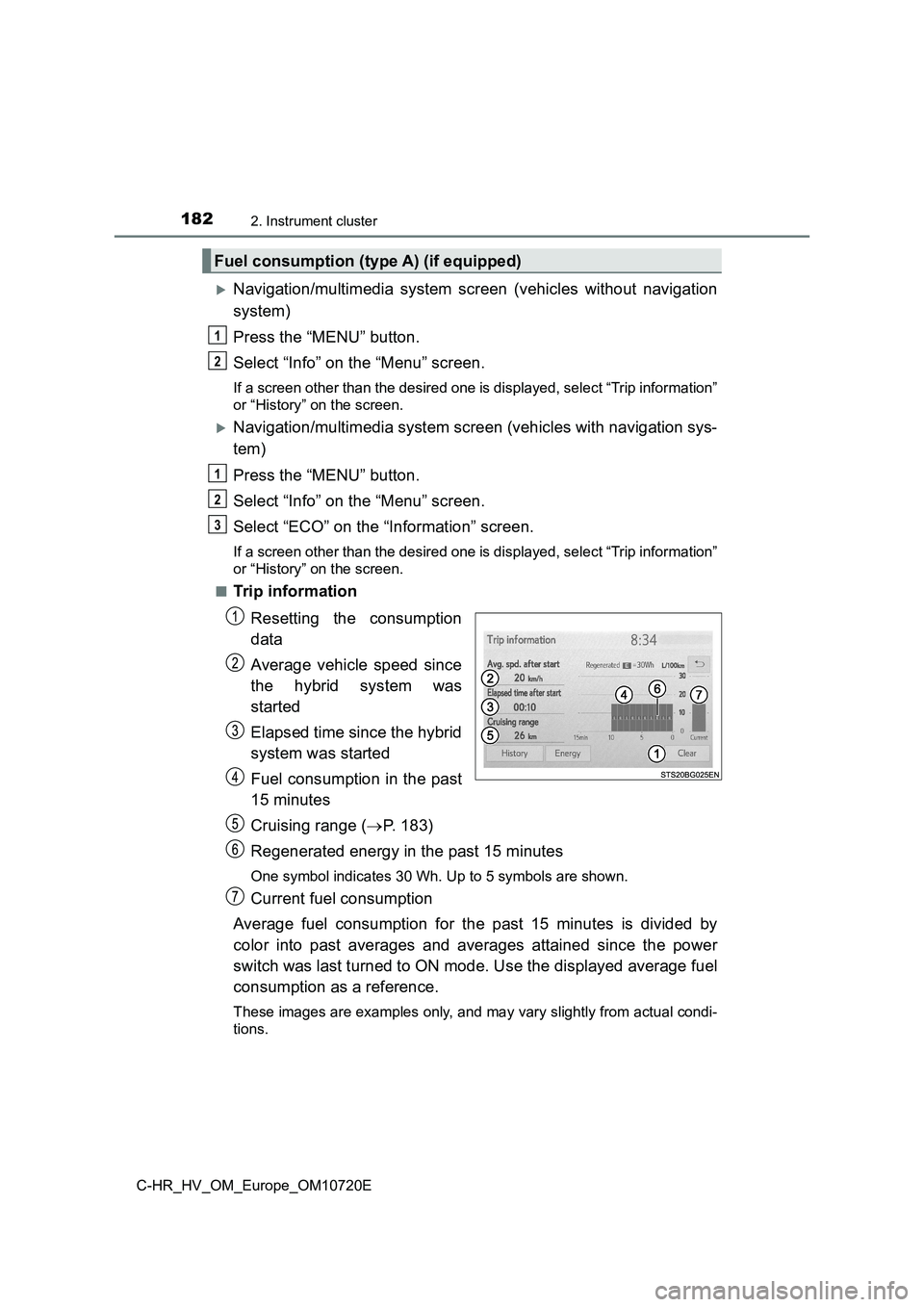
■Trip information
Resetting the consumption
data
Average vehicle speed since
the hybrid system was
started
Elapsed time since the hybrid
system was started
Fuel consumption in the past
15 minutes
Cruising range ( P. 183)
Regenerated energy in the past 15 minutes
One symbol indicates 30 Wh. Up to 5 symbols are shown.
Current fuel consumption
Average fuel consumption for the past 15 minutes is divided by
color into past averages and averages attained since the power
switch was last turned to ON mode. Use the displayed average fu el
consumption as a reference.
These images are examples only, and may vary slightly from actu al condi-
tions.
Fuel consumption (type A) (if equipped)
1
2
1
2
3
Page 185 of 818
1832. Instrument cluster
2
Instrument cluster
C-HR_HV_OM_Europe_OM10720E
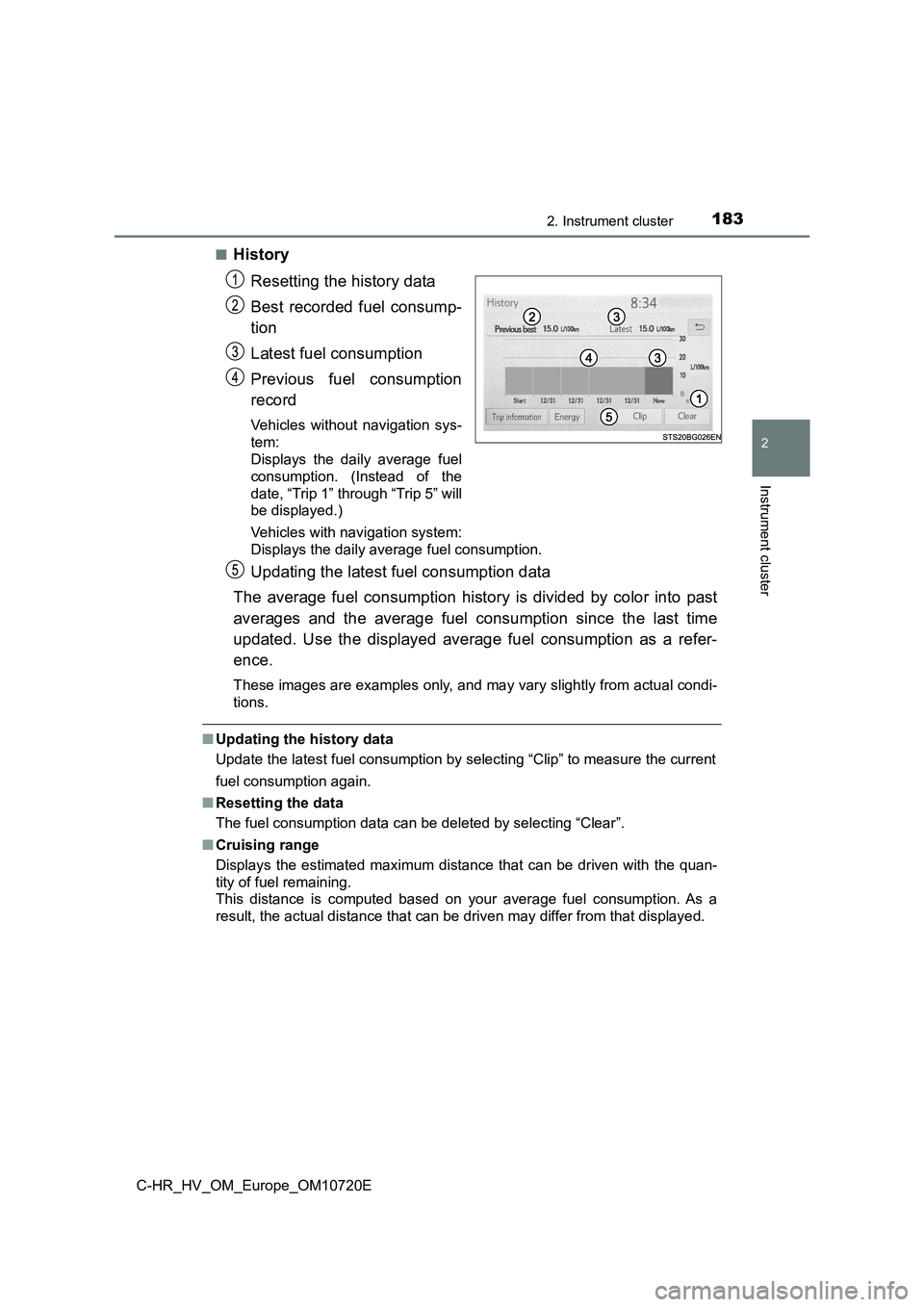
■History
Resetting the history data
Best recorded fuel consump-
tion
Latest fuel consumption
Previous fuel consumption
record
Vehicles without navigation sys-
tem:
Displays the daily average fuel
consumption. (Instead of the
date, “Trip 1” through “Trip 5” will
be displayed.)
Vehicles with navigation system:
Displays the daily average fuel consumption.
Updating the latest fuel consumption data
The average fuel consumption history is divided by color into p ast
averages and the average fuel consumption since the last time
updated. Use the displayed average fuel consumption as a refer-
ence.
These images are examples only, and may vary slightly from actu al condi-
tions.
■ Updating the history data
Update the latest fuel consumption by selecting “Clip” to measu re the current
fuel consumption again.
■ Resetting the data
The fuel consumption data can be deleted by selecting “Clear”.
■ Cruising range
Displays the estimated maximum distance that can be driven with the quan-
tity of fuel remaining.
This distance is computed based on your average fuel consumptio n. As a
result, the actual distance that can be driven may differ from that displayed.