light TOYOTA C-HR 2023 Repair Manual
[x] Cancel search | Manufacturer: TOYOTA, Model Year: 2023, Model line: C-HR, Model: TOYOTA C-HR 2023Pages: 814, PDF Size: 112.62 MB
Page 304 of 814
3024-1. Before driving
C-HR_HEV_OM_Europe_OM10764E
WARNING
Follow all the instructions described in this section.
Failure to do so could cause an accident resulting in death or serious injury.
■ Trailer towing precautions
When towing, make sure that none of the weight limits are excee ded.
( P. 295)
■ To avoid accident or injury
● Vehicles with a compact spare tire:
Do not tow a trailer when the compact spare tire is installed o n your vehi-
cle.
● Vehicles with an emergency tire puncture repair kit:
Do not tow a trailer when the tire installed is repaired with t he emergency
tire puncture repair kit.
● Do not use the following systems when trailer towing.
• Cruise control*
• Dynamic radar cruise control with full-speed range*
• LTA (Lane Tracing Assist)*
• PCS (Pre-Collision System)*
• BSM (Blind Spot Monitor)*
*: If equipped
■ Vehicle speed in towing
Observe the legal maximum speeds for trailer towing.
■ Before descending hills or long declines
Reduce speed and downshift. However, never downshift suddenly w hile
descending steep or long downhill grades.
■ Operation of the brake pedal
Do not hold the brake pedal depressed often or for long periods of time.
Doing so may result in the brake overheating or reduce braking effects.
NOTICE
■Do not directly splice trailer lights
Directly splicing trailer lights may damage your vehicle’s elec trical system
and cause a malfunction.
Page 305 of 814
303
4
4-2. Driving procedures
Driving
C-HR_HEV_OM_Europe_OM10764E
Power (ignition) switch
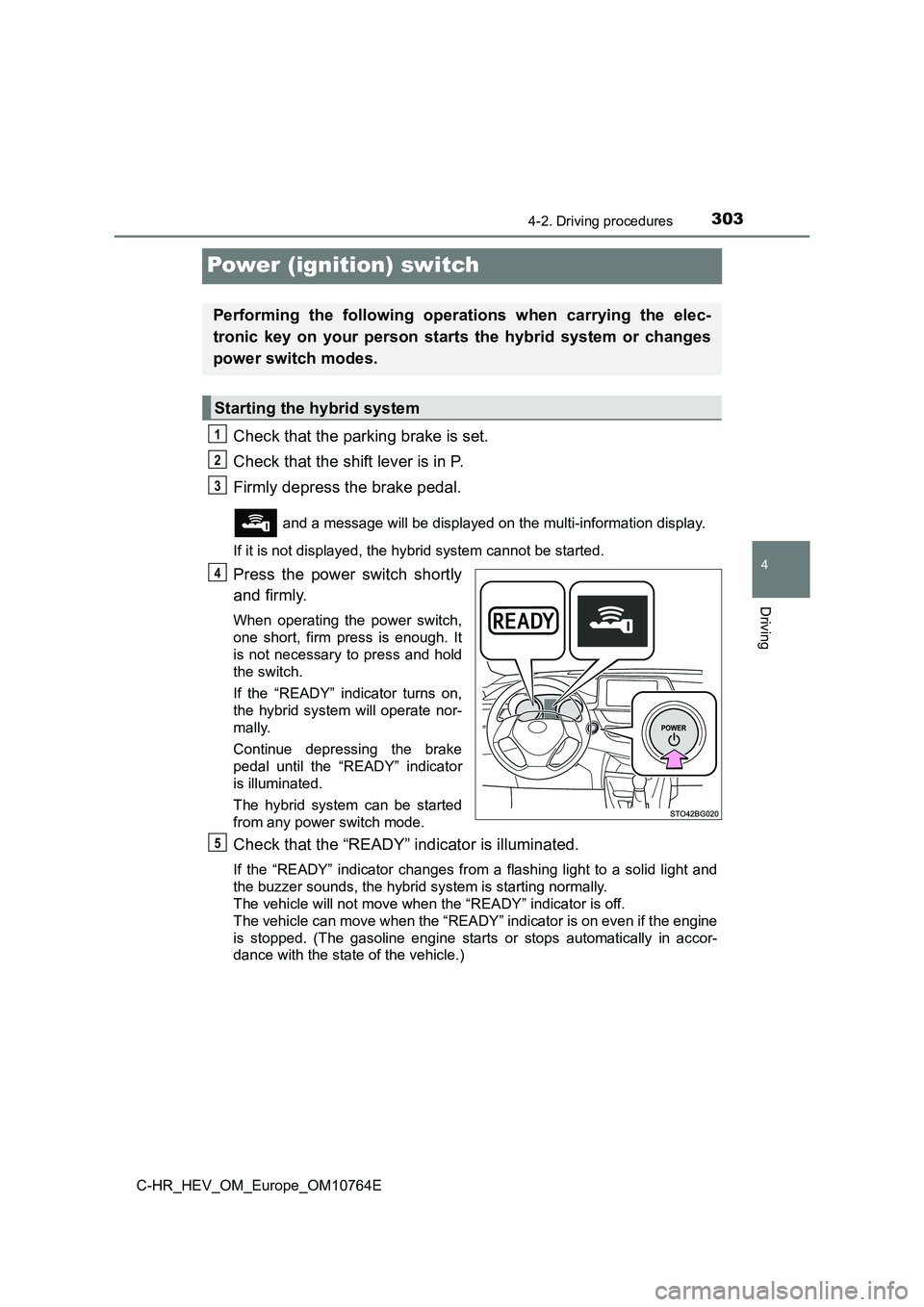
Check that the parking brake is set.
Check that the shift lever is in P.
Firmly depress the brake pedal.
and a message will be displayed on the multi-information displ ay.
If it is not displayed, the hybrid system cannot be started.
Press the power switch shortly
and firmly.
When operating the power switch,
one short, firm press is enough. It
is not necessary to press and hold
the switch.
If the “READY” indicator turns on,
the hybrid system will operate nor-
mally.
Continue depressing the brake
pedal until the “READY” indicator
is illuminated.
The hybrid system can be started
from any power switch mode.
Check that the “READY” indicator is illuminated.
If the “READY” indicator changes from a flashing light to a sol id light and
the buzzer sounds, the hybrid system is starting normally.
The vehicle will not move when the “READY” indicator is off.
The vehicle can move when the “READY” indicator is on even if t he engine
is stopped. (The gasoline engine starts or stops automatically in accor-
dance with the state of the vehicle.)
Performing the following operations when carrying the elec-
tronic key on your person starts the hybrid system or changes
power switch modes.
Starting the hybrid system
1
2
3
4
5
Page 311 of 814
3094-2. Driving procedures
4
Driving
C-HR_HEV_OM_Europe_OM10764E
NOTICE
■To prevent 12-volt battery discharge
● Do not leave the power switch in ACCESSORY or ON mode for long peri-
ods of time without the hybrid system on.
● If “ACCESSORY” or “IGNITION ON” is displayed on the multi-information
display while the hybrid system is not operating, the power swi tch is not
off. Exit the vehicle after turning the power switch off.
● Do not stop the hybrid system when the shift lever is in a position other
than P. If the hybrid system is stopped in another shift lever position, the
power switch will not be turned off but instead be turned to AC CESSORY
mode. If the vehicle is left in ACCESSORY mode, 12-volt battery dis-
charge may occur.
■ When starting the hybrid system
If the hybrid system becomes difficult to start, have your vehi cle checked by
any authorized Toyota retailer or Toyota authorized repairer, o r any reliable
repairer immediately.
■ Symptoms indicating a malfunction with the power switch
If the power switch seems to be operating somewhat differently than usual,
such as the switch sticking slightly, there may be a malfunctio n. Contact any
authorized Toyota retailer or Toyota authorized repairer, or an y reliable
repairer immediately.
Page 324 of 814
3224-2. Driving procedures
C-HR_HEV_OM_Europe_OM10764E
Turn signal lever
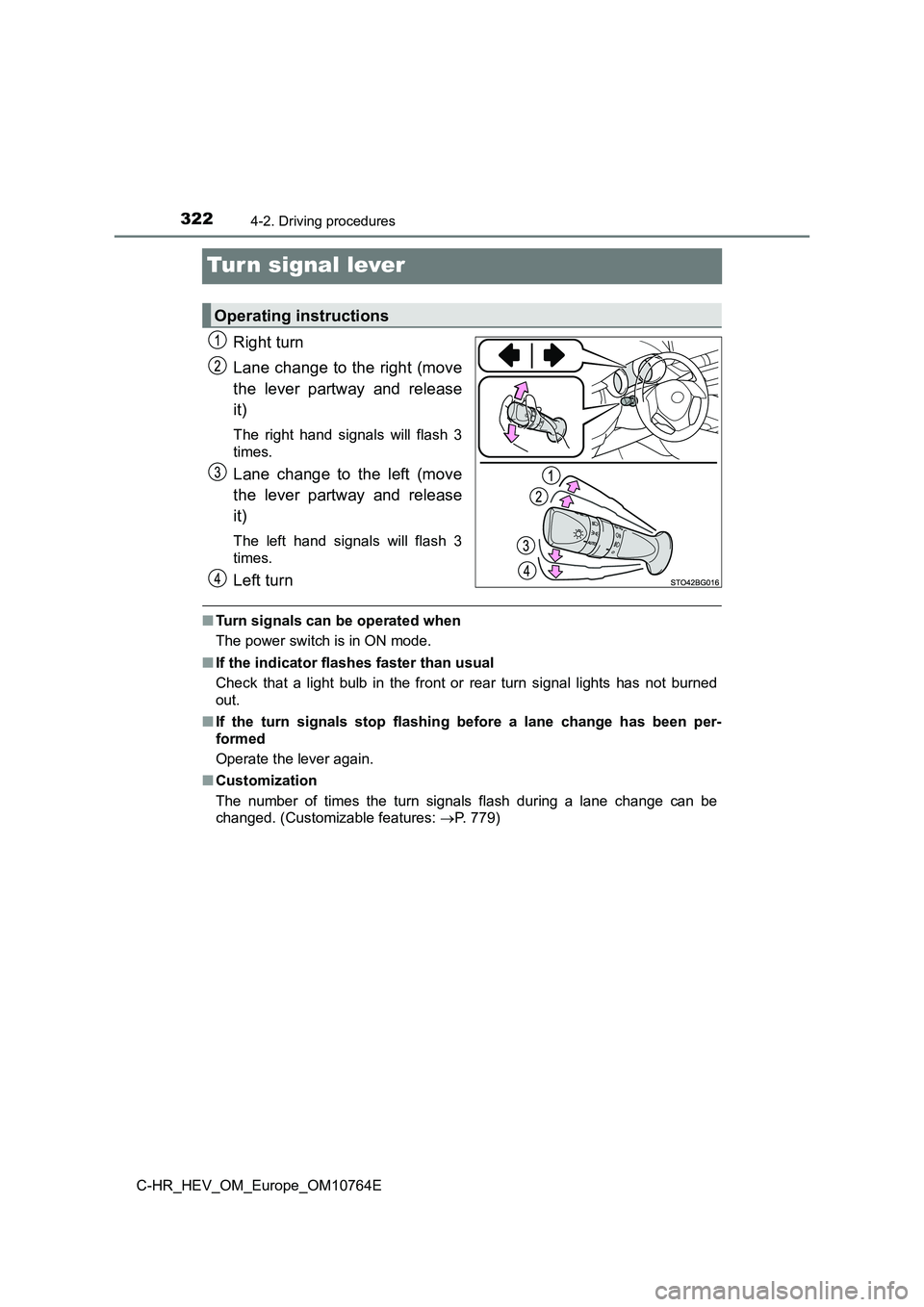
Right turn
Lane change to the right (move
the lever partway and release
it)
The right hand signals will flash 3
times.
Lane change to the left (move
the lever partway and release
it)
The left hand signals will flash 3
times.
Left turn
■ Turn signals can be operated when
The power switch is in ON mode.
■ If the indicator flashes faster than usual
Check that a light bulb in the front or rear turn signal lights has not burned
out.
■ If the turn signals stop flashing before a lane change has been per-
formed
Operate the lever again.
■ Customization
The number of times the turn signals flash during a lane change can be
changed. (Customizable features: P. 779)
Operating instructions
Page 325 of 814
323
4
4-2. Driving procedures
Driving
C-HR_HEV_OM_Europe_OM10764E
Parking brake
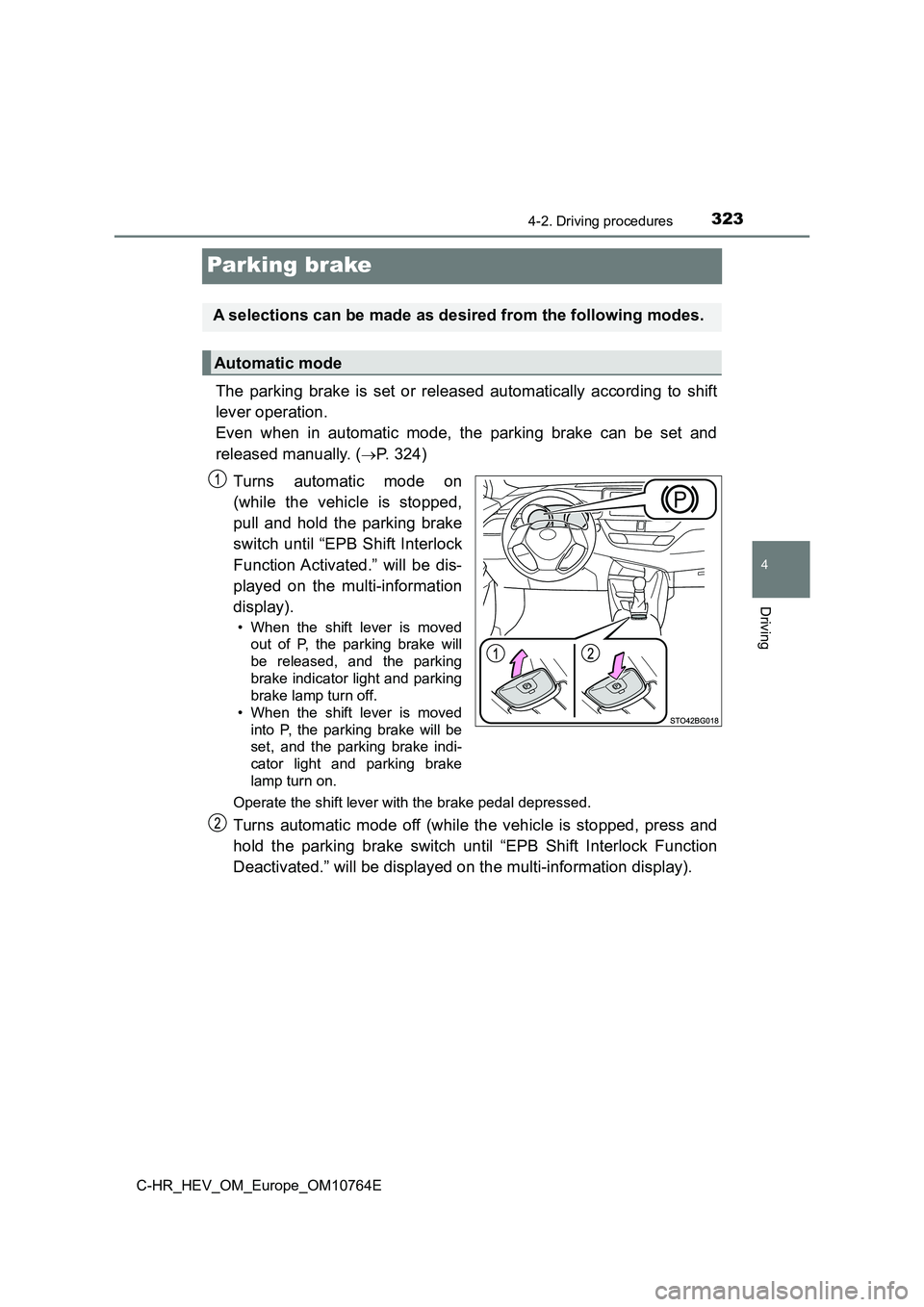
The parking brake is set or released automatically according to shift
lever operation.
Even when in automatic mode, the parking brake can be set and
released manually. (P. 3 2 4 )
Turns automatic mode on
(while the vehicle is stopped,
pull and hold the parking brake
switch until “EPB Shift Interlock
Function Activated.” will be dis-
played on the multi-information
display).
• When the shift lever is moved
out of P, the parking brake will
be released, and the parking
brake indicator light and parking
brake lamp turn off.
• When the shift lever is moved
into P, the parking brake will be
set, and the parking brake indi-
cator light and parking brake
lamp turn on.
Operate the shift lever with the brake pedal depressed.
Turns automatic mode off (while the vehicle is stopped, press a nd
hold the parking brake switch until “EPB Shift Interlock Functi on
Deactivated.” will be displayed on the multi-information displa y).
A selections can be made as desired from the following modes.
Automatic mode
Page 326 of 814
3244-2. Driving procedures
C-HR_HEV_OM_Europe_OM10764E
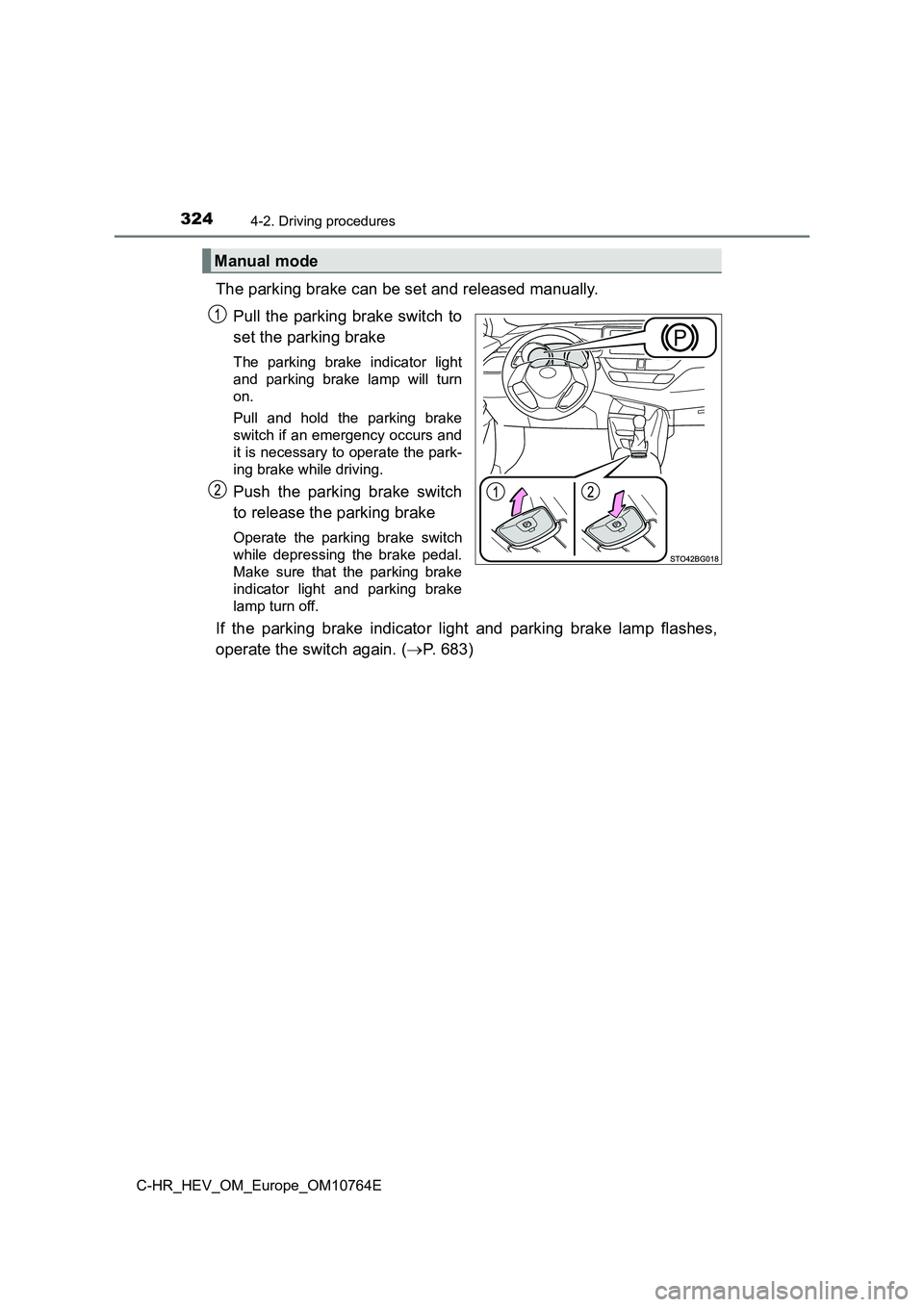
The parking brake can be set and released manually.
Pull the parking brake switch to
set the parking brake
The parking brake indicator light
and parking brake lamp will turn
on.
Pull and hold the parking brake
switch if an emergency occurs and
it is necessary to operate the park-
ing brake while driving.
Push the parking brake switch
to release the parking brake
Operate the parking brake switch
while depressing the brake pedal.
Make sure that the parking brake
indicator light and parking brake
lamp turn off.
If the parking brake indicator light and parking brake lamp fla shes,
operate the switch again. ( P. 683)
Manual mode
Page 327 of 814
3254-2. Driving procedures
4
Driving
C-HR_HEV_OM_Europe_OM10764E
■Parking brake operation
● When the power switch is not in ON mode, the parking brake cannot be
released using the parking brake switch.
● When the power switch is not in the ON mode, automatic mode (automatic
brake setting and releasing) is not available.
■ Automatic release function
The parking brake is automatically released when slowly depress the acceler-
ator pedal.
The parking brake will be released automatically under the foll owing condi-
tions:
● The driver’s door is closed.
● The driver’s seatbelt is fastened.
● Shift the shift lever is in a forward or reverse position.
● The malfunction indicator lamp or brake system warning light is not illumi-
nated.
If the automatic release function does not operate, manually re lease the park-
ing brake.
■ If “EPB Frequently Operated, Wait a Minute.” is displayed on the
multi-information display
If the parking brake is operated repeatedly over a short period of time, the
system may restrict operation to prevent overheating. If this h appens, refrain
from operating the parking brake. Normal operation will return after about 1
minute.
■ If “EPB Activation Incomplete.” or “EPB Unavailable” is displayed on the
multi-information display
Operate the parking brake switch. If the message does not disap pear after
operating the switch several times, the system may be malfuncti oning. Have
the vehicle inspected by any authorized Toyota retailer or Toyo ta authorized
repairer, or any reliabl e repairer immediately.
■ Parking brake operation sound
When the parking brake operates, a motor sound (whirring sound) may be
heard. This does not indicate a malfunction.
Page 328 of 814
3264-2. Driving procedures
C-HR_HEV_OM_Europe_OM10764E
■ Parking brake indicator light and parking brake lamp
● Depending on the power switch position/mode, the parking brake indicator
light and parking brake lamp will turn on and stay on as described below:
ON mode: Comes on until the parking brake is released.
Not in ON mode: Stays on for approximately 15 seconds.
● When the power switch is turned off with the parking brake set, the parking
brake indicator light and parking brake lamp will stay on for a bout 15 sec-
onds. This does not indicate a malfunction.
■ Changing the mode
When changing the automatic mode on/off, the message will be sh own on the
multi-information display and the buzzer sounds.
■ Parking the vehicle
P. 283
■ Parking brake engaged warning buzzer
A buzzer will sound if the vehicle is driven with the parking b rake engaged.
“EPB Applied.” is displayed on the multi-information display.
■ Warning messages and buzzers
Warning messages and buzzers are used to indicate a system malf unction or
to inform the driver of the need for caution. If a warning mess age is shown on
the multi-information display, read the message and follow the instructions.
■ If the brake system warning light comes on
P. 683
■ Usage in winter time
P. 542
Page 330 of 814
3284-2. Driving procedures
C-HR_HEV_OM_Europe_OM10764E
Brake Hold
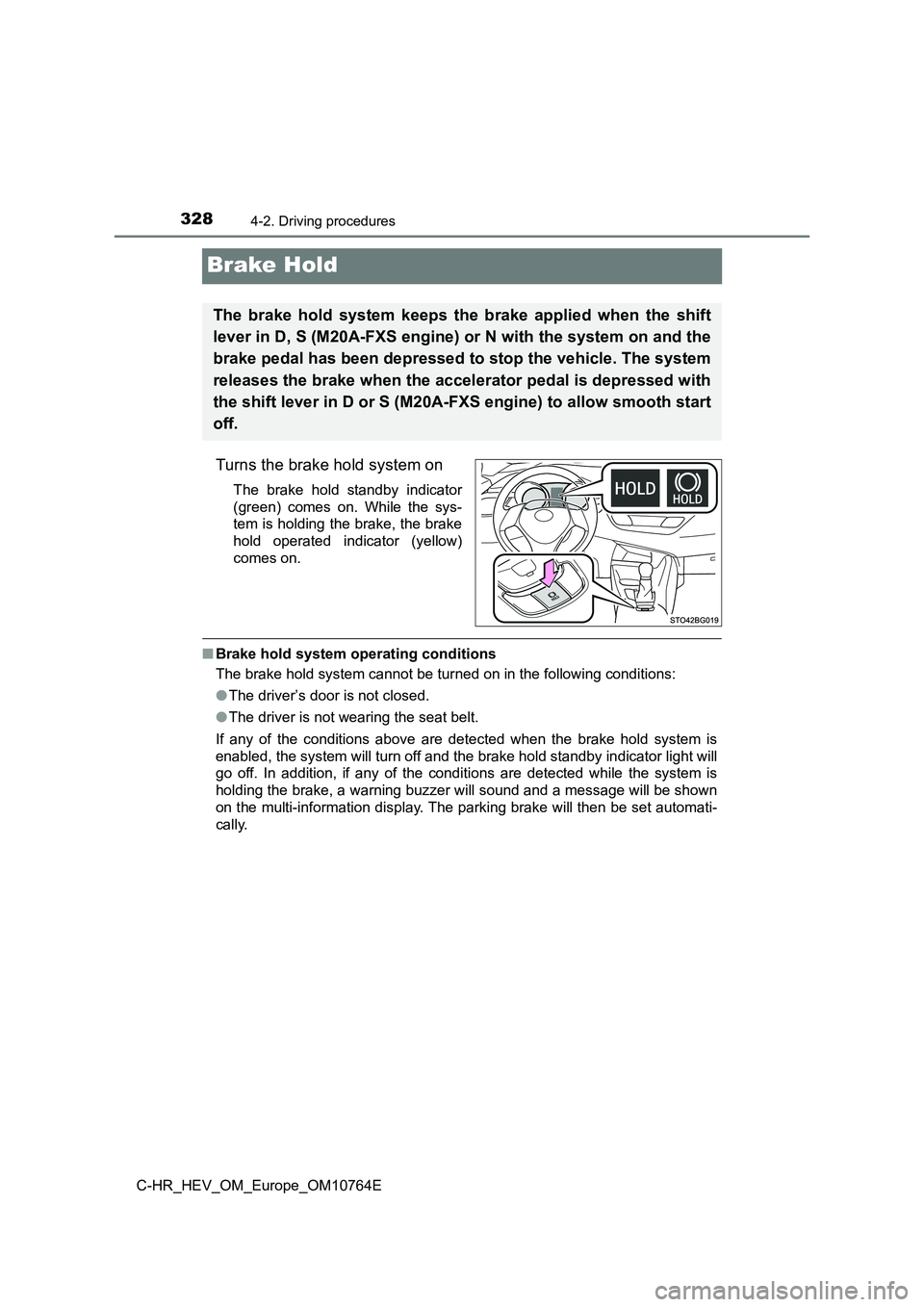
Turns the brake hold system on
The brake hold standby indicator
(green) comes on. While the sys-
tem is holding the brake, the brake
hold operated indicator (yellow)
comes on.
■ Brake hold system operating conditions
The brake hold system cannot be turned on in the following cond itions:
● The driver’s door is not closed.
● The driver is not wearing the seat belt.
If any of the conditions above are detected when the brake hold system is
enabled, the system will turn off and the brake hold standby in dicator light will
go off. In addition, if any of the conditions are detected whil e the system is
holding the brake, a warning buzzer will sound and a message wi ll be shown
on the multi-information display. The parking brake will then b e set automati-
cally.
The brake hold system keeps the brake applied when the shift
lever in D, S (M20A-FXS engine) or N with the system on and the
brake pedal has been depressed to stop the vehicle. The system
releases the brake when the accelerator pedal is depressed with
the shift lever in D or S (M20A-FXS engine) to allow smooth sta rt
off.
Page 331 of 814
3294-2. Driving procedures
4
Driving
C-HR_HEV_OM_Europe_OM10764E
■ Brake hold function
● If the brake pedal is left released for a period of about 3 minutes after the
system has started holding the brake, the parking brake will be set automat-
ically. In this case, a warning buzzer sounds and a message is shown on the
multi-information display.
● To turn the system off while the system is holding the brake, firmly depress
the brake pedal and press the button again.
● The brake hold function may not hold the vehicle when the vehicle is on a
steep incline. In this situation, it may be necessary for the d river to apply the
brakes. A warning buzzer will sound and the multi-information d isplay will
inform the driver of this situation. If a warning message is sh own on the
multi-information display, read the message and follow the inst ructions.
■ When the parking brake is set automatically while the system is holding
the brakes
Perform any of the following operations to release the parking brake.
● Depress the accelerator pedal. (The parking brake will not be released auto-
matically if the seat belt is not fastened.)
● Operate the parking brake switch with the brake pedal depressed. Make
sure that the parking brake indicator light goes off. ( P. 323)
■ When an inspection at your Toyota dealer is necessary
When the brake hold standby indicator (green) does not illumina te even when
the brake hold switch is pressed with the brake hold system ope rating condi-
tions met, the system may be malfunctioning. Have the vehicle i nspected at
any authorized Toyota retailer or Toyota authorized repairer, o r any reliable
repairer.
■ If “Brake Hold Fault Depress Brake to Deactivate Visit Your Dealer” is
displayed on the multi-information display
The system may be malfunctioning. Have the vehicle inspected by contact
any authorized Toyota retailer or Toyota authorized repairer, o r any reliable
repairer immediately.
■ Warning messages and buzzers
Warning messages and buzzers are used to indicate a system malf unction or
to inform the driver of the need for caution. If a warning mess age is shown on
the multi-information display, read the message and follow the instructions.
■ If the brake hold operated indicator flashes
P. 683