light TOYOTA C-HR 2023 Service Manual
[x] Cancel search | Manufacturer: TOYOTA, Model Year: 2023, Model line: C-HR, Model: TOYOTA C-HR 2023Pages: 814, PDF Size: 112.62 MB
Page 176 of 814
1742. Instrument cluster
C-HR_HEV_OM_Europe_OM10764E
■Setting items
● “Meter Settings” and “Vehicle Settings” setting items are not selectable
during driving and cannot be operated.
Also, the settings screen is temporarily canceled in the follow ing situations.
• A warning message is displayed.
• The vehicle starts off.
● Settings for functions not equipped to the vehicle are not displayed.
● When a function is turned off, the related settings for that function are not
selectable.
■ Pop-up display
In some situations, such as when a switch operation is performe d, a pop-up
display will be temporarily disp layed on the multi-information display.
The pop-up display function can be set on/off.
■ Liquid crystal display
Small spots or light spots may appear on the display. This phen omenon is
characteristic of liquid crystal displays, and there is no prob lem continuing to
use the display.
■ When disconnecting and reconnecting 12-volt battery terminals
The drive information will be reset.
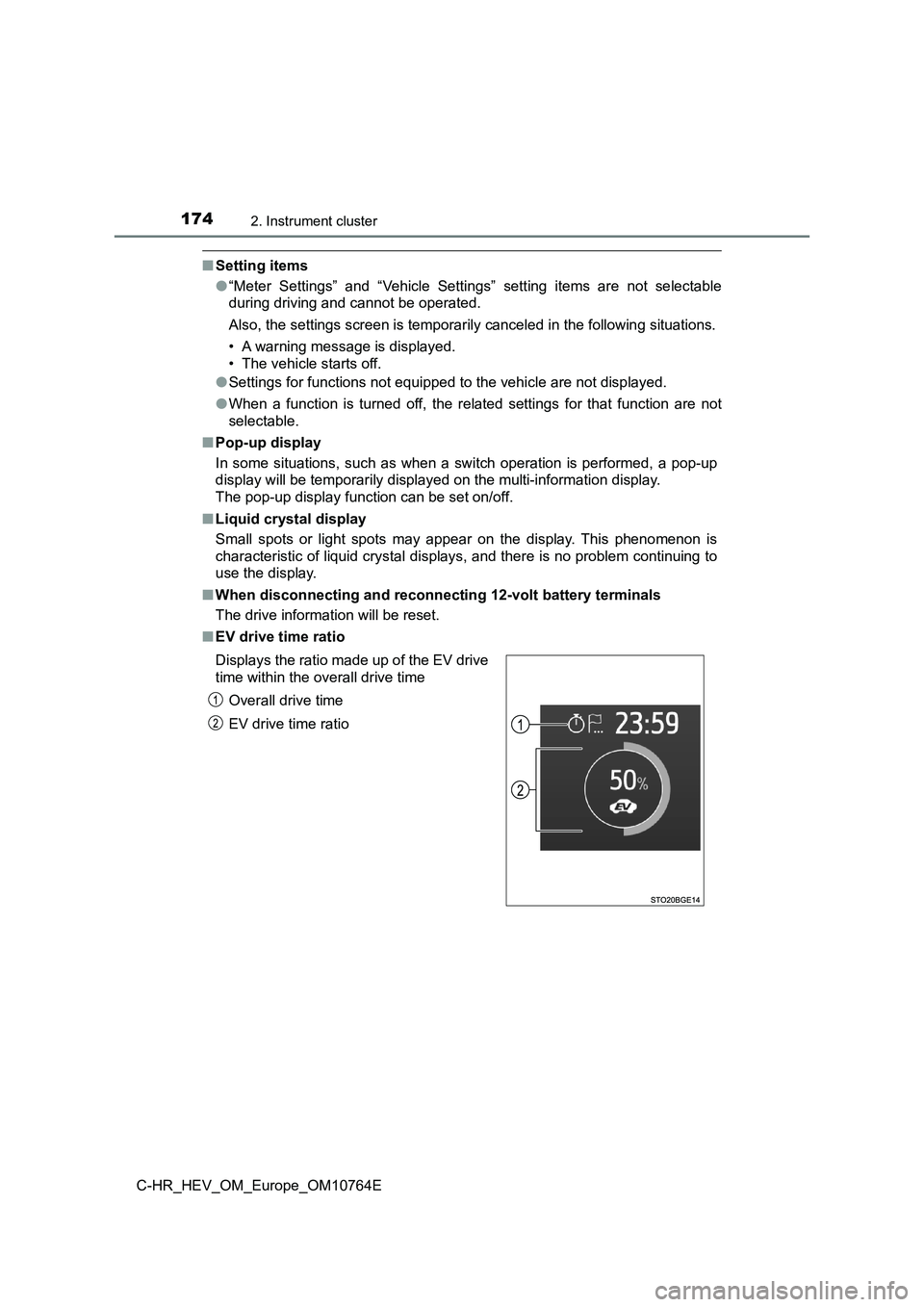
■ EV drive time ratio
Displays the ratio made up of the EV drive
time within the overall drive time
Overall drive time
EV drive time ratio
Page 177 of 814
1752. Instrument cluster
2
Instrument cluster
C-HR_HEV_OM_Europe_OM10764E
■ Meter brightness adjustment
The meter brightness level can be adjusted when the tail lights are on. How-
ever, when the surroundings are bright (daytime, etc.), the bri ghtness level
may not be adjustable.
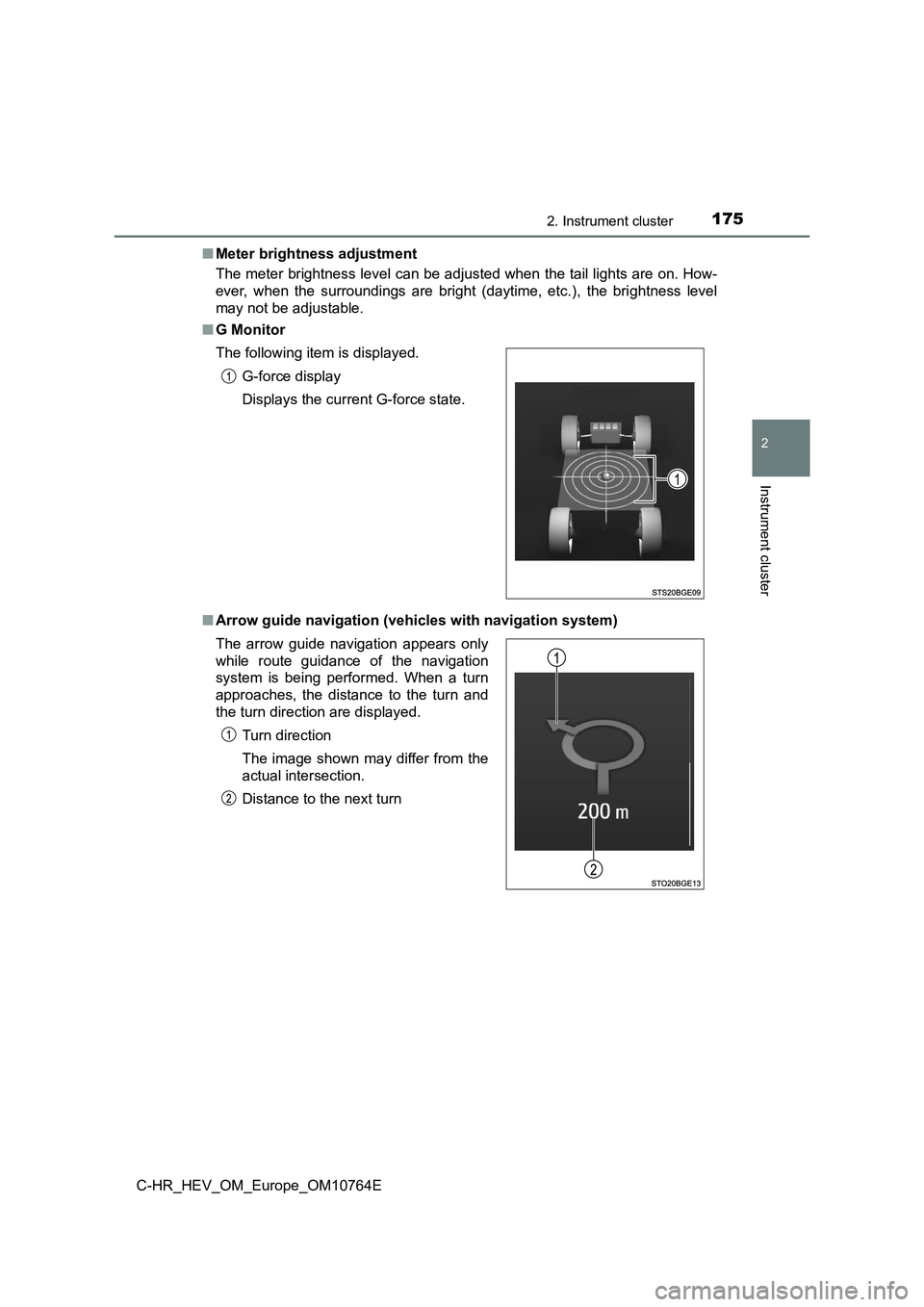
■ G Monitor
■ Arrow guide navigation (vehicles with navigation system)
The following item is displayed.
G-force display
Displays the current G-force state.
The arrow guide navigation appears only
while route guidance of the navigation
system is being performed. When a turn
approaches, the distance to the turn and
the turn direction are displayed.
Turn direction
The image shown may differ from the
actual intersection.
Distance to the next turn
Page 182 of 814
1802. Instrument cluster
C-HR_HEV_OM_Europe_OM10764E
Navigation/multimedia system screen (vehicles without navigation
system)
Press the “MENU” button.
Select “Info” on the “Menu” screen.
If a screen other than the desired one is displayed, select “Tr ip information”
or “History” on the screen.
Navigation/multimedia system screen (vehicles with navigation s ys-
tem)
Press the “MENU” button.
Select “Info” on the “Menu” screen.
Select “ECO” on the “Information” screen.
If a screen other than the desired one is displayed, select “Tr ip information”
or “History” on the screen.
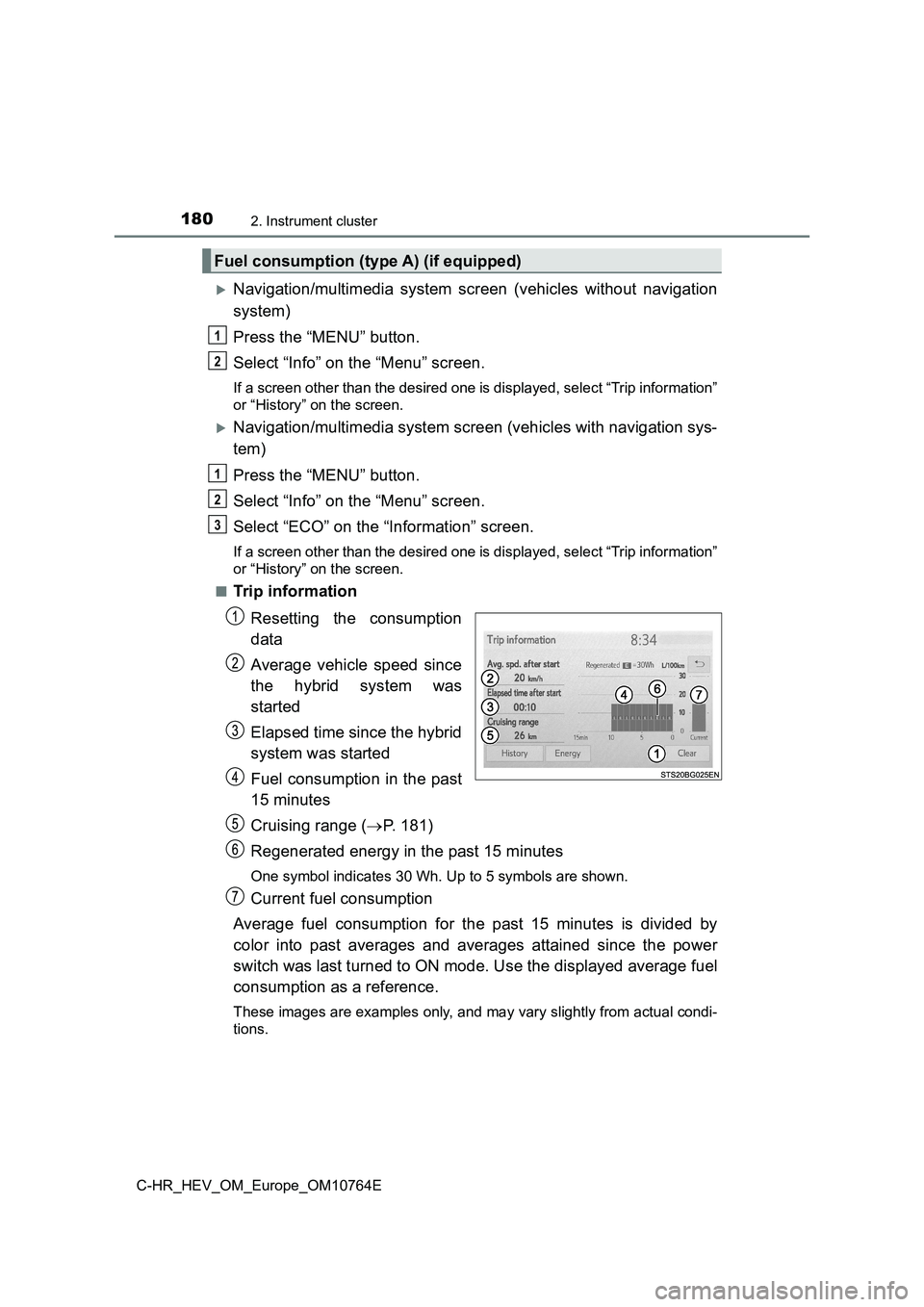
■Trip information
Resetting the consumption
data
Average vehicle speed since
the hybrid system was
started
Elapsed time since the hybrid
system was started
Fuel consumption in the past
15 minutes
Cruising range ( P. 181)
Regenerated energy in the past 15 minutes
One symbol indicates 30 Wh. Up to 5 symbols are shown.
Current fuel consumption
Average fuel consumption for the past 15 minutes is divided by
color into past averages and averages attained since the power
switch was last turned to ON mode. Use the displayed average fu el
consumption as a reference.
These images are examples only, and may vary slightly from actu al condi-
tions.
Fuel consumption (type A) (if equipped)
1
2
1
2
3
Page 183 of 814
1812. Instrument cluster
2
Instrument cluster
C-HR_HEV_OM_Europe_OM10764E
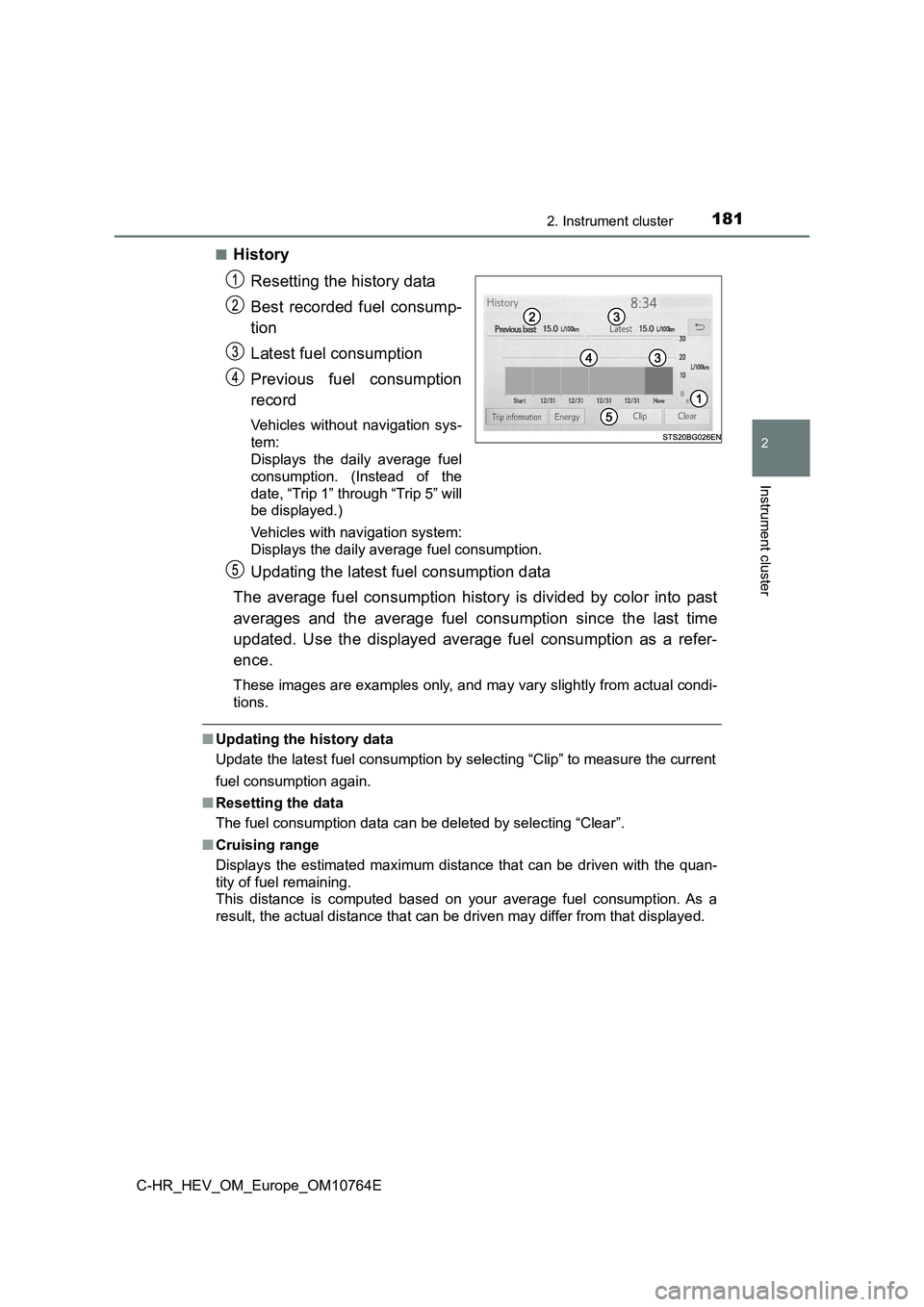
■History
Resetting the history data
Best recorded fuel consump-
tion
Latest fuel consumption
Previous fuel consumption
record
Vehicles without navigation sys-
tem:
Displays the daily average fuel
consumption. (Instead of the
date, “Trip 1” through “Trip 5” will
be displayed.)
Vehicles with navigation system:
Displays the daily average fuel consumption.
Updating the latest fuel consumption data
The average fuel consumption history is divided by color into p ast
averages and the average fuel consumption since the last time
updated. Use the displayed average fuel consumption as a refer-
ence.
These images are examples only, and may vary slightly from actu al condi-
tions.
■ Updating the history data
Update the latest fuel consumption by selecting “Clip” to measu re the current
fuel consumption again.
■ Resetting the data
The fuel consumption data can be deleted by selecting “Clear”.
■ Cruising range
Displays the estimated maximum distance that can be driven with the quan-
tity of fuel remaining.
This distance is computed based on your average fuel consumptio n. As a
result, the actual distance that can be driven may differ from that displayed.
Page 184 of 814
1822. Instrument cluster
C-HR_HEV_OM_Europe_OM10764E
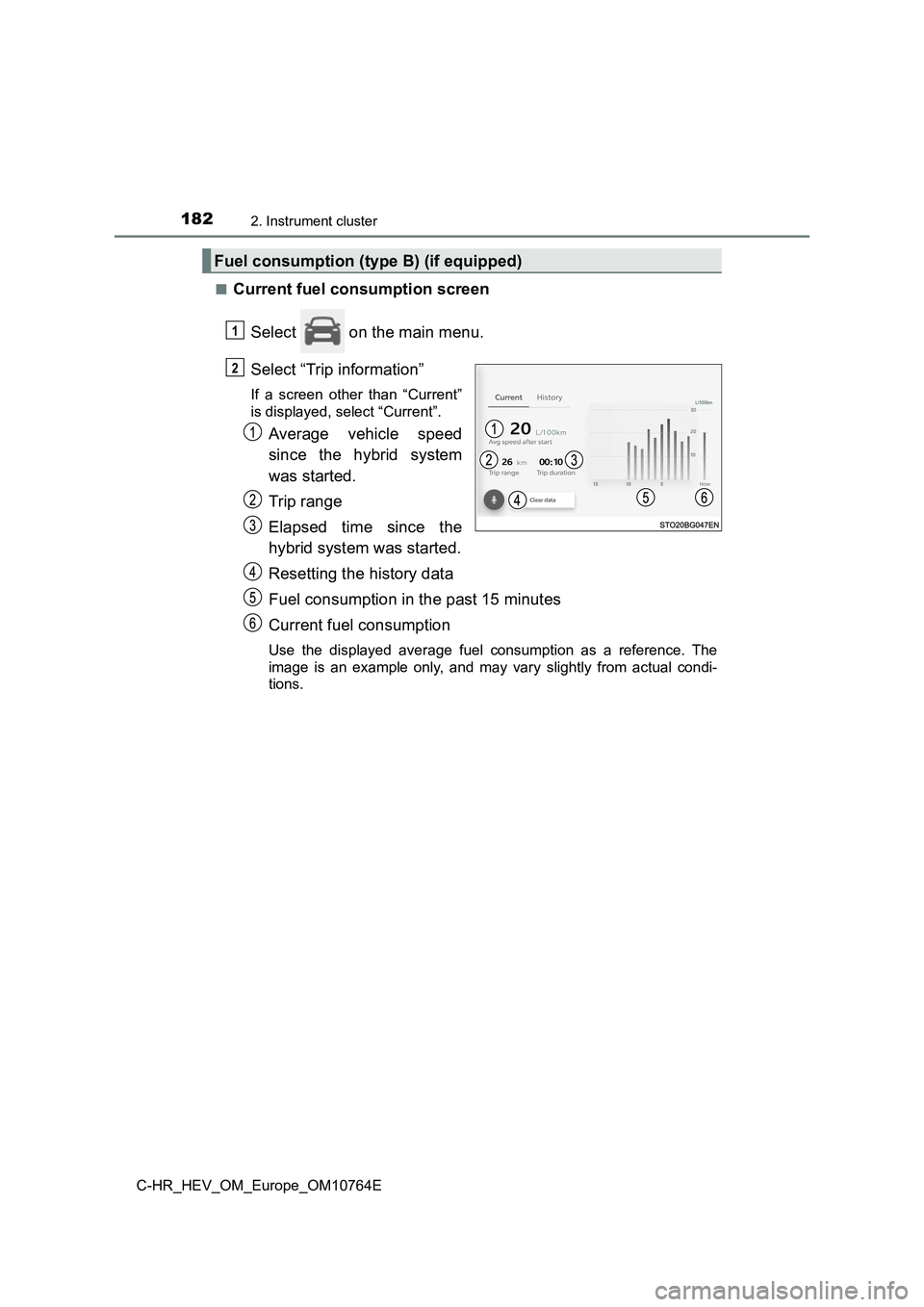
■Current fuel consumption screen
Select on the main menu.
Select “Trip information”
If a screen other than “Current”
is displayed, select “Current”.
Average vehicle speed
since the hybrid system
was started.
Trip range
Elapsed time since the
hybrid system was started.
Resetting the history data
Fuel consumption in the past 15 minutes
Current fuel consumption
Use the displayed average fuel consumption as a reference. The
image is an example only, and may vary slightly from actual con di-
tions.
Fuel consumption (type B) (if equipped)
1
2
Page 185 of 814
1832. Instrument cluster
2
Instrument cluster
C-HR_HEV_OM_Europe_OM10764E
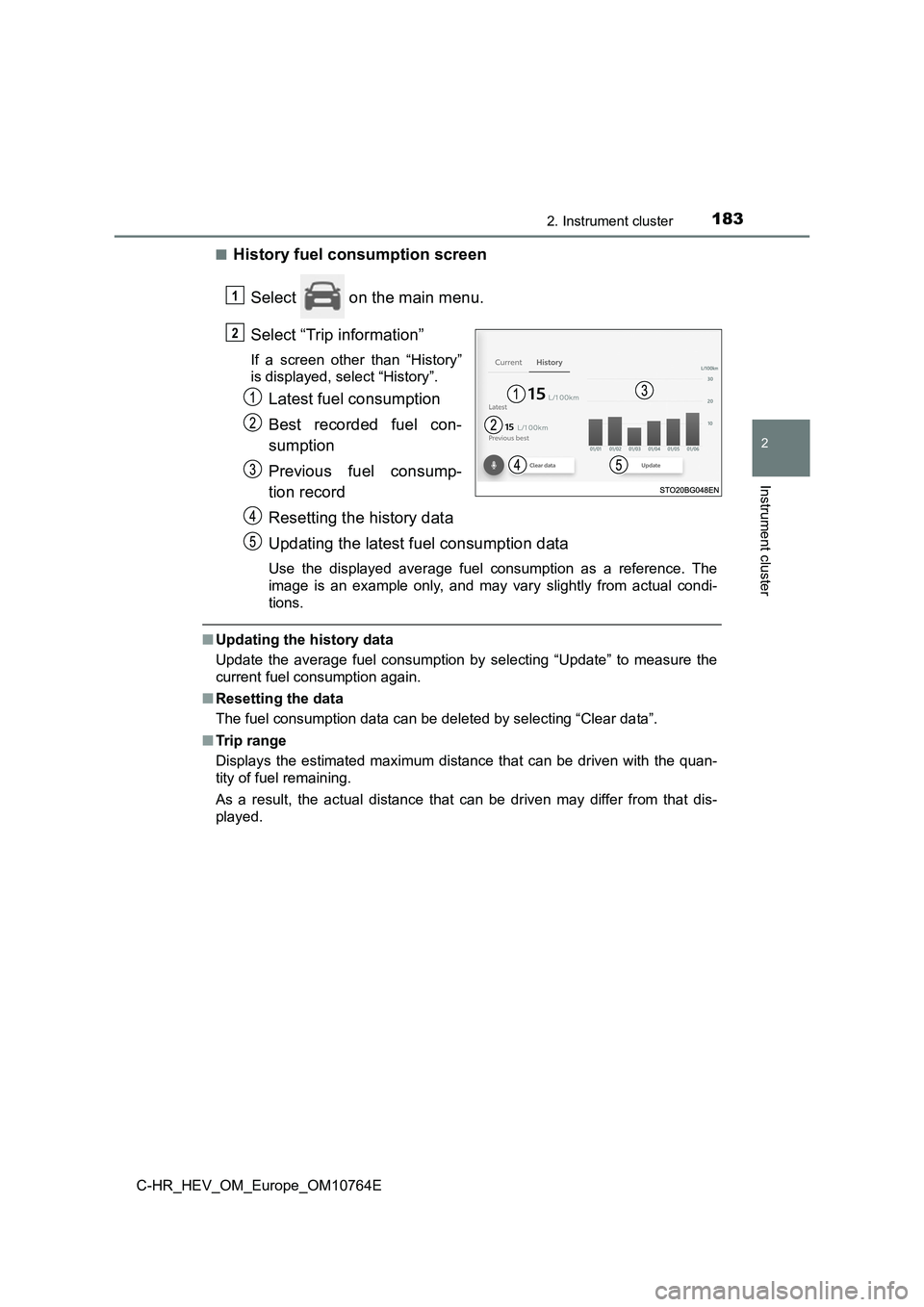
■History fuel consumption screen
Select on the main menu.
Select “Trip information”
If a screen other than “History”
is displayed, select “History”.
Latest fuel consumption
Best recorded fuel con-
sumption
Previous fuel consump-
tion record
Resetting the history data
Updating the latest fuel consumption data
Use the displayed average fuel consumption as a reference. The
image is an example only, and may vary slightly from actual con di-
tions.
■ Updating the history data
Update the average fuel consumption by selecting “Update” to me asure the
current fuel consumption again.
■ Resetting the data
The fuel consumption data can be deleted by selecting “Clear da ta”.
■ Trip range
Displays the estimated maximum distance that can be driven with the quan-
tity of fuel remaining.
As a result, the actual distance that can be driven may differ from that dis-
played.
1
2
Page 198 of 814
1963-2. Opening, closing and locking the doors
C-HR_HEV_OM_Europe_OM10764E
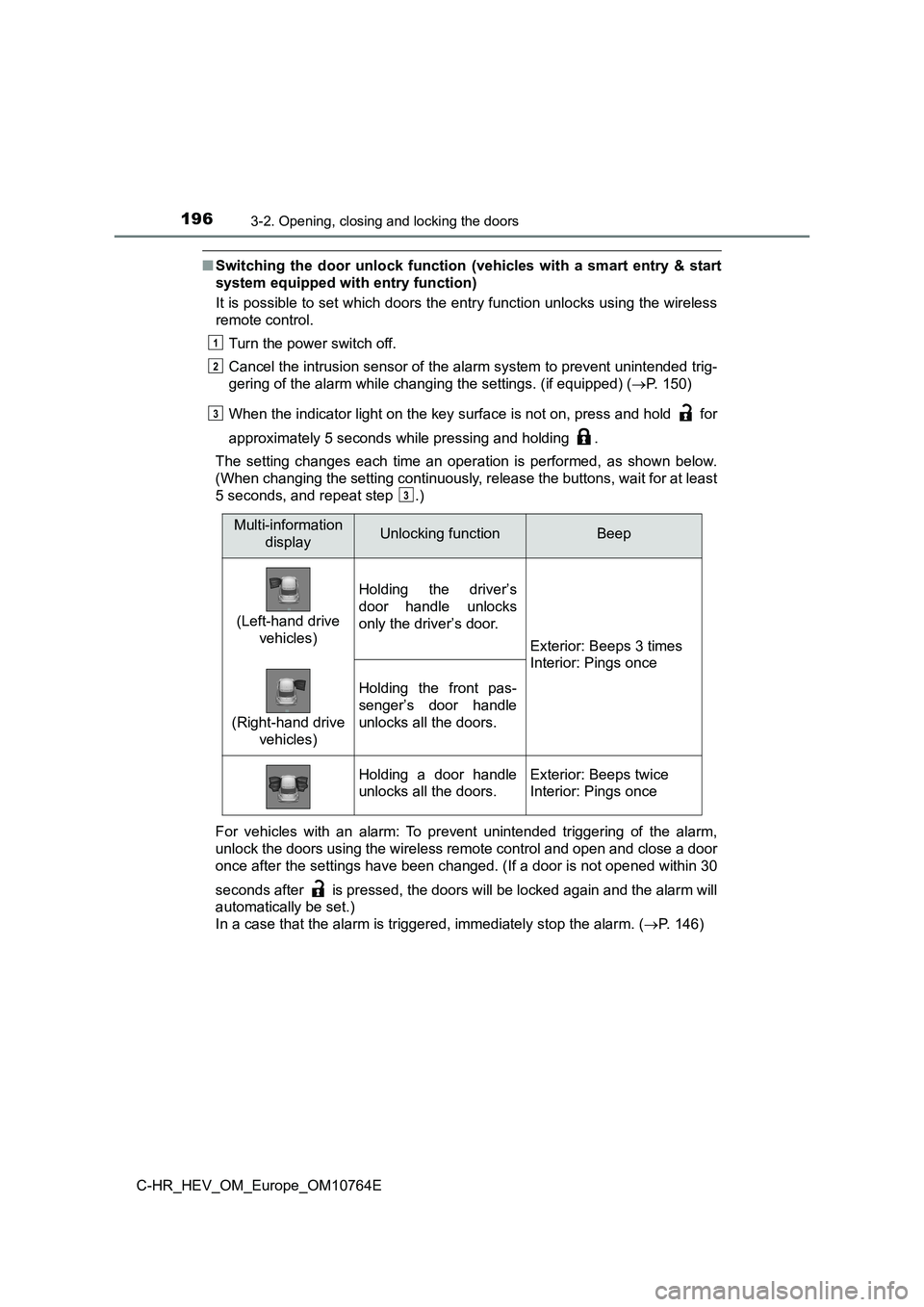
■Switching the door unlock function (vehicles with a smart entry & start
system equipped with entry function)
It is possible to set which doors the entry function unlocks us ing the wireless
remote control.
Turn the power switch off.
Cancel the intrusion sensor of the alarm system to prevent unin tended trig-
gering of the alarm while c hanging the settings. (if equipped) (P. 150)
When the indicator light on the key surface is not on, press an d hold for
approximately 5 seconds while pressing and holding .
The setting changes each time an operation is performed, as sho wn below.
(When changing the setting continuously, release the buttons, w ait for at least
5 seconds, and repeat step .)
For vehicles with an alarm: To prevent unintended triggering of the alarm,
unlock the doors using the wireless remote control and open and close a door
once after the settings have been changed. (If a door is not op ened within 30
seconds after is pressed, the doors will be locked again and t he alarm will
automatically be set.)
In a case that the alarm is triggered, immediately stop the ala rm. (P. 146)
1
2
3
3
Multi-information
displayUnlocking functionBeep
(Left-hand drive
vehicles)
Holding the driver’s
door handle unlocks
only the driver’s door.
Exterior: Beeps 3 times
Interior: Pings once
(Right-hand drive
vehicles)
Holding the front pas-
senger’s door handle
unlocks all the doors.
Holding a door handle
unlocks all the doors.
Exterior: Beeps twice
Interior: Pings once
Page 202 of 814
2003-2. Opening, closing and locking the doors
C-HR_HEV_OM_Europe_OM10764E
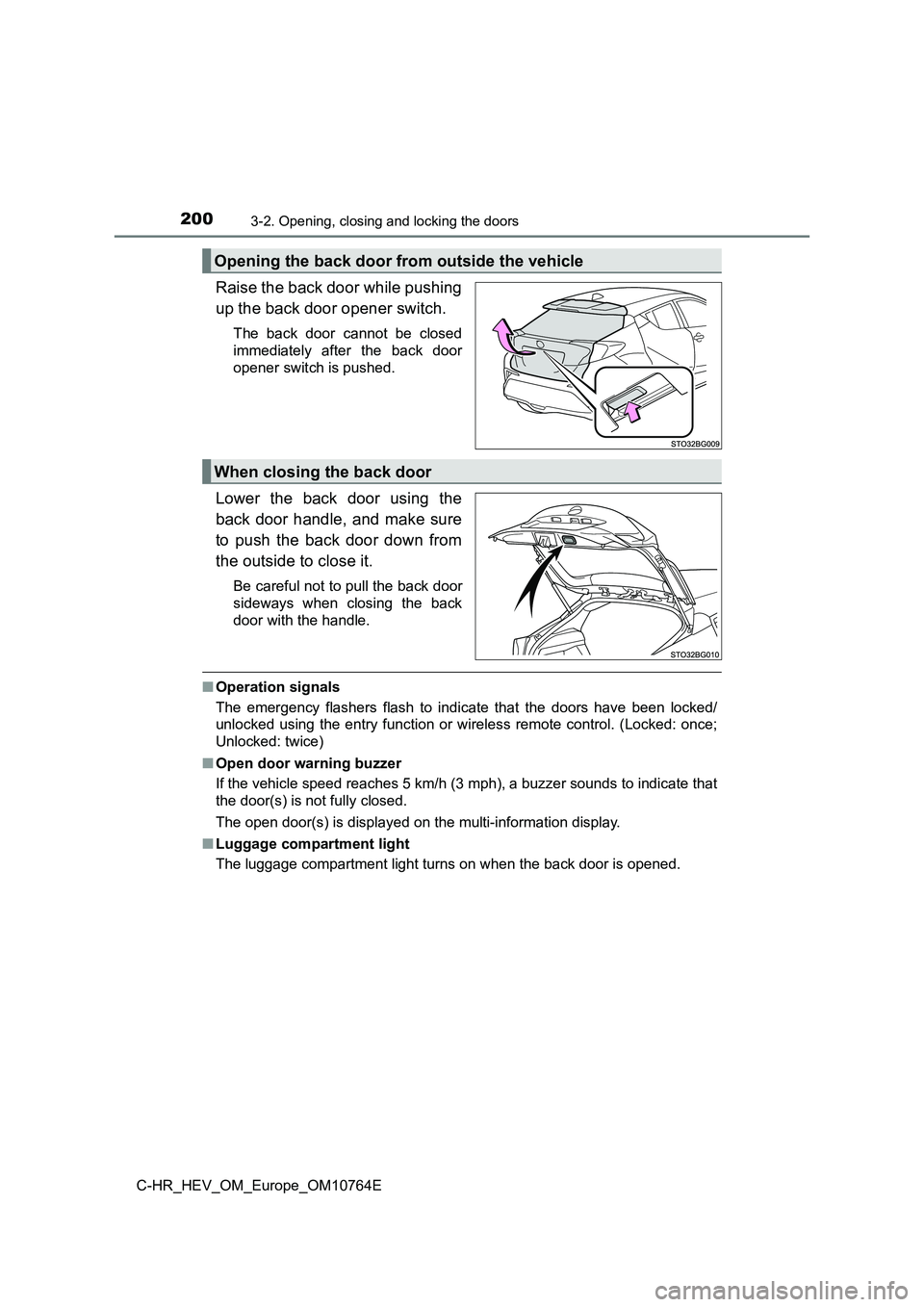
Raise the back door while pushing
up the back door opener switch.
The back door cannot be closed
immediately after the back door
opener switch is pushed.
Lower the back door using the
back door handle, and make sure
to push the back door down from
the outside to close it.
Be careful not to pull the back door
sideways when closing the back
door with the handle.
■ Operation signals
The emergency flashers flash to indicate that the doors have be en locked/
unlocked using the entry function or wireless remote control. ( Locked: once;
Unlocked: twice)
■ Open door warning buzzer
If the vehicle speed reaches 5 km/h (3 mph), a buzzer sounds to indicate that
the door(s) is not fully closed.
The open door(s) is displayed on the multi-information display.
■ Luggage compartment light
The luggage compartment light turns on when the back door is op ened.
Opening the back door from outside the vehicle
When closing the back door
Page 205 of 814
2033-2. Opening, closing and locking the doors
3
Operation of each component
C-HR_HEV_OM_Europe_OM10764E
WARNING
■Operating the back door
Observe the following precautions.
Failure to do so may cause parts of the body to be caught, resu lting in death
or serious injury.
● Remove any heavy loads, such as snow and ice, from the back door
before opening it. Failure to do so may cause the back door to suddenly
shut again after it is opened.
● When opening or closing the back door, thoroughly check to make sure
the surrounding area is safe.
● If anyone is in the vicinity, make sure they are safe and let them know that
the back door is about to open or close.
● Use caution when opening or closing the back door in windy weather as it
may move abruptly in strong wind.
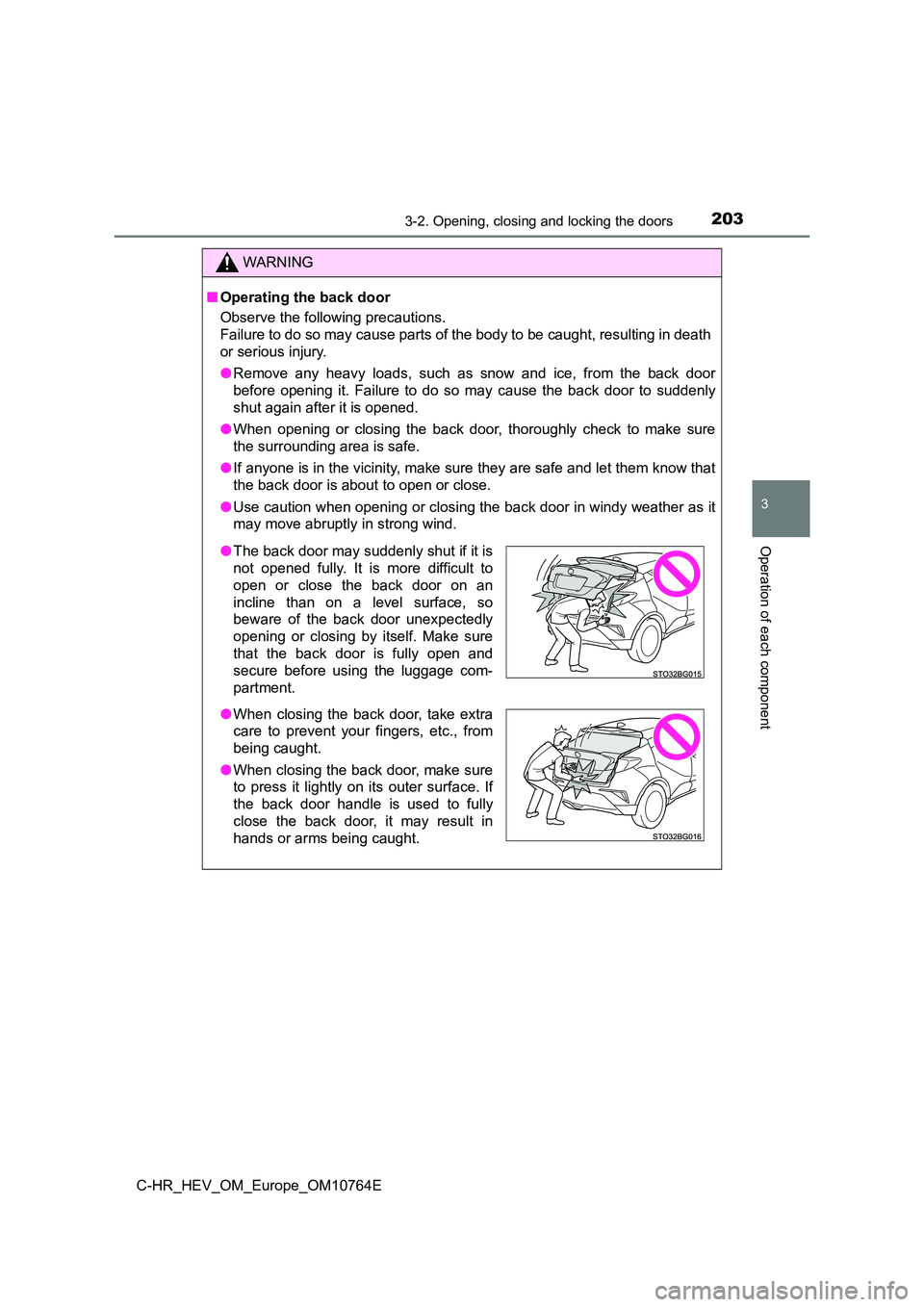
● The back door may suddenly shut if it is
not opened fully. It is more difficult to
open or close the back door on an
incline than on a level surface, so
beware of the back door unexpectedly
opening or closing by itself. Make sure
that the back door is fully open and
secure before using the luggage com-
partment.
● When closing the back door, take extra
care to prevent your fingers, etc., from
being caught.
● When closing the back door, make sure
to press it lightly on its outer surface. If
the back door handle is used to fully
close the back door, it may result in
hands or arms being caught.
Page 212 of 814
2103-2. Opening, closing and locking the doors
C-HR_HEV_OM_Europe_OM10764E
● If the electronic key is inside the vehicle and a door handle becomes wet
during a car wash, a message may be shown on the multi-informat ion dis-
play and a buzzer will sound outside the vehicle. To turn off t he alarm, lock
all the doors.
● The lock sensor may not work properly if it comes into contact with ice,
snow, mud, etc. Clean the lock sensor and attempt to operate it again.
● A sudden approach to the effective range or door handle may prevent the
doors from being unlocked. In this case, return the door handle to the origi-
nal position and check that the doors unlock before pulling the door handle
again.
● If there is another electronic key in the detection area, it may take slightly
longer to unlock the doors after the door handle is gripped.
● Fingernails may scrape against the door during operation of the door han-
dle. Be careful not to injure fingernails or damage the surface of the door.
■ When the vehicle is not driven for extended periods
● To prevent theft of the vehicle, do not leave the electronic key within 2 m
(6 ft.) of the vehicle.
● The smart entry & start system can be deactivated in advance. (P. 779)
■ To operate the system properly
Make sure to carry the electronic key when operating the system . Do not get
the electronic key too close to the vehicle when operating the system from the
outside of the vehicle.
Depending on the position and holding condition of the electron ic key, the key
may not be detected correctly and the system may not operate pr operly. (The
alarm may go off accidentally, or the door lock prevention func tion may not
operate.)