window TOYOTA C_HR HYBRID 2017 Service Manual
[x] Cancel search | Manufacturer: TOYOTA, Model Year: 2017, Model line: C_HR HYBRID, Model: TOYOTA C_HR HYBRID 2017Pages: 712, PDF Size: 49.31 MB
Page 484 of 712
4846-1. Using the air conditioning system and defogger
C-HR_HV_OM_Europe_OM10538E
■Using automatic mode
Fan speed is adjusted automatically according to the temperature setting and
the ambient conditions.
Therefore, the fan may stop for a while until warm or cool air is ready to flow
immediately after the button is pressed.
■ Fogging up of the windows
● The windows will easily fog up when the humidity in the vehicle is high.
Turning on will dehumidify the air from the outlets and defog the
windshield effectively.
● If you turn off, the windows may fog up more easily.
● The windows may fog up if the recirculated air mode is used.
■ Outside/recirculated air mode
● When driving on dusty roads, in tunnels, or in heavy traffic, set the outside/
recirculated air mode button to the recirculated air mode. This is effective in
preventing outside air from entering the vehicle interior. During cooling oper-
ation, setting the recirculated air mode will also cool the vehicle interior
effectively.
● Outside/recirculated air mode may automatically switch depending on the
temperature setting or the inside temperature.
■ Operation of the air conditioning system in Eco drive mode
● In Eco drive mode, the air conditioning system is controlled as follows to pri-
oritize fuel efficiency:
• Engine speed and compressor operation controlled to restrict heating/
cooling capacity
• Fan speed restricted when automatic mode is selected
● To improve air conditioning performance, perform the following operations:
• Adjust the fan speed
• Adjust the temperature setting
• Turn off Eco drive mode
● Even when the drive mode is set to Eco drive mode, the air conditioning eco
mode can be turned off by pressing the .
Page 513 of 712
5137-1. Maintenance and care
7
Maintenance and care
C-HR_HV_OM_Europe_OM10538E
■ High pressure car washes
● Do not allow the nozzles of the car wash to come within close proximity of
the windows.
● Before using the car wash, check that the fuel filler door on your vehicle is
closed properly.
■ Note for a smart entry & start system
If the door handle becomes wet while the electronic key is within the effective
range, the door may lock and unlock repeatedly. In that case, follow the fol-
lowing correction procedures to wash the vehicle:
● Place the key in a position 2 m (6 ft.) or more separate from the vehicle
while the vehicle is being washed. (Take care to ensure that the key is not
stolen.)
● Set the electronic key to battery-saving mode to disable the smart entry &
start system. ( P. 165)
■ Aluminum wheels
● Remove any dirt immediately by using a neutral detergent. Do not use hard
brushes or abrasive cleaners. Do not use strong or harsh chemical clean-
ers.
Use the same mild detergent and wax as used on the paint.
● Do not use detergent on the wheels when they are hot, for example after
driving for long distance in the hot weather.
● Wash detergent from the wheels immediately after use.
■ Bumpers and side moldings
Do not scrub with abrasive cleaners.
Page 519 of 712
5197-1. Maintenance and care
7
Maintenance and care
C-HR_HV_OM_Europe_OM10538E
NOTICE
■Cleaning detergents
● Do not use the following types of detergent, as they may discolor the vehi-
cle interior or cause streaks or damage to painted surfaces:
• Non-seat portions: Organic substances such as benzene or gasoline,
alkaline or acidic solutions, dye, and bleach
• Seats: Alkaline or acidic solutions, such as thinner, benzene, and alco-
hol
● Do not use a polish wax or polish cleaner. The instrument panel’s or other
interior part’s painted surface may be damaged.
■ Preventing damage to leather surfaces
Observe the following precautions to avoid damage to and deterioration of
leather surfaces:
● Remove any dust or dirt from leather surfaces immediately.
● Do not expose the vehicle to direct sunlight for extended periods of time.
Park the vehicle in the shade, especially during summer.
● Do not place items made of vinyl, plastic, or containing wax on the uphol-
stery, as they may stick to the leather surface if the vehicle interior heats
up significantly.
■ Water on the floor
Do not wash the vehicle floor with water.
Vehicle systems such as the audio system may be damaged if water comes
into contact with electrical components such as the audio system above or
under the floor of the vehicle. Water may also cause the body to rust.
■ When cleaning the inside of the windshield (vehicles with Toyota
Safety Sense)
Do not allow glass cleaner to contact the lens. Also, do not touch the lens.
( P. 2 6 9 )
■ Cleaning the inside of the rear window
● Do not use a glass cleaner to clean the rear window, as this may cause
damage to the rear window defogger heater wires. Use a cloth dampened
with lukewarm water to gently wipe the window clean. Wipe the window in
strokes running parallel to the heater wires.
● Be careful not to scratch or damage the heater wires.
Page 521 of 712
5217-2. Maintenance
C-HR_HV_OM_Europe_OM10538E
7
Maintenance and care
■Where to go for maintenance service?
In order to maintain your vehicle in the best possible condition, Toyota recom-
mends that maintenance service operations as well as other inspections and
repairs be carried out by authorized Toyota retailers or repairers or other duly
qualified and equipped professionals. For repairs and services covered by
your warranty, please visit an authorized Toyota retailers or repairer, who will
use genuine Toyota parts in repairing any difficulties you may encounter.
There can also be advantages in utilizing authorized Toyota retailers or
repairers for non-warranty repairs and services, as members of the Toyota
network will be able to expertly assist you with any difficulties you may
encounter.
Your authorized Toyota retailer or Toyo ta authorized repairer, or any reliable
repairer will perform all of the scheduled maintenance on your vehicle reliably
and economically due to their experience with Toyota vehicles.
■ Does your vehicle need repairs?
Be on the alert for changes in performance and sounds, and visual tip-offs
that indicate service is needed. Some important clues are:
● Engine misses, stumbling or pinging
● Appreciable loss of power
● Strange engine noises
● A fluid leak under the vehicle (However, water dripping from the air condi-
tioning system after use is normal.)
● Change in exhaust sound (This may indicate a dangerous carbon monoxide
leak. Drive with the windows open and have the exhaust system checked
immediately.)
● Flat-looking tires, excessive tire squeal when cornering, uneven tire wear
● Vehicle pulls to one side when driven straight on a level road
● Strange noises related to suspension movement
● Loss of brake effectiveness, spongy feeling brake pedal, pedal almost
touches the floor, vehicle pulls to one side when braking
● Engine coolant temperature continually higher than normal (P. 600, 657)
If you notice any of these clues, take your vehicle to any authorized Toyota
retailer or Toyota authorized repairer, or any reliable repairer as soon as pos-
sible. Your vehicle may need adjustment or repair.
Page 546 of 712
5467-3. Do-it-yourself maintenance
C-HR_HV_OM_Europe_OM10538E
■ Situations in which the tire pressure warning system may not operate
properly
● In the following cases, the tire pressure warning system may not operate
properly.
• If non-genuine Toyota wheels are used.
• A tire has been replaced with a tire t hat is not an OE (Original Equipment)
tire.
• A tire has been replaced with a tire that is not of the specified size.
• Tire chains, etc., are equipped.
• An auxiliary-supported run-flat tire is equipped.
• If a window tint that affects the radio wave signals is installed.
• If there is a lot of snow or ice on the vehicle, particularly around the
wheels or wheel housings.
• If the tire inflation pressure is extremely higher than the specified level.
• If wheels without the tire pressure warning valves and transmitters are
used.
• If the ID code on the tire pressure warning valves and transmitters is not
registered in the tire pressure warning computer.
● Performance may be affected in the following situations.
• Near a TV tower, electric power plant, gas station, radio station, large dis-
play, airport or other facility that generates strong radio waves or electri-
cal noise
• When carrying a portable radio, cellular phone, cordless phone or other
wireless communication device
● When the vehicle is parked, the time taken for the warning to start or go off
could be extended.
● When tire inflation pressure declines rapidly for example when a tire has
burst, the warning may not function.
Page 648 of 712
6488-2. Steps to take in an emergency
C-HR_HV_OM_Europe_OM10538E
If the electronic key does not operate
properly
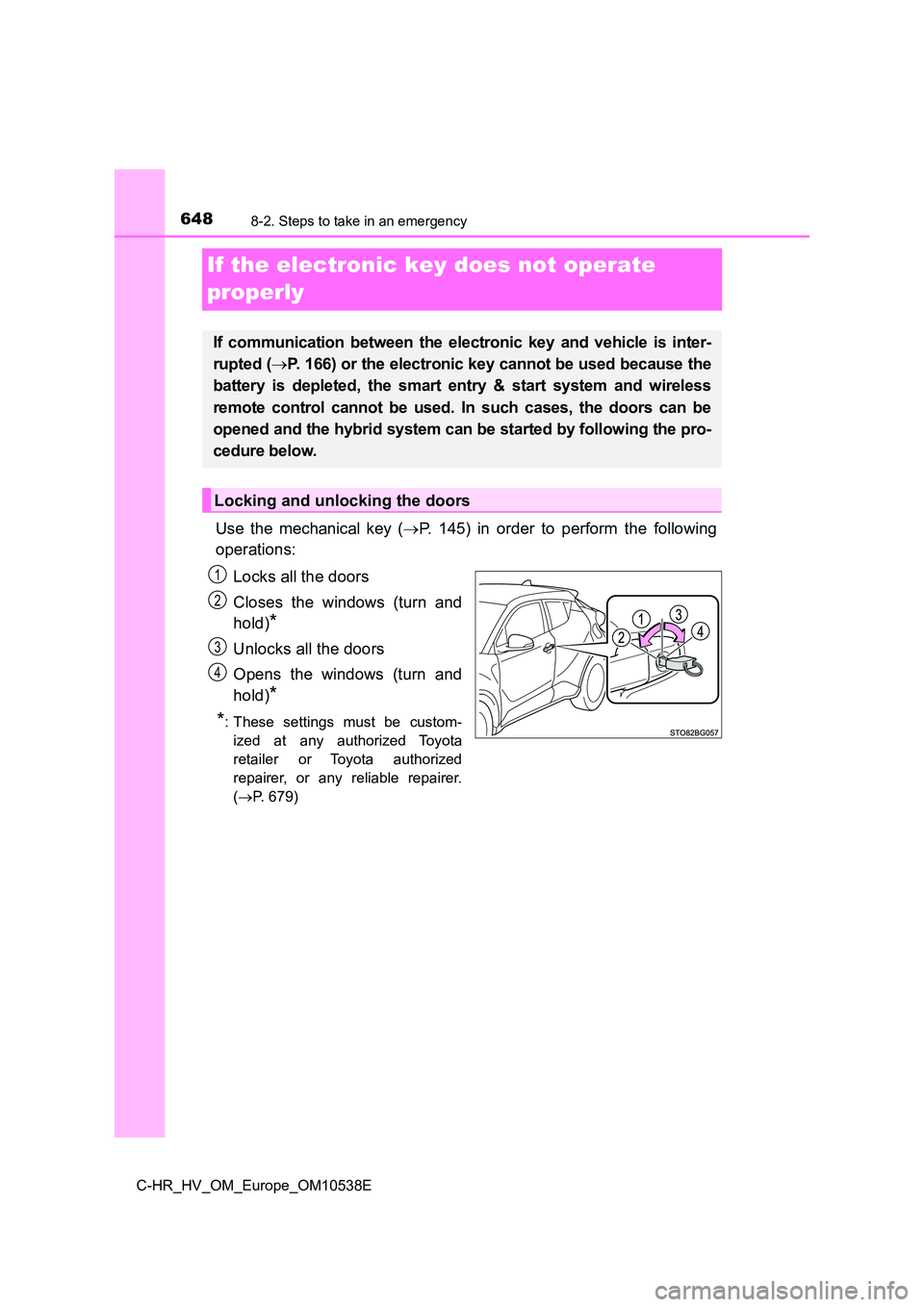
Use the mechanical key ( P. 145) in order to perform the following
operations:
Locks all the doors
Closes the windows (turn and
hold)*
Unlocks all the doors
Opens the windows (turn and
hold)*
*: These settings must be custom-
ized at any authorized Toyota
retailer or Toyota authorized
repairer, or any reliable repairer.
( P. 679)
If communication between the electronic key and vehicle is inter-
rupted ( P. 166) or the electronic key cannot be used because the
battery is depleted, the smart entry & start system and wireless
remote control cannot be used. In such cases, the doors can be
opened and the hybrid system can be started by following the pro-
cedure below.
Locking and unlocking the doors
1
2
3
4
Page 650 of 712
6508-2. Steps to take in an emergency
C-HR_HV_OM_Europe_OM10538E
■Stopping the hybrid system
Set the parking brake, shift the shift lever to P and press the power switch as
you normally do when stopping the hybrid system.
■ Replacing the key battery
As the above procedure is a temporary measure, it is recommended that the
electronic key battery be replaced imm ediately when the battery is depleted.
( P. 561)
■ Alarm (if equipped)
Using the mechanical key to lock the doors will not set the alarm system.
If a door is unlocked using the mechanical key when the alarm system is set,
the alarm may be triggered. ( P. 106)
■ Changing power switch modes
Release the brake pedal and press the power switch in step above. The
hybrid system does not start and modes will be changed each time the switch
is pressed. ( P. 222)
■ When the electronic key does not work properly
● Make sure that the smart entry & start system has not been deactivated in
the customization setting. If it is off, turn the function on.
(Customizable features: P. 679)
● Check if battery-saving mode is set. If it is set, cancel the function.
( P. 165)
WARNING
■When using the mechanical key and operating the power windows
Operate the power window after checking to make sure that there is no pos-
sibility of any passenger having any of their body parts caught in the side
window. Also, do not allow children to operate the mechanical key. It is pos-
sible for children and other passengers to get caught in the power window.
3
Page 684 of 712
6849-2. Customization
C-HR_HV_OM_Europe_OM10538E
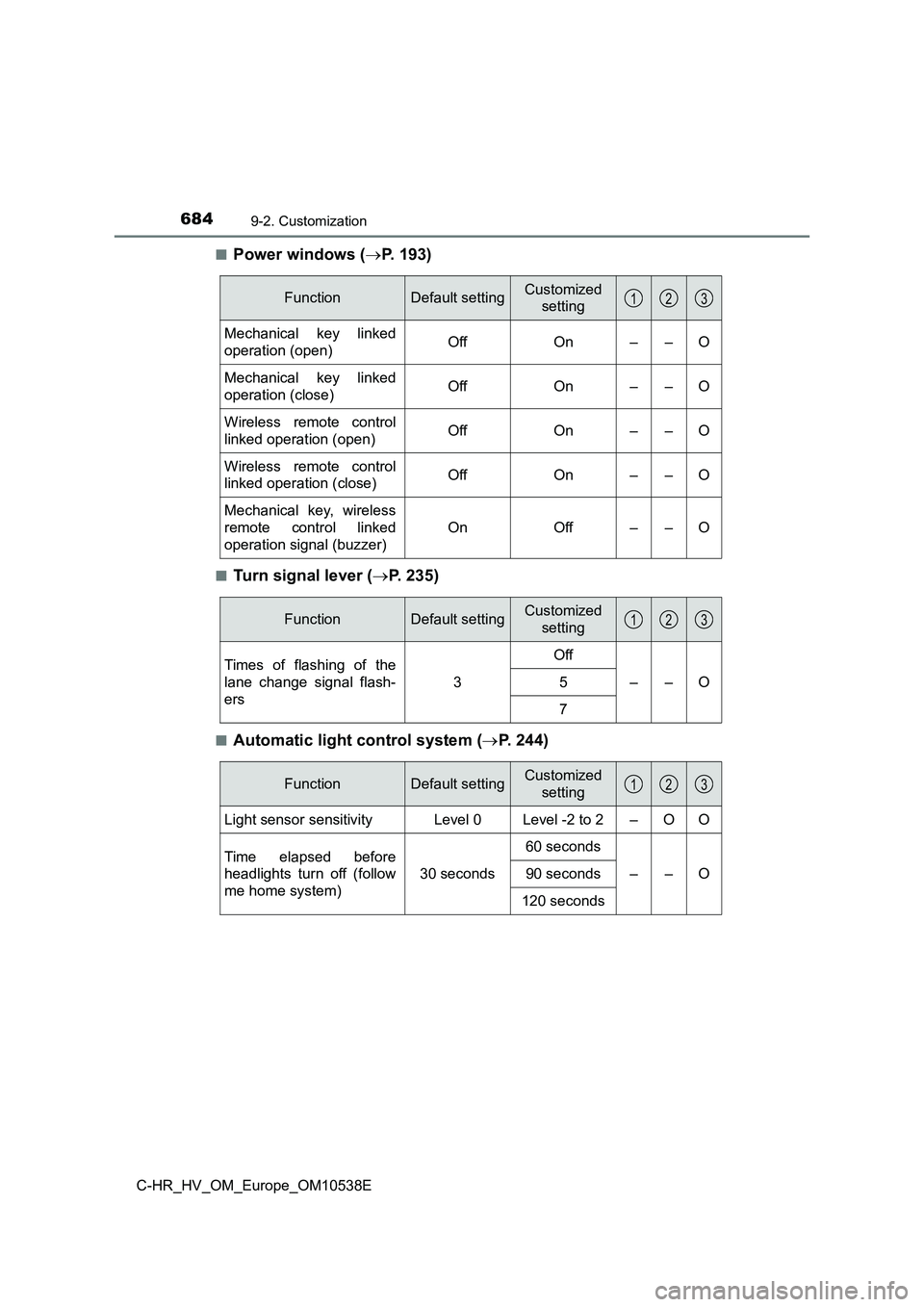
■Power windows ( P. 193)
■Turn signal lever (P. 235)
■Automatic light control system (P. 244)
FunctionDefault settingCustomized
setting
Mechanical key linked
operation (open)OffOn––O
Mechanical key linked
operation (close)OffOn––O
Wireless remote control
linked operation (open)OffOn––O
Wireless remote control
linked operation (close)OffOn––O
Mechanical key, wireless
remote control linked
operation signal (buzzer)
OnOff––O
123
FunctionDefault settingCustomized
setting
Times of flashing of the
lane change signal flash-
ers
3
Off
––O5
7
123
FunctionDefault settingCustomized
setting
Light sensor sensitivityLevel 0Level -2 to 2–OO
Time elapsed before
headlights turn off (follow
me home system)
30 seconds
60 seconds
––O90 seconds
120 seconds
123
Page 689 of 712
6899-3. Initialization
C-HR_HV_OM_Europe_OM10538E
9
Vehicle specifications
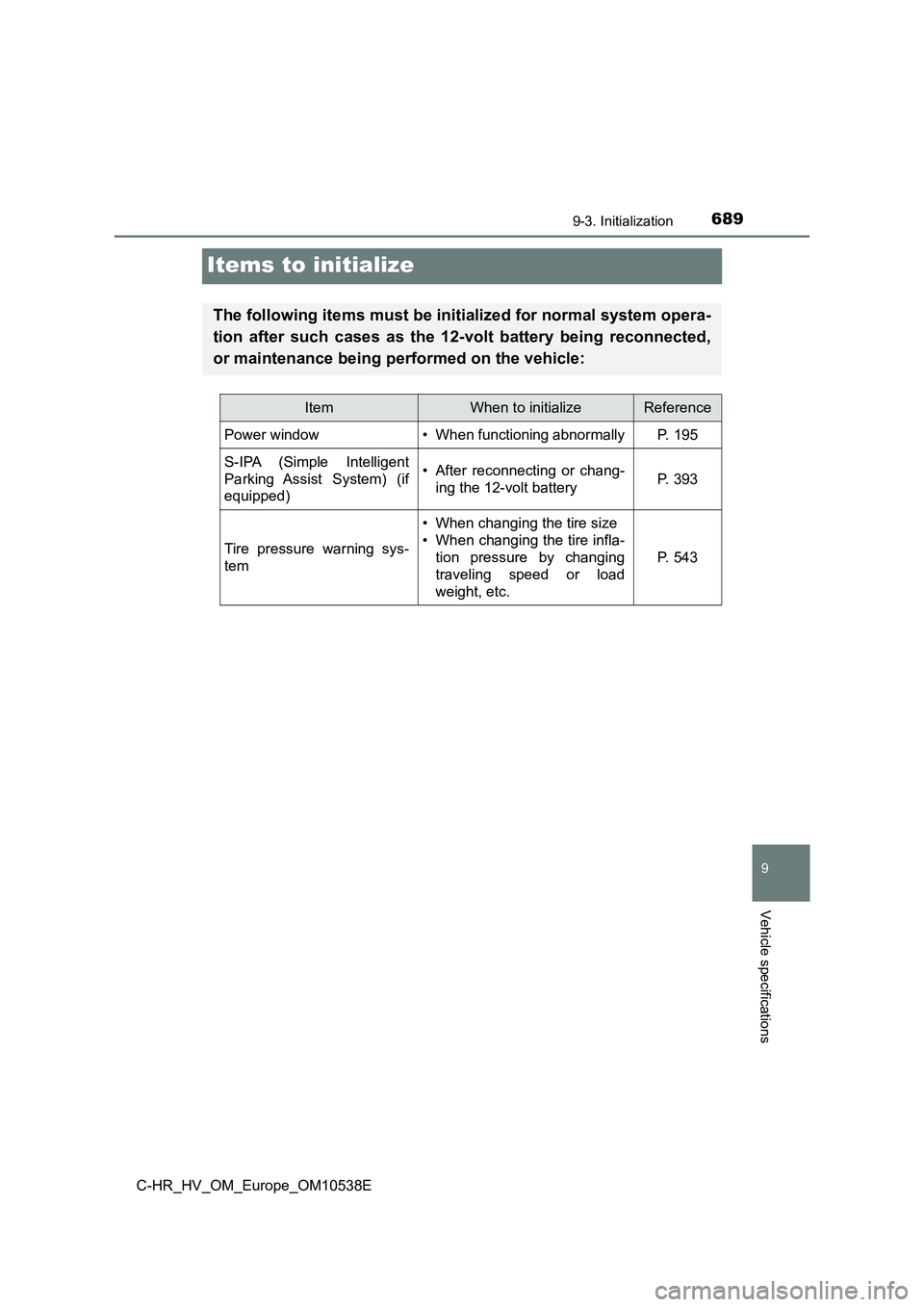
Items to initialize
The following items must be initialized for normal system opera-
tion after such cases as the 12-volt battery being reconnected,
or maintenance being performed on the vehicle:
ItemWhen to initializeReference
Power window• When functioning abnormallyP. 195
S-IPA (Simple Intelligent
Parking Assist System) (if
equipped)
• After reconnecting or chang-
ing the 12-volt batteryP. 393
Tire pressure warning sys-
tem
• When changing the tire size
• When changing the tire infla-
tion pressure by changing
traveling speed or load
weight, etc.
P. 543
Page 693 of 712
693What to do if... (Troubleshooting)
C-HR_HV_OM_Europe_OM10538E
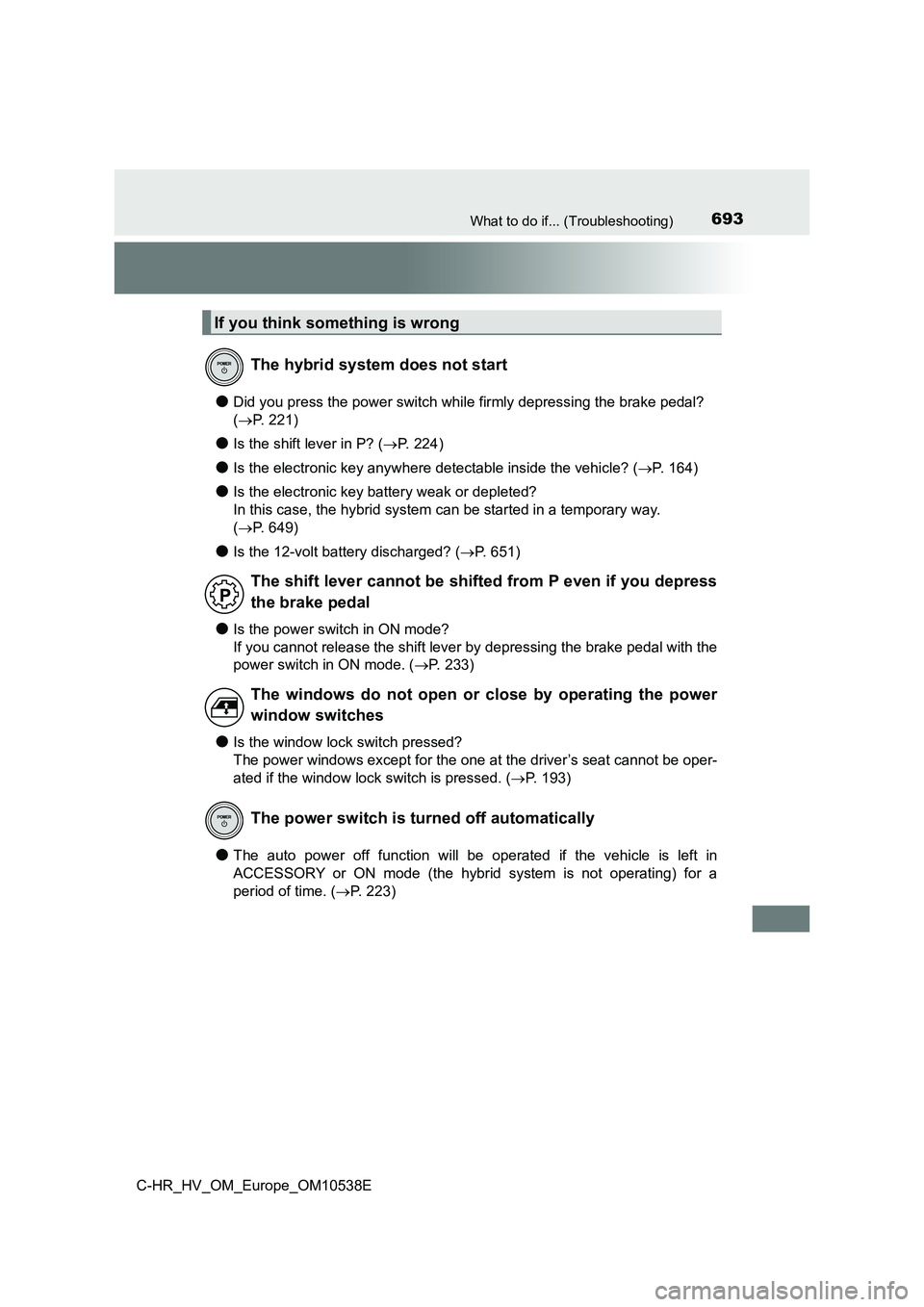
●Did you press the power switch while firmly depressing the brake pedal?
( P. 221)
●Is the shift lever in P? (P. 2 2 4 )
●Is the electronic key anywhere detectable inside the vehicle? (P. 164)
●Is the electronic key battery weak or depleted?
In this case, the hybrid system can be started in a temporary way.
( P. 649)
●Is the 12-volt battery discharged? (P. 651)
●Is the power switch in ON mode?
If you cannot release the shift lever by depressing the brake pedal with the
power switch in ON mode. ( P. 233)
●Is the window lock switch pressed?
The power windows except for the one at the driver’s seat cannot be oper-
ated if the window lock switch is pressed. ( P. 193)
●The auto power off function will be operated if the vehicle is left in
ACCESSORY or ON mode (the hybrid system is not operating) for a
period of time. ( P. 2 2 3 )
If you think something is wrong
The hybrid system does not start
The shift lever cannot be shifted from P even if you depress
the brake pedal
The windows do not open or close by operating the power
window switches
The power switch is turned off automatically