engine TOYOTA CAMRY 2010 XV40 / 8.G Owners Manual
[x] Cancel search | Manufacturer: TOYOTA, Model Year: 2010, Model line: CAMRY, Model: TOYOTA CAMRY 2010 XV40 / 8.GPages: 538, PDF Size: 9.22 MB
Page 2 of 538

TABLE OF CONTENTSIndex
2
1-1. Key informationKeys ..................................... 24
1-2. Opening, closing and locking the doors
and trunk
Smart key system................. 27
Wireless remote control ....... 38
Doors.................................... 42
Trunk .................................... 47
1-3. Adjustable components (seats, mirrors,
steering wheel)
Front seats ........................... 51
Rear seats ............................ 53
Head restraints ..................... 55
Seat belts ............................. 57
Steering wheel ..................... 65
Anti-glare inside rear view mirror .................................. 66
Outside rear view mirrors ................................ 68
1-4. Opening and closing the windows
Power windows .................... 70
Moon roof ............................. 72
1-5. Refueling Opening the fuel tank cap ..................................... 76 1-6. Theft deterrent system
Engine immobilizer system ................................ 80
Alarm .................................... 82
Theft prevention labels (for U.S.A.) ......................... 84
1-7. Safety information Correct driving posture ......... 85
SRS airbags ......................... 87
Front passenger occupant classification system ........... 99
Child restraint systems ....... 104
Installing child restraints ..... 108
2-1. Driving procedures Driving the vehicle .............. 120
Engine (ignition) switch (vehicles with smart
key system) ...................... 131
Engine (ignition) switch (vehicles without smart
key system) ...................... 135
Automatic transmission ...... 138
Manual transmission........... 142
Turn signal lever ................. 144
Parking brake ..................... 145
Horn .................................... 146
2-2. Instrument cluster Gauges and meters ............ 147
Indicators and warning lights ................................. 151
Multi-information display ..... 155
1Before driving
2When driving
Page 4 of 538

TABLE OF CONTENTSIndex
4
3-5. Using the interior lightsInterior lights list ................. 313
• Interior light ...................... 314
• Personal lights ................. 315
3-6. Using the storage features List of storage features....... 316
• Glove box ......................... 317
• Console box ..................... 317
• Cup holders ...................... 319
• Auxiliary boxes ................. 321
3-7. Other interior features Sun visors .......................... 324
Vanity mirrors ..................... 325
Clock .................................. 326
Ashtray ............................... 327
Power outlets ..................... 328
Seat heaters ....................... 330
Armrest............................... 332
Rear sunshade ................... 333
Trunk storage extension..... 334
Floor mat ............................ 335
Trunk features .................... 336
Garage door opener ........... 338
Compass ............................ 343 4-1. Maintenance and care
Cleaning and protecting the vehicle exterior ........... 348
Cleaning and protecting the vehicle interior ............ 350
4-2. Maintenance Maintenance requirements .................... 353
General maintenance ......... 355
Emission inspection and maintenance (I/M)
programs .......................... 358
4-3. Do-it-yourself maintenance Do-it-yourself service precautions ....................... 359
Hood ................................... 362
Positioning a floor jack........ 363
Engine compartment .......... 365
Tires.................................... 382
Tire inflation pressure ......... 392
Wheels................................ 396
Air conditioning filter ........... 398
Key battery ......................... 401
Checking and replacing fuses ................................. 405
Light bulbs .......................... 418
4Maintenance and care
Page 5 of 538

1
2
3
4
5
6
7
5
5-1. Essential informationEmergency flashers ............ 424
If your vehicle needs to be towed ........................... 425
If you think something is wrong ............................ 428
Fuel pump shut off system .............................. 429
Event data recorder ............ 430
5-2. Steps to take in an emergency
If a warning light turns on or a warning buzzer
sounds... .......................... 432
If a warning message is displayed (vehicles
with multi-information
display) ............................. 444
If you have a flat tire............ 454
If the engine will not start .... 465
If the shift lever cannot be shifted from P (automatic
transmission) .................... 467
If you lose your keys ........... 468
If the electronic key does not operate properly
(vehicles with smart
key system)....................... 469
If the battery is discharged ........................ 471
If your vehicle overheats ..... 475
If the vehicle becomes stuck ................................. 478 6-1. Specifications
Maintenance data (fuel, oil level, etc.) ........... 482
Fuel information.................. 495
Tire information .................. 498
6-2. Customization Customizable features........ 510
6-3. Initialization Items to initialize ................. 514
Reporting safety defects for U.S. owners ................ 516
Seat belt instructions for Canadian owners
(in French) ........................ 517
Abbreviation list ........................ 522
Alphabetical index .................... 523
What to do if... .......................... 533
5When trouble arises6Vehicle specifications
7For owners
Index
Page 15 of 538
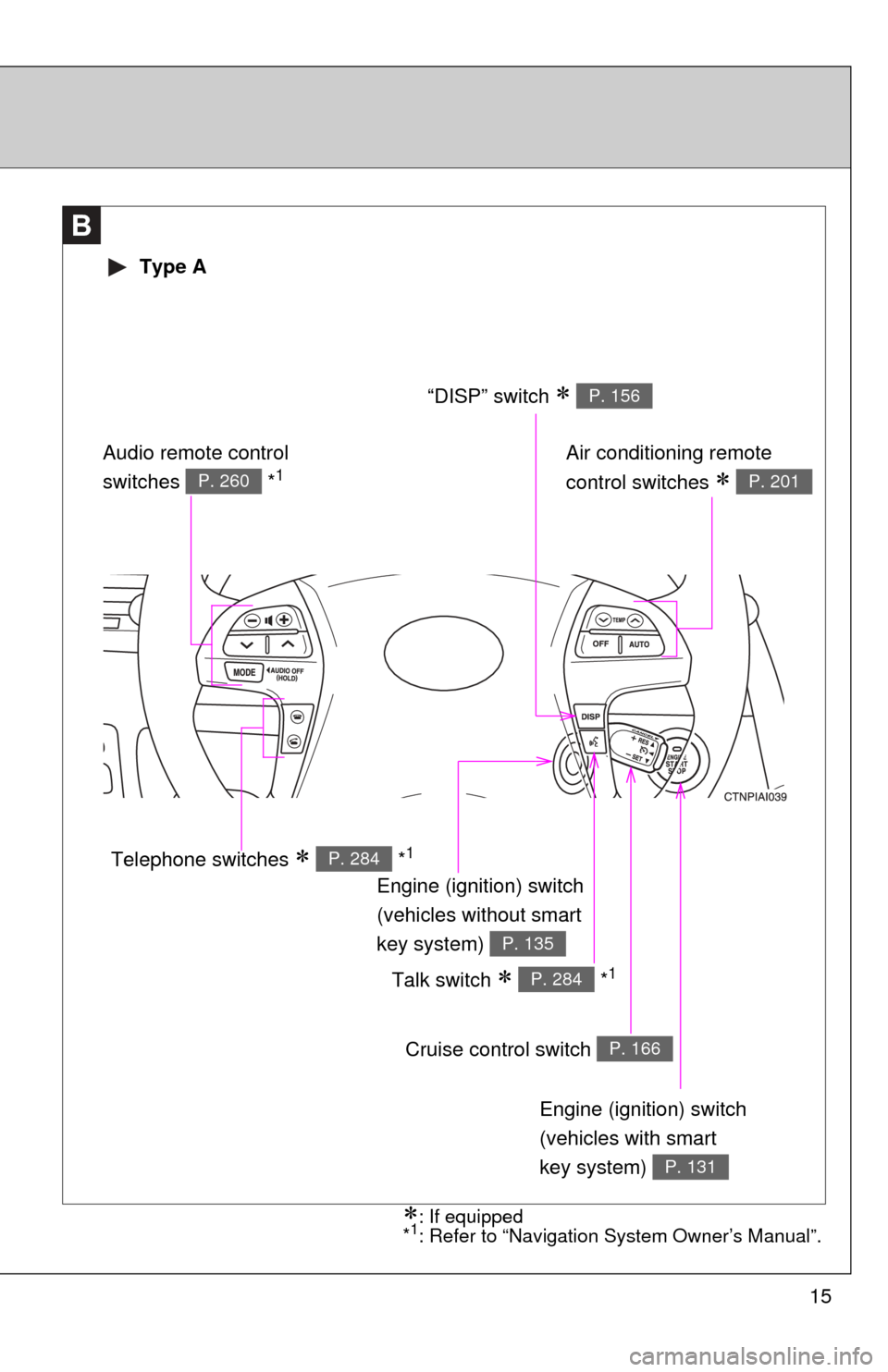
15
B
Engine (ignition) switch
(vehicles with smart
key system)
P. 131
Cruise control switch P. 166
Talk switch *1P. 284
Air conditioning remote
control switches
P. 201
Engine (ignition) switch
(vehicles without smart
key system)
P. 135
“DISP” switch P. 156
Telephone switches *1P. 284
Audio remote control
switches *1P. 260
Type A
: If equipped
*1: Refer to “Navigation System Owner’s Manual”.
Page 16 of 538
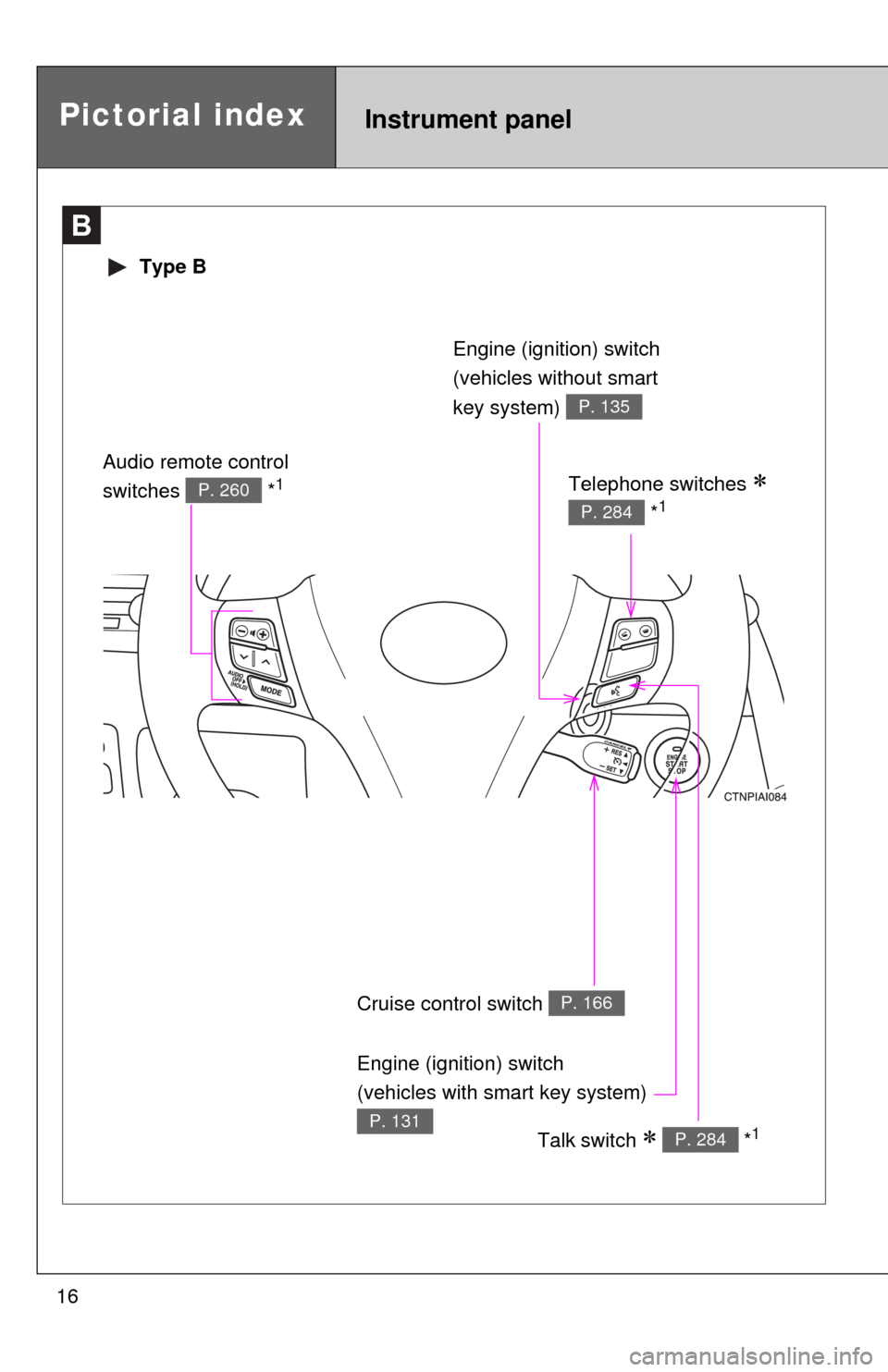
16
B
Type B
Cruise control switch P. 166
Talk switch *1P. 284
Engine (ignition) switch
(vehicles without smart
key system)
P. 135
Telephone switches
*1P. 284
Audio remote control
switches *1P. 260
Pictorial indexInstrument panel
Engine (ignition) switch
(vehicles with smart key system)
P. 131
Page 18 of 538

18
For your information
Main Owner’s Manual
Please note that this manual covers all models and all equipment, including
options. Therefore, you may find some explanations for equipment not
installed on your vehicle.
All specifications provided in this manual are current at the time of printing.
However, because of the Toyota policy of continual product improvement, we
reserve the right to make changes at any time without notice.
Depending on specifications, the vehicle shown in the illustrations may differ
from your vehicle in terms of equipment.
Noise from under vehicle after turning off the engine
Approximately five hours after the engine is turned off, you may hear sound
coming from under the vehicle for several minutes. This is the sound of a fuel
evaporation leakage check and, it does not indicate a malfunction.
Accessories, spare parts and modification of your Toyota
A wide variety of non-genuine spare parts and accessories for Toyota
vehicles are currently available on the market. You should know that these
parts are not covered by Toyota warranty and that Toyota is not responsible
for their performance, repair, or replacement, or for any damage they may
cause to, or adverse effect they may have on, your Toyota vehicle.
This vehicle should not be modified with non-genuine Toyota products.
Modification with non-genuine Toyota products could affect its performance,
safety or durability, and may even violate governmental regulations. In
addition, damage or performance problems resulting from the modification
may not be covered under warranty.
Page 23 of 538
Before driving1
23
1-1. Key informationKeys ................................... 24
1-2. Opening, closing and locking the doors
and trunk
Smart key system .............. 27
Wireless remote control ..... 38
Doors ................................. 42
Trunk .................................. 47
1-3. Adjustable components (seats, mirrors,
steering wheel)
Front seats ......................... 51
Rear seats.......................... 53
Head restraints................... 55
Seat belts ........................... 57
Steering wheel ................... 65
Anti-glare inside rear view mirror ....................... 66
Outside rear view mirrors.............................. 68 1-4. Opening and closing
the windows
Power windows .................. 70
Moon roof ........................... 72
1-5. Refueling Opening the fuel tank cap ................................... 76
1-6. Theft deterrent system Engine immobilizer system ............................. 80
Alarm.................................. 82
Theft prevention labels (for U.S.A.) ....................... 84
1-7. Safety information Correct driving posture....... 85
SRS airbags ....................... 87
Front passenger occupant classification system ........ 99
Child restraint systems..... 104
Installing child restraints ........................ 108
Page 27 of 538
27
1
Before driving
1-2. Opening, closing and locking the doors and trunk
Smart key system
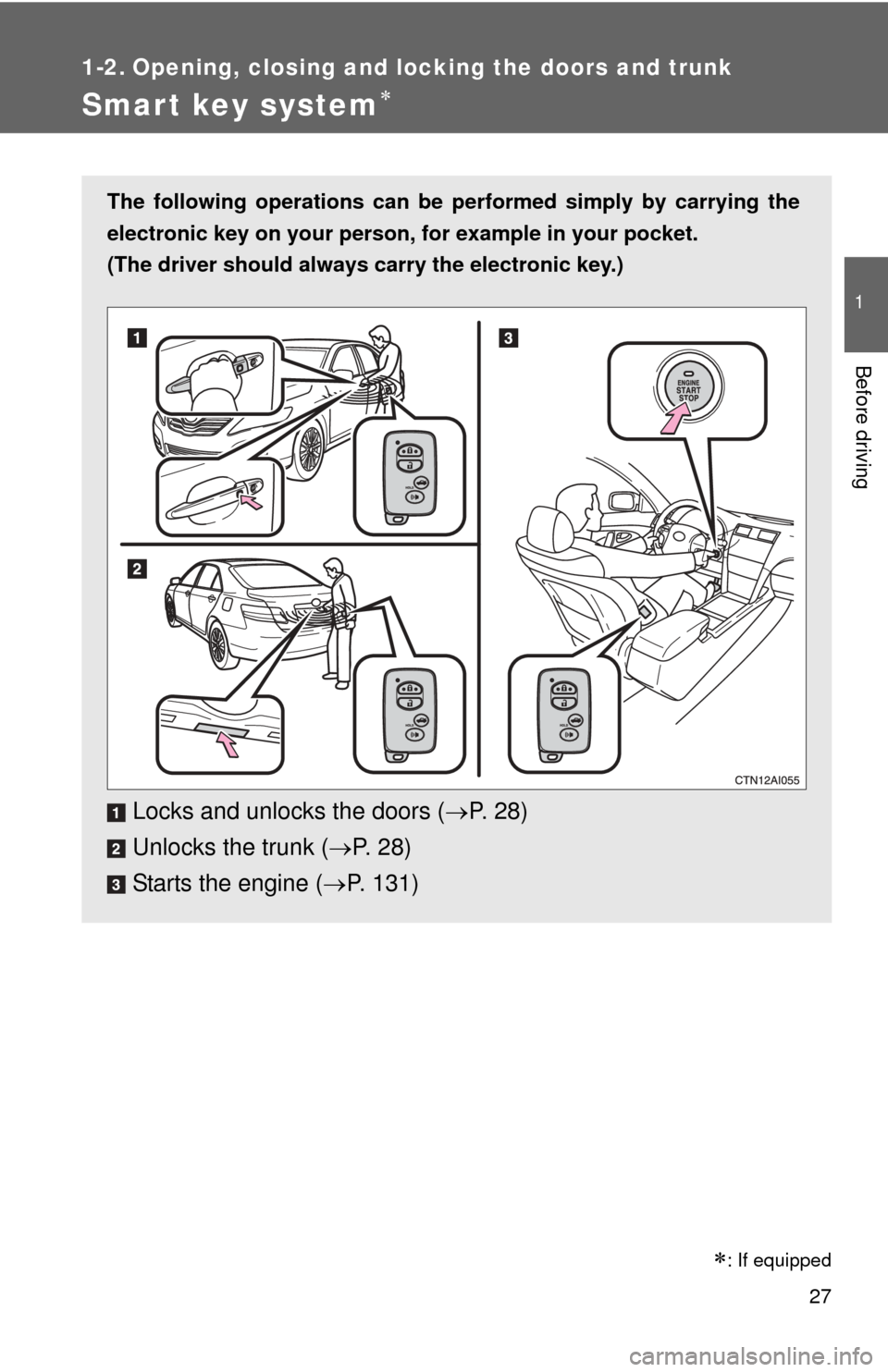
The following operations can be performed simply by carrying the
electronic key on your person, for example in your pocket.
(The driver should always carry the electronic key.)
Locks and unlocks the doors ( P. 2 8 )
Unlocks the trunk ( P. 2 8 )
Starts the engine ( P. 131)
: If equipped
Page 30 of 538
30 1-2. Opening, closing and locking the doors and trunk
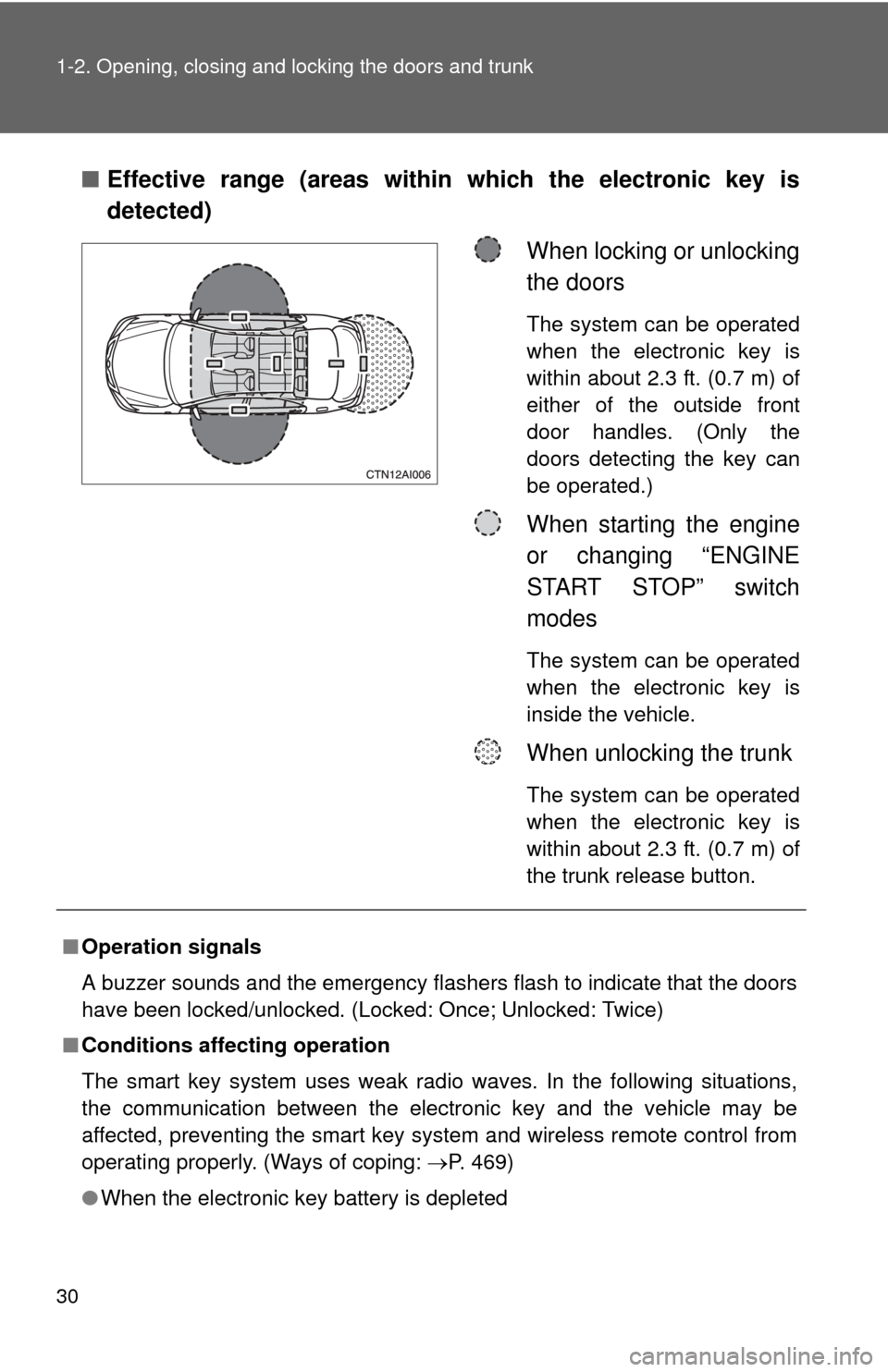
■Effective range (areas within which the electronic key is
detected)
When locking or unlocking
the doors
The system can be operated
when the electronic key is
within about 2.3 ft. (0.7 m) of
either of the outside front
door handles. (Only the
doors detecting the key can
be operated.)
When starting the engine
or changing “ENGINE
START STOP” switch
modes
The system can be operated
when the electronic key is
inside the vehicle.
When unlocking the trunk
The system can be operated
when the electronic key is
within about 2.3 ft. (0.7 m) of
the trunk release button.
■Operation signals
A buzzer sounds and the emergency flashers flash to indicate that the doors
have been locked/unlocked. (Locked: Once; Unlocked: Twice)
■ Conditions affecting operation
The smart key system uses weak radio waves. In the following situations,
the communication between the electronic key and the vehicle may be
affected, preventing the smart key system and wireless remote control from
operating properly. (Ways of coping: P. 469)
● When the electronic key battery is depleted
Page 31 of 538
31
1-2. Opening, closing and locking the doors and trunk
1
Before driving
●
Near a TV tower, electric power plant, gas station, radio station, large dis-
play, airport or other facility that generates strong radio waves or electri-
cal noise
● When carrying a portable radio, ce llular phone, cordless phone or other
wireless communication devices
● When the electronic key has come into contact with, or is covered by, a
metallic object
● When multiple electronic keys are in the vicinity
● When carrying or using the electronic key together with the following
devices that emit radio waves
• Another vehicle’s electronic key
• A wireless key that emits radio waves
• Personal computer
● If window tint with a metallic content or metallic objects are attached to
the rear window
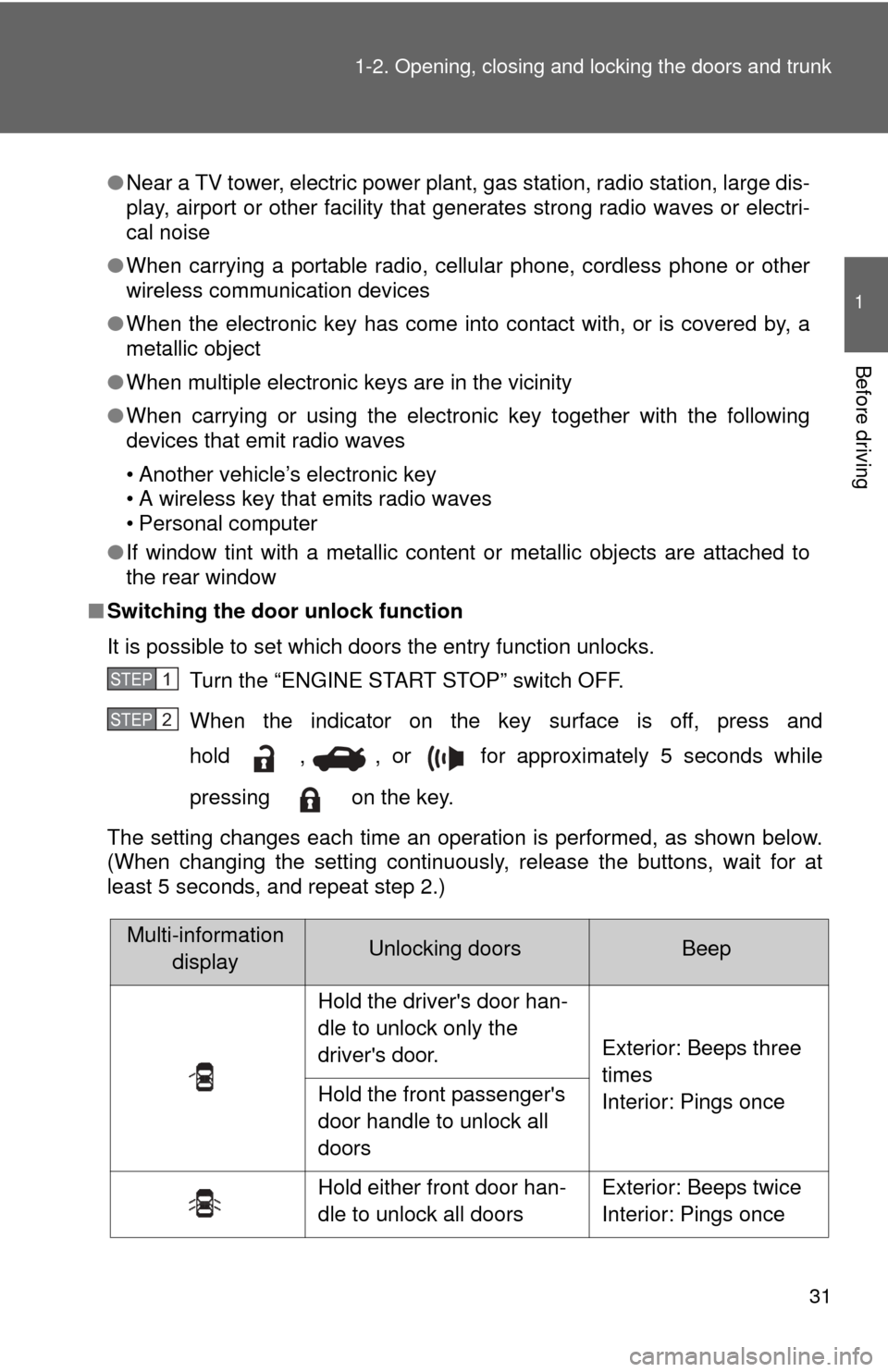
■ Switching the door unlock function
It is possible to set which doors the entry function unlocks.
Turn the “ENGINE START STOP” switch OFF.
When the indicator on the key surface is off, press and
hold , , or for approximately 5 seconds while
pressing on the key.
The setting changes each time an operation is performed, as shown below.
(When changing the setting continuously, release the buttons, wait for at
least 5 seconds, and repeat step 2.)
STEP1
STEP2
Multi-information displayUnlocking doorsBeep
Hold the driver's door han-
dle to unlock only the
driver's door. Exterior: Beeps three
times
Interior: Pings once
Hold the front passenger's
door handle to unlock all
doors
Hold either front door han-
dle to unlock all doors Exterior: Beeps twice
Interior: Pings once