window TOYOTA CAMRY 2012 XV50 / 9.G Owners Manual
[x] Cancel search | Manufacturer: TOYOTA, Model Year: 2012, Model line: CAMRY, Model: TOYOTA CAMRY 2012 XV50 / 9.GPages: 532, PDF Size: 6.44 MB
Page 2 of 532

TABLE OF CONTENTSIndex
2
1-1. Key informationKeys ..................................... 28
1-2. Opening, closing and
locking the doors and
trunk
Smart key system................. 32
Wireless remote control ....... 46
Doors.................................... 52
Trunk .................................... 58
1-3. Adjustable components
(seats, mirrors,
steering wheel)
Front seats ........................... 62
Rear seats ............................ 65
Head restraints ..................... 67
Seat belts ............................. 69
Steering wheel ..................... 76
Anti-glare inside rear view mirror.......................... 77
Outside rear view mirrors ..... 79
1-4. Opening a nd closing the
windo ws and moon roof
Power windows .................... 81
Moon roof ............................. 84
1-5. Refueling Opening the fuel tank cap .... 88 1-6. Theft deterrent system
Engine immobilizer system ... 92
Alarm .................................... 95
1-7. Safety information Correct driving posture ......... 98
SRS airbags ....................... 100
Front passenger occupant classification system ......... 113
Child restraint systems ....... 118
Installing child restraints ..... 122
2-1. Driving procedures Driving the vehicle .............. 134
Engine (ignition) switch (vehicles without a
smart key system) ............ 145
Engine (ignition) switch (vehicles with a smart
key system) ...................... 148
Automatic transmission (vehicles without
paddle shift switches) ....... 155
Automatic transmission (vehicles with paddle
shift switches) ................... 159
Turn signal lever ................. 166
Parking brake ..................... 167
Horn .................................... 168
1Before driving
2When driving
Page 3 of 532

1
2
3
4
5
6
7
3
2-2. Instrument clusterGauges and meters ............ 169
Indicators and warning lights ................................. 179
2-3. Operating the lights and wipers
Headlight switch .................. 185
Fog light switch ................... 192
Windshield wipers and washer .............................. 194
2-4. Using other driving systems
Cruise control ...................... 199
Driving assist systems ........ 203
BSM (Blind Spot Monitor) ... 208
2-5. Driving information Cargo and luggage ............. 213
Vehicle load limits ............... 217
Winter driving tips ............... 218
Trailer towing ...................... 222
Dinghy towing ..................... 223 3-1. Using the air conditioning
system and defogger
Manual air conditioning system .............................. 226
Automatic air conditioning system.......... 233
Rear window and outside rear view mirror
defoggers ......................... 240
3-2. Using the audio system Audio system types ............ 242
Using the radio ................... 248
Using the CD player ........... 251
Playing back MP3 and WMA discs ....................... 257
Operating an iPod .............. 264
Operating a USB memory ............................ 272
Optimal use of the audio system .............................. 280
Using the AUX port............. 283
3-3. Using the interior lights Interior lights list ................. 285
• Interior lights..................... 286
• Personal lights.................. 287
3Interior features
Page 7 of 532
7
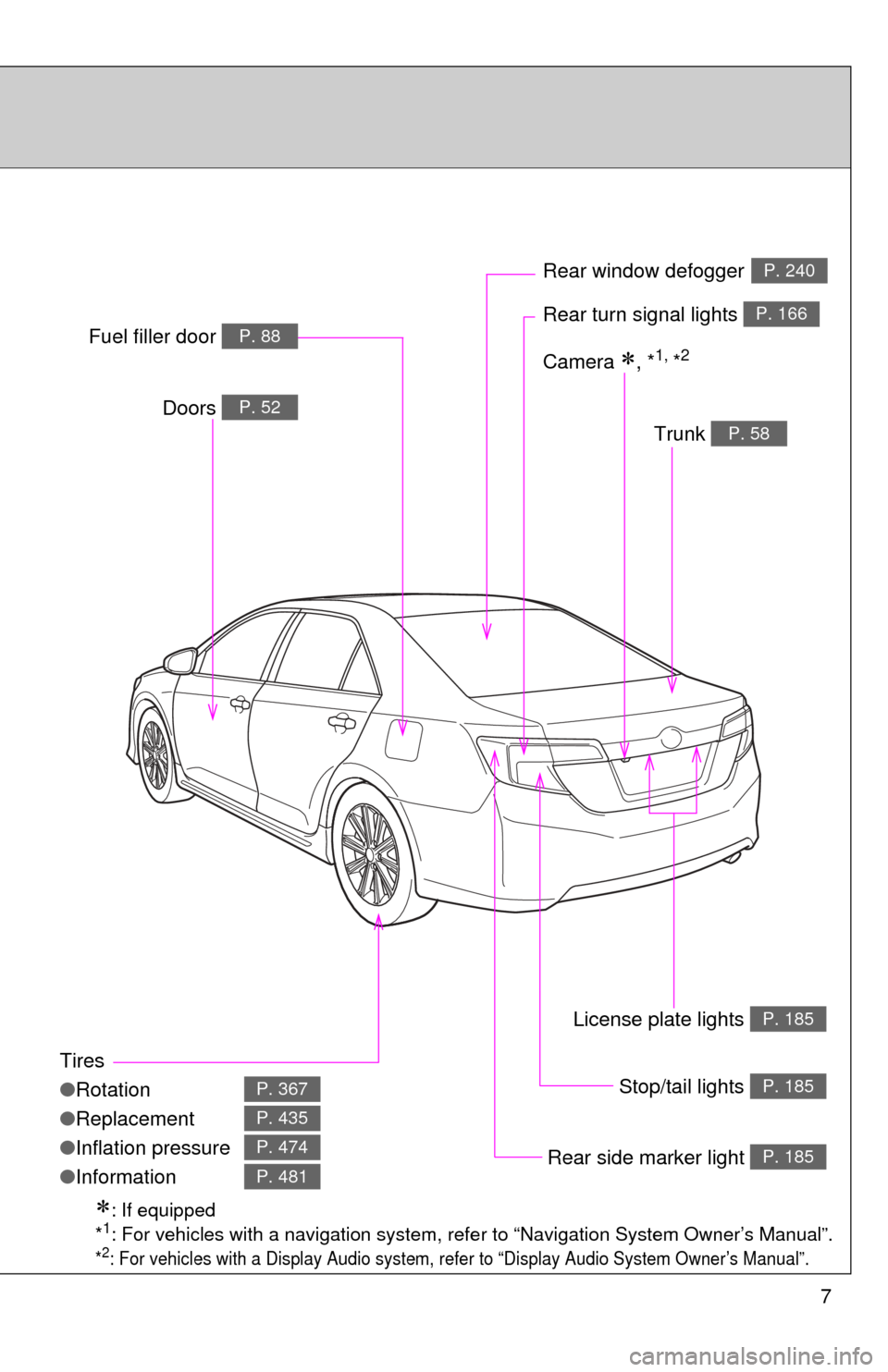
Tires
●Rotation
● Replacement
● Inflation pressure
● Information
P. 367
P. 435
P. 474
P. 481
Trunk P. 58
Doors P. 52
Rear turn signal lights P. 166
Rear window defoggerP. 240
Stop/tail lights P. 185
Rear side marker light P. 185
Fuel filler door P. 88
: If equipped
*1: For vehicles with a navigation system, refe r to “Navigation System Owner’s Manual”.
*2: For vehicles with a Display Audio system, re fer to “Display Audio System Owner’s Manual”.
Camera , *1, *2
License plate lights P. 185
Page 8 of 532
8
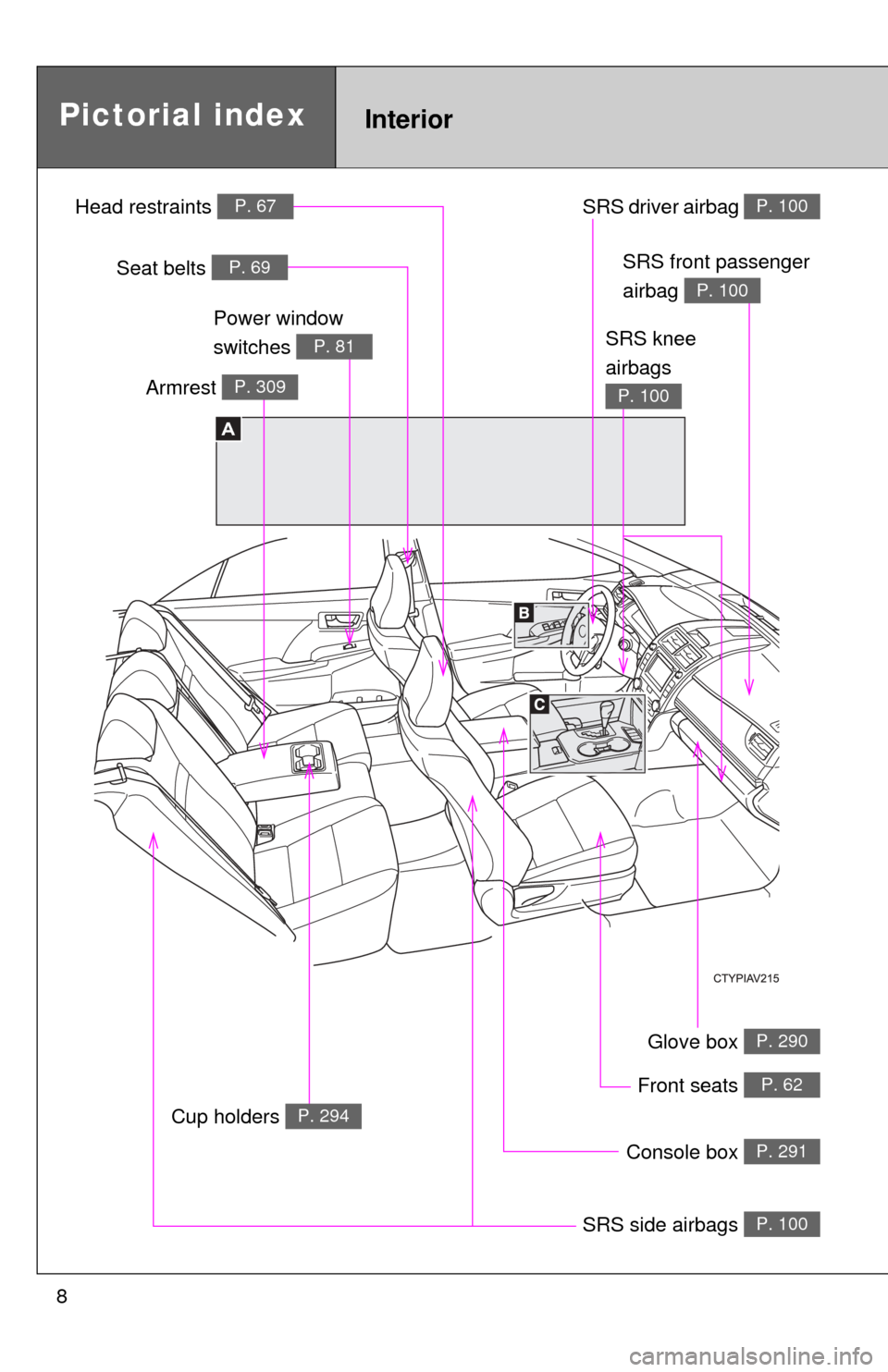
Glove box P. 290
Front seats P. 62
SRS side airbags P. 100
SRS driver airbag P. 100
Console box P. 291
InteriorPictorial index
A
Head restraints P. 67
Seat belts P. 69
SRS knee
airbags
P. 100
SRS front passenger
airbag
P. 100
Cup holders P. 294
Armrest P. 309
Power window
switches
P. 81
Page 11 of 532
11
B
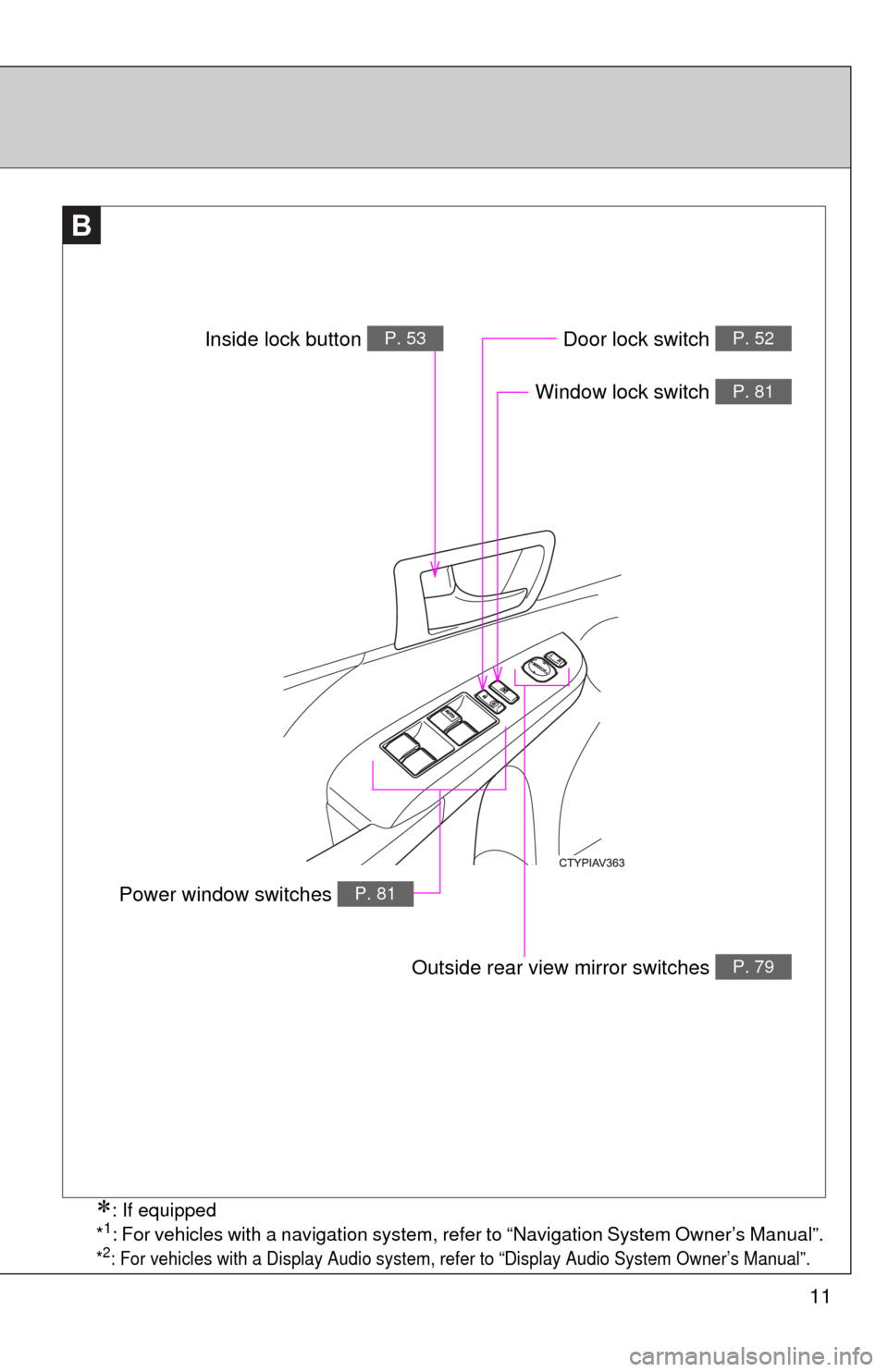
Window lock switch P. 81
Outside rear view mirror switches P. 79
Door lock switch P. 52
Power window switches P. 81
Inside lock button P. 53
: If equipped
*1: For vehicles with a navigation system, refer to “Navigation System Owner’s Manual”.
*2: For vehicles with a Display Audio system, refer to “Display Audio System Owner’s Manual”.
Page 14 of 532
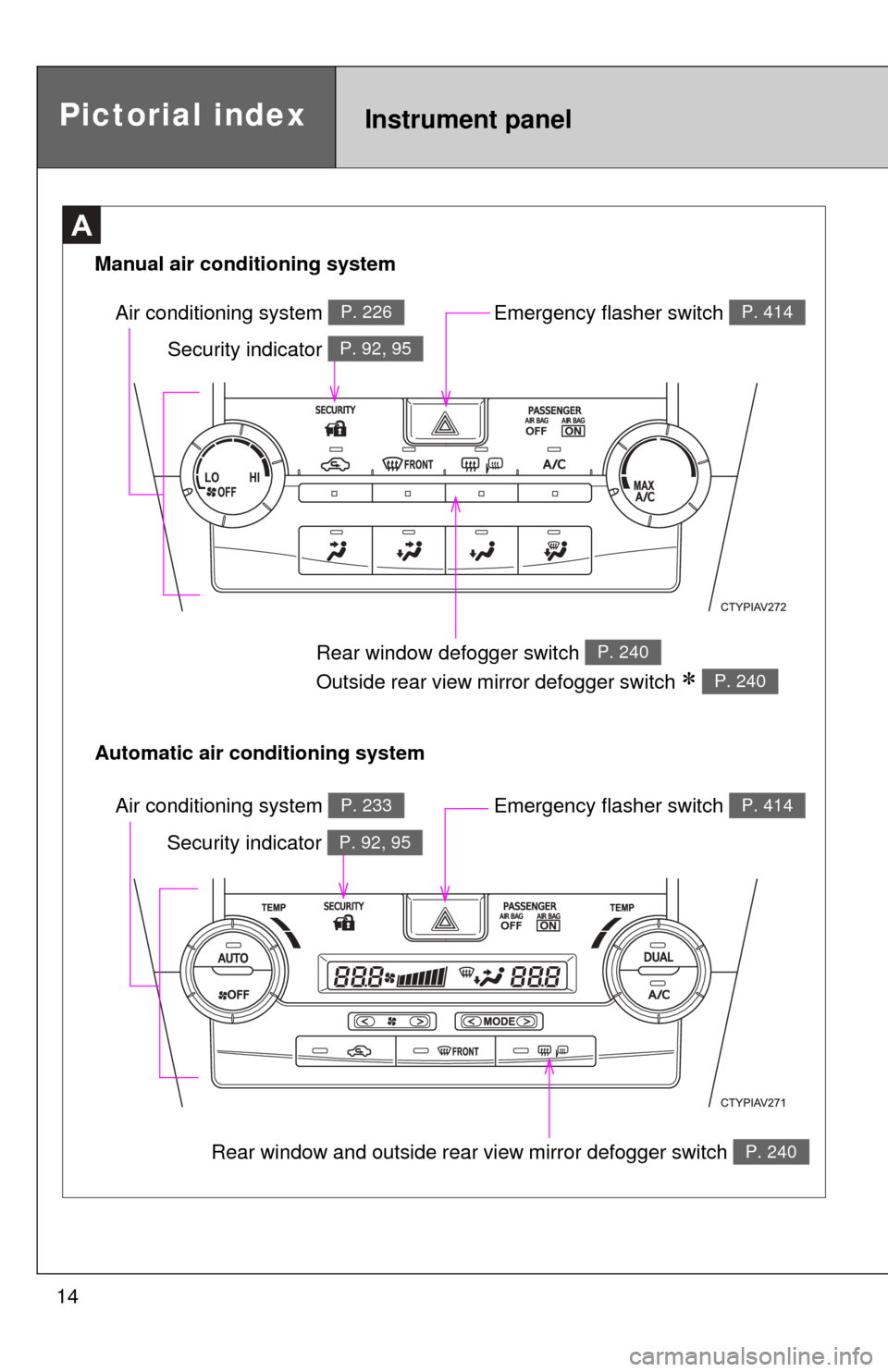
14Rear window and outside rear view mirror defogger switch
P. 240
A
Air conditioning system P. 233
Rear window defogger switch
Outside rear view mirror defogger switch
P. 240
P. 240
Air conditioning system P. 226
Pictorial indexInstrument panel
Automatic air conditioning system Manual air conditioning system
Emergency flasher switch P. 414
Emergency flasher switch P. 414
Security indicator P. 92, 95
Security indicator P. 92, 95
Page 24 of 532

24
CAUTION
■General precautions while driving
Driving under the influence: Never drive your vehicle when under the influ-
ence of alcohol or drugs that have impaired your ability to operate your vehi-
cle. Alcohol and certain drugs delay reaction time, impair judgment and
reduce coordination, which could lead to an accident that could result in
death or serious injury.
Defensive driving: Always drive defensively. Anticipate mistakes that other
drivers or pedestrians might make and be ready to avoid accidents.
Driver distraction: Always give your full attention to driving. Anything that dis-
tracts the driver, such as adjusting controls, talking on a cellular phone or
reading can result in a collision with resulting death or serious injury to you,
your occupants or others.
■ General precaution regarding children’s safety
Never leave children unattended in the vehicle, and never allow children to
have or use the key.
Children may be able to start the vehicle or shift the vehicle into neutral.
There is also a danger that children may injure themselves by playing with
the windows, the moon roof, or other features of the vehicle. In addition, heat
build-up or extremely cold temperatures inside the vehicle can be fatal to
children.
Page 27 of 532
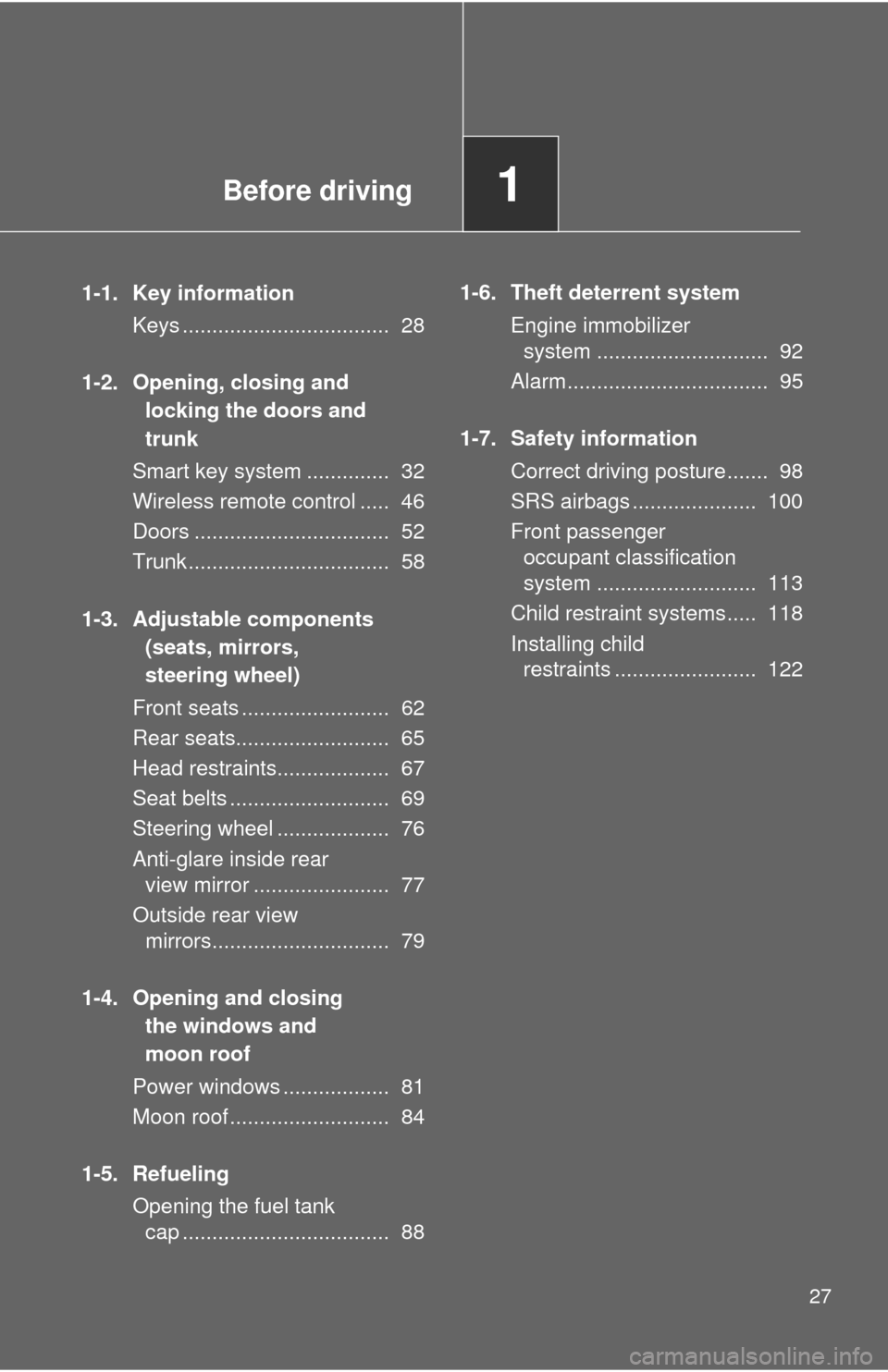
Before driving1
27
1-1. Key informationKeys ................................... 28
1-2. Opening, closing and locking the doors and
trunk
Smart key system .............. 32
Wireless remote control ..... 46
Doors ................................. 52
Trunk .................................. 58
1-3. Adjustable components (seats, mirrors,
steering wheel)
Front seats ......................... 62
Rear seats.......................... 65
Head restraints................... 67
Seat belts ........................... 69
Steering wheel ................... 76
Anti-glare inside rear view mirror ....................... 77
Outside rear view mirrors.............................. 79
1-4. Opening and closing the windows and
moon roof
Power windows .................. 81
Moon roof ........................... 84
1-5. Refueling Opening the fuel tank cap ................................... 88 1-6. Theft deterrent system
Engine immobilizer system ............................. 92
Alarm.................................. 95
1-7. Safety information Correct driving posture....... 98
SRS airbags ..................... 100
Front passenger occupant classification
system ........................... 113
Child restraint systems..... 118
Installing child restraints ........................ 122
Page 40 of 532

40 1-2. Opening, closing and locking the doors and trunk
■Conditions affecting operation
The smart key system uses weak radio waves. In the following situations,
the communication between the electronic key and the vehicle may be
affected, preventing the smart key system, wireless remote control and
engine immobilizer system from operating properly.
(Ways of coping: P. 451)
● When the electronic key battery is depleted
● Near a TV tower, electric power plant, gas station, radio station, large dis-
play, airport or other facility that generates strong radio waves or electri-
cal noise
● When the electronic key is in contact with, or is covered by the following
metallic objects
• Cards to which aluminum foil is attached
• Cigarette boxes that have aluminum foil inside
• Metallic wallets or bags
• Coins
• Hand warmers made of metal
• Media such as CDs and DVDs
● When other wireless key (that emit radio waves) is being used nearby
● When carrying the electronic key together with the following devices that
emit radio waves
• A portable radio, cellular phone, cordless phone or other wireless com-
munication device
• Another vehicle’s electronic key or a wireless key that emits radio waves
• Personal computers or personal digital assistants (PDAs)
• Digital audio players
• Portable game systems
● If window tint with a metallic content or metallic objects are attached to
the rear window
● When the electronic key is placed near a battery charger or electronic
devices
Page 41 of 532

41
1-2. Opening, closing and locking the doors and trunk
1
Before driving
■
Notes for the entry function
●Even when the electronic key is within the effective range (detection
areas), the system may not operate properly in the following cases:
• The electronic key is too close to the window or outside door handle,
near the ground, or in a high place when the doors are locked or
unlocked.
• The electronic key is near the ground or in a high place, or too close to the rear bumper center when the trunk is unlocked.
• The electronic key is on the instrument panel, rear package tray or floor, in the door pockets or glove box, or near a vent when the engine
is started or “ENGINE START STOP” switch modes are changed.
● Do not leave the electronic key on top of the instrument panel or near the
door pockets or a vent when exiting the vehicle. Depending on the radio
wave reception conditions, it may be detected by the antenna outside the
cabin and the door will become lockable from the outside, possibly trap-
ping the electronic key inside the vehicle.
● As long as the electronic key is within the effective range, the doors may
be locked or unlocked by anyone.
● Even if the electronic key is not inside the vehicle, it may be possible to
start the engine if the electronic key is near the window.
● The doors may unlock if a large amount of water splashes on the door
handle, such as in the rain or in a car wash when the electronic key is
within the effective range. (The door will automatically be locked after
approximately 60 seconds if the doors are not opened and closed.)
● Gripping the door handle when wearing a glove may not unlock the door.
● If the wireless remote control is used to lock the doors when the elec-
tronic key is near the vehicle, there is a possibility that the door may not
be unlocked by the entry function. (Use the wireless remote control to
unlock the doors.)
● A sudden approach to the effective range or door handle may prevent the
doors from being unlocked. In this case, return the door handle to the
original position and check that the doors unlock before pulling the door
handle again.