TOYOTA CAMRY 2012 XV50 / 9.G User Guide
CAMRY 2012 XV50 / 9.G
TOYOTA
TOYOTA
https://www.carmanualsonline.info/img/14/6238/w960_6238-0.png
TOYOTA CAMRY 2012 XV50 / 9.G User Guide
Page 271 of 532
271
3-2. Using the audio system
3
Interior features
Depending on differences between models or software versions etc., some
models might be incompatible with this system.
Items related to standards and limitations are as follows:
●
Maximum number of lists in device: 9999
● Maximum number of songs in device: 65535
● Maximum number of songs per list: 65535
CAUTION
■Caution while driving
Do not connect iPod or operate the controls.
NOTICE
■If the auxiliary box lid cannot be fully closed
Depending on the size and shape of the iPod that is connected to the sys-
tem, the auxiliary box lid may not close fully. In this case, do not forcibly
close the lid as this may damage the iPod or the terminal, etc.
■ To prevent damage to iPod
●Do not leave iPod in the vehicle. The temperature inside the vehicle may
become high, resulting in damage to the iPod.
● Do not push down on or apply unnecessary pressure to the iPod while it is
connected as this may damage the iPod or its terminal.
● Do not insert foreign objects into the port as this may damage the iPod or
its terminal.
Page 279 of 532
279
3-2. Using the audio system
3
Interior features
NOTICE
■
If the auxiliary box lid cannot be fully closed
Depending on the size and shape of the USB memory that is connected to
the system, the auxiliary box lid may not close fully. In this case, do not forc-
ibly close the lid as this may damage the USB memory or the terminal, etc.
■ To prevent damage to USB memory
●Do not leave USB memory in the vehicle. The temperature inside the vehi-
cle may become high, resulting in damage to the player.
● Do not push down on or apply unnecessary pressure to the USB memory
while it is connected as this may damage the USB memory or its terminal.
● Do not insert foreign objects into the port as this may damage the USB
memory or its terminal.
Page 283 of 532
283
3-2. Using the audio system
3
Interior features
Using the AUX port
■Operating portable audio devices connected to the audio system
The volume can be adjusted using the vehicle's audio controls. All other
adjustments must be made on the portable audio device itself.
■ When using a portable audio devi ce connected to the power outlet
Noise may occur during playback. Use the power source of the portable
audio device.
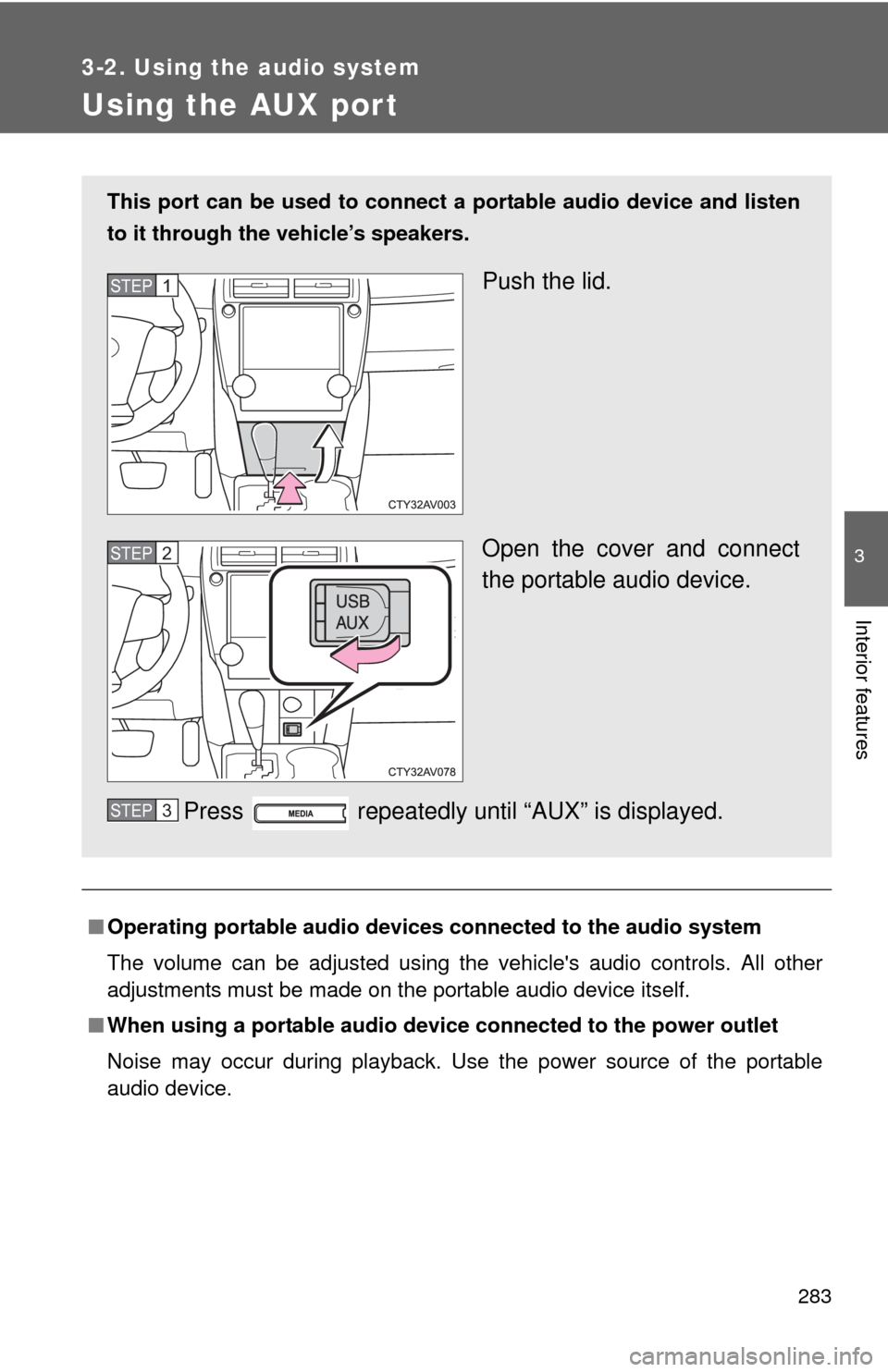
This port can be used to connect a portable audio device and listen
to it through the vehicle’s speakers.
Push the lid.
Open the cover and connect
the portable audio device.
Press repeatedly until “AUX” is displayed.STEP1
STEP2
STEP3
Page 284 of 532
284 3-2. Using the audio system
NOTICE
■If the auxiliary box lid cannot be fully closed
Depending on the size and shape of the portable audio device that is con-
nected to the system, the auxiliary box lid may not close fully. In this case, do
not forcibly close the lid as this may damage the portable audio device or the
terminal, etc.
Page 289 of 532
289
3
Interior features
3-4. Using the storage features
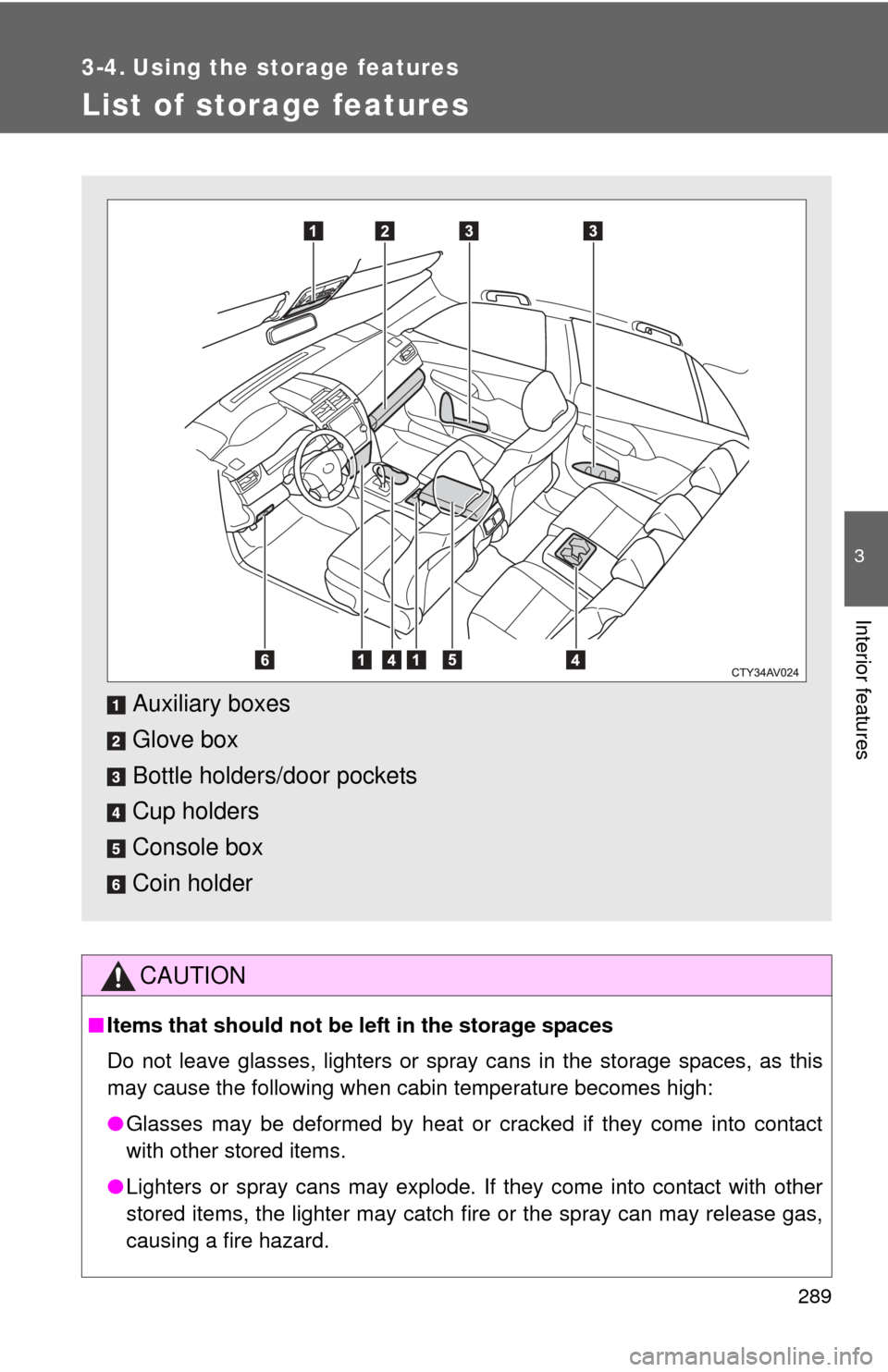
List of storage features
CAUTION
■Items that should not be left in the storage spaces
Do not leave glasses, lighters or spray cans in the storage spaces, as this
may cause the following when cabin temperature becomes high:
● Glasses may be deformed by heat or cracked if they come into contact
with other stored items.
● Lighters or spray cans may explode. If they come into contact with other
stored items, the lighter may catch fire or the spray can may release gas,
causing a fire hazard.
Auxiliary boxes
Glove box
Bottle holders/door pockets
Cup holders
Console box
Coin holder
Page 296 of 532
296 3-4. Using the storage features
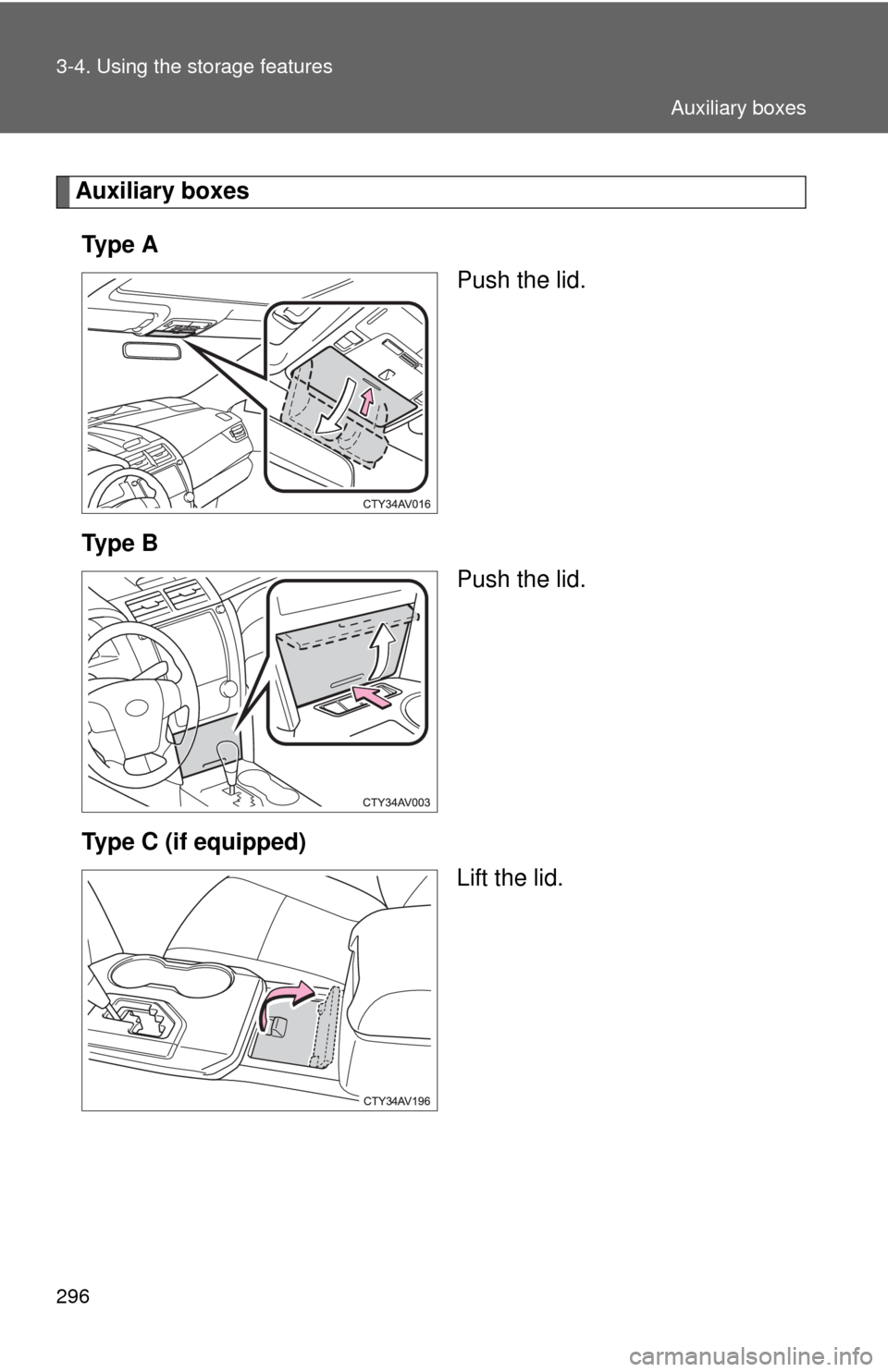
Auxiliary boxesTy p e A Push the lid.
Ty p e B Push the lid.
Type C (if equipped) Lift the lid.
Auxiliary boxes
Page 297 of 532
297
3-4. Using the
storage features
3
Interior features
CAUTION
■Caution while driving
Keep the auxiliary boxes closed. In the event of sudden braking, an accident
may occur due to an occupant being struck by an open auxiliary box or the
items stored inside.
■ Items unsuitable for storing (type A only)
Do not store items heavier than 0.4 lb. (0.2 kg).
Doing so may cause the auxiliary box to open and the items inside may fall
out, resulting in an accident.
Auxiliary boxes
Page 350 of 532
350
4-3. Do-it-yourself maintenance
Hood
CAUTION
■Pre-driving check
Check that the hood is fully closed and locked.
If the hood is not locked properly, it may open while the vehicle is in motion
and cause an accident, which may result in death or serious injury.
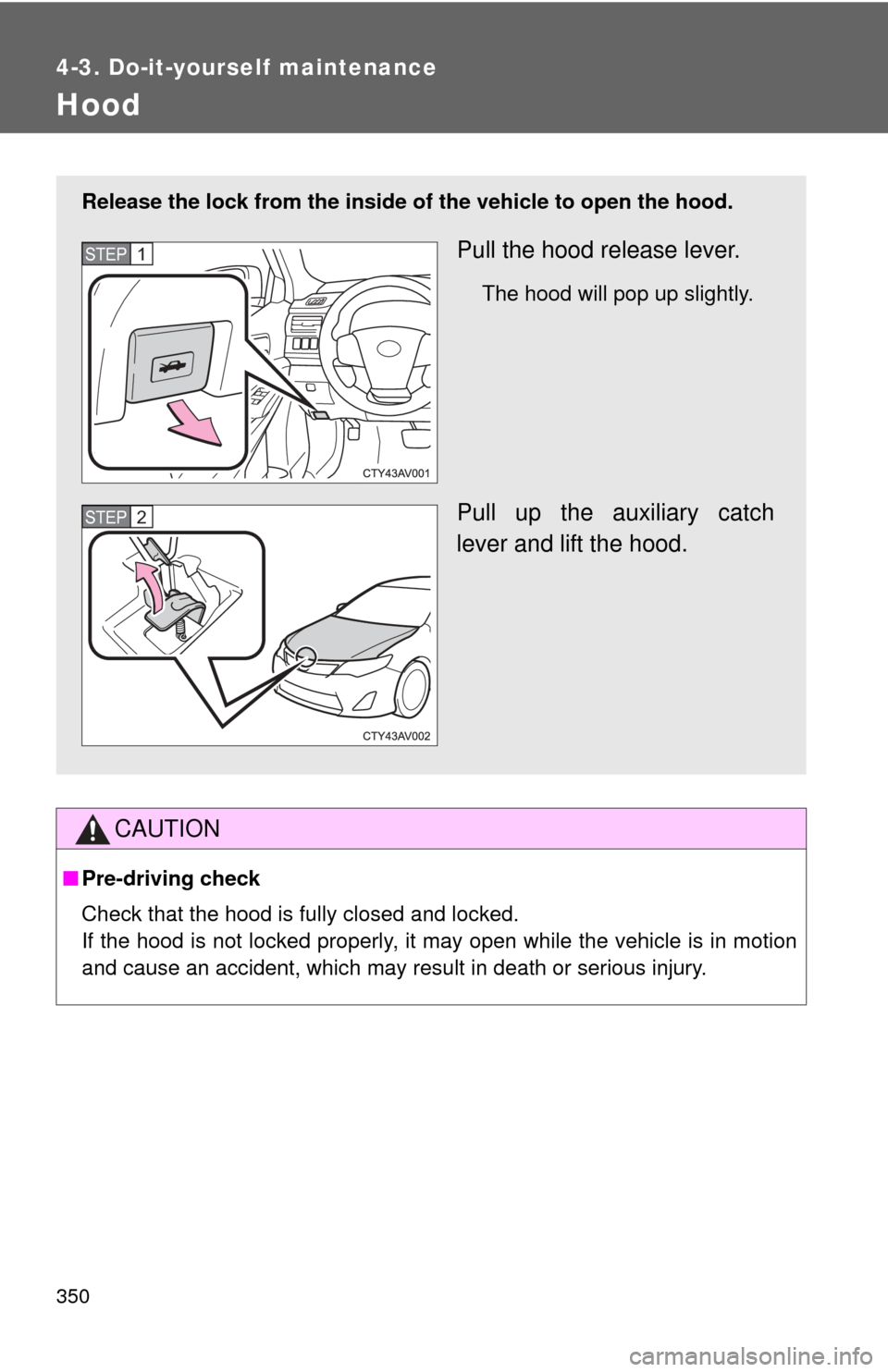
Release the lock from the inside of the vehicle to open the hood.
Pull the hood release lever.
The hood will pop up slightly.
Pull up the auxiliary catch
lever and lift the hood.
STEP1
STEP2
Page 505 of 532
505
7
For owners
SRS airbag instructions for Canadian owners (in French)
The following is a French explanation of SRS airbag instructions
extracted from the SRS airbag section in this manual.
See the SRS airbag section for more detailed SRS airbag instruc-
tions in English.
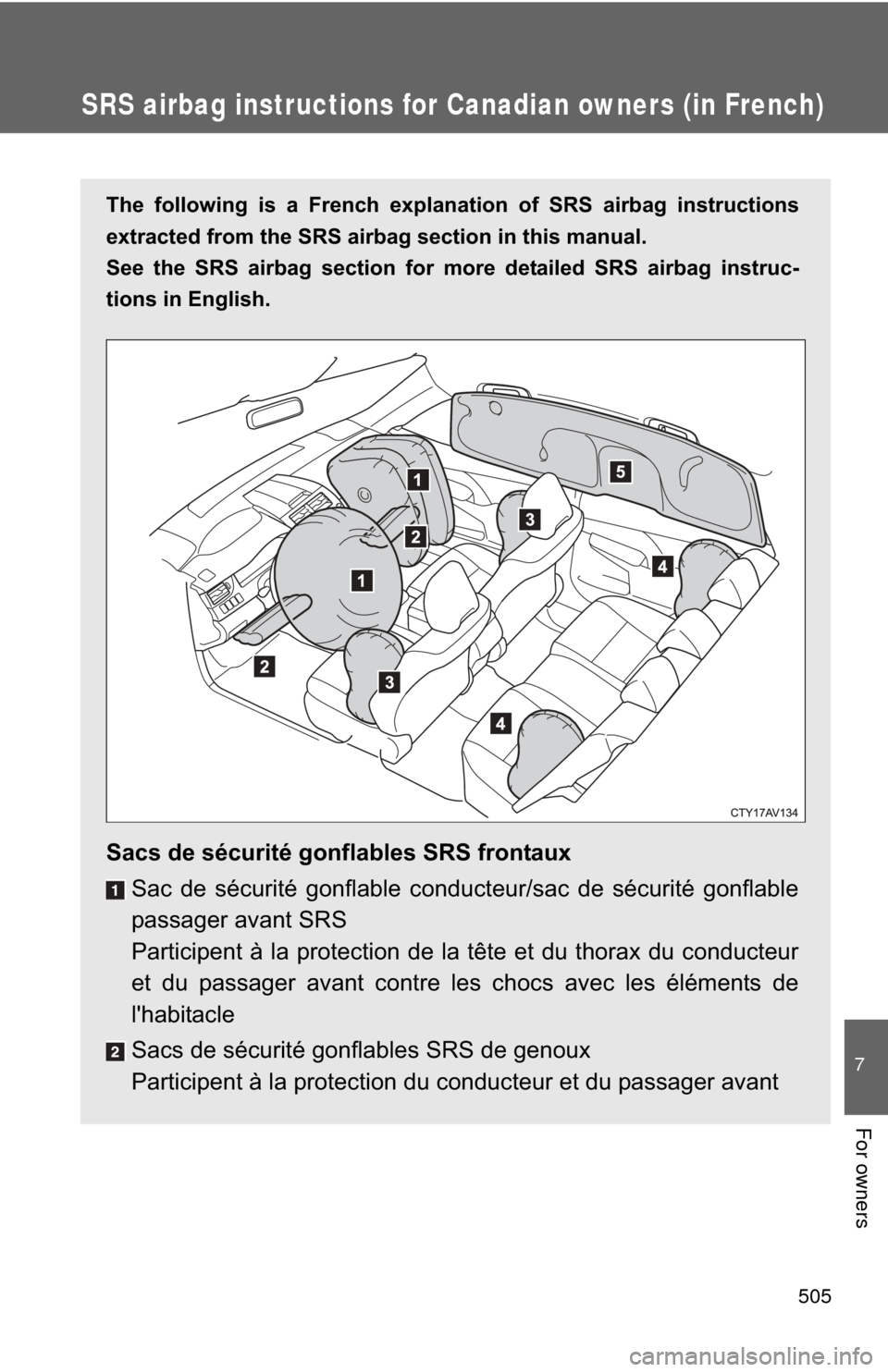
Sacs de sécurité gonflables SRS frontauxSac de sécurité gonflable conducteur/sac de sécurité gonflable
passager avant SRS
Participent à la protection de la tête et du thorax du conducteur
et du passager avant contre les chocs avec les éléments de
l'habitacle
Sacs de sécurité gonflables SRS de genoux
Participent à la protection du conducteur et du passager avant
Page 506 of 532
506
Sacs de sécurité gonflables SRS latéraux et rideauSacs de sécurité gonflables SRS latéraux avant
Participent à la protection du haut du corps des occupants assis
aux places avant
Sacs de sécurité gonflables SRS latéraux arrière
Participent à la protection du haut du corps des occupants assis
aux places arrière extérieures
Sacs de sécurité gonflables SRS rideau
Participent principalement à la protection de la tête des
occupants assis aux places extérieures