lock TOYOTA CAMRY 2012 XV50 / 9.G Manual Online
[x] Cancel search | Manufacturer: TOYOTA, Model Year: 2012, Model line: CAMRY, Model: TOYOTA CAMRY 2012 XV50 / 9.GPages: 532, PDF Size: 6.44 MB
Page 234 of 532
234 3-1. Using the air conditioning system and defogger
Using the automatic air conditioning system
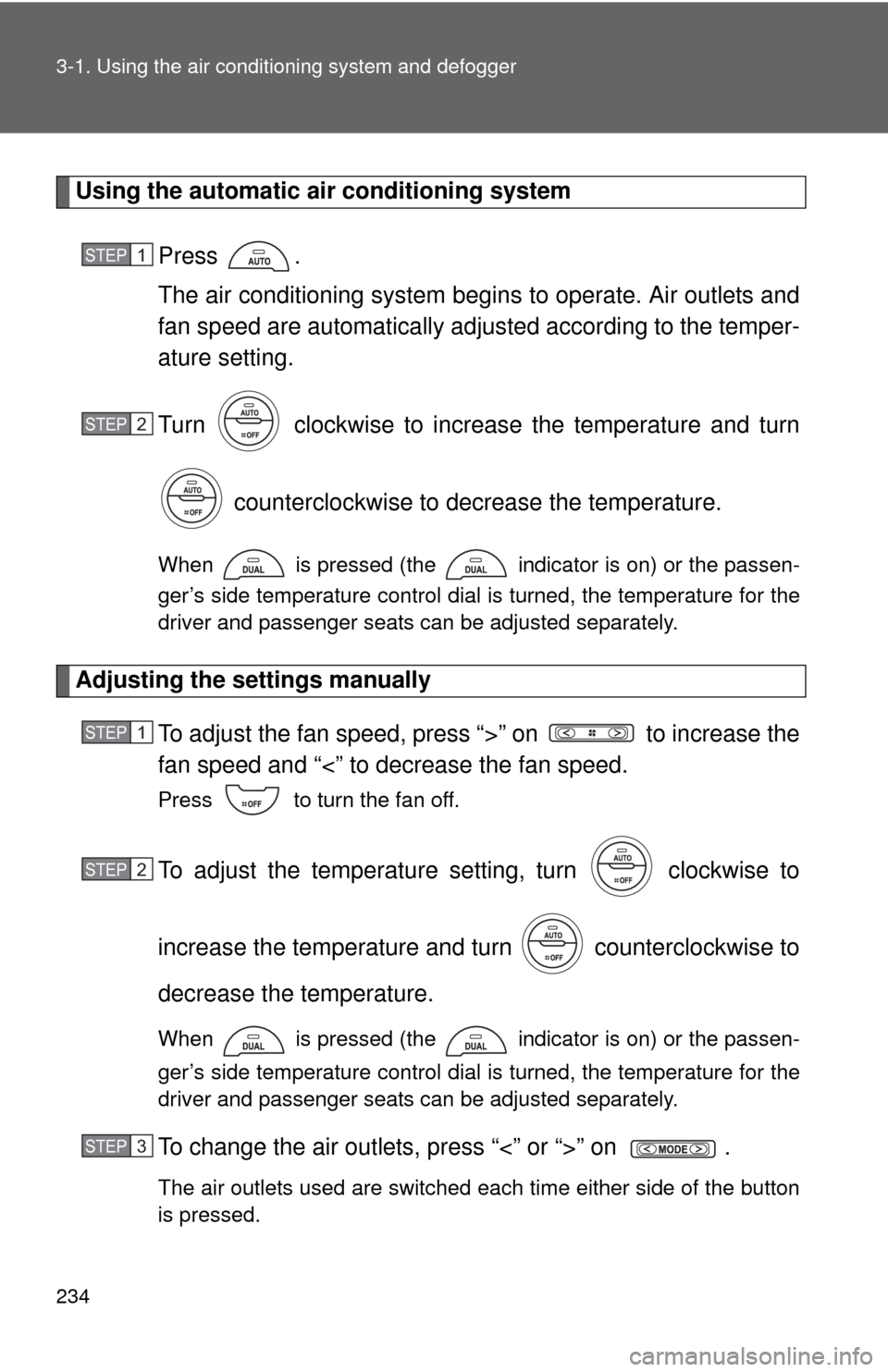
Press .
The air conditioning system beg ins to operate. Air outlets and
fan speed are automatically adjus ted according to the temper-
ature setting.
Turn clockwise to increase the temperature and turn
counterclockwise to decrease the temperature.
When is pressed (the indicator is on) or the passen-
ger’s side temperature control dial is turned, the temperature for the
driver and passenger seats can be adjusted separately.
Adjusting the settings manually To adjust the fan speed, press “>” on to increase the
fan speed and “<” to decrease the fan speed.
Press to turn the fan off.
To adjust the temperature setting, turn clockwise to
increase the temperature and turn counterclockwise to
decrease the temperature.
When is pressed (the indicator is on) or the passen-
ger’s side temperature control dial is turned, the temperature for the
driver and passenger seats can be adjusted separately.
To change the air outlets, press “<” or “>” on .
The air outlets used are switched each time either side of the button
is pressed.
STEP1
STEP2
STEP1
STEP2
STEP3
Page 239 of 532
239
3-1. Using the air conditioning system
and defogger
3
Interior features
■Air conditioning odors
●During use, various odors from inside and outside the vehicle may enter
into and accumulate in the air conditioning system. This may then cause
odor to be emitted from the vents.
● To reduce potential odors from occurring:
• It is recommended that the air conditioning system be set to outside air
mode prior to turning the vehicle off.
• The start timing of the blower may be delayed for a short period of time immediately after the air conditioning system is started in automatic
mode.
■ Air conditioning filter
P. 382
■ Customization that can be co nfigured at Toyota dealer
Settings (e.g. air conditioning setting) can be changed.
(Customizable features P. 493)
CAUTION
■To prevent the windshield from fogging up
Do not use during cool air operation in extremely humid weather.
The difference between the temperature of the outside air and that of the
windshield can cause the outer surface of the windshield to fog up, blocking
your vision.
NOTICE
■To prevent battery discharge
Do not leave the air conditioning system on longer than necessary when the
engine is stopped.
Page 265 of 532
265
3-2. Using the audio system
3
Interior features
Selecting a play mode
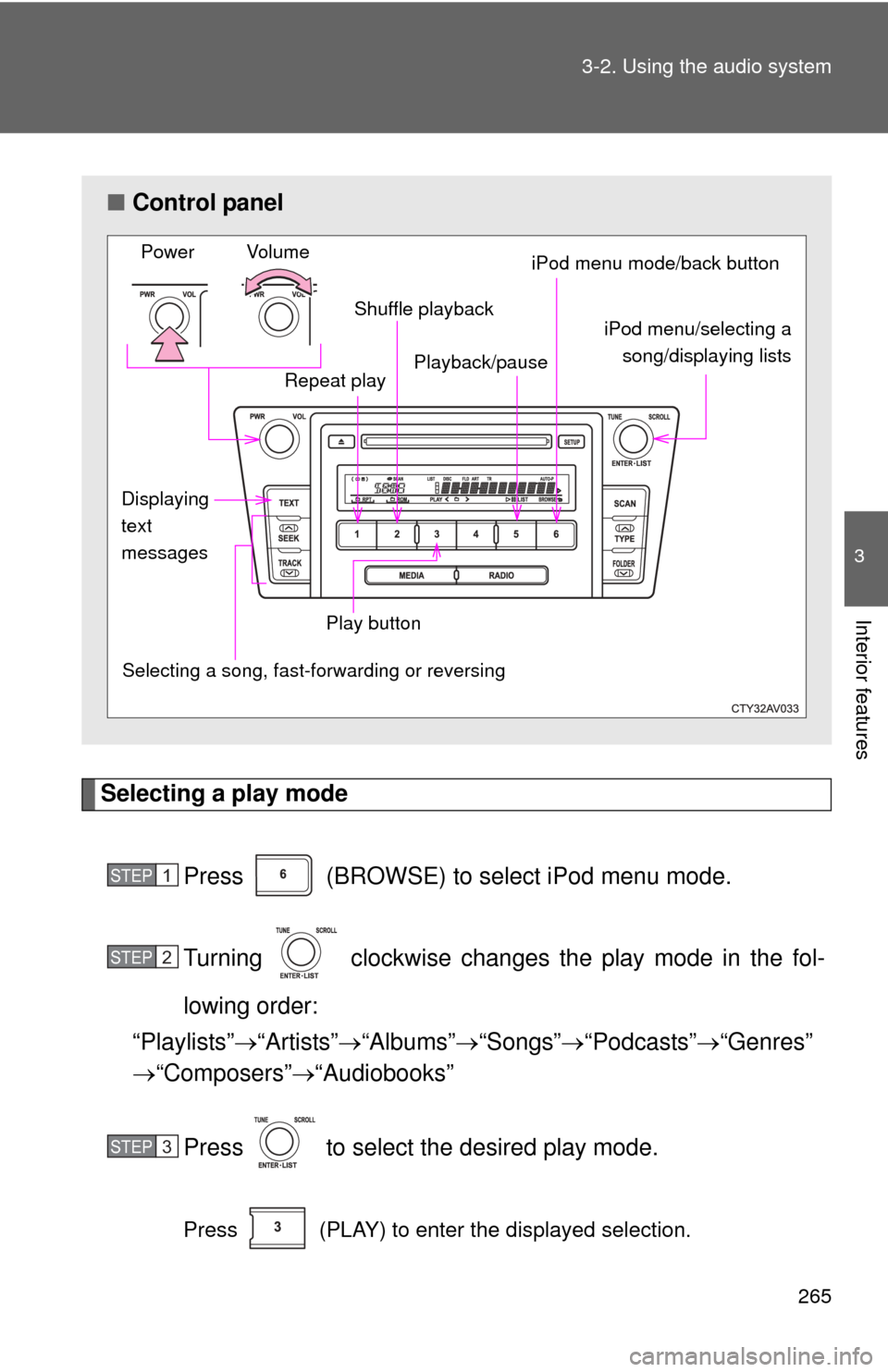
Press (BROWSE) to select iPod menu mode.
Turning clockwise changes the play mode in the fol-
lowing order:
“Playlists” “Artists” “Albums” “Songs” “Podcasts” “Genres”
“Composers” “Audiobooks”
Press to select the desired play mode.
Press (PLAY) to enter the displayed selection.
■ Control panel
Selecting a song, fast-forwarding or reversingPower Volume
Shuffle playback
Repeat play iPod menu/selecting a
song/displaying lists
iPod menu mode/back button
Displaying
text
messages
Playback/pause
Play button
STEP1
STEP2
STEP3
Page 288 of 532

288 3-3. Using the interior lights
■Illuminated entry system
Vehicles without a smart key system
The lights automatically turn on/off according to the engine switch position,
whether the doors are locked/unlocked, and whether the doors are open/
closed.
Vehicles with a smart key system
The lights automatically turn on/off according to “ENGINE START STOP”
switch mode, the presence of the electronic key, whether the doors are
locked/unlocked, and whether the doors are open/closed.
■ To prevent battery discharge
Vehicles without a smart key system
If the interior lights, personal lights and/or door courtesy lights are left on
when the engine switch is turned to the “LOCK” position, the lights will go off
automatically after 20 minutes.
Vehicles with a smart key system
If the interior lights, personal lights and/or door courtesy lights are left on
when the “ENGINE START STOP” switch is turned off, the lights will go off
automatically after 20 minutes.
■ Customization that can be co nfigured at Toyota dealer
Settings (e.g. the time elapsed before lights turn off) can be changed.
(Customizable features P. 493)
Personal lights
Page 290 of 532
290 3-4. Using the storage features
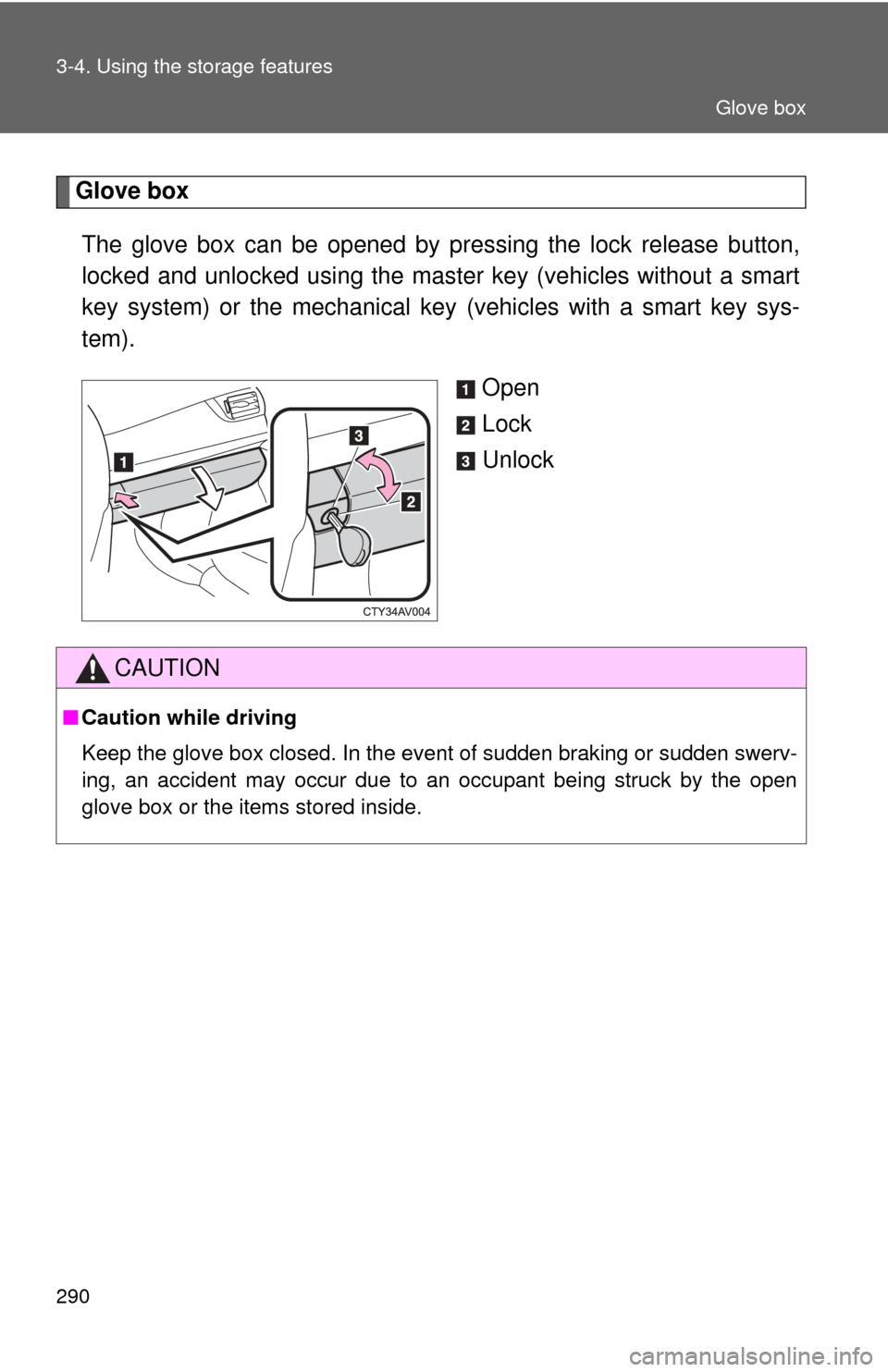
Glove boxThe glove box can be opened by pr essing the lock release button,
locked and unlocked using the master key (vehicles without a smart
key system) or the mechanical key (vehicles with a smart key sys-
tem).
Open
Lock
Unlock
CAUTION
■Caution while driving
Keep the glove box closed. In the event of sudden braking or sudden swerv-
ing, an accident may occur due to an occupant being struck by the open
glove box or the items stored inside.
Glove box
Page 291 of 532
291
3-4. Using the
storage features
3
Interior features
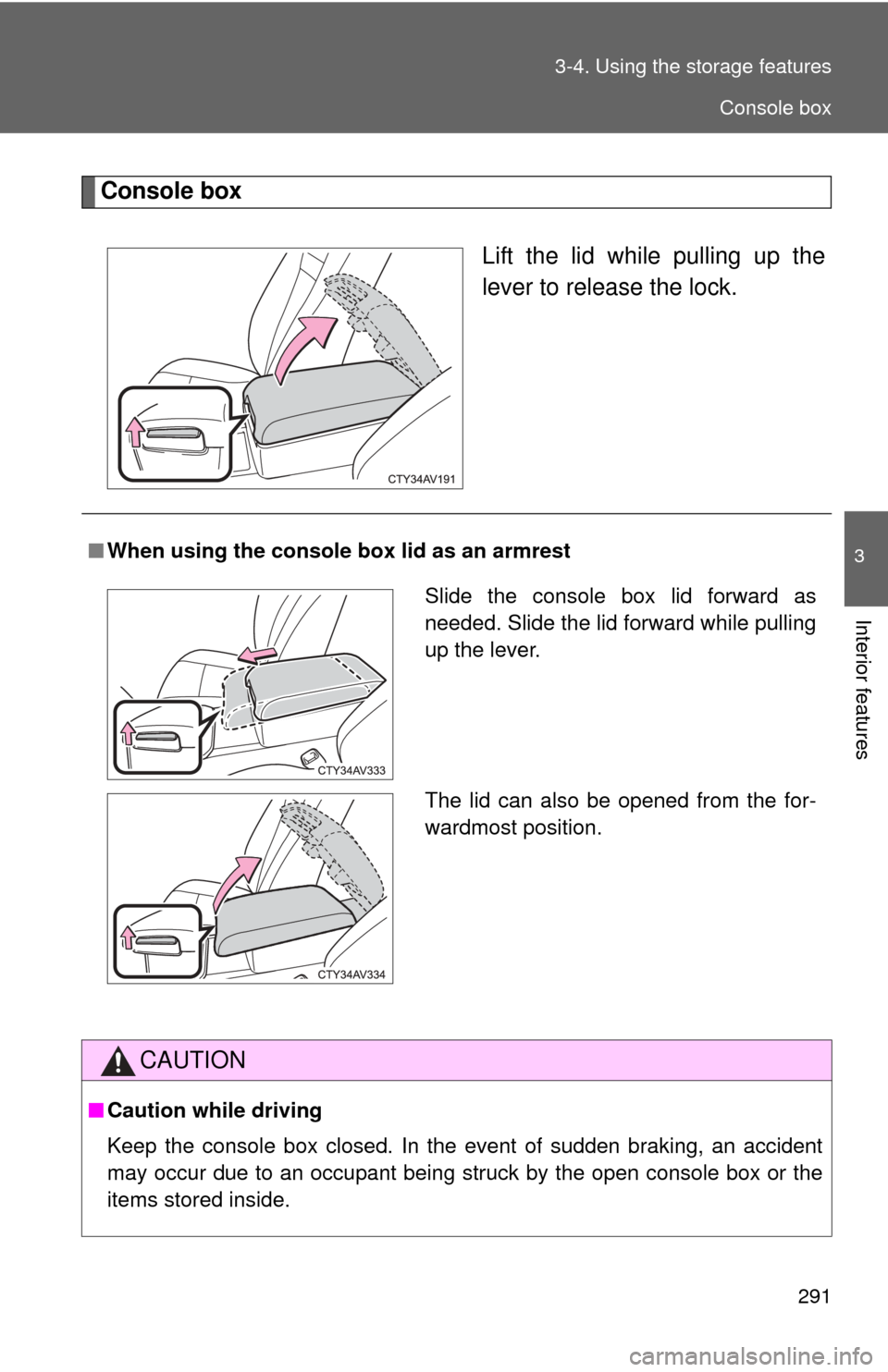
Console box
Lift the lid while pulling up the
lever to release the lock.
■When using the console box lid as an armrest
CAUTION
■Caution while driving
Keep the console box closed. In the event of sudden braking, an accident
may occur due to an occupant being struck by the open console box or the
items stored inside.
Slide the console box lid forward as
needed. Slide the lid forward while pulling
up the lever.
The lid can also be opened from the for-
wardmost position.
Console box
Page 300 of 532
300
3-5. Other interior features
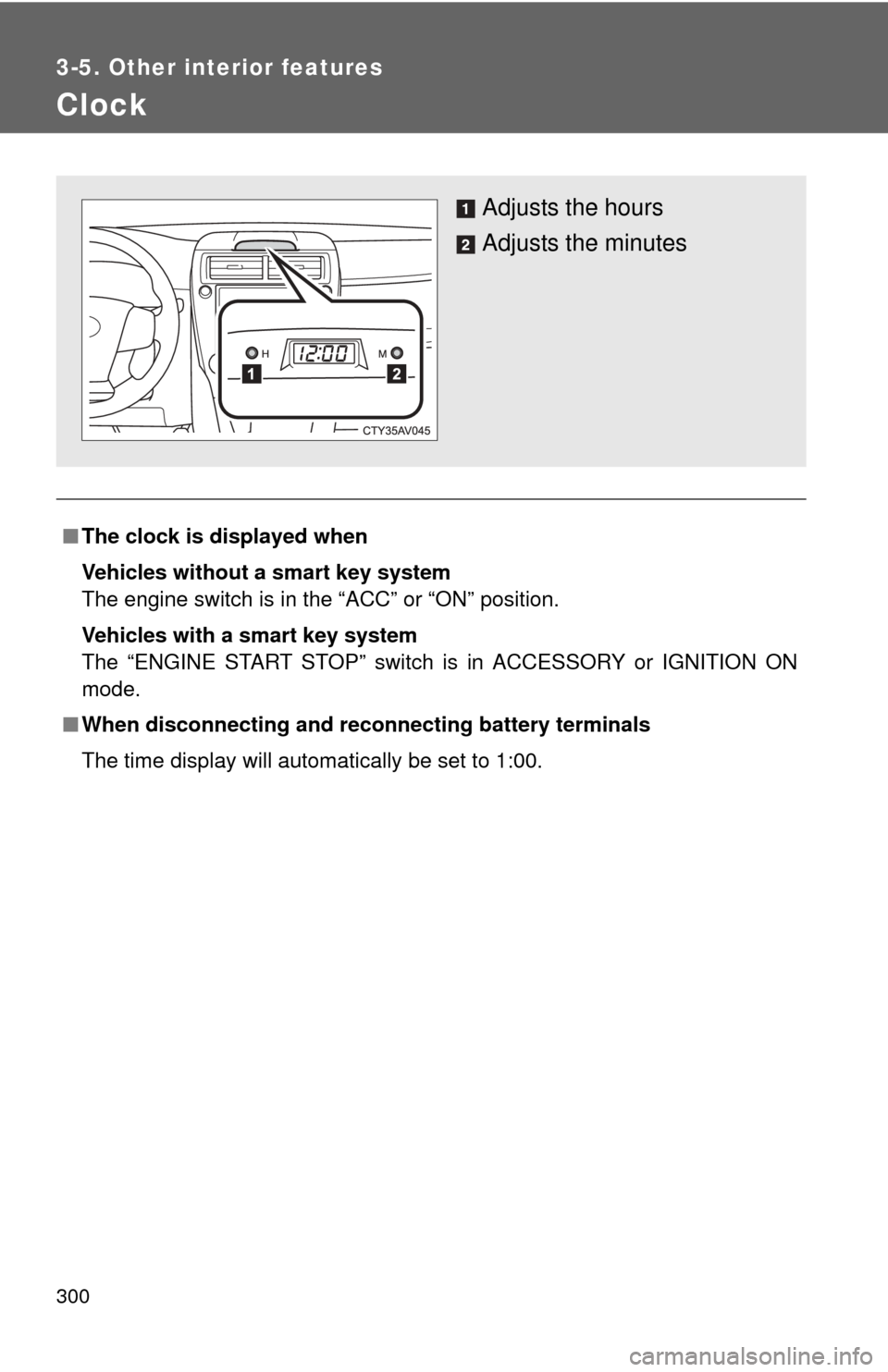
Clock
■The clock is displayed when
Vehicles without a smart key system
The engine switch is in the “ACC” or “ON” position.
Vehicles with a smart key system
The “ENGINE START STOP” switch is in ACCESSORY or IGNITION ON
mode.
■ When disconnecting and reco nnecting battery terminals
The time display will automatically be set to 1:00.
Adjusts the hours
Adjusts the minutes
Page 315 of 532
315
3-5. Other interior features
3
Interior features
Garage door opener
The garage door opener (HomeLink Universal Transceiver) is manufac-
tured under license from HomeLink.
Programming HomeLink (for U.S. owners)
The HomeLink
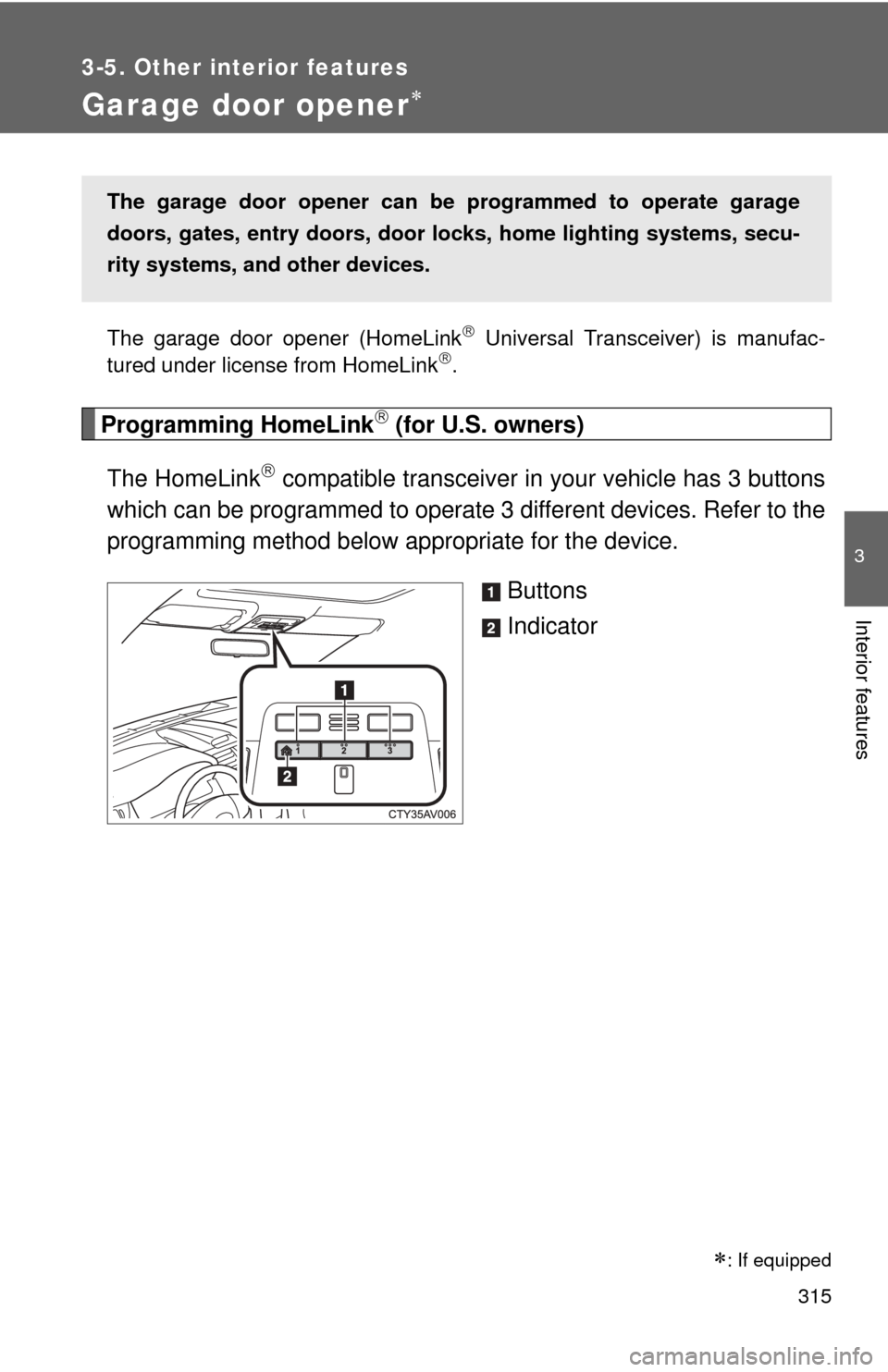
compatible transceiver in your vehicle has 3 buttons
which can be programmed to operate 3 different devices. Refer to the
programming method below appropriate for the device.
Buttons
Indicator
The garage door opener can be programmed to operate garage
doors, gates, entry doors, door locks, home lighting systems, secu-
rity systems, and other devices.
: If equipped
Page 318 of 532
318 3-5. Other interior features
Press and hold the vehicle’s programmed HomeLink button
for 2 seconds and then releas e it. Repeat this step once
again. The garage door may open.
If the garage door opens, the programming process is complete. If
the door does not open, press and release the button a third time.
This third press and release will complete the programming process
by opening the garage door.
The ceiling mounted garage door opener motor should now recog-
nize the HomeLink
signal and operate the garage door.
Repeat the steps above to prog ram another rolling code sys-
tem for any of the remaining HomeLink buttons.
■ Programming an entry gate (for U.S. owners)/Programming a
device in the Canadian market
Place the remote control transmitter 1 to 3 in. (25 to 75 mm)
away from the HomeLink
buttons.
Keep the HomeLink indicator light in view while programming.
Press and hold the selected HomeLink button.
Repeatedly press and release (cycle) the remote control
transmitter for 2 seconds each until step 4 is completed.
When the HomeLink
indicator light starts to flash rapidly,
release the buttons.
Test the HomeLink
operation by pressing the newly pro-
grammed button. Check to see if the gate/device operates
correctly.
Repeat the steps above to program another device for any of
the remaining HomeLink
buttons.
■ Programming other devices
To program other devices such as home security systems, home
door locks or lighting, contact y our Toyota dealer for assistance.
■ Reprogramming a button
The individual HomeLink
buttons cannot be erased but can be
reprogrammed. To reprogram a button, follow the “Reprogramming
a HomeLink
button” instructions.
STEP3
STEP4
STEP1
STEP2
STEP3
STEP4
STEP5
STEP6
Page 324 of 532
324 3-5. Other interior features
Referring to the map above, press “AUTO” to select the num-
ber of the zone you are in.
If the direction is displayed several seconds after adjustment, the
calibration is complete.
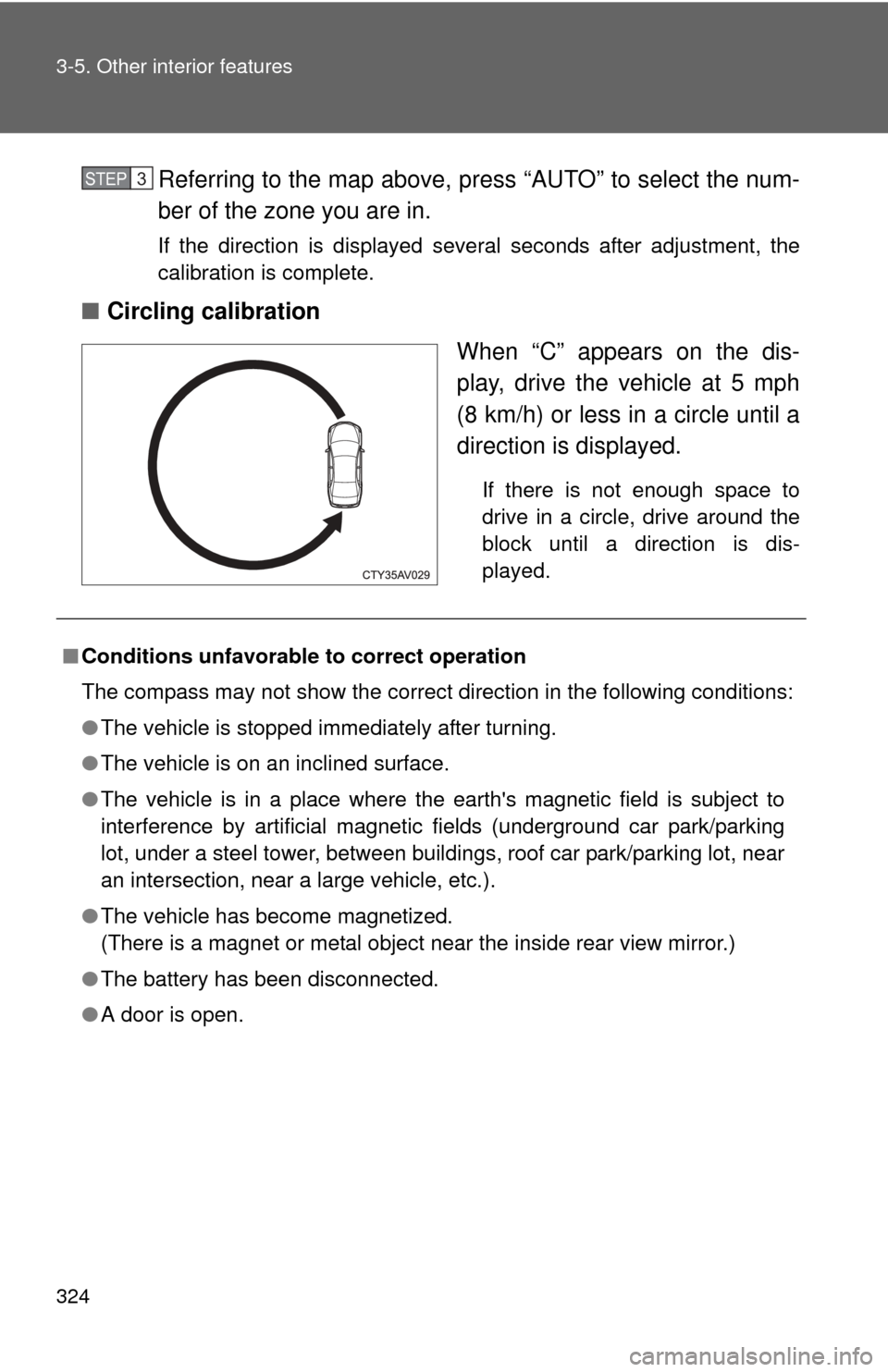
■Circling calibration
When “C” appears on the dis-
play, drive the vehicle at 5 mph
(8 km/h) or less in a circle until a
direction is displayed.
If there is not enough space to
drive in a circle, drive around the
block until a direction is dis-
played.
STEP3
■Conditions unfavorable to correct operation
The compass may not show the correct direction in the following conditions:
●The vehicle is stopped immediately after turning.
● The vehicle is on an inclined surface.
● The vehicle is in a place where the earth's magnetic field is subject to
interference by artificial magnetic fields (underground car park/parking
lot, under a steel tower, between buildings, roof car park/parking lot, near
an intersection, near a large vehicle, etc.).
● The vehicle has become magnetized.
(There is a magnet or metal object near the inside rear view mirror.)
● The battery has been disconnected.
● A door is open.