interior lights TOYOTA CAMRY 2012 XV50 / 9.G Owners Manual
[x] Cancel search | Manufacturer: TOYOTA, Model Year: 2012, Model line: CAMRY, Model: TOYOTA CAMRY 2012 XV50 / 9.GPages: 532, PDF Size: 6.44 MB
Page 3 of 532

1
2
3
4
5
6
7
3
2-2. Instrument clusterGauges and meters ............ 169
Indicators and warning lights ................................. 179
2-3. Operating the lights and wipers
Headlight switch .................. 185
Fog light switch ................... 192
Windshield wipers and washer .............................. 194
2-4. Using other driving systems
Cruise control ...................... 199
Driving assist systems ........ 203
BSM (Blind Spot Monitor) ... 208
2-5. Driving information Cargo and luggage ............. 213
Vehicle load limits ............... 217
Winter driving tips ............... 218
Trailer towing ...................... 222
Dinghy towing ..................... 223 3-1. Using the air conditioning
system and defogger
Manual air conditioning system .............................. 226
Automatic air conditioning system.......... 233
Rear window and outside rear view mirror
defoggers ......................... 240
3-2. Using the audio system Audio system types ............ 242
Using the radio ................... 248
Using the CD player ........... 251
Playing back MP3 and WMA discs ....................... 257
Operating an iPod .............. 264
Operating a USB memory ............................ 272
Optimal use of the audio system .............................. 280
Using the AUX port............. 283
3-3. Using the interior lights Interior lights list ................. 285
• Interior lights..................... 286
• Personal lights.................. 287
3Interior features
Page 9 of 532
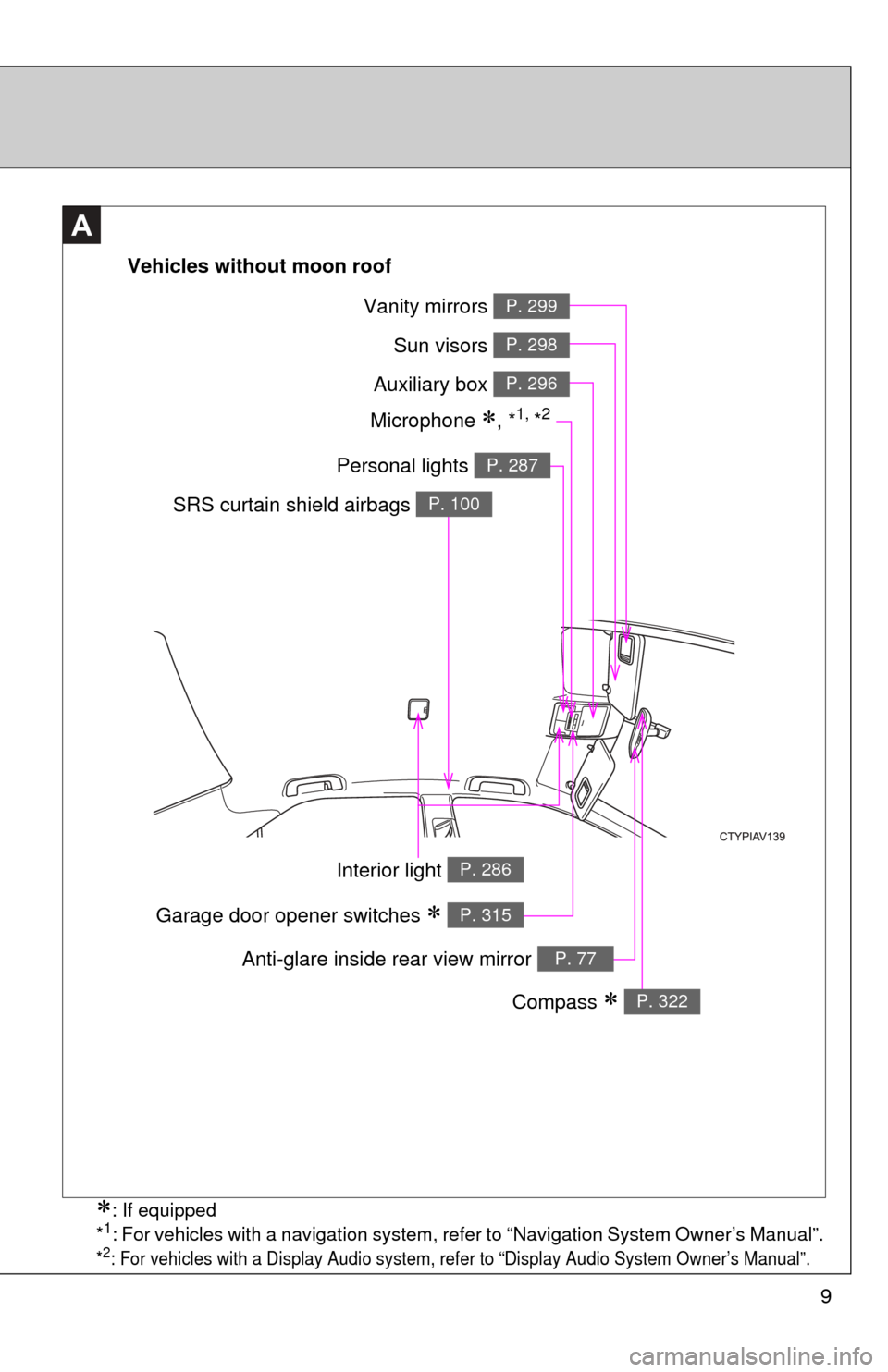
9
A
Vehicles without moon roof
Vanity mirrors P. 299
Sun visors P. 298
Auxiliary box P. 296
Personal lights P. 287
SRS curtain shield airbags P. 100
Interior light P. 286
Compass P. 322
Anti-glare inside rear view mirror P. 77
Garage door opener switches P. 315
Microphone , *1, *2
: If equipped
*1: For vehicles with a navigation system, refer to “Navigation System Owner’s Manual”.
*2: For vehicles with a Display Audio system, refer to “Display Audio System Owner’s Manual”.
Page 10 of 532
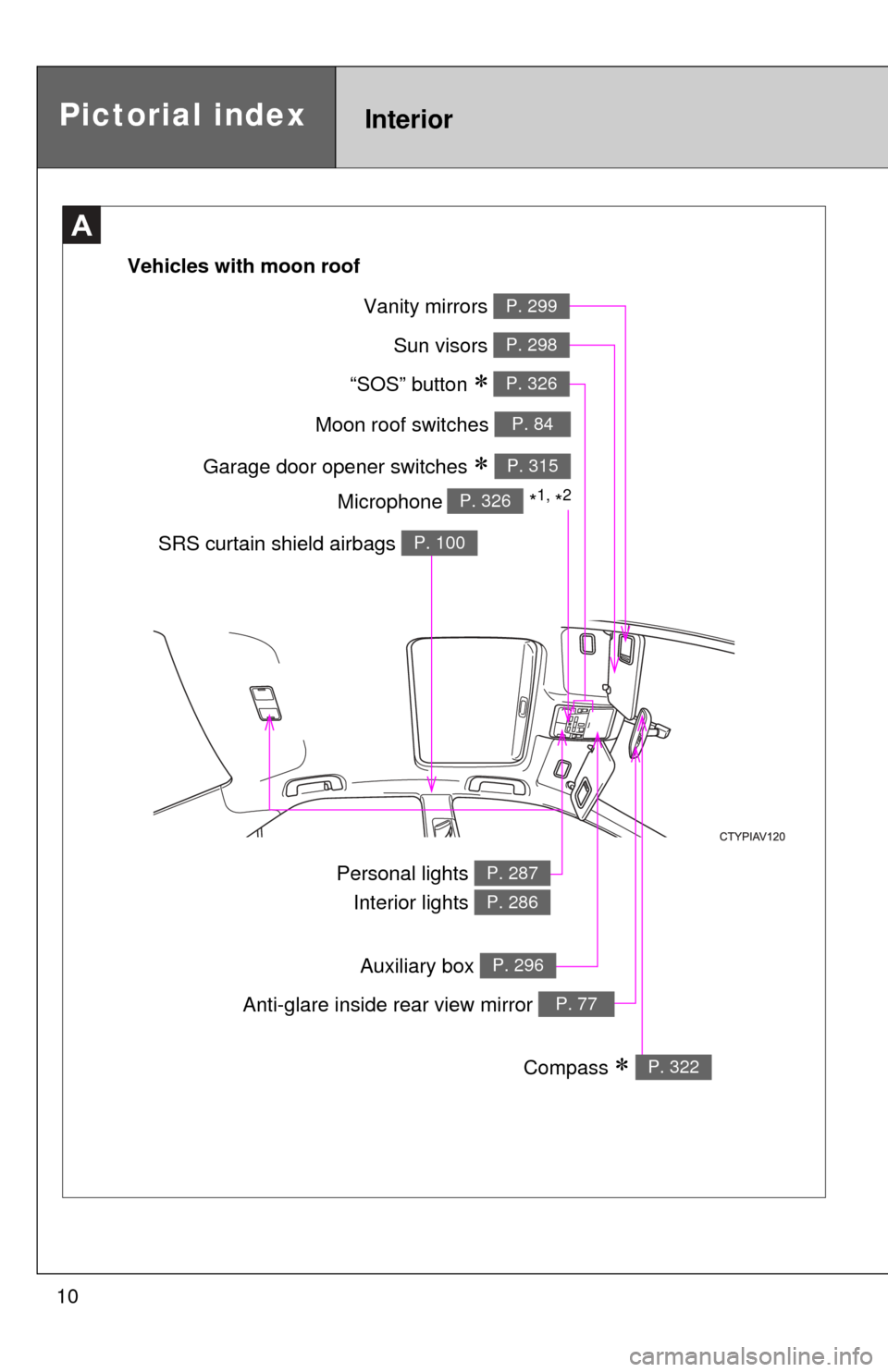
10
A
Moon roof switches P. 84
Garage door opener switches P. 315
“SOS” button P. 326
Sun visors P. 298
Vanity mirrors P. 299
SRS curtain shield airbags P. 100
Personal lights Interior lights P. 287
P. 286
Anti-glare inside rear view mirror P. 77
Compass P. 322
Vehicles with moon roof
Microphone
*1, *2P. 326
Pictorial indexInterior
Auxiliary box P. 296
Page 36 of 532
36 1-2. Opening, closing and locking the doors and trunk
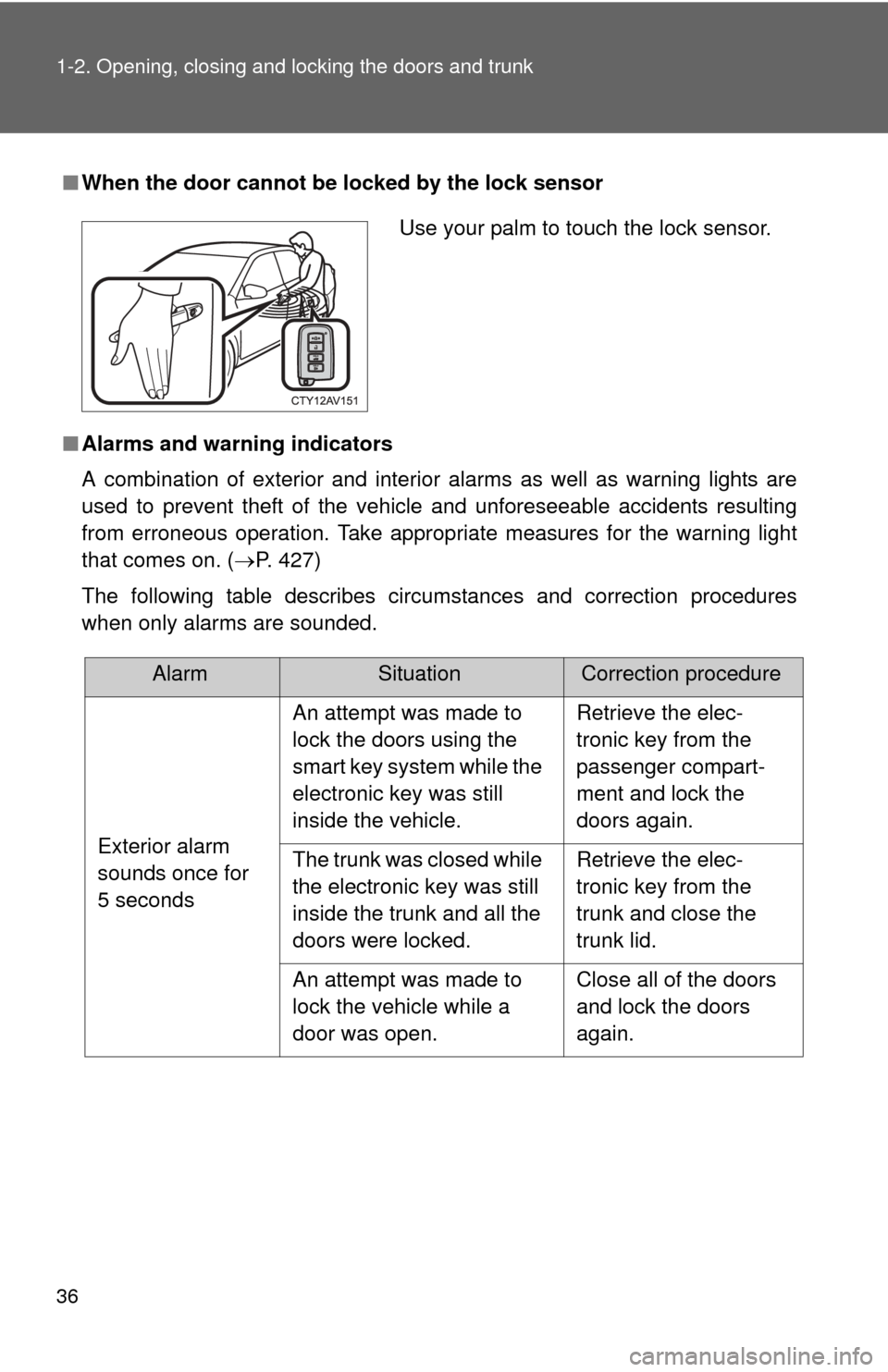
■When the door cannot be locked by the lock sensor
■ Alarms and warning indicators
A combination of exterior and interior alarms as well as warning lights are
used to prevent theft of the vehicle and unforeseeable accidents resulting
from erroneous operation. Take appropria te measures for the warning light
that comes on. ( P. 427)
The following table describes circumstances and correction procedures
when only alarms are sounded.
Use your palm to touch the lock sensor.
AlarmSituationCorrection procedure
Exterior alarm
sounds once for
5 seconds An attempt was made to
lock the doors using the
smart key system while the
electronic key was still
inside the vehicle.
Retrieve the elec-
tronic key from the
passenger compart-
ment and lock the
doors again.
The trunk was closed while
the electronic key was still
inside the trunk and all the
doors were locked. Retrieve the elec-
tronic key from the
trunk and close the
trunk lid.
An attempt was made to
lock the vehicle while a
door was open. Close all of the doors
and lock the doors
again.
Page 225 of 532
Interior features3
225
3-1. Using the air conditioning system and defogger
Manual air conditioning system ........................... 226
Automatic air conditioning system ....... 233
Rear window and outside rear view
mirror defoggers ............ 240
3-2. Using the audio system Audio system types .......... 242
Using the radio ................. 248
Using the CD player ......... 251
Playing back MP3 and WMA discs ..................... 257
Operating an iPod ............ 264
Operating a USB memory .......................... 272
Optimal use of the audio system ........................... 280
Using the AUX port .......... 283
3-3. Using the interior lights Interior lights list ............... 285
• Interior lights .................. 286
• Personal lights ............... 287 3-4. Using the storage
features
List of storage features .... 289
• Glove box....................... 290
• Console box ................... 291
• Coin holder .................... 292
• Bottle holders ................. 293
• Cup holders ................... 294
• Auxiliary boxes ............... 296
3-5. Other interior features Sun visors ........................ 298
Vanity mirrors ................... 299
Clock ................................ 300
Outside temperature display............................ 301
Ashtray ............................. 303
Power outlets ................... 304
Seat heaters..................... 307
Armrest ............................ 309
Coat hooks ....................... 310
Floor mat .......................... 311
Trunk features .................. 313
Garage door opener......... 315
Compass .......................... 322
Safety Connect ................ 326
Page 285 of 532
285
3
Interior features
3-3. Using the interior lights
Interior lights list
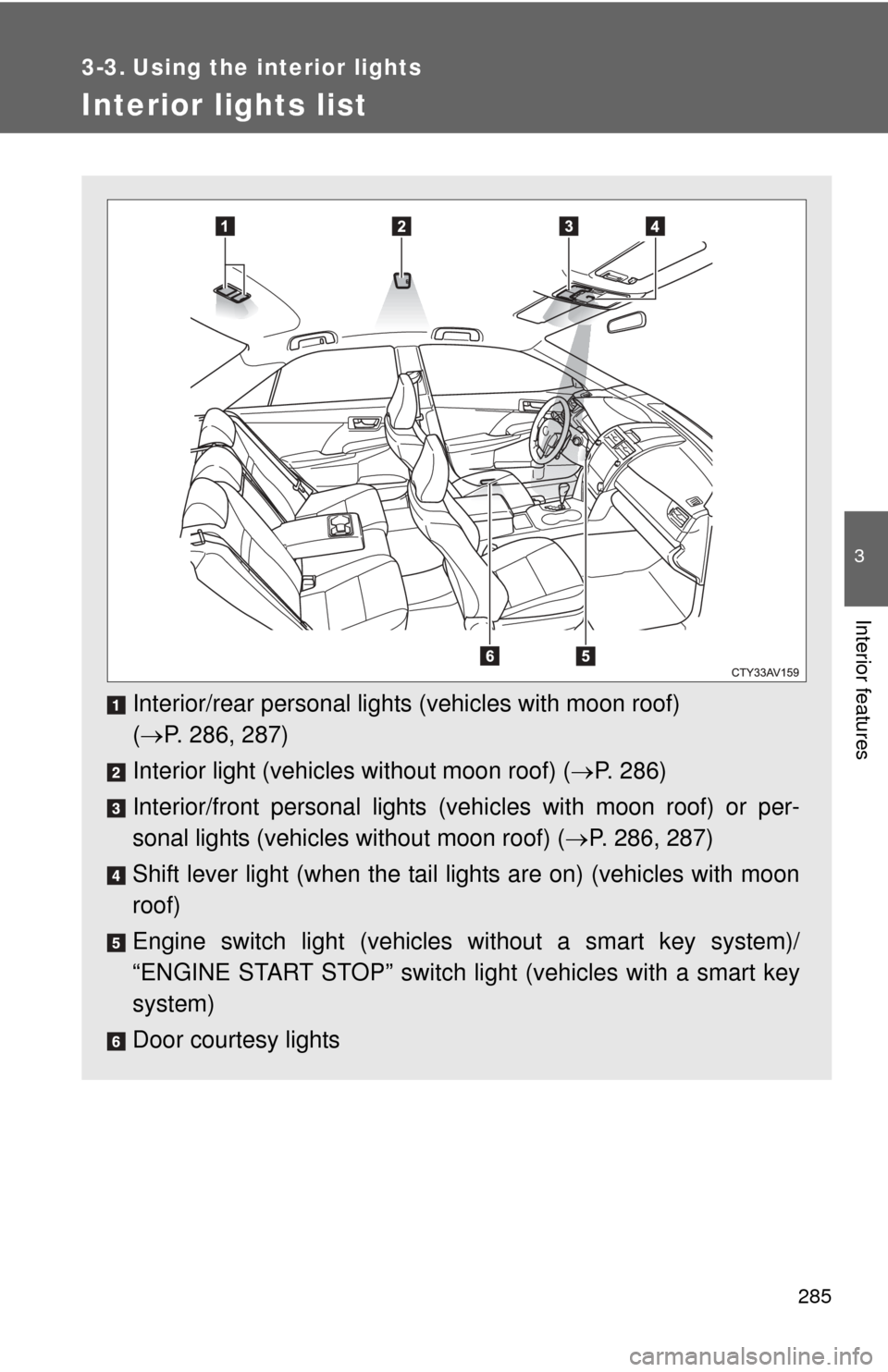
Interior/rear personal lights (vehicles with moon roof)
( P. 286, 287)
Interior light (vehicles without moon roof) ( P. 286)
Interior/front personal lights (vehi cles with moon roof) or per-
sonal lights (vehicles without moon roof) ( P. 286, 287)
Shift lever light (when the tail lights are on) (vehicles with moon
roof)
Engine switch light (vehicles without a smart key system)/
“ENGINE START STOP” switch light (vehicles with a smart key
system)
Door courtesy lights
Page 286 of 532
286 3-3. Using the interior lights
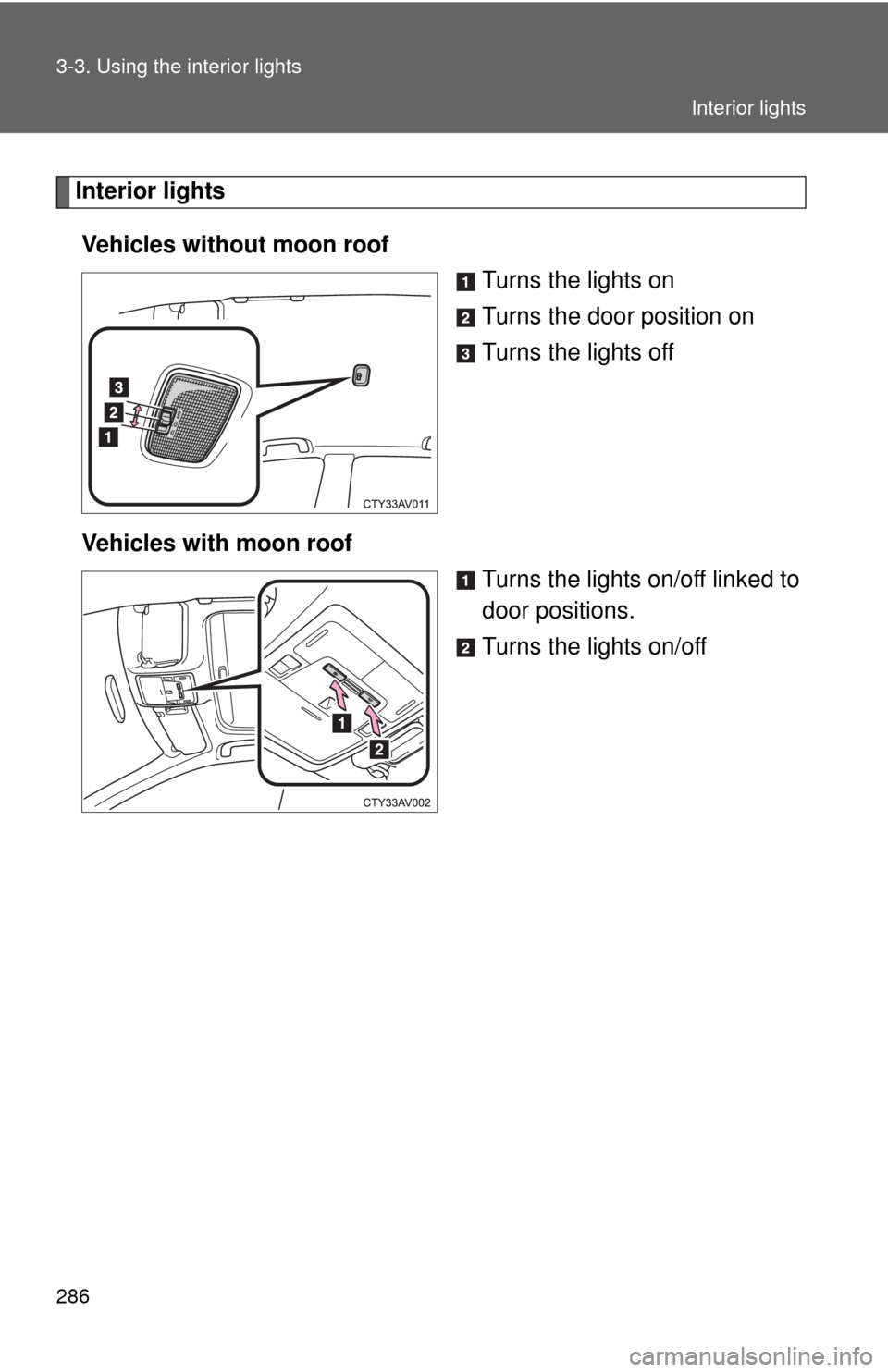
Interior lightsVehicles without moon roof Turns the lights on
Turns the door position on
Turns the lights off
Vehicles with moon roof Turns the lights on/off linked to
door positions.
Turns the lights on/off
Interior lights
Page 287 of 532
287
3-3. Using the interior lights
3
Interior features
Personal lights
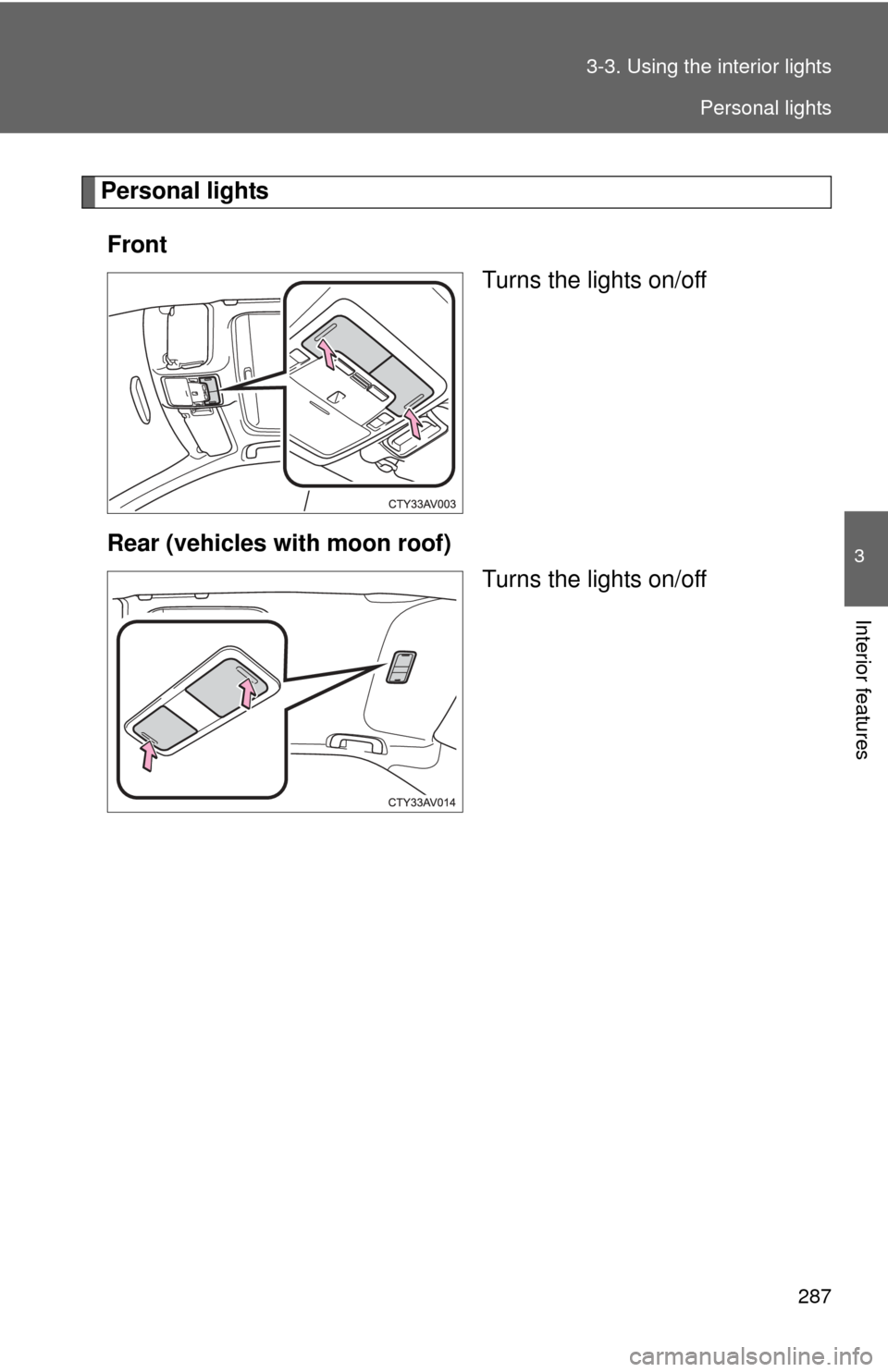
Front Turns the lights on/off
Rear (vehicles with moon roof) Turns the lights on/off
Personal lights
Page 288 of 532

288 3-3. Using the interior lights
■Illuminated entry system
Vehicles without a smart key system
The lights automatically turn on/off according to the engine switch position,
whether the doors are locked/unlocked, and whether the doors are open/
closed.
Vehicles with a smart key system
The lights automatically turn on/off according to “ENGINE START STOP”
switch mode, the presence of the electronic key, whether the doors are
locked/unlocked, and whether the doors are open/closed.
■ To prevent battery discharge
Vehicles without a smart key system
If the interior lights, personal lights and/or door courtesy lights are left on
when the engine switch is turned to the “LOCK” position, the lights will go off
automatically after 20 minutes.
Vehicles with a smart key system
If the interior lights, personal lights and/or door courtesy lights are left on
when the “ENGINE START STOP” switch is turned off, the lights will go off
automatically after 20 minutes.
■ Customization that can be co nfigured at Toyota dealer
Settings (e.g. the time elapsed before lights turn off) can be changed.
(Customizable features P. 493)
Personal lights
Page 299 of 532
299
3-5. Other interior features
3
Interior features
Vanity mirrors
■To prevent battery discharge (vehicles with vanity lights)
If the vanity lights remain on for 20 minutes while the engine is off, the lights
will turn off automatically.
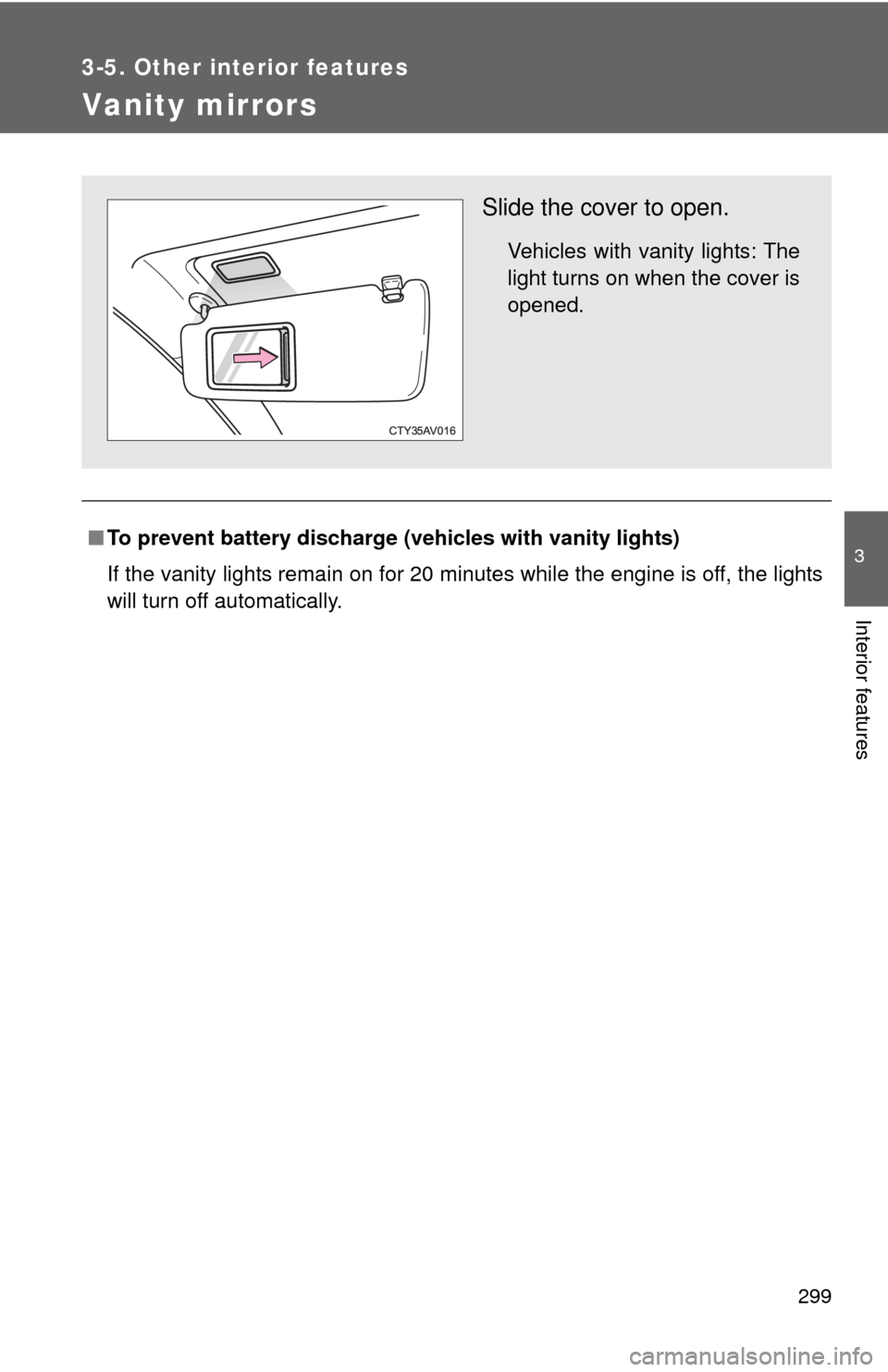
Slide the cover to open.
Vehicles with vanity lights: The
light turns on when the cover is
opened.