trunk TOYOTA CAMRY 2012 XV50 / 9.G Owners Manual
[x] Cancel search | Manufacturer: TOYOTA, Model Year: 2012, Model line: CAMRY, Model: TOYOTA CAMRY 2012 XV50 / 9.GPages: 532, PDF Size: 6.44 MB
Page 2 of 532

TABLE OF CONTENTSIndex
2
1-1. Key informationKeys ..................................... 28
1-2. Opening, closing and
locking the doors and
trunk
Smart key system................. 32
Wireless remote control ....... 46
Doors.................................... 52
Trunk .................................... 58
1-3. Adjustable components
(seats, mirrors,
steering wheel)
Front seats ........................... 62
Rear seats ............................ 65
Head restraints ..................... 67
Seat belts ............................. 69
Steering wheel ..................... 76
Anti-glare inside rear view mirror.......................... 77
Outside rear view mirrors ..... 79
1-4. Opening a nd closing the
windo ws and moon roof
Power windows .................... 81
Moon roof ............................. 84
1-5. Refueling Opening the fuel tank cap .... 88 1-6. Theft deterrent system
Engine immobilizer system ... 92
Alarm .................................... 95
1-7. Safety information Correct driving posture ......... 98
SRS airbags ....................... 100
Front passenger occupant classification system ......... 113
Child restraint systems ....... 118
Installing child restraints ..... 122
2-1. Driving procedures Driving the vehicle .............. 134
Engine (ignition) switch (vehicles without a
smart key system) ............ 145
Engine (ignition) switch (vehicles with a smart
key system) ...................... 148
Automatic transmission (vehicles without
paddle shift switches) ....... 155
Automatic transmission (vehicles with paddle
shift switches) ................... 159
Turn signal lever ................. 166
Parking brake ..................... 167
Horn .................................... 168
1Before driving
2When driving
Page 4 of 532

TABLE OF CONTENTSIndex
4
3-4. Using the storage featuresList of storage features....... 289
• Glove box ......................... 290
• Console box ..................... 291
• Coin holder ....................... 292
• Bottle holders ................... 293
• Cup holders ...................... 294
• Auxiliary boxes ................. 296
3-5. Other interior features Sun visors .......................... 298
Vanity mirrors ..................... 299
Clock .................................. 300
Outside temperature display .............................. 301
Ashtray ............................... 303
Power outlets ..................... 304
Seat heaters ....................... 307
Armrest............................... 309
Coat hooks ......................... 310
Floor mat ............................ 311
Trunk features .................... 313
Garage door opener ........... 315
Compass ............................ 322
Safety Connect................... 326 4-1. Maintenance and care
Cleaning and protecting the vehicle exterior ........... 334
Cleaning and protecting the vehicle interior ............ 337
4-2. Maintenance Maintenance requirements .................... 340
General maintenance ......... 342
Emission inspection and maintenance (I/M)
programs .......................... 346
4-3. Do-it-yourself maintenance
Do-it-yourself service precautions ....................... 347
Hood ................................... 350
Positioning a floor jack........ 351
Engine compartment .......... 353
Tires.................................... 367
Tire inflation pressure ......... 375
Wheels................................ 379
Air conditioning filter ........... 382
Wireless remote control/ electronic key battery ....... 384
Checking and replacing fuses ................................. 389
Light bulbs .......................... 401
4Maintenance and care
Page 7 of 532
7
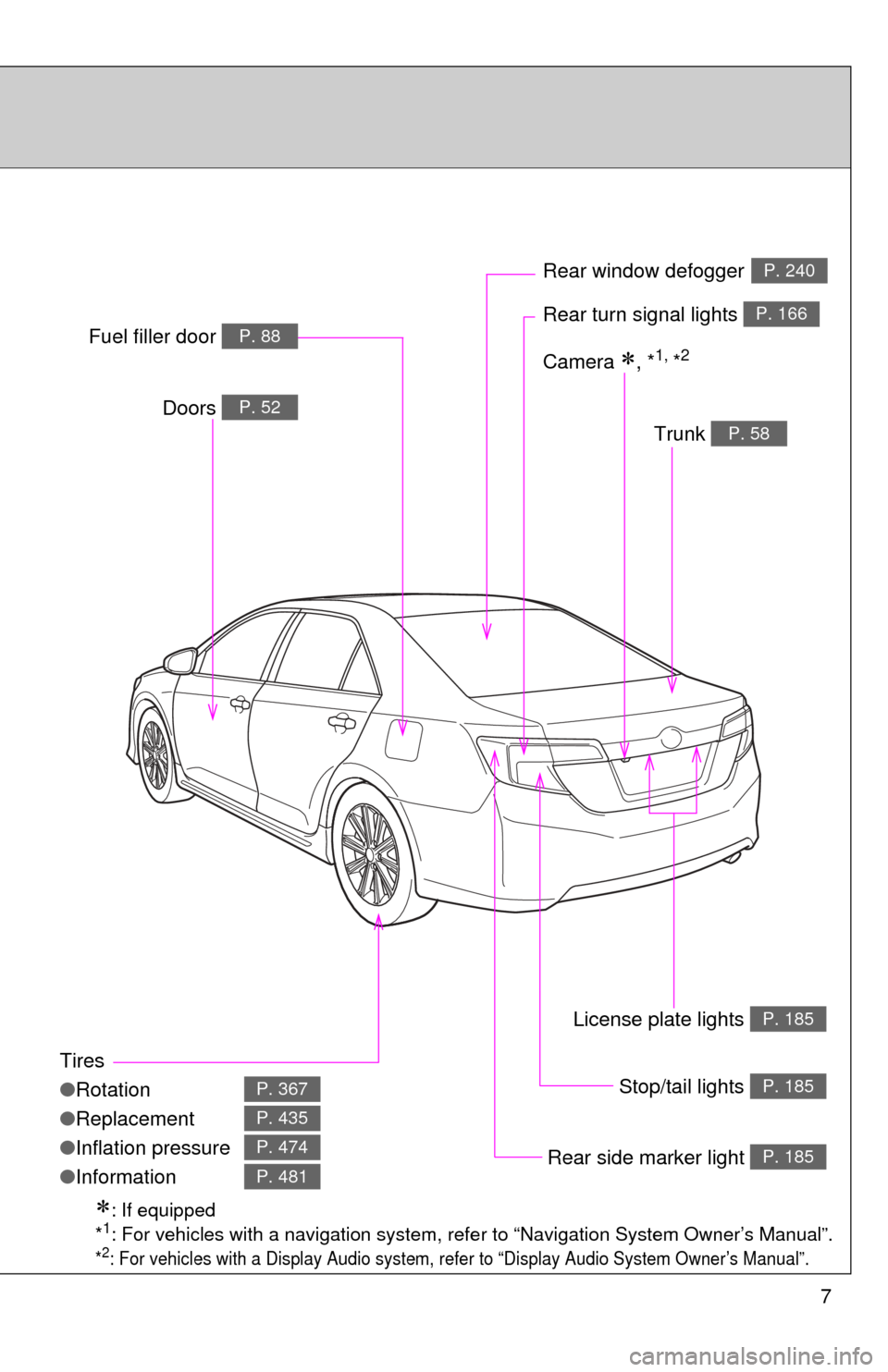
Tires
●Rotation
● Replacement
● Inflation pressure
● Information
P. 367
P. 435
P. 474
P. 481
Trunk P. 58
Doors P. 52
Rear turn signal lights P. 166
Rear window defoggerP. 240
Stop/tail lights P. 185
Rear side marker light P. 185
Fuel filler door P. 88
: If equipped
*1: For vehicles with a navigation system, refe r to “Navigation System Owner’s Manual”.
*2: For vehicles with a Display Audio system, re fer to “Display Audio System Owner’s Manual”.
Camera , *1, *2
License plate lights P. 185
Page 13 of 532
13
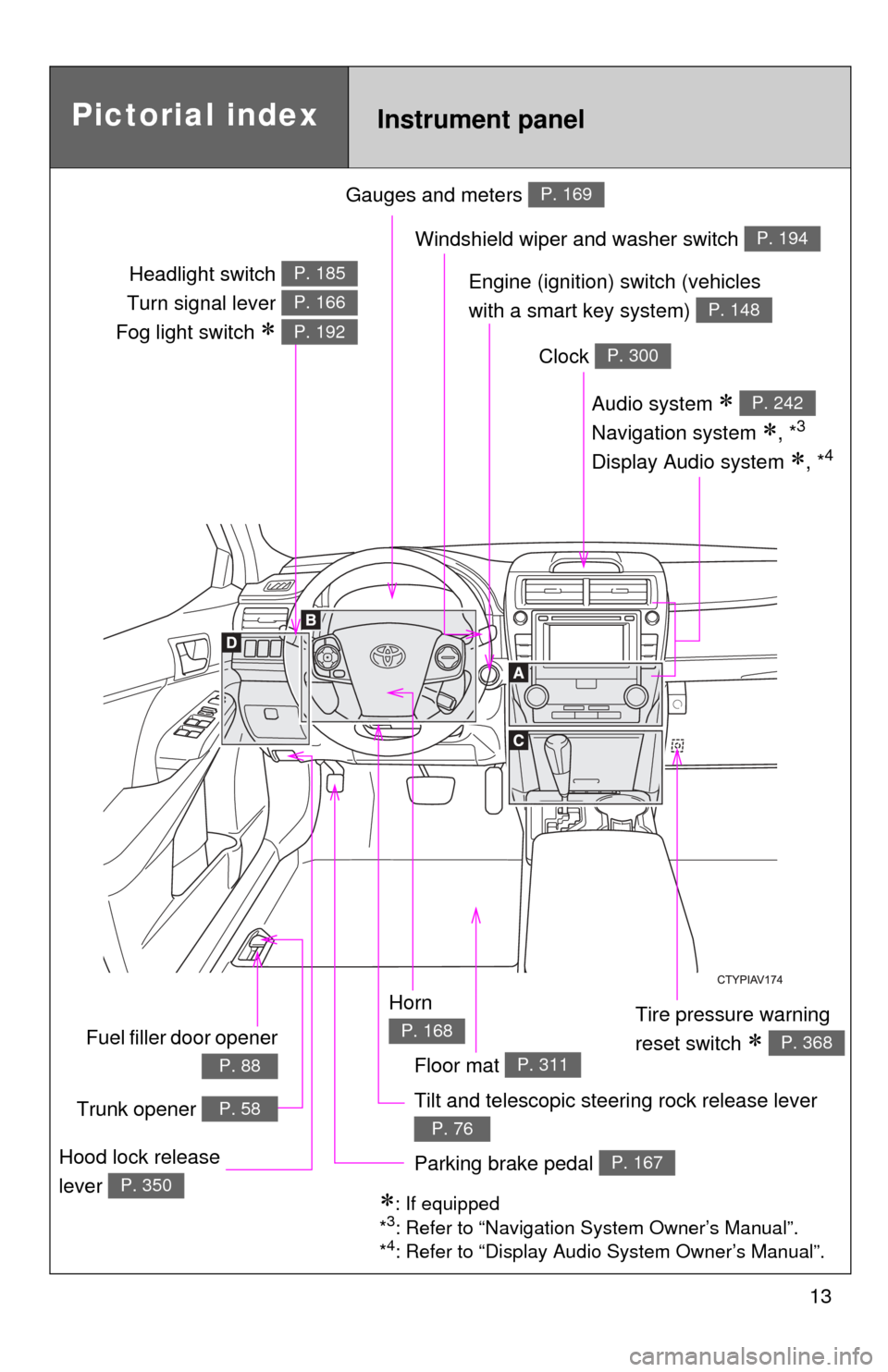
Gauges and meters P. 169
Tilt and telescopic steering rock release lever
P. 76
Pictorial indexInstrument panel
Audio system
Navigation system
, *3
Display Audio system , *4
P. 242
Windshield wiper and washer switch P. 194
Clock P. 300
Tire pressure warning
reset switch
P. 368
Parking brake pedal P. 167Hood lock release
lever
P. 350: If equipped
*3: Refer to “Navigation System Owner’s Manual”.
*4: Refer to “Display Audio System Owner’s Manual”.
Horn
P. 168
Engine (ignition) switch (vehicles
with a smart key system)
P. 148
Headlight switch
Turn signal lever
Fog light switch
P. 185
P. 166
P. 192
Fuel filler door opener
P. 88
Trunk opener P. 58
Floor mat P. 311
Page 27 of 532
Before driving1
27
1-1. Key informationKeys ................................... 28
1-2. Opening, closing and locking the doors and
trunk
Smart key system .............. 32
Wireless remote control ..... 46
Doors ................................. 52
Trunk .................................. 58
1-3. Adjustable components (seats, mirrors,
steering wheel)
Front seats ......................... 62
Rear seats.......................... 65
Head restraints................... 67
Seat belts ........................... 69
Steering wheel ................... 76
Anti-glare inside rear view mirror ....................... 77
Outside rear view mirrors.............................. 79
1-4. Opening and closing the windows and
moon roof
Power windows .................. 81
Moon roof ........................... 84
1-5. Refueling Opening the fuel tank cap ................................... 88 1-6. Theft deterrent system
Engine immobilizer system ............................. 92
Alarm.................................. 95
1-7. Safety information Correct driving posture....... 98
SRS airbags ..................... 100
Front passenger occupant classification
system ........................... 113
Child restraint systems..... 118
Installing child restraints ........................ 122
Page 32 of 532
32
1-2. Opening, closing and locking the doors and trunk
Smart key system
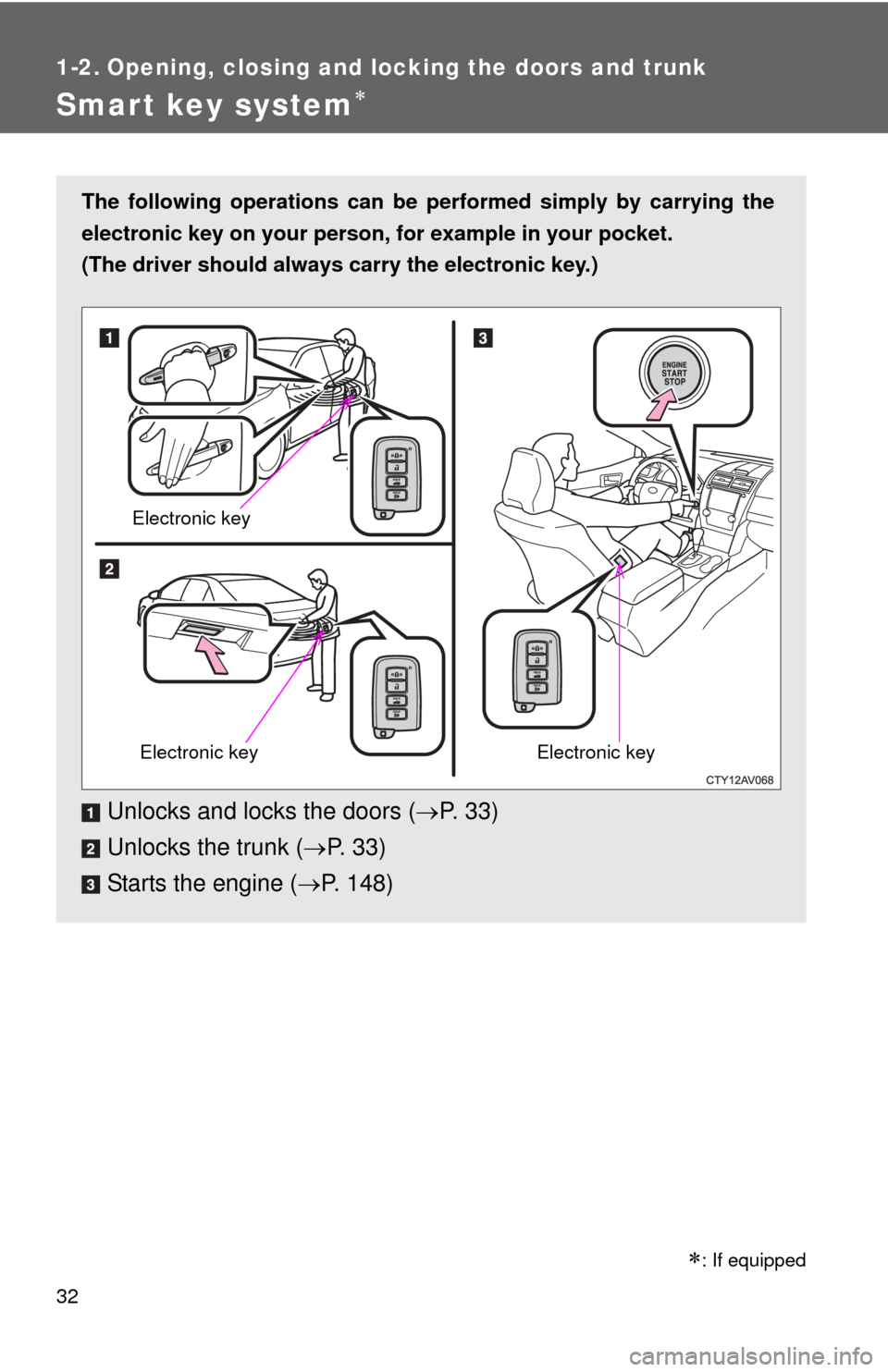
The following operations can be performed simply by carrying the
electronic key on your person, for example in your pocket.
(The driver should always carry the electronic key.)
Unlocks and locks the doors ( P. 33)
Unlocks the trunk ( P. 3 3 )
Starts the engine ( P. 148)
Electronic key
Electronic keyElectronic key
: If equipped
Page 33 of 532
33
1-2. Opening, closing and locking the doors and trunk
1
Before driving
Unlocking and locking the door
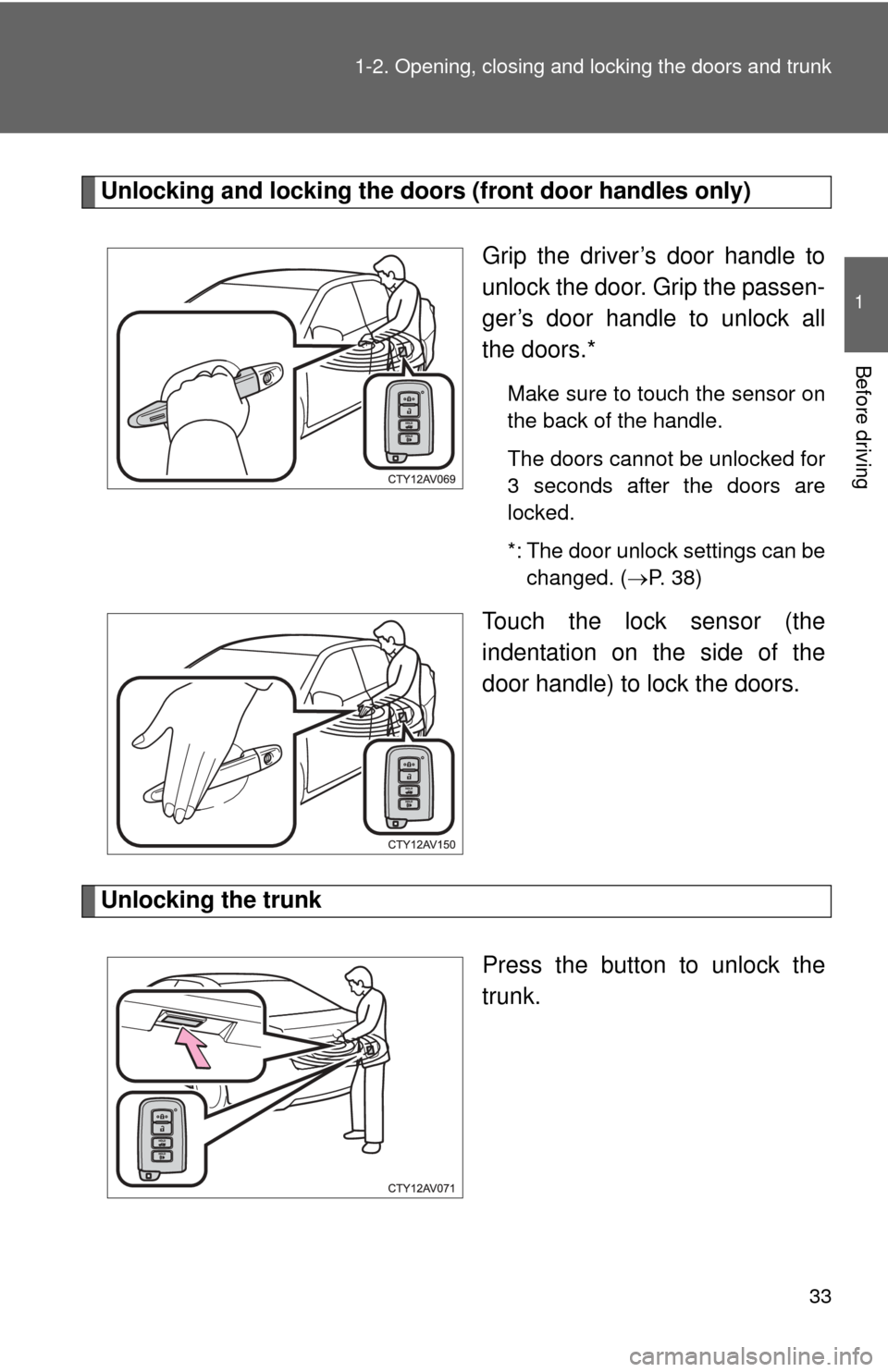
s (front door handles only)
Grip the driver’s door handle to
unlock the door. Grip the passen-
ger’s door handle to unlock all
the doors.*
Make sure to touch the sensor on
the back of the handle.
The doors cannot be unlocked for
3 seconds after the doors are
locked.
*: The door unlock settings can bechanged. ( P. 38)
Touch the lock sensor (the
indentation on the side of the
door handle) to lock the doors.
Unlocking the trunk
Press the button to unlock the
trunk.
Page 34 of 532
34 1-2. Opening, closing and locking the doors and trunk
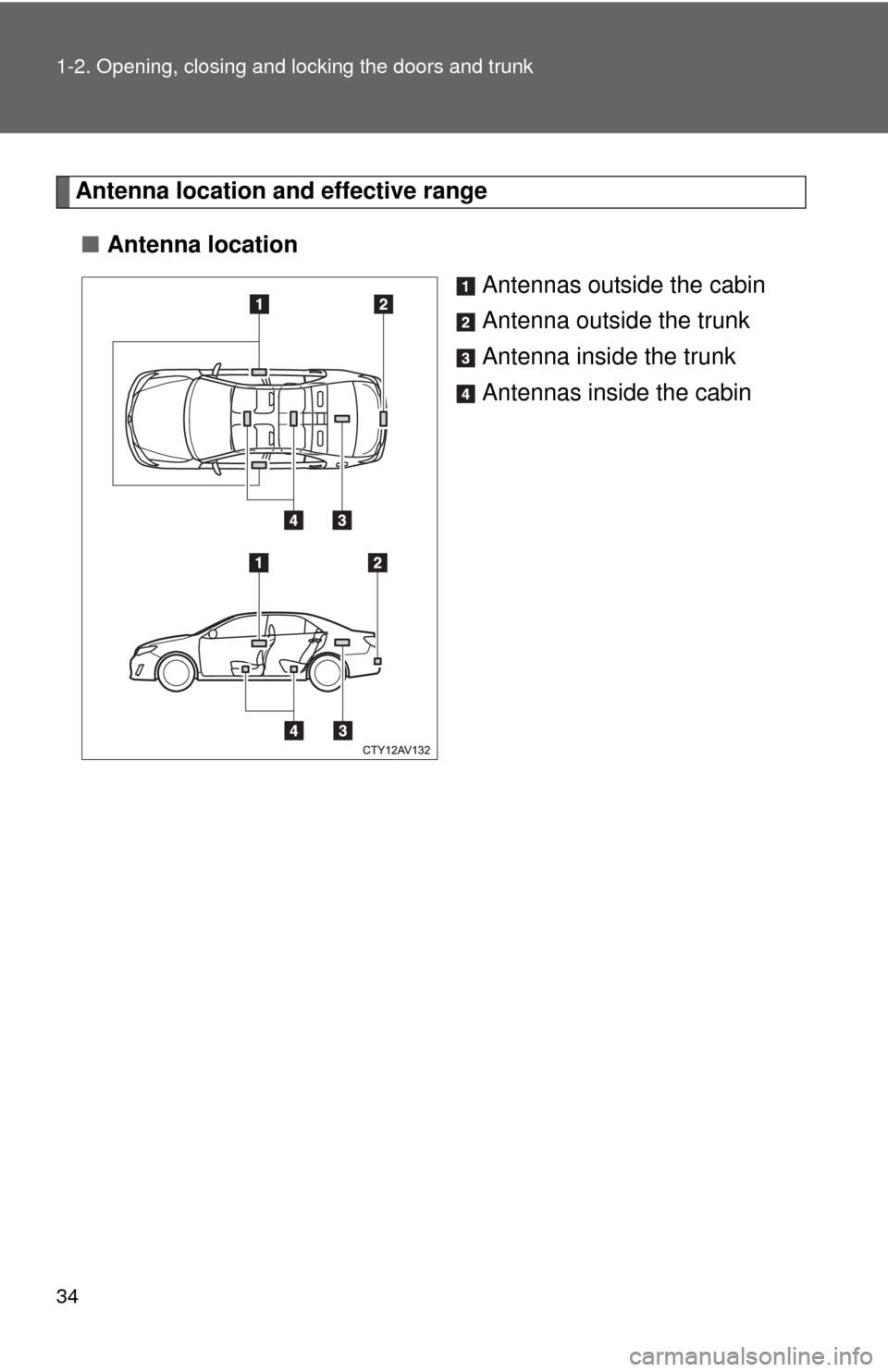
Antenna location and effective range
■ Antenna location
Antennas outside the cabin
Antenna outside the trunk
Antenna inside the trunk
Antennas inside the cabin
Page 35 of 532
35
1-2. Opening, closing and locking the doors and trunk
1
Before driving
■
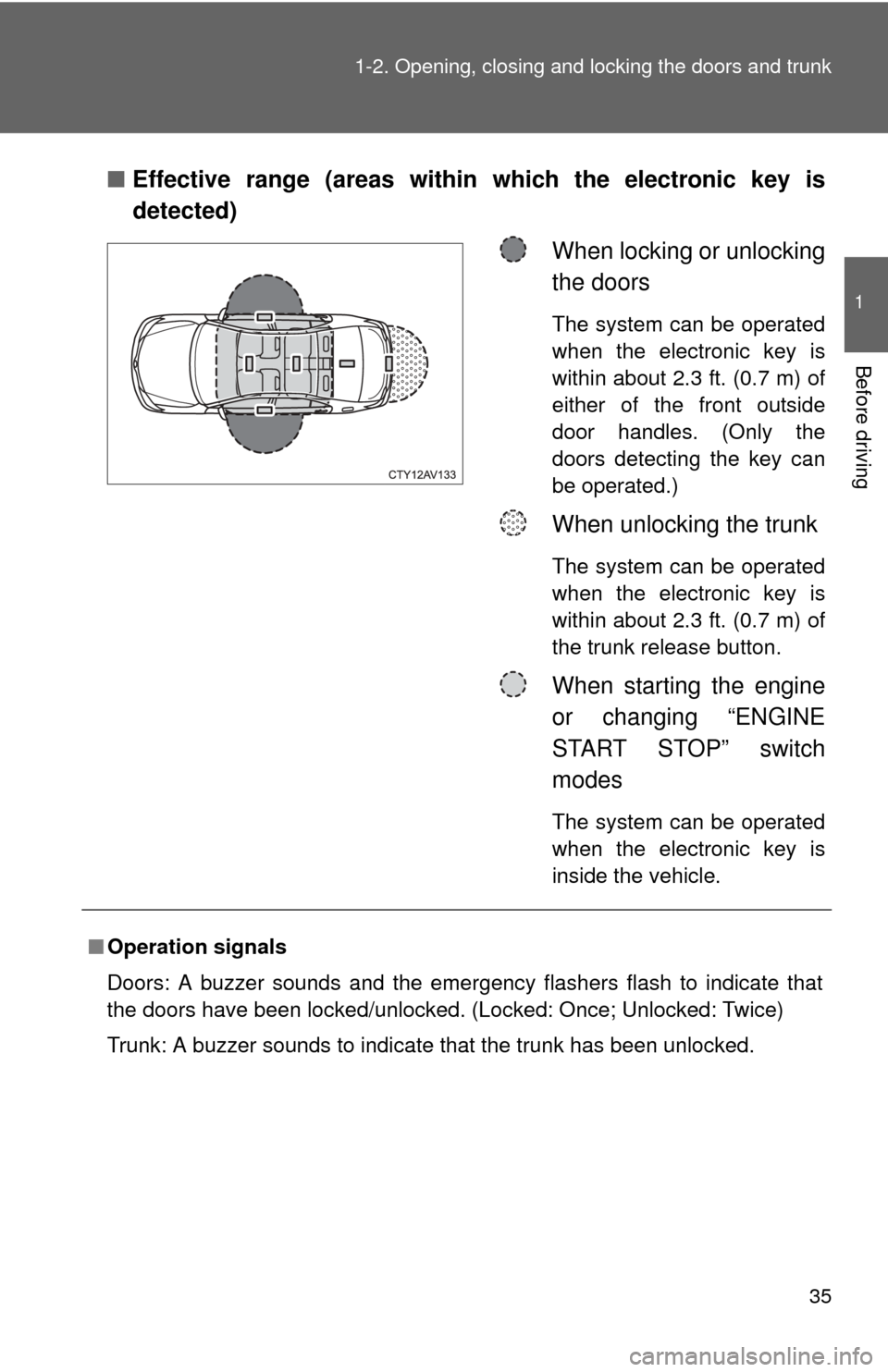
Effective range (areas within which the electronic key is
detected)
When locking or unlocking
the doors
The system can be operated
when the electronic key is
within about 2.3 ft. (0.7 m) of
either of the front outside
door handles. (Only the
doors detecting the key can
be operated.)
When unlocking the trunk
The system can be operated
when the electronic key is
within about 2.3 ft. (0.7 m) of
the trunk release button.
When starting the engine
or changing “ENGINE
START STOP” switch
modes
The system can be operated
when the electronic key is
inside the vehicle.
■Operation signals
Doors: A buzzer sounds and the emergency flashers flash to indicate that
the doors have been locked/unlocked. (Locked: Once; Unlocked: Twice)
Trunk: A buzzer sounds to indicate that the trunk has been unlocked.
Page 36 of 532
36 1-2. Opening, closing and locking the doors and trunk
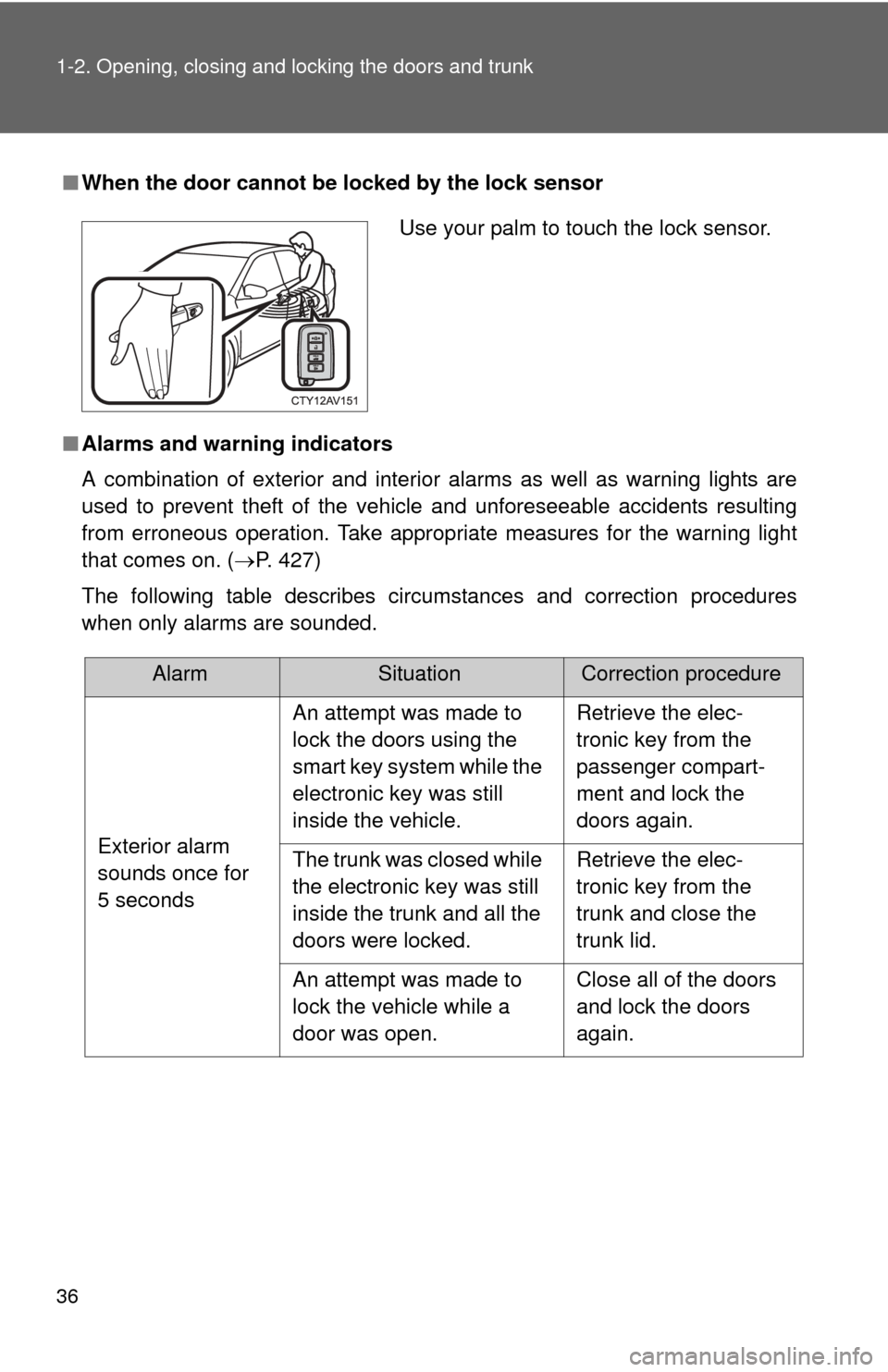
■When the door cannot be locked by the lock sensor
■ Alarms and warning indicators
A combination of exterior and interior alarms as well as warning lights are
used to prevent theft of the vehicle and unforeseeable accidents resulting
from erroneous operation. Take appropria te measures for the warning light
that comes on. ( P. 427)
The following table describes circumstances and correction procedures
when only alarms are sounded.
Use your palm to touch the lock sensor.
AlarmSituationCorrection procedure
Exterior alarm
sounds once for
5 seconds An attempt was made to
lock the doors using the
smart key system while the
electronic key was still
inside the vehicle.
Retrieve the elec-
tronic key from the
passenger compart-
ment and lock the
doors again.
The trunk was closed while
the electronic key was still
inside the trunk and all the
doors were locked. Retrieve the elec-
tronic key from the
trunk and close the
trunk lid.
An attempt was made to
lock the vehicle while a
door was open. Close all of the doors
and lock the doors
again.