phone TOYOTA CAMRY 2013 XV50 / 9.G Navigation Manual
[x] Cancel search | Manufacturer: TOYOTA, Model Year: 2013, Model line: CAMRY, Model: TOYOTA CAMRY 2013 XV50 / 9.GPages: 336, PDF Size: 7.37 MB
Page 195 of 336
195
1. AUDIO/VIDEO SYSTEM OPERATION
5
AUDIO/VIDEO SYSTEM
6. RADIO OPERATION (INTERNET RADIO BROADCAST)
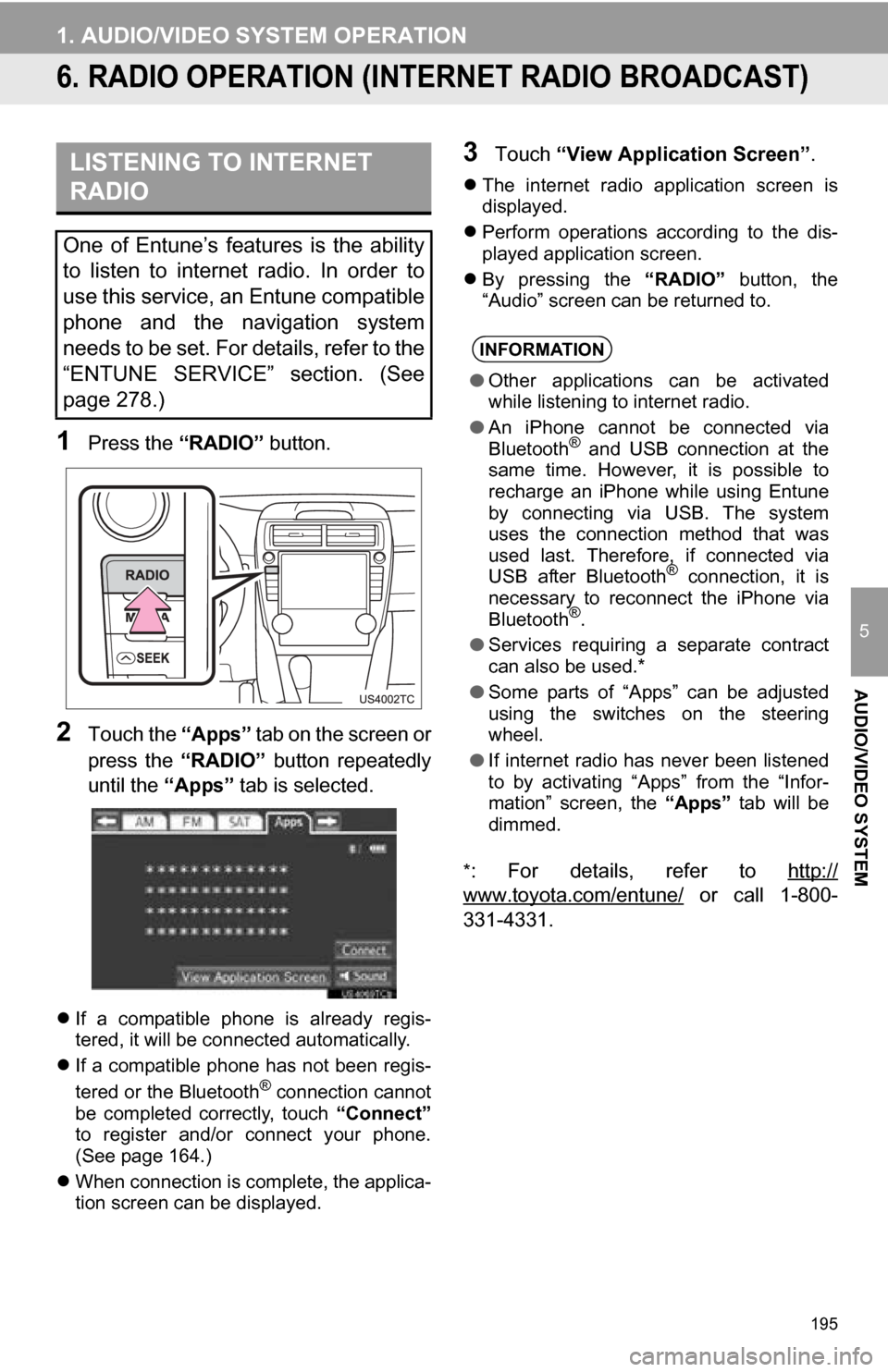
1Press the “RADIO” button.
2Touch the “Apps” tab on the screen or
press the “RADIO” button repeatedly
until the “Apps” tab is selected.
If a compatible phone is already regis-
tered, it will be connected automatically.
If a compatible phone has not been regis-
tered or the Bluetooth
® connection cannot
be completed correctly, touch “Connect”
to register and/or connect your phone.
(See page 164.)
When connection is complete, the applica-
tion screen can be displayed.
3Touch “View Application Screen” .
The internet radio application screen is
displayed.
Perform operations according to the dis-
played application screen.
By pressing the “RADIO” button, the
“Audio” screen can be returned to.
*
: For details, refer to http://
www.toyota.com/entune/ or call 1-800-
331-4331.
LISTENING TO INTERNET
RADIO
One of Entune’s features is the ability
to listen to internet radio. In order to
use this service, an Entune compatible
phone and the navigation system
needs to be set. For details, refer to the
“ENTUNE SERVICE” section. (See
page 278.)
INFORMATION
● Other applications can be activated
while listening to internet radio.
● An iPhone cannot be connected via
Bluetooth
® and USB connection at the
same time. However, it is possible to
recharge an iPhone while using Entune
by connecting via USB. The system
uses the connection method that was
used last. Therefore, if connected via
USB after Bluetooth
® connection, it is
necessary to reconnect the iPhone via
Bluetooth
®.
● Services requiring a separate contract
can also be used.*
● Some parts of “Apps” can be adjusted
using the switches on the steering
wheel.
● If internet radio has never been listened
to by activating “Apps” from the “Infor-
mation” screen, the “Apps” tab will be
dimmed.
Page 224 of 336
224
1. AUDIO/VIDEO SYSTEM OPERATION
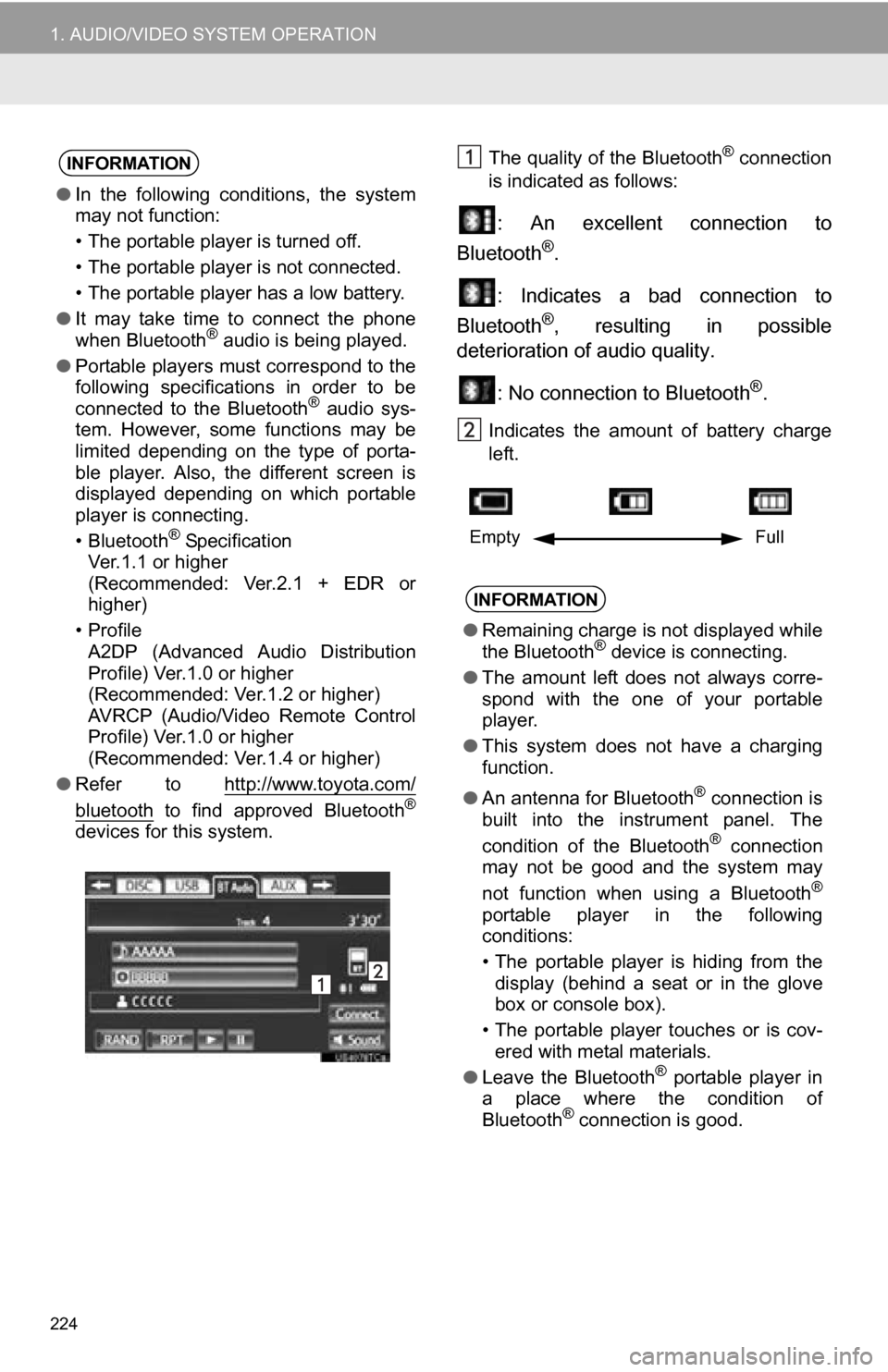
The quality of the Bluetooth® connection
is indicated as follows:
: An excellent connection to
Bluetooth®.
: Indicates a bad connection to
Bluetooth
®, resulting in possible
deterioration of audio quality.
: No connection to Bluetooth
®.
Indicates the amount of battery charge
left.
INFORMATION
●In the following conditions, the system
may not function:
• The portable player is turned off.
• The portable player is not connected.
• The portable player has a low battery.
● It may take time to connect the phone
when Bluetooth
® audio is being played.
● Portable players must correspond to the
following specifications in order to be
connected to the Bluetooth
® audio sys-
tem. However, some functions may be
limited depending on the type of porta-
ble player. Also, the different screen is
displayed depending on which portable
player is connecting.
• Bluetooth
® Specification
Ver.1.1 or higher
(Recommended: Ver.2.1 + EDR or
higher)
•Profile A2DP (Advanced Audio Distribution
Profile) Ver.1.0 or higher
(Recommended: Ver.1.2 or higher)
AVRCP (Audio/Video Remote Control
Profile) Ver.1.0 or higher
(Recommended: Ver.1.4 or higher)
● Refer to http://www.toyota.com/
bluetooth to find approved Bluetooth®
devices for this system.
INFORMATION
●Remaining charge is not displayed while
the Bluetooth® device is connecting.
● The amount left does not always corre-
spond with the one of your portable
player.
● This system does not have a charging
function.
● An antenna for Bluetooth
® connection is
built into the instrument panel. The
condition of the Bluetooth
® connection
may not be good and the system may
not function when using a Bluetooth
®
portable player in the following
conditions:
• The portable player is hiding from the display (behind a seat or in the glove
box or console box).
• The portable player touches or is cov- ered with metal materials.
● Leave the Bluetooth
® portable player in
a place where the condition of
Bluetooth
® connection is good.
Empty Full
Page 227 of 336
227
1. AUDIO/VIDEO SYSTEM OPERATION
5
AUDIO/VIDEO SYSTEM
If the Bluetooth® device is disconnected
on purpose, such as it was turned off, this
does not happen. Reconnect the portable
player manually.
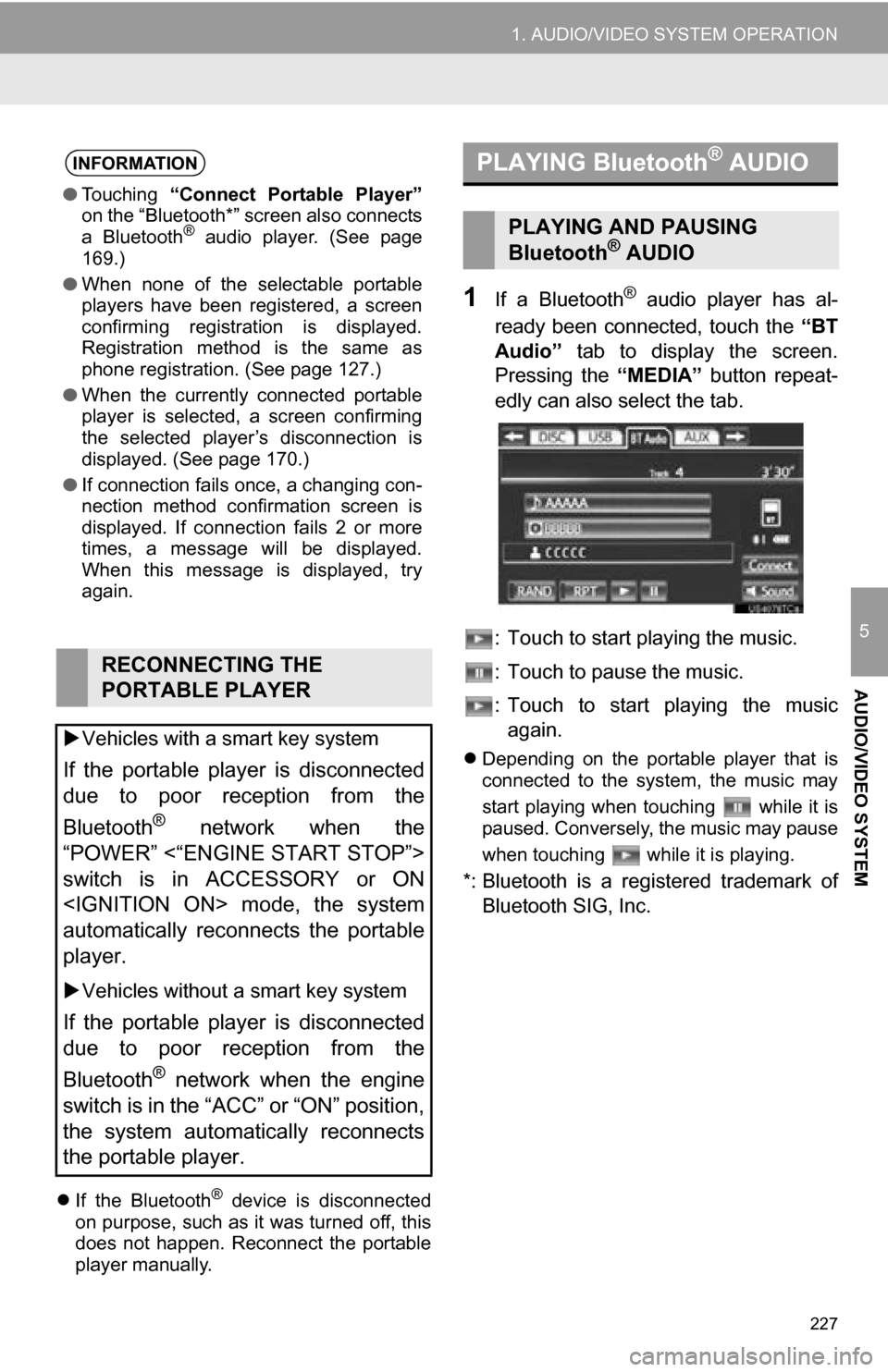
1If a Bluetooth® audio player has al-
ready been connected, touch the “BT
Audio” tab to display the screen.
Pressing the “MEDIA” button repeat-
edly can also select the tab.
: Touch to start playing the music.
: Touch to pause the music.
: Touch to start playing the music again.
Depending on the portable player that is
connected to the system, the music may
start playing when touching while it is
paused. Conversely, the music may pause
when touching while it is playing.
*: Bluetooth is a regi stered trademark of
Bluetooth SIG, Inc.
INFORMATION
● Touching “Connect Portable Player”
on the “Bluetooth*” screen also connects
a Bluetooth
® audio player. (See page
169.)
● When none of the selectable portable
players have been registered, a screen
confirming registration is displayed.
Registration method is the same as
phone registration. (See page 127.)
● When the currently connected portable
player is selected, a screen confirming
the selected player’s disconnection is
displayed. (See page 170.)
● If connection fails once, a changing con-
nection method confirmation screen is
displayed. If connection fails 2 or more
times, a message will be displayed.
When this message is displayed, try
again.
RECONNECTING THE
PORTABLE PLAYER
Vehicles with a smart key system
If the portable player is disconnected
due to poor reception from the
Bluetooth
® network when the
“POWER” <“ENGINE START STOP”>
switch is in ACCESSORY or ON
automatically reconnects the portable
player.
Vehicles without a smart key system
If the portable player is disconnected
due to poor reception from the
Bluetooth
® network when the engine
switch is in the “ACC” or “ON” position,
the system automatically reconnects
the portable player.
PLAYING Bluetooth® AUDIO
PLAYING AND PAUSING
Bluetooth® AUDIO
Page 232 of 336
232
1. AUDIO/VIDEO SYSTEM OPERATION
12. AUDIO/VIDEO SYST EM OPERATING HINTS
Fading and drifting stations: Generally, the
effective range of FM is about 25 miles (40
km). Once outside this range, you may no-
tice fading and drifting, which increase with
the distance from the radio transmitter.
They are often accompanied by distortion. Multi-path: FM signals are reflective, mak-
ing it possible for two signals to reach the
vehicle’s antenna at the same time. If this
happens, the signals will cancel each other
out, causing a momentary flutter or loss of
reception.
Static and fluttering: These occur when
signals are blocked by buildings, trees or
other large objects. Increasing the bass
level may reduce static and fluttering.
Station swapping: If the FM signal being
listened to is interrupted or weakened, and
there is another strong station nearby on
the FM band, the radio may tune in the
second station until the original signal can
be picked up again.
Fading: AM broadcasts are reflected by
the upper atmosphere — especially at
night. These reflected signals can interfere
with those received directly from the radio
station, causing the radio station to sound
alternately strong and weak.
Station interference: When a reflected sig-
nal and a signal received directly from a ra-
dio station are very nearly the same
frequency, they can interfere with each
other, making it difficult to hear the broad-
cast.
Static: AM is easily affected by external
sources of electrical noise, such as high
tension power lines, lightening or electrical
motors. This results in static.
Cargo loaded on the roof luggage carrier,
especially metal objects, may adversely
affect the reception of XM Satellite Radio.
Alternation or modifications carried out
without appropriate authorization may
invalidate the user’s right to operate the
equipment.
NOTICE
●To avoid damage to the audio/video sys-
tem:
• Be careful not to spill beverages over
the audio/video system.
• Do not put anything other than an appropriate disc into the disc slot.
INFORMATION
● The use of a cellular phone inside or
near the vehicle may cause a noise from
the speakers of the audio/video system
which you are listening to. However, this
does not indicate a malfunction.
RADIO RECEPTION
Usually, a problem with radio reception
does not mean there is a problem with
the radio — it is just the normal result
of conditions outside the vehicle.
For example, nearby buildings and ter-
rain can interfere with FM reception.
Power lines or phone wires can inter-
fere with AM signals. And of course, ra-
dio signals have a limited range. The
farther the vehicle is from a station, the
weaker its signal will be. In addition, re-
ception conditions change constantly
as the vehicle moves.
Here, some common reception prob-
lems that probably do not indicate a
problem with the radio are described.
FM
AM
XM
Page 233 of 336
233
1. AUDIO/VIDEO SYSTEM OPERATION
5
AUDIO/VIDEO SYSTEM
“Made for iPod” and “Made for iPhone”
mean that an electronic accessory has
been designed to connect specifically to
iPod, or iPhone, respectively, and has
been certified by the developer to meet
Apple performance standards.
Apple is not responsible for the operation
of this device or its compliance with safety
and regulatory standards. Please note
that the use of this accessory with iPod or
iPhone may affect wireless performance.
iPhone, iPod, iPod classic, iPod nano and
iPod touch are trademarks of Apple Inc.,
registered in the U.S. and other countries.
The following iPod, iPod nano, iPod
classic, iPod touch and iPhone devic-
es can be used with this system.
Made for
• iPod touch (4th generation)
• iPod touch (3rd generation)
• iPod touch (2nd generation)
• iPod touch (1st generation)
• iPod classic
• iPod with video
• iPod nano (6th generation)
• iPod nano (5th generation)
• iPod nano (4th generation)
• iPod nano (3rd generation)
• iPod nano (2nd generation)
• iPod nano (1st generation)
• iPhone 4
• iPhone 3GS
• iPhone 3G
• iPhone
Depending on differences between mod-
els or software versions etc., some models
might be incompatible with this system.
USB memory that can be used for MP3
and WMA playback:
• USB communication formats: USB 2.0
HS (480 Mbps) and FS (12 Mbps)
• File formats: FAT 16/32
• Correspondence class: Mass storage
class
This DVD player is intended for use with
4.7 in. (12 cm) discs only.
Extremely high temperatures can keep the
DVD player from working. On hot days,
use the air conditioning system to cool the
inside of the vehicle before using the
player.
Bumpy roads or other vibrations may
make the DVD player skip.
If moisture gets into the DVD player, the
discs may not be able to be played.
Remove the discs from the player and
wait until it dries.
iPod
COMPATIBLE MODELS
USB MEMORY
CARING FOR YOUR DVD
PLAYER AND DISC
Page 244 of 336
244
1. VOICE COMMAND SYSTEM OPERATION
1. VOICE COMMAND SYSTEM
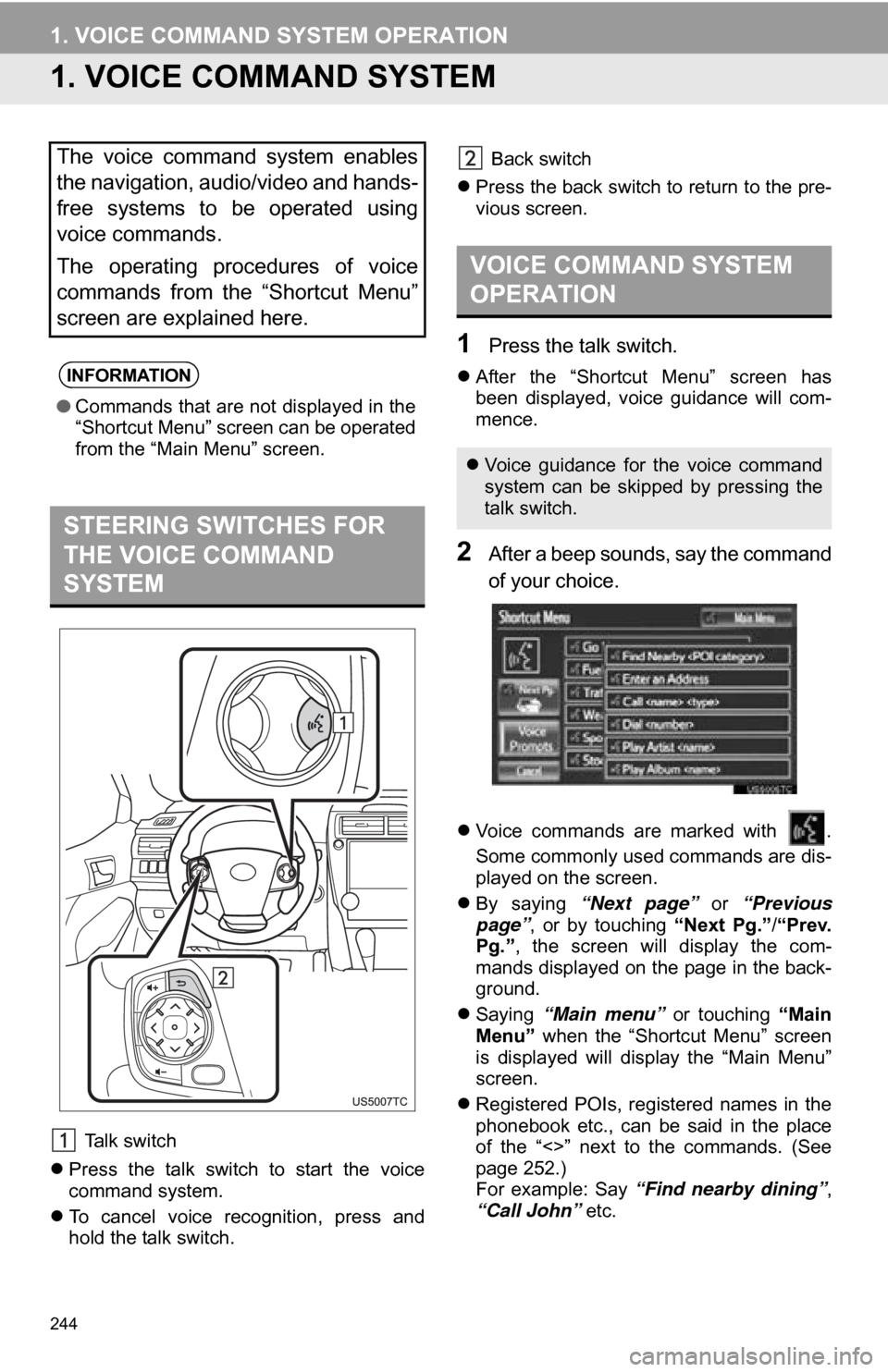
Talk switch
Press the talk switch to start the voice
command system.
To cancel voice recognition, press and
hold the talk switch. Back switch
Press the back switch to return to the pre-
vious screen.
1Press the talk switch.
After the “Shortcut Menu” screen has
been displayed, voice guidance will com-
mence.
2After a beep sounds, say the command
of your choice.
Voice commands are marked with .
Some commonly used commands are dis-
played on the screen.
By saying “Next page” or “Previous
page” , or by touching “Next Pg.”/“Prev.
Pg.” , the screen will display the com-
mands displayed on the page in the back-
ground.
Saying “Main menu” or touching “Main
Menu” when the “Shortcut Menu” screen
is displayed will display the “Main Menu”
screen.
Registered POIs, registered names in the
phonebook etc., can be said in the place
of the “<>” next to the commands. (See
page 252.)
For example: Say “Find nearby dining” ,
“Call John” etc.
The voice command system enables
the navigation, audio/video and hands-
free systems to be operated using
voice commands.
The operating procedures of voice
commands from the “Shortcut Menu”
screen are explained here.
INFORMATION
●Commands that are not displayed in the
“Shortcut Menu” screen can be operated
from the “Main Menu” screen.
STEERING SWITCHES FOR
THE VOICE COMMAND
SYSTEM
VOICE COMMAND SYSTEM
OPERATION
Voice guidance for the voice command
system can be skipped by pressing the
talk switch.
Page 246 of 336
246
1. VOICE COMMAND SYSTEM OPERATION
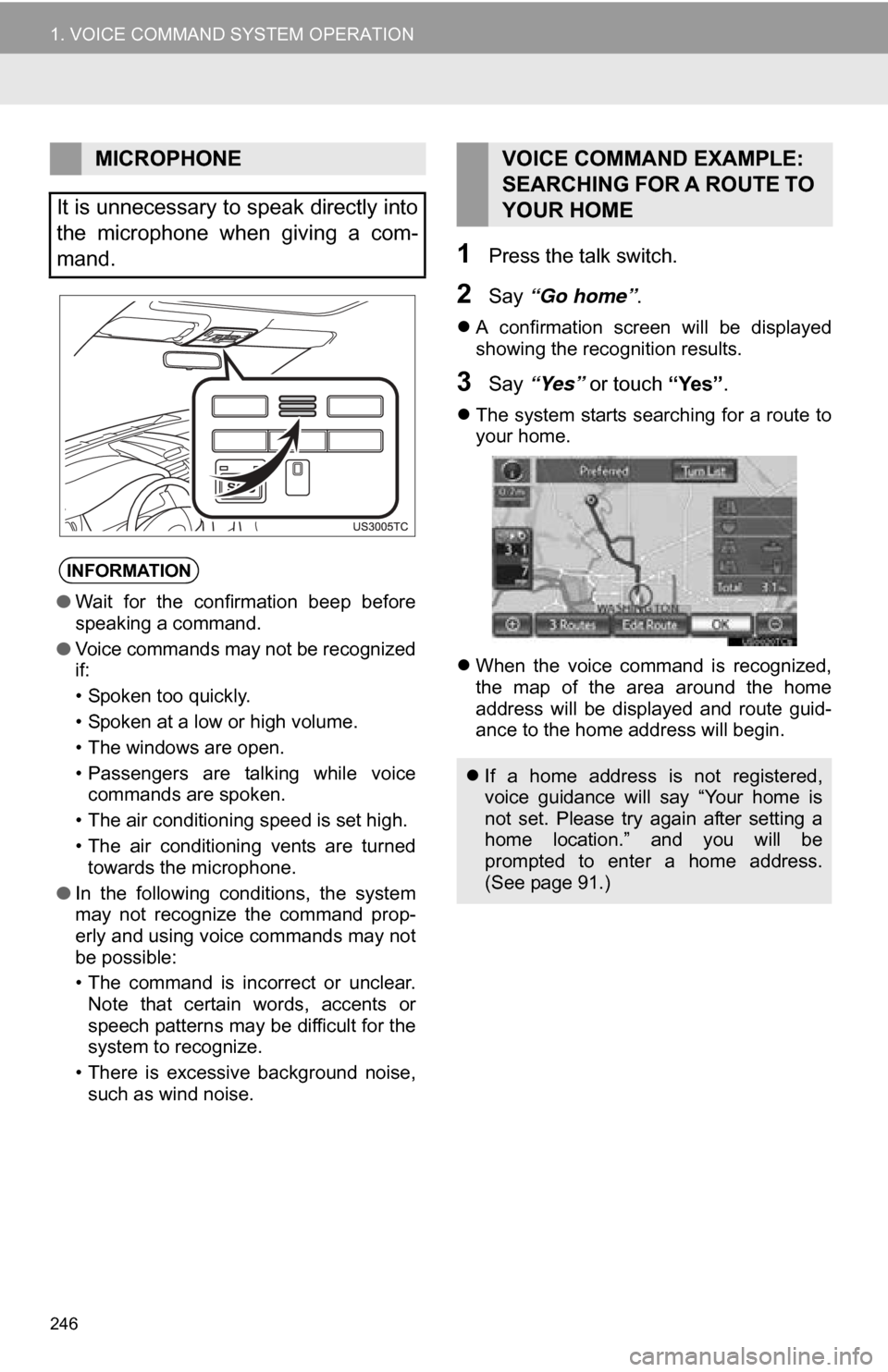
1Press the talk switch.
2Say “Go home” .
A confirmation screen will be displayed
showing the recognition results.
3Say “Yes” or touch “Yes”.
The system starts searching for a route to
your home.
When the voice command is recognized,
the map of the area around the home
address will be displayed and route guid-
ance to the home address will begin.
MICROPHONE
It is unnecessary to speak directly into
the microphone when giving a com-
mand.
INFORMATION
● Wait for the confirmation beep before
speaking a command.
● Voice commands may not be recognized
if:
• Spoken too quickly.
• Spoken at a low or high volume.
• The windows are open.
• Passengers are talking while voice
commands are spoken.
• The air conditioning speed is set high.
• The air conditioning vents are turned towards the microphone.
● In the following conditions, the system
may not recognize the command prop-
erly and using voice commands may not
be possible:
• The command is incorrect or unclear.
Note that certain words, accents or
speech patterns may be difficult for the
system to recognize.
• There is excessive background noise, such as wind noise.
VOICE COMMAND EXAMPLE:
SEARCHING FOR A ROUTE TO
YOUR HOME
If a home address is not registered,
voice guidance will say “Your home is
not set. Please try again after setting a
home location.” and you will be
prompted to enter a home address.
(See page 91.)
Page 250 of 336
250
1. VOICE COMMAND SYSTEM OPERATION
2. NATURAL SPEECH INFORM ATION (ENGLISH ONLY)
*: Say the desired artist name or album
name in the place of the “<>”.
Due to natural language speech recog-
nition technology, this system enables
recognition of a command when spo-
ken naturally. However, the system
cannot recognize every variation of
each command. In some situations, it
is possible to omit the command for the
procedure and directly state the de-
sired operation. Not all voice com-
mands are displayed in the short cut
menu.
INFORMATION
●The “Set a Destination”, “Use the
Phone”, “Play Music” and “Get Informa-
tion” commands displayed on the “Short-
cut Menu” screen can be operated using
natural language speech recognition
technology.
● If the command cannot be recognized
completely, the command input screen
will be displayed. (Search results will be
shown based on the part of the com-
mand that was recognized.)
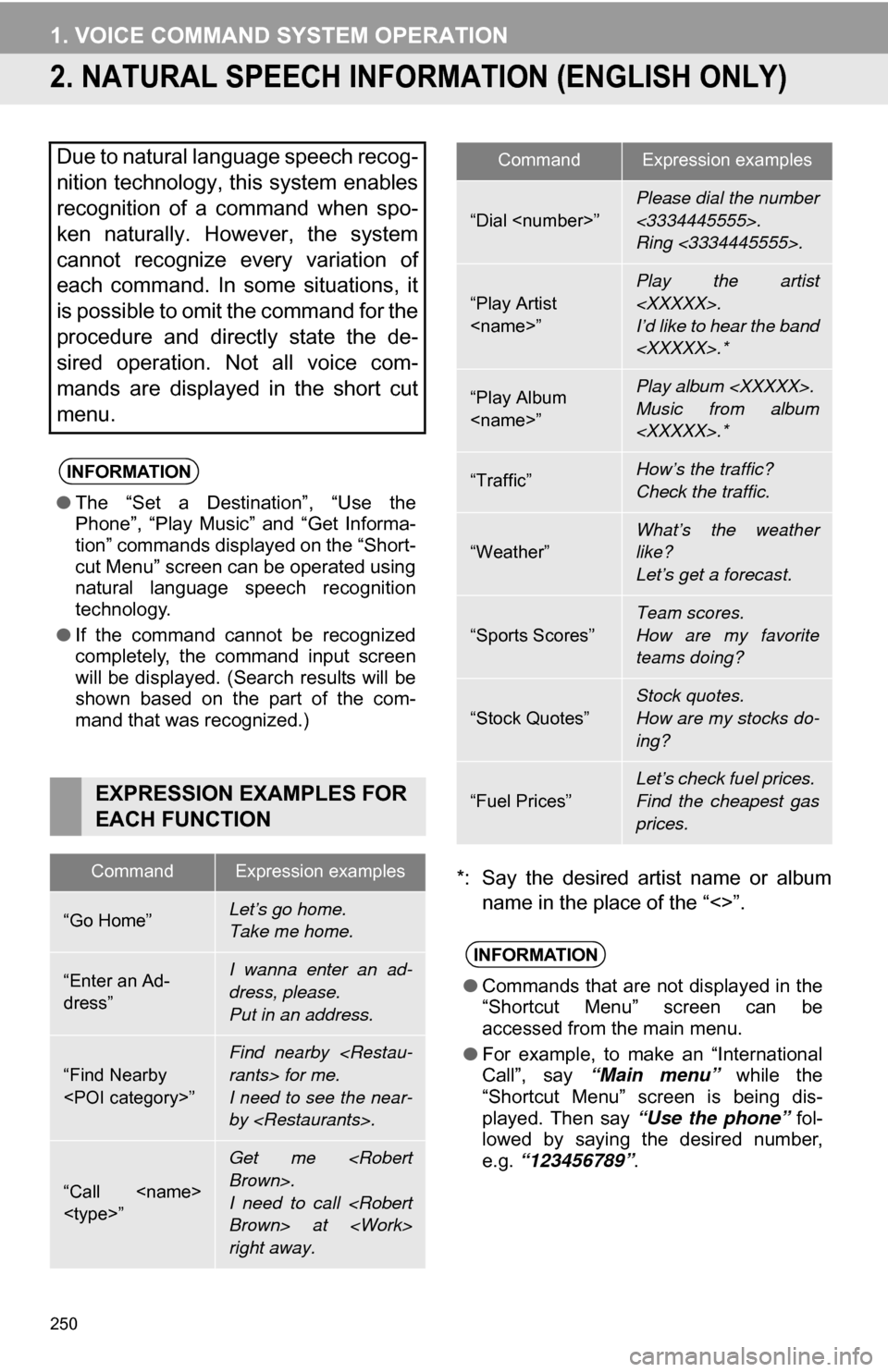
EXPRESSION EXAMPLES FOR
EACH FUNCTION
CommandExpression examples
“Go Home”Let’s go home.
Take me home.
“Enter an Ad-
dress”I wanna enter an ad-
dress, please.
Put in an address.
“Find Nearby
Find nearby
I need to see the near-
by
“Call
Get me
I need to call
right away.
“Dial
Please dial the number
<3334445555>.
Ring <3334445555>.
“Play Artist
I’d like to hear the band
“Play Album
Music from album
“Traffic”How’s the traffic?
Check the traffic.
“Weather”What’s the weather
like?
Let’s get a forecast.
“Sports Scores”
Team scores.
How are my favorite
teams doing?
“Stock Quotes”
Stock quotes.
How are my stocks do-
ing?
“Fuel Prices”
Let’s check fuel prices.
Find the cheapest gas
prices.
INFORMATION
●Commands that are not displayed in the
“Shortcut Menu” screen can be
accessed from the main menu.
● For example, to make an “International
Call”, say “Main menu” while the
“Shortcut Menu” screen is being dis-
played. Then say “Use the phone” fol-
lowed by saying the desired number,
e.g. “123456789” .
CommandExpression examples
Page 252 of 336
252
1. VOICE COMMAND SYSTEM OPERATION
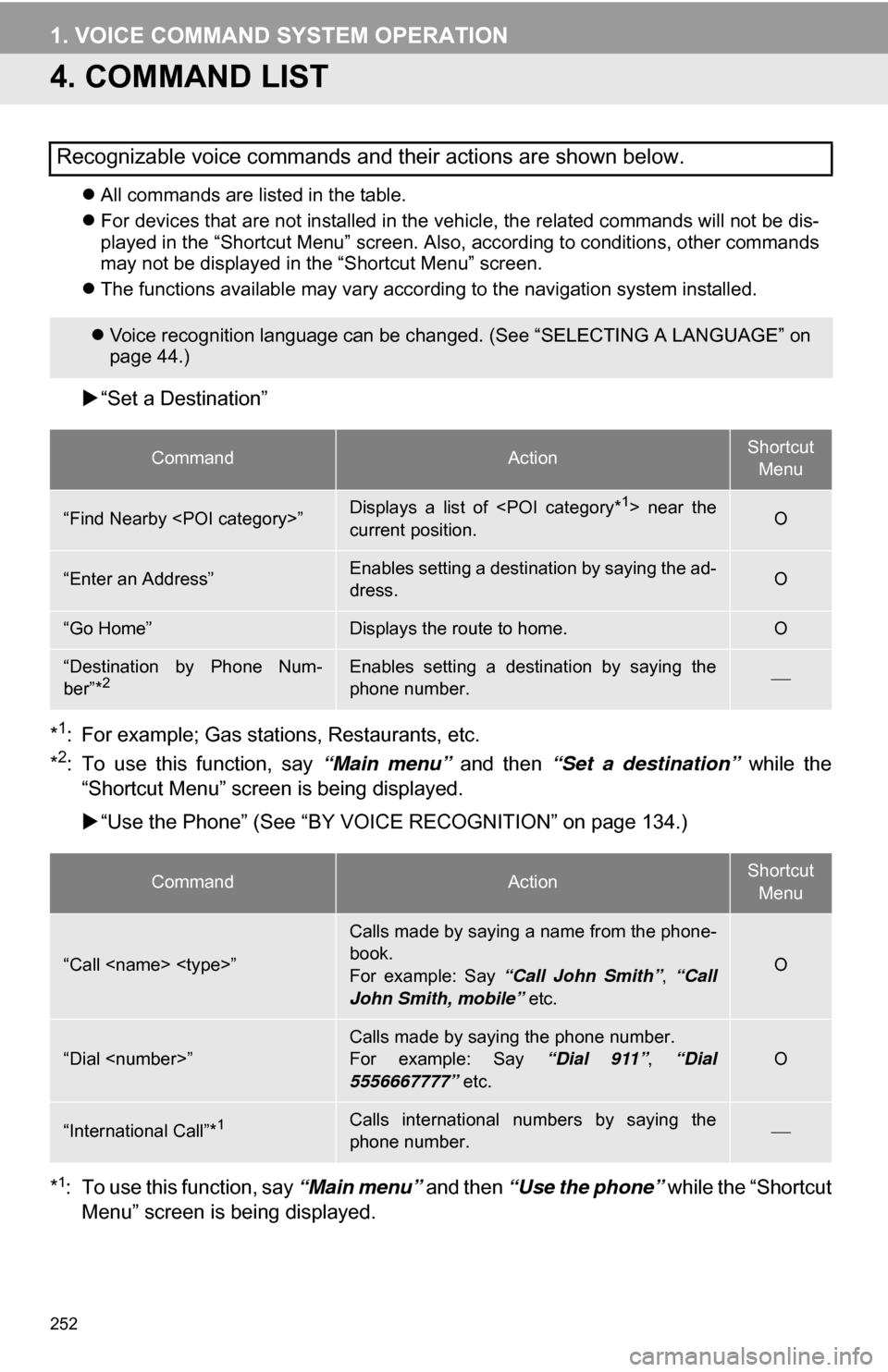
4. COMMAND LIST
All commands are listed in the table.
For devices that are not installed in the vehicle, the related commands will not be dis-
played in the “Shortcut Menu” screen. Also, according to conditions, other commands
may not be displayed in the “Shortcut Menu” screen.
The functions available may vary according to the navigation system installed.
“Set a Destination”
*
1: For example; Gas stations, Restaurants, etc.
*2: To use this function, say “Main menu” and then “Set a destination” while the
“Shortcut Menu” screen is being displayed.
“Use the Phone” (See “BY VOIC E RECOGNITION” on page 134.)
*
1: To use this function, say “Main menu” and then “Use the phone” while the “Shortcut
Menu” screen is being displayed.
Recognizable voice commands and their actions are shown below.
Voice recognition language can be changed. (See “SELECTING A LANGUAGE” on
page 44.)
CommandActionShortcut
Menu
“Find Nearby
current position.O
“Enter an Address”Enables setting a destination by saying the ad-
dress.O
“Go Home”Displays the route to home.O
“Destination by Phone Num-
ber”*2Enables setting a destination by saying the
phone number.
CommandActionShortcut Menu
“Call
Calls made by saying a name from the phone-
book.
For example: Say “Call John Smith” , “Call
John Smith, mobile” etc.
O
“Dial
For example: Say “Dial 911”, “Dial
5556667777” etc.O
“International Call”*1Calls international numbers by saying the
phone number.
Page 267 of 336
267
3. XM FUNCTION OPERATION
7
INFORMATION
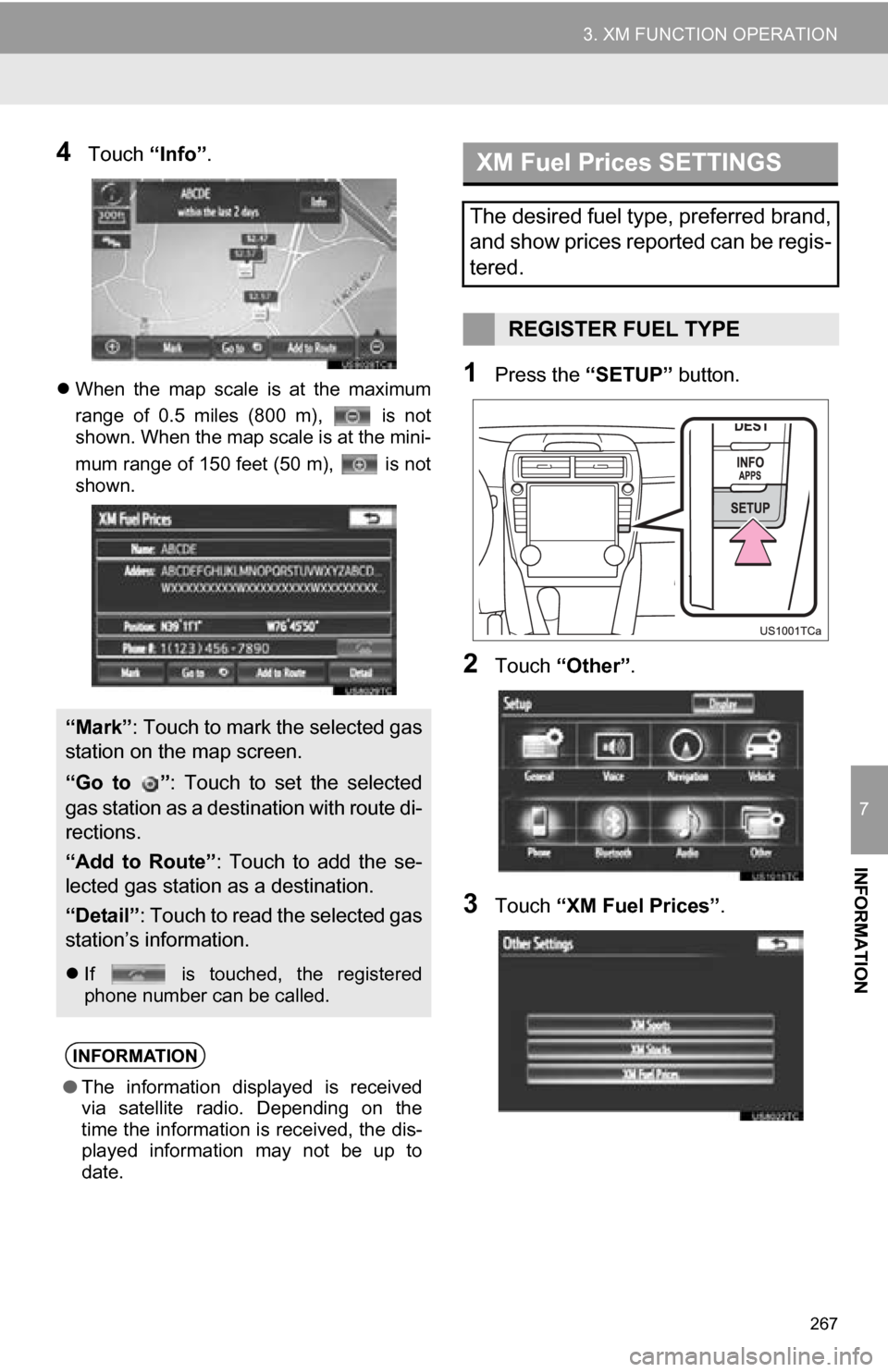
4Touch “Info”.
When the map scale is at the maximum
range of 0.5 miles (800 m), is not
shown. When the map scale is at the mini-
mum range of 150 feet (50 m), is not
shown.1Press the “SETUP” button.
2Touch “Other” .
3Touch “XM Fuel Prices” .
“Mark”: Touch to mark the selected gas
station on the map screen.
“Go to ” : Touch to set the selected
gas station as a destination with route di-
rections.
“Add to Route” : Touch to add the se-
lected gas station as a destination.
“Detail” : Touch to read the selected gas
station’s information.
If is touched, the registered
phone number can be called.
INFORMATION
● The information displayed is received
via satellite radio. Depending on the
time the information is received, the dis-
played information may not be up to
date.
XM Fuel Prices SETTINGS
The desired fuel type, preferred brand,
and show prices reported can be regis-
tered.
REGISTER FUEL TYPE