lock TOYOTA CAMRY 2018 (in English) Workshop Manual
[x] Cancel search | Manufacturer: TOYOTA, Model Year: 2018, Model line: CAMRY, Model: TOYOTA CAMRY 2018Pages: 612, PDF Size: 10.63 MB
Page 171 of 612

1713-5. Opening and closing the windows
3
Operation of each component
CAMRY_U (01999-06139)■
Operating the power windows a fter turning the engine off
Vehicles without a smart key system
The power windows can be operated for approximately 45 seconds even
after the engine switch is turned to the “ACC” or “LOCK” position. They can-
not, however, be operated once either front door is opened.
Vehicles with a smart key system
The power windows can be operated for approximately 45 seconds even
after the engine switch is turned to ACCESSORY mode or turned off. They
cannot, however, be operated once either front door is opened.
■ Jam protection function
If an object becomes jammed between the window and the window frame
while the window is closing, window movement is stopped and the window is
opened slightly.
■ Catch protection function
If an object becomes caught between the door and window while the window
is opening, window movement is stopped.
■ When the window cannot be opened or closed
When the jam protection function or catch protection function operates
unusually and the door window cannot be opened or closed, perform the fol-
lowing operations with the power window switch of that door.
●Vehicles without a smart key system: Stop the vehicle. With the engine
switch in the “ON” position, within 4 seconds of the jam protection function
or catch protection function activating, continuously operate the power win-
dow switch in the one-touch closing direction or one-touch opening direction
so that the door window can be opened and closed.
Vehicles with a smart key system: Stop the vehicle. With the engine switch
in IGNITION ON mode, within 4 seconds of the jam protection function or
catch protection function activating, continuously operate the power win-
dow switch in the one-touch closing direction or one-touch opening direc-
tion so that the door window can be opened and closed.
Page 172 of 612

1723-5. Opening and closing the windows
CAMRY_U (01999-06139)●
If the door window cannot be opened and closed even when performing the
above operations, perform the following procedure for function initialization.
Vehicles without a smart key system:
Turn the engine switch to the “ON” position.
Vehicles with a smart key system:
Turn the engine switch to IGNITION ON mode.
Pull and hold the power window switch in the one-touch closing direction
and completely close the door window.
Release the power window switch for a moment, resume pulling the
switch in the one-touch closing direction, and hold it there for approxi-
mately 6 seconds or more.
Press and hold the power window switch in the one-touch opening direc-
tion. After the door window is completely opened, continue holding the
switch for an additional 1 second or more.
Release the power window switch for a moment, resume pushing the
switch in the one-touch opening direction, and hold it there for approxi-
mately 4 seconds or more.
Pull and hold the power window switch in the one-touch closing direction
again. After the door window is completely closed, continue holding the
switch for a further 1 second or more.
If you release the switch while the window is moving, start again from t\
he
beginning.
If the window reverses and cannot be fully closed or opened, have the vehicle
inspected by your Toyota dealer.
■ Door lock linked window operation
●Vehicles without a smart key system: The power windows can be opened
and closed using the key.
* (→P. 137)
Vehicles with a smart key system: The power windows can be opened and
closed using the mechanical key.
* ( →P. 526)
● The power windows can be opened using the wireless remote control.
*
(→P. 136)
*: These settings must be customized at your Toyota dealer.
■ Alarm (if equipped)
The alarm may be triggered if the alarm is set and a power window is closed
using the door lock linked power window operation function. ( →P. 75)
■ Power windows open warning buzzer
A buzzer sounds and a message is shown on the multi-information display in
the instrument cluster when the engine switch is turned off and the driver’s
door is opened with the power windows open.
■ Customization
Some functions can be customized. ( →P. 567)
1
2
3
4
5
6
Page 173 of 612
1733-5. Opening and closing the windows
3
Operation of each component
CAMRY_U (01999-06139)
WARNING
Observe the following precautions.
Failure to do so may result in death or serious injury.
■Closing the windows
● The driver is responsible for all the power window operations, including the
operation for the passengers. In order to prevent accidental operation,
especially by a child, do not let a child operate the power windows. It is
possible for children and other passengers to have body parts caught in
the power window. Also, when riding with a child, it is recommended to use
the window lock switch.( →P. 170)
● When using the wireless remote control, key or mechanical key and oper-
ating the power windows, operate the power window after checking to
make sure that there is no possibility of any passenger having any of their
body parts caught in the window. Also do not let a child operate window by
the wireless remote control, key or mechanical key. It is possible for chil-
dren and other passengers to get caught in the power window.
● When exiting the vehicle, turn the engine switch off, carry the key and exit
the vehicle along with the child. There may be accidental operation, due to
mischief, etc., that may possibly lead to an accident.
■ Jam protection function
● Never use any part of your body to intentionally activate the jam protection
function.
● The jam protection function may not work if something gets jammed just
before the window is fully closed. Be careful not to get any part of your
body jammed in the window.
■ Catch protection function
● Never use any part of your body or clothing to intentionally activate the
catch protection function.
● The catch protection function may not work if something gets caught just
before the window is fully opened. Be careful not to get any part of your
body or clothing caught in the window.
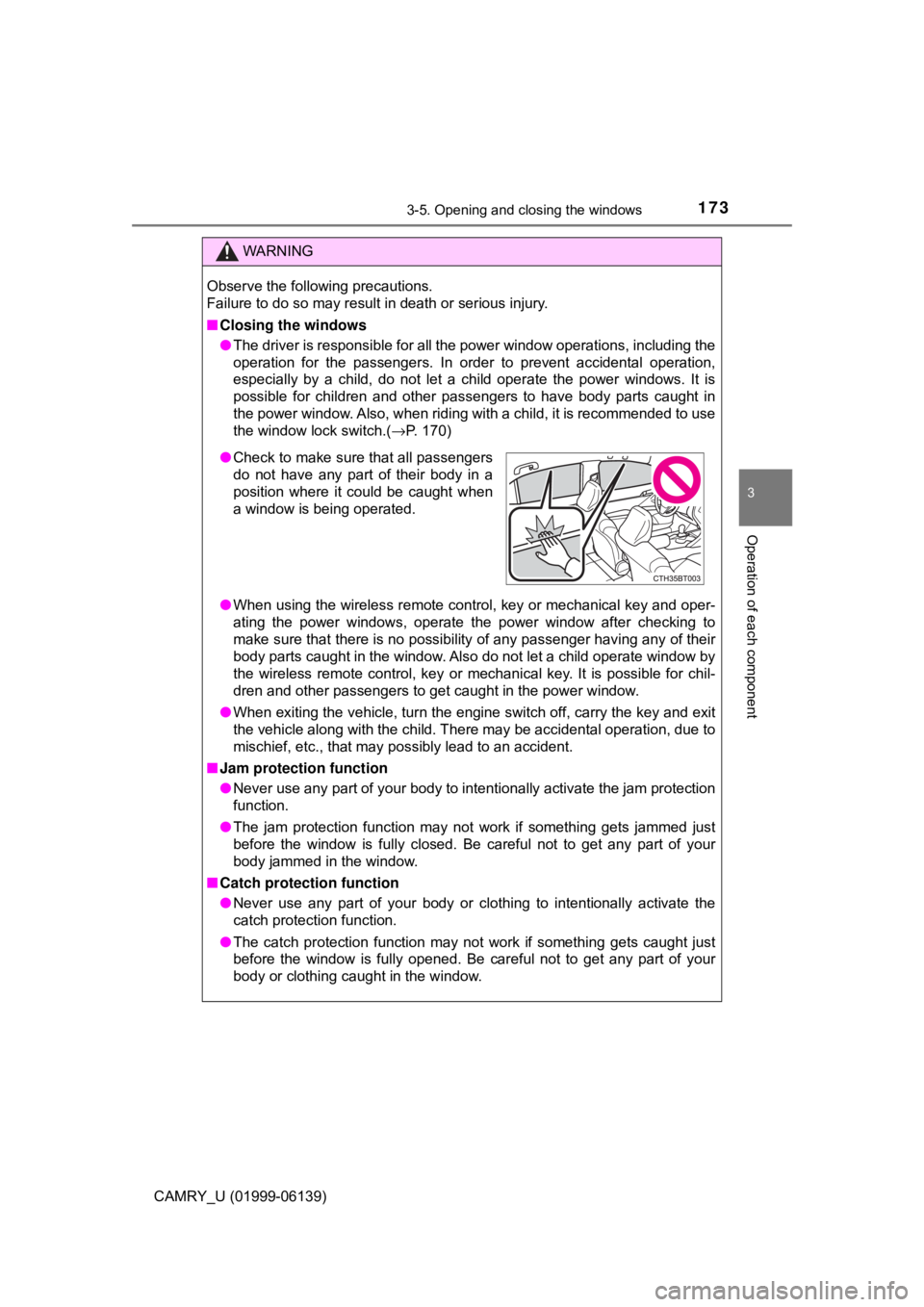
●Check to make sure that all passengers
do not have any part of their body in a
position where it could be caught when
a window is being operated.
Page 175 of 612

1753-5. Opening and closing the windows
3
Operation of each component
CAMRY_U (01999-06139)
■The moon roof can be operated when
Vehicles without a smart key system
The engine switch is in the “ON” position.
Vehicles with a smart key system
The engine switch is in IGNITION ON mode.
■ Operating the moon roof af ter turning the engine off
Vehicles without a smart key system
The moon roof can be operated for approximately 45 seconds after the
engine switch is turned to the “ACC” or “LOCK” position. It cannot, howe\
ver,
be operated once either front door is opened.
Vehicles with a smart key system
The moon roof can be operated for approximately 45 seconds after the
engine switch is turned to ACCESSORY mode or turned off. It cannot, how-
ever, be operated once either front door is opened.
■ Jam protection function
If an object is detected between the moon roof and the frame while the moon
roof is closing or tilting down, travel is stopped and the moon roof opens
slightly.
■ Sunshade
The sunshade can be opened and closed manually. However, the sunshade
will open automatically when the moon roof is opened.
■ Door lock linked mo on roof operation
● Vehicles without a smart key system: The moon roof can be opened and
closed using the key.
* (→ P. 137)
Vehicles with a smart key system: The moon roof can be opened and
closed using the mechanical key.
* ( → P. 526)
● The moon roof can be opened using the wireless remote control.
*
(→P. 136)
*: These settings must be customized at your Toyota dealer.
Page 176 of 612

1763-5. Opening and closing the windows
CAMRY_U (01999-06139)■
When the moon roof do es not close normally
Perform the following procedure:
● If the moon roof closes but then re-opens slightly
Stop the vehicle.
Press and hold the “CLOSE” switch.
*1
The moon roof will close, reopen and pause for approximately 10 sec-
onds.
*2 Then it will close again, tilt up and pause for approximately 1 sec-
ond. Finally, it will tilt down, open and close.
Check to make sure that the moon roof is completely closed and then
release the switch.
● If the moon roof tilts down but then tilts back up
Stop the vehicle.
Press and hold the “UP” switch
*1 until the moon roof moves into the tilt
up position and stops.
Release the “UP” switch once and then press and hold the “UP” switch
again.
*1
The moon roof will pause for approximately 10 seconds in the tilt up posi-
tion.
*2 Then it will adjust slightly and pause for approximately 1 second.
Finally, it will tilt down, open and close.
Check to make sure that the moon roof is completely closed and then
release the switch.
*1: If the switch is released at the incorrect time, the procedure will have to
be performed again from the beginning.
*2: If the switch is released after the above mentioned 10 second pause,automatic operation will be disabled. In that case, press and hold the
“CLOSE” or “UP” switch, and the moon roof will tilt up and pause for
approximately 1 second. Then it will tilt down, open and close. Check to
make sure that the moon roof is completely closed and then release the
switch.
If the moon roof does not fully close even after performing the above proce-
dure correctly, have the vehicle inspected by your Toyota dealer.
■ Alarm
The alarm may be triggered if the alarm is set and the moon roof is closed
using the door lock linked moon roof operation function. (→P. 75)
■ Moon roof open warning buzzer
A buzzer sounds and a message is shown on the multi-information display in
the instrument cluster when the engine switch is turned off and the driver's
door is opened with the moon roof open.
■ Customization
Some functions can be customized. ( →P. 567)
1
2
3
1
2
3
4
Page 179 of 612
1793-5. Opening and closing the windows
3
Operation of each component
CAMRY_U (01999-06139)
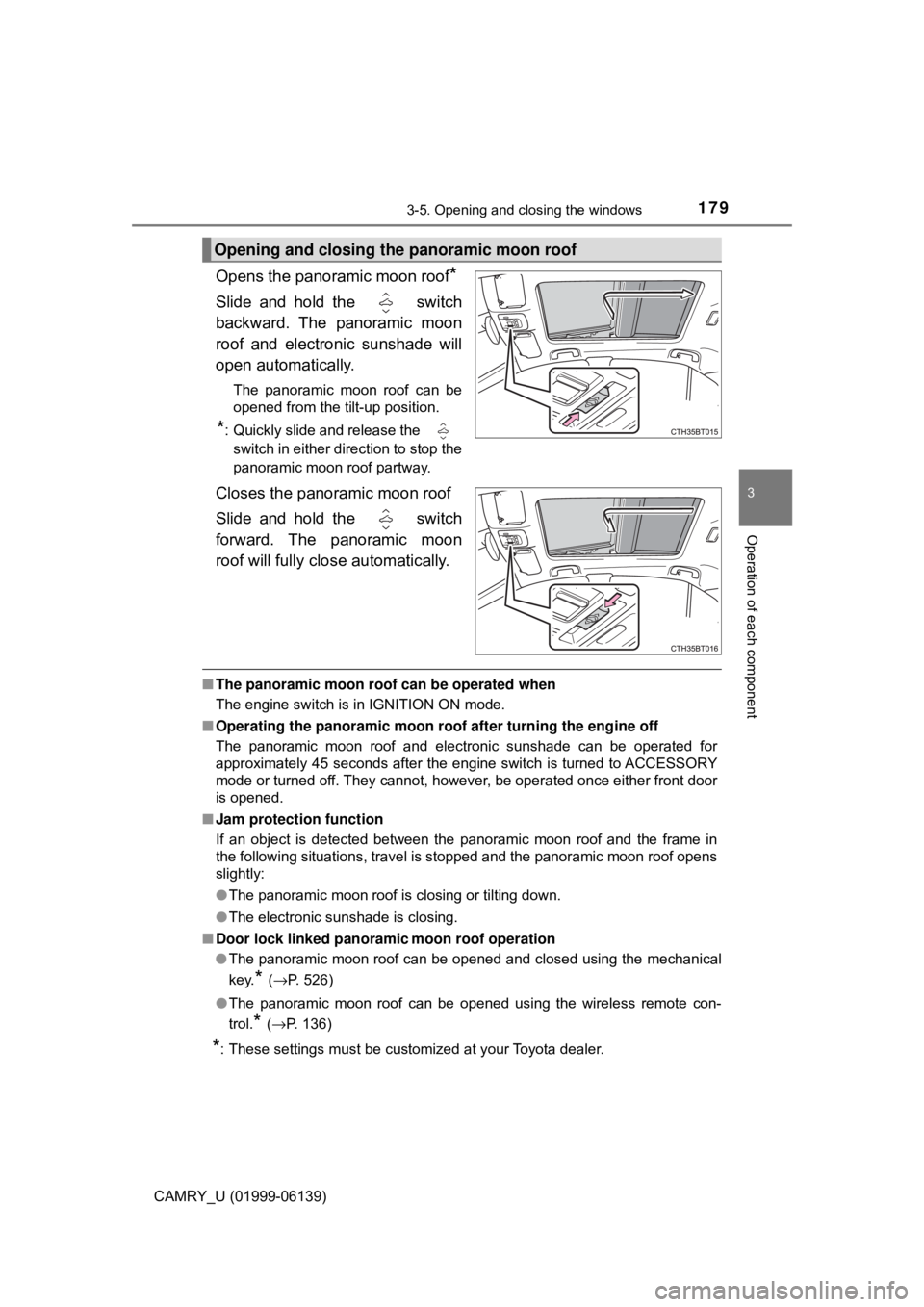
Opens the panoramic moon roof*
Slide and hold the switch
backward. The panoramic moon
roof and electronic sunshade will
open automatically.
The panoramic moon roof can be
opened from the tilt-up position.
*: Quickly slide and release the switch in either direction to stop the
panoramic moon roof partway.
Closes the panoramic moon roof
Slide and hold the switch
forward. The panoramic moon
roof will fully close automatically.
■ The panoramic moon roof can be operated when
The engine switch is in IGNITION ON mode.
■ Operating the panoramic moon roof after turning the engine off
The panoramic moon roof and electronic sunshade can be operated for
approximately 45 seconds after the engine switch is turned to ACCESSORY
mode or turned off. They cannot, however, be operated once either front door
is opened.
■ Jam protection function
If an object is detected between the panoramic moon roof and the frame in
the following situations, travel is stopped and the panoramic moon roof opens
slightly:
● The panoramic moon roof is closing or tilting down.
● The electronic sunshade is closing.
■ Door lock linked panoramic moon roof operation
● The panoramic moon roof can be opened and closed using the mechanical
key.
* (→ P. 526)
● The panoramic moon roof can be opened using the wireless remote con-
trol.
* (→P. 136)
*: These settings must be customized at your Toyota dealer.
Opening and closing the panoramic moon roof
Page 180 of 612

1803-5. Opening and closing the windows
CAMRY_U (01999-06139)■
Closing both the panoramic moon roof and electronic sunshade
Slide the
switch forward.
The electronic sunshade will close to the half-open position and pause. The
panoramic moon roof will then fully close. Then the electronic sunshade will
fully close.
■ When the panoramic moon roof or electronic sunshade does not close
normally
Perform the following procedure:
Stop the vehicle.
Turn the engine switch to IGNITION ON mode.
Slide and hold the switch or switch forward. Continue pressing
the switch for approximately 10 seconds after the panoramic moon roof or
electronic sunshade closes and reopens. The panoramic moon roof and
electronic sunshade will start to close.
*
Check that the panoramic moon roof and electronic sunshade are fully
closed and release the switch.
*: If the switch is released at the incorrect time, the procedure will have to beperformed again from the beginning.
If the panoramic moon roof or electronic sunshade does not fully close e\
ven
after performing the above procedure correctly, have the vehicle inspected by
your Toyota dealer.
■ Alarm
The alarm may be triggered if the alar m is set and the panoramic moon roof is
closed using the door lock linked panoramic moon roof operation function.
( →P. 75)
■ Panoramic moon roof open warning buzzer
A buzzer sounds and a message is shown on the multi-information display in
the instrument cluster when the engine switch is turned off and the driver’s
door is opened with the panoramic moon roof open.
■ Customization
Some functions can be customized. ( →P. 567)
1
2
3
4
Page 184 of 612
184
CAMRY_U (01999-06139)
4-1. Before driving
→P. 198, 200
With the brake pedal depressed, shift the shift lever to D.
( → P. 205)
Release the parking brake. ( →P. 212, 214)
Gradually release the brake pedal and gently depress the accelera-
tor pedal to accelerate the vehicle.
With the shift lever in D, depress the brake pedal.
If necessary, set the parking brake.
If the vehicle is to be stopped for an extended period of time, shift the shift
lever to P or N. ( →P. 205)
With the shift lever in D, depress the brake pedal.
Set the parking brake ( →P. 212, 214), and shift the shift lever to P
( → P. 205).
Vehicles without a smart key system:
Turn the engine switch to the “L OCK” position to stop the engine.
Vehicles with a smart key system:
Press the engine switch to stop the engine.
Lock the door, making sure that you have the key on your person.
If parking on a hill, block the wheels as needed.
Make sure that the parking brake is set and shift the shift lever to D.
Gently depress the accelerator pedal.
Release the parking brake.
Driving the vehicle
The following procedures should be observed to ensure safe
driving:
Starting the engine
Driving
Stopping
Parking the vehicle
Starting off on a steep uphill
1
2
3
1
2
1
2
3
4
1
2
3
Page 190 of 612

1904-1. Before driving
CAMRY_U (01999-06139)
WARNING
Observe the following precautions.
Failure to do so may result in death or serious injury.
■When the vehicle is parked
● Always apply the parking brake, shift the shift lever to P, stop the engine
and lock the vehicle.
Do not leave the vehicle unattended while the engine is running.
If the vehicle is parked with the shift lever in P but the parking brake is not
set, the vehicle may start to move, possibly leading to an accident.
● Do not touch the exhaust pipes while the engine is running or immediately
after turning the engine off.
Doing so may cause burns.
■ When taking a nap in the vehicle
Always turn the engine off. Otherwise, if you accidentally move the shift
lever or depress the accelerator pedal, this could cause an accident or fire
due to engine overheating. Additionally, if the vehicle is parked in a poorly
ventilated area, exhaust gases may collect and enter the vehicle, leading to
death or a serious health hazard.
■ When braking
● When the brakes are wet, drive more cautiously.
Braking distance increases when the brakes are wet, and this may cause
one side of the vehicle to brake differently than the other side. Also, the
parking brake may not securely hold the vehicle.
● If the power brake assist function does not operate, do not follow other\
vehicles closely and avoid hills or sharp turns that require braking.
In this case, braking is still possible, but the brake pedal should be
depressed more firmly than usual. Also, the braking distance will increase.
Have your brakes fixed immediately.
● Do not pump the brake pedal if the engine stalls.
Each push on the brake pedal uses up the reserve for the power-assisted
brakes.
● The brake system consists of 2 individual hydraulic systems; if one of the
systems fails, the other will still operate. In this case, the brake pedal
should be depressed more firmly than usual and the braking distance will\
increase.
Have your brakes fixed immediately.
Page 194 of 612

1944-1. Before driving
CAMRY_U (01999-06139)
WARNING
■Things that must not be carried in the trunk
The following things may cause a fire if loaded in the trunk:
●Receptacles containing gasoline
●Aerosol cans
■Storage precautions
Observe the following precautions.
Failure to do so may prevent the pedals from being depressed properly,
may block the driver’s vision, or may result in items hitting the driver or
passengers, possibly causing an accident.
●Stow cargo and luggage in the trunk whenever possible.
●To prevent cargo and luggage from sliding forward during braking, do
not stack anything in the enlarged trunk. Keep cargo and luggage low,
as close to the floor as possible.
●Do not place cargo or luggage in or on the following locations.
• At the feet of the driver
• On the front passenger or rear seats (when stacking items)
• On the package tray
• On the instrument panel
• On the dashboard
• Tray that has no lid
●Secure all items in the occupant compartment.
●Fold-down type rear seat: When you fold down the rear seats, long
items should not be placed directly behind the front seats.
●Fold-down type rear seat: Never allow anyone to ride in the enlarged
trunk. It is not designed for passengers. They should ride in their seats
with their seat belts properly fastened.
■Capacity and distribution
●Do not exceed the maximum axle weight rating or the total vehicle
weight rating.
●Even if the total load of occupant’s weight and the cargo load is less
than the total load capacity, do not apply the load unevenly. Improper
loading may cause deterioration of steering or braking control which
may cause death or serious injury.