lock TOYOTA CAMRY 2018 (in English) Manual PDF
[x] Cancel search | Manufacturer: TOYOTA, Model Year: 2018, Model line: CAMRY, Model: TOYOTA CAMRY 2018Pages: 612, PDF Size: 10.63 MB
Page 222 of 612

2224-3. Operating the lights and wipers
CAMRY_U (01999-06139)■
Windshield wiper linked headlight illumination
When driving during daytime with the headlight switch turned to , if the
windshield wipers are used, the headlights will turn on automatically after
several seconds to help enhance the visibility of your vehicle.
■ Battery-saving function
In the following conditions, the remaining lights will go off automatically after
20 minutes in order to prevent the vehicle battery from being discharged:
●The headlights and/or tail lights are on.
● Vehicles without a smart key system:
The engine switch is in the “ACC” or “LOCK” position.
Vehicles with a smart key system:
The engine switch is in ACCESSORY mode or turned off.
This function will be canceled in any of the following situations:
● Vehicles without a smart key system:
When the engine switch is turned to the “ON” position.
Vehicles with a smart key system:
When the engine switch is turned to IGNITION ON mode.
● When the light switch is operated
● When a door or the trunk is opened or closed
■ Customization
Some functions can be customized. ( →P. 567)
NOTICE
■To prevent battery discharge
Do not leave the lights on longer than necessary when the engine is not
running.
Page 228 of 612
2284-3. Operating the lights and wipers
CAMRY_U (01999-06139)
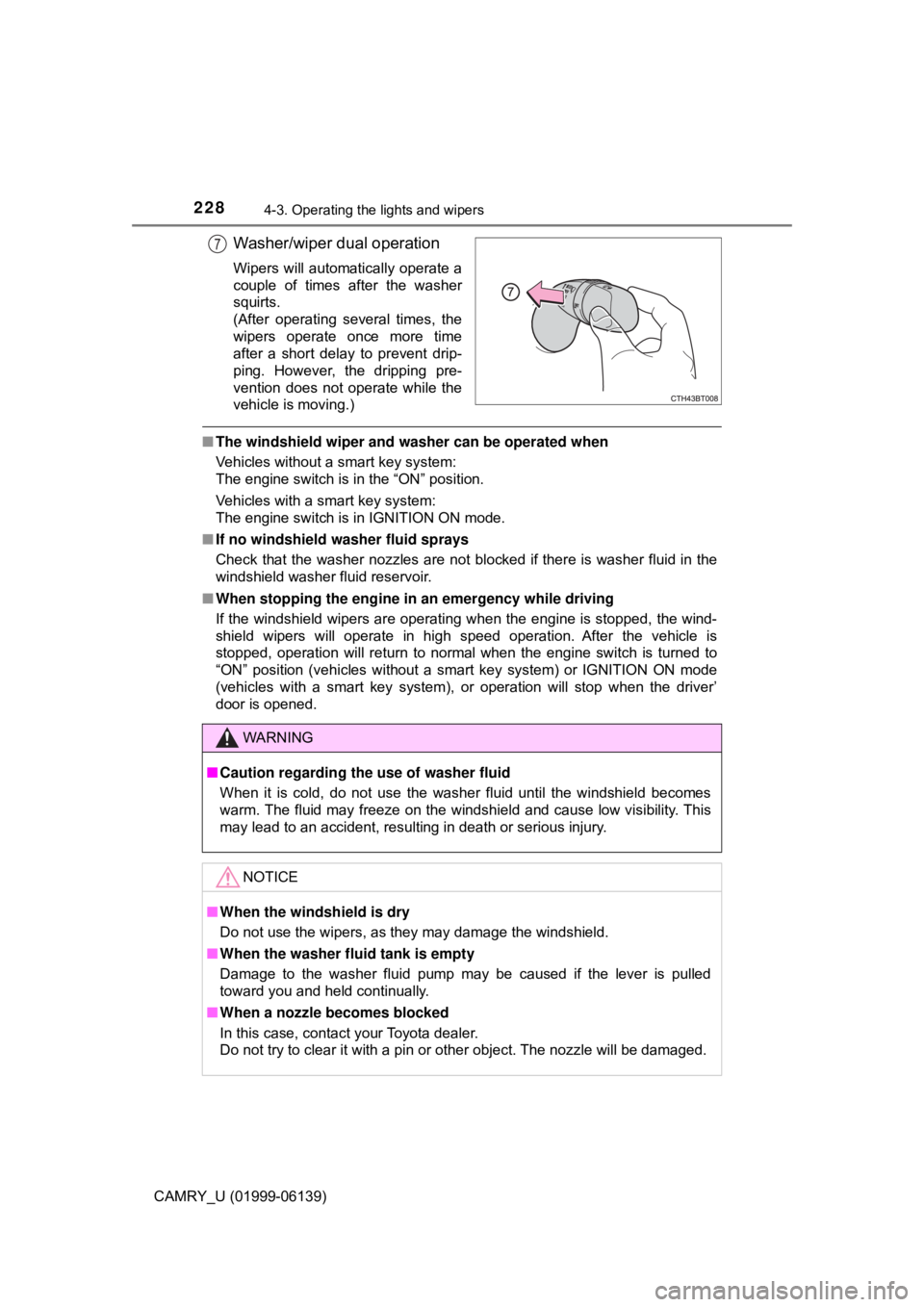
Washer/wiper dual operation
Wipers will automatically operate a
couple of times after the washer
squirts.
(After operating several times, the
wipers operate once more time
after a short delay to prevent drip-
ping. However, the dripping pre-
vention does not operate while the
vehicle is moving.)
■The windshield wiper and washer can be operated when
Vehicles without a smart key system:
The engine switch is in the “ON” position.
Vehicles with a smart key system:
The engine switch is in IGNITION ON mode.
■ If no windshield washer fluid sprays
Check that the washer nozzles are not blocked if there is washer fluid in the
windshield washer fluid reservoir.
■ When stopping the engine in an emergency while driving
If the windshield wipers are operating when the engine is stopped, the wind-
shield wipers will operate in high speed operation. After the vehicle is
stopped, operation will return to normal when the engine switch is turned to
“ON” position (vehicles without a smart key system) or IGNITION ON mode
(vehicles with a smart key system), or operation will stop when the driver’
door is opened.
7
WARNING
■Caution regarding the use of washer fluid
When it is cold, do not use the washer fluid until the windshield becomes
warm. The fluid may freeze on the windshield and cause low visibility. This
may lead to an accident, resulting in death or serious injury.
NOTICE
■When the windshield is dry
Do not use the wipers, as they may damage the windshield.
■ When the washer fluid tank is empty
Damage to the washer fluid pump may be caused if the lever is pulled
toward you and held continually.
■ When a nozzle becomes blocked
In this case, contact your Toyota dealer.
Do not try to clear it with a pin or other object. The nozzle will be damaged.
Page 250 of 612
2504-5. Using the driving support systems
CAMRY_U (01999-06139)• When a very bright light, such as the sun or the headlights of oncoming
traffic, shines directly into the camera sensor
• When the surrounding area is dim, such as at dawn or dusk, or while at night or in a tunnel
• After the engine has started the vehicle has not been driven for a certain amount of time
• While making a left/right turn and for a few seconds after making a left/
right turn
• While driving on a curve and for a few seconds after driving on a curve
• If your vehicle is skidding
• If the wheels are misaligned
• If a wiper blade is blocking the camera sensor
• The vehicle is wobbling.
• The vehicle is being driven at extremely high speeds.
• When driving on a hill
• If the radar sensor or camera sensor is misaligned
● In some situations such as the following, sufficient braking force may not be
obtained, preventing the system from performing properly:
• If the braking functions cannot operate to their full extent, such as when
the brake parts are extremely cold, extremely hot, or wet
• If the vehicle is not properly maintained (brakes or tires are excessively worn, improper tire inflation pressure, etc.)
• When the vehicle is being driven on a gravel road or other slippery sur- face
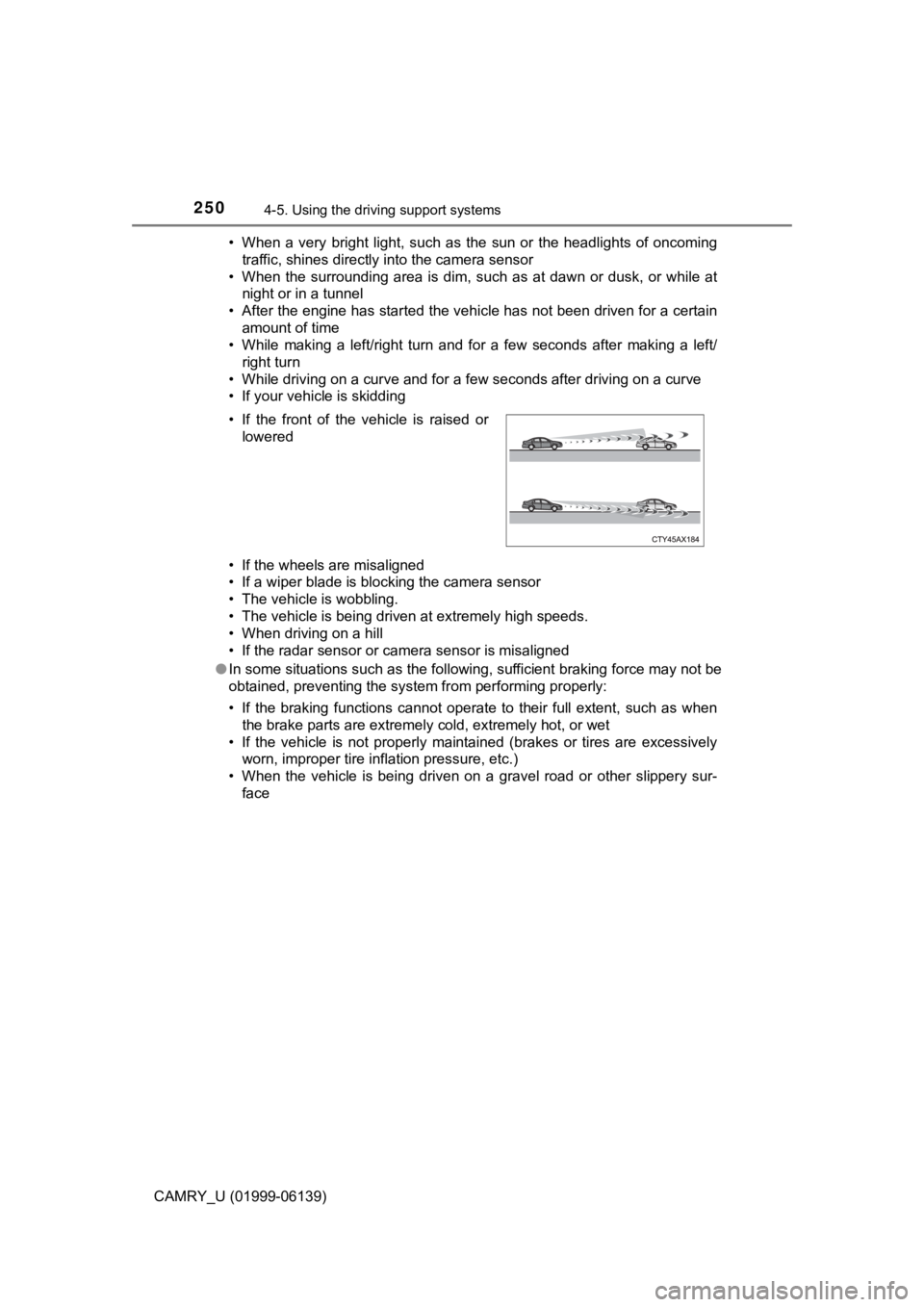
• If the front of the vehicle is raised or
lowered
Page 294 of 612
2944-5. Using the driving support systems
CAMRY_U (01999-06139)
◆ABS (Anti-lock Brake System)
Helps to prevent wheel lock when the brakes are applied suddenly,
or if the brakes are applied while driving on a slippery road surface
◆Brake assist
Generates an increased level of braking force after the brake pedal
is depressed when the system detects a panic stop situation
◆VSC (Vehicle Stability Control)
Helps the driver to control skidding when swerving suddenly or
turning on slippery road surfaces.
◆Enhanced VSC (Enhanced Ve hicle Stability Control)
Provides cooperative control of the ABS, TRAC, VSC and EPS.
Helps to maintain directional stability when swerving on slippery
road surfaces by controllin g steering performance.
◆Secondary Collision Brake (if equipped)
When the airbag sensor detects a collision, the brakes and brake
lights are automatically controlled to reduce the vehicle speed and
that helps reduce the possibility of further damage due to a second-
ary collision
◆TRAC (Traction Control)
Helps to maintain drive power and prevent the drive wheels from
spinning when starting the vehicle or accelerating on slippery roads
◆Hill-start assist control
Helps to reduce the backward move ment of the vehicle when start-
ing on an uphill
Driving assist systems
To keep driving safety and perf ormance, the following systems
operate automatically in response to various driving situations.
Be aware, however, that these systems are supplementary and
should not be relied upon too he avily when operating the vehi-
cle.
Page 346 of 612
3464-6. Driving tips
CAMRY_U (01999-06139)
Accelerate the vehicle slowly, keep a safe distance between you and
the vehicle ahead, and drive at a reduced speed suitable to road con-
ditions.
●Park the vehicle and move the shift lever to P without setting the
parking brake. The parking brake may freeze up, preventing it from
being released. If the vehicle is parked without setting the parking
brake, make sure to block the wheels.
Failure to do so may be dangerous because it may cause the vehi-
cle to move unexpectedly, pos sibly leading to an accident.
● If the vehicle is parked without se tting the parking brake, confirm
that the shift lever ca nnot be moved out of P
*.
*: The shift lever will be locked if it is attempted to be shifted from P to any
other position without depressing the brake pedal. If the shift lever can be
shifted from P, there may be a problem with the shift lock system. Have the
vehicle inspected by your Toyota dealer immediately.
Vehicles with 16 and 17-inch tires
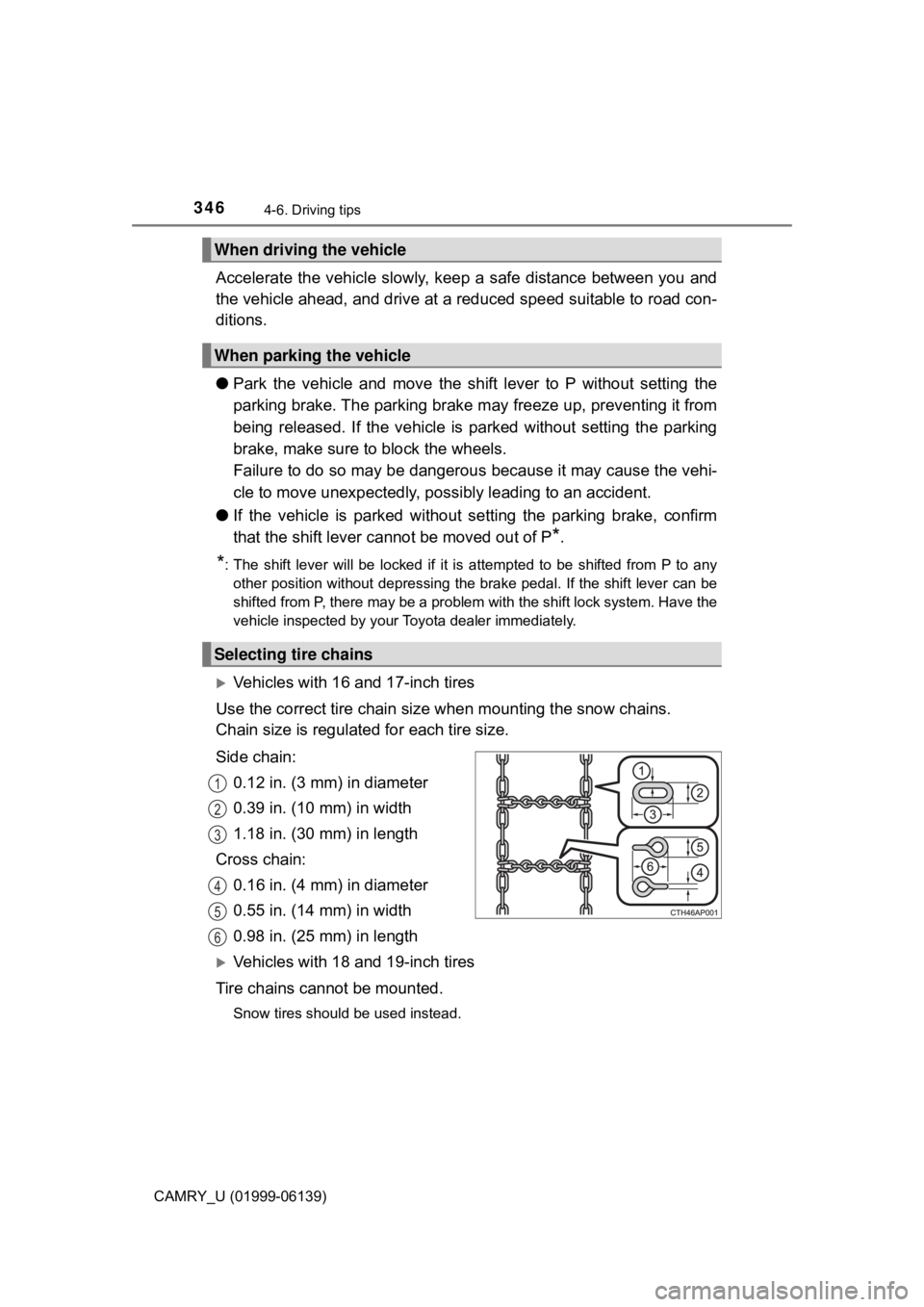
Use the correct tire chain size when mounting the snow chains.
Chain size is regulated for each tire size.
Side chain: 0.12 in. (3 mm) in diameter
0.39 in. (10 mm) in width
1.18 in. (30 mm) in length
Cross chain: 0.16 in. (4 mm) in diameter
0.55 in. (14 mm) in width
0.98 in. (25 mm) in length
Vehicles with 18 and 19-inch tires
Tire chains cannot be mounted.
Snow tires should be used instead.
When driving the vehicle
When parking the vehicle
Selecting tire chains
1
2
3
4
5
6
Page 350 of 612
350
CAMRY_U (01999-06139)
5-1. Using the air conditioning system and defogger
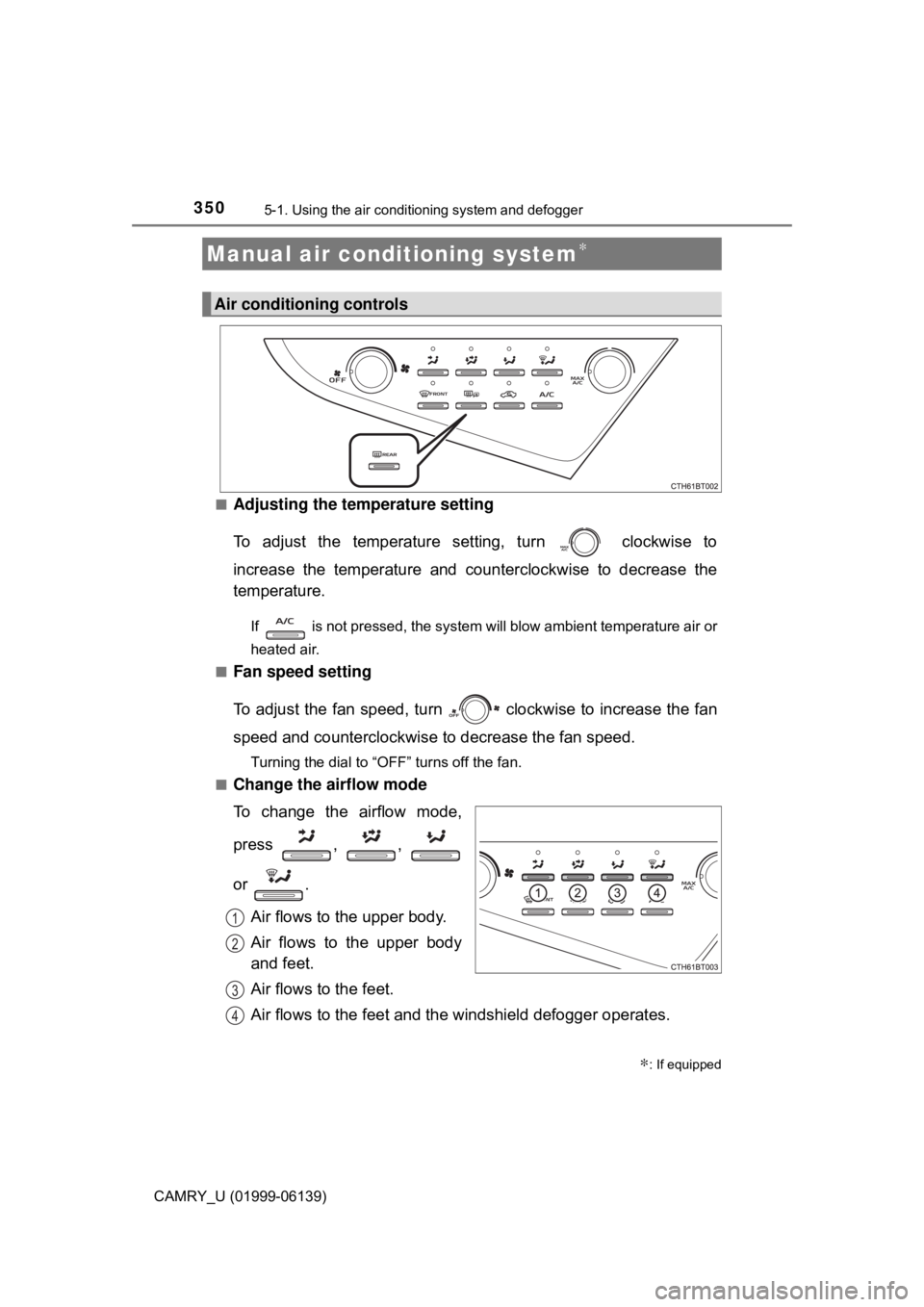
■Adjusting the temperature setting
To adjust the temperature setting, turn clockwise to
increase the temperature and c ounterclockwise to decrease the
temperature.
If is not pressed, the system will blow ambient temperature air or
heated air.
■
Fan speed setting
To adjust the fan speed, turn clockwise to increase the fan
speed and counterclockwise to decrease the fan speed.
Turning the dial to “OFF” turns off the fan.
■
Change the airflow mode
To change the airflow mode,
press , ,
or .
Air flows to the upper body.
Air flows to the upper body
and feet.
Air flows to the feet.
Air flows to the feet and the windshield defogger operates.
Manual air conditioning system∗
∗: If equipped
Air conditioning controls
1
2
3
4
Page 354 of 612
3545-1. Using the air conditioning system and defogger
CAMRY_U (01999-06139)
WARNING
■To prevent the windshield from fogging up
● Do not use during cool air operation in extremely humid weather.
The difference between the temperature of the outside air and that of the
windshield can cause the outer surface of the windshield to fog up, block-
ing your vision.
■ To prevent burns (vehicles with outs ide rear view mirror defoggers)
Do not touch the rear view mirror surf aces when the outside rear view mirror
defoggers are on.
NOTICE
■ To prevent battery discharge
Do not leave the air conditioning system on longer than necessary when the
engine is stopped.
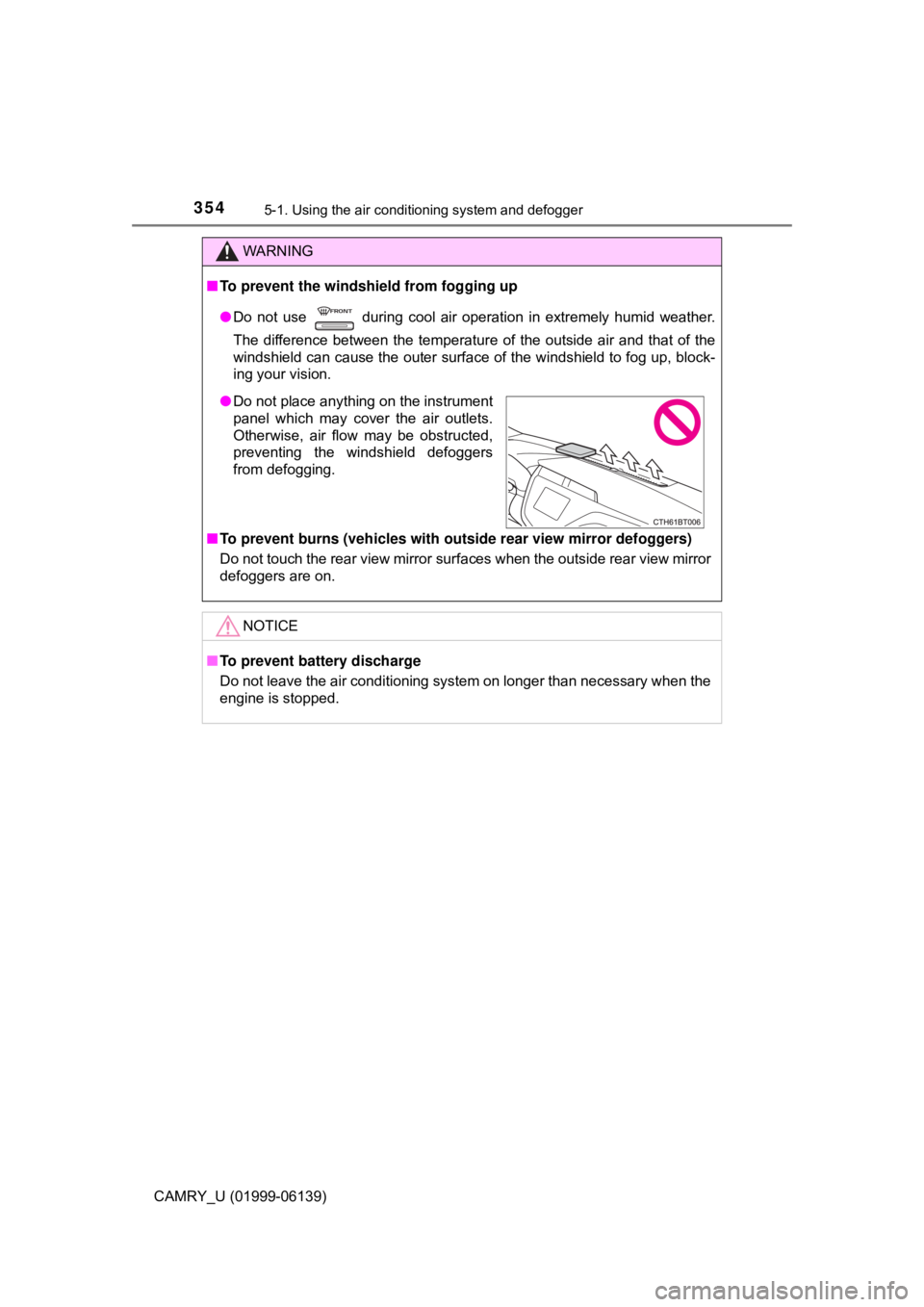
● Do not place anything on the instrument
panel which may cover the air outlets.
Otherwise, air flow may be obstructed,
preventing the windshield defoggers
from defogging.
Page 355 of 612
3555-1. Using the air conditioning system and defogger
5
Interior features
CAMRY_U (01999-06139)■
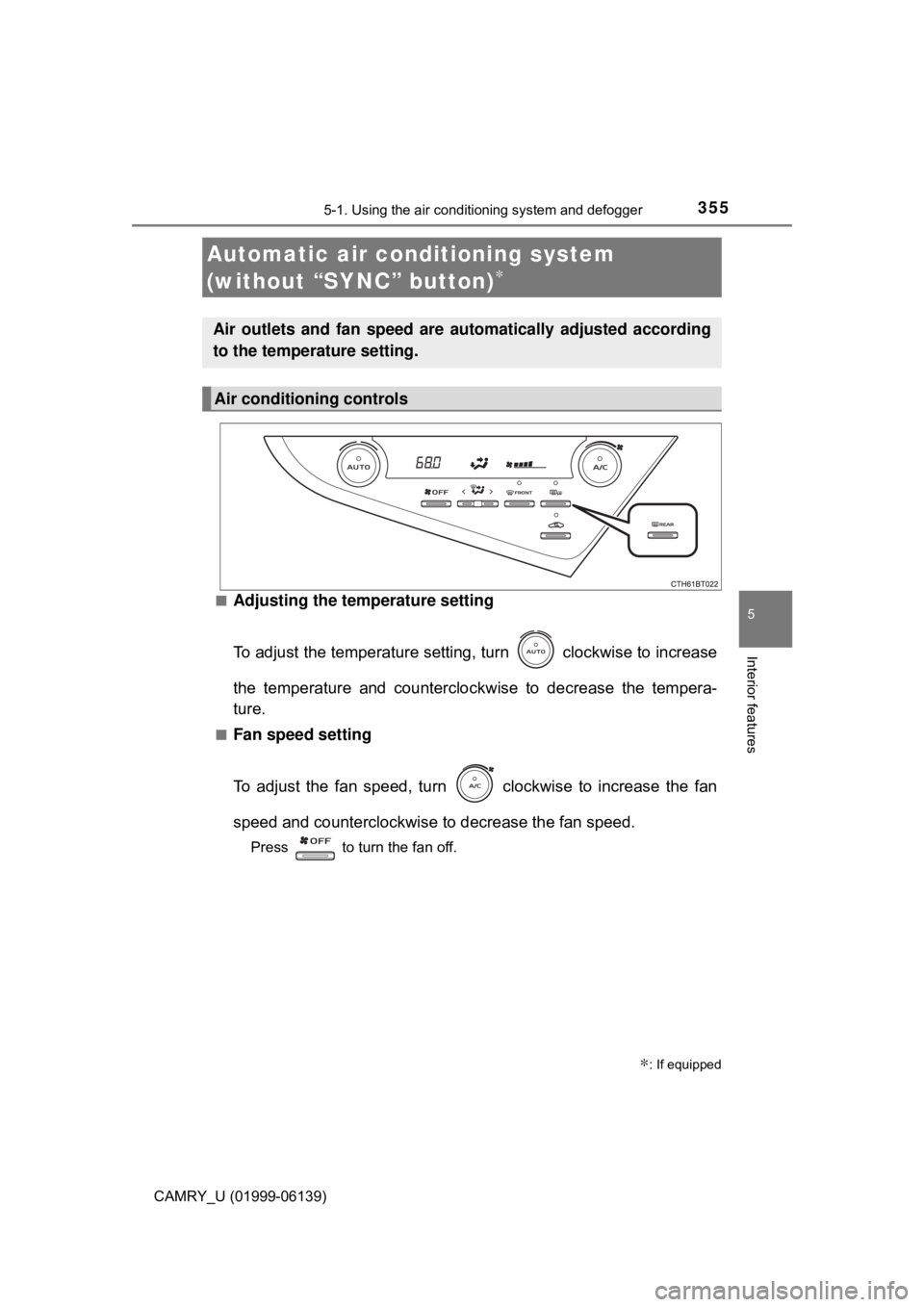
Adjusting the temperature setting
To adjust the temperature setting, turn clockwise to increase
the temperature and countercloc
kwise to decrease the tempera-
ture.
■Fan speed setting
To adjust the fan speed, turn clockwise to increase the fan
speed and counterclockwise to decrease the fan speed.
Press to turn the fan off.
Automatic air conditioning system
(without “SYNC” button)
∗
∗: If equipped
Air outlets and fan speed are automatically adjusted according
to the temperature setting.
Air conditioning controls
Page 360 of 612
 Manual PDF 3605-1. Using the air conditioning system and defogger
CAMRY_U (01999-06139)■
Ventilation and air conditioning odors
●To let fresh air in, set the air conditioning system to the outside air m\
ode")
3605-1. Using the air conditioning system and defogger
CAMRY_U (01999-06139)■
Ventilation and air conditioning odors
●To let fresh air in, set the air conditioning system to the outside air m\
ode.
● During use, various odors from inside and outside the vehicle may enter into
and accumulate in the air conditioning system. This may then cause odor to
be emitted from the vents.
● To reduce potential odors from occurring:
• It is recommended that the air conditioning system be set to outside air
mode prior to turning the vehicle off.
• The start timing of the blower may be delayed for a short period of time
immediately after the air conditioning system is started in automatic
mode.
■ Air conditioning filter
→P. 464
■ Customization
Some functions can be customized. ( →P. 573)
WARNING
■To prevent the windshield from fogging up
● Do not use during cool air operation in extremely humid weather.
The difference between the temperature of the outside air and that of the
windshield can cause the outer surface of the windshield to fog up, block-
ing your vision.
■ To prevent burns (vehicles with outs ide rear view mirror defoggers)
Do not touch the rear view mirror surf aces when the outside rear view mirror
defoggers are on.
NOTICE
■ To prevent battery discharge
Do not leave the air conditioning system on longer than necessary when the
engine is stopped.
● Do not place anything on the instrument
panel which may cover the air outlets.
Otherwise, air flow may be obstructed,
preventing the windshield defoggers
from defogging.
Page 362 of 612

3625-1. Using the air conditioning system and defogger
CAMRY_U (01999-06139)■
Adjusting the temperature setting
To adjust the temperature setting, turn clockwise to increase
the temperature and countercloc
kwise to decrease the tempera-
ture.
The air conditioning system switches between individual and synchro-
nized modes each time is pressed.
Synchronized modes (indicator on):
The driver’s side
dial can be used to adjust the temperature for
the driver’s and front passenger’s side. At this time, operate the front
passenger’s side
dial to enter individual mode.
Individual modes (indicator off):
The temperature for the driver’s and front passenger’s side can be
adjusted separately.
■
Fan speed setting
To adjust the fan speed, press to increase the fan speed
and to decrease the fan speed.
Press to turn the fan off.