light TOYOTA CAMRY 2019 (in English) Service Manual
[x] Cancel search | Manufacturer: TOYOTA, Model Year: 2019, Model line: CAMRY, Model: TOYOTA CAMRY 2019Pages: 612, PDF Size: 11.44 MB
Page 118 of 612

1182. Instrument cluster
CAMRY_U■
Odometer
Displays the total distance
the vehicle has been driven.
■Trip meter A/trip meter B
Displays the distance the vehicl e has been driven since the met er
was last reset. Trip meters A and B can be used to record and d is-
play different distances independently.
To reset, display the desired trip meter and press and hold the “ODO/
TRIP” switch.
Displays suggestions to the drive r in the following situations. To select
a response to a displayed suggestion, use the meter control swi tches.
The suggestion function can be turned on/off.
(Customizable features:P. 567)
■
Suggestion to turn off the headlights
If the headlights are left on for a certain amount of time afte r the
engine switch has been turned of f, if the headlight switch is in the
“AUTO” position, a suggestion m essage will be displayed asking if
you wish to turn the headlights off. To turn the headlights off , select
“Yes”.
If a front door is opened after the engine switch is turned off, this sug-
gestion message will not be displayed.
Odometer/trip meter
Suggestion function
Page 119 of 612
1192. Instrument cluster
2
Instrument cluster
CAMRY_U
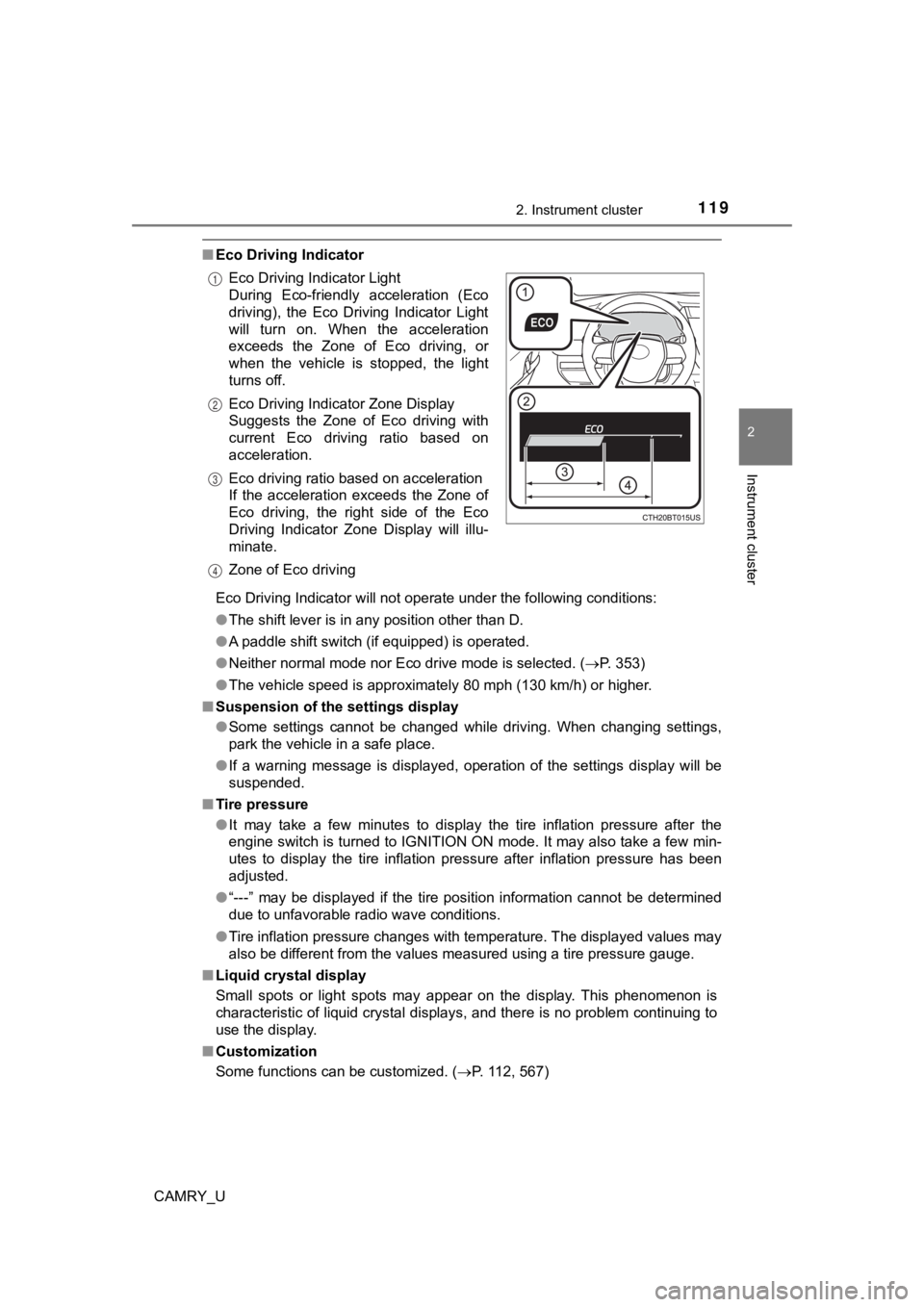
■Eco Driving Indicator
Eco Driving Indicator will not operate under the following cond itions:
● The shift lever is in any position other than D.
● A paddle shift switch (if equipped) is operated.
● Neither normal mode nor Eco drive mode is selected. ( P. 353)
● The vehicle speed is approximately 80 mph (130 km/h) or higher.
■ Suspension of the settings display
●Some settings cannot be changed while driving. When changing se ttings,
park the vehicle in a safe place.
● If a warning message is displayed, operation of the settings di splay will be
suspended.
■ Tire pressure
●It may take a few minutes to display the tire inflation pressur e after the
engine switch is turned to IGNITION ON mode. It may also take a few min-
utes to display the tire inflation pressure after inflation pre ssure has been
adjusted.
● “---” may be displayed if the tire position information cannot be determined
due to unfavorable radio wave conditions.
● Tire inflation pressure changes with temperature. The displayed values may
also be different from the values measured using a tire pressur e gauge.
■ Liquid crystal display
Small spots or light spots may appear on the display. This phen omenon is
characteristic of liquid crystal displays, and there is no prob lem continuing to
use the display.
■ Customization
Some functions can be customized. ( P. 112, 567)
Eco Driving Indicator Light
During Eco-friendly acceleration (Eco
driving), the Eco Driving Indicator Light
will turn on. When the acceleration
exceeds the Zone of Eco driving, or
when the vehicle is stopped, the light
turns off.
Eco Driving Indicator Zone Display
Suggests the Zone of Eco driving with
current Eco driving ratio based on
acceleration.
Eco driving ratio based on acceleration
If the acceleration exceeds the Zone of
Eco driving, the right side of the Eco
Driving Indicator Zone Display will illu-
minate.
Zone of Eco driving
1
2
3
4
Page 137 of 612
1373-1. Key information
3
Operation of each component
CAMRY_U
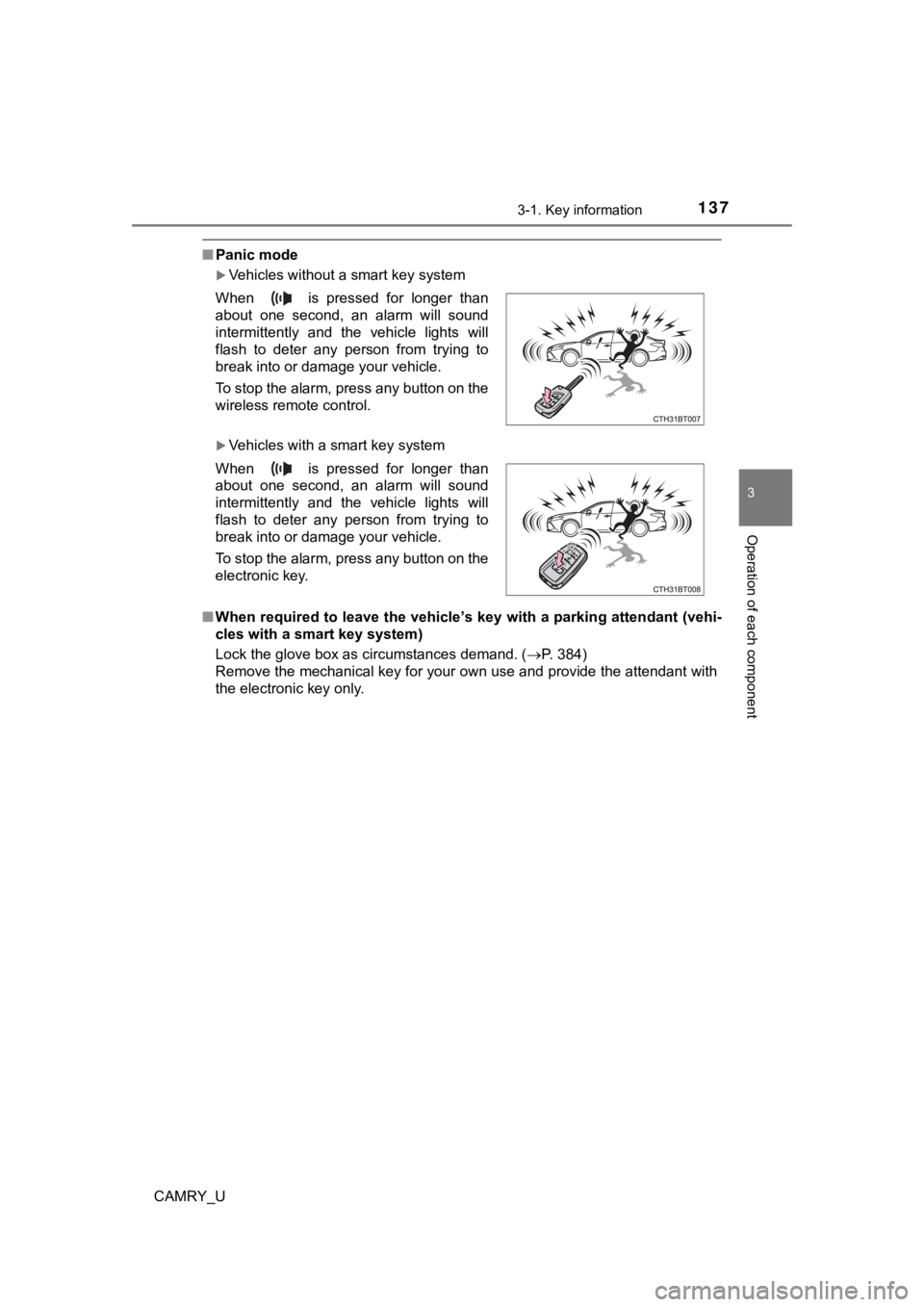
■Panic mode
Vehicles without a smart key system
Vehicles with a smart key system
■ When required to leave the vehicle’s key with a parking attenda nt (vehi-
cles with a smart key system)
Lock the glove box as circumstances demand. (P. 384)
Remove the mechanical key for your own use and provide the attendant with
the electronic key only. When is pressed for longer than
about one second, an alarm will sound
intermittently and the vehicle lights will
flash to deter any person from trying to
break into or damage your vehicle.
To stop the alarm, press any button on the
wireless remote control.
When is pressed for longer than
about one second, an alarm will sound
intermittently and the vehicle lights will
flash to deter any person from trying to
break into or damage your vehicle.
To stop the alarm, press any button on the
electronic key.
Page 149 of 612
1493-2. Opening, closing and locking the doors
3
Operation of each component
CAMRY_U
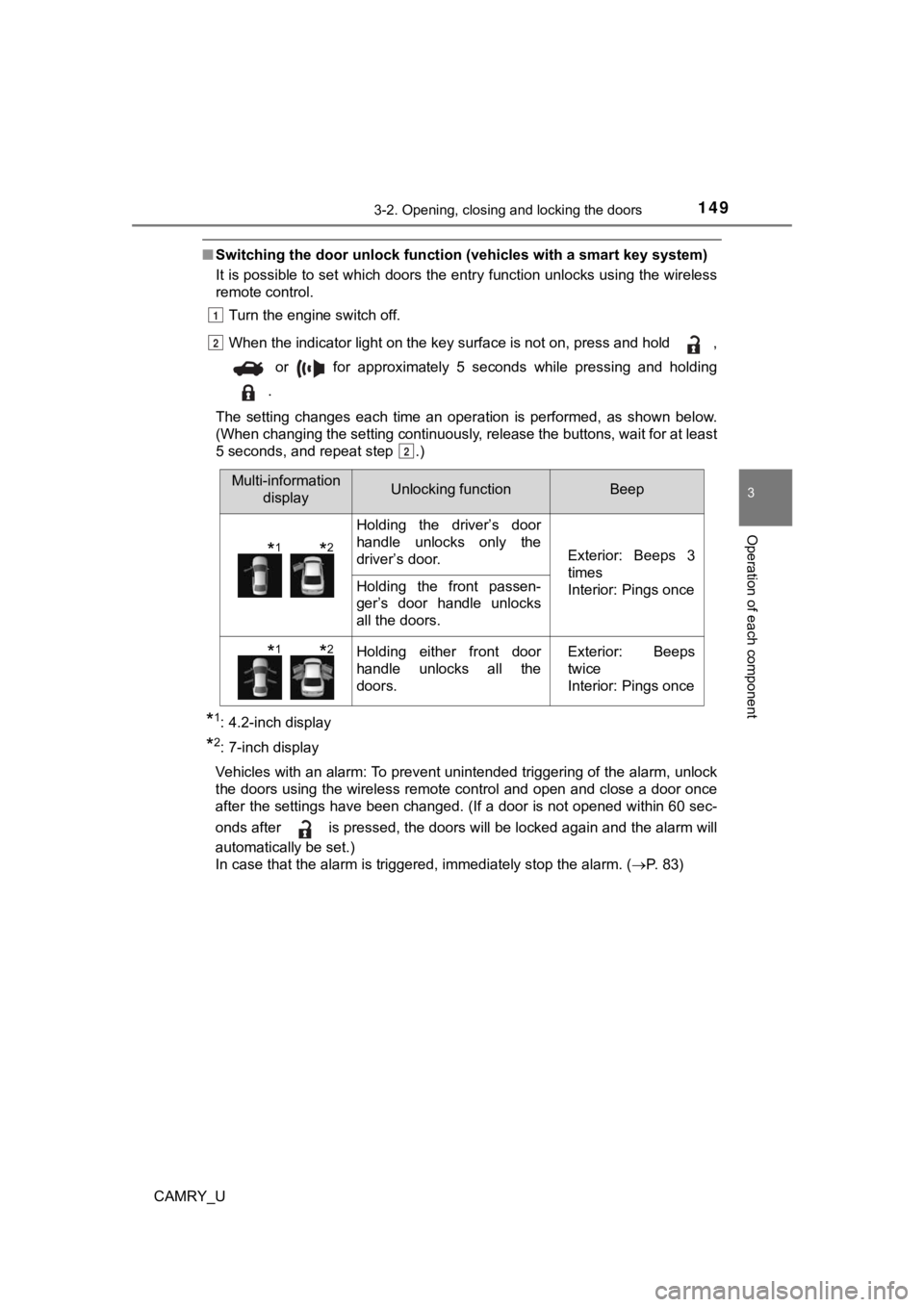
■Switching the door unlock func tion (vehicles with a smart key system)
It is possible to set which doors the entry function unlocks using the wireless
remote control.
Turn the engine switch off.
When the indicator light on the key surface is not on, press and hold ,
or for approximately 5 seconds while pressing and holding
.
The setting changes each time an operation is performed, as sho wn below.
(When changing the setting continuously, release the buttons, w ait for at least
5 seconds, and repeat step .)
*1: 4.2-inch display
*2: 7-inch display
Vehicles with an alarm: To prevent unintended triggering of the alarm, unlock
the doors using the wireless remote control and open and close a door once
after the settings have been changed. (If a door is not opened within 60 sec-
onds after is pressed, the doors will be locked again and the alarm will
automatically be set.)
In case that the alarm is triggered, immediately stop the alarm . ( P. 83)
1
2
2
Multi-information
displayUnlocking functionBeep
Holding the driver’s door
handle unlocks only the
driver’s door.
Exterior: Beeps 3
times
Interior: Pings once
Holding the front passen-
ger’s door handle unlocks
all the doors.
Holding either front door
handle unlocks all the
doors.Exterior: Beeps
twice
Interior: Pings once
*1*2
*1*2
Page 150 of 612

1503-2. Opening, closing and locking the doors
CAMRY_U■
Impact detection door lock release system
In the event that the vehicle is subject to a strong impact, all the doors are
unlocked. Depending on the force of the impact or the type of a ccident, how-
ever, the system may not operate.
■ Open door warning buzzer
If the vehicle reaches a speed of 3 mph (5 km/h), the master warning light
flashes and a buzzer sounds to indicate that the door(s) are no t yet fully
closed.
The open door(s) is displayed on the multi-information display.
■ Conditions affecting the operation of the smart key system or w ireless
remote control
Vehicles without a smart key system
P. 138
Vehicles with a smart key system
P. 159
■ Customization
Some functions can be customized. ( P. 567)
Page 154 of 612
1543-2. Opening, closing and locking the doors
CAMRY_U
■Tr u n k l i g h t
The trunk light turns on when the trunk is opened.
■ Function to prevent th e trunk being locked with the electronic key inside
(vehicles with a smart key system)
● When all doors are locked, closing the trunk lid with the elect ronic key left
inside the trunk will sound an alarm.
In this case, the trunk lid can be opened by pressing the trunk release but-
ton on the trunk lid.
● If the spare electronic key is put in the trunk with all the doors locked, the
key confinement prevention function is activated so the trunk can be
opened. In order to prevent theft, take all electronic keys wit h you when
leaving the vehicle.
● If the electronic key is put in the trunk with all the doors lo cked, the key may
not be detected depending on the location of the key and the su rrounding
radio wave conditions. In this case, the key confinement preven tion function
cannot be activated, causing the doors to lock when the trunk i s closed.
Make sure to check where the key is before closing the trunk.
● The key confinement prevention function cannot be activated if any one of
the doors is unlocked. In this case, open the trunk using the t runk opener.
■ Open trunk warning buzzer
If the vehicle reaches a speed of 3 mph (5 km/h), the master warning light
flashes and a buzzer sounds to indicate that the trunk is not y et fully closed.
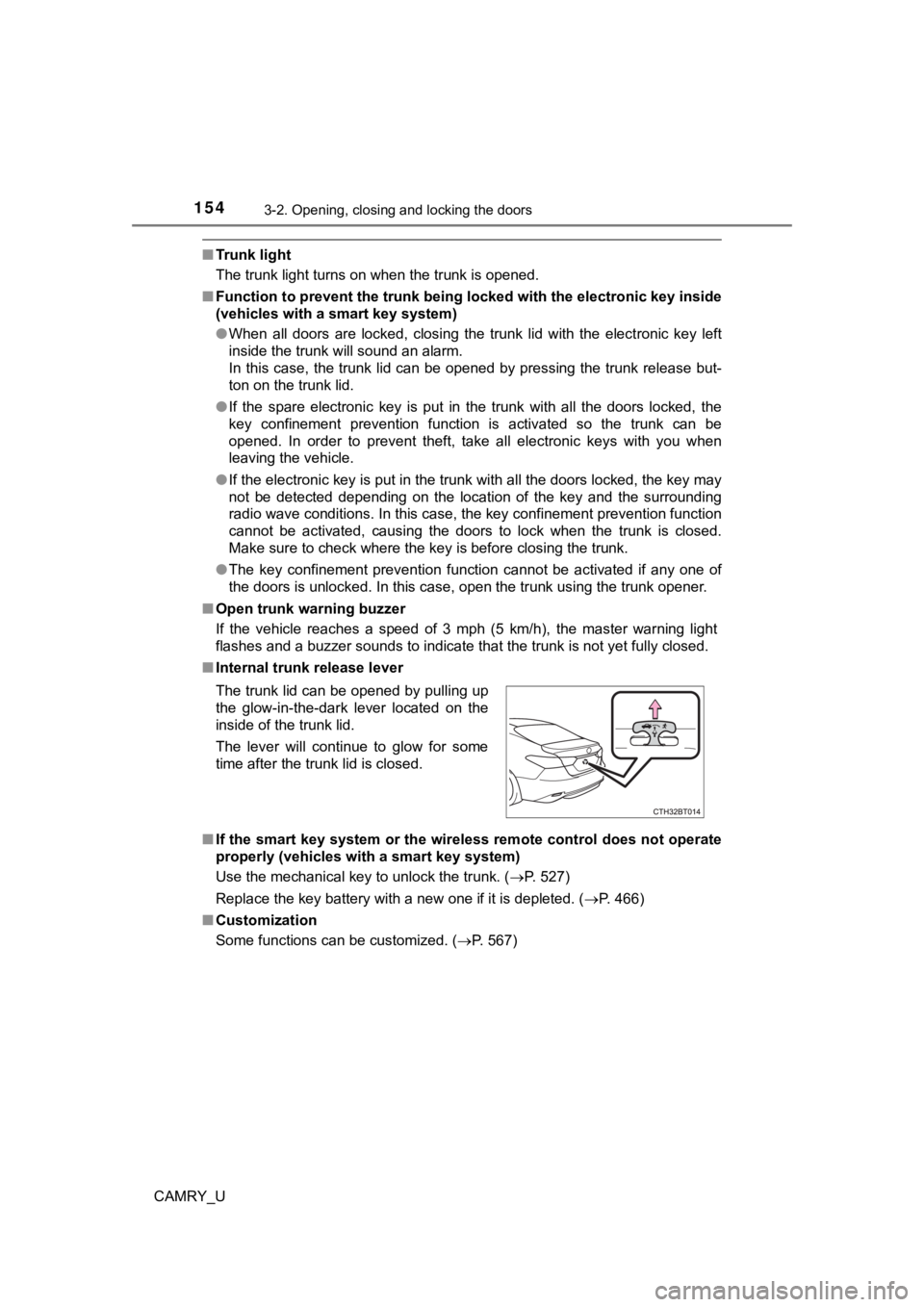
■ Internal trunk release lever
■ If the smart key system or the wireless remote control does not operate
properly (vehicles with a smart key system)
Use the mechanical key to unlock the trunk. ( P. 527)
Replace the key battery with a new one if it is depleted. ( P. 466)
■ Customization
Some functions can be customized. ( P. 567)
The trunk lid can be opened by pulling up
the glow-in-the-dark lever located on the
inside of the trunk lid.
The lever will continue to glow for some
time after the trunk lid is closed.
Page 156 of 612
1563-2. Opening, closing and locking the doors
CAMRY_U
WARNING
■Using the trunk
Observe the following precautions.
Failure to do so may cause parts of the body to be caught, resu lting in seri-
ous injury.
● Remove any heavy loads, such as snow and ice, from the trunk li d before
opening it. Failure to do so may cause the trunk lid to suddenl y shut again
after it is opened.
● When opening or closing the trunk lid, thoroughly check to make sure the
surrounding area is safe.
● If anyone is in the vicinity, make sure they are safe and let t hem know that
the trunk is about to open or close.
● Use caution when opening or closing the trunk lid in windy weat her as it
may move abruptly in strong wind.
● On an incline it is more difficult to open or close the trunk lid than on a level
surface, so beware of the trunk lid unexpectedly opening or clo sing by
itself. Make sure that the trunk lid is fully open and secure before using the
trunk.
● Do not attach any accessories other than genuine Toyota parts t o the trunk
lid. Such additional weight on the trunk lid may cause the lid to suddenly
shut again after it is opened.
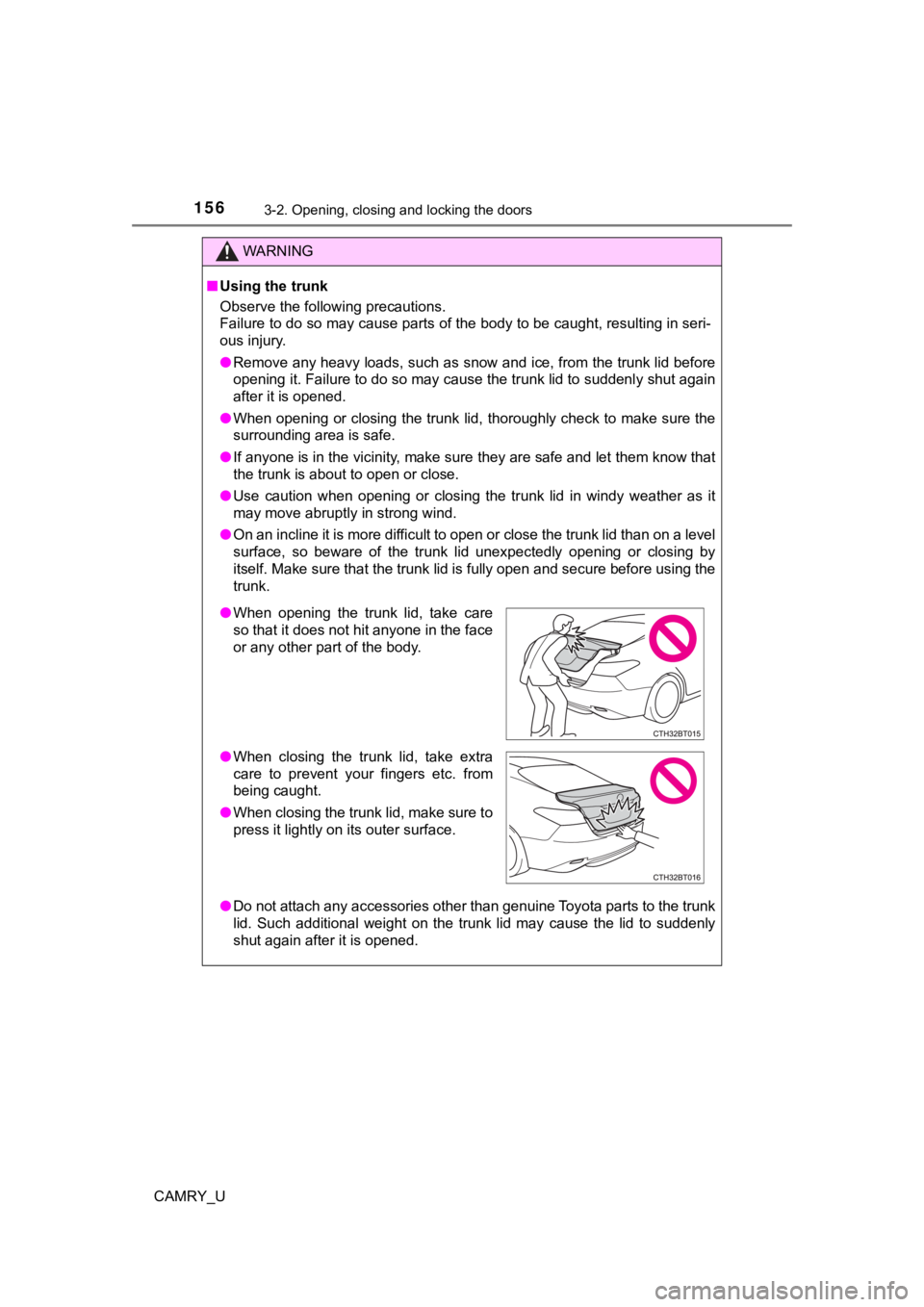
● When opening the trunk lid, take care
so that it does not hit anyone in the face
or any other part of the body.
● When closing the trunk lid, take extra
care to prevent your fingers etc. from
being caught.
● When closing the trunk lid, make sure to
press it lightly on its outer surface.
Page 161 of 612

1613-2. Opening, closing and locking the doors
3
Operation of each component
CAMRY_U●
If the wireless remote control is used to lock the doors when t he electronic
key is near the vehicle, there is a possibility that the door m ay not be
unlocked by the entry function. (Use the wireless remote contro l to unlock
the doors.)
● Touching the door lock sensor while wearing gloves may delay or prevent
lock operation. Remove the gloves and touch the lock sensor aga in.
● When the lock operation is performed using the lock sensor, rec ognition sig-
nals will be shown up to two consecutive times. After this, no recognition
signals will be given.
*
● If the door handle becomes wet while the electronic key is with in the effec-
tive range, the door may lock and unlock repeatedly. In this ca se, follow the
following correction procedures to wash the vehicle:
• Place the electronic key in a location 6 ft. (2 m) or more awa y from the
vehicle. (Take care to ensure that the key is not stolen.)
• Set the electronic key to battery-saving mode to disable the s mart key
system. ( P. 159)
● If the electronic key is inside the vehicle and a door handle b ecomes wet
during a car wash, a message may be shown on the multi-informat ion dis-
play and a buzzer will sound outside the vehicle. To turn off t he alarm, lock
all the doors.
● The lock sensor may not work properly if it comes into contact with ice,
snow, mud, etc. Clean the lock sensor and attempt to operate it again.
● A sudden approach to the effective range or door handle may prevent the
doors from being unlocked. In this case, return the door handle to the origi-
nal position and check that the doors unlock before pulling the door handle
again.
● If there is another electronic key in the detection area, it ma y take slightly
longer to unlock the doors after the door handle is gripped.
● Fingernails may scrape against the door during operation of the door han-
dle. Be careful not to injure fingernails or damage the surface of the door.
*: This setting can be customized at your Toyota dealer.
Page 174 of 612
1743-4. Adjusting the steering wheel and mirrors
CAMRY_U
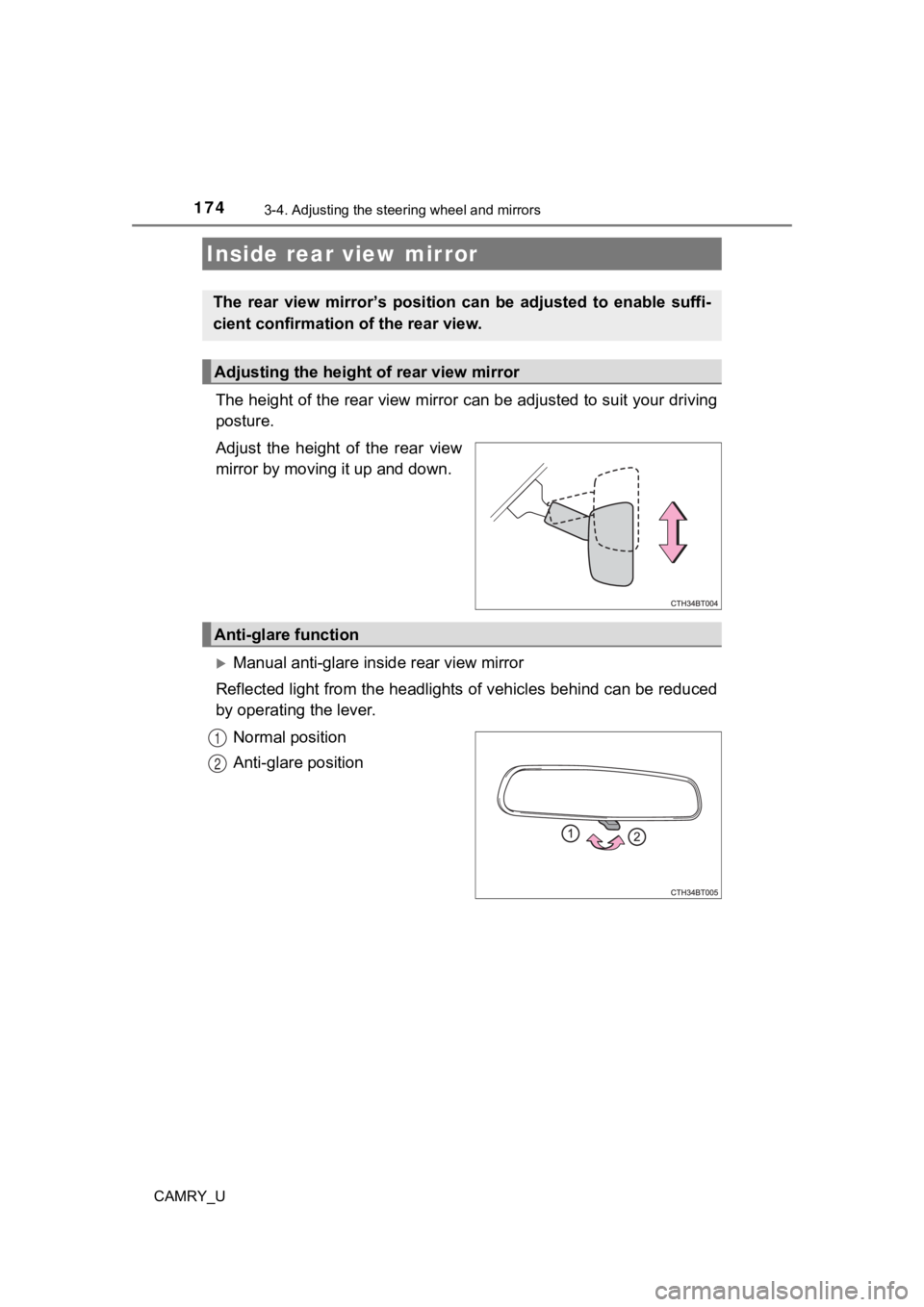
The height of the rear view mirror can be adjusted to suit your driving
posture.
Adjust the height of the rear view
mirror by moving it up and down.
Manual anti-glare inside rear view mirror
Reflected light from the headlights of vehicles behind can be r educed
by operating the lever.
Normal position
Anti-glare position
Inside rear view mirror
The rear view mirror’s position ca n be adjusted to enable suffi-
cient confirmation of the rear view.
Adjusting the height of rear view mirror
Anti-glare function
1
2
Page 175 of 612
1753-4. Adjusting the steering wheel and mirrors
3
Operation of each component
CAMRY_U
Auto anti-glare inside rear view mirror
Responding to the level of brightness of the headlights of vehi cles
behind, the reflected light is automatically reduced.
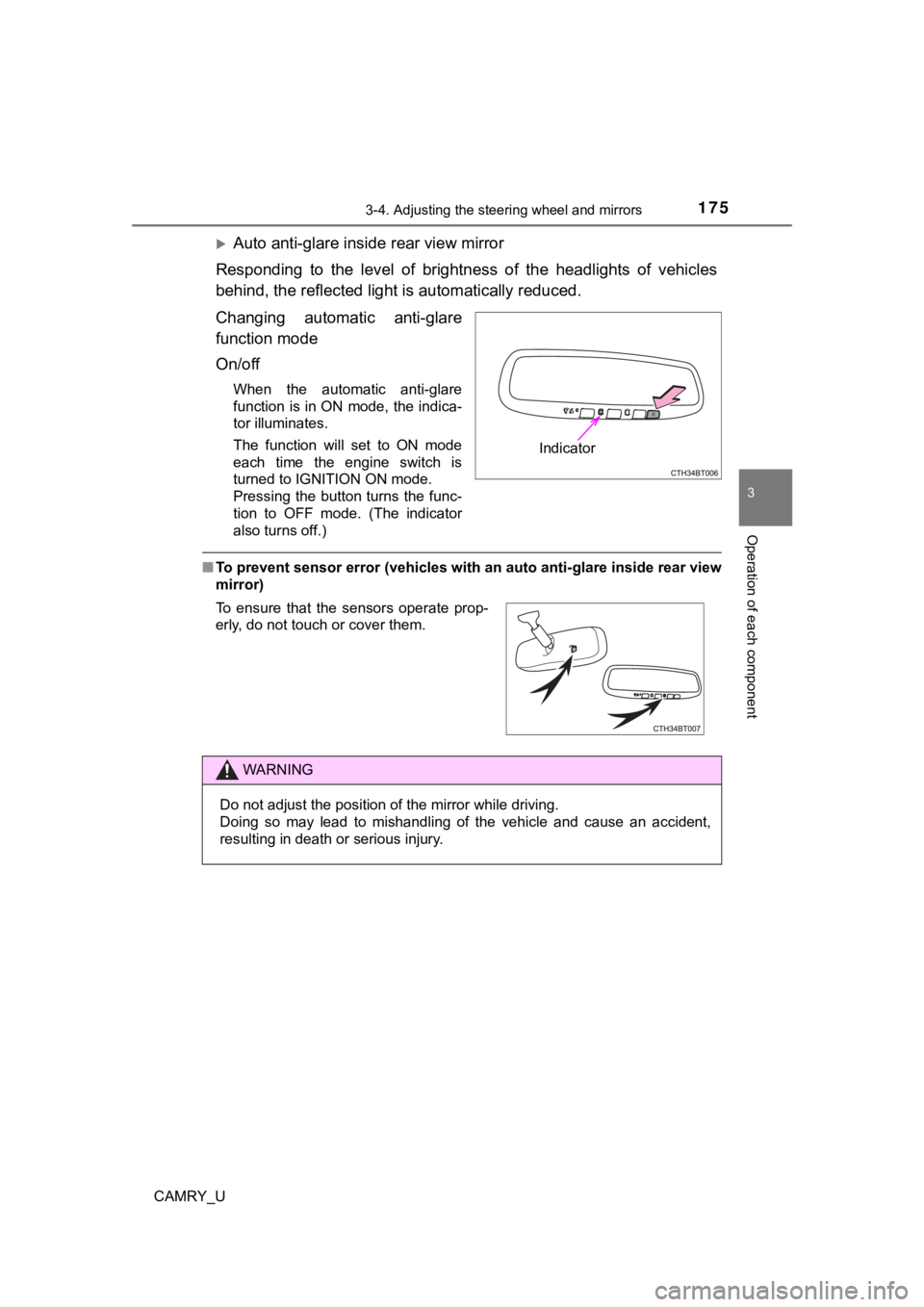
Changing automatic anti-glare
function mode
On/off
When the automatic anti-glare
function is in ON mode, the indica-
tor illuminates.
The function will set to ON mode
each time the engine switch is
turned to IGNITION ON mode.
Pressing the button turns the func-
tion to OFF mode. (The indicator
also turns off.)
■ To prevent sensor error (vehicles with an auto anti-glare insid e rear view
mirror)
Indicator
To ensure that the sensors operate prop-
erly, do not touch or cover them.
WARNING
Do not adjust the position of the mirror while driving.
Doing so may lead to mishandling of the vehicle and cause an ac cident,
resulting in death or serious injury.