interior lights TOYOTA CAMRY 2019 Owners Manual (in English)
[x] Cancel search | Manufacturer: TOYOTA, Model Year: 2019, Model line: CAMRY, Model: TOYOTA CAMRY 2019Pages: 612, PDF Size: 11.44 MB
Page 1 of 612

CAMRY_U
Pictorial indexSearch by illustration
1For safety
and securityMake sure to read through them
2Instrument
clusterHow to read the gauges and meters, the variety of
warning lights and indicators, etc.
3
Operation of
each
componentOpening and closing the doors and windows,
adjustment before driving, etc.
4DrivingOperations and advice which are necessary for
driving
5Interior featuresUsage of the interior features, etc.
6Maintenance
and careCaring for your vehicle and maintenance
procedures
7When trouble
arisesWhat to do in case of malfunction or emergency
8Vehicle
specificationsVehicle specifications, customizable features, etc.
9For ownersReporting safety defects for U.S. owners, and seat
belt and SRS airbag instructions for Canadian
owners
IndexSearch by symptom
Search alphabetically
Page 4 of 612

TABLE OF CONTENTS4
CAMRY_U4-5. Using the driving
support systems
Toyota Safety Sense P ..... 243
PCS (Pre-Collision System) .... 250
LDA (Lane Departure Alert with steering
control) ............................ 261
Dynamic radar cruise control with full-speed
range ............................... 271
Dynamic radar cruise control ............................. 285
Cruise control .................... 299
Driving assist systems....... 304
BSM (Blind Spot Monitor) ........ 310
• BSM function ................ 314
• RCTA function .............. 316
Rear Camera Detection Function .......................... 320
Intuitive parking assist ....... 324
Intelligent Clearance Sonar (ICS) ..................... 332
Driving mode select switches .......................... 353
4-6. Driving tips Winter driving tips.............. 355 5-1. Using the air
conditioning system
and defogger
Manual air conditioning system ......... 360
Automatic air conditioning system (without “SYNC”
button) ............................. 365
Automatic air conditioning system (with “SYNC”
button) ............................. 371
Seat heaters ...................... 379
5-2. Using the interior lights Interior lights list................. 380
• Interior lights.................. 381
• Personal lights............... 382
5-3. Using the storage features
List of storage features ...... 383
• Glove box ...................... 384
• Console box .................. 384
• Coin holder .................... 384
• Bottle holders ................ 385
• Cup holders ................... 386
• Auxiliary boxes .............. 387
• Open tray ...................... 388
Trunk features ................... 389
5Interior features
Page 22 of 612
22Pictorial index
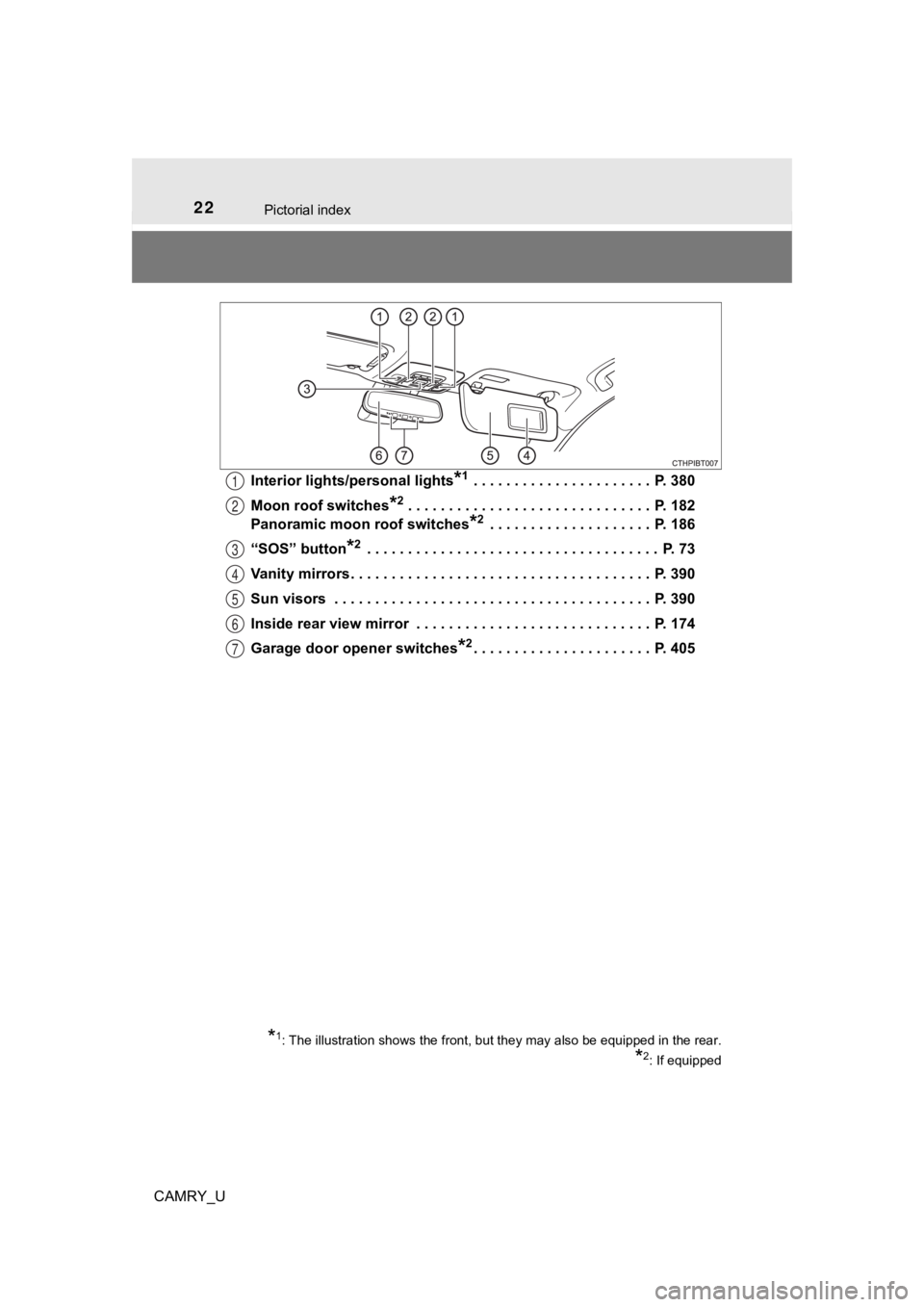
CAMRY_UInterior lights/personal lights
*1 . . . . . . . . . . . . . . . . . . . . . . P. 380
Moon roof switches
*2 . . . . . . . . . . . . . . . . . . . . . . . . . . . . . . P. 182
Panoramic moon roof switches
*2 . . . . . . . . . . . . . . . . . . . . P. 186
“SOS” button
*2 . . . . . . . . . . . . . . . . . . . . . . . . . . . . . . . . . . . . P. 73
Vanity mirrors . . . . . . . . . . . . . . . . . . . . . . . . . . . . . . . . . . . . . P. 390
Sun visors . . . . . . . . . . . . . . . . . . . . . . . . . . . . . . . . . . . . . . . P. 390
Inside rear view mirror . . . . . . . . . . . . . . . . . . . . . . . . . . . . . P. 174
Garage door opener switches
*2. . . . . . . . . . . . . . . . . . . . . . P. 405
1
2
3
4
5
6
7
*1: The illustration shows the front, but they may also be equipp ed in the rear.
*2: If equipped
Page 359 of 612

359
5Interior features
CAMRY_U5-1. Using the air
conditioning system
and defogger
Manual air conditioning system............................. 360
Automatic air conditioning system (without “SYNC”
button) ............................. 365
Automatic air conditioning system (with “SYNC”
button) ............................. 371
Seat heaters ...................... 379
5-2. Using the interior lights Interior lights list ................ 380
• Interior lights ................. 381
• Personal lights .............. 382
5-3. Using the storage features
List of storage features ..... 383
• Glove box...................... 384
• Console box .................. 384
• Coin holder ................... 384
• Bottle holders ................ 385
• Cup holders .................. 386
• Auxiliary boxes.............. 387
• Open tray ...................... 388
Trunk features ................... 389 5-4. Other interior features
Other interior features ....... 390
• Sun visors ..................... 390
• Vanity mirrors................ 390
• Power outlet .................. 391
• USB charging ports....... 392
• Wireless charger ........... 394
• Armrest ......................... 403
• Assist grips ................... 403
• Coat hooks.................... 404
Garage door opener.......... 405
Page 379 of 612
3795-1. Using the air conditioning system and defogger
5
Interior features
CAMRY_U
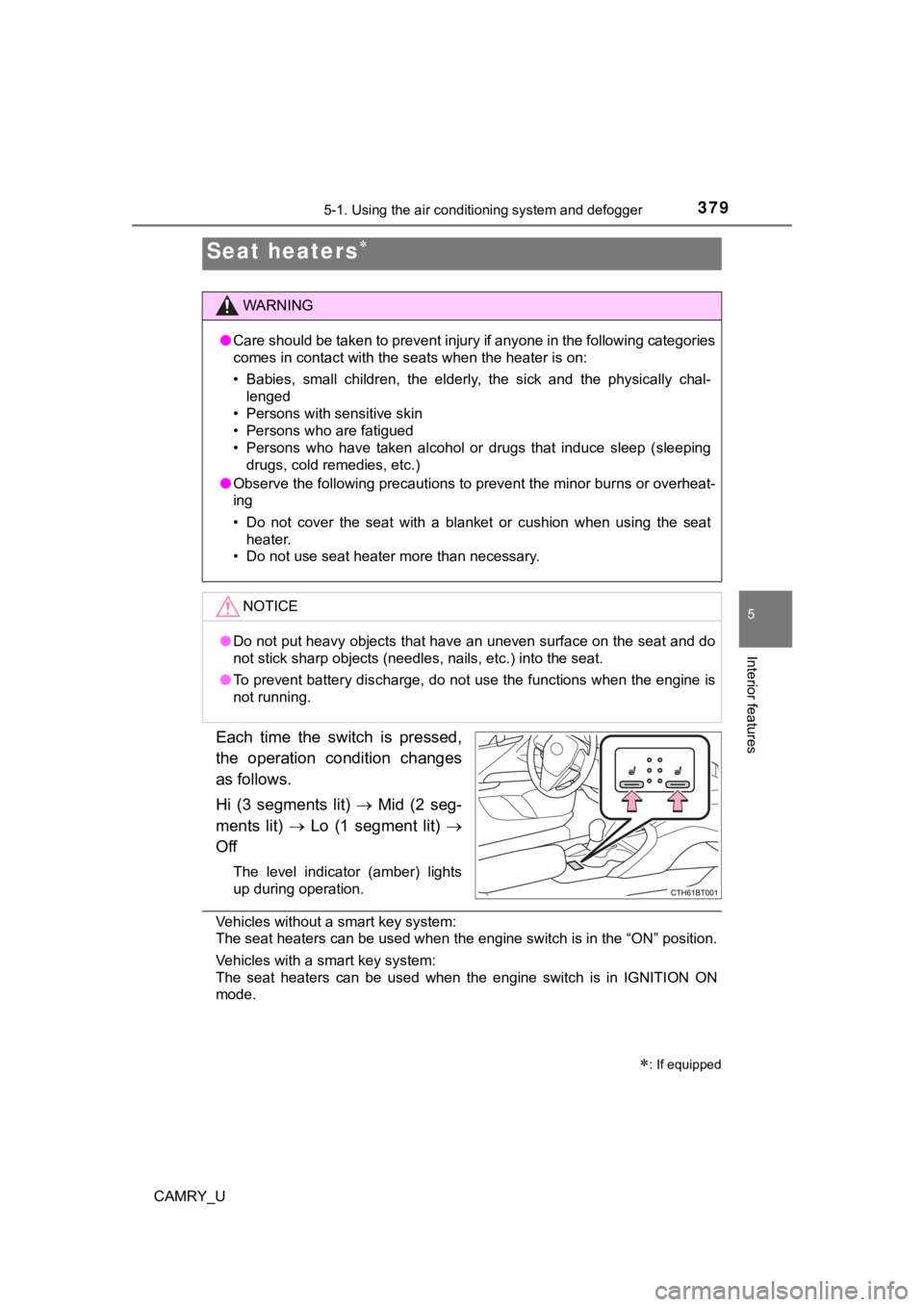
Each time the switch is pressed,
the operation condition changes
as follows.
Hi (3 segments lit) Mid (2 seg-
ments lit) Lo (1 segment lit)
Off
The level indicator (amber) lights
up during operation.
Vehicles without a smart key system:
The seat heaters can be used when the engine switch is in the “ ON” position.
Vehicles with a smart key system:
The seat heaters can be used when the engine switch is in IGNIT ION ON
mode.
Seat heaters
: If equipped
WARNING
● Care should be taken to prevent injury if anyone in the following categories
comes in contact with the seats when the heater is on:
• Babies, small children, the elderly, the sick and the physical ly chal-
lenged
• Persons with sensitive skin
• Persons who are fatigued
• Persons who have taken alcohol or drugs that induce sleep (sle eping
drugs, cold remedies, etc.)
● Observe the following precautions to prevent the minor burns or overheat-
ing
• Do not cover the seat with a blanket or cushion when using the seat
heater.
• Do not use seat heater more than necessary.
NOTICE
● Do not put heavy objects that have an uneven surface on the sea t and do
not stick sharp objects (needles, nails, etc.) into the seat.
● To prevent battery discharge, do not use the functions when the engine is
not running.
Page 380 of 612
380
CAMRY_U
5-2. Using the interior lights
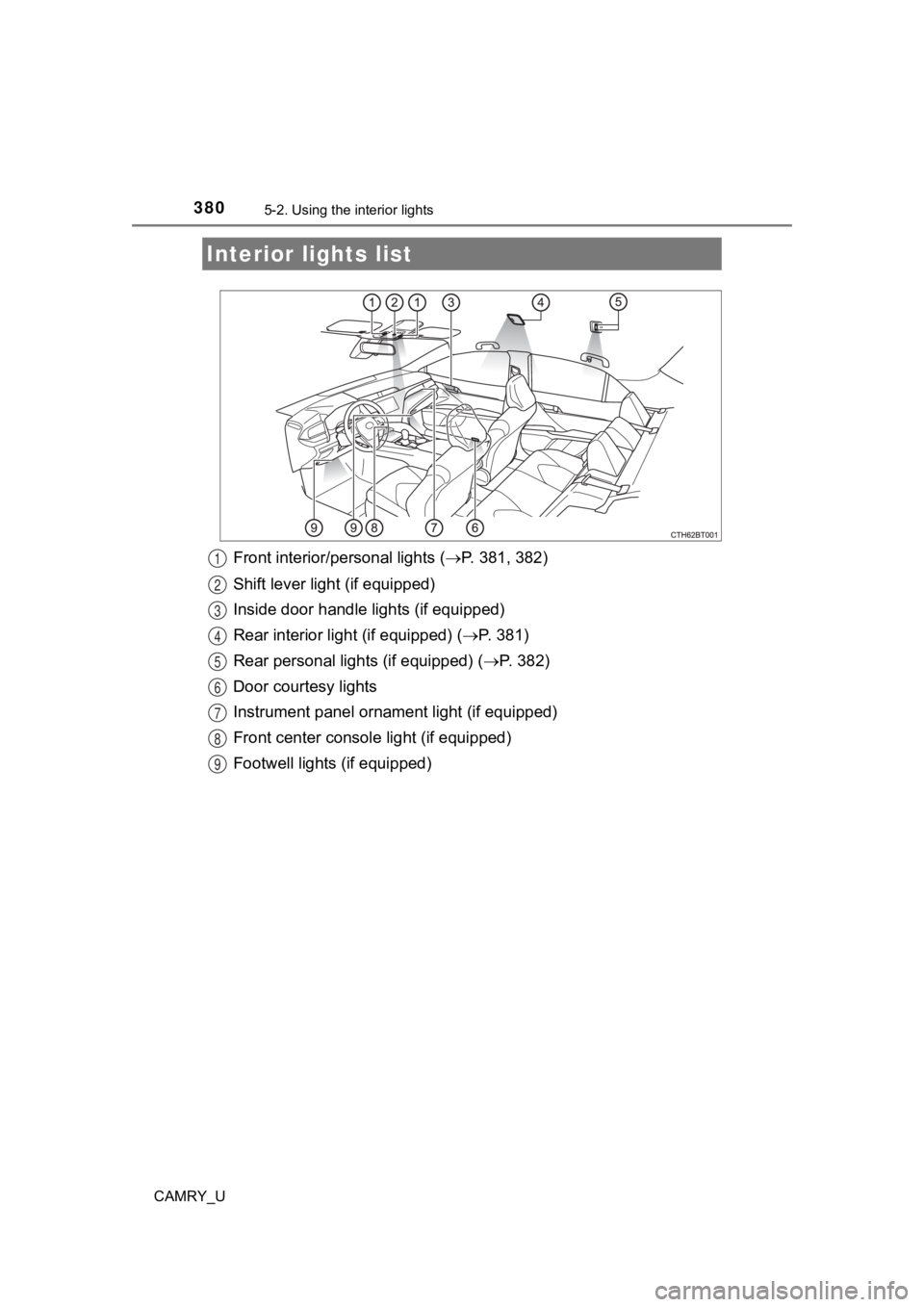
Front interior/personal lights ( P. 381, 382)
Shift lever light (if equipped)
Inside door handle lights (if equipped)
Rear interior light (if equipped) ( P. 381)
Rear personal lights (if equipped) ( P. 382)
Door courtesy lights
Instrument panel ornamen t light (if equipped)
Front center console light (if equipped)
Footwell lights (if equipped)
Interior lights list
1
2
3
4
5
6
7
8
9
Page 381 of 612
3815-2. Using the interior lights
CAMRY_U
5
Interior features
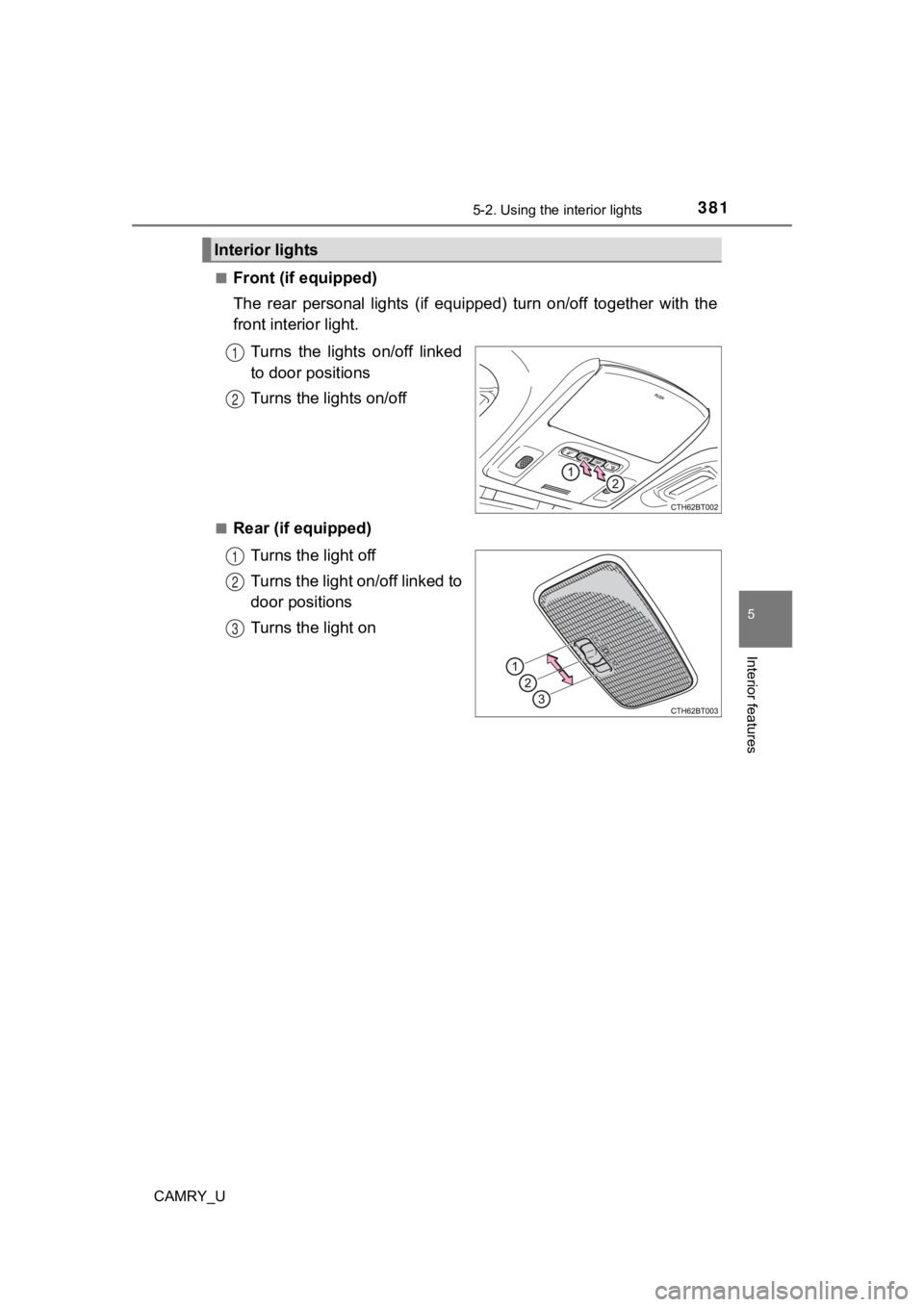
■Front (if equipped)
The rear personal lights (if equipped) turn on/off together with the
front interior light.
Turns the lights on/off linked
to door positions
Turns the lights on/off
■Rear (if equipped)Turns the light off
Turns the light on/off linked to
door positions
Turns the light on
Interior lights
1
2
1
2
3
Page 382 of 612
3825-2. Using the interior lights
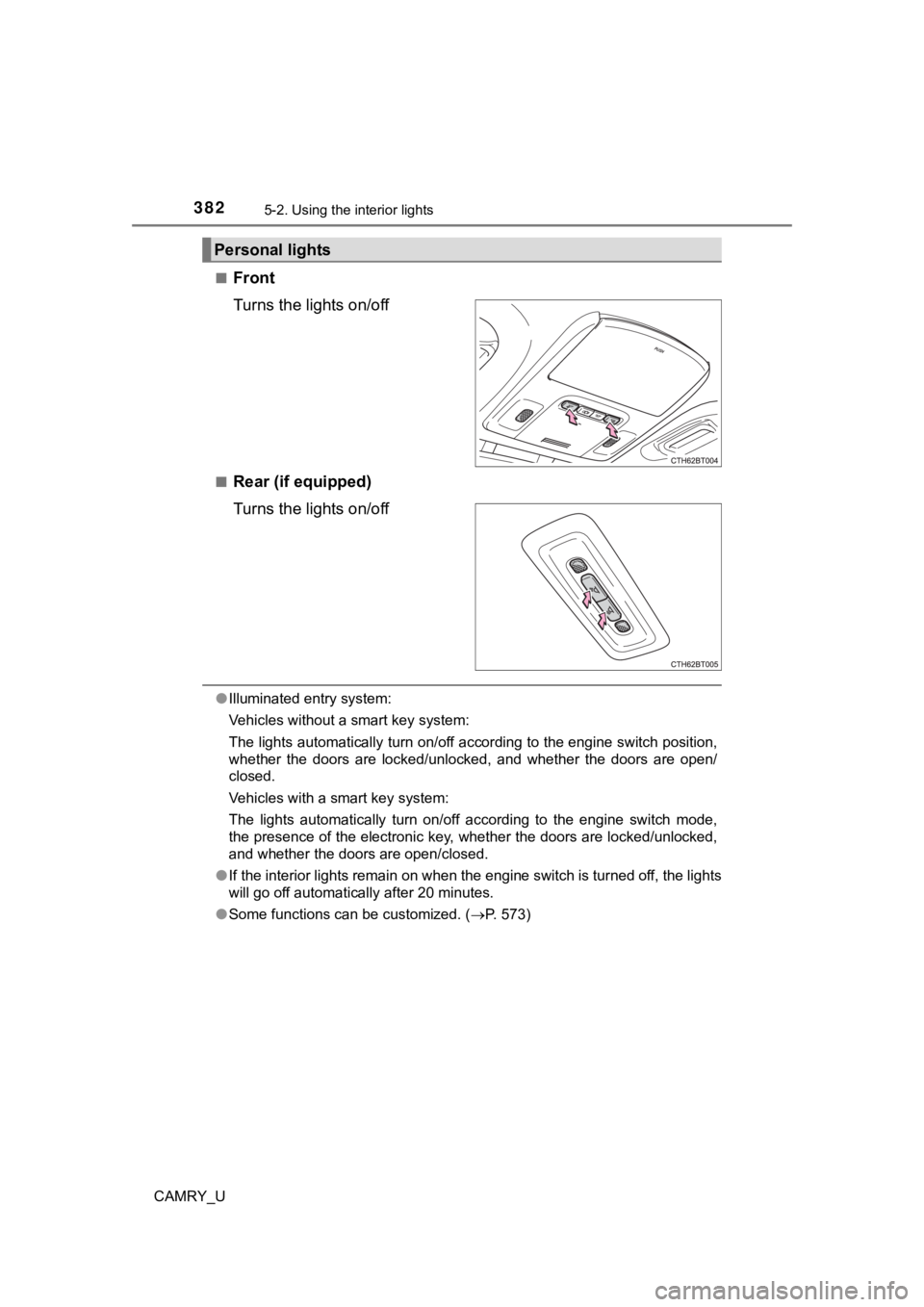
CAMRY_U■
Front
Turns the lights on/off
■Rear (if equipped)
Turns the lights on/off
●
Illuminated entry system:
Vehicles without a smart key system:
The lights automatically turn on/off according to the engine sw itch position,
whether the doors are locked/unlocked, and whether the doors ar e open/
closed.
Vehicles with a smart key system:
The lights automatically turn on/off according to the engine switch mode,
the presence of the electronic key, whether the doors are locke d/unlocked,
and whether the doors are open/closed.
● If the interior lights remain on when the engine switch is turn ed off, the lights
will go off automatically after 20 minutes.
● Some functions can be customized. ( P. 573)
Personal lights
Page 390 of 612
390
CAMRY_U
5-4. Other interior features
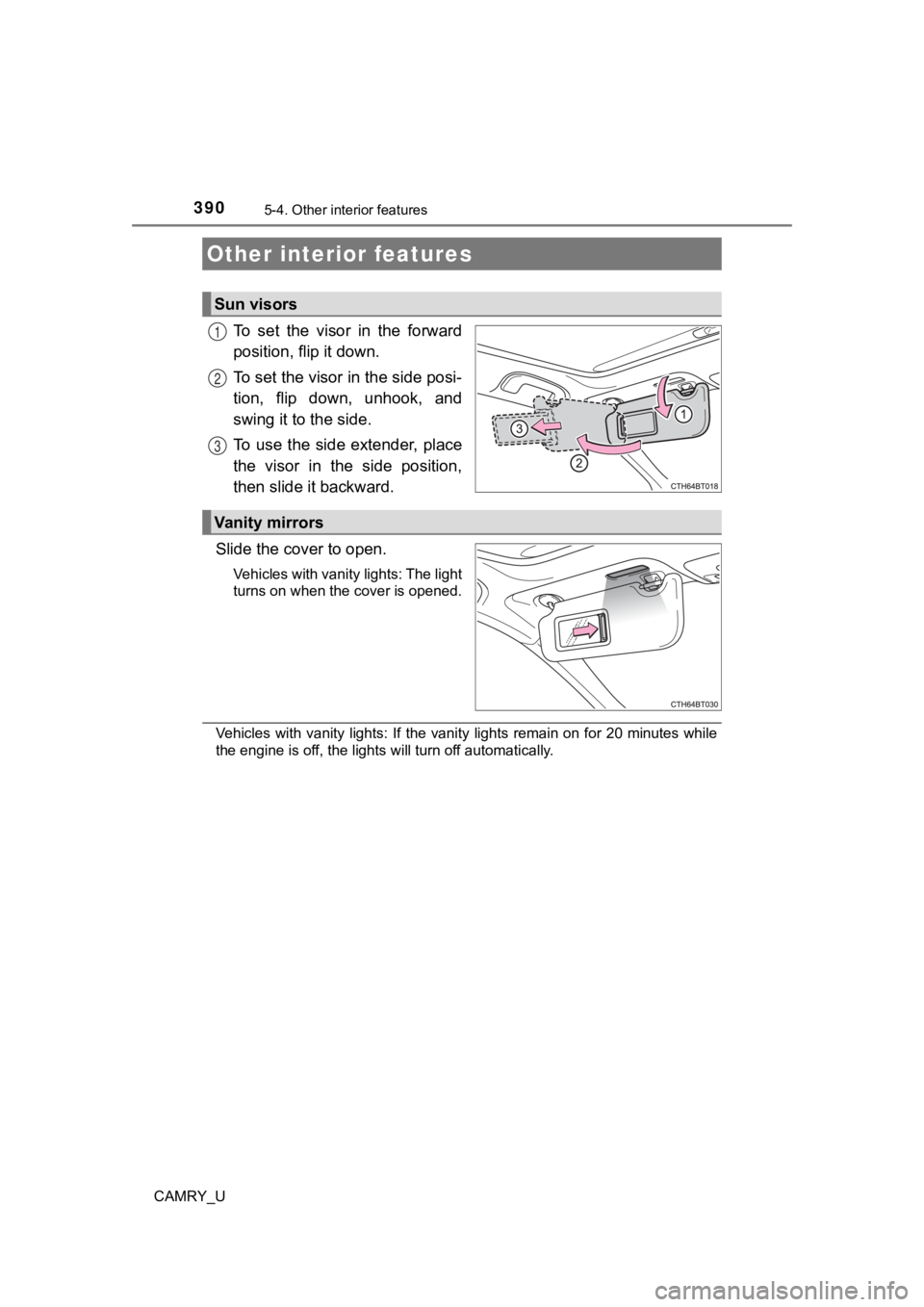
To set the visor in the forward
position, flip it down.
To set the visor in the side posi-
tion, flip down, unhook, and
swing it to the side.
To use the side extender, place
the visor in the side position,
then slide it backward.
Slide the cover to open.
Vehicles with vanity lights: The light
turns on when the cover is opened.
Vehicles with vanity lights: If the vanity lights remain on for 20 minutes while
the engine is off, the lights will turn off automatically.
Other interior features
Sun visors
1
2
3
Vanity mirrors
Page 396 of 612
3965-4. Other interior features
CAMRY_U■
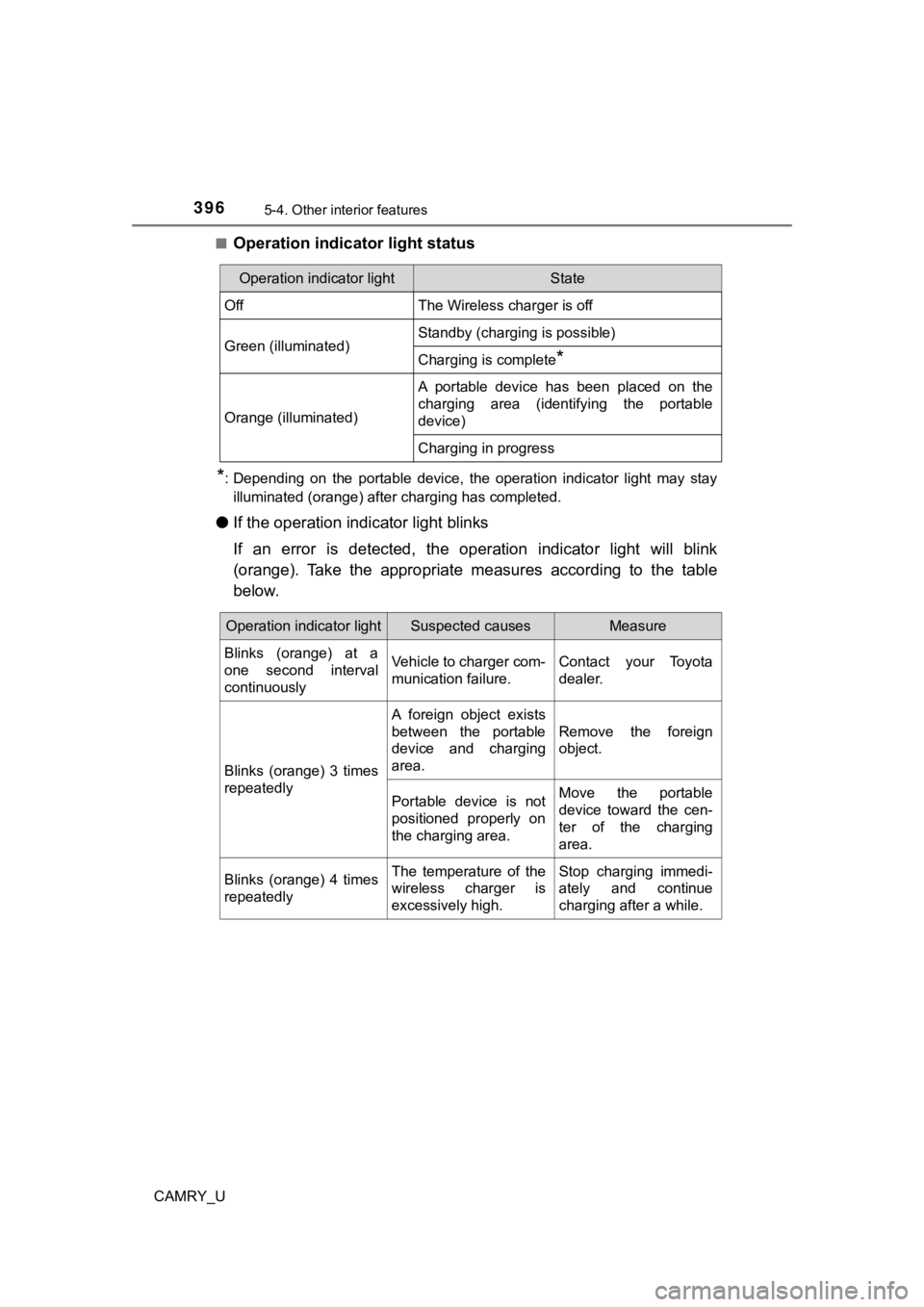
Operation indicator light status
*: Depending on the portable device, the operation indicator ligh
t may stay
illuminated (orange) after charging has completed.
● If the operation indi cator light blinks
If an error is detected, the operation indicator light will bli nk
(orange). Take the appropriate measures according to the table
below.
Operation indicator lightState
OffThe Wireless charger is off
Green (illuminated)Standby (charging is possible)
Charging is complete*
Orange (illuminated)
A portable device has been placed on the
charging area (identifying the portable
device)
Charging in progress
Operation indicator lightSuspected causesMeasure
Blinks (orange) at a
one second interval
continuously Vehicle to charger com-
munication failure.
Contact your Toyota
dealer.
Blinks (orange) 3 times
repeatedly A foreign object exists
between the portable
device and charging
area.
Remove the foreign
object.
Portable device is not
positioned properly on
the charging area. Move the portable
device toward the cen-
ter of the charging
area.
Blinks (orange) 4 times
repeatedly The temperature of the
wireless charger is
excessively high.Stop charging immedi-
ately and continue
charging after a while.