warning light TOYOTA CAMRY 2020 (in English) Workshop Manual
[x] Cancel search | Manufacturer: TOYOTA, Model Year: 2020, Model line: CAMRY, Model: TOYOTA CAMRY 2020Pages: 620, PDF Size: 12.95 MB
Page 305 of 620
3054-5. Using the driving support systems
4
Driving
CAMRY_U
■Turning off both TRAC and VSC systems
To turn the TRAC and VSC systems off, press and hold for more than 3
seconds while the vehicle is stopped.
The VSC OFF indicator light will come on and the “Traction Cont rol Turned
Off” will be shown on the multi-information display
*.
Press again to turn the systems back on.
*: On vehicles with pre-collision system, pre-collision brake ass ist and pre-
collision braking will also be disabled. The pre-collision syst em warning
light will come on and the message will be shown on the multi-i nformation
display. ( P. 2 5 8 )
■ When the message is displayed on the multi-information display show-
ing that TRAC has been disabled even if has not been pressed
TRAC is temporary deactivated. If the information continues to show, contact
your Toyota dealer.
■ Operating conditions of hill-start assist control
When the following four conditions are met, the hill-start assi st control will
operate:
● The shift lever is in a position other than P or N (when starting off forward/
backward on an upward incline)
● The vehicle is stopped
● The accelerator pedal is not depressed
● The parking brake is not engaged
■ Automatic system cancelation of hill-start assist control
The hill-start assist control will turn off in any of the following situations:
● The shift lever is shifted to P or N
● The accelerator pedal is depressed
● The parking brake is engaged
● 2 seconds at maximum elapsed after the brake pedal is released
Page 309 of 620

3094-5. Using the driving support systems
4
Driving
CAMRY_U
WARNING
■Hill- start assist control does not operate effectively when
● Do not overly rely on hill-start assist control. Hill-start ass ist control may
not operate effectively on steep inclines and roads covered wit h ice.
● Unlike the parking brake, hill-start assist control is not inte nded to hold the
vehicle stationary for an extended period of time. Do not attempt to use
hill-start assist control to hold the vehicle on an incline, as doing so may
lead to an accident.
■ When the TRAC/VSC is activated
The slip indicator light flashes. Always drive carefully. Reckless driving may
cause an accident. Exercise particular care when the indicator light flashes.
■ When the TRAC/VSC systems are turned off
Be especially careful and drive at a speed appropriate to the r oad condi-
tions. As these are the systems to help ensure vehicle stabilit y and driving
force, do not turn the TRAC/VSC systems off unless necessary.
■ Secondary Collision Brake
Do not overly rely solely upon the Secondary Collision Brake. T his system
is designed to help reduce the possibility of further damage du e to a sec-
ondary collision, however, that effect changes according to var ious condi-
tions. Overly relying on the system may result in death or seri ous injury.
■ Replacing tires
Make sure that all tires are of the specified size, brand, trea d pattern and
total load capacity. In addition, make sure that the tires are inflated to the
recommended tire inflation pressure level.
The ABS, TRAC and VSC systems will not function correctly if di fferent tires
are installed on the vehicle.
Contact your Toyota dealer for further information when replaci ng tires or
wheels.
■ Handling of tires and the suspension
Using tires with any kind of problem or modifying the suspensio n will affect
the driving assist systems, and may cause a system to malfuncti on.
Page 313 of 620
3134-5. Using the driving support systems
4
Driving
CAMRY_U
WARNING
■Handling the radar sensor
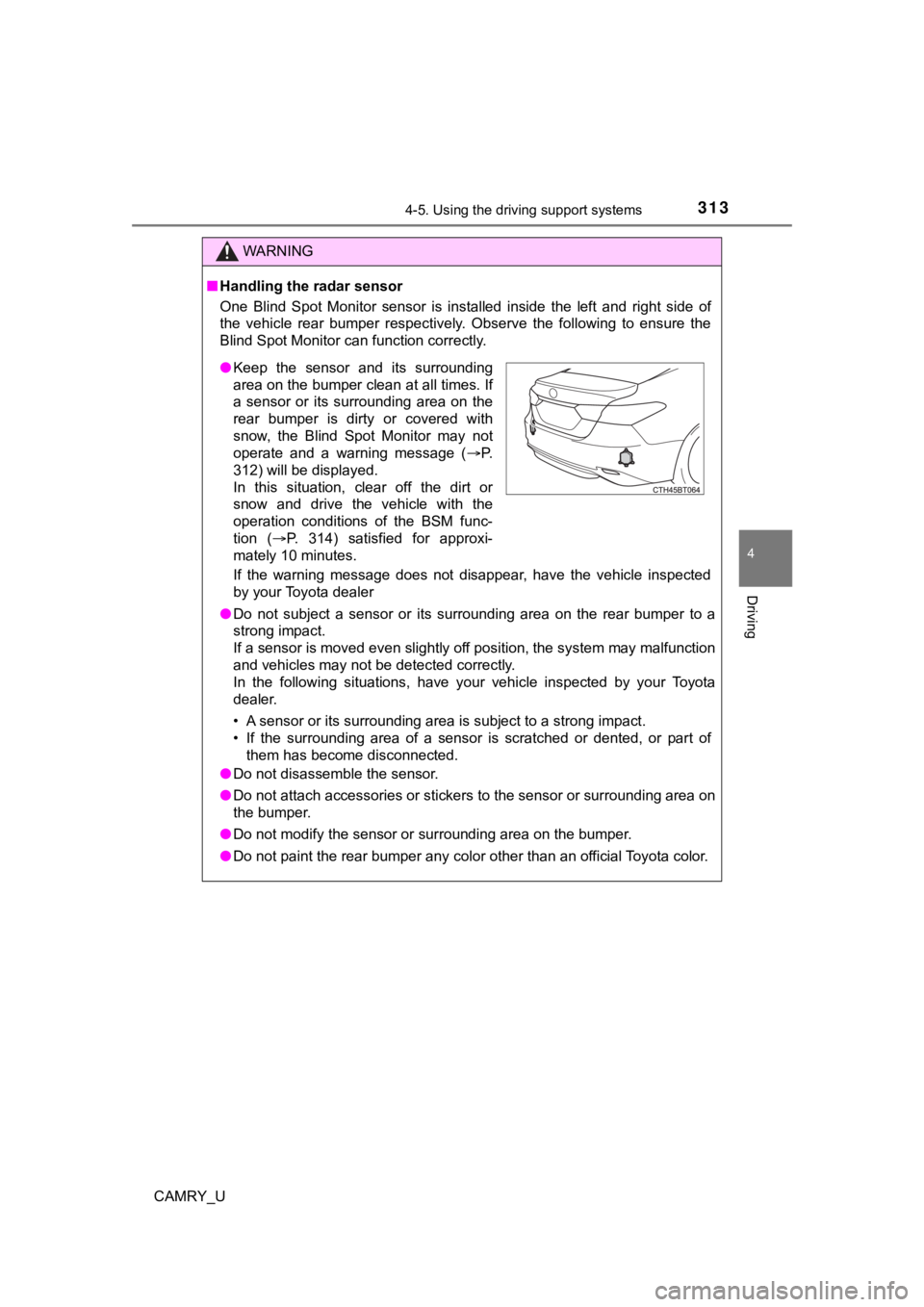
One Blind Spot Monitor sensor is installed inside the left and right side of
the vehicle rear bumper respectively. Observe the following to ensure the
Blind Spot Monitor can function correctly.
If the warning message does not disappear, have the vehicle inspected
by your Toyota dealer
● Do not subject a sensor or its surrounding area on the rear bum per to a
strong impact.
If a sensor is moved even slightly off position, the system may malfunction
and vehicles may not be detected correctly.
In the following situations, have your vehicle inspected by your Toyota
dealer.
• A sensor or its surrounding area is subject to a strong impact .
• If the surrounding area of a sensor is scratched or dented, or part of
them has become disconnected.
● Do not disassemble the sensor.
● Do not attach accessories or stickers to the sensor or surround ing area on
the bumper.
● Do not modify the sensor or surrounding area on the bumper.
● Do not paint the rear bumper any color other than an official Toyota color.
●Keep the sensor and its surrounding
area on the bumper clean at all times. If
a sensor or its surrounding area on the
rear bumper is dirty or covered with
snow, the Blind Spot Monitor may not
operate and a warning message ( P.
312) will be displayed.
In this situation, clear off the dirt or
snow and drive the vehicle with the
operation conditions of the BSM func-
tion ( P. 314) satisfied for approxi-
mately 10 minutes.
Page 330 of 620

3304-5. Using the driving support systems
CAMRY_U
WARNING
■Sensors
Certain vehicle conditions and the surrounding environment may affect the
ability of a sensor to correctly detect an object. Particular instances where
this may occur are listed below.
● There is dirt, snow or ice on the sensor. (Wiping the sensors w ill resolve
this problem.)
● The sensor is frozen. (Thawing the area will resolve this probl em.)
In especially cold weather, if a sensor is frozen the screen ma y show an
abnormal display, or objects may not be detected.
● The sensor is covered in any way.
● The vehicle is leaning considerably to one side.
● On an extremely bumpy road, on an incline, on gravel, or on grass.
● The vicinity of the vehicle is noisy due to vehicle horns, moto rcycle
engines, air brakes of large vehicles, or other loud noises pro ducing ultra-
sonic waves.
● There is another vehicle equipped with parking assist sensors i n the vicin-
ity.
● The sensor is coated with a sheet of spray or heavy rain.
● The sensor is drenched with water on a flooded road.
● The vehicle is equipped with a fender pole or wireless antenna.
● Towing eyelets are installed.
● The bumper or sensor receives a strong impact.
● The vehicle is approaching a tall or curved curb.
● The detection range is reduced due to an object such as a sign.
● In harsh sunlight or intense cold weather.
● The area directly under the bumpers is not detected.
● If objects draw too close to the sensor.
● A non-genuine Toyota suspension (lowered suspension, etc.) is i nstalled.
● A backlit license plate is installed.
In addition to the examples above, there are instances in which , because of
their shape, signs and other objects may be judged by a sensor to be closer
than they are.
Page 386 of 620
386
CAMRY_U
5-3. Using the storage features
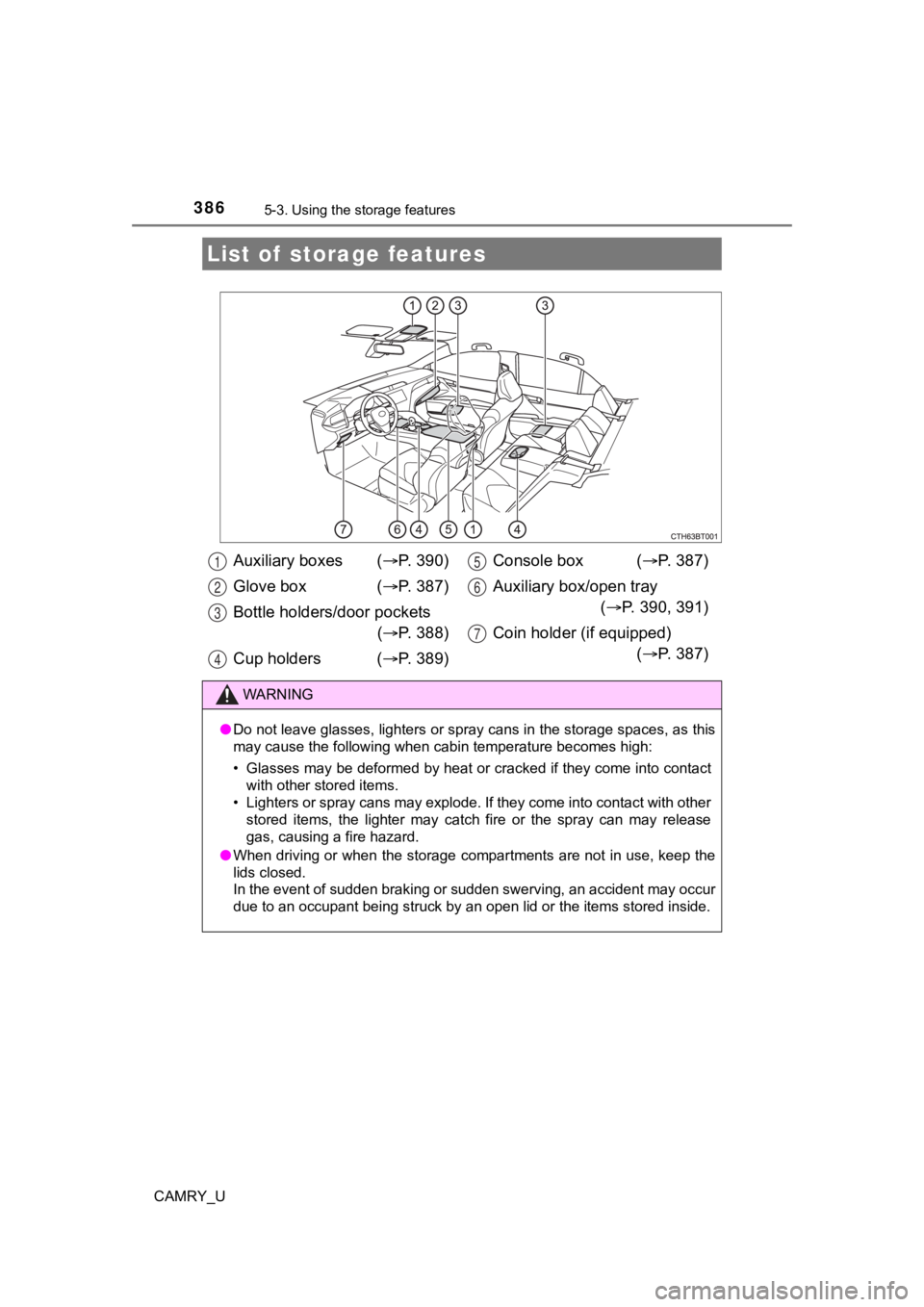
List of storage features
Auxiliary boxes ( P. 3 9 0 )
Glove box ( P. 3 8 7 )
Bottle holders/door pockets ( P. 3 8 8 )
Cup holders ( P. 3 8 9 ) Console box (
P. 387)
Auxiliary box/open tray ( P. 390, 391)
Coin holder (if equipped) ( P. 387)
WARNING
●Do not leave glasses, lighters or spray cans in the storage spa ces, as this
may cause the following when cabin temperature becomes high:
• Glasses may be deformed by heat or cracked if they come into c ontact
with other stored items.
• Lighters or spray cans may explode. If they come into contact with other
stored items, the lighter may catch fire or the spray can may r elease
gas, causing a fire hazard.
● When driving or when the storage compartments are not in use, k eep the
lids closed.
In the event of sudden braking or sudden swerving, an accident may occur
due to an occupant being struck by an open lid or the items sto red inside.
1
2
3
4
5
6
7
Page 432 of 620
4326-3. Do-it-yourself maintenance
CAMRY_U
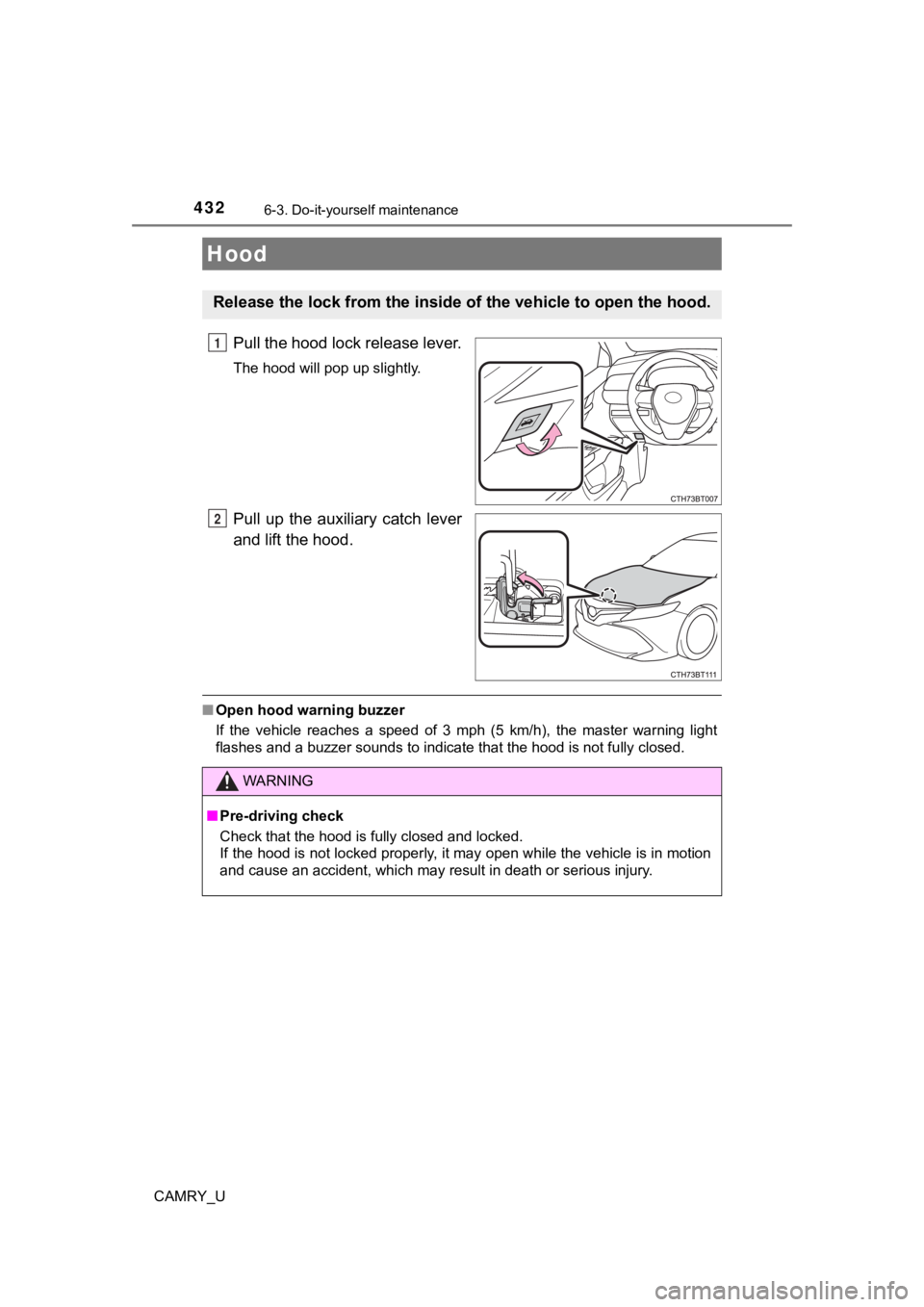
Pull the hood lock release lever.
The hood will pop up slightly.
Pull up the auxiliary catch lever
and lift the hood.
■Open hood warning buzzer
If the vehicle reaches a speed of 3 mph (5 km/h), the master warning light
flashes and a buzzer sounds to indicate that the hood is not fu lly closed.
Hood
Release the lock from the inside of the vehicle to open the hoo d.
1
2
WARNING
■Pre-driving check
Check that the hood is fully closed and locked.
If the hood is not locked properly, it may open while the vehic le is in motion
and cause an accident, which may result in death or serious inj ury.
Page 441 of 620
4416-3. Do-it-yourself maintenance
CAMRY_U
6
Maintenance and care
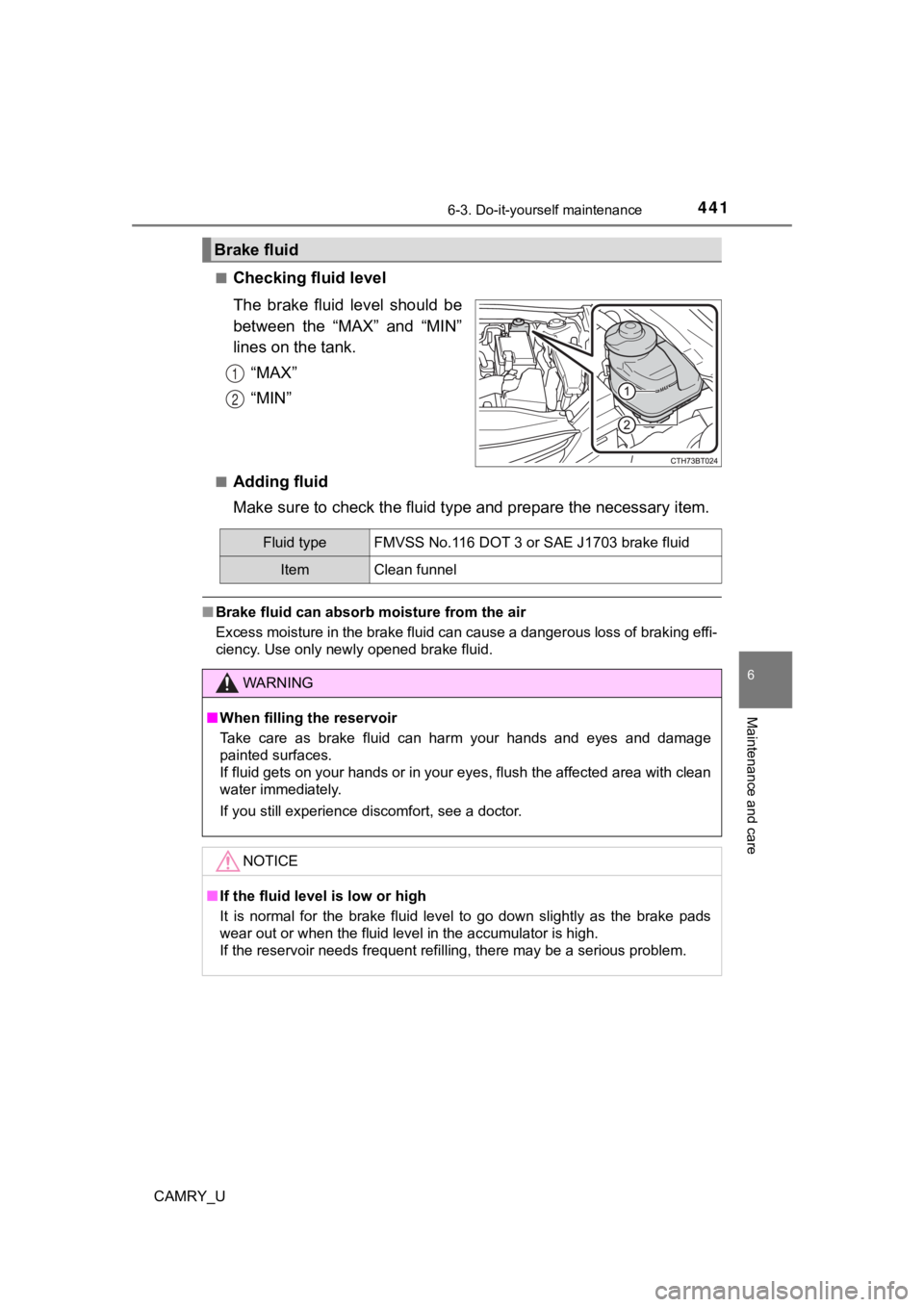
■Checking fluid level
The brake fluid level should be
between the “MAX” and “MIN”
lines on the tank.“MAX”
“MIN”
■Adding fluid
Make sure to check the fluid ty pe and prepare the necessary ite m.
■Brake fluid can absorb moisture from the air
Excess moisture in the brake fluid can cause a dangerous loss o f braking effi-
ciency. Use only newly opened brake fluid.
Brake fluid
1
2
Fluid type FMVSS No.116 DOT 3 or SAE J1703 brake fluid
ItemClean funnel
WARNING
■ When filling the reservoir
Take care as brake fluid can harm your hands and eyes and damag e
painted surfaces.
If fluid gets on your hands or in your eyes, flush the affected area with clean
water immediately.
If you still experience discomfort, see a doctor.
NOTICE
■ If the fluid level is low or high
It is normal for the brake fluid level to go down slightly as t he brake pads
wear out or when the fluid level in the accumulator is high.
If the reservoir needs frequent refilling, there may be a serio us problem.
Page 443 of 620
4436-3. Do-it-yourself maintenance
CAMRY_U
6
Maintenance and care
■Before recharging
When recharging, the battery produces hydrogen gas which is flammable and
explosive. Therefore, observe the following before recharging:
●If recharging with the battery installed on the vehicle, be sur e to disconnect
the ground cable.
● Make sure the power switch on the charger is off when connectin g and dis-
connecting the charger cables to the battery.
■ After recharging/reconnecting the battery (vehicles with a smar t key sys-
tem)
● Unlocking the doors using the smart key system may not be possi ble imme-
diately after reconnecting the battery. If this happens, use the wireless
remote control or the mechanical key to lock/unlock the doors.
● Start the engine with the engine switch in ACCESSORY mode. The engine
may not start with the engine switch turned off. However, the e ngine will
operate normally from the second attempt.
● The engine switch mode is recorded by the vehicle. If the batte ry is recon-
nected, the vehicle will return the engine switch mode to the s tatus it was in
before the battery was disconnected. Make sure to turn off the engine
before disconnecting the battery. Take extra care when connecti ng the bat-
tery if the engine switch mode prior to discharge is unknown.
If the system will not start even after multiple attempts, contact your Toyota
dealer.
WARNING
■ Chemicals in the battery
Batteries contain poisonous and corrosive sulfuric acid and may produce
hydrogen gas which is flammable and explosive. To reduce the ri sk of death
or serious injury, take the following precautions while working on or near the
battery:
● Do not cause sparks by touching the battery terminals with tool s.
● Do not smoke or light a match near the battery.
● Avoid contact with eyes, skin and clothes.
● Never inhale or swallow electrolyte.
● Wear protective safety glasses when working near the battery.
● Keep children away from the battery.
■ Where to safely charge the battery
Always charge the battery in an open area. Do not charge the ba ttery in a
garage or closed room where there is insufficient ventilation.
Page 447 of 620
4476-3. Do-it-yourself maintenance
CAMRY_U
6
Maintenance and care
Your vehicle is equipped with a tire pressure warning system that uses
tire pressure warning valve and t ransmitters to detect low tire inflation
pressure before serious problems arise.
Vehicles without a tire inflat ion pressure display function
If the tire pressure drops below a predetermined level, the dri ver is
warned by a warning light. ( P. 503)
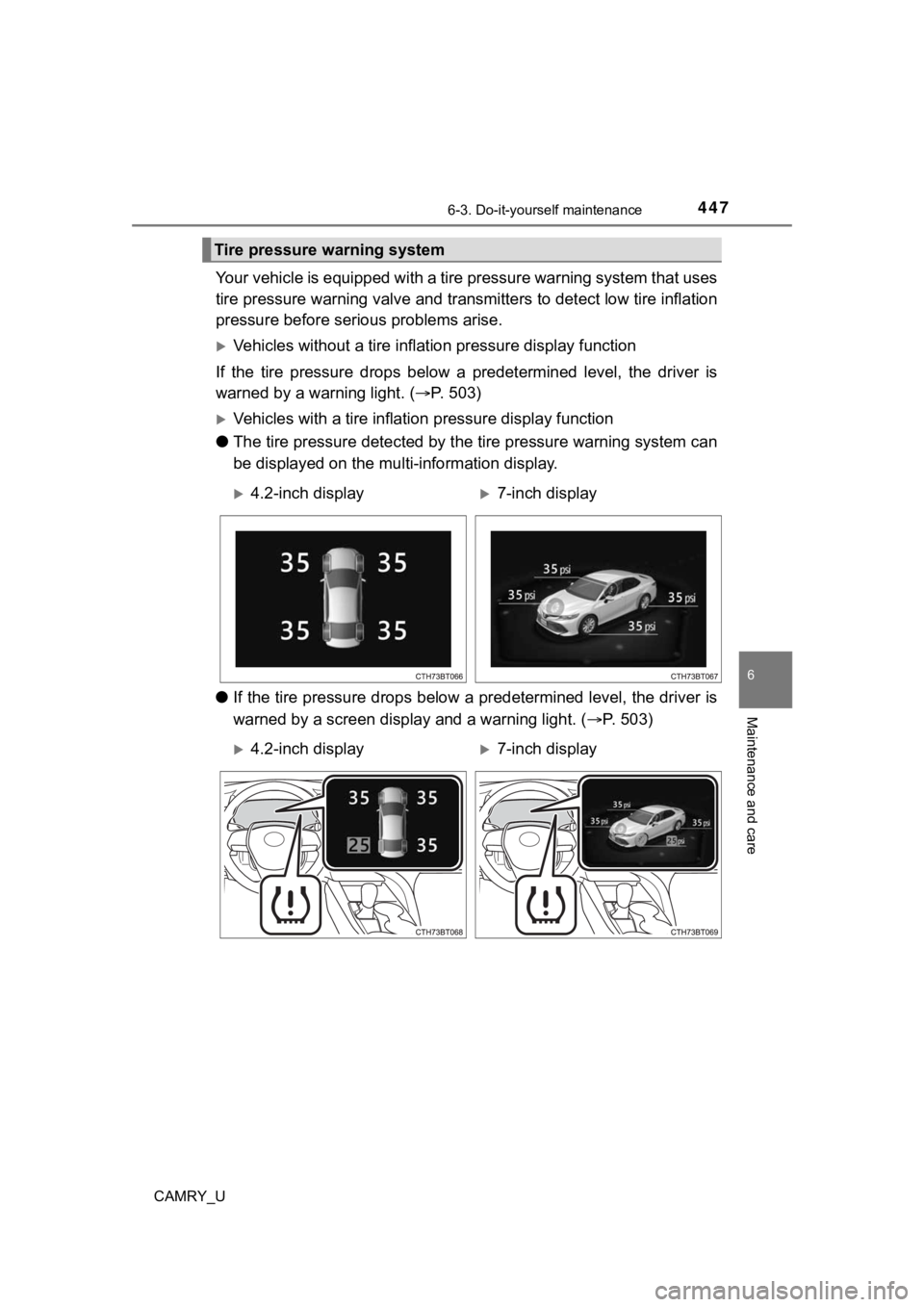
Vehicles with a tire inflation pressure display function
● The tire pressure detected by th e tire pressure warning system can
be displayed on the mul ti-information display.
● If the tire pressure drops below a predetermined level, the dri ver is
warned by a screen display and a warning light. ( P. 5 0 3 )
Tire pressure warning system
4.2-inch display7-inch display
4.2-inch display7-inch display
Page 449 of 620
4496-3. Do-it-yourself maintenance
CAMRY_U
6
Maintenance and care
4.2-inch display: Select “Vehicle Settings” and then press .
7-inch display: Select and then press and hold .
Select “TPWS” and then press .
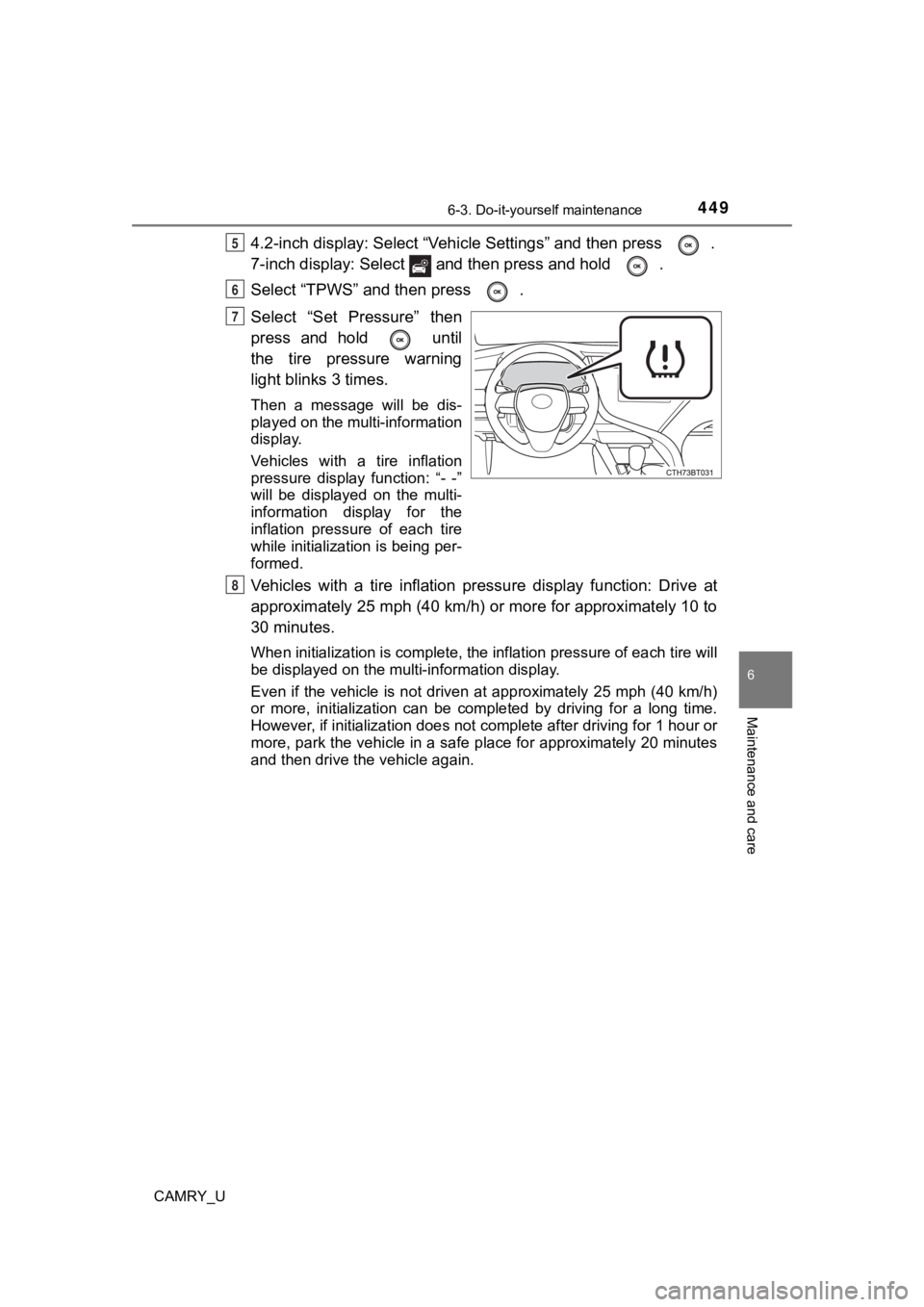
Select “Set Pressure” then
press and hold until
the tire pressure warning
light blinks 3 times.
Then a message will be dis-
played on the multi-information
display.
Vehicles with a tire inflation
pressure display function: “- -”
will be displayed on the multi-
information display for the
inflation pressure of each tire
while initialization is being per-
formed.
Vehicles with a tire inflation pr essure display function: Drive at
approximately 25 mph (40 km/h) or more for approximately 10 to
30 minutes.
When initialization is complete, the inflation pressure of each tire will
be displayed on the multi-information display.
Even if the vehicle is not driven at approximately 25 mph (40 k m/h)
or more, initialization can be completed by driving for a long time.
However, if initialization does not complete after driving for 1 hour or
more, park the vehicle in a safe place for approximately 20 min utes
and then drive the vehicle again.
5
6
7
8