air conditioning TOYOTA CAMRY 2020 Owners Manual (in English)
[x] Cancel search | Manufacturer: TOYOTA, Model Year: 2020, Model line: CAMRY, Model: TOYOTA CAMRY 2020Pages: 620, PDF Size: 12.95 MB
Page 4 of 620

TABLE OF CONTENTS4
CAMRY_U4-5. Using the driving
support systems
Toyota Safety Sense P ..... 243
PCS (Pre-Collision System) .... 249
LDA (Lane Departure Alert
with steering control) ....... 259
Dynamic radar cruise control with full-speed
range ............................... 269
Dynamic radar cruise control ............................. 283
Cruise control .................... 297
Driving assist systems....... 302
BSM (Blind Spot Monitor) ........ 310
• BSM function ................ 314
• RCTA function .............. 316
Rear Camera Detection Function .......................... 320
Intuitive parking assist ....... 324
Intelligent Clearance Sonar (ICS) ..................... 332
Driving mode select switches .......................... 353
4-6. Driving tips Winter driving tips.............. 355 5-1. Using the air conditioning
system and defogger
Manual air conditioning system ............................. 360
Automatic air conditioning system (without “SYNC”
button) ............................. 365
Automatic air conditioning system (with “SYNC”
button) ............................. 371
Heated steering wheel/ seat heaters/
seat ventilators ................ 379
5-2. Using the interior lights Interior lights list................. 382
• Interior lights.................. 383
• Personal lights............... 384
5-3. Using the storage features
List of storage features ...... 386
• Glove box ...................... 387
• Console box .................. 387
• Coin holder .................... 387
• Bottle holders ................ 388
• Cup holders ................... 389
• Auxiliary boxes .............. 390
• Open tray ...................... 391
Trunk features ................... 392
5Interior features
Page 5 of 620

5
1
8 7 5 4
3
2
CAMRY_U
9
6
5-4. Other interior featuresOther interior features ....... 393
• Sun visors ..................... 393
• Vanity mirrors................ 393
• Power outlet .................. 394
• USB charging ports....... 395
• Wireless charger ........... 397
• Armrest ......................... 406
• Assist grips ................... 406
• Coat hooks.................... 407
Garage door opener .......... 408 6-1. Maintenance and care
Cleaning and protecting the vehicle exterior .......... 416
Cleaning and protecting the vehicle interior ........... 419
6-2. Maintenance Maintenance requirements ................... 422
General maintenance ........ 425
Emission inspection and maintenance (I/M)
programs ......................... 429
6-3. Do-it-yourself maintenance
Do-it-yourself service precautions ...................... 430
Hood .................................. 432
Positioning a floor jack....... 433
Engine compartment ......... 434
Tires................................... 446
Tire inflation pressure ........ 461
Wheels............................... 464
Air conditioning filter .......... 466
Wireless remote control/ electronic key battery ...... 468
Checking and replacing fuses ................................ 472
Light bulbs ......................... 4756Maintenance and care
Page 17 of 620

17Pictorial index
CAMRY_UParking brake . . . . . . . . . . . . . . . . . . . . . . . . . . . . . . . . . P. 220, 221
Applying/releasing . . . . . . . . . . . . . . . . . . . . . . . . . . P. 220, 221, 222
Precautions for winter season . . . . . . . . . . . . . . . . . . . . . . . . . P. 356
Warning light/warning buzzer/
warning message . . . . . . . . . . . . . . . . . . . . . . . . . . . P. 220, 224, 500
Turn signal lever . . . . . . . . . . . . . . . . . . . . . . . . . . . . . . . . . . P. 219
Headlight switch . . . . . . . . . . . . . . . . . . . . . . . . . . . . . . . . . . P. 227
Headlights/side marker lights/parking lights/tail lights/
license plate lights/daytime running lights . . . . . . . . . .
. . . . . . P. 227
Windshield wiper and washer switch . . . . . . . . . . . . . . . . . P. 235
Usage . . . . . . . . . . . . . . . . . . . . . . . . . . . . . . . . . . . . . . . . . . . P. 235
Adding washer fluid . . . . . . . . . . . . . . . . . . . . . . . . . . . . . . . . . P. 445
Emergency flasher switch . . . . . . . . . . . . . . . . . . . . . . . . . . P. 488
Hood lock release lever. . . . . . . . . . . . . . . . . . . . . . . . . . . . . P. 432
Tilt and telescopic steering lock release lever . . . . . . . . . . P. 169
Air conditioning system . . . . . . . . . . . . . . . . . . . . P. 360, 365, 371
Usage . . . . . . . . . . . . . . . . . . . . . . . . . . . . . . . . . . . P. 360, 365, 371
Rear window defogger . . . . . . . . . . . . . . . . . . . . . . . P. 361, 367, 374
Audio
*1, 2
Audio Plus
*1, 2
Premium Audio*1, 2
Clock*2
4
5
6
7
8
9
10
11
*1: If equipped
*2: Refer to “NAVIGATION AND MULTIMEDIA SYSTEM OWNER'S MANUAL”.
Page 248 of 620
2484-5. Using the driving support systems
CAMRY_U■
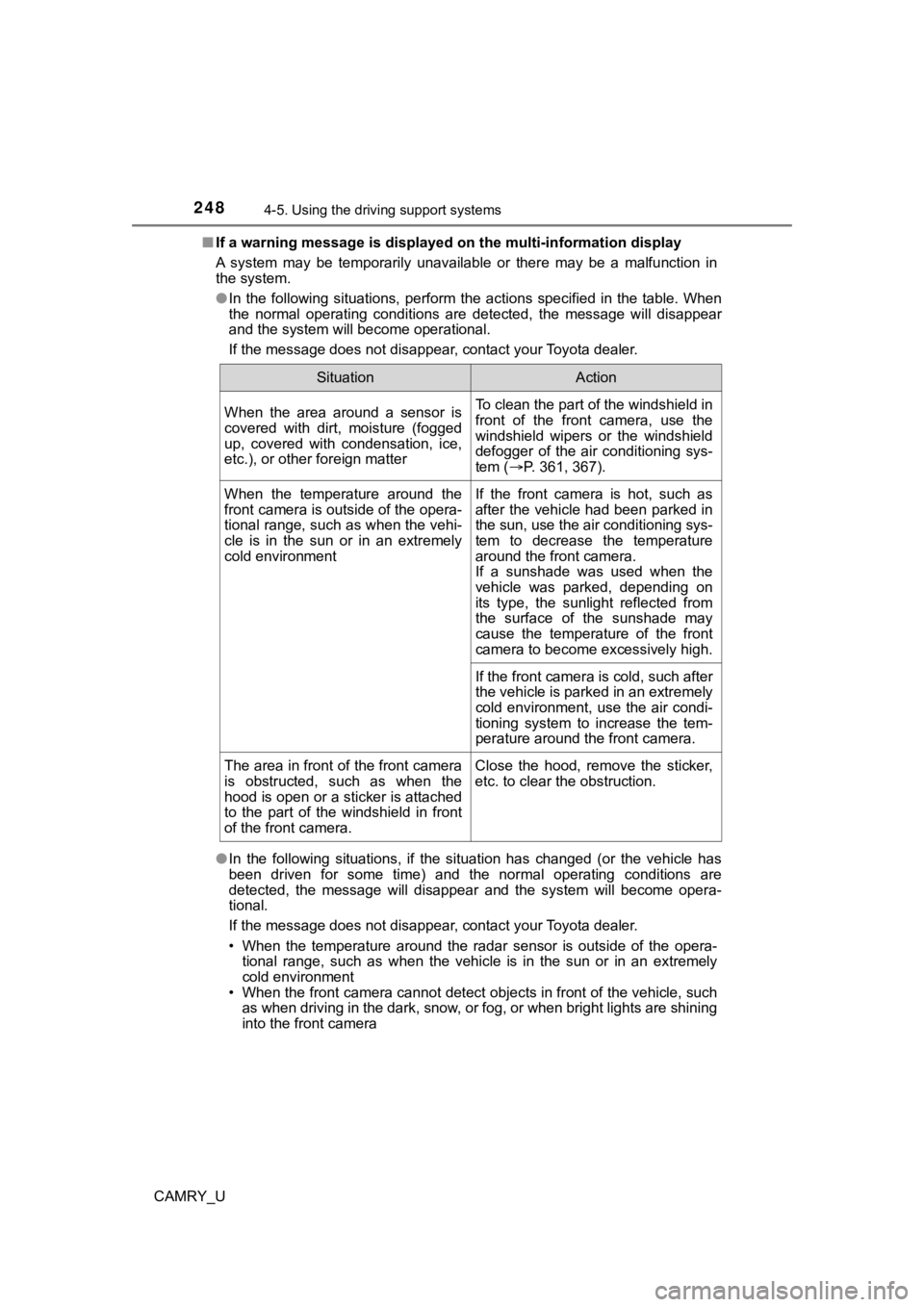
If a warning message is displayed on the multi-information disp lay
A system may be temporarily unavailable or there may be a malfu nction in
the system.
● In the following situations, perform the actions specified in t he table. When
the normal operating conditions are detected, the message will disappear
and the system will become operational.
If the message does not disappear, contact your Toyota dealer.
● In the following situations, if the situation has changed (or the vehicle has
been driven for some time) and the normal operating conditions are
detected, the message will disappear and the system will become opera-
tional.
If the message does not disappear, contact your Toyota dealer.
• When the temperature around the radar sensor is outside of the opera- tional range, such as when the vehicle is in the sun or in an e xtremely
cold environment
• When the front camera cannot detect objects in front of the ve hicle, such
as when driving in the dark, snow, or fog, or when bright lights are shining
into the front camera
SituationAction
When the area around a sensor is
covered with dirt, moisture (fogged
up, covered with condensation, ice,
etc.), or other foreign matterTo clean the part of the windshield in
front of the front camera, use the
windshield wipers or the windshield
defogger of the air conditioning sys-
tem ( P. 361, 367).
When the temperature around the
front camera is outside of the opera-
tional range, such as when the vehi-
cle is in the sun or in an extremely
cold environmentIf the front camera is hot, such as
after the vehicle had been parked in
the sun, use the air conditioning sys-
tem to decrease the temperature
around the front camera.
If a sunshade was used when the
vehicle was parked, depending on
its type, the sunlight reflected from
the surface of the sunshade may
cause the temperature of the front
camera to become excessively high.
If the front camera is cold, such after
the vehicle is parked in an extremely
cold environment, use the air condi-
tioning system to increase the tem-
perature around the front camera.
The area in front of the front camera
is obstructed, such as when the
hood is open or a sticker is attached
to the part of the windshield in front
of the front camera. Close the hood, remove the sticker,
etc. to clear the obstruction.
Page 323 of 620

3234-5. Using the driving support systems
4
Driving
CAMRY_U• If the orientation of the rear camera has been changed due to
a collision
or other impact, or removal and installation
• If a towing eyelet is installed to the rear of the vehicle
• When the rear camera is obscured (dirt, snow, ice, etc. are at tached) or
scratched
• When water is flowing over the rear camera lens
• If there is a flashing light in the detection area, such as th e emergency
flashers of another vehicle
■ Situations in which the Rear Cam era Detection function may be difficult
to notice
● If buzzer may be difficult to hear if the surrounding area is noisy, the volume
of the audio system volume is high, the air conditioning system is being
used, etc.
● If the temperature in the cabin is extremely high or low, the a udio system
screen may not operate correctly.
Page 329 of 620

3294-5. Using the driving support systems
4
Driving
CAMRY_U■
Sensor detection information
●The sensor’s detection areas are limited to the areas around th e vehicle’s
bumper.
● Depending on the shape of the object and other factors, the det ection dis-
tance may shorten, or detection may be impossible.
● Objects may not be detected if they are too close to the sensor .
● There will be a short delay between object detection and display. Even at
slow speeds, there is a possibility that the object will come within the sen-
sor’s detection areas before the display is shown and the buzze r sounds.
● Thin posts or objects lower than the sensor may not be detected when
approached, even if they have been detected once.
● It might be difficult to hear beeps due to the volume of audio system or air
flow noise of the air conditioning system.
■ If “Parking Assist Unavailable Clean Parking Assist Sensor” is displayed
on the multi-information display
A sensor may be dirty or covered with snow or ice. In such case s, if it is
removed from the sensor, the system should return to normal.
Also, due to the sensor being frozen at low temperatures, a mal function dis-
play may appear or an object may not be detected. If the sensor thaws out,
the system should return to normal.
■ If “Parking Assist Unavailable” is displayed on the multi-infor mation dis-
play
Water may be continuously flowing over the sensor surface, such as in a
heavy rain. When the system determines that it is normal, the system will
return to normal.
■ Certification
For vehicles sold in Canada
This ISM device complies with Canadian ICES-001.
Cet appareil ISM est conforme a la norme NMB-001 du Canada.
WARNING
■ When using the intuitive parking assist
Observe the following precautions.
Failing to do so may result in the vehicle being unable to be d riven safely
and possibly cause an accident.
● Do not use the sensor at speeds in excess of 6 mph (10 km/h).
● The sensors’ detection areas and reaction times are limited. When moving
forward or reversing, check the areas surrounding the vehicle ( especially
the sides of the vehicle) for safety, and drive slowly, using t he brake to
control the vehicle’s speed.
● Do not install accessories within the sensors’ detection areas.
Page 354 of 620

3544-5. Using the driving support systems
CAMRY_U
■Operation of the air conditioning system in Eco drive mode
Eco drive mode controls the heating/cooling operations and fan speed of the
air conditioning system to enhance fuel efficiency ( P. 365, 371). To improve
air conditioning performance, adjust the fan speed or turn off Eco drive mode.
■ Sport mode automatic deactivation
Sport mode is automatically deactivated if the engine switch is turned off after
driving in sport mode.
Page 359 of 620

359
5Interior features
CAMRY_U5-1. Using the
air conditioning system
and defogger
Manual air conditioning system............................. 360
Automatic air conditioning system (without
“SYNC” button) ............... 365
Automatic air conditioning system (with
“SYNC” button) ............... 371
Heated steering wheel/ seat heaters/
seat ventilators ................ 379
5-2. Using the interior lights Interior lights list ................ 382
• Interior lights ................. 383
• Personal lights .............. 384 5-3. Using the storage
features
List of storage features ..... 386
• Glove box...................... 387
• Console box .................. 387
• Coin holder ................... 387
• Bottle holders ................ 388
• Cup holders .................. 389
• Auxiliary boxes.............. 390
• Open tray ...................... 391
Trunk features ................... 392
5-4. Other interior features Other interior features ....... 393
• Sun visors ..................... 393
• Vanity mirrors................ 393
• Power outlet .................. 394
• USB charging ports....... 395
• Wireless charger ........... 397
• Armrest ......................... 406
• Assist grips ................... 406
• Coat hooks.................... 407
Garage door opener.......... 408
Page 360 of 620
360
CAMRY_U
5-1. Using the air conditioning system and defogger
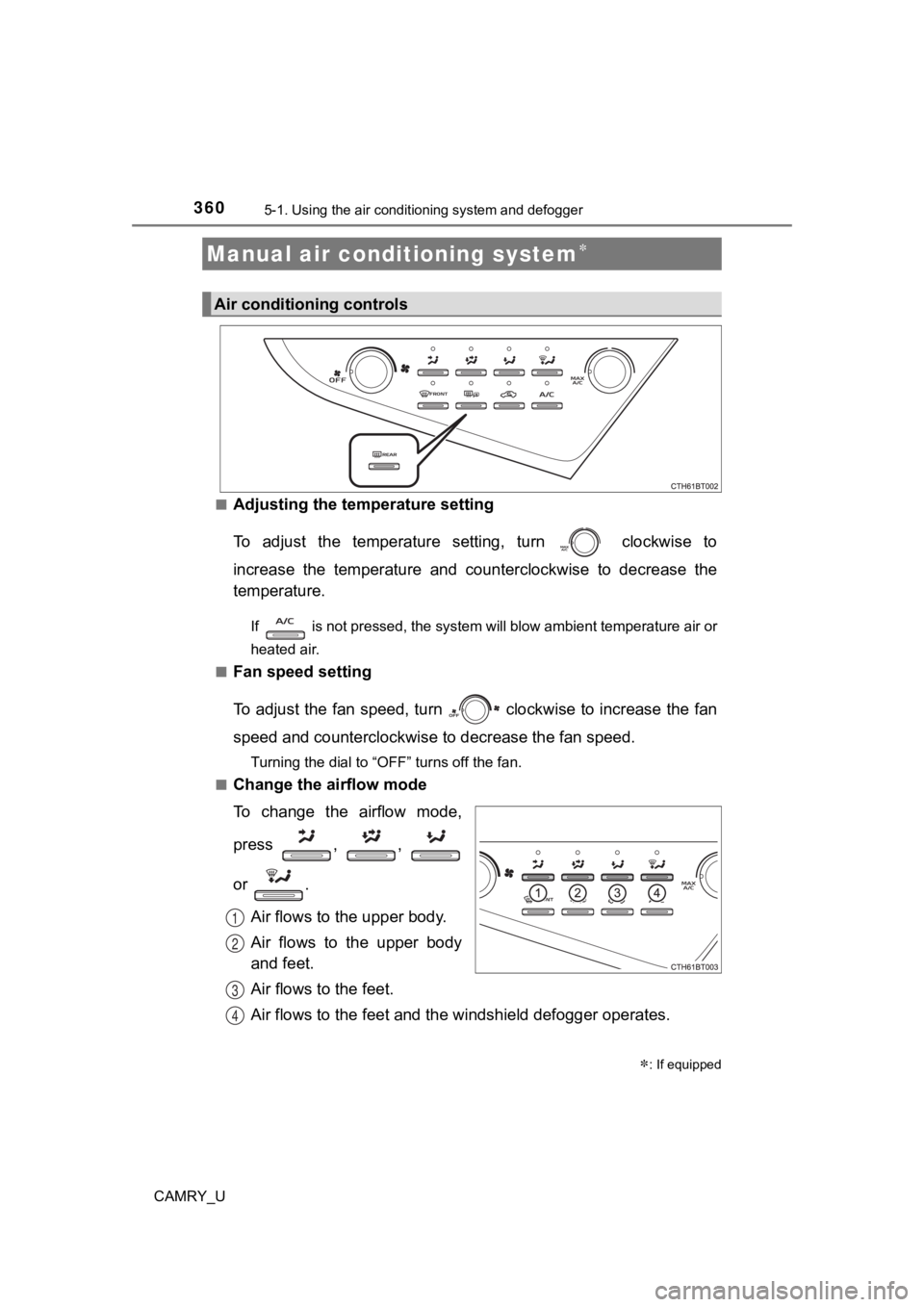
■Adjusting the temperature setting
To adjust the temperature setting, turn clockwise to
increase the temperature and counterclockwise to decrease the
temperature.
If is not pressed, the system will blow ambient temperature air or
heated air.
■
Fan speed setting
To adjust the fan speed, turn clockwise to increase the fan
speed and counterclockwise to decrease the fan speed.
Turning the dial to “OFF” turns off the fan.
■
Change the airflow mode
To change the airflow mode,
press , ,
or .
Air flows to the upper body.
Air flows to the upper body
and feet.
Air flows to the feet.
Air flows to the feet and the windshield defogger operates.
Manual air conditioning system
: If equipped
Air conditioning controls
1
2
3
4
Page 361 of 620
3615-1. Using the air conditioning system and defogger
5
Interior features
CAMRY_U■
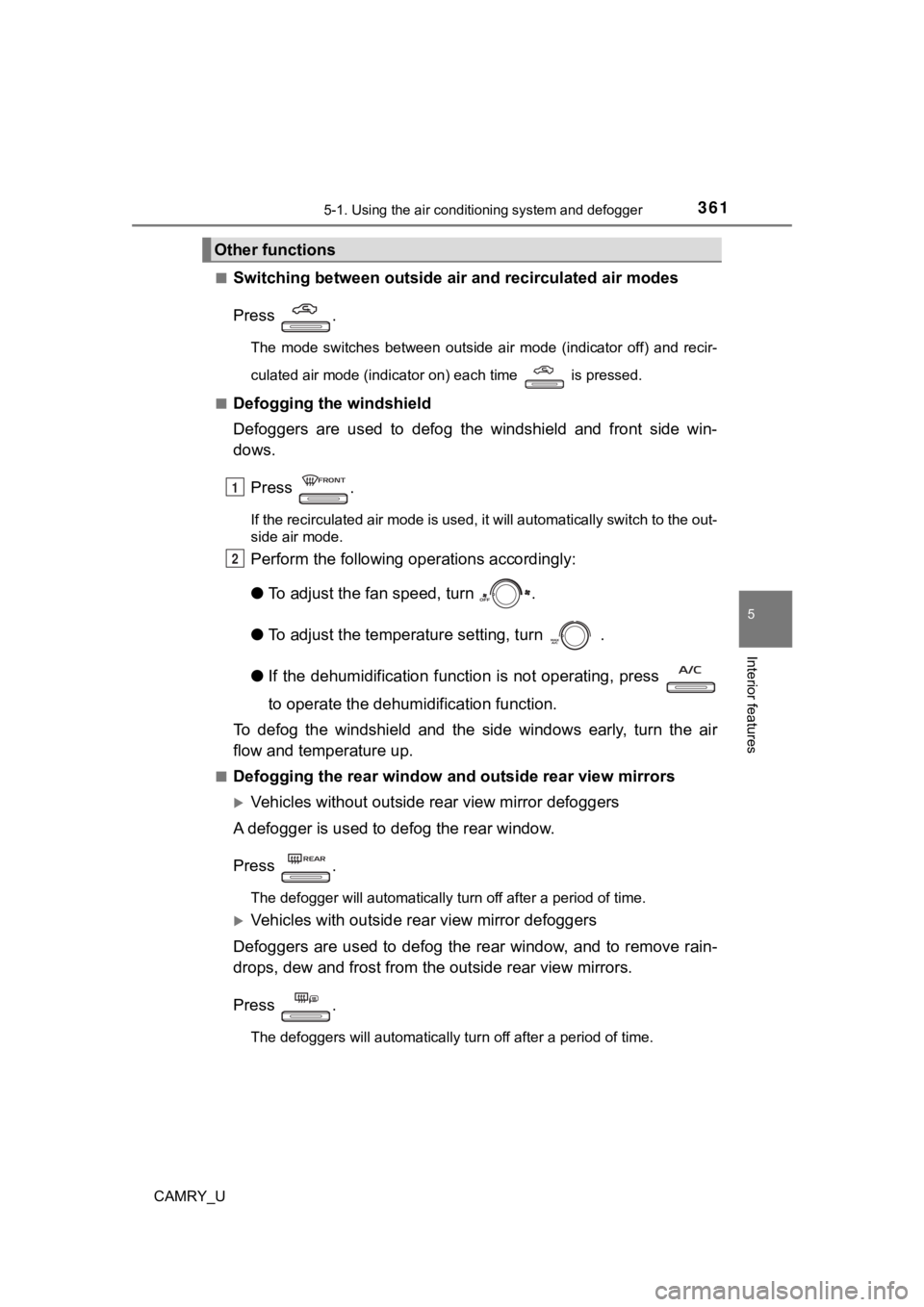
Switching between outside air
and recirculated air modes
Press .
The mode switches between outside air mode (indicator off) and recir-
culated air mode (indicator on) each time is pressed.
■
Defogging the windshield
Defoggers are used to defog the windshield and front side win-
dows.
Press .
If the recirculated air mode is used, it will automatically swi tch to the out-
side air mode.
Perform the following operations accordingly:
● To adjust the fan speed, turn .
● To adjust the temperature setting, turn .
● If the dehumidification function is not operating, press
to operate the dehumidification function.
To defog the windshield and the side windows early, turn the ai r
flow and temperature up.
■Defogging the rear window and outside rear view mirrors
Vehicles without outside rear view mirror defoggers
A defogger is used to defog the rear window.
Press .
The defogger will automatically turn off after a period of time .
Vehicles with outside rear view mirror defoggers
Defoggers are used to defog the rear window, and to remove rain -
drops, dew and frost from the outside rear view mirrors.
Press .
The defoggers will automatically turn off after a period of tim e.
Other functions
1
2