display TOYOTA CAMRY HV 2012 Service Manual
[x] Cancel search | Manufacturer: TOYOTA, Model Year: 2012, Model line: CAMRY HV, Model: TOYOTA CAMRY HV 2012Pages: 536, PDF Size: 6.29 MB
Page 179 of 536
179
2-2. Instrument cluster
2
When driving
■
The brightness of the instrument panel lights
When the tail lights are turned on, the meter’s brightness will be reduced
slightly unless the meter brightness level adjustment is set to the brightest
setting.
If the tail lights are turned on when the surroundings are dark, the meter’s
brightness will reduce slightly. However, when the surroundings are bright,
such as during the daytime, the meter’s brightness will not be reduced even
if the tail lights are turned on.
■ Fuel gauge and odometer/trip meter display remain on mode
After the “POWER” switch has been turned off, the fuel gauge and odome-
ter/trip meter display remain on for 10 minutes, enabling the fuel gauge and
odometer/trip meter values to be checked again without having to turn the
“POWER” switch to ON mode.
When confirming the gauges and meters, turn the headlight switch to the
position. Press the display change button to change between the
odometer and trip meter displays.
NOTICE
■ To prevent damage to the engine and its components
The engine may be overheating if the rightmost segment of the engine cool-
ant temperature display is flashing. In this case, immediately stop the vehicle
in a safe place, and check the engine after it has cooled completely.
(
P. 465)
Page 185 of 536
185
2-2. Instrument cluster
2
When driving
Multi-information display
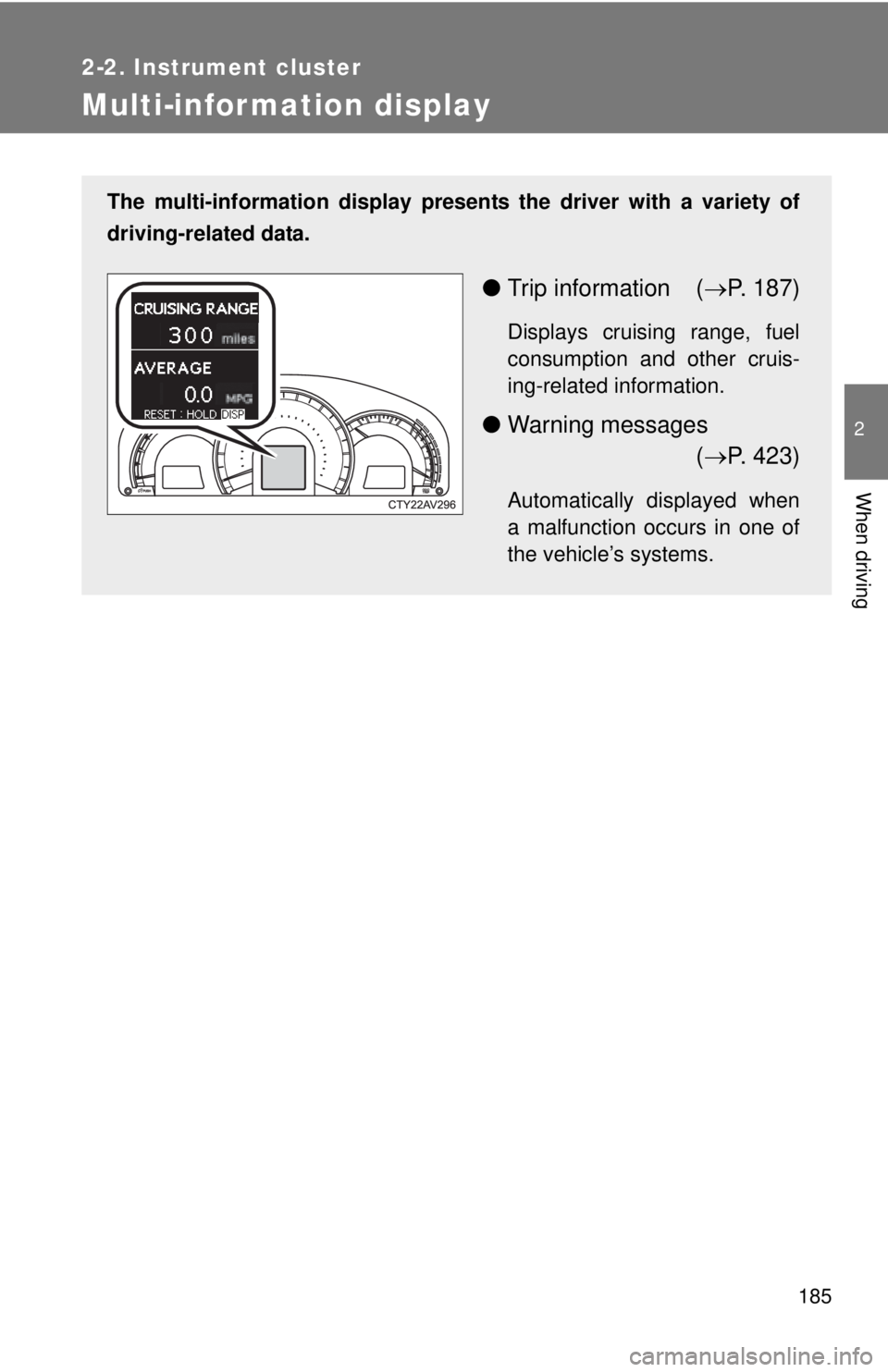
The multi-information display presents the driver with a variety of
driving-related data.
● Trip information ( P. 187)
Displays cruising range, fuel
consumption and other cruis-
ing-related information.
● Warning messages
( P. 423)
Automatically displayed when
a malfunction occurs in one of
the vehicle’s systems.
Page 186 of 536
186 2-2. Instrument cluster
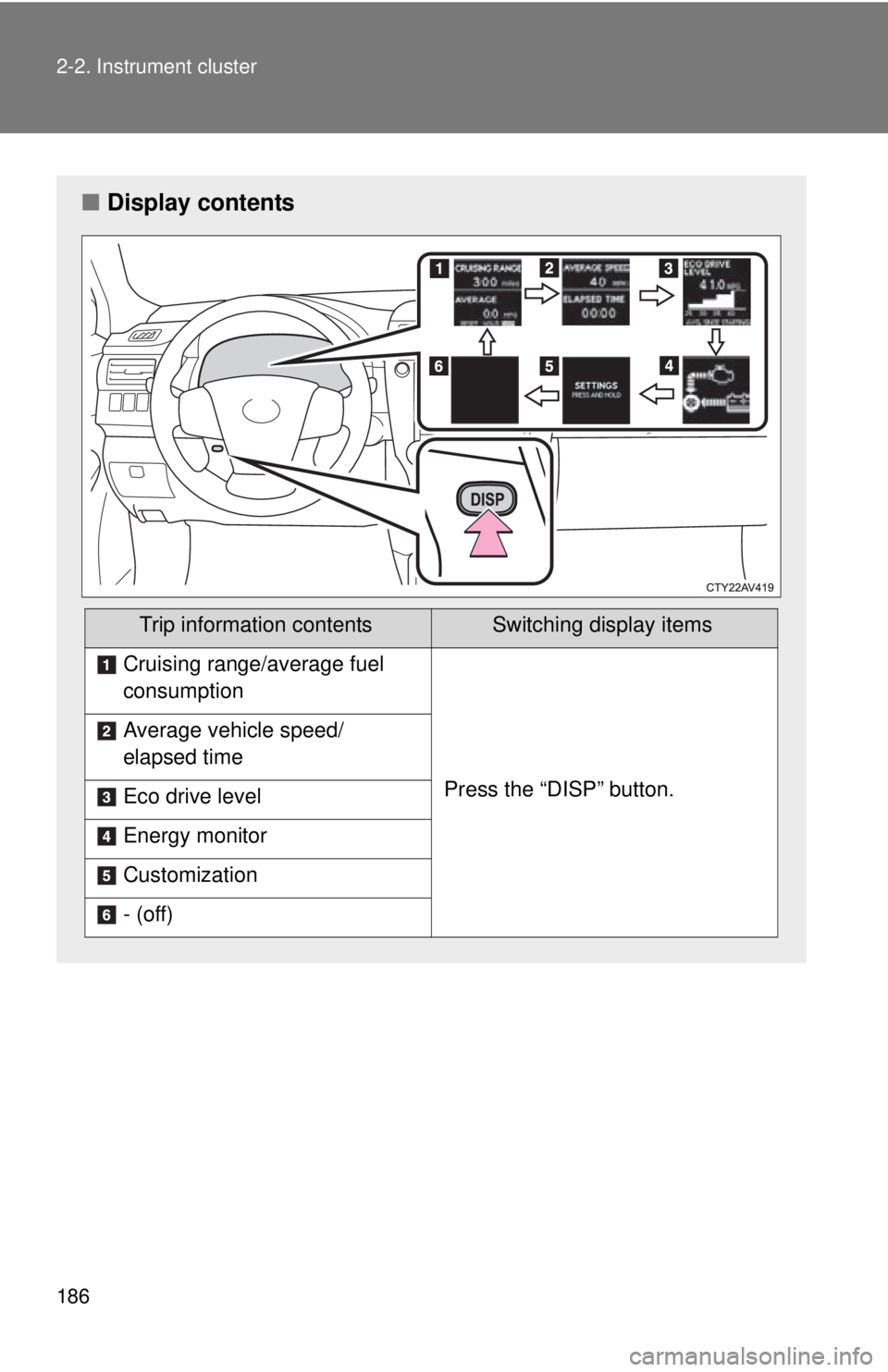
■Display contents
Trip information contentsSwitching display items
Cruising range/average fuel
consumption
Press the “DISP” button.
Average vehicle speed/
elapsed time
Eco drive level
Energy monitor
Customization
- (off)
Page 187 of 536

187
2-2. Instrument cluster
2
When driving
Trip information
■ Cruising range/average fuel consumption
Cruising range
Displays the estimated maximum di stance that can be driven with
the quantity of fuel remaining.
• This distance is computed based on your average fuel consumption.
As a result, the actual distance that can be driven may differ from that
displayed.
• When only a small amount of fuel is added to the tank, the display
may not be updated.
When refueling, turn the “POWER” switch off. If the vehicle is refueled
without turning the “POWER” switch off, the display may not be
updated.
Average fuel consumption
Displays the average fuel cons umption since the function was
reset.
• The function can be reset by pressing the “DISP” button for longer
than 1 second when the average fuel consumption is displayed.
The average fuel consumption meter will also be reset, returning the
needle to the 0 position.
• Use the displayed average fuel consumption as a reference.
■ Average vehicle speed/elapsed time
Displays the average vehicle speed and elapsed time since the
hybrid system was started.
Page 188 of 536
188 2-2. Instrument cluster
■Eco drive level
Displays the average fuel consum ption and eco drive level since
the hybrid system was started.
Even if a different screen has been selected for the multi-information dis-
play, when the “POWER” switch is turned off, the eco drive level is dis-
played. This is not a malfunction.
When the highest eco drive level has been achieved “EXCELLENT!” is
displayed.
■ Energy monitor
Displays the status of the hybrid system ( P. 3 9 )
■ Customization
Language, Eco Indicator (current fuel consumption gauge) and EV
Indicator settings can be changed. ( P. 188)
Customizing vehicle features
It is possible to cust omize the language, Eco Indicator (current fuel
consumption gauge) and EV Indicator settings using the “DISP” but-
ton.
When customizing vehicle features, ensure that the vehicle is parked
in a safe place with the shift position in P and the parking brake set.
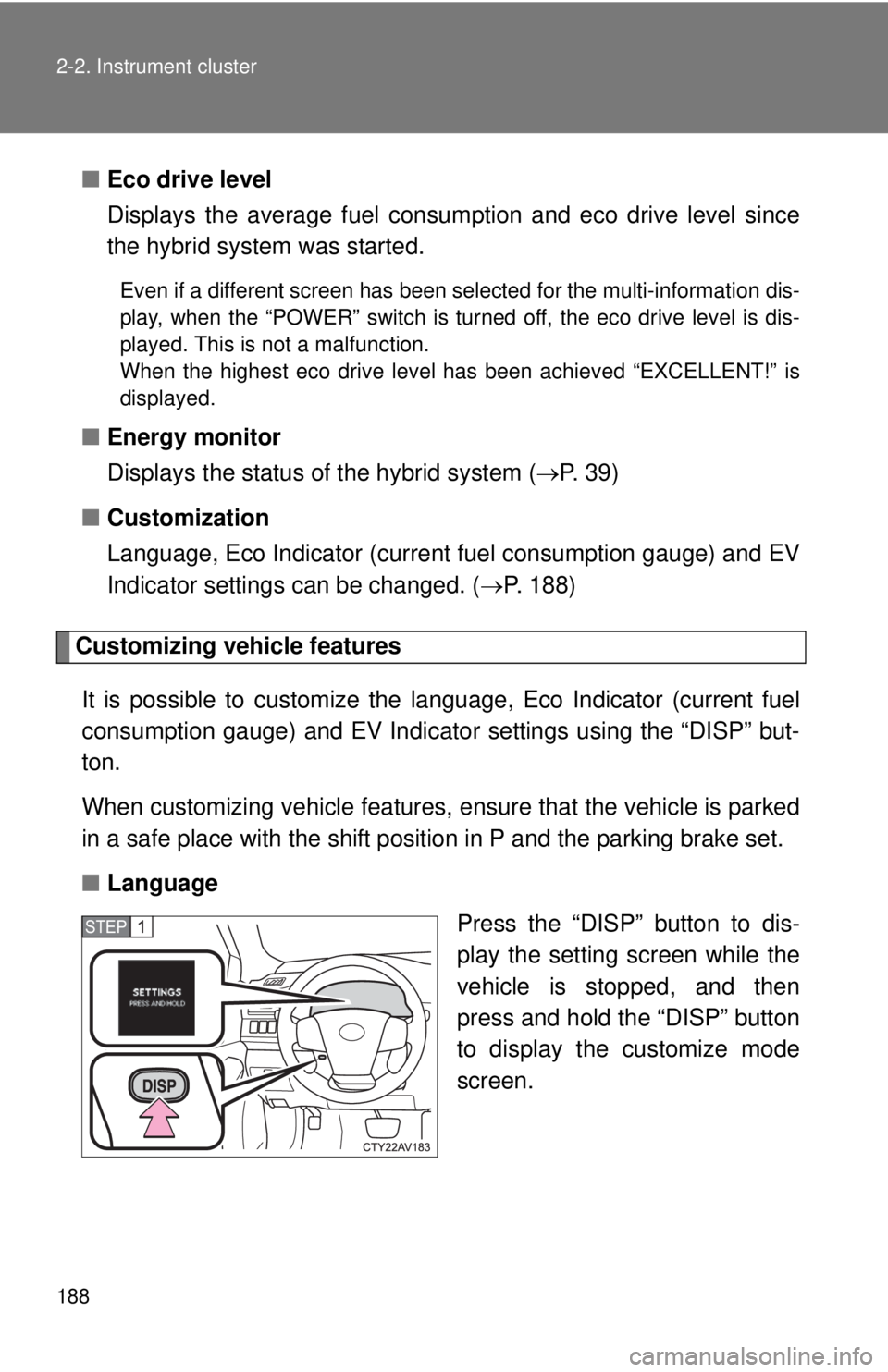
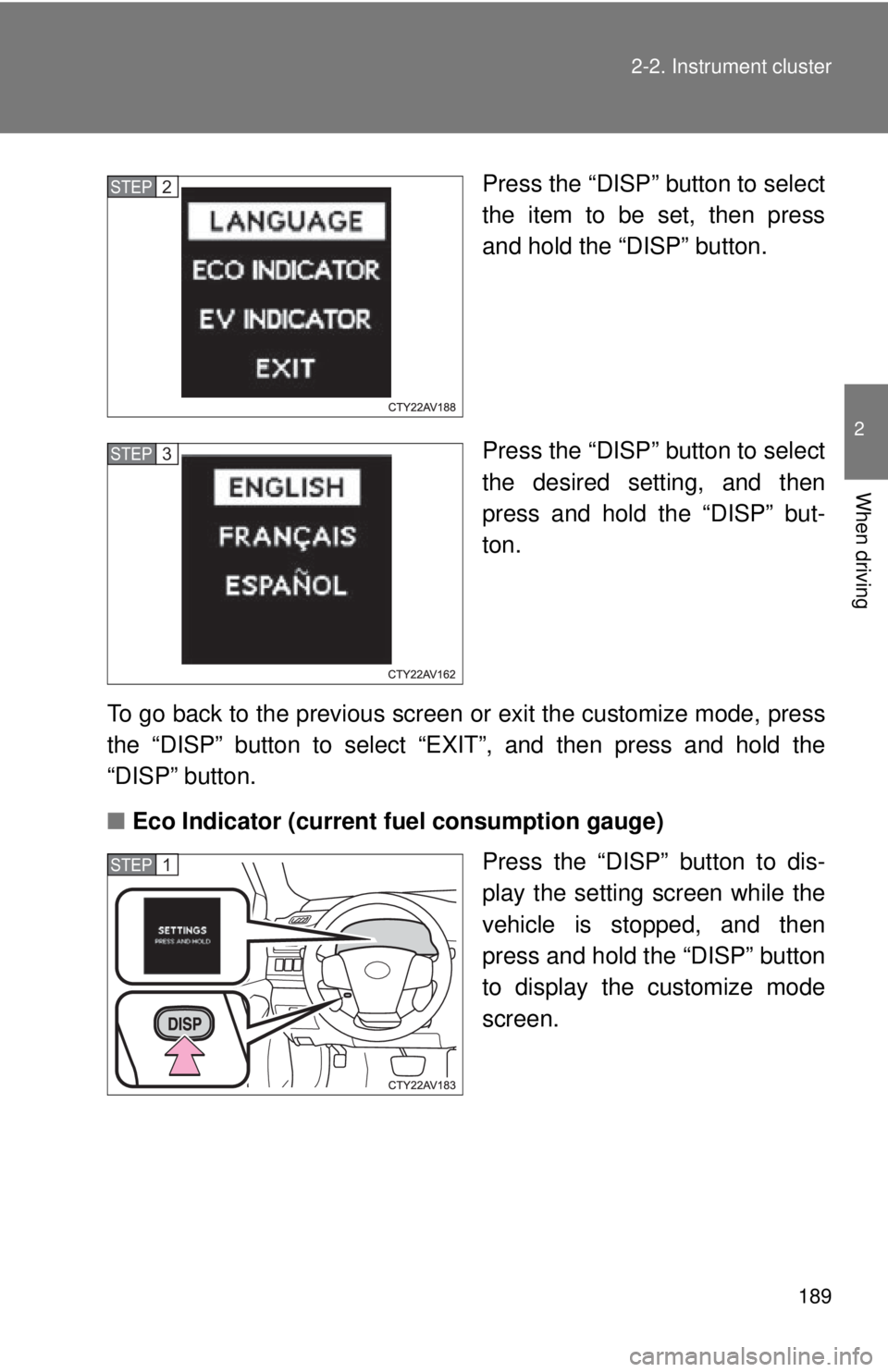
■ Language
Press the “DISP” button to dis-
play the setting screen while the
vehicle is stopped, and then
press and hold the “DISP” button
to display the customize mode
screen.
STEP1
Page 189 of 536
189
2-2. Instrument cluster
2
When driving
Press the “DISP” button to select
the item to be set, then press
and hold the “DISP” button.
Press the “DISP” button to select
the desired setting, and then
press and hold the “DISP” but-
ton.
To go back to the previous screen or exit the customize mode, press
the “DISP” button to select “EXIT”, and then press and hold the
“DISP” button.
■ Eco Indicator (current fuel consumption gauge)
Press the “DISP” button to dis-
play the setting screen while the
vehicle is stopped, and then
press and hold the “DISP” button
to display the customize mode
screen.STEP2
STEP3
STEP1
Page 190 of 536
190 2-2. Instrument cluster
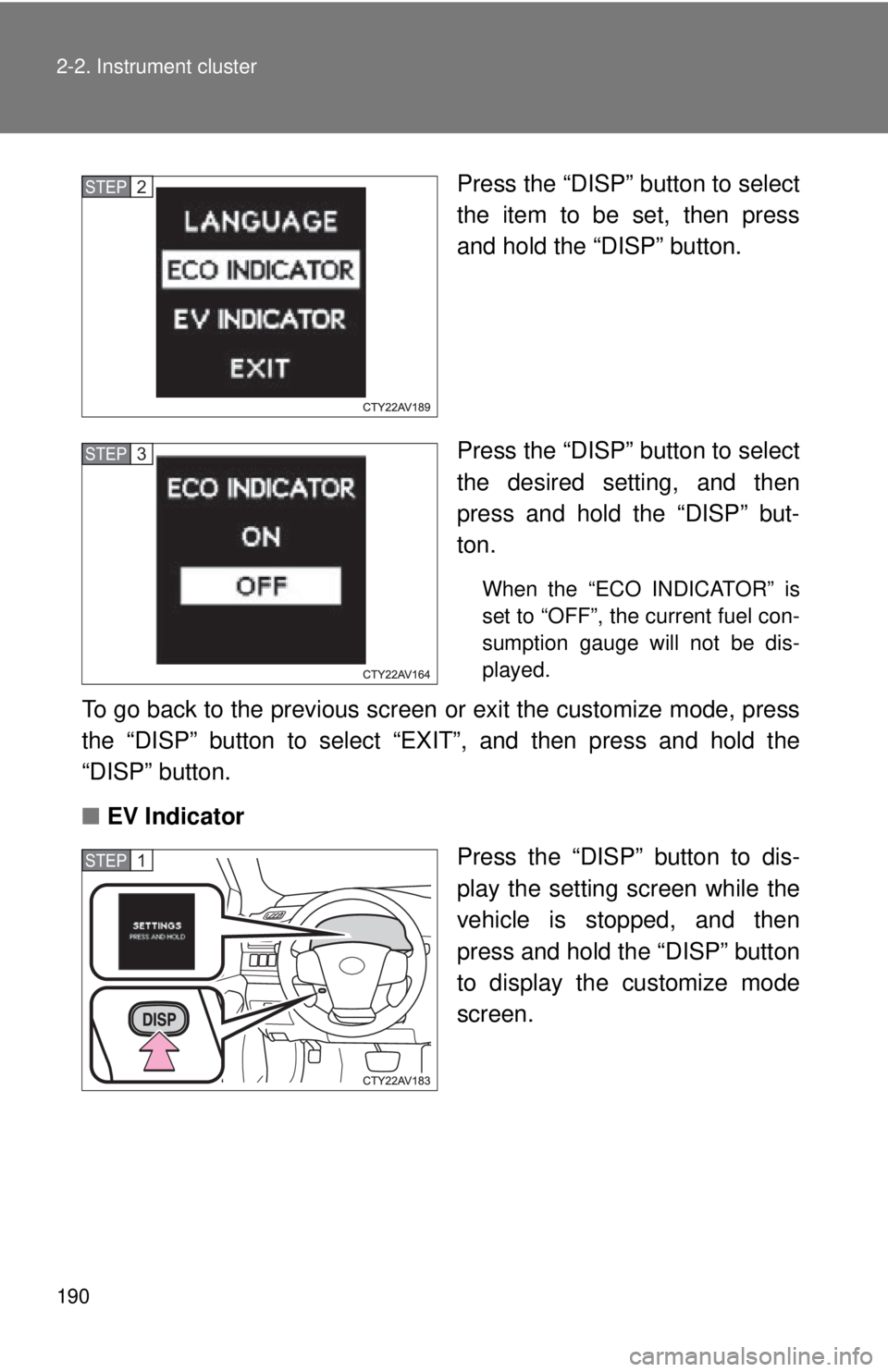
Press the “DISP” button to select
the item to be set, then press
and hold the “DISP” button.
Press the “DISP” button to select
the desired setting, and then
press and hold the “DISP” but-
ton.
When the “ECO INDICATOR” is
set to “OFF”, the current fuel con-
sumption gauge will not be dis-
played.
To go back to the previous screen or exit the customize mode, press
the “DISP” button to select “EXIT”, and then press and hold the
“DISP” button.
■ EV Indicator
Press the “DISP” button to dis-
play the setting screen while the
vehicle is stopped, and then
press and hold the “DISP” button
to display the customize mode
screen.
STEP2
STEP3
STEP1
Page 191 of 536
191
2-2. Instrument cluster
2
When driving
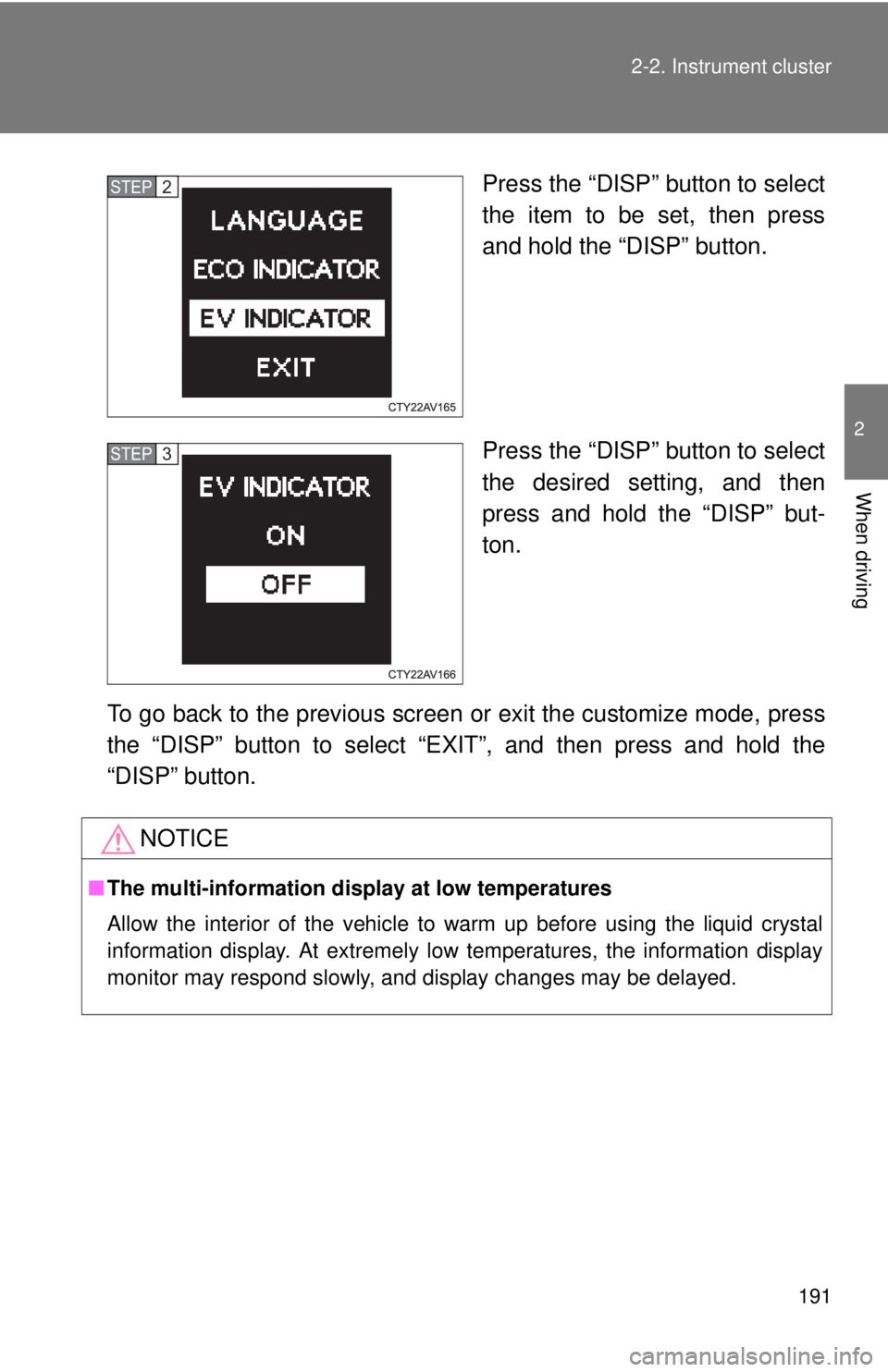
Press the “DISP” button to select
the item to be set, then press
and hold the “DISP” button.
Press the “DISP” button to select
the desired setting, and then
press and hold the “DISP” but-
ton.
To go back to the previous screen or exit the customize mode, press
the “DISP” button to select “EXIT”, and then press and hold the
“DISP” button. STEP2
STEP3
NOTICE
■ The multi-information disp lay at low temperatures
Allow the interior of the vehicle to warm up before using the liquid crystal
information display. At extremely low temperatures, the information display
monitor may respond slowly, and display changes may be delayed.
Page 218 of 536
218 2-4. Using other driving systems
●Instances of the Blind Spot Monitor unnecessarily detecting a vehicle
and/or object may increase under the following conditions:
• When there is only a short distance between your vehicle and a guard-
rail, wall etc.
• When there is only a short distance between your vehicle and a follow- ing vehicle.
• When vehicle lanes are narrow and a vehicle driving 2 lanes across from your vehicle enters the detection area
■ The outside rear view mirror indicators visibility
When under strong sunlight, the outside rear view mirror indicator may be
difficult to see.
■ When there is a malfunction in the system
If a system malfunction is detected due to any of the following reasons,
warning messages will be displayed: ( P. 425)
● There is a malfunction with the sensors
● The sensors have become dirty
● The outside temperature is extremely high or low
● The sensor voltage has become abnormal
■ Certification for the BSM
FCC ID: OAYBSDTX
This device complies with part 15 of the FCC Rules. Operation is subject to
the following three conditions:
(1) This device may not cause harmful interference.
(2) This device must accept any interference received, including interference
that may cause undesired operation.
(3) This device may only work when the vehicle is in operation pursuant to § 15.252 (a) (4).
FCC WARNING
Changes or modifications not expressly approved by the party responsible
for compliance could void the user’s authority to operate the equipment.
Page 231 of 536
Interior features3
231
3-1. Using the air conditioning system and defogger
Automatic air conditioning system ....... 232
Rear window and outside rear view mirror
defoggers ....................... 239
3-2. Using the audio system Audio system types .......... 240
Using the radio ................. 246
Using the CD player ......... 249
Playing back MP3 and WMA discs ..................... 255
Operating an iPod ............ 262
Operating a USB memory .......................... 270
Optimal use of the audio system ........................... 278
Using the AUX port .......... 281
Using the steering wheel audio switches ..... 283
3-3. Using the interior lights Interior lights list ............... 286
• Interior lights .................. 287
• Personal lights ............... 288 3-4. Using the storage features
List of storage features .... 289
• Glove box....................... 290
• Console box ................... 291
• Coin holder .................... 292
• Bottle holders ................. 293
• Cup holders ................... 294
• Auxiliary boxes ............... 296
3-5. Other interior features Sun visors ........................ 298
Vanity mirrors ................... 299
Clock ................................ 300
Outside temperature display............................ 301
Ashtray ............................. 302
Power outlets ................... 303
Seat heaters..................... 305
Armrest ............................ 307
Coat hooks ....................... 308
Floor mat .......................... 309
Trunk features .................. 311
Garage door opener......... 313
Compass .......................... 320
Safety Connect ................ 324