warning TOYOTA CAMRY V20 1986 Service Information
[x] Cancel search | Manufacturer: TOYOTA, Model Year: 1986, Model line: CAMRY V20, Model: TOYOTA CAMRY V20 1986Pages: 2389, PDF Size: 84.44 MB
Page 804 of 2389
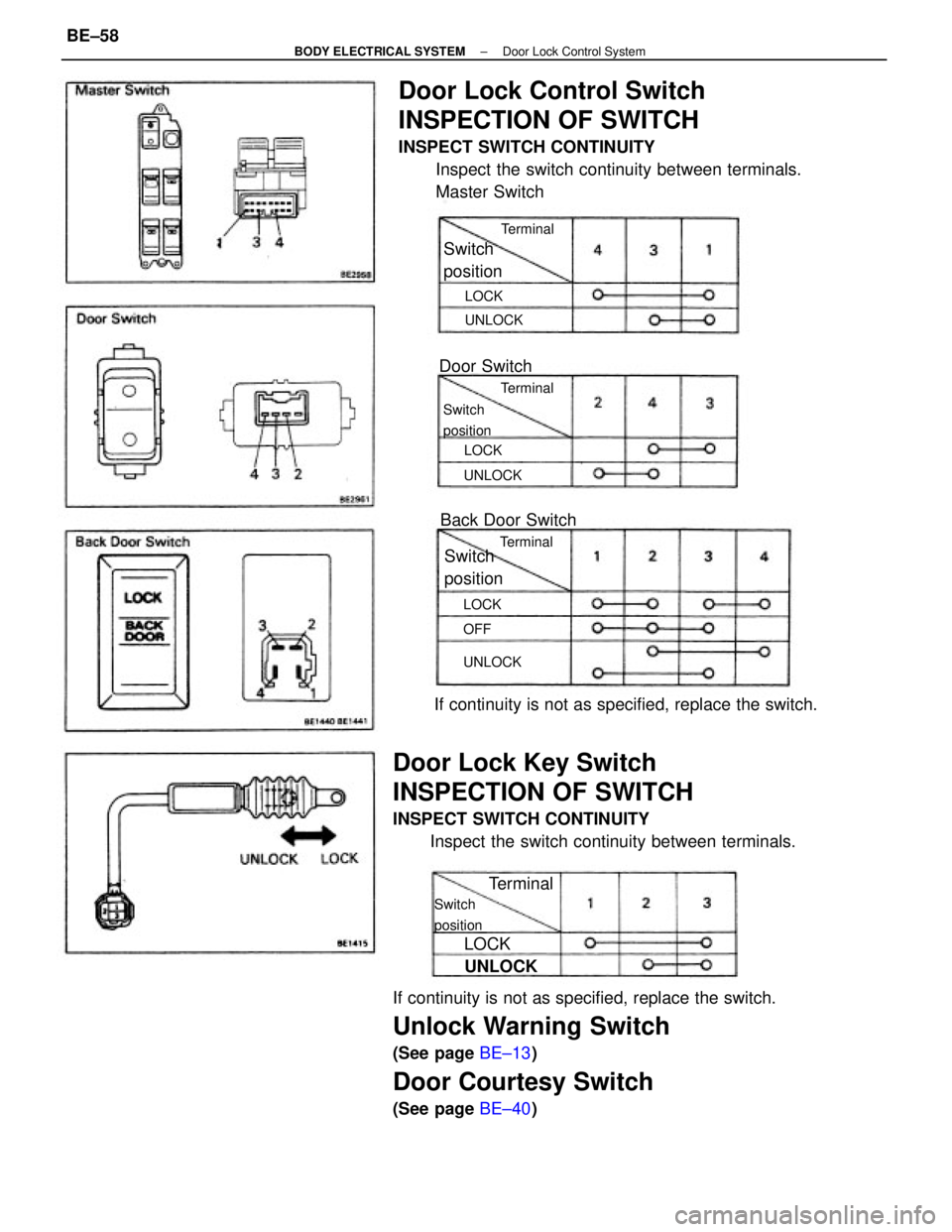
If continuity is not as specified, replace the switch.
Unlock Warning Switch
(See page BE±13)
Door Courtesy Switch
(See page BE±40)
Door Lock Control Switch
INSPECTION OF SWITCH
INSPECT SWITCH CONTINUITY
Inspect the switch continuity between terminals.
Master Switch
Door Lock Key Switch
INSPECTION OF SWITCH
INSPECT SWITCH CONTINUITY
Inspect the switch continuity between terminals.If continuity is not as specified, replace the switch.Back Door Switch
Switch
position
Door SwitchSwitch
position
Switch
position
Switch
position
Terminal
UNLOCK
TerminalTerminalTerminal
UNLOCKUNLOCKUNLOCK
LOCK
LOCKLOCK
LOCK
OFF
± BODY ELECTRICAL SYSTEMDoor Lock Control SystemBE±58
Page 805 of 2389
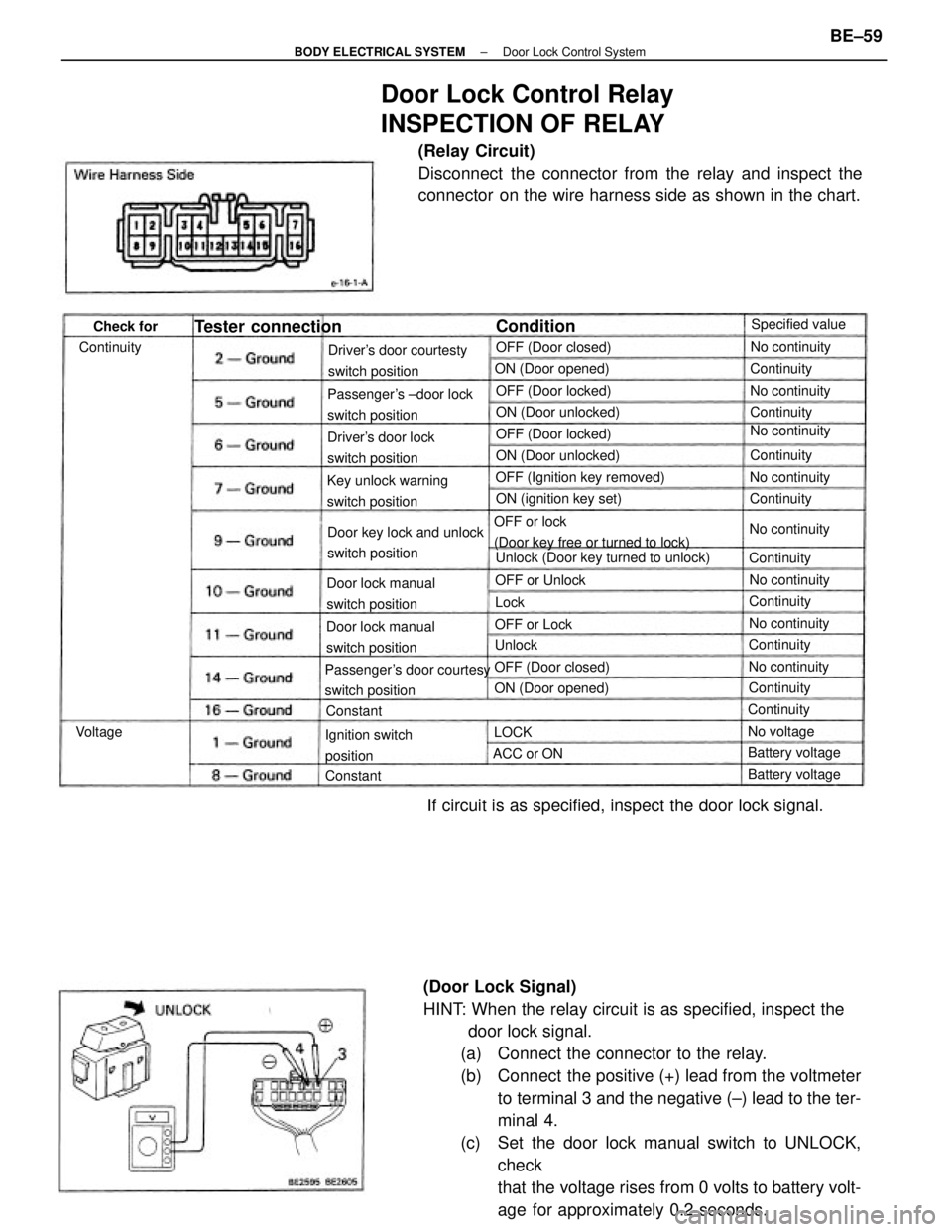
(Door Lock Signal)
HINT: When the relay circuit is as specified, inspect the
door lock signal.
(a) Connect the connector to the relay.
(b) Connect the positive (+) lead from the voltmeter
to terminal 3 and the negative (±) lead to the ter-
minal 4.
(c) Set the door lock manual switch to UNLOCK,
check
that the voltage rises from 0 volts to battery volt-
age for approximately 0.2 seconds.
Door Lock Control Relay
INSPECTION OF RELAY
(Relay Circuit)
Disconnect the connector from the relay and inspect the
connector on the wire harness side as shown in the chart.
If circuit is as specified, inspect the door lock signal.
OFF or lock
(Door key free or turned to lock)
Passenger's door courtesy
switch positionPassenger's ±door lock
switch positionDriver's door courtesty
switch position
Unlock (Door key turned to unlock) Door key lock and unlock
switch position Key unlock warning
switch positionOFF (Ignition key removed)
Door lock manual
switch position
Door lock manual
switch positionDriver's door lock
switch position
Ignition switch
positionON (ignition key set) ON (Door unlocked)
ON (Door unlocked) ON (Door opened)
Tester connection
OFF (Door locked)
ON (Door opened)OFF (Door locked)
OFF (Door closed)OFF (Door closed)Specified value
No continuity
Battery voltage Battery voltage OFF or UnlockNo continuity
No continuityNo continuity
No continuity
No continuity
No continuityNo continuity
Continuity OFF or Lock
No voltageContinuityContinuity
Continuity ContinuityContinuity
ContinuityContinuityContinuity
ACC or ON Continuity
ConditionCheck for
ConstantConstant
VoltageUnlock
LOCKLock
± BODY ELECTRICAL SYSTEMDoor Lock Control SystemBE±59
Page 812 of 2389
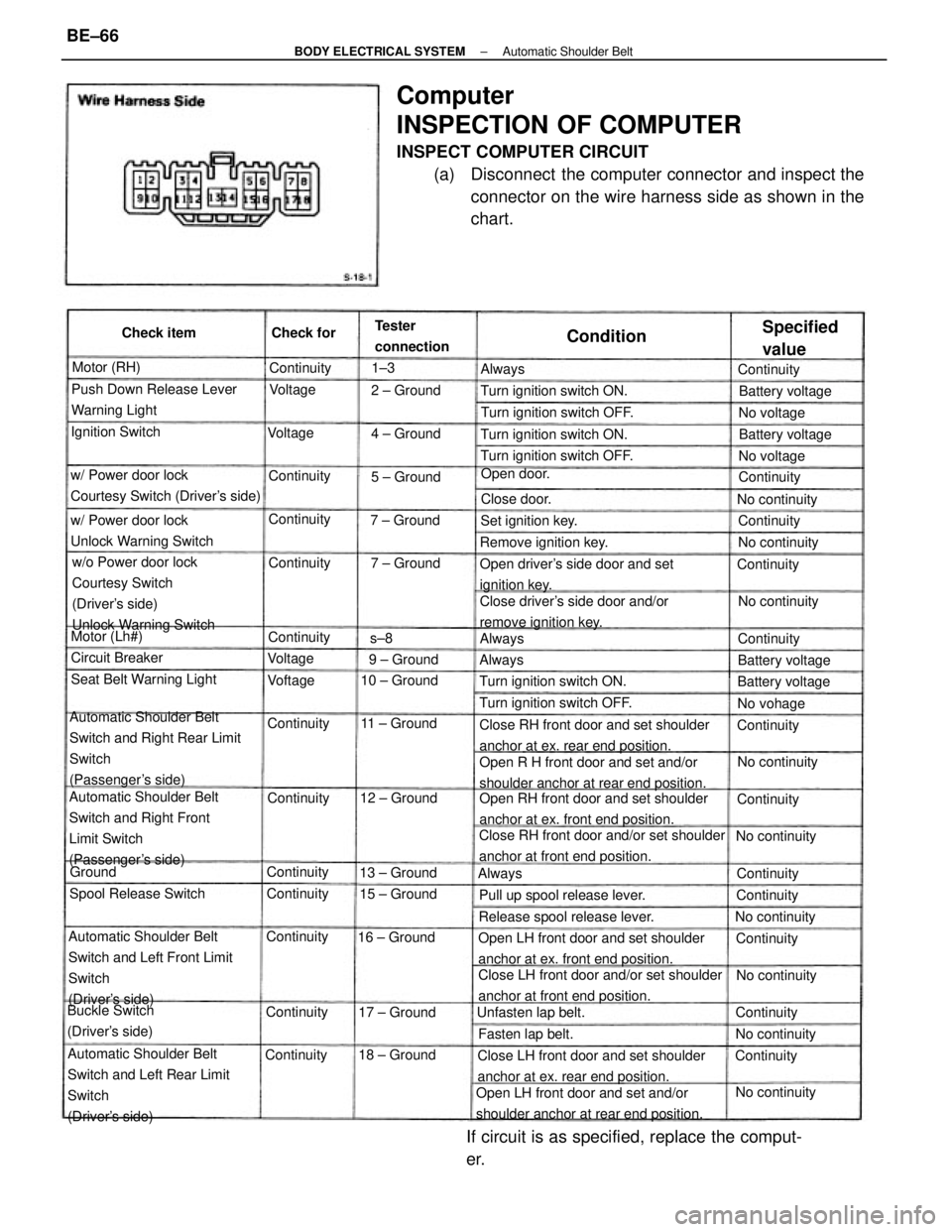
Computer
INSPECTION OF COMPUTER
INSPECT COMPUTER CIRCUIT
(a) Disconnect the computer connector and inspect the
connector on the wire harness side as shown in the
chart.
Automatic Shoulder Belt
Switch and Right Rear Limit
Switch
(Passenger's side)
Automatic Shoulder Belt
Switch and Left Front Limit
Switch
(Driver's side)
Automatic Shoulder Belt
Switch and Left Rear Limit
Switch
(Driver's side)Automatic Shoulder Belt
Switch and Right Front
Limit Switch
(Passenger's side)w/o Power door lock
Courtesy Switch
(Driver's side)
Unlock Warning Switch
Open RH front door and set shoulder
anchor at ex. front end position.
Close LH front door and/or set shoulder
anchor at front end position.Close RH front door and/or set shoulder
anchor at front end position.Close RH front door and set shoulder
anchor at ex. rear end position.
Open R H front door and set and/or
shoulder anchor at rear end position.
Open LH front door and set shoulder
anchor at ex. front end position.
Open LH front door and set and/or
shoulder anchor at rear end position.Close LH front door and set shoulder
anchor at ex. rear end position.
If circuit is as specified, replace the comput-
er.
Close driver's side door and/or
remove ignition key. Open driver's side door and set
ignition key. w/ Power door lock
Courtesy Switch (Driver's side)Push Down Release Lever
Warning Light
w/ Power door lock
Unlock Warning Switch
Release spool release lever.Pull up spool release lever.Turn ignition switch ON.
Seat Belt Warning LightTurn ignition switch OFF.
Turn ignition switch OFF.Turn ignition switch OFF.
Turn ignition switch ON.Turn ignition switch ON.
Buckle Switch
(Driver's side)Spool Release SwitchRemove ignition key. Tester
connection
Unfasten lap belt.
Specified
value
Set ignition key.
Battery voltage Ignition Switch
Battery voltage Battery voltage
Battery voltage
Fasten lap belt. Circuit Breaker
No continuity
No continuityNo continuity
No continuity No continuity
No continuity
No continuity
No continuity 15 ± Ground
No continuity 11 ± Ground 10 ± Ground
12 ± Ground
16 ± Ground
18 ± Ground13 ± Ground
17 ± GroundOpen door. Check item
7 ± Ground4 ± Ground
9 ± Ground7 ± Ground2 ± Ground
5 ± Ground Motor (RH)
Motor (Lh#)
Continuity
ContinuityNo voltage No voltage
No vohage Continuity
Continuity Continuity
ContinuityContinuity Continuity
Continuity
ContinuityContinuity Check for
Continuity ContinuityContinuity
Continuity Close door.
Continuity
ContinuityContinuityContinuity
ContinuityContinuity
Continuity
ContinuityContinuity
Condition
Voltage Voltage
VoftageVoltageAlways
AlwaysAlways
Always
Ground1±3
s±8
± BODY ELECTRICAL SYSTEMAutomatic Shoulder BeltBE±66
Page 813 of 2389
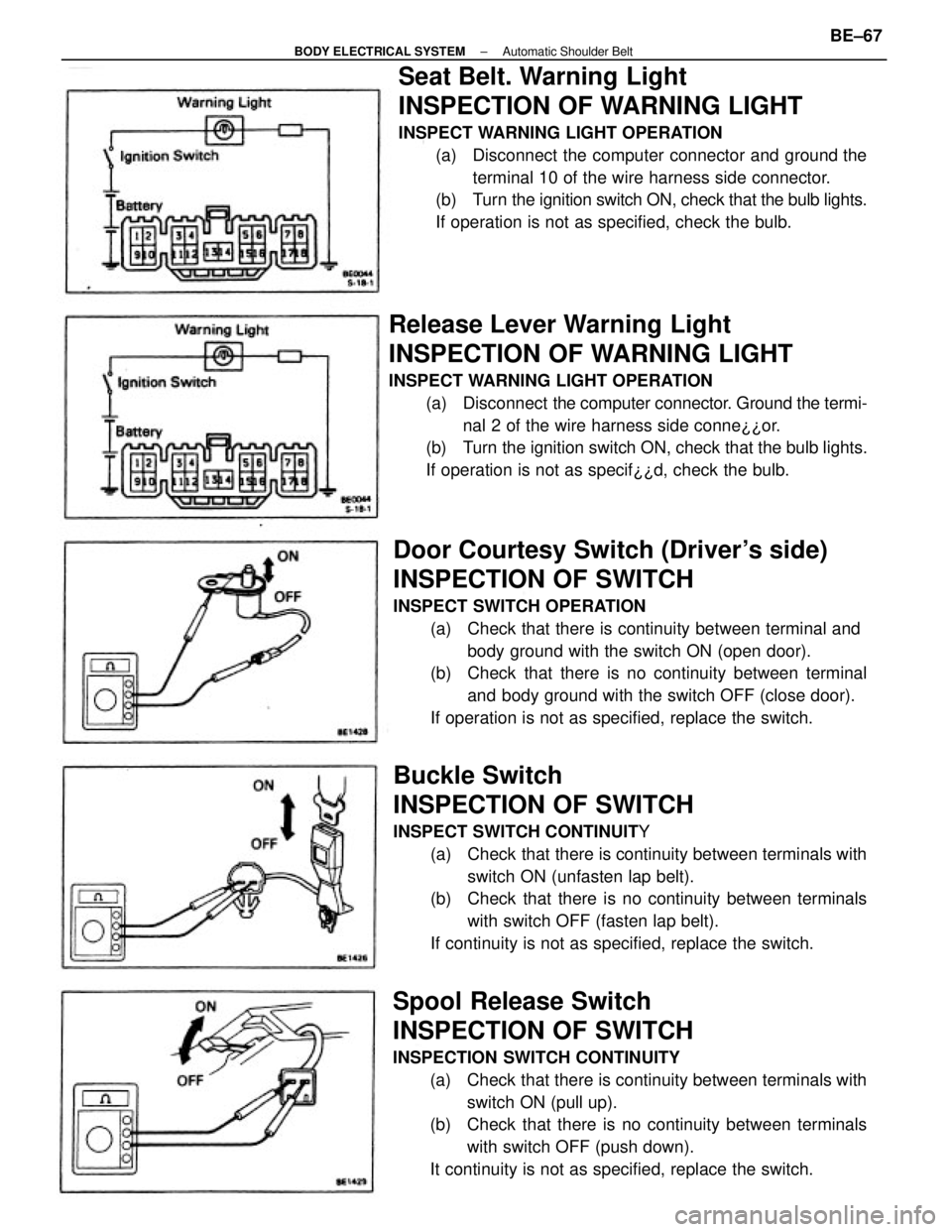
Seat Belt. Warning Light
INSPECTION OF WARNING LIGHT
INSPECT WARNING LIGHT OPERATION
(a) Disconnect the computer connector and ground the
terminal 10 of the wire harness side connector.
(b) Turn the ignition switch ON, check that the bulb lights.
If operation is not as specified, check the bulb.
Buckle Switch
INSPECTION OF SWITCH
INSPECT SWITCH CONTINUITY
(a) Check that there is continuity between terminals with
switch ON (unfasten lap belt).
(b) Check that there is no continuity between terminals
with switch OFF (fasten lap belt).
If continuity is not as specified, replace the switch.
Door Courtesy Switch (Driver's side)
INSPECTION OF SWITCH
INSPECT SWITCH OPERATION
(a) Check that there is continuity between terminal and
body ground with the switch ON (open door).
(b) Check that there is no continuity between terminal
and body ground with the switch OFF (close door).
If operation is not as specified, replace the switch.
Spool Release Switch
INSPECTION OF SWITCH
INSPECTION SWITCH CONTINUITY
(a) Check that there is continuity between terminals with
switch ON (pull up).
(b) Check that there is no continuity between terminals
with switch OFF (push down).
It continuity is not as specified, replace the switch.
Release Lever Warning Light
INSPECTION OF WARNING LIGHT
INSPECT WARNING LIGHT OPERATION
(a) Disconnect the computer connector. Ground the termi-
nal 2 of the wire harness side conne¿¿or.
(b) Turn the ignition switch ON, check that the bulb lights.
If operation is not as specif¿¿d, check the bulb.
± BODY ELECTRICAL SYSTEMAutomatic Shoulder BeltBE±67
Page 814 of 2389
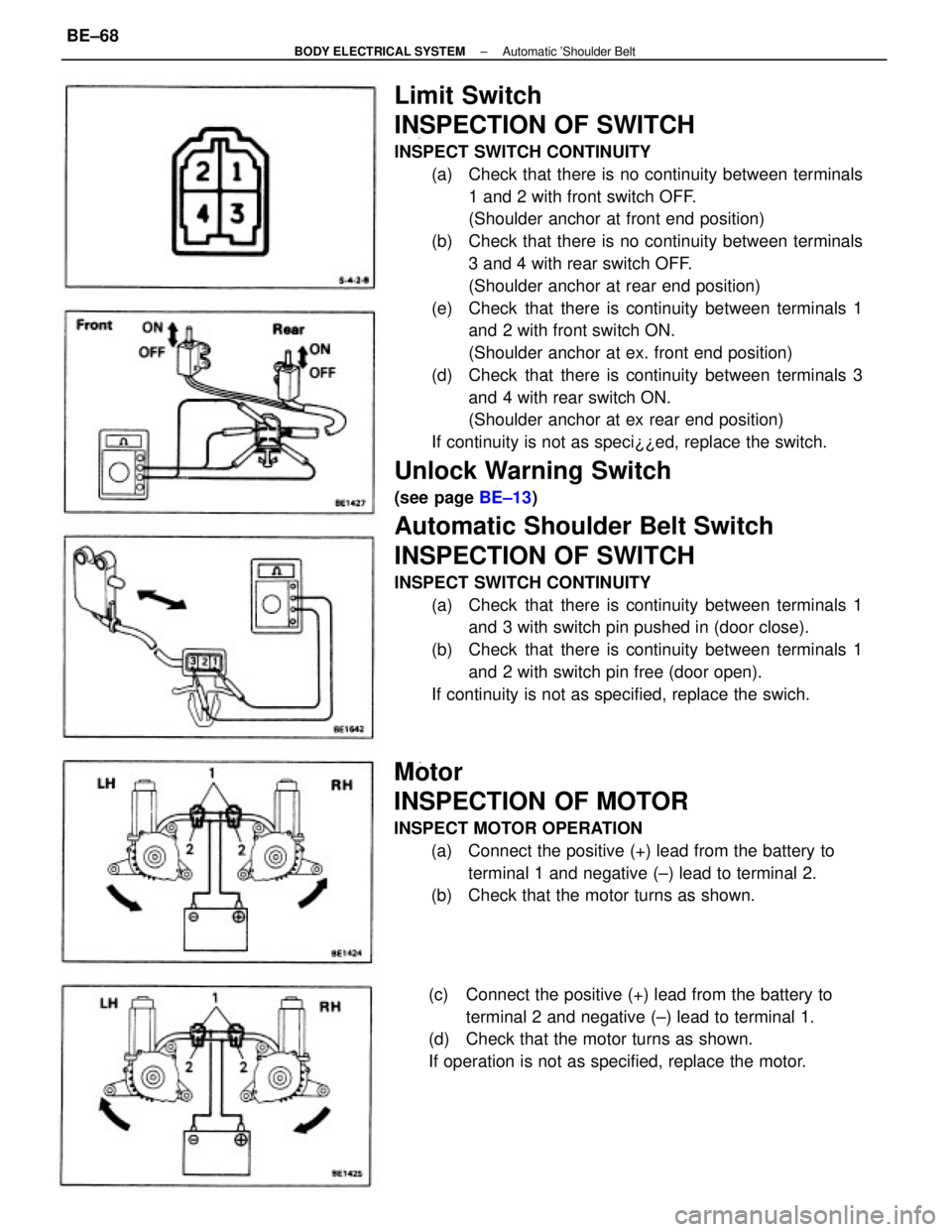
Limit Switch
INSPECTION OF SWITCH
INSPECT SWITCH CONTINUITY
(a) Check that there is no continuity between terminals
1 and 2 with front switch OFF.
(Shoulder anchor at front end position)
(b) Check that there is no continuity between terminals
3 and 4 with rear switch OFF.
(Shoulder anchor at rear end position)
(e) Check that there is continuity between terminals 1
and 2 with front switch ON.
(Shoulder anchor at ex. front end position)
(d) Check that there is continuity between terminals 3
and 4 with rear switch ON.
(Shoulder anchor at ex rear end position)
If continuity is not as speci¿¿ed, replace the switch.
Unlock Warning Switch
(see page BE±13)
Automatic Shoulder Belt Switch
INSPECTION OF SWITCH
INSPECT SWITCH CONTINUITY
(a) Check that there is continuity between terminals 1
and 3 with switch pin pushed in (door close).
(b) Check that there is continuity between terminals 1
and 2 with switch pin free (door open).
If continuity is not as specified, replace the swich.
Motor
INSPECTION OF MOTOR
INSPECT MOTOR OPERATION
(a) Connect the positive (+) lead from the battery to
terminal 1 and negative (±) lead to terminal 2.
(b) Check that the motor turns as shown.
(c) Connect the positive (+) lead from the battery to
terminal 2 and negative (±) lead to terminal 1.
(d) Check that the motor turns as shown.
If operation is not as specified, replace the motor.
± BODY ELECTRICAL SYSTEMAutomatic 'Shoulder BeltBE±68
Page 828 of 2389
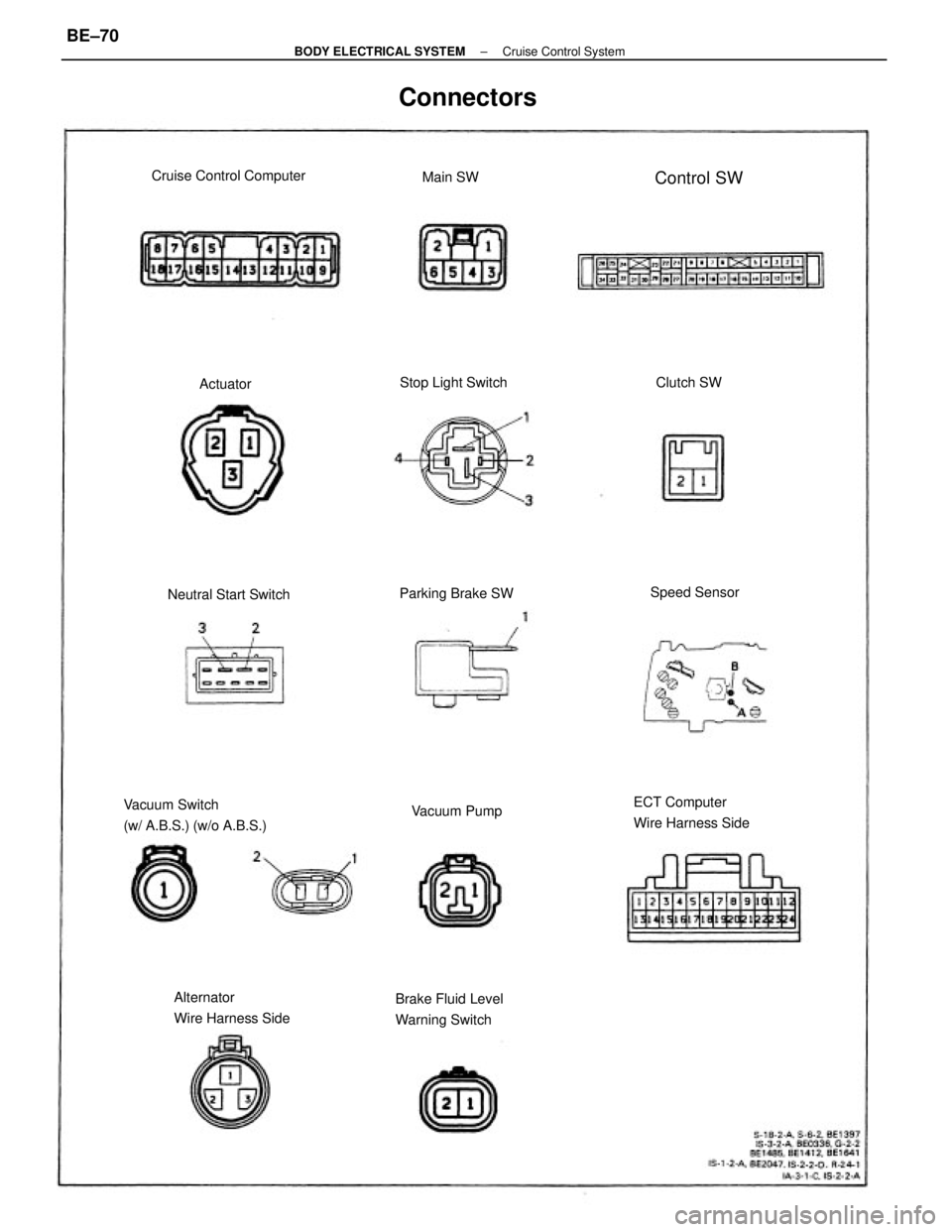
Vacuum Switch
(w/ A.B.S.) (w/o A.B.S.)ECT Computer
Wire Harness Side
Alternator
Wire Harness SideBrake Fluid Level
Warning Switch
Connectors
Cruise Control Computer
Neutral Start SwitchStop Light Switch
Parking Brake SW
Vacuum PumpSpeed SensorControl SW
Clutch SW Main SW
Actuator
± BODY ELECTRICAL SYSTEMCruise Control SystemBE±70
Page 840 of 2389
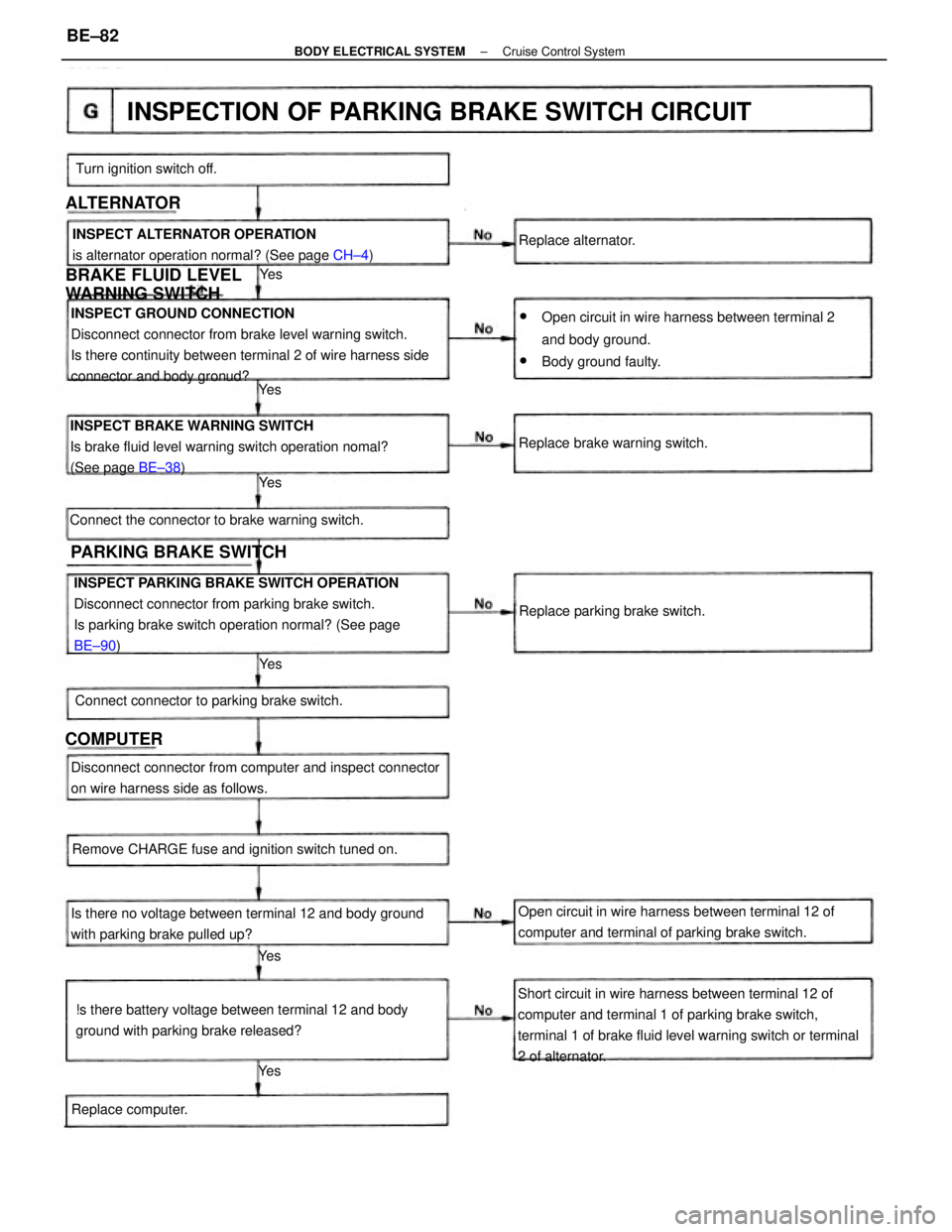
INSPECT PARKING BRAKE SWITCH OPERATION
Disconnect connector from parking brake switch.
Is parking brake switch operation normal? (See page
BE±90) INSPECT GROUND CONNECTION
Disconnect connector from brake level warning switch.
Is there continuity between terminal 2 of wire harness side
connector and body gronud?
Short circuit in wire harness between terminal 12 of
computer and terminal 1 of parking brake switch,
terminal 1 of brake fluid level warning switch or terminal
2 of alternator. INSPECT BRAKE WARNING SWITCH
Is brake fluid level warning switch operation nomal?
(See page BE±38)
wOpen circuit in wire harness between terminal 2
and body ground.
wBody ground faulty.
INSPECTION OF PARKING BRAKE SWITCH CIRCUIT
Is there no voltage between terminal 12 and body ground
with parking brake pulled up?
!s there battery voltage between terminal 12 and body
ground with parking brake released? Disconnect connector from computer and inspect connector
on wire harness side as follows.
Open circuit in wire harness between terminal 12 of
computer and terminal of parking brake switch. INSPECT ALTERNATOR OPERATION
is alternator operation normal? (See page CH±4)
Remove CHARGE fuse and ignition switch tuned on. Connect the connector to brake warning switch.
Connect connector to parking brake switch.
BRAKE FLUID LEVEL
WARNING SWITCH
Replace brake warning switch.
Replace parking brake switch.
PARKING BRAKE SWITCH
Turn ignition switch off.
Replace computer.Replace alternator.
ALTERNATOR
COMPUTER
Ye s
Ye s Ye s
Ye s Ye sYe s
± BODY ELECTRICAL SYSTEMCruise Control SystemBE±82
Page 860 of 2389
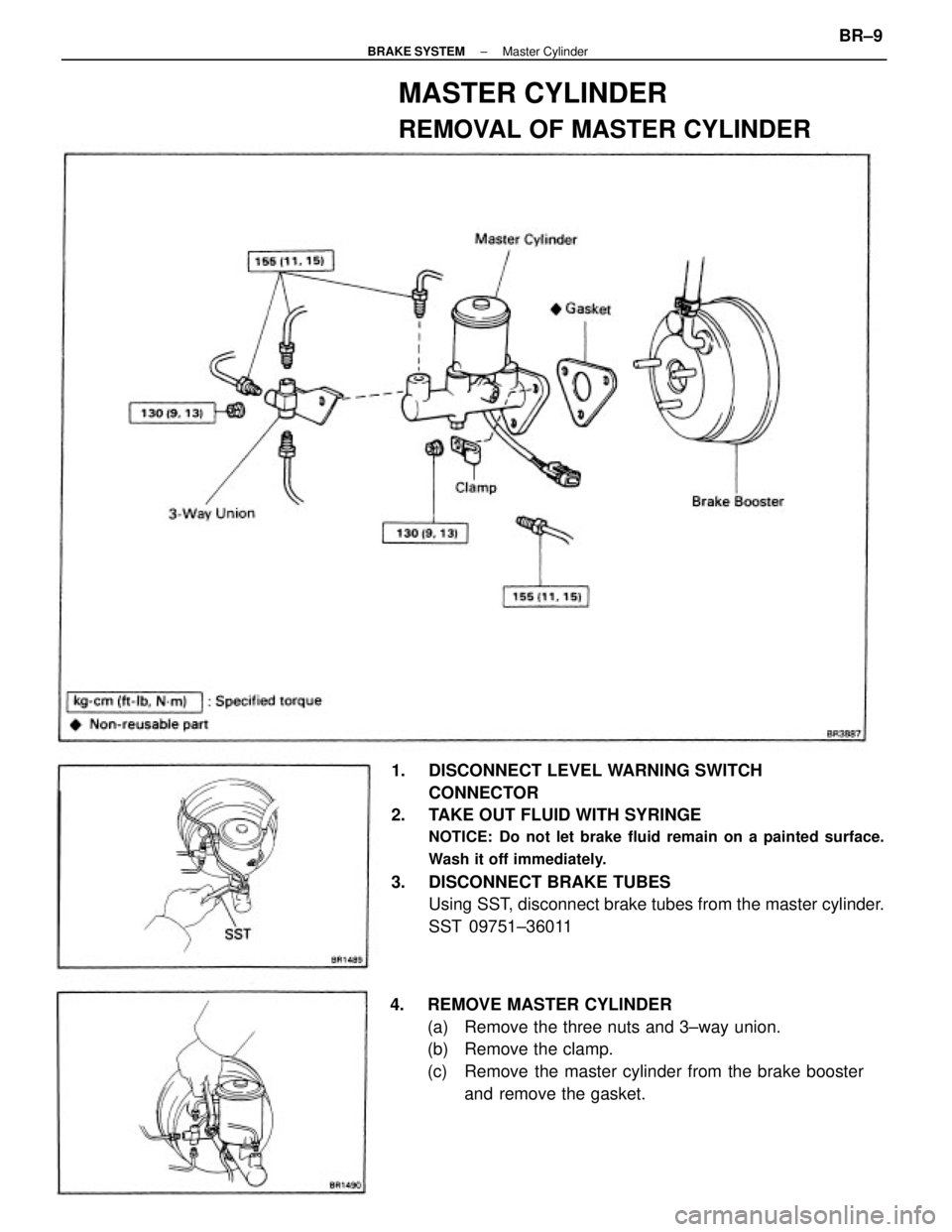
1. DISCONNECT LEVEL WARNING SWITCH
CONNECTOR
2. TAKE OUT FLUID WITH SYRINGE
NOTICE: Do not let brake fluid remain on a painted surface.
Wash it off immediately.
3. DISCONNECT BRAKE TUBES
Using SST, disconnect brake tubes from the master cylinder.
SST 09751±36011
4. REMOVE MASTER CYLINDER
(a) Remove the three nuts and 3±way union.
(b) Remove the clamp.
(c) Remove the master cylinder from the brake booster
and remove the gasket.
MASTER CYLINDER
REMOVAL OF MASTER CYLINDER
± BRAKE SYSTEMMaster CylinderBR±9
Page 865 of 2389
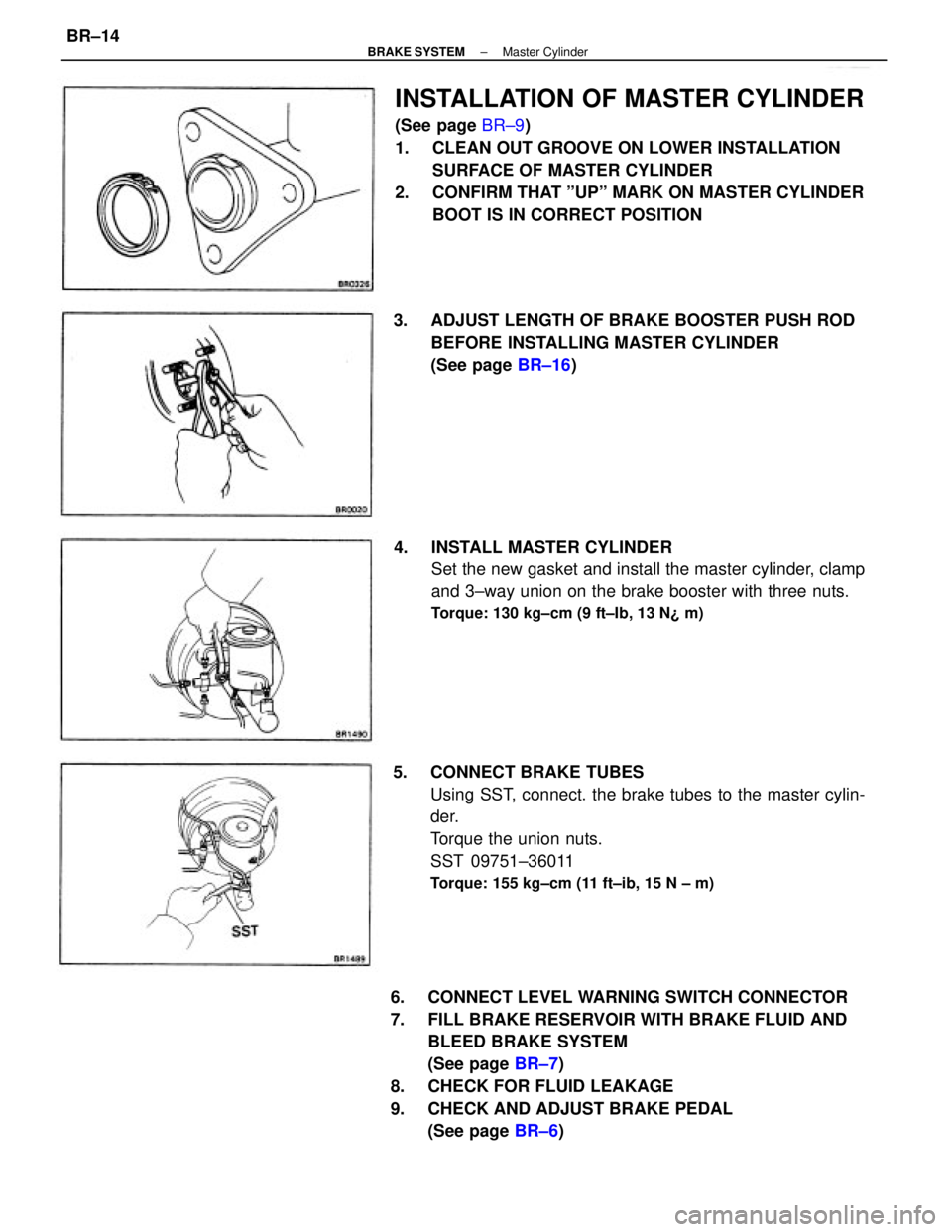
6. CONNECT LEVEL WARNING SWITCH CONNECTOR
7. FILL BRAKE RESERVOIR WITH BRAKE FLUID AND
BLEED BRAKE SYSTEM
(See page BR±7)
8. CHECK FOR FLUID LEAKAGE
9. CHECK AND ADJUST BRAKE PEDAL
(See page BR±6)
INSTALLATION OF MASTER CYLINDER
(See page BR±9)
1. CLEAN OUT GROOVE ON LOWER INSTALLATION
SURFACE OF MASTER CYLINDER
2. CONFIRM THAT ºUPº MARK ON MASTER CYLINDER
BOOT IS IN CORRECT POSITION
5. CONNECT BRAKE TUBES
Using SST, connect. the brake tubes to the master cylin-
der.
Torque the union nuts.
SST 09751±36011
Torque: 155 kg±cm (11 ft±ib, 15 N ± m)
4. INSTALL MASTER CYLINDER
Set the new gasket and install the master cylinder, clamp
and 3±way union on the brake booster with three nuts.
Torque: 130 kg±cm (9 ft±Ib, 13 N¿ m)
3. ADJUST LENGTH OF BRAKE BOOSTER PUSH ROD
BEFORE INSTALLING MASTER CYLINDER
(See page BR±16)
± BRAKE SYSTEMMaster CylinderBR±14
Page 909 of 2389
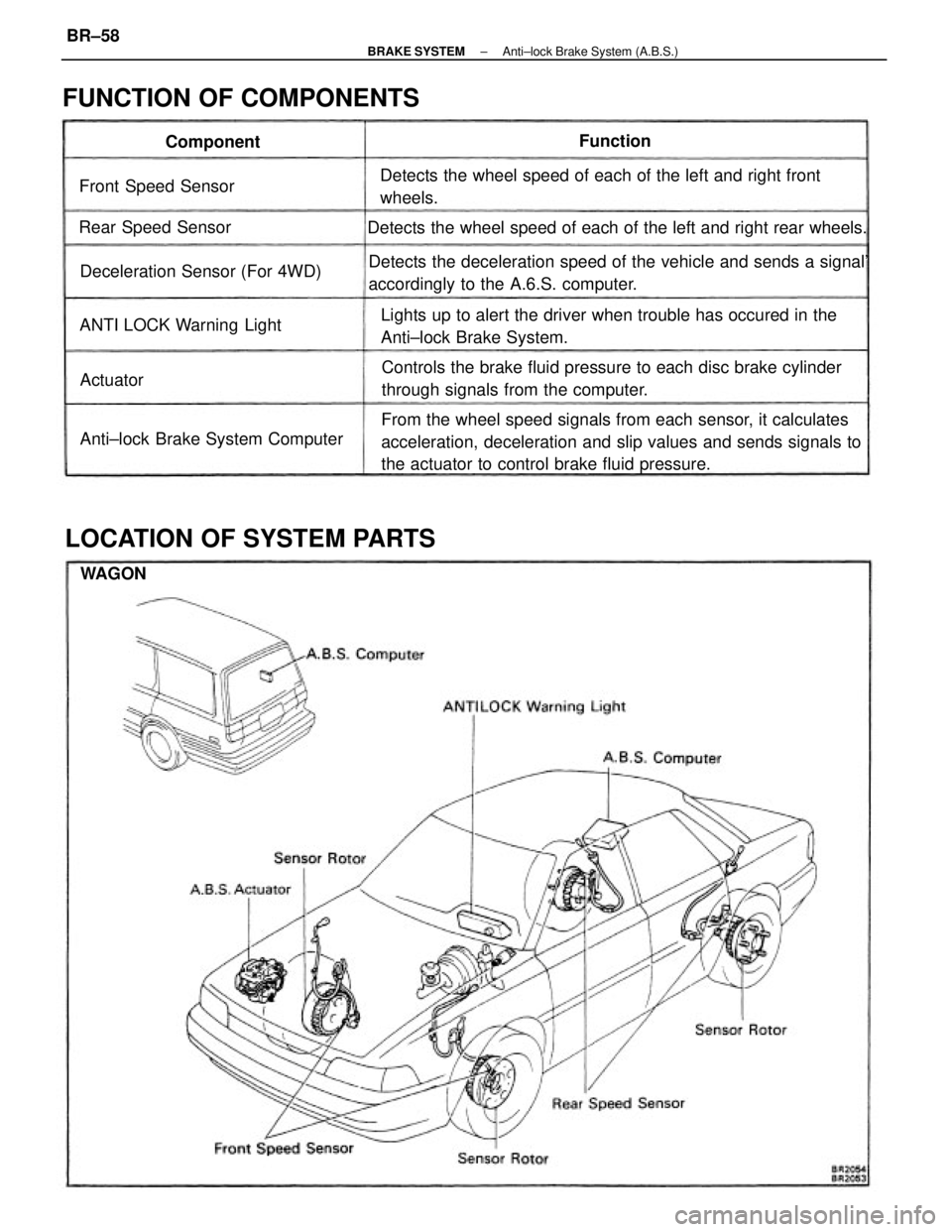
From the wheel speed signals from each sensor, it calculates
acceleration, deceleration and slip values and sends signals to
the actuator to control brake fluid pressure. Detects the deceleration speed of the vehicle and sends a signal'
accordingly to the A.6.S. computer.
Controls the brake fluid pressure to each disc brake cylinder
through signals from the computer. Lights up to alert the driver when trouble has occured in the
Anti±lock Brake System. Detects the wheel speed of each of the left and right front
wheels.
Detects the wheel speed of each of the left and right rear wheels.
LOCATION OF SYSTEM PARTS FUNCTION OF COMPONENTS
Anti±lock Brake System Computer Deceleration Sensor (For 4WD)
ANTI LOCK Warning Light Front Speed Sensor
Rear Speed SensorComponentFunction
Actuator
WAGON
± BRAKE SYSTEMAnti±lock Brake System (A.B.S.)BR±58