phone TOYOTA COROLLA 2010 10.G User Guide
[x] Cancel search | Manufacturer: TOYOTA, Model Year: 2010, Model line: COROLLA, Model: TOYOTA COROLLA 2010 10.GPages: 476, PDF Size: 9.5 MB
Page 234 of 476
234 3-3. Using the hands-free phone system (for cellular phone)
FCC WARNING:
Changes or modifications in construction not expressly approved by the
party responsible for compliance could void the user's authority to operate
the equipment.
CAUTION:
Radio Frequency Radiation Exposure
This equipment complies with FCC radiation exposure limits set forth for
uncontrolled equipment and meets the FCC radio frequency (RF) Exposure
Guidelines in Supplement C to OET65. This equipment has very low levels
of RF energy that it deemed to comply without maximum permissive expo-
sure evaluation (MPE). But it is desirable that it should be installed and oper-
ated with at least 20 cm and more between the radiator and person’s body
(excluding extremities: hands, wrists, feet and legs).
Co-location:
This transmitter must not be co-located or operated in conjunction with any
other antenna or transmitter.
CAUTION
■Caution while driving
Do not use a cellular phone, or connect the Bluetooth
® phone.
NOTICE
■To prevent damage to a cellular phone
Do not leave a cellular phone in the vehicle. The temperature inside may
become high resulting in damage to the phone.
Page 235 of 476
235
3-3. Using the hands-free phone system (for cellular phone)
3
Interior features
Using the hands-free phone system (for cellular phone)
■Audio unit
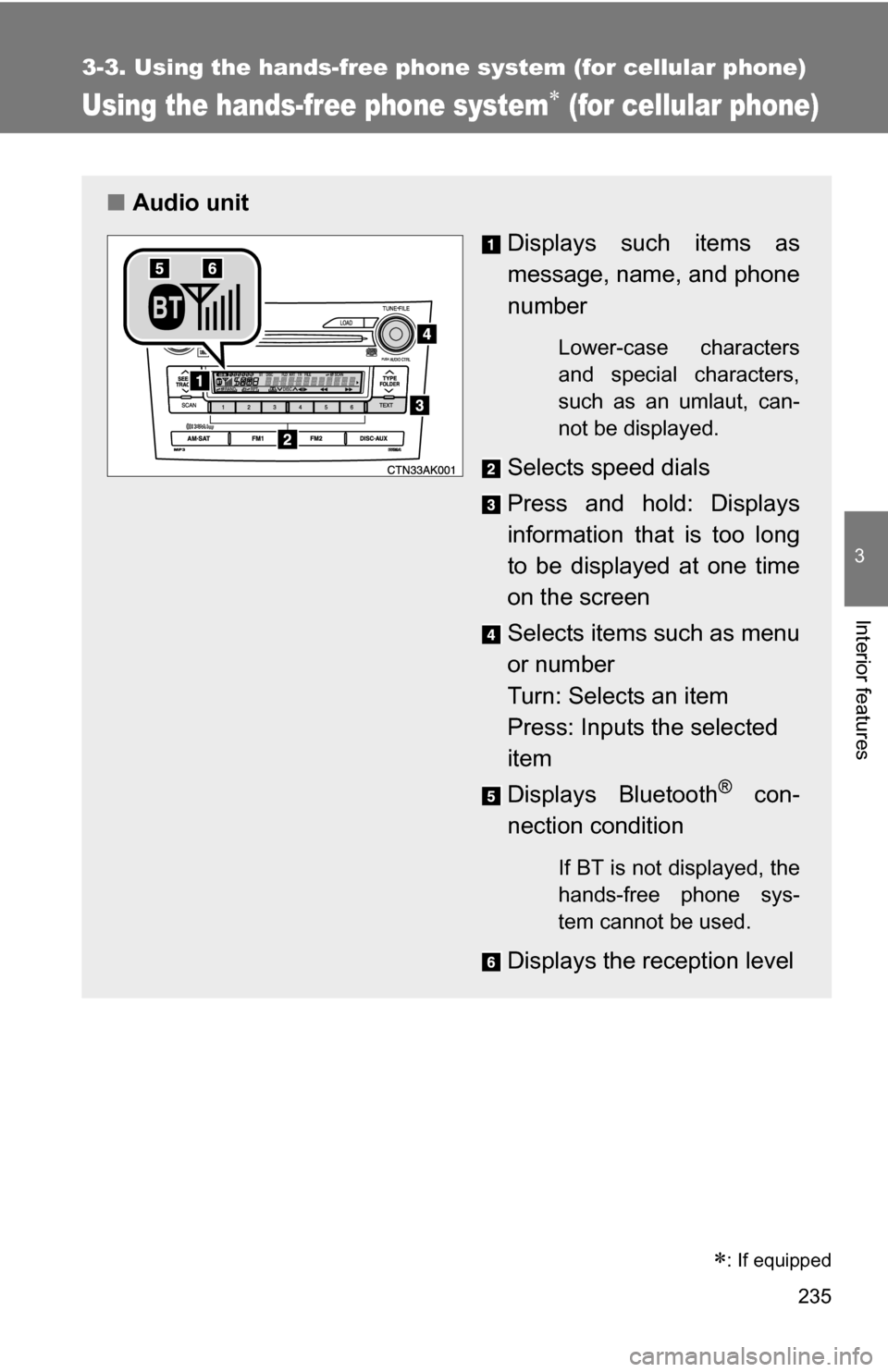
Displays such items as
message, name, and phone
number
Lower-case characters
and special characters,
such as an umlaut, can-
not be displayed.
Selects speed dials
Press and hold: Displays
information that is too long
to be displayed at one time
on the screen
Selects items such as menu
or number
Turn: Selects an item
Press: Inputs the selected
item
Displays Bluetooth
® con-
nection condition
If BT is not displayed, the
hands-free phone sys-
tem cannot be used.
Displays the reception level
: If equipped
Page 236 of 476
236 3-3. Using the hands-free phone system (for cellular phone)
■Steering wheel
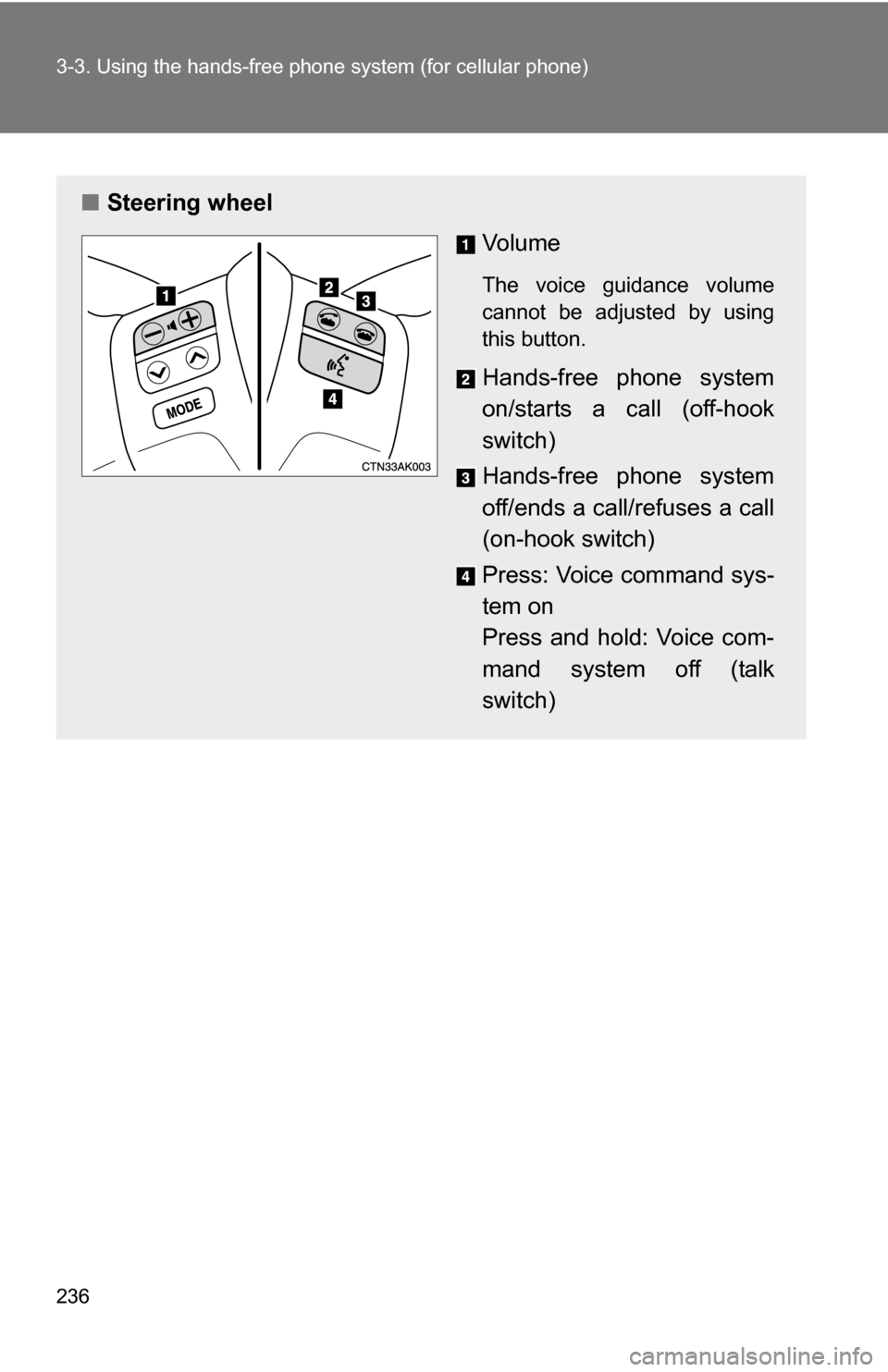
Vo l u m e
The voice guidance volume
cannot be adjusted by using
this button.
Hands-free phone system
on/starts a call (off-hook
switch)
Hands-free phone system
off/ends a call/refuses a call
(on-hook switch)
Press: Voice command sys-
tem on
Press and hold: Voice com-
mand system off (talk
switch)
Page 237 of 476
237
3-3. Using the hand
s-free phone system (for cellular phone)
3
Interior features
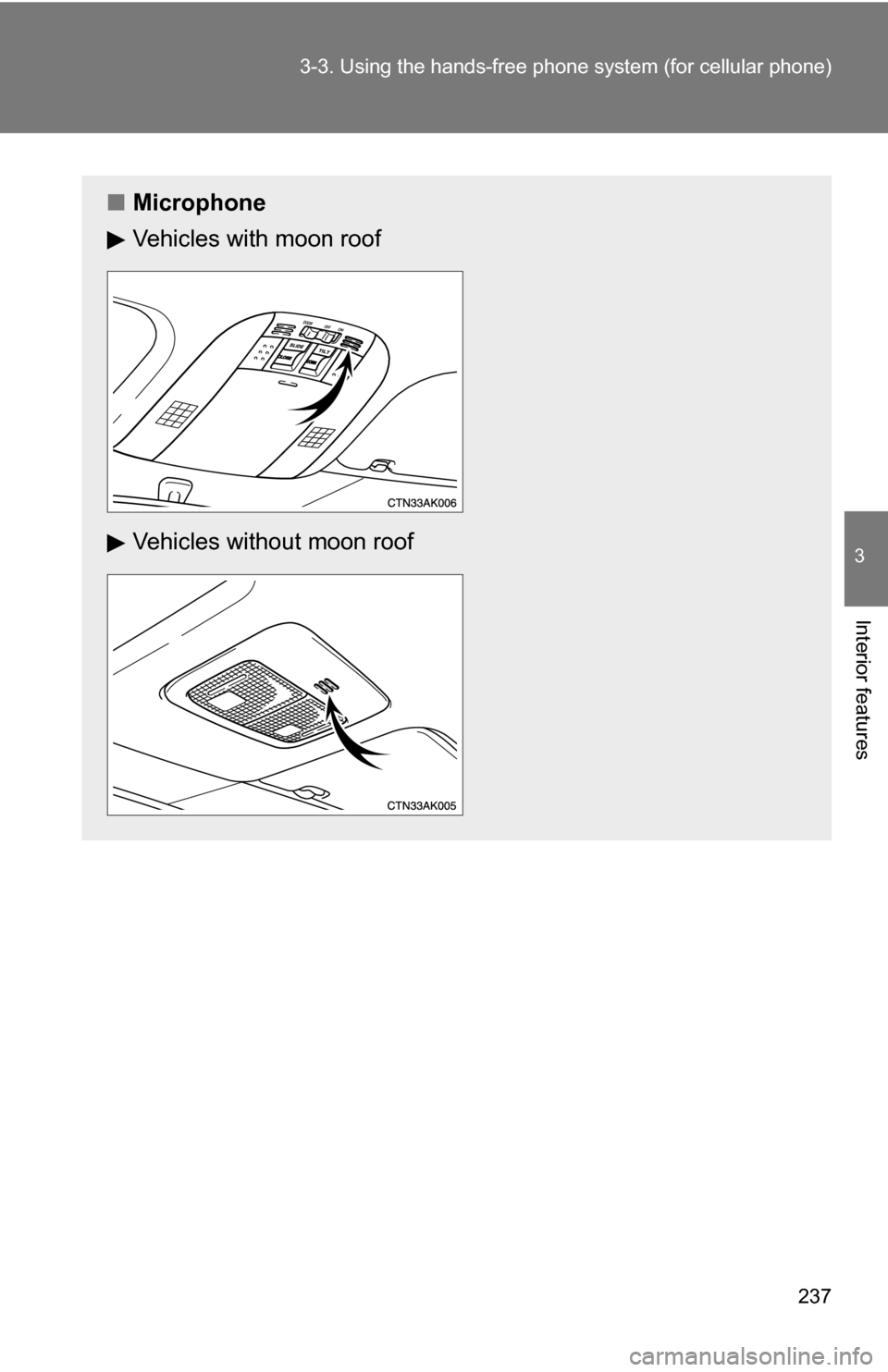
■Microphone
Vehicles with moon roof
Vehicles without moon roof
Page 238 of 476
238 3-3. Using the hands-free phone system (for cellular phone)
Operating the system by using a voice command
By following voice gui dance instructions output from the speaker,
voice commands can be given to allow for operation of the hands-
free phone system without checking the display or operating .
■ Operation procedure when using a voice command
Press the talk switch and say the command for a desired function.
( P. 240)
■ Auxiliary commands when using a voice command
The following auxiliary commands can be used when operating the
system using a voice command:
Cancel: Exits the hands-free phone system
Repeat: Repeats the previous voice guidance instruction
Go back: Returns to the previous procedure
Help: Reads aloud the function summary if a help comment is
registered for the selected function
Page 239 of 476
239
3-3. Using the hand
s-free phone system (for cellular phone)
3
Interior features
Using the hands-free phone system for the first time
Before using the hands-free phone system, it is necessary to register
a cellular phone in the system. Th e phone registration mode will be
entered automatically when starting the system with no cellular
phone registered. Follow the procedure below to register a cellular
phone:
Press the off-hook switch or the talk switch.
The introductory guidance and phone name registration instructions
are heard.
Register a phone name by either of the following methods.
a. Select “Record Name” by using , and say a name to
be registered.
b. Press the talk switch and say a name to be registered.
A voice guidance instruction to confirm the input is heard.
Select “Confirm” by using a voice command or .
A passkey is displayed and heard, and a voice guidance instruction
for inputting the passkey into the cellular phone is heard. Input the passkey into the cellular phone.
Refer to the manual that comes with the cellular phone for the oper-
ation of the phone.
Guidance for registration completion is heard.
STEP 1
STEP 2
STEP 3
STEP 4
Page 240 of 476
240 3-3. Using the hands-free phone system (for cellular phone)
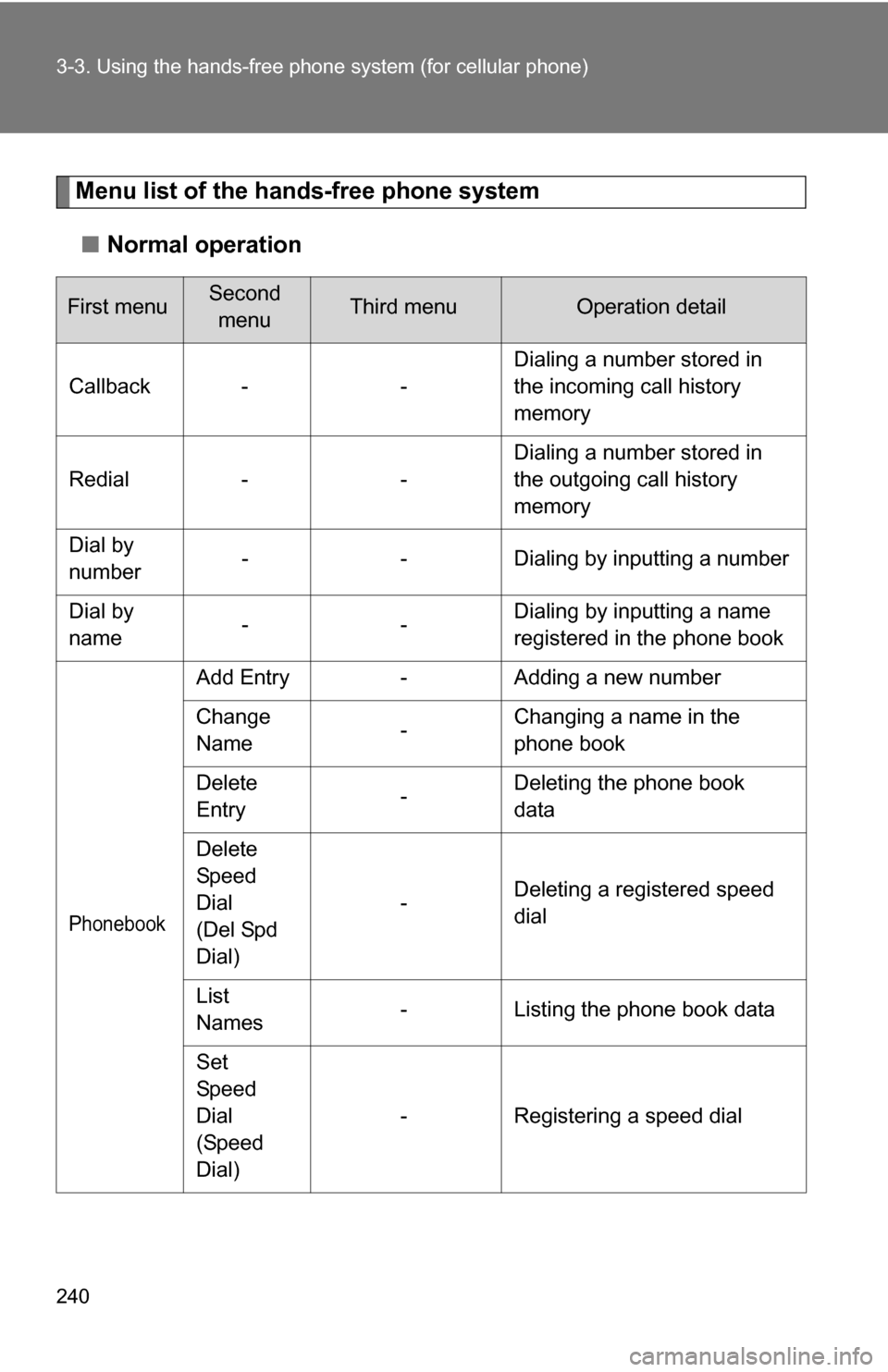
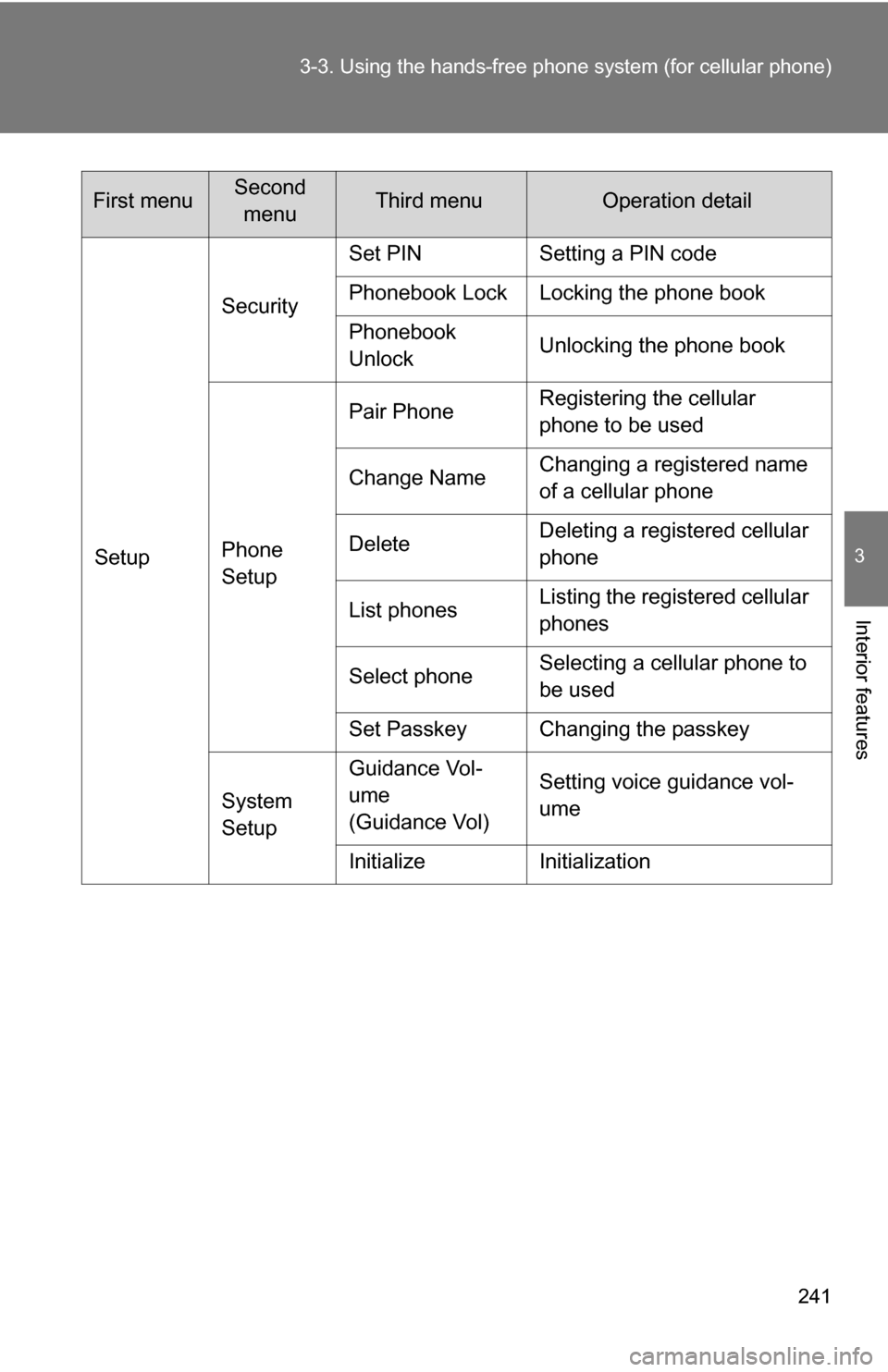
Menu list of the hands-free phone system
■ Normal operation
First menuSecond
menuThird menuOperation detail
Callback - - Dialing a number stored in
the incoming call history
memory
Redial - - Dialing a number stored in
the outgoing call history
memory
Dial by
number - - Dialing by inputting a number
Dial by
name -- Dialing by inputting a name
registered in the phone book
Phonebook
Add Entry
-Adding a new number
Change
Name -Changing a name in the
phone book
Delete
Entry -Deleting the phone book
data
Delete
Speed
Dial
(Del Spd
Dial) -
Deleting a registered speed
dial
List
Names -
Listing the phone book data
Set
Speed
Dial
(Speed
Dial) -
Registering a speed dial
Page 241 of 476
241
3-3. Using the hand
s-free phone system (for cellular phone)
3
Interior features
SetupSecurity
Set PIN Setting a PIN code
Phonebook Lock Locking the phone book
Phonebook
Unlock
Unlocking the phone book
Phone
Setup Pair Phone
Registering the cellular
phone to be used
Change Name Changing a registered name
of a cellular phone
Delete Deleting a registered cellular
phone
List phones Listing the registered cellular
phones
Select phone Selecting a cellular phone to
be used
Set Passkey Changing the passkey
System
Setup Guidance Vol-
ume
(Guidance Vol)
Setting voice guidance vol-
ume
Initialize Initialization
First menuSecond menuThird menuOperation detail
Page 242 of 476
242 3-3. Using the hands-free phone system (for cellular phone)
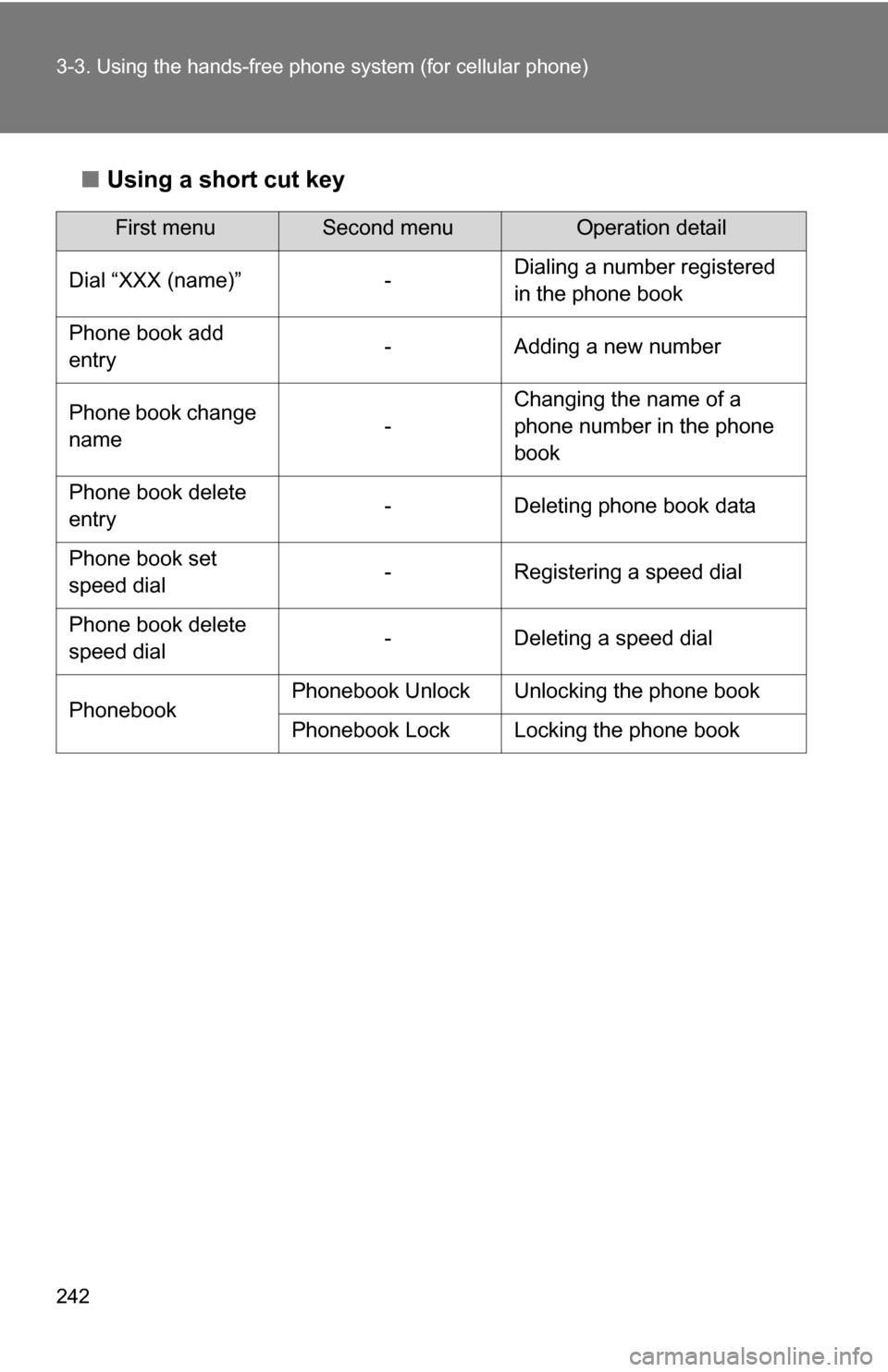
■Using a short cut key
First menuSecond menuOperation detail
Dial “XXX (name)” - Dialing a number registered
in the phone book
Phone book add
entry - Adding a new number
Phone book change
name -Changing the name of a
phone number in the phone
book
Phone book delete
entry - Deleting phone book data
Phone book set
speed dial - Registering a speed dial
Phone book delete
speed dial - Deleting a speed dial
Phonebook Phonebook Unlock Unlocking the phone book
Phonebook Lock Locking the phone book
Page 243 of 476
243
3-3. Using the hand
s-free phone system (for cellular phone)
3
Interior features
■Automatic adjustment of volume
When vehicle speed is 50 mph (80 km/h) or more, the volume automatically
increases. The volume returns to the previous volume setting when vehicle
speed drops to 43 mph (70 km/h) or less.
■ When using a voice command
For numbers, say a combination of single digits from zero to nine, # (pound),
(star), and + (plus).
Say a command correctly and clearly.
■ The system may not recognize your voice in the following situations:
●When driving on a rough road
● When driving at high speeds
● When air is blowing out of the vents onto the microphone
● When the air conditioning fan emits a loud noise
■ The following cannot be performed while driving:
●Operating the system with
● Registering a cellular phone to the system
■ Changing the passkey
P. 252