display TOYOTA COROLLA 2012 10.G User Guide
[x] Cancel search | Manufacturer: TOYOTA, Model Year: 2012, Model line: COROLLA, Model: TOYOTA COROLLA 2012 10.GPages: 529, PDF Size: 8.07 MB
Page 158 of 529
158 2-2. Instrument cluster
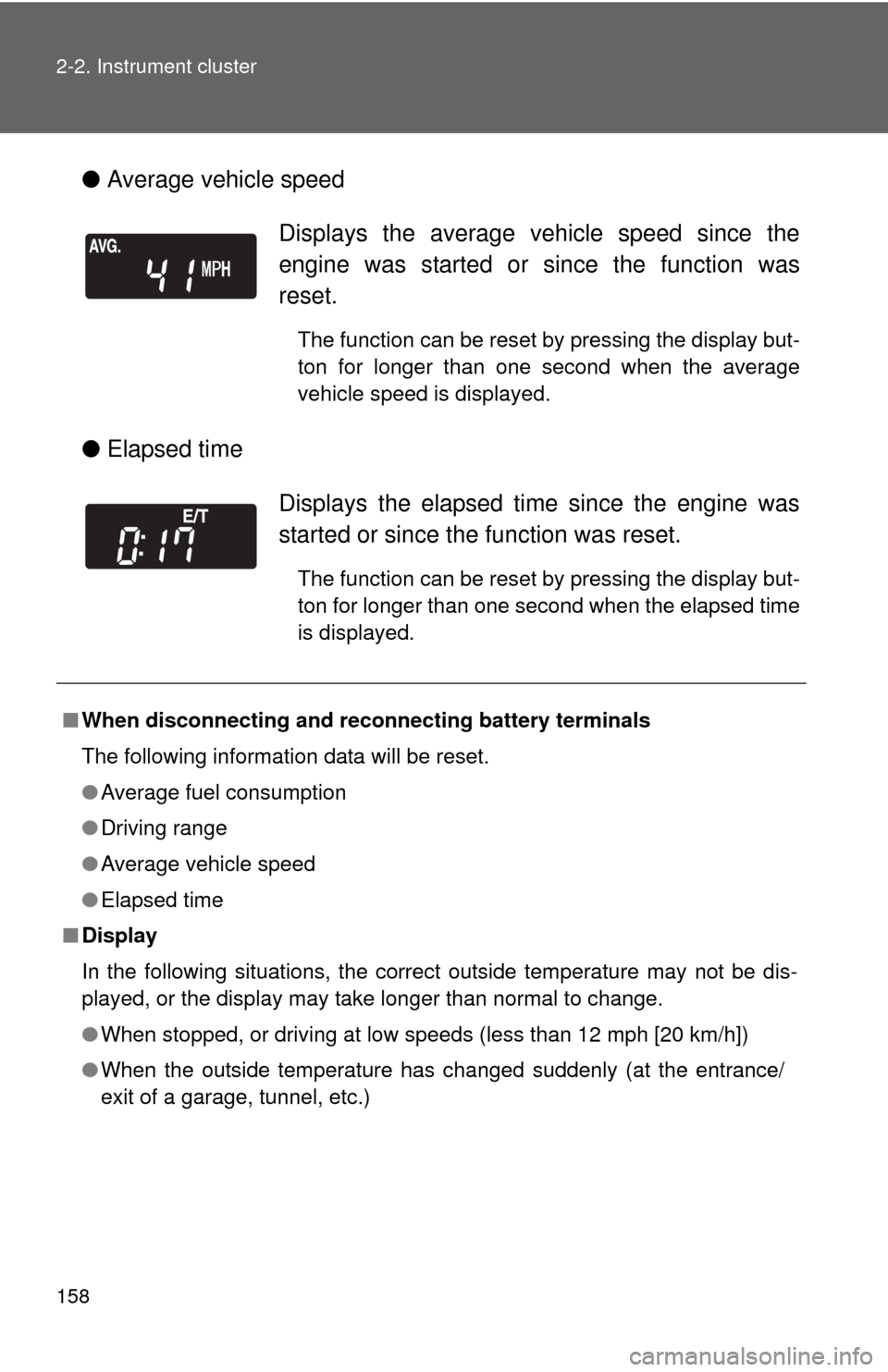
●Average vehicle speed
● Elapsed time
Displays the average vehicle speed since the
engine was started or since the function was
reset.
The function can be reset by pressing the display but-
ton for longer than one second when the average
vehicle speed is displayed.
Displays the elapsed ti me since the engine was
started or since the function was reset.
The function can be reset by pressing the display but-
ton for longer than one second when the elapsed time
is displayed.
■ When disconnecting and reco nnecting battery terminals
The following information data will be reset.
● Average fuel consumption
● Driving range
● Average vehicle speed
● Elapsed time
■ Display
In the following situations, the correct outside temperature may not be dis-
played, or the display may take longer than normal to change.
●When stopped, or driving at low speeds (less than 12 mph [20 km/h])
● When the outside temperature has changed suddenly (at the entrance/
exit of a garage, tunnel, etc.)
Page 159 of 529

159
2-2. Instrument cluster
2
When driving
NOTICE
■
The multi-information disp lay at low temperatures
Allow the interior of the vehicle to warm up before using the liquid crystal
information display. At extremely low temperatures, the information display
monitor may respond slowly, and display changes may be delayed.
Page 206 of 529
206
3-1. Using the air conditioning system and defogger
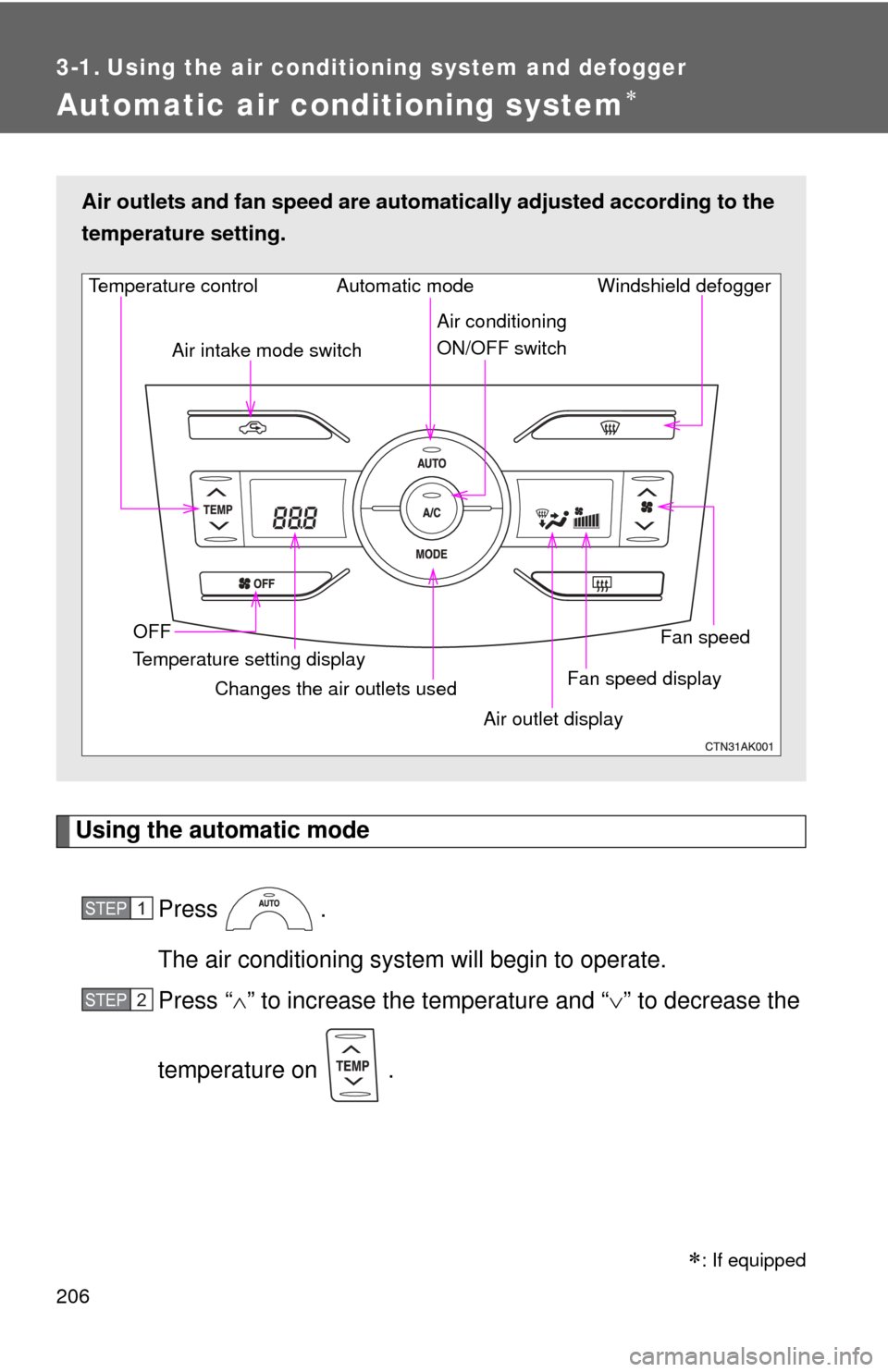
Automatic air conditioning system
Using the automatic modePress .
The air conditioning system will begin to operate.
Press “ ” to increase the temperature and “ ” to decrease the
temperature on .
Air outlets and fan speed are automa tically adjusted according to the
temperature setting.
Fan speed display Windshield defogger
Temperature control
Air intake mode switch
Fan speed
Temperature setting display OFF Automatic mode
Changes the air outlets used Air outlet display
Air conditioning
ON/OFF switch
STEP 1
STEP 2
: If equipped
Page 207 of 529
207
3-1. Using the air conditioning system
and defogger
3
Interior features
Adjusting the settings
■ Adjusting the temperature setting
Press “ ” to increase the temperature and “ ” to decrease the tem-
perature on .
■ Adjusting the fan speed
Press “ ” (increase) or “ ” (decrease) on .
The fan speed is shown on the display. (7 levels)
Press to turn the fan off.
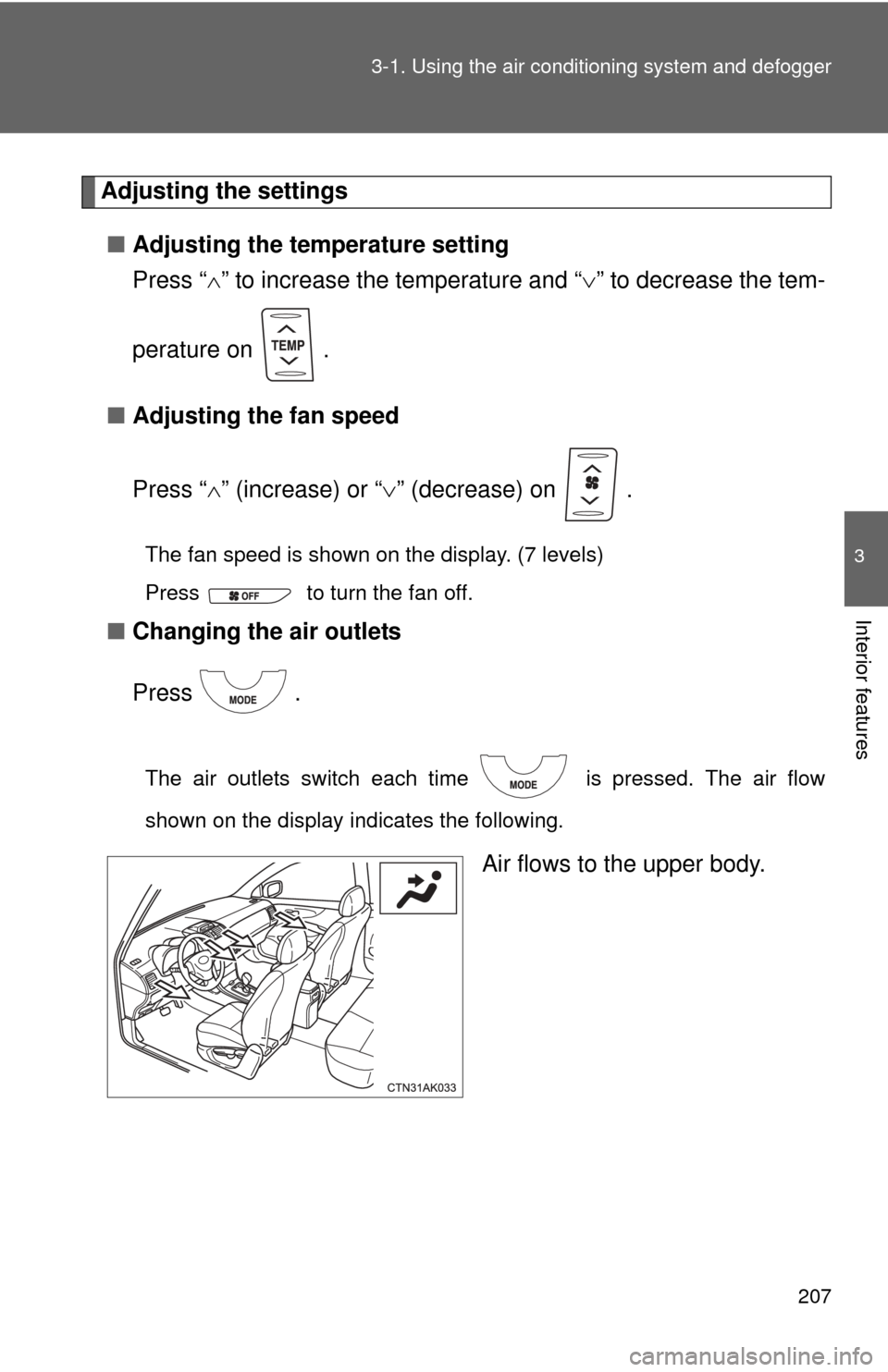
■ Changing the air outlets
Press .
The air outlets switch each time is pressed. The air flow
shown on the display indicates the following.
Air flows to the upper body.
Page 220 of 529
220
3-2. Using the audio system
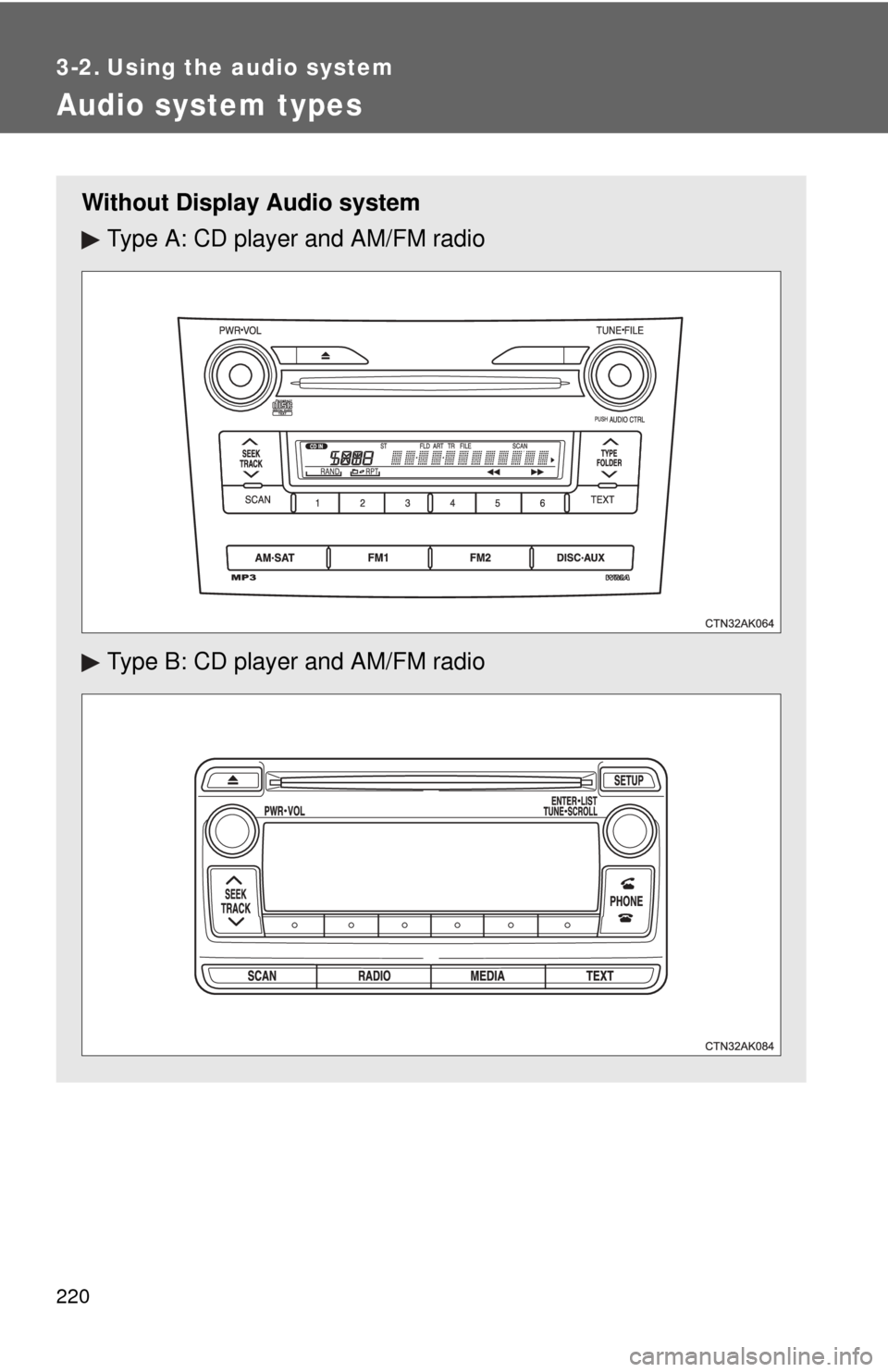
Audio system types
Without Display Audio systemType A: CD player and AM/FM radio
Type B: CD player and AM/FM radio
Page 221 of 529
221
3-2. Using the audio system
3
Interior features
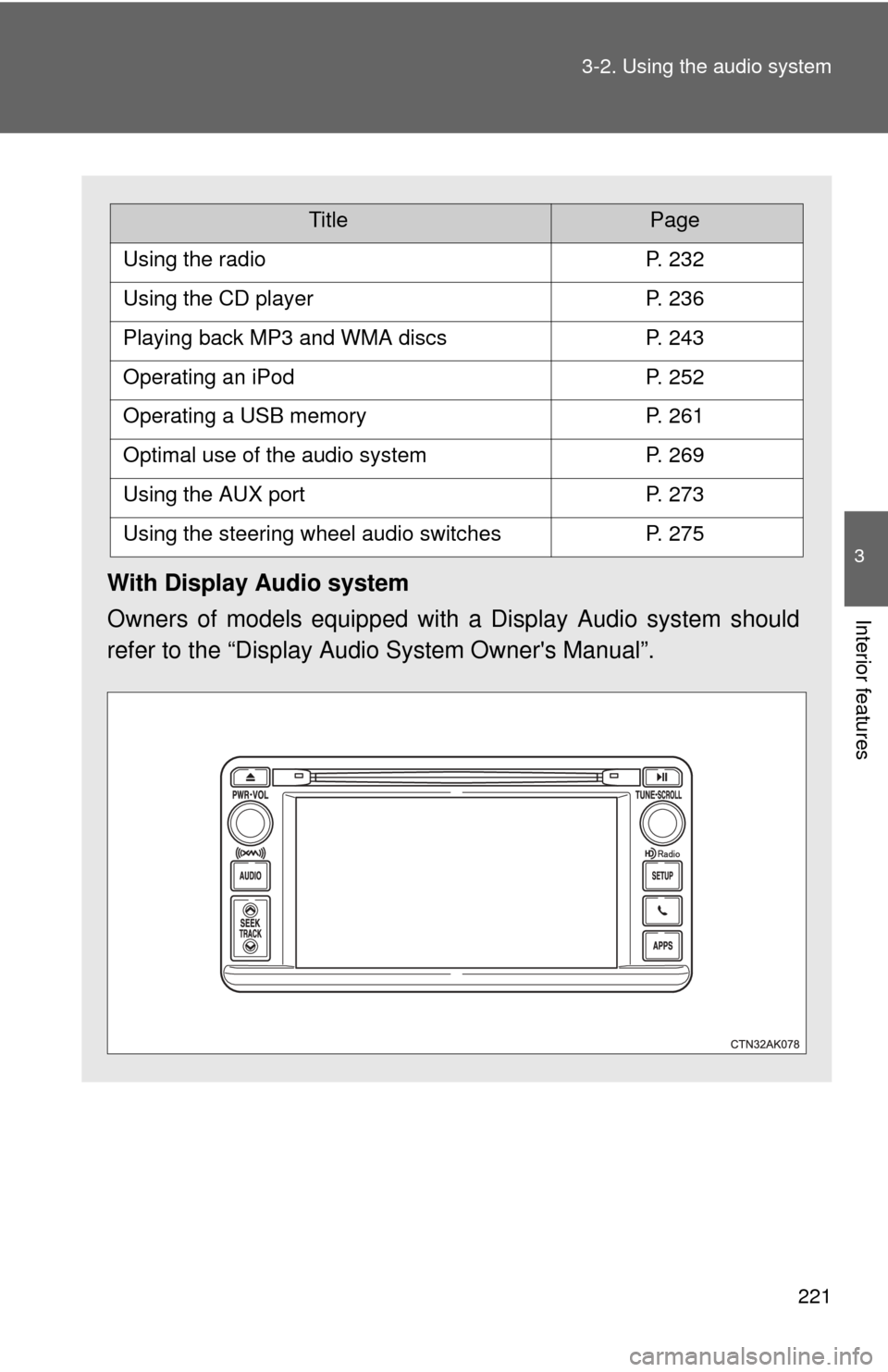
With Display Audio system
Owners of models equipped with
a Display Audio system should
refer to the “Display Audio System Owner's Manual”.
TitlePage
Using the radioP. 232
Using the CD playerP. 236
Playing back MP3 and WMA discsP. 243
Operating an iPodP. 252
Operating a USB memoryP. 261
Optimal use of the audio systemP. 269
Using the AUX portP. 273
Using the steering wheel audio switchesP. 275
Page 223 of 529
223
3-2. Using the audio system
3
Interior features
CAUTION
■
U.S.A. and Canada (type A: without Display Audio system)
●Part 15 of the FCC Rules
FCC Warning:
Any unauthorized changes or modifications to this equipment will void the
user’s authority to operate this device.
This transmitter must not be co-located or operated in conjunction with any
other antenna or transmitter.
This equipment complies with FCC radiation exposure limits set forth for
an uncontrolled environment and meets the FCC radio frequency (RF)
Exposure Guidelines in Supplement C to OET65. This equipment has very
low levels of RF energy that it deemed to comply without maximum per-
missive exposure evaluation (MPE). But it is desirable that it should be
installed and operated keeping the radiator at least 20cm or more away
from person’s body (excluding extremit ies: hands, wrists, feet and ankles).
● Laser products
• Do not take this unit apart or attempt to make any changes yourself.
This is an intricate unit that uses a laser pickup to retrieve information
from the surface of compact discs.
The laser is carefully shielded so that its rays remain inside the cabinet.
Therefore, never try to disassemble the player or alter any of its parts
since you may be exposed to laser rays and dangerous voltages.
• This product utilizes a laser. Use of controls or adjustments or performance of procedures other
than those specified herein may result in hazardous radiation expo-
sure.
• The use of optical instruments with this product will increase eye haz- ard.
Page 224 of 529
224 3-2. Using the audio system
CAUTION
■U.S.A. (type B: without Display Audio system)
FCC ID: ACJ932PTA184
FCC WARNING:
Changes or modifications not expressly approved by the party responsible
for compliance could void the user’s authority to operate the equipment.
This transmitter must not be co-located or operated in conjunction with any
other antenna or transmitter.
This equipment complies with FCC radiation exposure limits set forth for an
uncontrolled environment and meets the FCC radio frequency (RF) Expo-
sure Guidelines in Supplement C to OET65. This equipment has very low
levels of RF energy that it deemed to comply without maximum permissive
exposure evaluation (MPE). But it is desirable that it should be installed and
operated keeping the radiator at least 20cm or more away from person's
body (excluding extremities: hands, wrists, feet and ankles).
● Laser products
• Do not take this unit apart or attempt to make any changes yourself.
This is an intricate unit that uses a laser pickup to retrieve information
from the surface of compact discs.
The laser is carefully shielded so that its rays remain inside the cabinet.
Therefore, never try to disassemble the player or alter any of its parts
since you may be exposed to laser rays and dangerous voltages.
• This product utilizes a laser. Use of controls or adjustments or performance of procedures other
than those specified herein may result in hazardous radiation expo-
sure.
• The use of optical instruments with this product will increase eye haz- ard.
Page 225 of 529
225
3-2. Using the audio system
3
Interior features
CAUTION
■
Canada (type B: without Display Audio system)
This device complies with Industry Canada licence-exempt RSS
standard(s).
Operation is subject to the following two conditions:
(1) this device may not cause interference, and
(2) this device must accept any interference, including interference that may
cause undesired operation of this device.
Le présent appareil est conforme aux CNR d’Industrie Canada applicables
aux appareils radio exempts de licence.
L’exploitation est autorisée aux deux conditions suivantes : (1) l’appareil ne
doit pas produire de brouillage, et (2) l’utilisateur de l’appareil doit accepter
tout brouillage radioélectrique subi, même si le brouillage est susceptible
d’en compromettre le fonctionnement.
Under Industry Canada regulations, this radio transmitter may only operate
using an antenna of a type and maximum (or lesser) gain approved for the
transmitter by Industry Canada. To reduce potential radio interference to
other users, the antenna type and its gain should be so chosen that the
equivalent isotropically radiated power (e.i.r.p.) is not more than that neces-
sary for successful communication.
Conformément à la réglementation d’Industrie Canada, le présent émetteur
radio peut fonctionner avec une antenne d’un type et d’un gain maximal (ou
inférieur) approuvé pour l’émetteur par Industrie Canada. Dans le but de
réduire les risques de brouillage radioélectrique à l’intention des autres
utilisateurs, il faut choisir le type d’antenne et son gain de sorte que la
puissance isotrope rayonnée équivalente (p.i.r.e.) ne dépasse pas l’intensité
nécessaire à l’établissement d’une communication satisfaisante.
Page 227 of 529
227
3-2. Using the audio system
3
Interior features
CAUTION
■
U.S.A. (with Display Audio system)
FCC ID: AJDK032
This device complies with Part 15 of FCC Rules and Industry Canada
licence-exempt RSS standard(s).
Operation is subject to the following two conditions:
(1) this device may not cause interference, and
(2) this device must accept any interference, including interference that may
cause undesired operation of this device.
The antenna for Bluetooth cannot be removed (or replaced) by user.
This device complies with RSS-310 of Industry Canada. Operation is subject
to the condition that this device does not cause harmful interference.
FCC Warning:
Changes or modifications not expressly approved by the party responsible
for compliance could void the user’s authority to operate the equipment.
This equipment complies with FCC/IC ra diation exposure limits set forth for
an uncontrolled environment and meets the FCC radio frequency (RF) Expo-
sure Guidelines in Supplement C to OET65 and RSS-102 of the IC radio fre-
quency (RF) Exposure rules. This equipment has very low levels of RF
energy that it deemed to comply without maximum permissive exposure
evaluation (MPE). But it is desirable that it should be installed and operated
keeping the radiator at least 20cm or more away from person’s body
(excluding extremities: hands, wrists, feet and ankles).