automatic ac TOYOTA COROLLA 2012 10.G Owner's Guide
[x] Cancel search | Manufacturer: TOYOTA, Model Year: 2012, Model line: COROLLA, Model: TOYOTA COROLLA 2012 10.GPages: 529, PDF Size: 8.07 MB
Page 167 of 529
167
2-3. Operating the lights and wipers
2
When driving
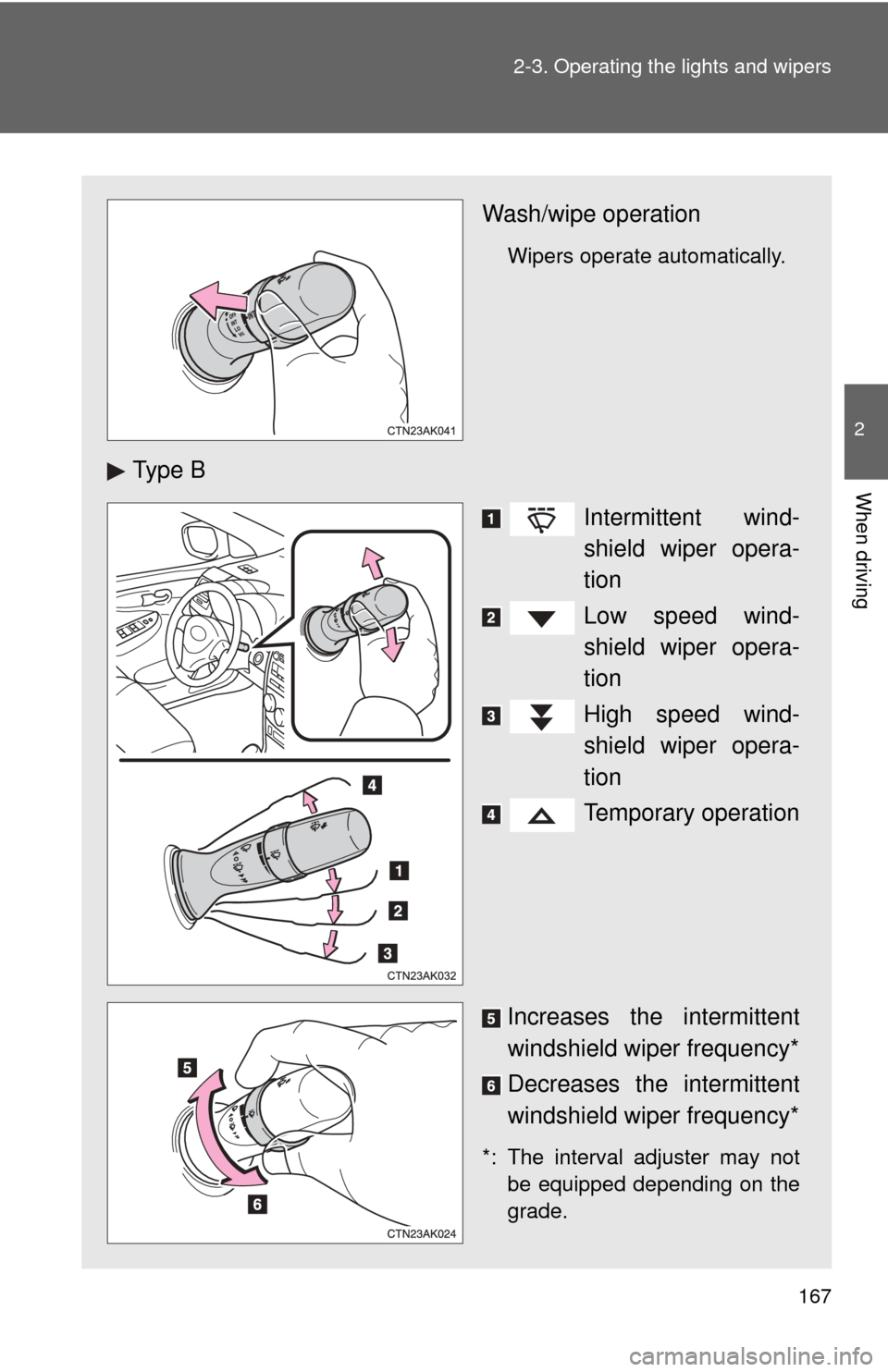
Wash/wipe operation
Wipers operate automatically.
Ty p e B
Intermittent wind-
shield wiper opera-
tion
Low speed wind-
shield wiper opera-
tion
High speed wind-
shield wiper opera-
tion
Temporary operation
Increases the intermittent
windshield wiper frequency*
Decreases the intermittent
windshield wiper frequency*
*: The interval adjuster may not be equipped depending on the
grade.
Page 168 of 529
168 2-3. Operating the lights and wipers
■The windshield wipers and washers can be operated when
Vehicles with smart key system
The “ENGINE START STOP” switch is in IGNITION ON mode. Vehicles without smart key system
The engine switch is in the “ON” position.
■ If no windshield washer fluid sprays
Check that the washer nozzles are not blocked and if there is washer fluid in
the windshield washer fluid reservoir.
NOTICE
■When the windshield is dry
Do not use the wipers, as they may damage the windshield.
■ When there is no washer fluid spray from the nozzle
Damage to the washer fluid pump may be caused if the lever is pulled
toward you and held continually.
■ When a nozzle becomes blocked
In this case, contact your Toyota dealer.
Do not try to clear it with a pin or other object. The nozzle will be damaged.
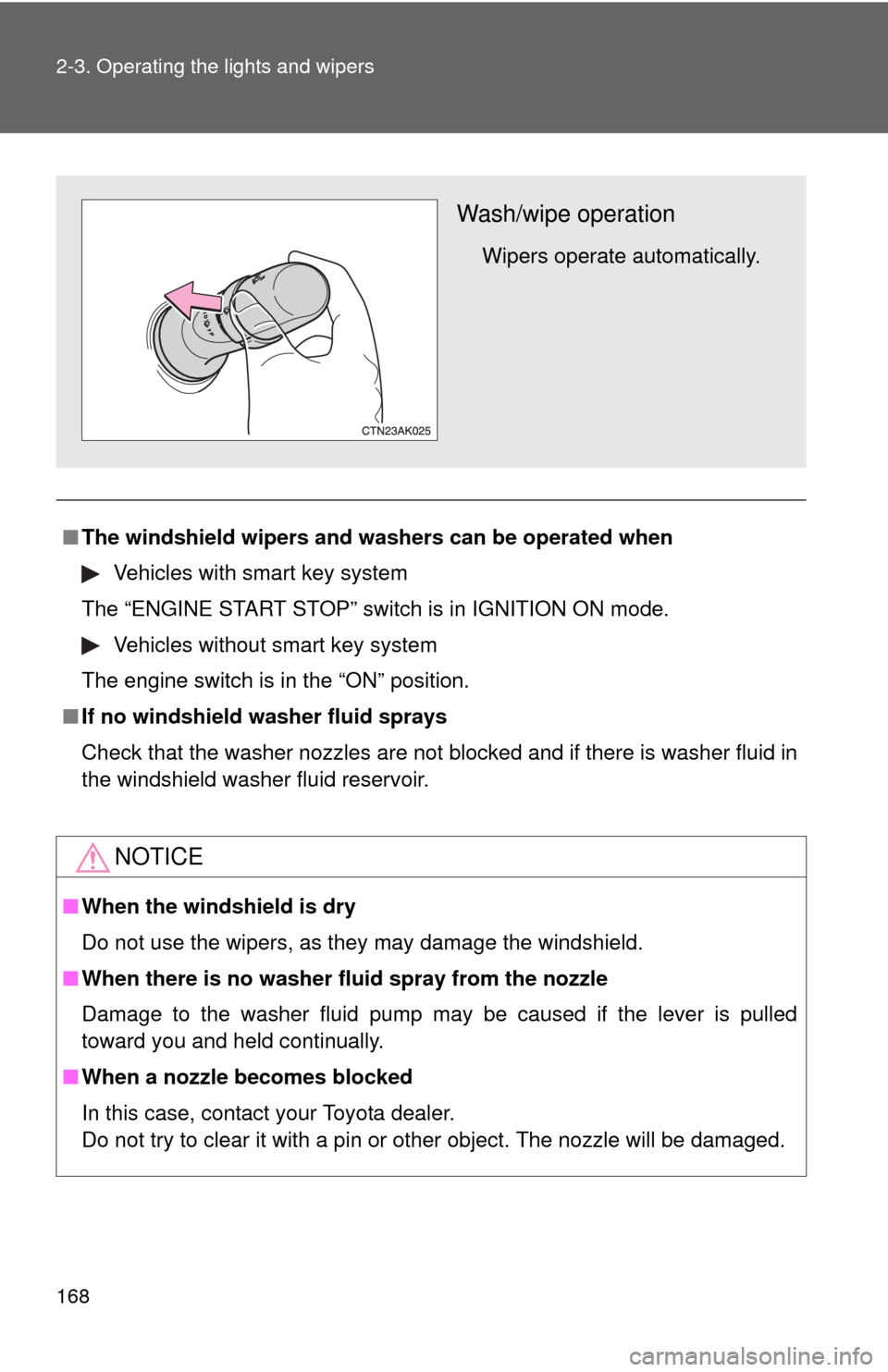
Wash/wipe operation
Wipers operate automatically.
Page 171 of 529
171
2-4. Using other
driving systems
2
When driving
■Cruise control can be set when
●Automatic transmission:
The shift lever is in the D or range 3 (standard type), or in the D or range
4 or higher of S has been selected (multi-mode type).
● Vehicle speed is above approximately 25 mph (40 km/h).
■ Accelerating after setting the vehicle speed
●The vehicle can be accelerated normally. After acceleration, the set
speed resumes.
● Even without canceling the cruise control, the set speed can be
increased by first accelerating the vehicle to the desired speed and then
pushing the lever down to set the new speed.
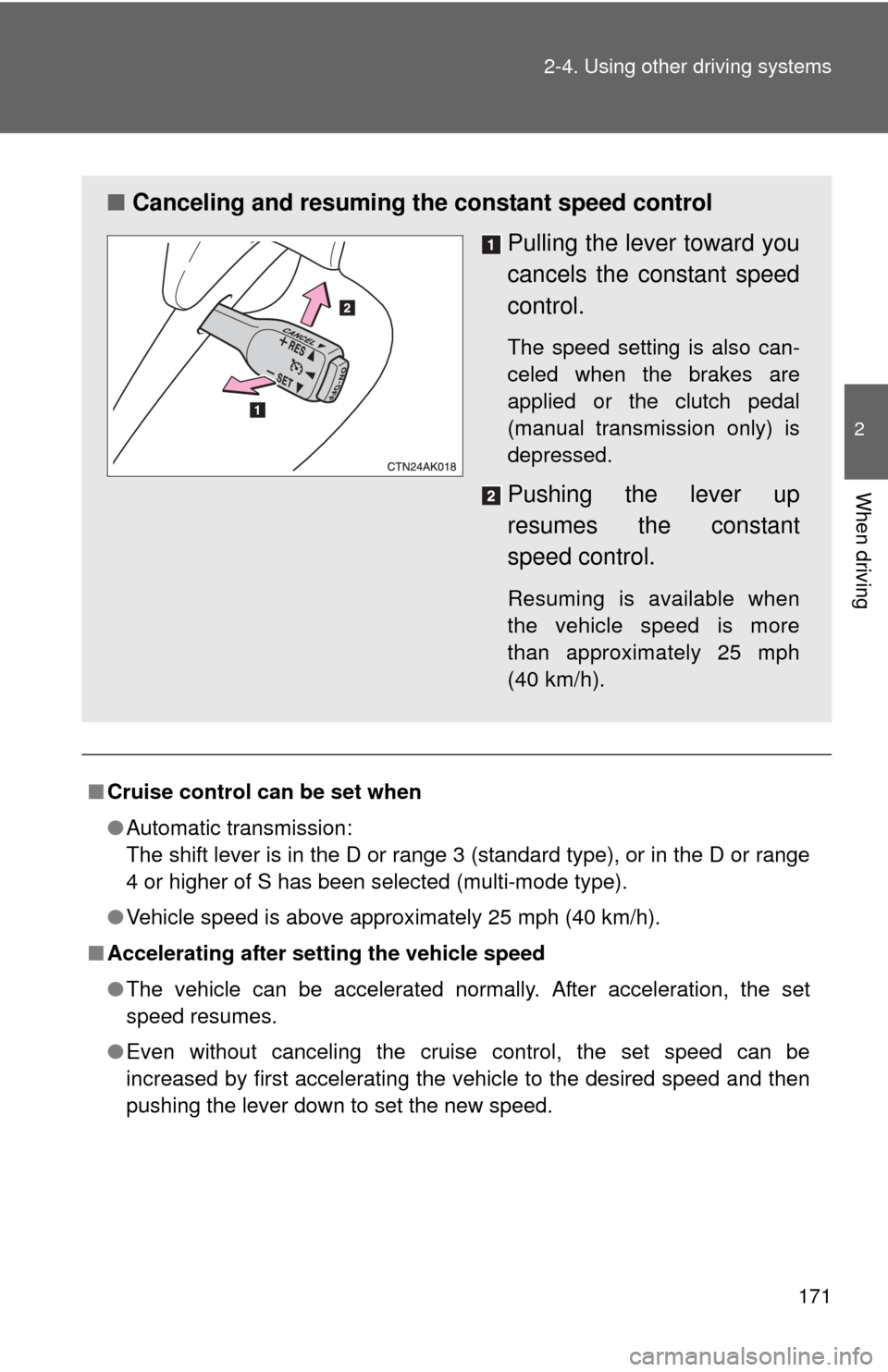
■ Canceling and resuming the constant speed control
Pulling the lever toward you
cancels the constant speed
control.
The speed setting is also can-
celed when the brakes are
applied or the clutch pedal
(manual transmission only) is
depressed.
Pushing the lever up
resumes the constant
speed control.
Resuming is available when
the vehicle speed is more
than approximately 25 mph
(40 km/h).
Page 172 of 529
172 2-4. Using other driving systems
■Automatic cruise control cancelation
Cruise control will stop maintaining the vehicle speed in any of the following
situations.
●Actual vehicle speed falls more than approximately 10 mph (16 km/h)
below the preset vehicle speed.
At this time, the memorized set speed is not retained.
● Actual vehicle speed is below approximately 25 mph (40 km/h).
● VSC is activated.
■ If the cruise control indicator light flashes
Press the “ON-OFF” button once to deactivate the system, and then press
the button again to reactivate the system.
If the cruise control speed cannot be set or if the cruise control cancels
immediately after being activated, there may be a malfunction in the cruise
control system. Have the vehicle inspected by your Toyota dealer.
CAUTION
■To avoid operating the cruise control by mistake
Switch the cruise control off using the “ON-OFF” button when not in use.
■ Situations unsuitable for cruise control
Do not use cruise control in any of the following situations.
Doing so may result in loss of control and could cause an accident resulting
in death or serious injury.
●In heavy traffic
● On roads with sharp bends
● On winding roads
● On slippery roads, such as those covered with rain, ice or snow
● On steep hills
Vehicle speed may exceed the set speed when driving down a steep hill.
● When your vehicle is towing a trailer or during emergency towing
Page 173 of 529
173
2-4. Using other driving systems
2
When driving
Driving assist systems
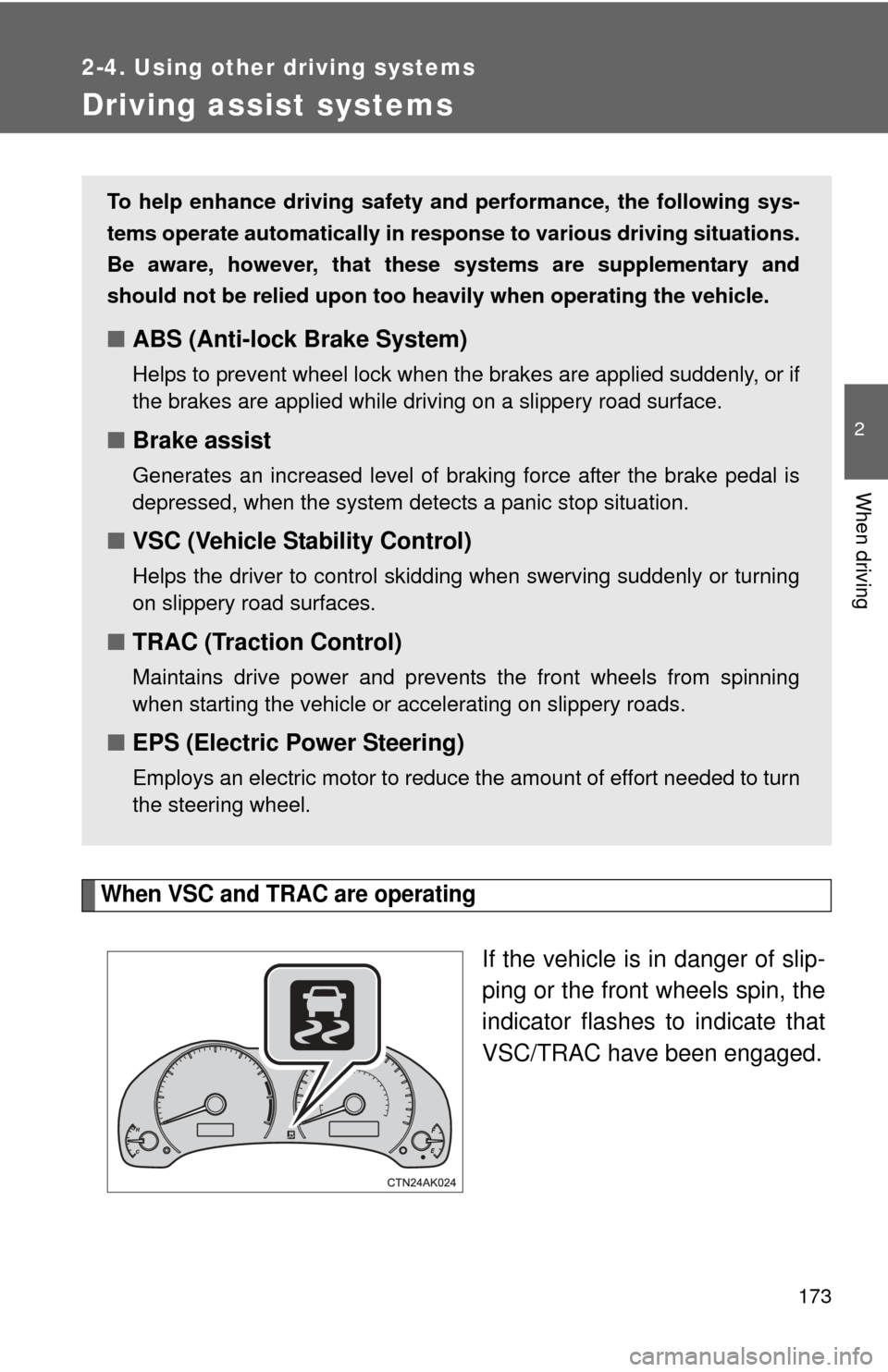
When VSC and TRAC are operating
If the vehicle is in danger of slip-
ping or the front wheels spin, the
indicator flashes to indicate that
VSC/TRAC have been engaged.
To help enhance driving safety and performance, the following sys-
tems operate automatically in res ponse to various driving situations.
Be aware, however, that these systems are supplementary and
should not be relied upon too heavi ly when operating the vehicle.
■ABS (Anti-lock Brake System)
Helps to prevent wheel lock when the brakes are applied suddenly, or if
the brakes are applied while driving on a slippery road surface.
■Brake assist
Generates an increased level of braking force after the brake pedal is
depressed, when the system detects a panic stop situation.
■VSC (Vehicle Stability Control)
Helps the driver to control skidding when swerving suddenly or turning
on slippery road surfaces.
■TRAC (Traction Control)
Maintains drive power and prevents the front wheels from spinning
when starting the vehicle or accelerating on slippery roads.
■EPS (Electric Power Steering)
Employs an electric motor to reduce the amount of effort needed to turn
the steering wheel.
Page 174 of 529
174 2-4. Using other driving systems
To disable TRAC and/or VSCIf the vehicle gets stuck in fres h snow or mud, TRAC and VSC may
reduce power from the engine to the wheels. You may need to turn
the system off to enable you to rock the vehicle in order to free it.
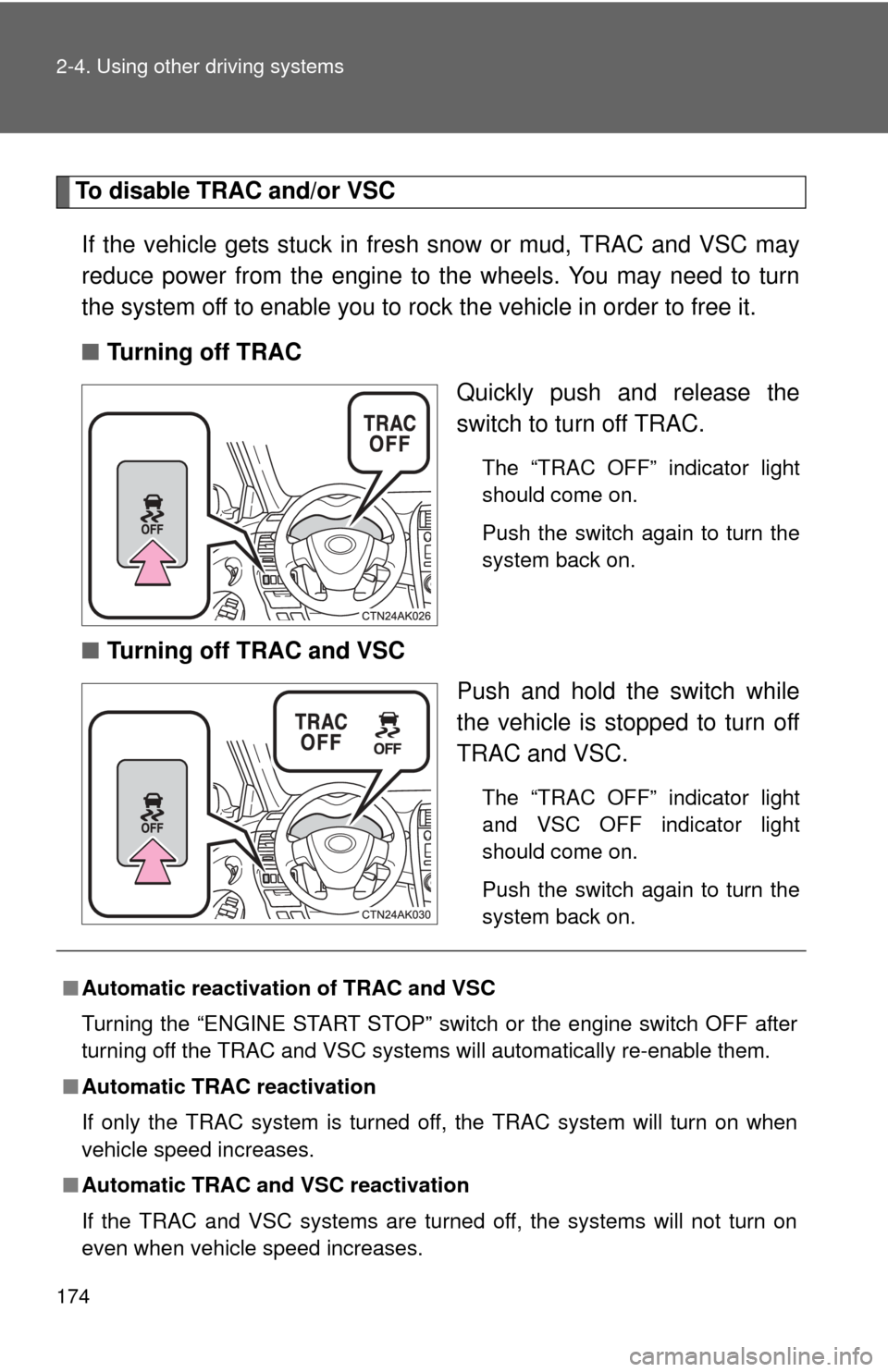
■ Turning off TRAC
Quickly push and release the
switch to turn off TRAC.
The “TRAC OFF” indicator light
should come on.
Push the switch again to turn the
system back on.
■Turning off TRAC and VSC
Push and hold the switch while
the vehicle is stopped to turn off
TRAC and VSC.
The “TRAC OFF” indicator light
and VSC OFF indicator light
should come on.
Push the switch again to turn the
system back on.
■Automatic reactivation of TRAC and VSC
Turning the “ENGINE START STOP” switch or the engine switch OFF after
turning off the TRAC and VSC systems will automatically re-enable them.
■ Automatic TRAC reactivation
If only the TRAC system is turned off, the TRAC system will turn on when
vehicle speed increases.
■ Automatic TRAC and VSC reactivation
If the TRAC and VSC systems are turned off, the systems will not turn on
even when vehicle speed increases.
Page 182 of 529
182 2-5. Driving information
Selecting tire chainsVehicles with 15-inch tires
Use the tire chains of correct size and type.
Use SAE Class “S” type radial tire chai ns except radial cable chains or
V-bar type chains.
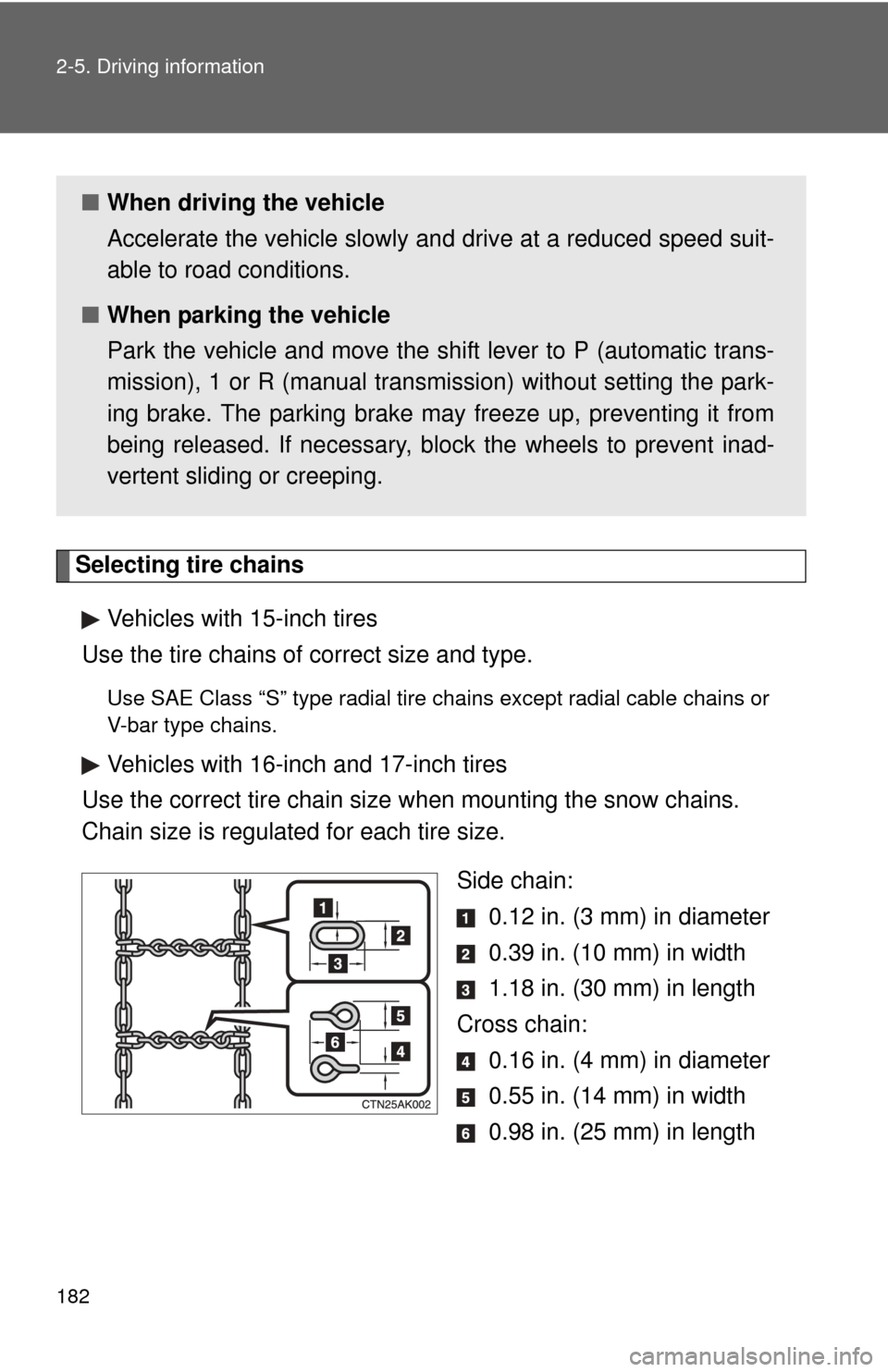
Vehicles with 16-inch and 17-inch tires
Use the correct tire chain size when mounting the snow chains.
Chain size is regulated for each tire size.
Side chain: 0.12 in. (3 mm) in diameter
0.39 in. (10 mm) in width
1.18 in. (30 mm) in length
Cross chain: 0.16 in. (4 mm) in diameter
0.55 in. (14 mm) in width
0.98 in. (25 mm) in length
■When driving the vehicle
Accelerate the vehicle slowly and drive at a reduced speed suit-
able to road conditions.
■ When parking the vehicle
Park the vehicle and move the shift lever to P (automatic trans-
mission), 1 or R (manual transmission) without setting the park-
ing brake. The parking brake may freeze up, preventing it from
being released. If necessary, block the wheels to prevent inad-
vertent sliding or creeping.
Page 188 of 529
188 2-5. Driving information
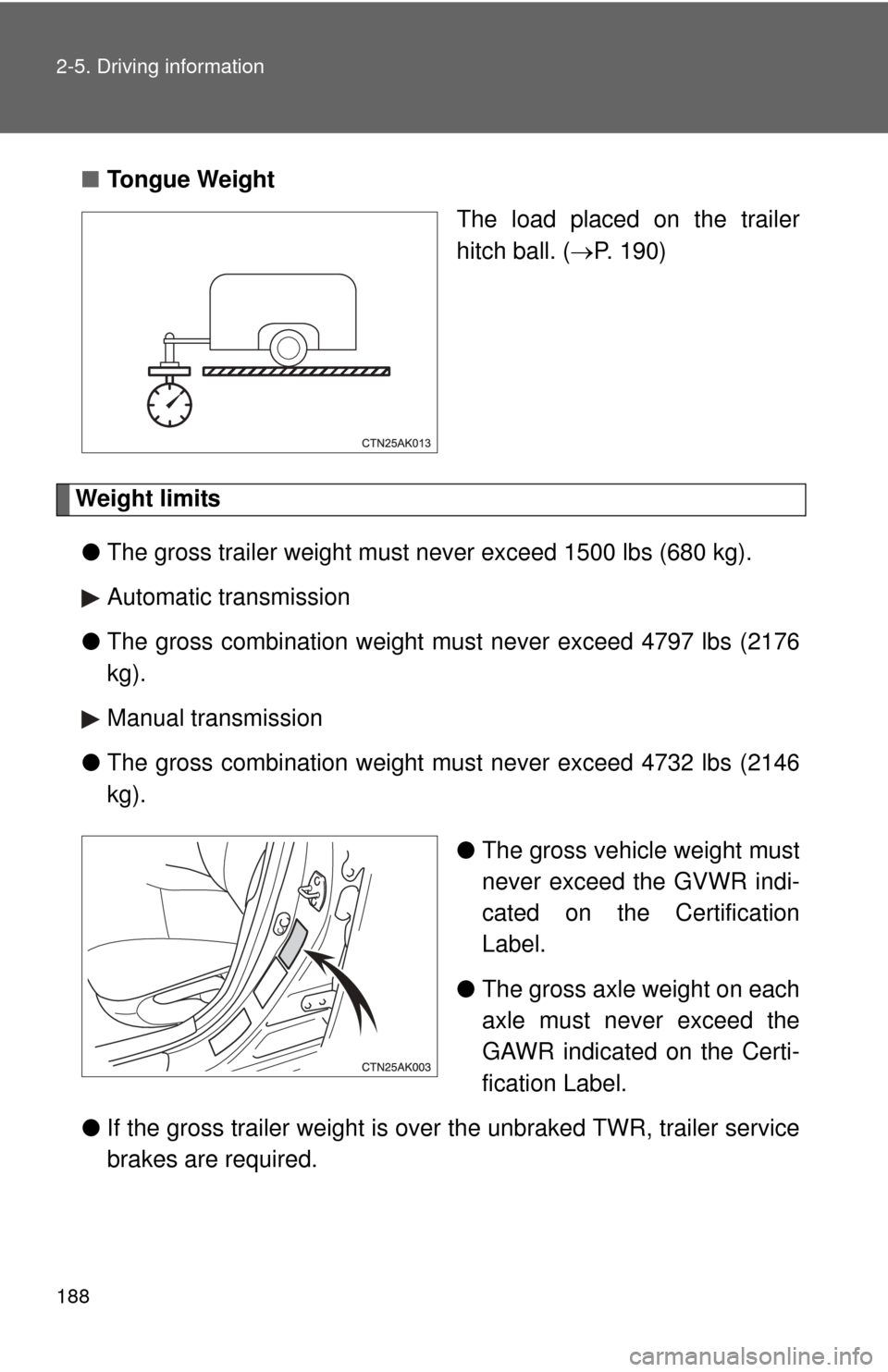
■Tongue Weight
The load placed on the trailer
hitch ball. (P. 190)
Weight limits
● The gross trailer weight must never exceed 1500 lbs (680 kg).
Automatic transmission
● The gross combination weight mu st never exceed 4797 lbs (2176
kg).
Manual transmission
● The gross combination weight mu st never exceed 4732 lbs (2146
kg).
●The gross vehicle weight must
never exceed the GVWR indi-
cated on the Certification
Label.
● The gross axle weight on each
axle must never exceed the
GAWR indicated on the Certi-
fication Label.
● If the gross trailer weight is over the unbraked TWR, trailer service
brakes are required.
Page 189 of 529

189
2-5. Driving information
2
When driving
GCWR, TWR and Unbraked TWR
Confirm that the gross trailer weight, gross combination weight, gross
vehicle weight, gross axle weight and tongue weight are all within the
limits.
■ GCWR
*
Automatic transmission
4797 lb. (2176 kg)
Manual transmission
4732 lb. (2146 kg)
■ TWR
*
1500 lb. (680 kg)
■ Unbraked TWR
*
1000 lb. (454 kg)
*: This model meets the tow-vehicle trailering requirement of SAE Interna-
tional per SAE J2807.
Page 193 of 529

193
2-5. Driving information
2
When driving
●
Avoid jerky starts or sudden acceleration.
● Avoid jerky steering and sharp turns, and slow down before mak-
ing a turn.
● Note that when making a turn, th e trailer wheels will be closer than
the vehicle wheels to the inside of the turn. Compensate by making
a wider than normal turning radius.
● Slow down before making a turn, in cross winds, on wet or slippery
surfaces, etc.
Increasing vehicle speed can destabilize the trailer.
● Take care when passing other vehicles. Passing requires consider-
able distance. After passing a vehicle, do not forget the length of
your trailer, and be sure you hav e plenty of room before changing
lanes.
● Automatic transmission:
To maintain engine braking efficiency and charging system perfor-
mance when using engine braking, do not put the transmission in
“D”. If in the S mode, the transmission shift gear position must be in
4 or lower.
● Manual transmission:
To maintain engine braking efficiency and charging system perfor-
mance when using engine braking, do not use fifth gear.
● Instability happens more frequently when descending steep or long
downhill grades. Before descending, slow down and downshift. Do
not make sudden downshifts while descending steep or long down-
hill grades.
● Avoid holding the brake pedal down too long or applying the
brakes too frequently. This could cause the brakes to overheat and
result in reduced braking efficiency.