automatic ac TOYOTA COROLLA 2012 10.G Owner's Manual
[x] Cancel search | Manufacturer: TOYOTA, Model Year: 2012, Model line: COROLLA, Model: TOYOTA COROLLA 2012 10.GPages: 529, PDF Size: 8.07 MB
Page 129 of 529

129
2-1. Driving procedures
2
When driving
NOTICE
■
When driving the vehicle
●Do not depress the accelerator and brake pedals at the same time during
driving. If the brake pedal is depressed while driving with the accelerator
pedal depressed, driving torque may be restrained.
Manual transmission
● Do not shift gears unless the clutch pedal is fully depressed. After shifting,
do not release the clutch abruptly. Doing so may damage the clutch, tran-
saxle and gears.
● Do not rest your foot on the clutch pedal while driving.
Doing so may cause clutch trouble.
● Do not use any gears other than the first gear when starting off and mov-
ing forward.
Doing so may damage the clutch.
● Do not use the clutch to hold the vehicle when stopping on an uphill grade.
Doing so may damage the clutch.
● Do not shift into reverse when the vehicle is still moving. Doing so may
damage the clutch, transaxle and gears.
Automatic transmission
● Do not use the accelerator pedal or depress the accelerator and brake
pedals together to hold the vehicle on a hill.
■ When parking the vehicle (vehicl es with an automatic transmission)
Always put the shift lever in P. Failure to do so may cause the vehicle to
move or the vehicle may accelerate suddenly if the accelerator pedal is acci-
dentally depressed.
■ Avoiding damage to vehicle parts
●Do not turn the steering wheel fully in either direction and hold it there for
an extended period of time.
Doing so may damage the power steering motor.
● When driving over bumps in the road, drive as slowly as possible to avoid
damaging the wheels, underside of the vehicle, etc.
Page 133 of 529
133
2-1. Driving procedures
2
When driving
■
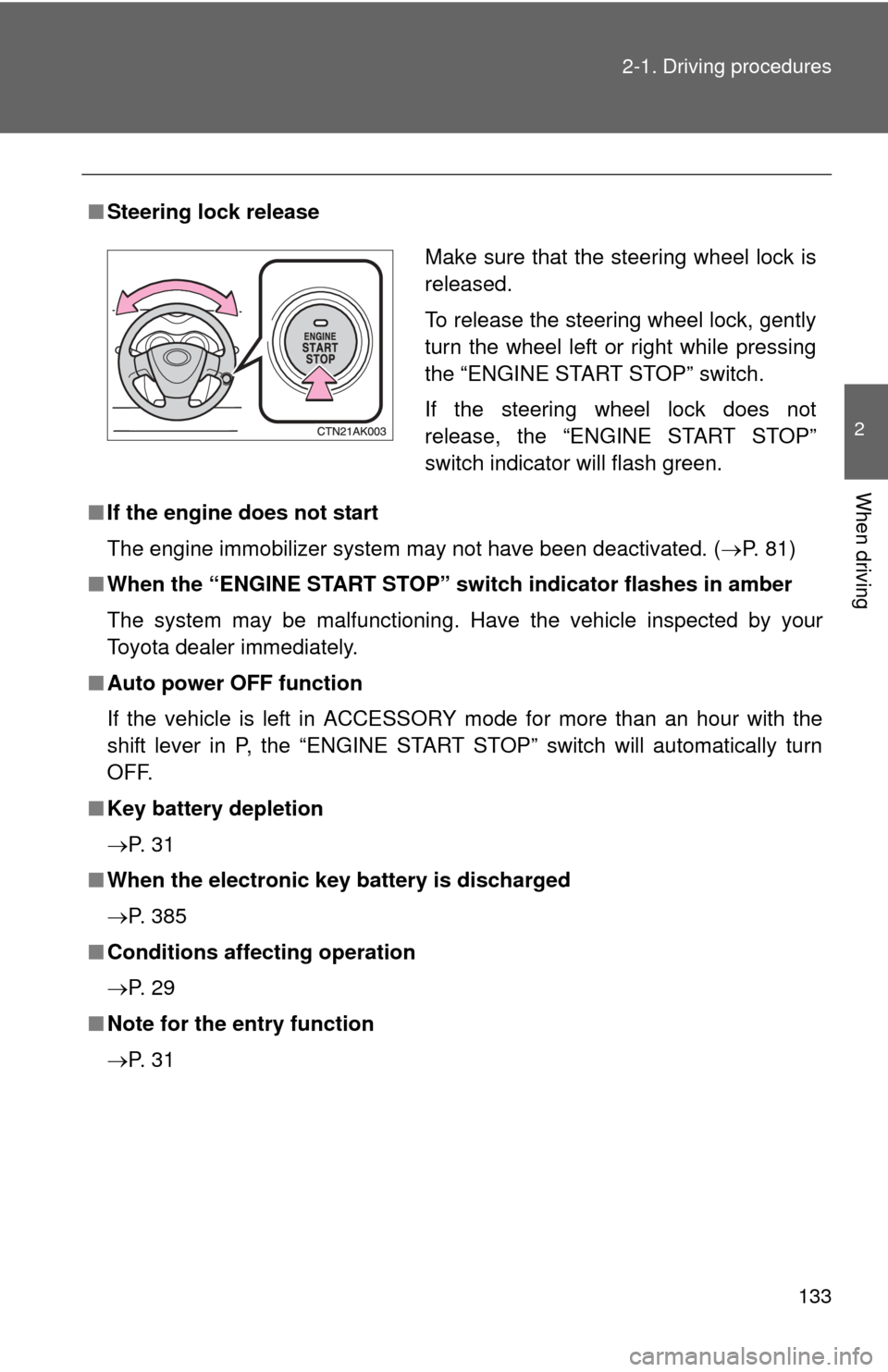
Steering lock release
■ If the engine does not start
The engine immobilizer system may not have been deactivated. ( P. 81)
■ When the “ENGINE START STOP” sw itch indicator flashes in amber
The system may be malfunctioning. Have the vehicle inspected by your
Toyota dealer immediately.
■ Auto power OFF function
If the vehicle is left in ACCESSORY mode for more than an hour with the
shift lever in P, the “ENGINE START STOP” switch will automatically turn
OFF.
■ Key battery depletion
P. 3 1
■ When the electronic key battery is discharged
P. 385
■ Conditions affecting operation
P. 2 9
■ Note for the entry function
P. 3 1
Make sure that the steering wheel lock is
released.
To release the steering wheel lock, gently
turn the wheel left or right while pressing
the “ENGINE START STOP” switch.
If the steering wheel lock does not
release, the “ENGINE START STOP”
switch indicator will flash green.
Page 135 of 529
135
2-1. Driving procedures
2
When driving
Engine (ignition) switch (vehicles without smart key system)
■Starting the engine
Automatic transmission
Check that the parking brake is set.
Check that the shift lever is set in P.
Sit in the driver’s seat and firmly depress the brake pedal.
Turn the engine switch to the “START” position and start
the engine.
1.8 L 4-cylinder (2ZR-FE) engine: The engine will crank until it
starts or for up to 25 seconds, whichever is less. If you turn the
engine switch, the engine will keep cranking for about 30 seconds
maximum.
Continue depressing the brake pedal until the engine is com-
pletely started.
Manual transmissionCheck that the parking brake is set.
Check that the shift lever is set in N.
Firmly depress the clutch pedal.
Turn the engine switch to the “START” position and start
the engine.
1.8 L 4-cylinder (2ZR-FE) engine: The engine will crank until it
starts or for up to 25 seconds, whichever is less. If you turn the
engine switch, the engine will keep cranking for about 30 seconds
maximum.
Continue depressing the brake pedal until the engine is com-
pletely started.
STEP 1
STEP 2
STEP 3
STEP 4
STEP 1
STEP 2
STEP 3
STEP 4
Page 136 of 529
136 2-1. Driving procedures
■Turning the engine switch from “ACC” to “LOCK”
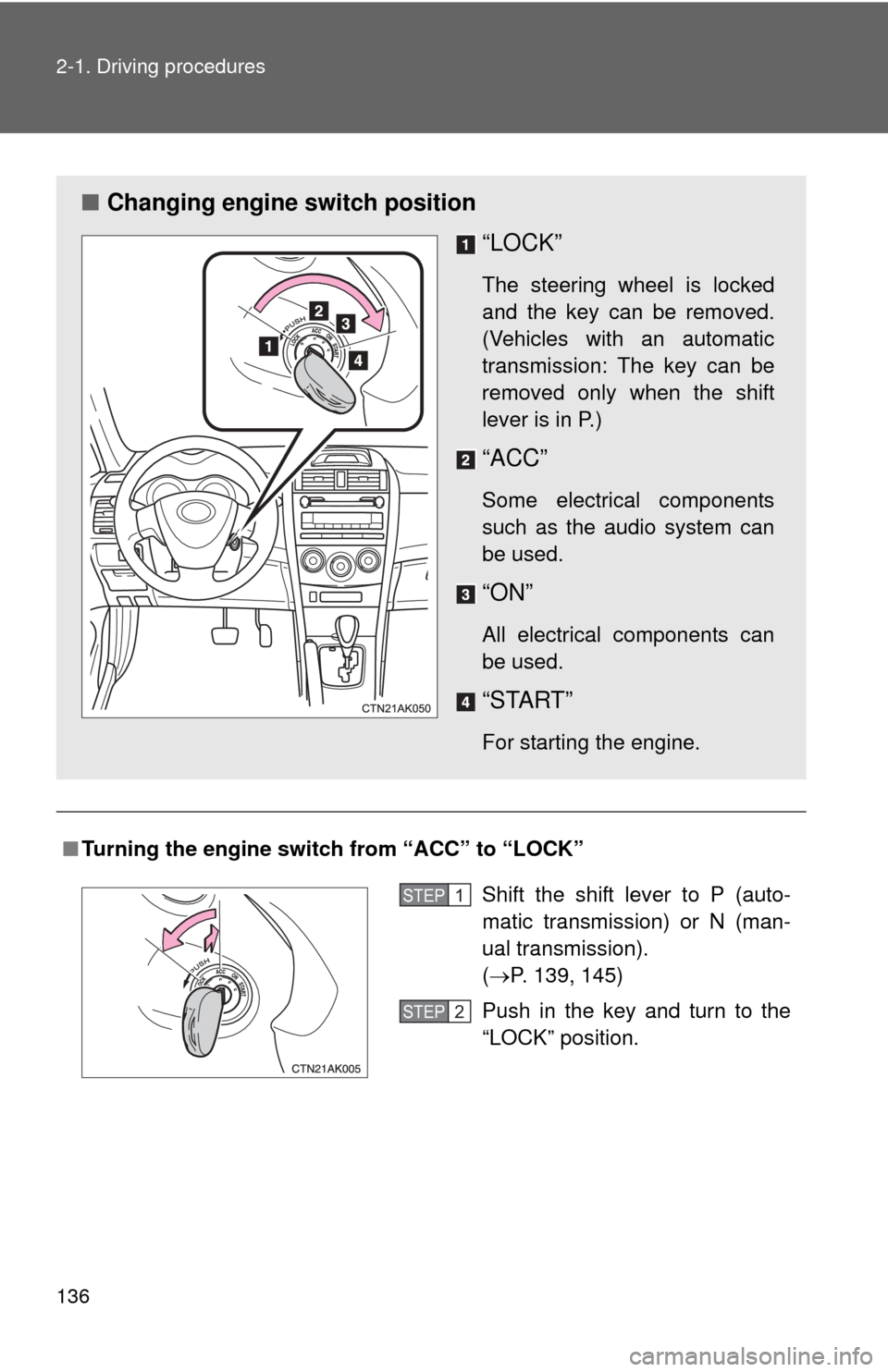
■ Changing engine switch position
“LOCK”
The steering wheel is locked
and the key can be removed.
(Vehicles with an automatic
transmission: The key can be
removed only when the shift
lever is in P.)
“ACC”
Some electrical components
such as the audio system can
be used.
“ON”
All electrical components can
be used.
“START”
For starting the engine.
Shift the shift lever to P (auto-
matic transmission) or N (man-
ual transmission).
(P. 139, 145)
Push in the key and turn to the
“LOCK” position.STEP 1
STEP 2
Page 139 of 529
139
2-1. Driving procedures
2
When driving
Automatic transmission
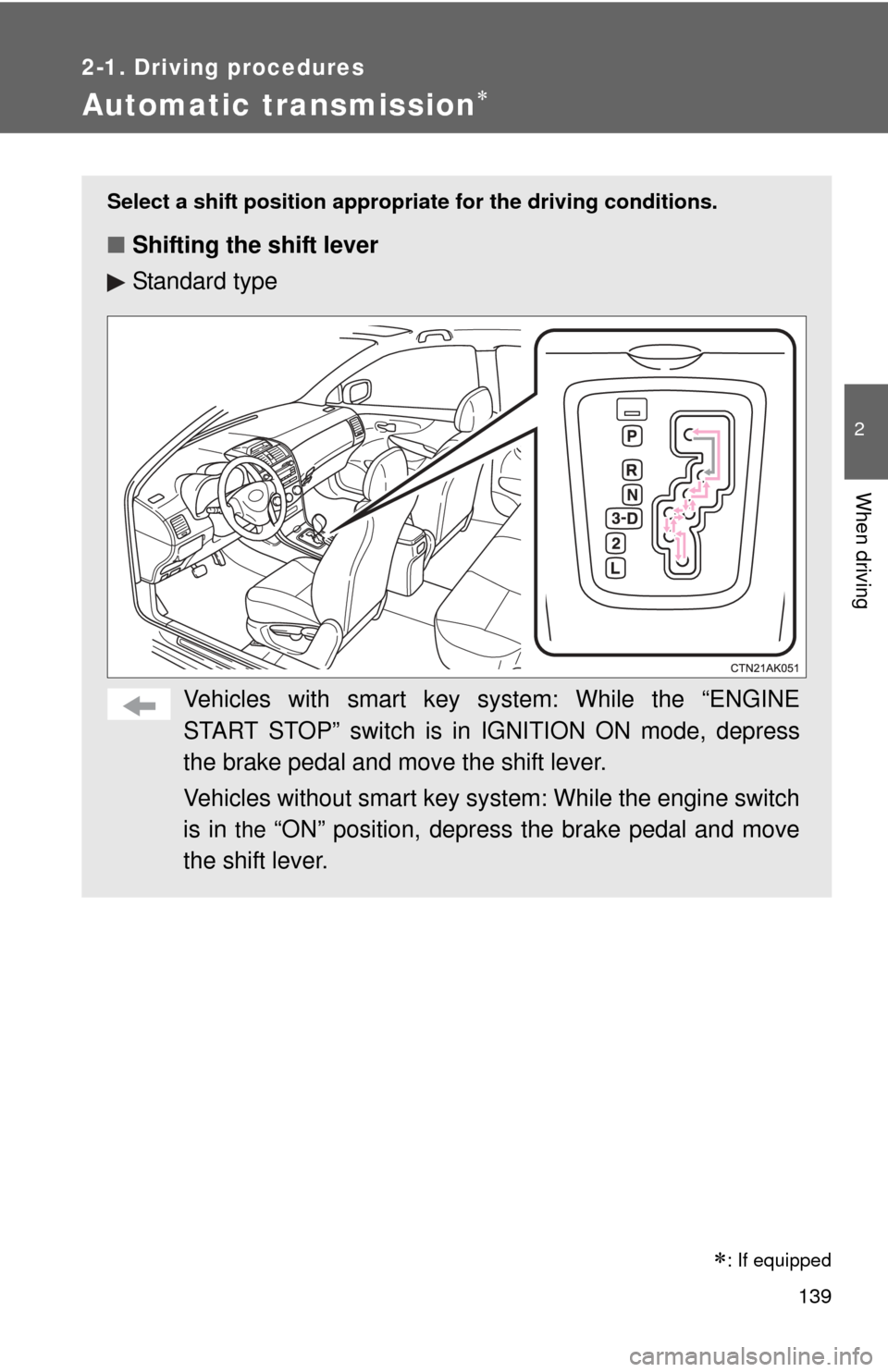
Select a shift position appropriate for the driving conditions.
■Shifting the shift lever
Standard type
Vehicles with smart key system: While the “ENGINE
START STOP” switch is in IGNITION ON mode, depress
the brake pedal and move the shift lever.
Vehicles without smart key sy stem: While the engine switch
is in
the “ON” position, depress the brake pedal and move
the shift lever.
: If equipped
Page 142 of 529
142 2-1. Driving procedures
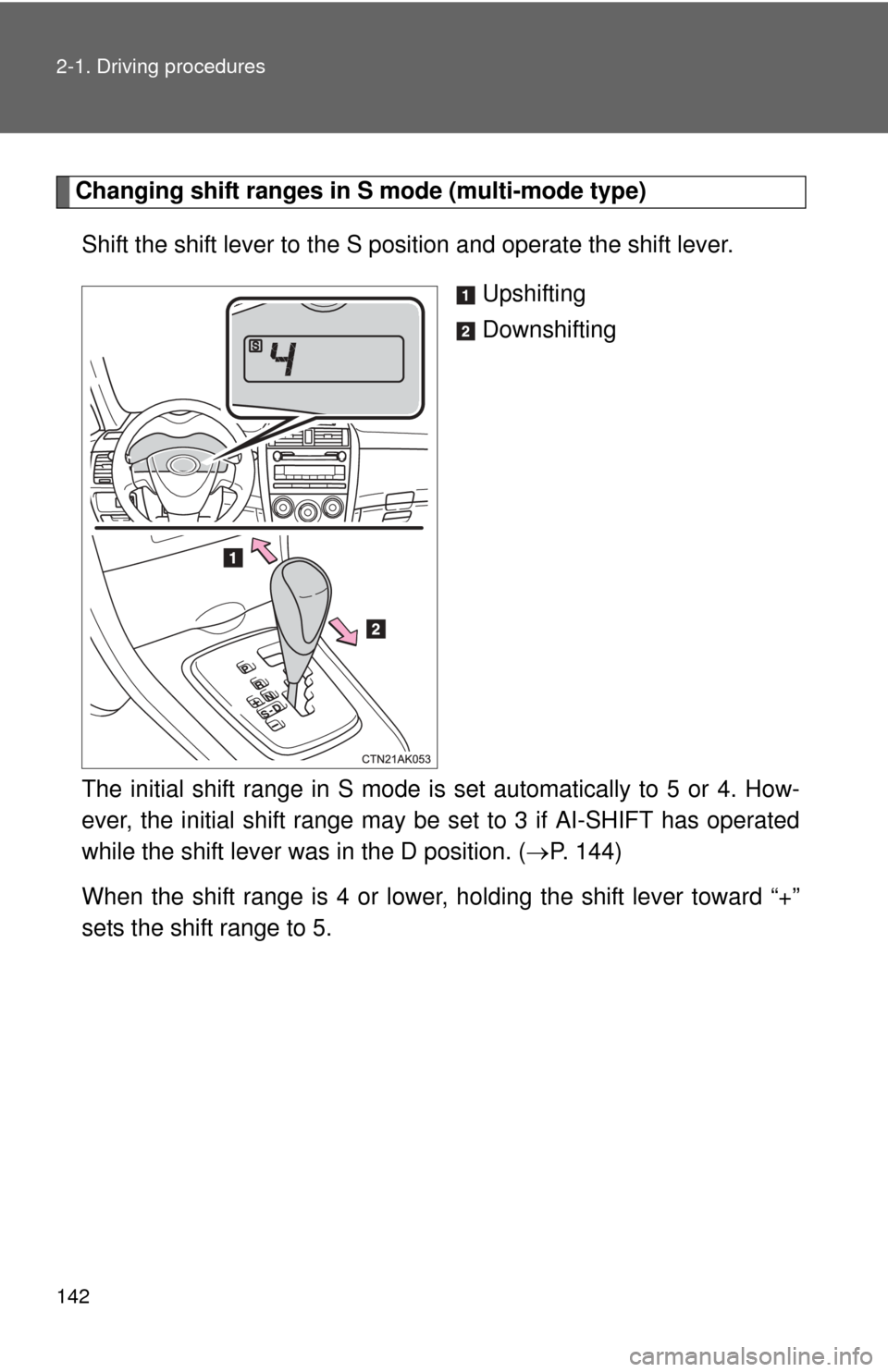
Changing shift ranges in S mode (multi-mode type)Shift the shift lever to the S position and operate the shift lever. Upshifting
Downshifting
The initial shift range in S mode is set automatically to 5 or 4. How-
ever, the initial shift range may be set to 3 if AI-SHIFT has operated
while the shift lever was in the D position. ( P. 144)
When the shift range is 4 or lower, holding the shift lever toward “+”
sets the shift range to 5.
Page 143 of 529
143
2-1. Driving procedures
2
When driving
■
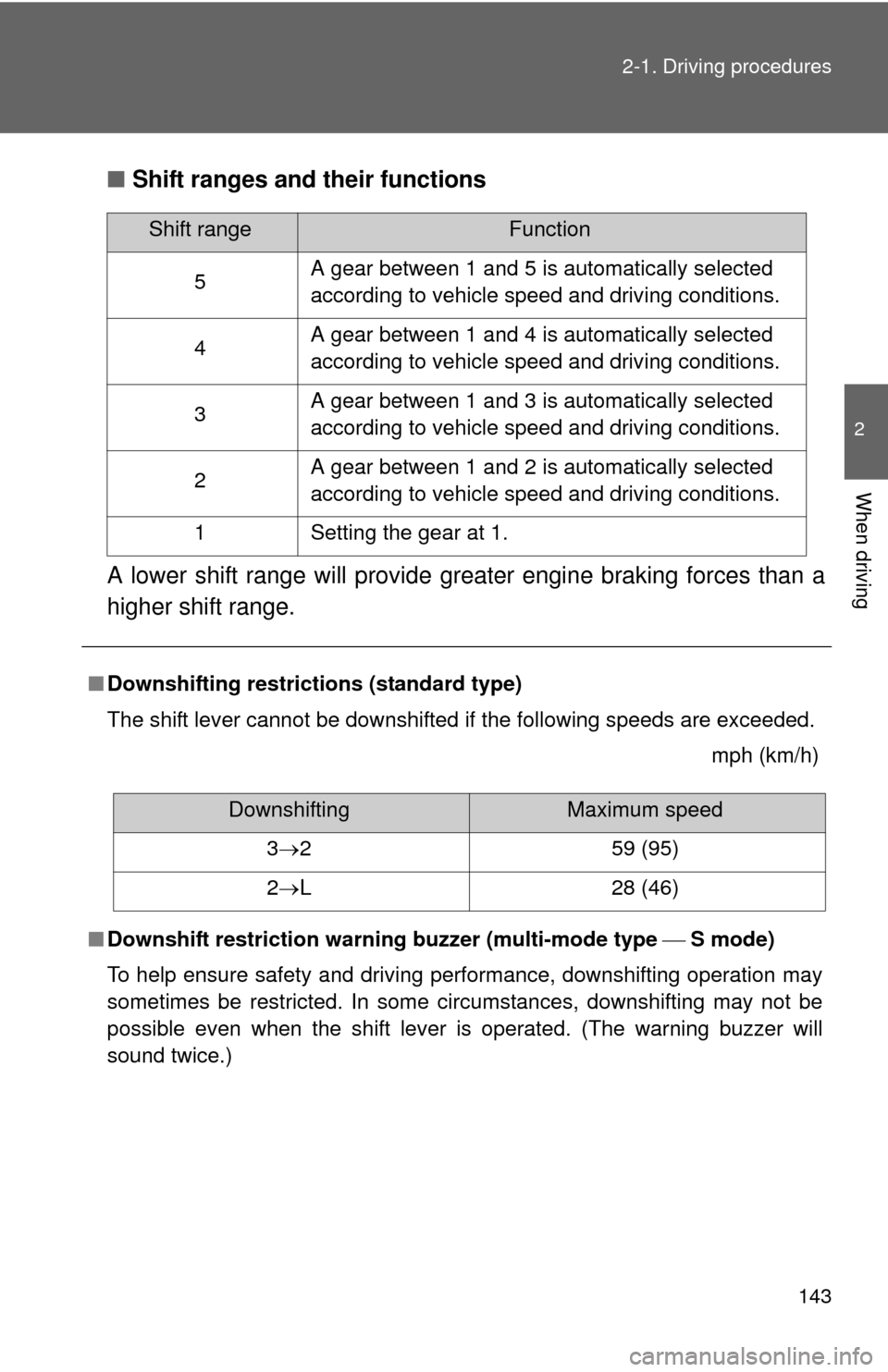
Shift ranges and their functions
A lower shift range will provide greater engine braking forces than a
higher shift range.
■ Downshifting restrictions (standard type)
The shift lever cannot be downshifted if the following speeds are exceeded.
mph (km/h)
■ Downshift restriction warning buzzer (multi-mode type S mode)
To help ensure safety and driving performance, downshifting operation may
sometimes be restricted. In some circumstances, downshifting may not be
possible even when the shift lever is operated. (The warning buzzer will
sound twice.)
Shift rangeFunction
5 A gear between 1 and 5 is automatically selected
according to vehicle speed and driving conditions.
4 A gear between 1 and 4 is automatically selected
according to vehicle speed and driving conditions.
3 A gear between 1 and 3 is automatically selected
according to vehicle speed and driving conditions.
2 A gear between 1 and 2 is automatically selected
according to vehicle speed and driving conditions.
1 Setting the gear at 1.
DownshiftingMaximum speed
3 2 59 (95)
2 L 28 (46)
Page 144 of 529

144 2-1. Driving procedures
■When driving with cruise cont rol activated (if equipped)
Standard type
Even when performing the following actions with the intent of enabling
engine braking, engine braking will not activate while downshifting to 3
because cruise control will not be canceled. ( P. 169)
Multi-mode type
Even when performing the following actions with the intent of enabling
engine braking, engine braking will not activate while driving in S mode and
downshifting to 4 because cruise control will not be canceled. ( P. 169)
■ If the shift lever cannot be shifted from P
P. 446
■ If the “S” indicator does not come on even after shifting the shift lever
to S (multi-mode type)
This may indicate a malfunction in the automatic transmission system. Have
the vehicle inspected by your Toyota dealer immediately.
(In this situation, the vehicle will operate as if the shift lever is in D.)
■ AI-SHIFT
AI-SHIFT automatically selects the suitable gear according to driver perfor-
mance and driving conditions.
Standard type
AI-SHIFT automatically operates when the shift lever is in the D position. Multi-mode type
AI-SHIFT automatically operates when the shift lever is in the D position.
(Shifting the shift lever to the S position cancels the function.)
Page 154 of 529
154 2-2. Instrument cluster
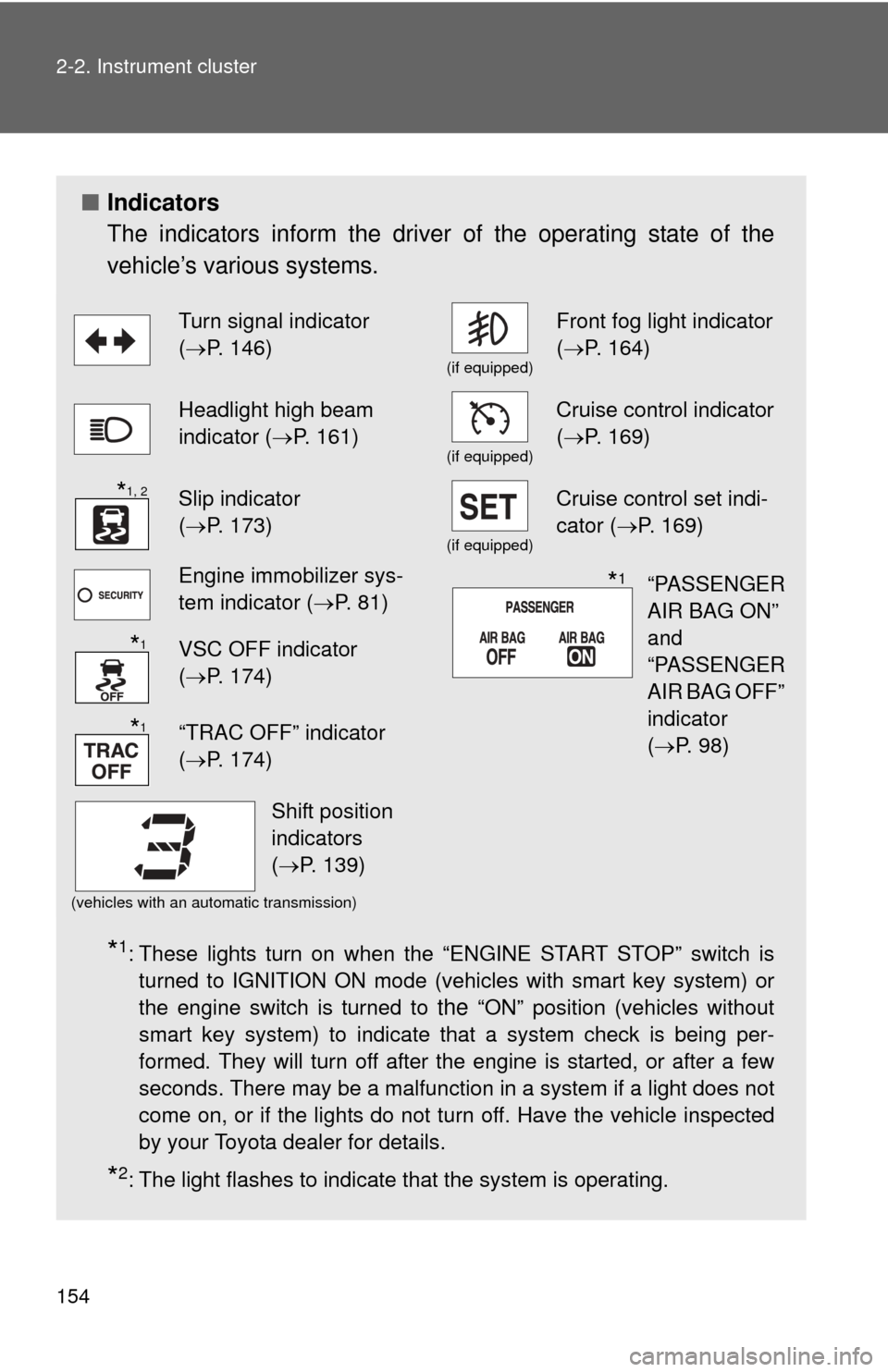
■Indicators
The indicators inform the driver of the operating state of the
vehicle’s various systems.
*1: These lights turn on when the “ENGINE START STOP” switch is
turned to IGNITION ON mode (vehicles with smart key system) or
the engine switch is turned to
the “ON” position (vehicles without
smart key system) to indicate that a system check is being per-
formed. They will turn off after the engine is started, or after a few
seconds. There may be a malfunction in a system if a light does not
come on, or if the lights do not turn off. Have the vehicle inspected
by your Toyota dealer for details.
*2: The light flashes to indicate that the system is operating.
Turn signal indicator
( P. 146)
(if equipped)
Front fog light indicator
( P. 164)
Headlight high beam
indicator ( P. 161)
(if equipped)
Cruise control indicator
(P. 169)
Slip indicator
(P. 173)
(if equipped)
Cruise control set indi-
cator (P. 169)
Engine immobilizer sys-
tem indicator ( P. 81)
VSC OFF indicator
(P. 174)
“TRAC OFF” indicator
(P. 174)
(vehicles with an automatic transmission)
*1, 2
“PASSENGER
AIR BAG ON”
and
“PASSENGER
AIR BAG OFF”
indicator
(P. 98)*1
*1
*1
Shift position
indicators
(P. 139)
Page 162 of 529
162 2-3. Operating the lights and wipers
■Daytime running light system
●To make your vehicle more visible to other drivers, the headlights turn on
automatically whenever the engine is started and the parking brake is
released.
● Compared to turning on the headlights, the daytime running light system
offers greater durability and consumes less electricity, so it can help
improve fuel economy.
● Vehicles with daytime running light control sensor: The brightness of
headlights will automatically change depending on the darkness of the
surroundings. The other exterior lights and instrument panel lights auto-
matically turn on or off.
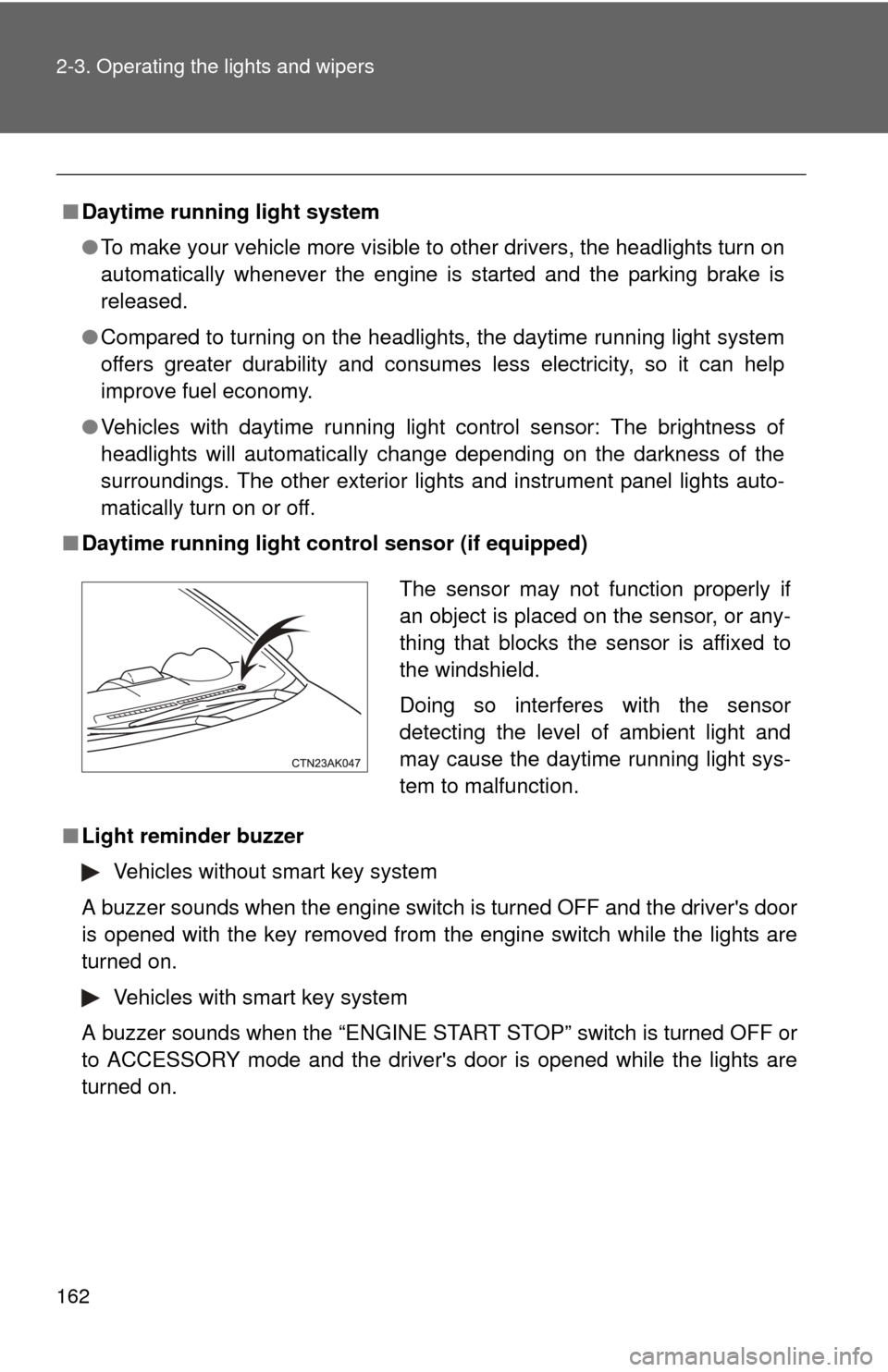
■ Daytime running light co ntrol sensor (if equipped)
■ Light reminder buzzer
Vehicles without smart key system
A buzzer sounds when the engine switch is turned OFF and the driver's door
is opened with the key removed from the engine switch while the lights are
turned on.
Vehicles with smart key system
A buzzer sounds when the “ENGINE START STOP” switch is turned OFF or
to ACCESSORY mode and the driver's door is opened while the lights are
turned on.
The sensor may not function properly if
an object is placed on the sensor, or any-
thing that blocks the sensor is affixed to
the windshield.
Doing so interferes with the sensor
detecting the level of ambient light and
may cause the daytime running light sys-
tem to malfunction.