display TOYOTA COROLLA 2014 11.G Owners Manual
[x] Cancel search | Manufacturer: TOYOTA, Model Year: 2014, Model line: COROLLA, Model: TOYOTA COROLLA 2014 11.GPages: 612, PDF Size: 12.58 MB
Page 305 of 612

3055-15. Playing an audio CD and MP3/WMA/AAC discs (Multimedia system)
5
Interior features
COROLLA_TMMMS_TMMC_U (OM12F00U)●AAC file compatibility
• Compatible standards
MPEG4/AAC-LC
• Compatible sampling frequencies
11.025/12/16/22.05/24/32/44.1/48 (kHz)
• Compatible bit rates
16-320 (kbps)
●Compatible media
Media that can be used for MP3, WMA and AAC playback are CD-Rs and
CD-RWs.
Playback in some instances may not be possible if the CD-R or CD-RW is
not finalized. Playback may not be possible or the audio may jump if the
disc is scratched or marked with fingerprints.
●Compatible disc formats
The following disc formats can be used.
• Disc formats: CD-ROM Mode 1 and Mode 2
CD-ROM XA Mode 2, Form 1 and Form 2
• File formats: ISO9660 Level 1, Level 2, (Romeo, Joliet)
UDF (2.01 or lower)
MP3, WMA and AAC files written in any format other than those listed
above may not play correctly, and their file names and folder names may
not be displayed correctly.
Items related to standards and limitations are as follows.
• Maximum directory hierarchy: 8 levels (including the root)
• Maximum length of folder names/file names: 32 characters
• Maximum number of folders: 192 (including the root)
• Maximum number of files per disc: 255
●File names
The only files that can be recognized as MP3/WMA/AAC and played are
those with the extension .mp3, .wma or .m4a.
●Discs containing multi-session recordings
As the multimedia system is compatible with multi session discs, it is possi-
ble to play discs that contain MP3, WMA and AAC files. However, only the
first session can be played.
Page 308 of 612
308
COROLLA_TMMMS_TMMC_U (OM12F00U)5-
16.
Using an external device (Multimedia system)
P. 2 8 6
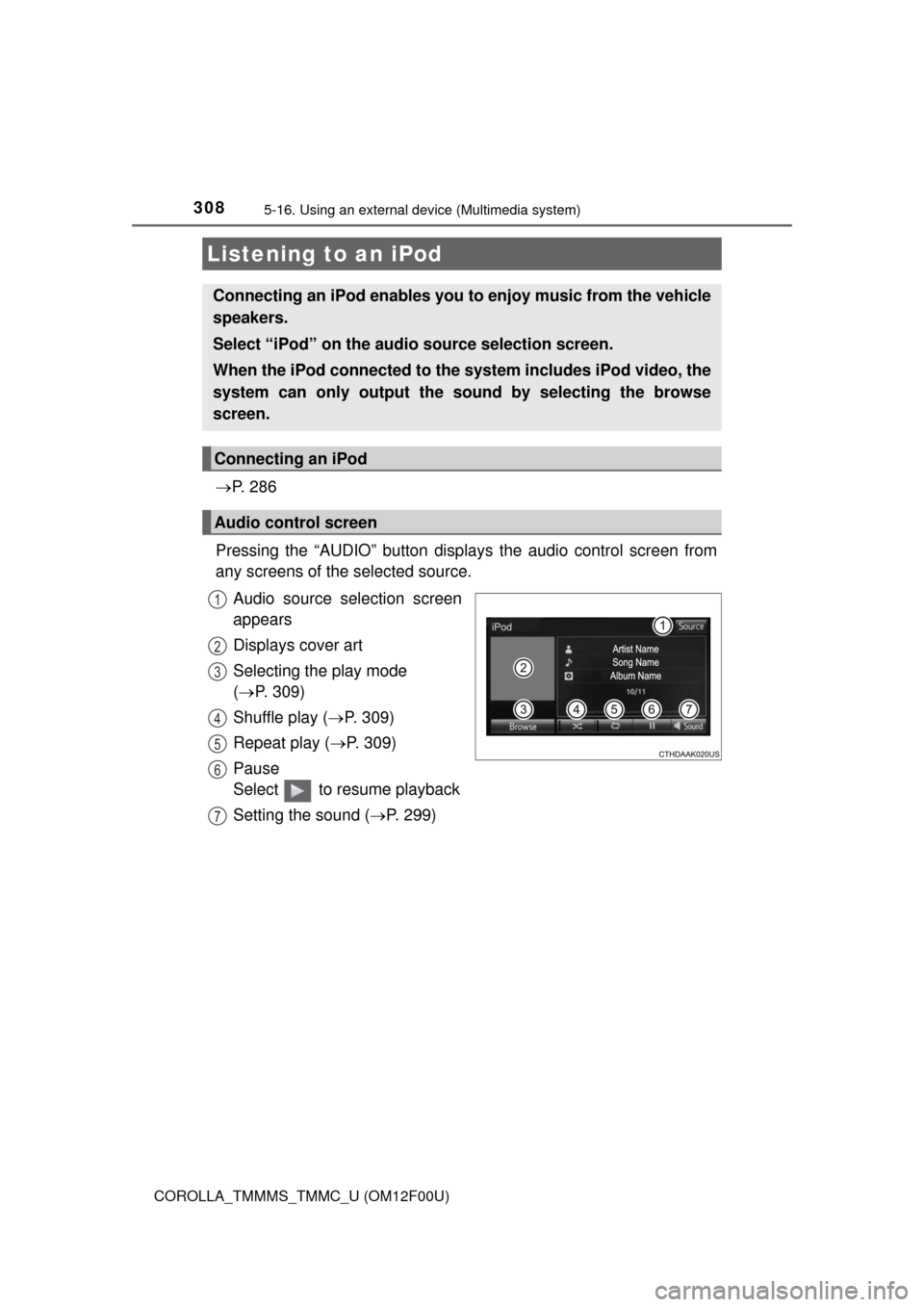
Pressing the “AUDIO” button disp lays the audio control screen from
any screens of the selected source.
Audio source selection screen
appears
Displays cover art
Selecting the play mode
( P. 309)
Shuffle play ( P. 309)
Repeat play ( P. 309)
Pause
Select to resume playback
Setting the sound ( P. 299)
Listening to an iPod
Connecting an iPod enables you to enjoy music from the vehicle
speakers.
Select “iPod” on the audi o source selection screen.
When the iPod connected to the system includes iPod video, the
system can only output the sound by selecting the browse
screen.
Connecting an iPod
Audio control screen
1
2
3
4
5
6
7
Page 310 of 612
3105-16. Using an external device (Multimedia system)
COROLLA_TMMMS_TMMC_U (OM12F00U)
■About iPod
●“Made for iPod” and “Made for iPhone” mean that an electronic accessory
has been designed to connect specifically to iPod or iPhone, respectively,
and has been certified by the developer to meet Apple performance stan-
dards.
●Apple is not responsible for the operation of this device or its compliance
with safety and regulatory standards. Please note that the use of this acces-
sory with iPod or iPhone may affect wireless performance.
●iPhone, iPod, iPod classic, iPod nano, and iPod touch are trademarks of
Apple Inc., registered in the U.S. and other countries. Lightning is a trade-
mark of Apple Inc.
■iPod cover art
●Depending on the iPod and songs in the iPod, iPod cover art may be dis-
played.
●This function can be changed to on/off. (P. 292)
●It may take time to display iPod cover art, and the iPod may not be operated
while the cover art display is in process.
●Only iPod cover art that is saved in JPEG format can be displayed.
■iPod functions
●When an iPod is connected and the audio source is changed to iPod mode,
the iPod will resume play from the same point in which it was last used.
●Depending on the iPod that is connected to the system, certain functions
may not be available. If a function is unavailable due to a malfunction (as
opposed to a system specification), disconnecting the device and recon-
necting it may resolve the problem.
●While connected to the system, the iPod cannot be operated with its own
controls. It is necessary to use the controls of the vehicle's multimedia sys-
tem instead.
●When the battery level of an iPod is very low, the iPod may not operate. If
so, charge the iPod before use.
●Compatible models (P. 312)
Page 311 of 612
3115-16. Using an external device (Multimedia system)
5
Interior features
COROLLA_TMMMS_TMMC_U (OM12F00U)■iPod problems
To resolve most problems encountered when using your iPod, disconnect
your iPod from the vehicle iPod connection and reset it. For instructions on
how to reset your iPod, refer to your iPod Owner's Manual.
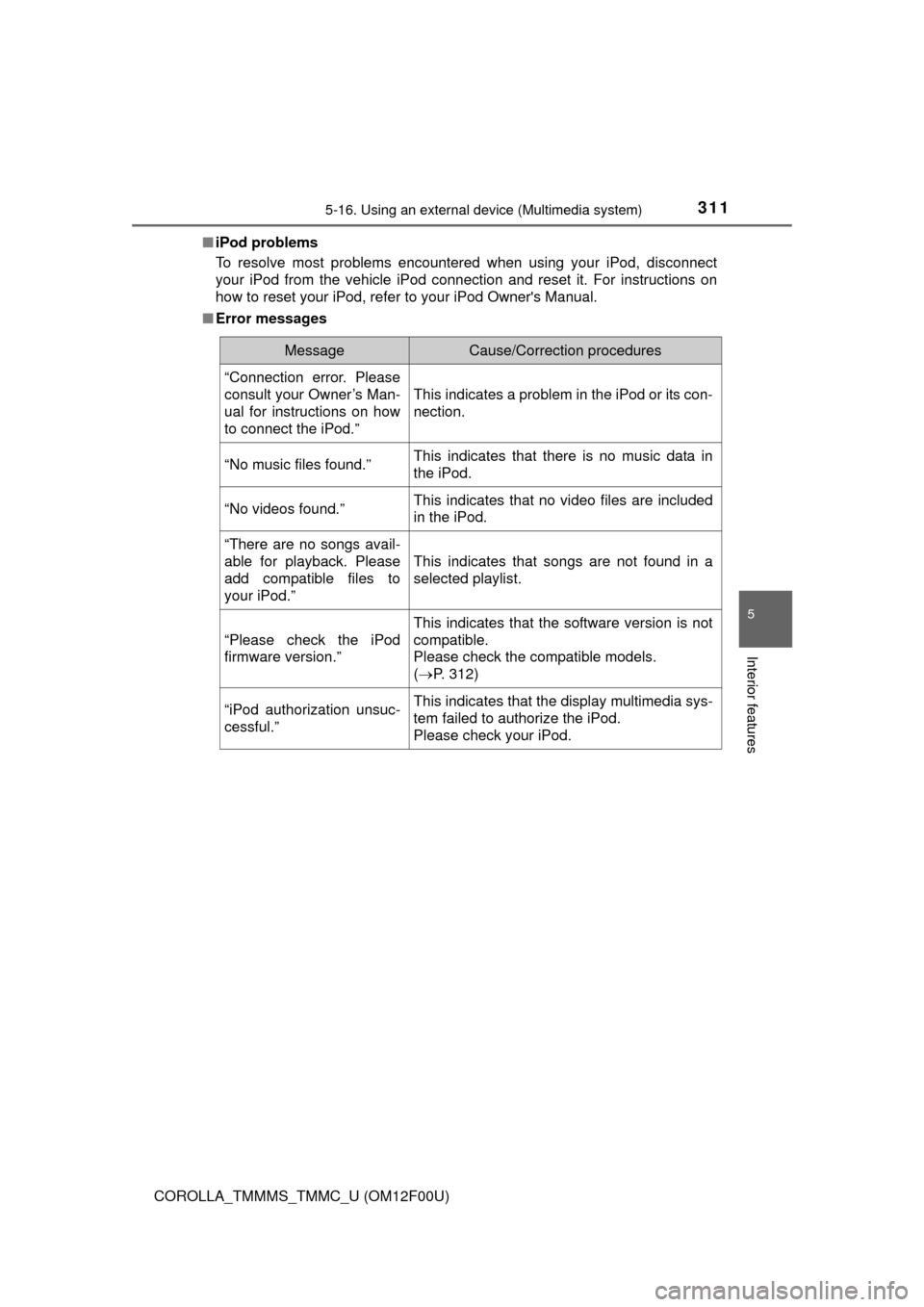
■Error messages
MessageCause/Correction procedures
“Connection error. Please
consult your Owner’s Man-
ual for instructions on how
to connect the iPod.”
This indicates a problem in the iPod or its con-
nection.
“No music files found.”This indicates that there is no music data in
the iPod.
“No videos found.”This indicates that no video files are included
in the iPod.
“There are no songs avail-
able for playback. Please
add compatible files to
your iPod.”
This indicates that songs are not found in a
selected playlist.
“Please check the iPod
firmware version.”
This indicates that the software version is not
compatible.
Please check the compatible models.
(P. 312)
“iPod authorization unsuc-
cessful.”This indicates that the display multimedia sys-
tem failed to authorize the iPod.
Please check your iPod.
Page 313 of 612
3135-16. Using an external device (Multimedia system)
5
Interior features
COROLLA_TMMMS_TMMC_U (OM12F00U)
P. 2 8 6
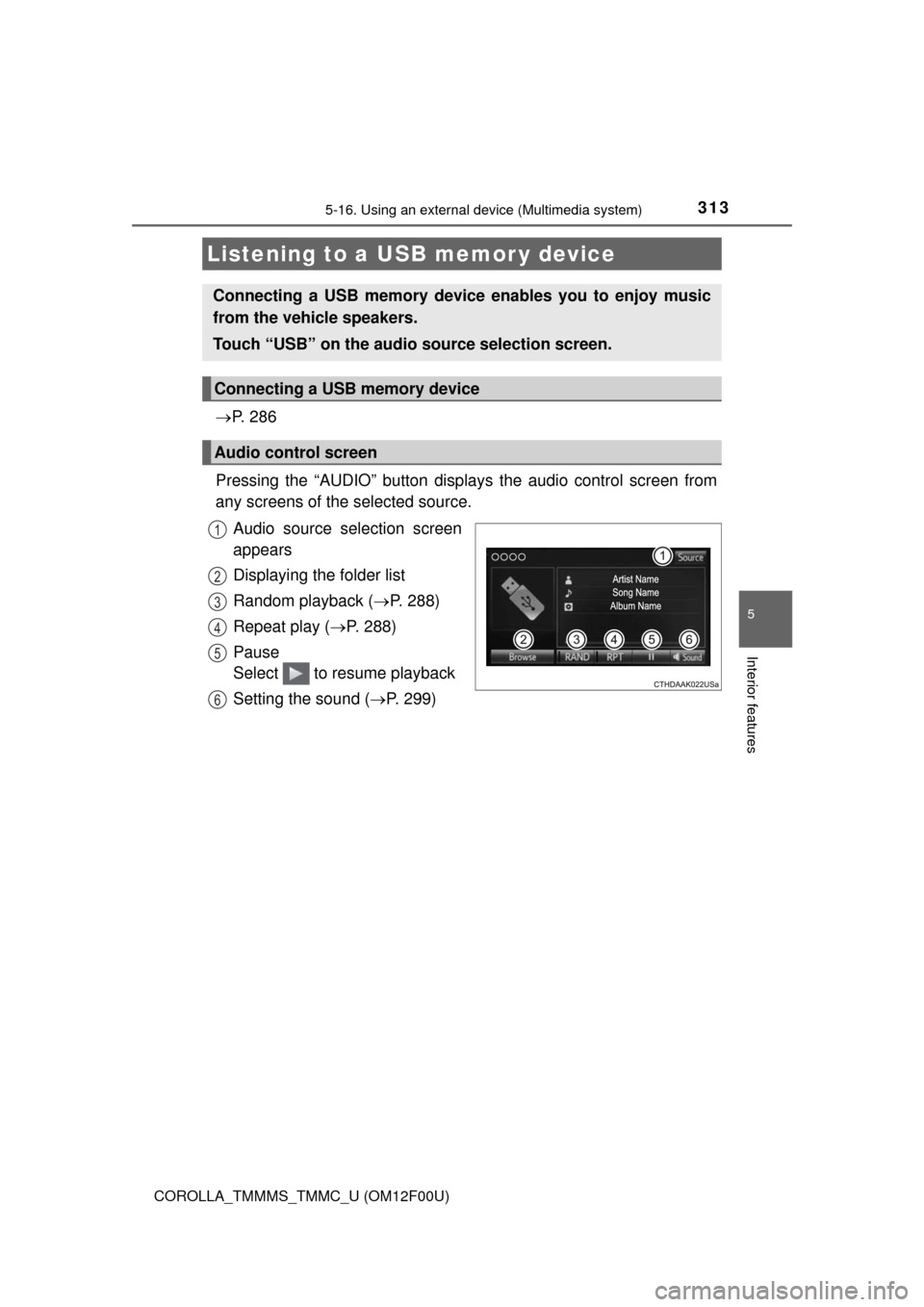
Pressing the “AUDIO” button displays the audio control screen from
any screens of the selected source.
Audio source selection screen
appears
Displaying the folder list
Random playback (P. 288)
Repeat play (P. 288)
Pause
Select to resume playback
Setting the sound (P. 299)
Listening to a USB memor y device
Connecting a USB memory device enables you to enjoy music
from the vehicle speakers.
Touch “USB” on the audio source selection screen.
Connecting a USB memory device
Audio control screen
1
2
3
4
5
6
Page 314 of 612
3145-16. Using an external device (Multimedia system)
COROLLA_TMMMS_TMMC_U (OM12F00U)
■USB memory functions
●Depending on the USB memory device that is connected to the system, the
device itself may not be operable and certain functions may not be avail-
able. If the device is inoperable or a function is unavailable due to a mal-
function (as opposed to a system specification), disconnecting the device
and reconnecting it may resolve the problem.
●If the USB memory device still does not begin operation after being discon-
nected and reconnected, format the memory.
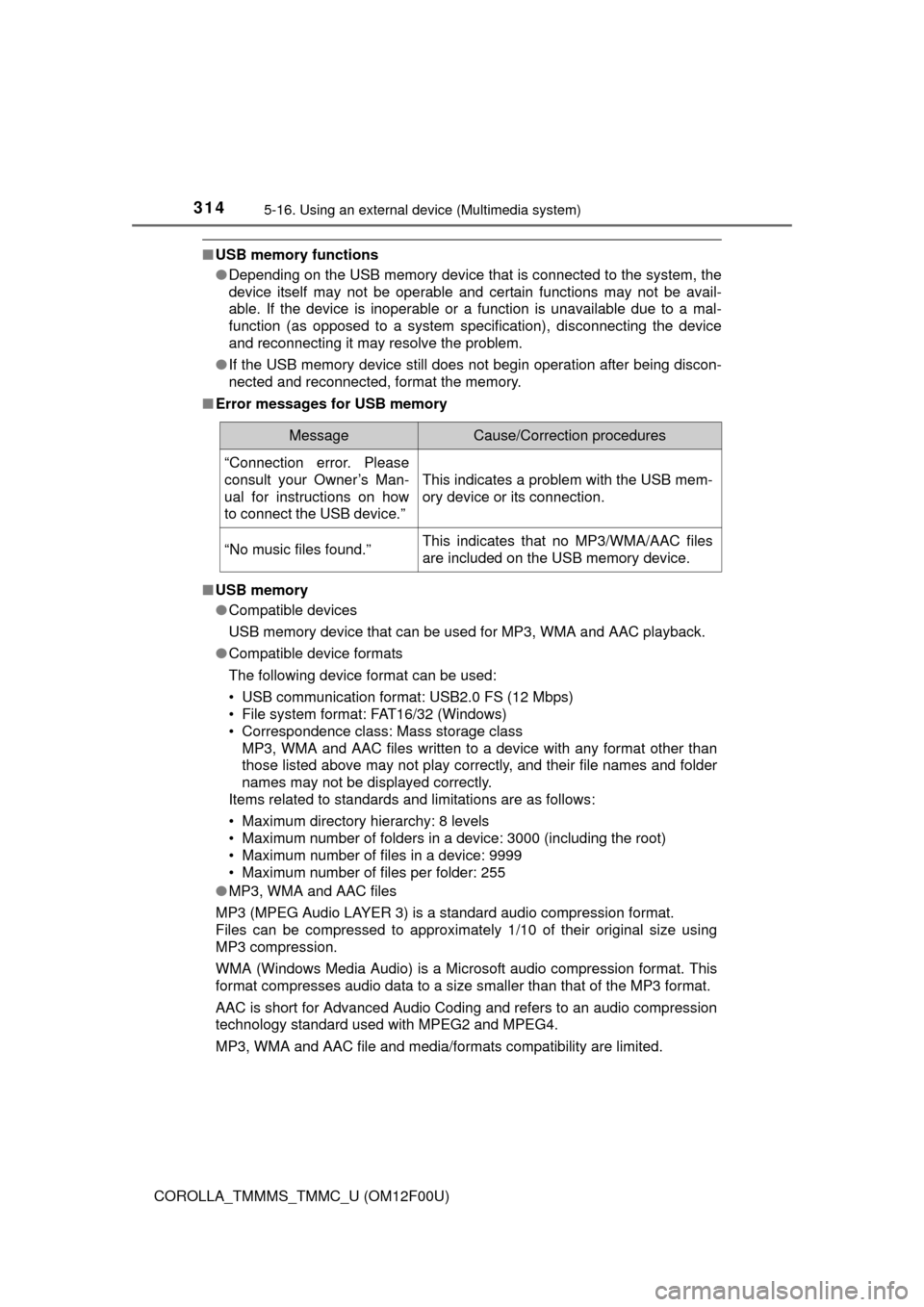
■Error messages for USB memory
■USB memory
●Compatible devices
USB memory device that can be used for MP3, WMA and AAC playback.
●Compatible device formats
The following device format can be used:
• USB communication format: USB2.0 FS (12 Mbps)
• File system format: FAT16/32 (Windows)
• Correspondence class: Mass storage class
MP3, WMA and AAC files written to a device with any format other than
those listed above may not play correctly, and their file names and folder
names may not be displayed correctly.
Items related to standards and limitations are as follows:
• Maximum directory hierarchy: 8 levels
• Maximum number of folders in a device: 3000 (including the root)
• Maximum number of files in a device: 9999
• Maximum number of files per folder: 255
●MP3, WMA and AAC files
MP3 (MPEG Audio LAYER 3) is a standard audio compression format.
Files can be compressed to approximately 1/10 of their original size using
MP3 compression.
WMA (Windows Media Audio) is a Microsoft audio compression format. This
format compresses audio data to a size smaller than that of the MP3 format.
AAC is short for Advanced Audio Coding and refers to an audio compression
technology standard used with MPEG2 and MPEG4.
MP3, WMA and AAC file and media/formats compatibility are limited.
MessageCause/Correction procedures
“Connection error. Please
consult your Owner’s Man-
ual for instructions on how
to connect the USB device.”
This indicates a problem with the USB mem-
ory device or its connection.
“No music files found.”This indicates that no MP3/WMA/AAC files
are included on the USB memory device.
Page 317 of 612
3175-16. Using an external device (Multimedia system)
5
Interior features
COROLLA_TMMMS_TMMC_U (OM12F00U)
P. 2 8 6
■Operating portable audio players connected to the multimedia system
The volume can be adjusted using the vehicle's audio controls. All other
adjustments must be made on the portable audio player itself.
■When using a portable audio player connected to the power outlet
Noise may occur during playback. Use the power source of the portable
audio player.
Using the AUX port
To use the AUX port, connect a portable player, press the
“AUDIO” button, then select “AUX” to display the audio control
screen.
Connecting a portable audio player
CAUTION
■While driving
Do not connect a portable audio player or operate the device controls.
Page 318 of 612
3185-16. Using an external device (Multimedia system)
COROLLA_TMMMS_TMMC_U (OM12F00U)
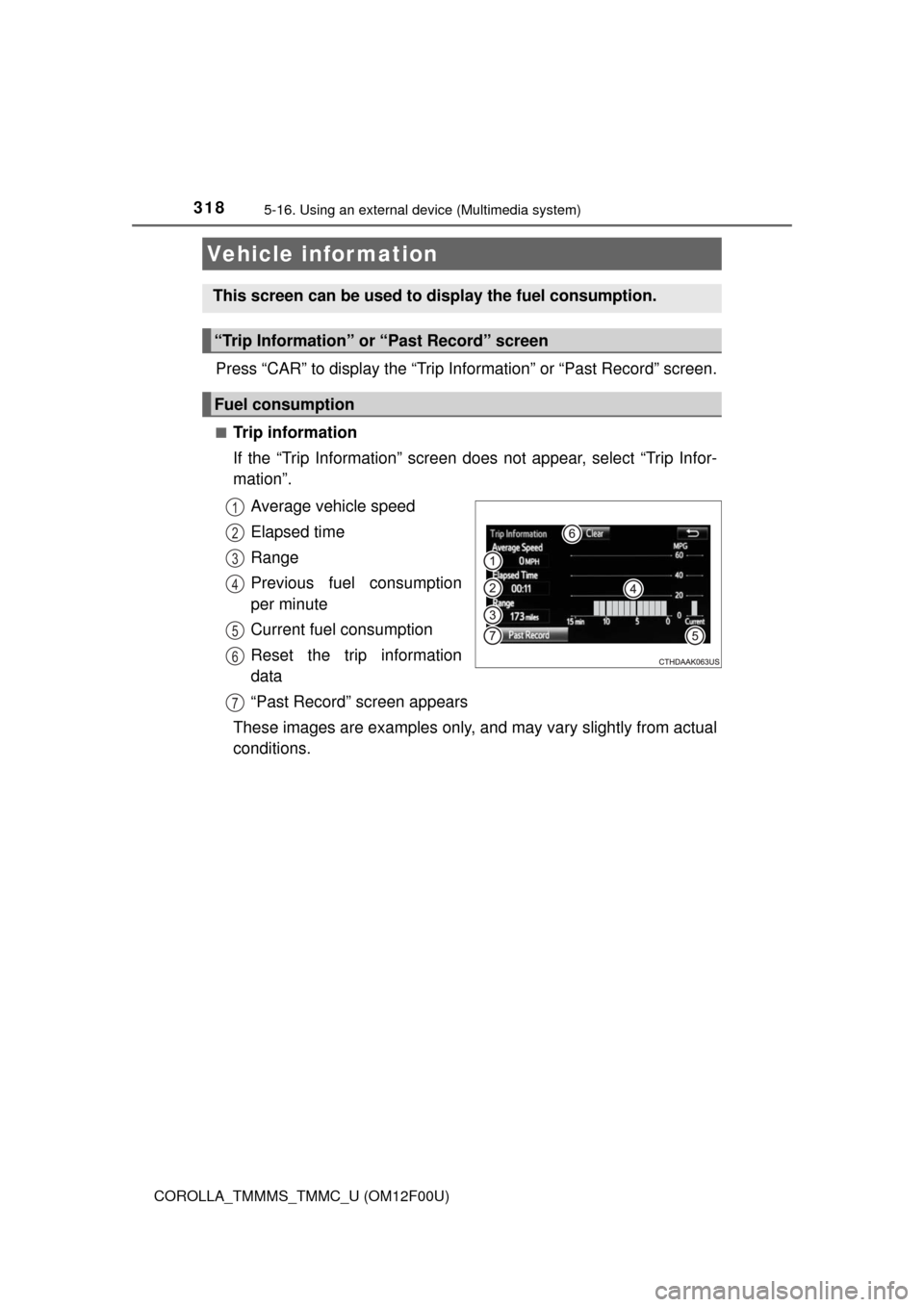
Press “CAR” to display the “Trip Information” or “Past Record” screen.
■Trip information
If the “Trip Information” screen does not appear, select “Trip Infor-
mation”.
Average vehicle speed
Elapsed time
Range
Previous fuel consumption
per minute
Current fuel consumption
Reset the trip information
data
“Past Record” screen appears
These images are examples only, and may vary slightly from actual
conditions.
Vehicle information
This screen can be used to display the fuel consumption.
“Trip Information” or “Past Record” screen
Fuel consumption
1
2
3
4
5
6
7
Page 323 of 612
3235-17. Connecting Bluetooth® (Multimedia system)
5
Interior features
COROLLA_TMMMS_TMMC_U (OM12F00U)
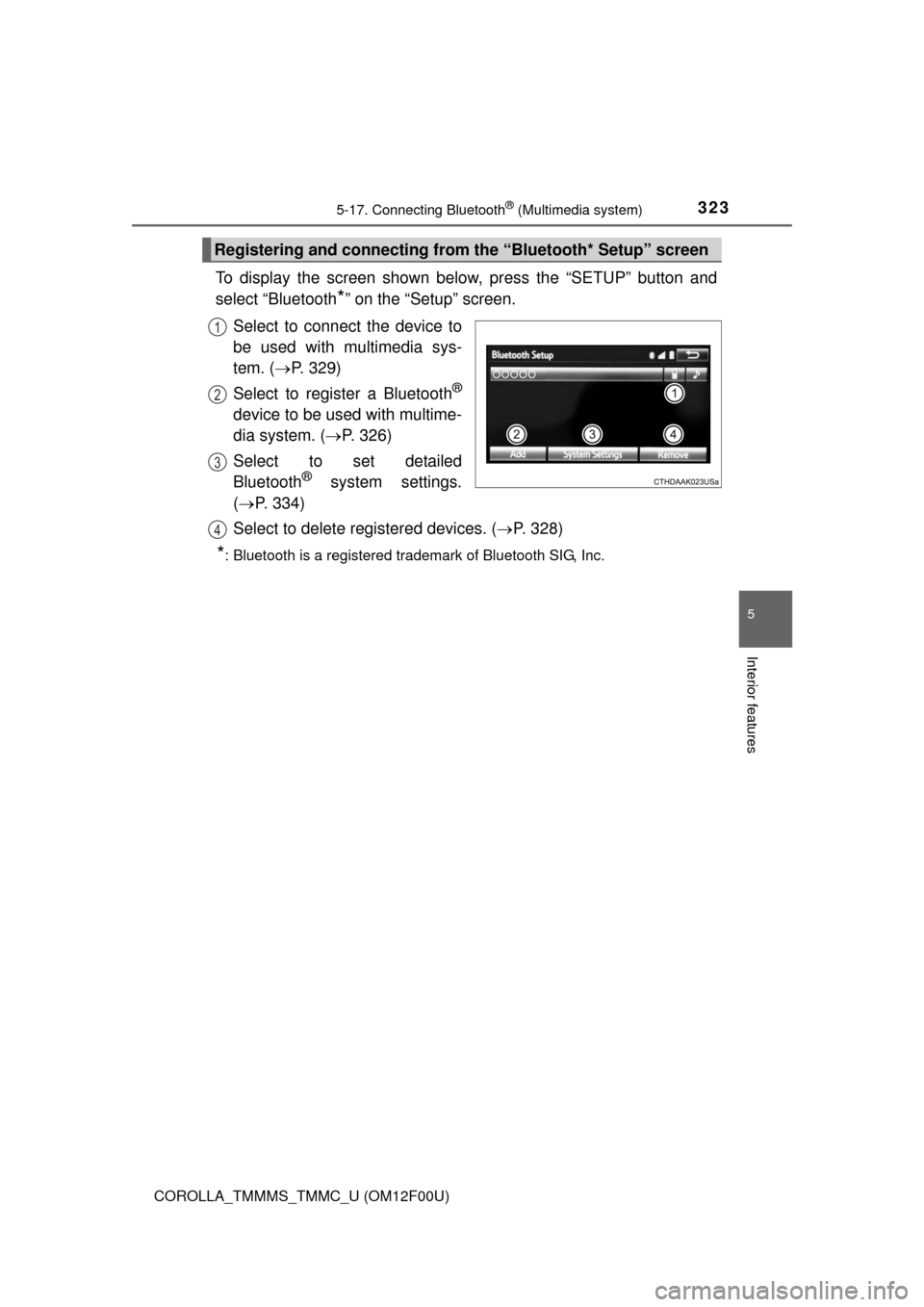
To display the screen shown below, press the “SETUP” button and
select “Bluetooth
*” on the “Setup” screen.
Select to connect the device to
be used with multimedia sys-
tem. (P. 329)
Select to register a Bluetooth
®
device to be used with multime-
dia system. (P. 326)
Select to set detailed
Bluetooth
® system settings.
(P. 334)
Select to delete registered devices. (P. 328)
*: Bluetooth is a registered trademark of Bluetooth SIG, Inc.
Registering and connecting from the “Bluetooth* Setup” screen
1
2
3
4
Page 326 of 612
3265-17. Connecting Bluetooth® (Multimedia system)
COROLLA_TMMMS_TMMC_U (OM12F00U)
Display the “Bluetooth* Setup” screen. (P. 323)
*: Bluetooth is a registered trademark of Bluetooth SIG, Inc.
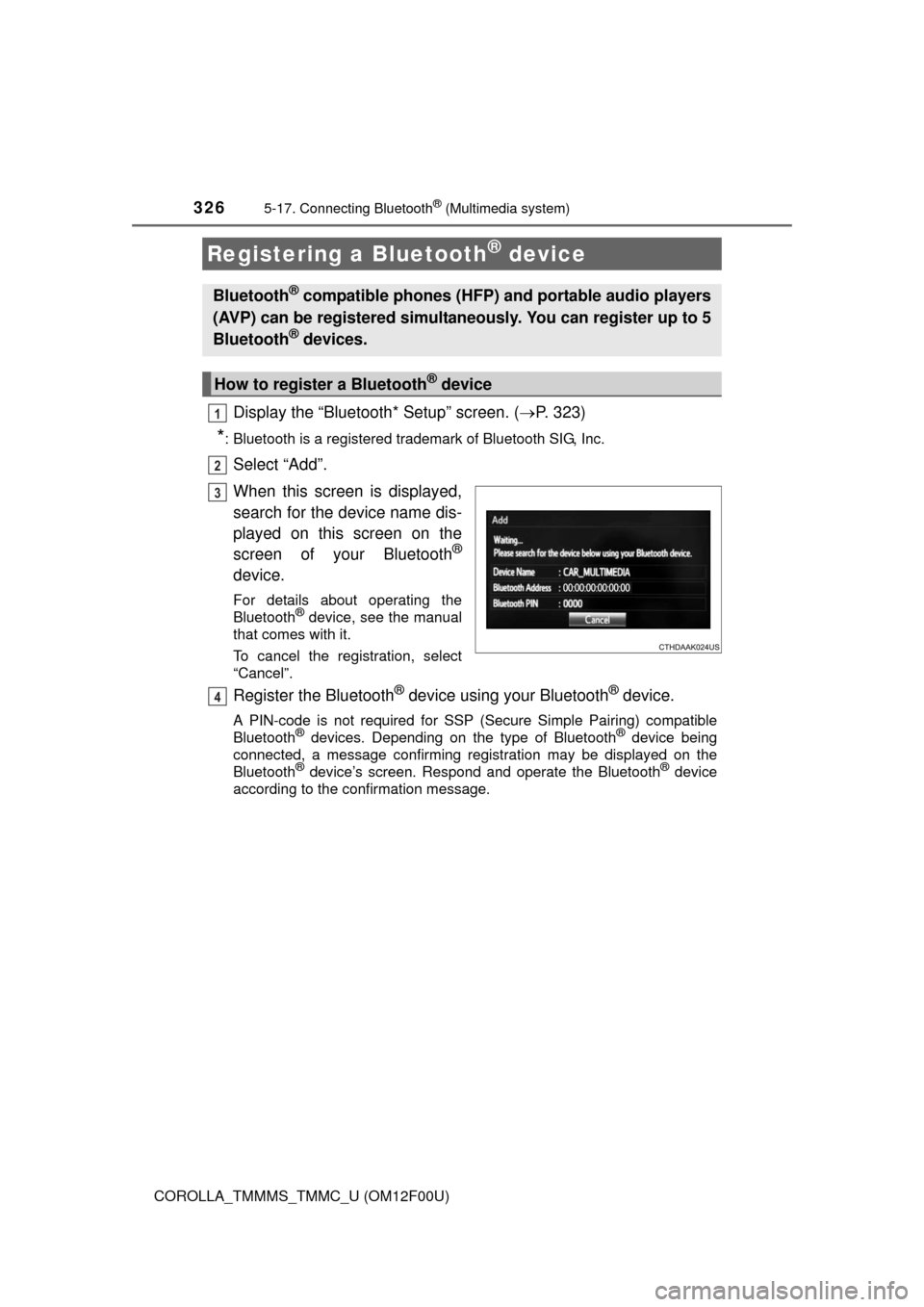
Select “Add”.
When this screen is displayed,
search for the device name dis-
played on this screen on the
screen of your Bluetooth
®
device.
For details about operating the
Bluetooth® device, see the manual
that comes with it.
To cancel the registration, select
“Cancel”.
Register the Bluetooth® device using your Bluetooth® device.
A PIN-code is not required for SSP (S ecure Simple Pairing) compatible
Bluetooth® devices. Depending on the type of Bluetooth® device being
connected, a message confirming registration may be displayed on the
Bluetooth
® device’s screen. Respond and operate the Bluetooth® device
according to the confirmation message.
Registering a Bluetooth® device
Bluetooth® compatible phones (HFP) and portable audio players
(AVP) can be registered simultaneously. You can register up to 5
Bluetooth
® devices.
How to register a Bluetooth® device
1
2
3
4