display TOYOTA COROLLA 2014 11.G Manual PDF
[x] Cancel search | Manufacturer: TOYOTA, Model Year: 2014, Model line: COROLLA, Model: TOYOTA COROLLA 2014 11.GPages: 612, PDF Size: 12.58 MB
Page 263 of 612
2635-7. “SET UP” menu
5
Interior features
COROLLA_TMMMS_TMMC_U (OM12F00U)
Select “List Audio” using . (P. 258) The list of registered por-
table players will be displayed.
●Connecting the registered portable player to the audio system
Select the name of the portable player to be connected using
.
Select “Select” using .
●Deleting the registered portable player
Select the name of the portable player to be deleted using
.
Select “Delete” using .
Press (YES).
Listing the registered portable players
1
2
1
2
3
Page 265 of 612
2655-7. “SET UP” menu
5
Interior features
COROLLA_TMMMS_TMMC_U (OM12F00U)
Select “Bluetooth* info” using . (P. 258)
●Displaying the device name
Select “Device Name” using .
●Displaying the device address
Select “Device Address” using .
*: Bluetooth is a registered trademark of Bluetooth SIG, Inc.
If the “Display Setting” is set to on, the portable player connection sta-
tus will be displayed when the engine switch is turned to the “ACC” or
“ON” position (vehicles without a smart key system) or ACCESSORY
or IGNITION ON mode (vehicles with a smart key system).
Select “Display Setting” using . (P. 258)
Select “ON” or “OFF” using .
Displaying the device status
Setting the automatic connection confirmation display to on or
off
1
2
Page 266 of 612
2665-7. “SET UP” menu
COROLLA_TMMMS_TMMC_U (OM12F00U)
Select “Initialize” using . (P. 258)
●Initializing the sound settings
Select “Sound setting” using and press (YES).
For details about sound settings: P. 270
●Initializing the device information
Select “Car Device Info” using and press (YES).
Automatic connection of a portable device, the automatic connection con-
firmation display and passkey will be initialized.
●Initializing all the settings
Select “All Initialize” using and press (YES).
Initialization
Page 272 of 612
272
COROLLA_TMMMS_TMMC_U (OM12F00U)
5-8. Bluetooth® Audio
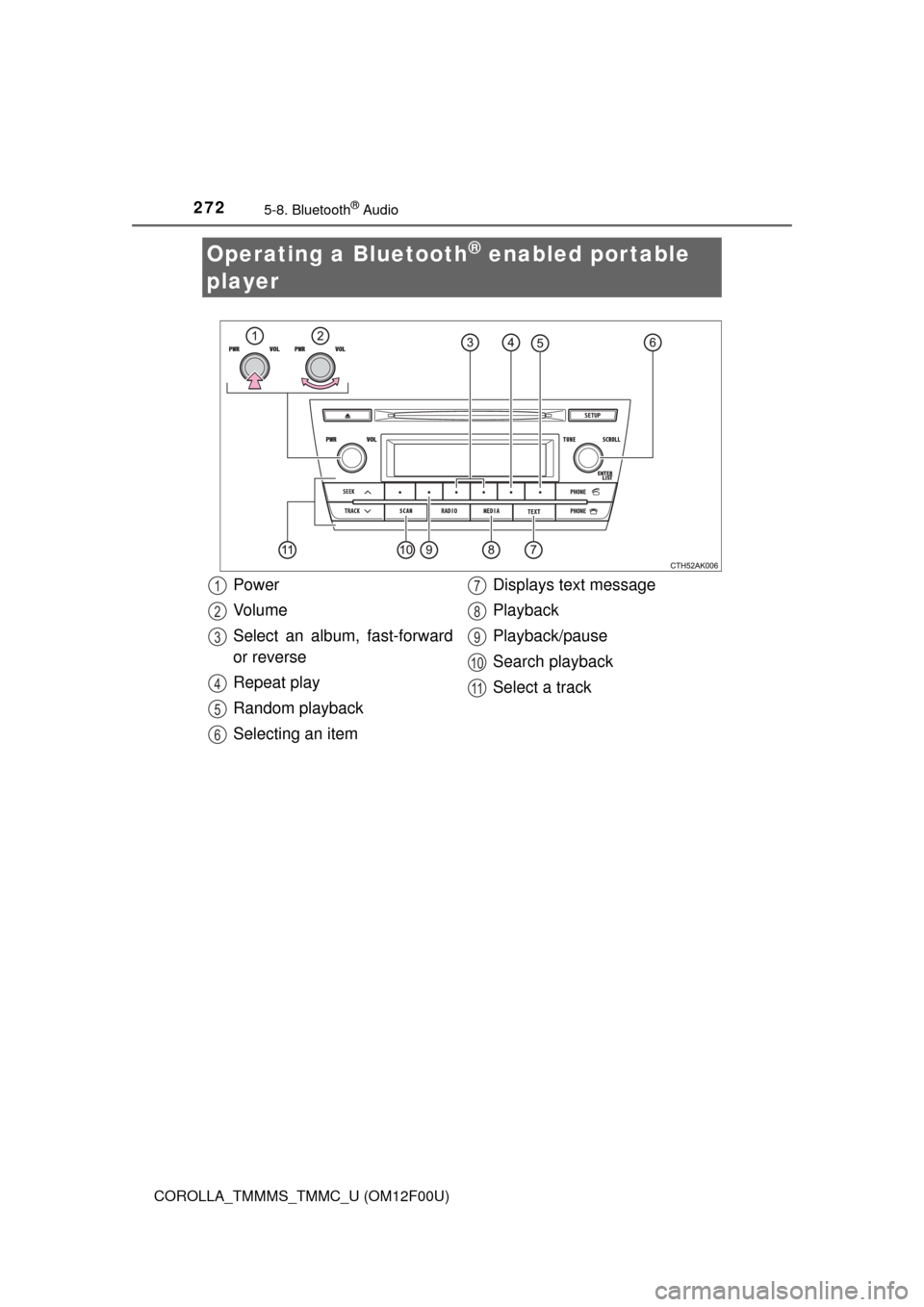
Operating a Bluetooth® enabled portable
player
Power
Vo l u m e
Select an album, fast-forward
or reverse
Repeat play
Random playback
Selecting an itemDisplays text message
Playback
Playback/pause
Search playback
Select a track1
2
3
4
5
6
7
8
9
10
11
Page 274 of 612
2745-8. Bluetooth® Audio
COROLLA_TMMMS_TMMC_U (OM12F00U)
Pressing (RPT) changes the repeat play mode in the following
order:
Track repeat Album repeat
* Off
*: Available except when RDM (random playback) is selected
Press .
Track title and artist name are displayed on the display.
To return to the previous display, press or (BACK).
■Bluetooth® audio system functions
Depending on the portable player that is connected to the system, certain
functions may not be available.
Repeat play
Switching the display
Page 283 of 612
283
5
Interior features
COROLLA_TMMMS_TMMC_U (OM12F00U)5-
11.
Basic Operations (Multimedia system)
Multimedia system
: If equipped
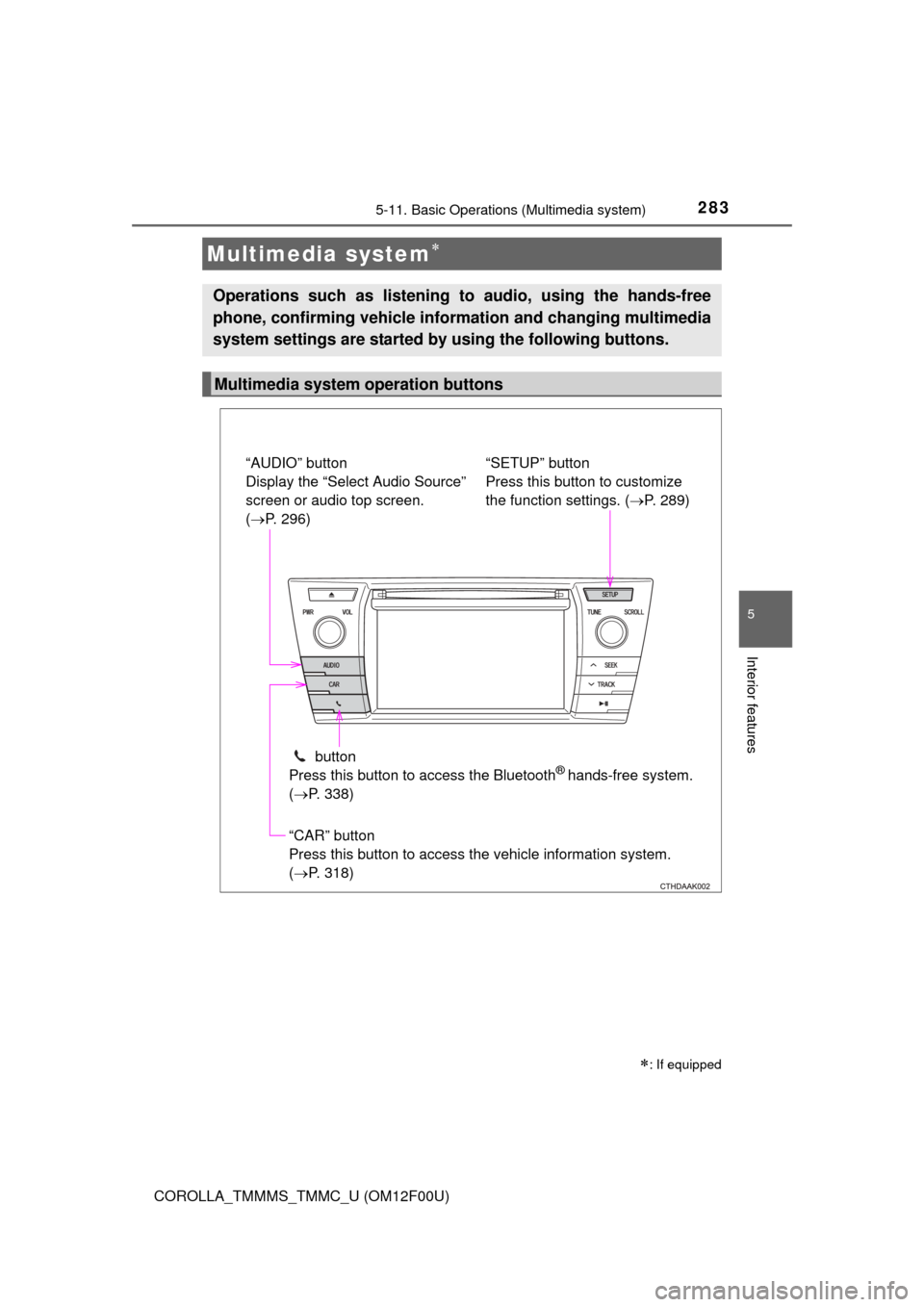
Operations such as listening to audio, using the hands-free
phone, confirming vehicle inform ation and changing multimedia
system settings are started by using the following buttons.
Multimedia system operation buttons
“AUDIO” button
Display the “Select Audio Source”
screen or audio top screen.
( P. 296)
button
Press this button to access the Bluetooth
® hands-free system.
( P. 338)
“CAR” button
Press this button to access the vehicle information system.
(P. 318) “SETUP” button
Press this button to customize
the function settings. (
P. 289)
Page 284 of 612
2845-11. Basic Operations (Multimedia system)
COROLLA_TMMMS_TMMC_U (OM12F00U)
By touching the screen with your finger, you can control the multime-
dia system, etc.
■Drag*
Touch the screen with your finger, and move the screen to the
desired position.
●Scrolling the lists
●Using scroll bar in lists
■Flick*
Touch the screen with your finger and quickly move the screen by
flicking your finger.
●Scrolling the main screen page
●Returning to the menu screen from the sub-menu screen (screen
one level below)
*: The above operations may not be performed on all screens.
■When using the touch screen
●If the screen is cold, the display may be dark, or the system may seem to be
operating slightly slower than normal.
●The screen may seem dark and hard to see when viewed through sun-
glasses. Change your angle of viewing, adjust the display on the “Display
Settings” screen (P. 294) or remove your sunglasses.
Operating the touch screen
NOTICE
■To avoid damaging the touch screen
●To prevent damaging the screen, lightly touch the screen buttons with your
finger.
●Do not use objects other than your finger to touch the screen.
●Wipe off fingerprints using a glass cleaning cloth. Do not use chemical
cleaners to clean the screen, as they may damage the touch screen.
Page 285 of 612
2855-11. Basic Operations (Multimedia system)
5
Interior features
COROLLA_TMMMS_TMMC_U (OM12F00U)
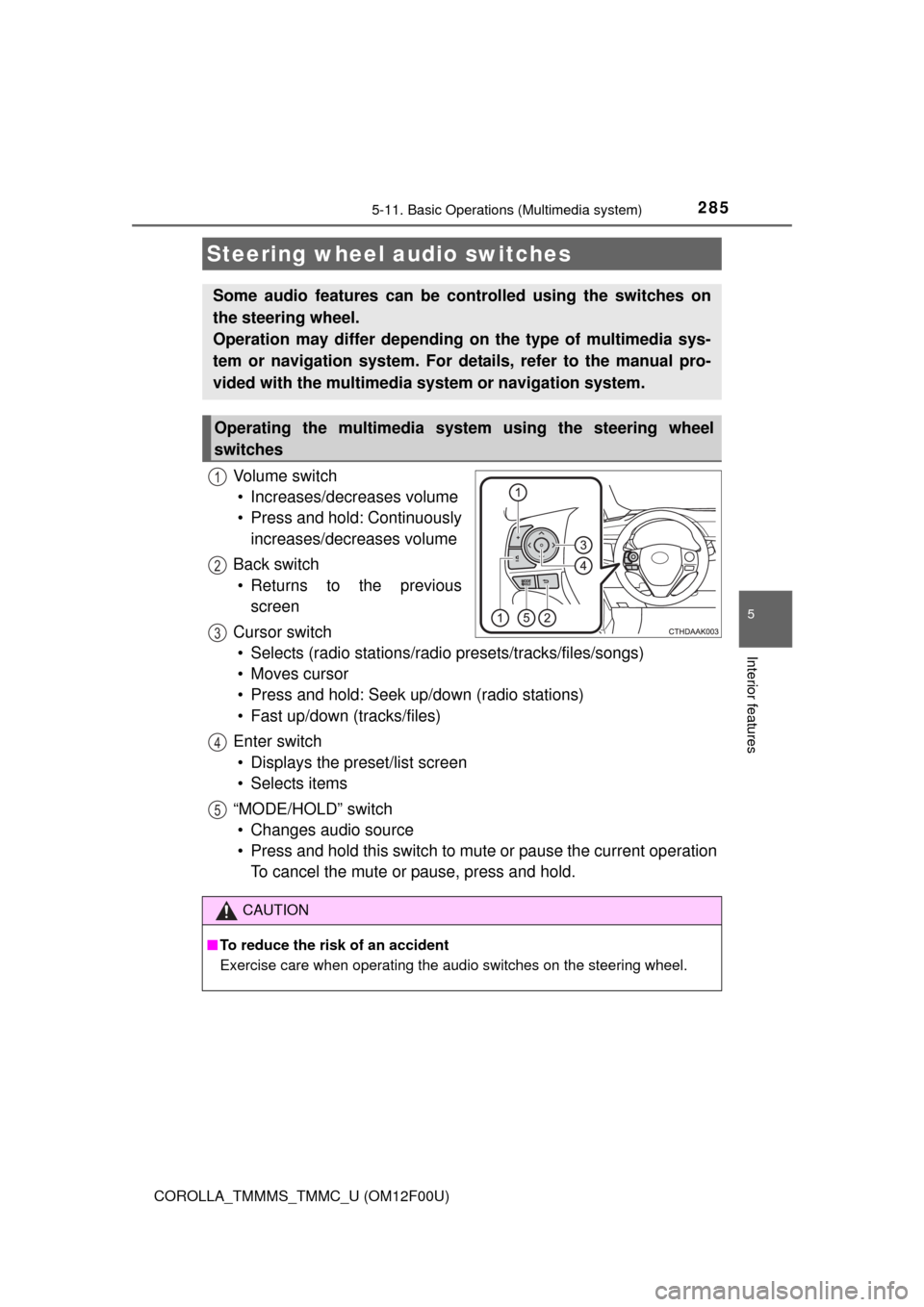
Vo l u m e s w i t c h
• Increases/decreases volume
• Press and hold: Continuously
increases/decreases volume
Back switch
• Returns to the previous
screen
Cursor switch
• Selects (radio stations/radio presets/tracks/files/songs)
• Moves cursor
• Press and hold: Seek up/down (radio stations)
• Fast up/down (tracks/files)
Enter switch
• Displays the preset/list screen
• Selects items
“MODE/HOLD” switch
• Changes audio source
• Press and hold this switch to mute or pause the current operation
To cancel the mute or pause, press and hold.
Steering wheel audio switches
Some audio features can be controlled using the switches on
the steering wheel.
Operation may differ depending on the type of multimedia sys-
tem or navigation system. For details, refer to the manual pro-
vided with the multimedia system or navigation system.
Operating the multimedia system using the steering wheel
switches
1
12
3
4
5
CAUTION
■To reduce the risk of an accident
Exercise care when operating the audio switches on the steering wheel.
Page 287 of 612
2875-11. Basic Operations (Multimedia system)
5
Interior features
COROLLA_TMMMS_TMMC_U (OM12F00U)
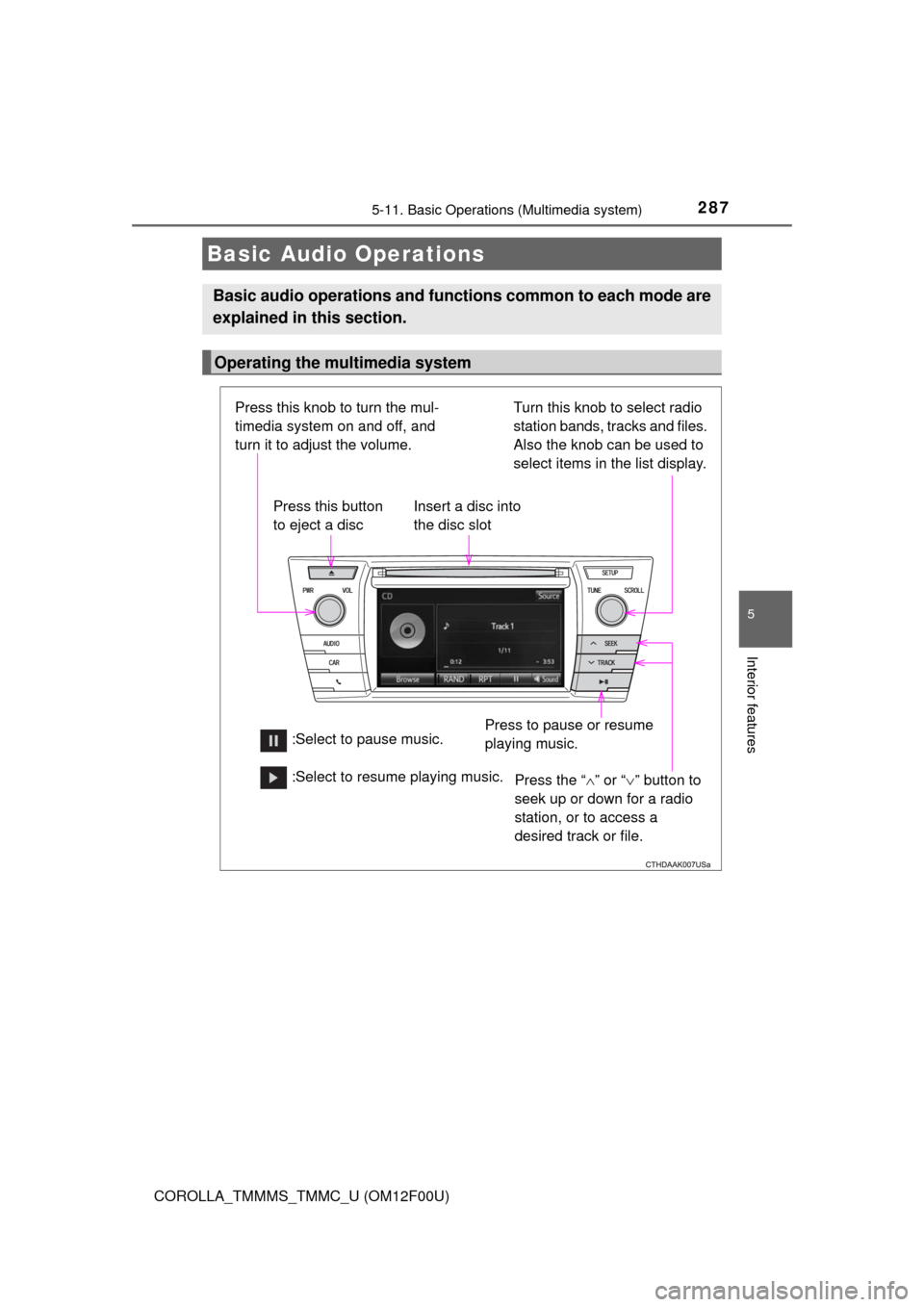
Basic Audio Operations
Basic audio operations and functions common to each mode are
explained in this section.
Operating the multimedia system
Press the “” or “” button to
seek up or down for a radio
station, or to access a
desired track or file. Press this knob to turn the mul-
timedia system on and off, and
turn it to adjust the volume.
Press this button
to eject a disc
Press to pause or resume
playing music. Insert a disc into
the disc slot
:Select to pause music.Turn this knob to select radio
station bands, tracks and files.
Also the knob can be used to
select items in the list display. :Select to resume playing music.
Page 289 of 612
289
5
Interior features
COROLLA_TMMMS_TMMC_U (OM12F00U)5-12.
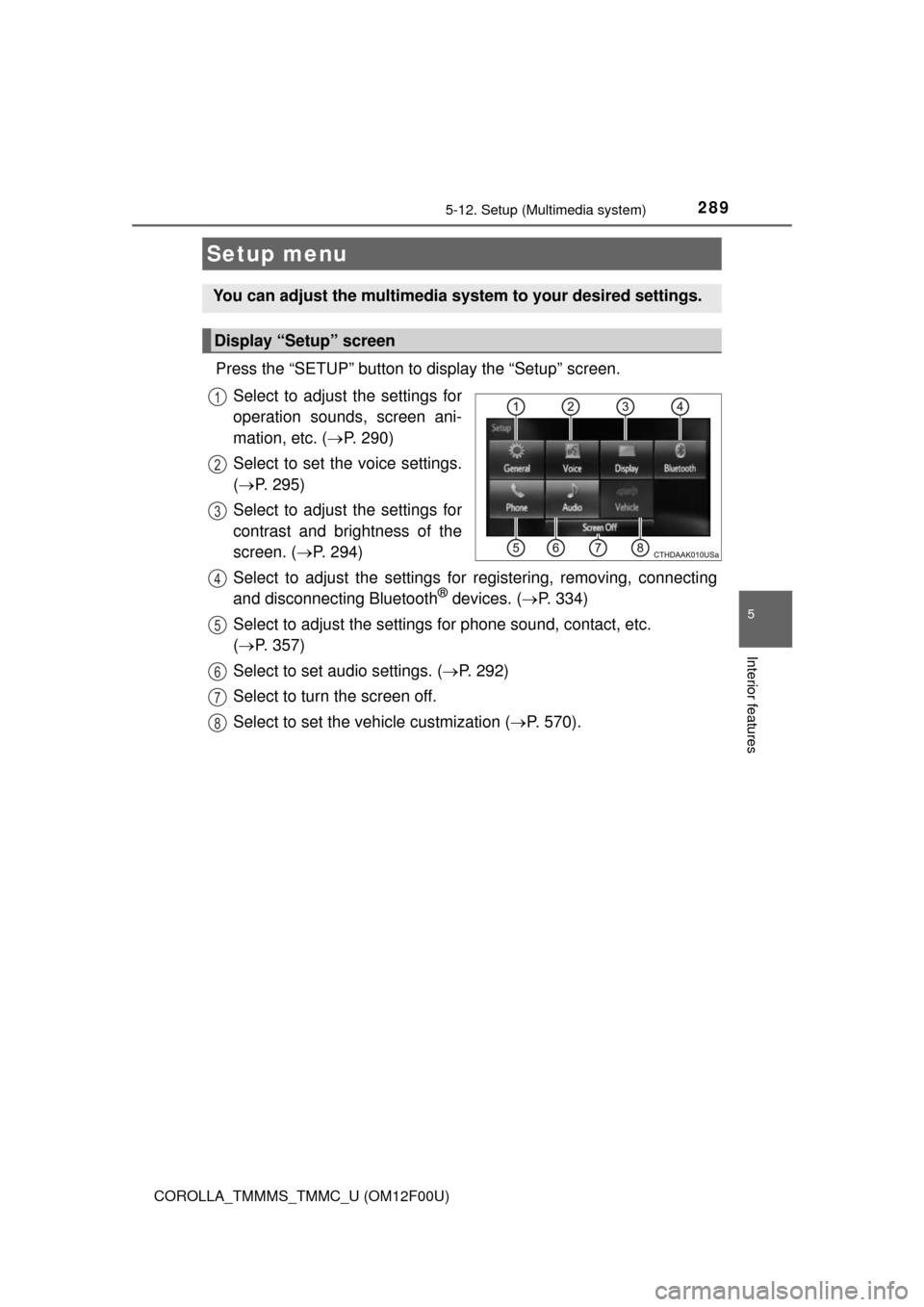
Setup (Multimedia system)
Press the “SETUP” button to display the “Setup” screen.
Select to adjust the settings for
operation sounds, screen ani-
mation, etc. ( P. 290)
Select to set the voice settings.
( P. 295)
Select to adjust the settings for
contrast and brightness of the
screen. ( P. 294)
Select to adjust the settings for registering, removing, connecting
and disconnecting Bluetooth
® devices. ( P. 334)
Select to adjust the settings for phone sound, contact, etc.
( P. 357)
Select to set audio settings. ( P. 292)
Select to turn the screen off.
Select to set the vehicle custmization ( P. 570).
Setup menu
You can adjust the multimedia system to your desired settings.
Display “Setup” screen
1
2
3
4
5
6
7
8