Cide TOYOTA COROLLA 2015 11.G Service Manual
[x] Cancel search | Manufacturer: TOYOTA, Model Year: 2015, Model line: COROLLA, Model: TOYOTA COROLLA 2015 11.GPages: 612, PDF Size: 8.48 MB
Page 200 of 612

2004-5. Using the driving support systems
COROLLA_TMMMS_TMMC_U (OM12F00U)■
If the warning message for the crui se control is shown on the multi-
information display (vehicles wi th a multi-information display)
Press the “ON-OFF” button once to deactivate the system, and then press
the button again to reactivate the system.
If the cruise control speed cannot be set or if the cruise control cancels imme-
diately after being activated, there may be a malfunction in the cruise control
system. Have the vehicle inspected by your Toyota dealer.
CAUTION
■ To avoid operating the cruise control by mistake
Switch the cruise control off using the “ON-OFF” button when not in use.
■ Situations unsuitable for cruise control
Do not use cruise control in any of the following situations.
Doing so may result in loss of control and could cause an accident resulting
in death or serious injury.
● In heavy traffic
● On roads with sharp bends
● On winding roads
● On slippery roads, such as those covered with rain, ice or snow
● On steep hills
Vehicle speed may exceed the set speed when driving down a steep hill.
● During emergency towing
Page 209 of 612

2094-5. Using the driving support systems
4
Driving
COROLLA_TMMMS_TMMC_U (OM12F00U)
CAUTION
■When using the rear view monitor system
The rear view monitor system is a supplemental device intended to assist
the driver when backing up. When backing up, be sure to check visually
behind and all around the vehicle before proceeding.
Observe the following precautions to avoid an accident that could result in
death or serious injuries.
● Never depend on the rear view monitor system entirely when backing up.
The image and the position of the guide lines displayed on the screen may
differ from the actual state.
Use caution, just as you would when backing up any vehicle.
● Be sure to back up slowly, depressing the brake pedal to control vehicle
speed.
● The instructions given are only guidelines.
When and how much to turn the steering wheel will vary according to traf-
fic conditions, road surface conditions, vehicle condition, etc. when park-
ing. It is necessary to be fully aware of this before using the rear view
monitor system.
● When parking, be sure to check that the parking space will accommodate
your vehicle before maneuvering into it.
● Do not use the rear view monitor system in the following cases:
• On icy or slick road surfaces, or in snow
• When using tire chains or the compact spare tire
• When the trunk lid is not closed completely
• On roads that are not flat or straight, such as curves or slopes.
● In low temperatures, the screen may darken or the image may become
faint. The image could distort when the vehicle is moving, or you may
become unable to see the image on the screen. Be sure to check direct
visually and with the mirrors all around the vehicle before proceeding.
● If the tire sizes are changed, the position of the fixed guide lines displayed
on the screen may change.
● The camera uses a special lens. The distances between objects and
pedestrians that appear in the image displayed on the screen will differ
from the actual distances. ( P. 204)
Page 214 of 612

2144-5. Using the driving support systems
COROLLA_TMMMS_TMMC_U (OM12F00U)
CAUTION
■The ABS does not operate effectively when
● The limits of tire gripping performance have been exceeded (such as
excessively worn tires on a snow covered road).
● The vehicle hydroplanes while driving at high speed on wet or slick roads.
■ Stopping distance when the ABS is operating may exceed that of nor-
mal conditions
The ABS is not designed to shorten the vehicle’s stopping distance. Always
maintain a safe distance from the vehicle in front of you, especially in the
following situations:
● When driving on dirt, gravel or snow-covered roads
● When driving with tire chains
● When driving over bumps in the road
● When driving over roads with potholes or uneven surfaces
■ TRAC may not operat e effectively when
Directional control and power may not be achievable while driving on slip-
pery road surfaces, even if the TRAC system is operating.
Drive the vehicle carefully in conditions where stability and power may be
lost.
■ When the VSC is activated
The slip indicator light flashes. Always drive carefully. Reckless driving may
cause an accident. Exercise particular care when the indicator light flashes.
■ When the TRAC or VSC system is turned off
Be especially careful and drive at a speed appropriate to the road condi-
tions. As these are the systems help ensure vehicle stability and driving
force, do not turn the TRAC or VSC system off unless necessary.
Page 218 of 612

2184-6. Driving tips
COROLLA_TMMMS_TMMC_U (OM12F00U)
■Tire chain installation
Observe the following precautions when installing and removing chains:
●Install and remove tire chains in a safe location.
● Install tire chains on the front tires. Do not install tire chains on the rear tires.
● Install tire chains on front tires as tightly as possible. Retighten chains after
driving 1/4 1/2 mile (0.5 1.0 km).
● Install tire chains following the instructions provided with the tire chains.
CAUTION
■Driving with snow tires
Observe the following precautions to reduce the risk of accidents.
Failure to do so may result in a loss of vehicle control and cause death or
serious injury.
● Use tires of the size specified.
● Maintain the recommended level of air pressure.
● Do not drive in excess of 75 mph (120 km/h), regardless of the type of
snow tires being used.
● Use snow tires on all, not just some wheels.
■ Driving with tire chains
Observe the following precautions to reduce the risk of accidents.
Failure to do so may result in the vehicle being unable to be driven safely,
and may cause death or serious injury.
● Do not drive in excess of the speed limit specified for the tire chains being
used, or 30 mph (50 km/h), whichever is lower.
● Avoid driving on bumpy road surfaces or over potholes.
● Avoid sudden acceleration, abrupt steering, sudden braking and shifting
operations that cause sudden engine braking.
● Slow down sufficiently before entering a curve to ensure that vehicle con-
trol is maintained.
NOTICE
■Repairing or replacing snow tires (vehicles with a tire pressure warn-
ing system)
Request repairs or replacement of snow tires from Toyota dealers or legiti-
mate tire retailers.
This is because the removal and attachment of snow tires affects the opera-
tion of the tire pressure warning valves and transmitters.
■ Fitting tire chains (vehicles with a tire pressure warning system)
The tire pressure warning valves and transmitters may not function correctly
when tire chains are fitted.
Page 226 of 612
2265-1. Basic Operations
COROLLA_TMMMS_TMMC_U (OM12F00U)
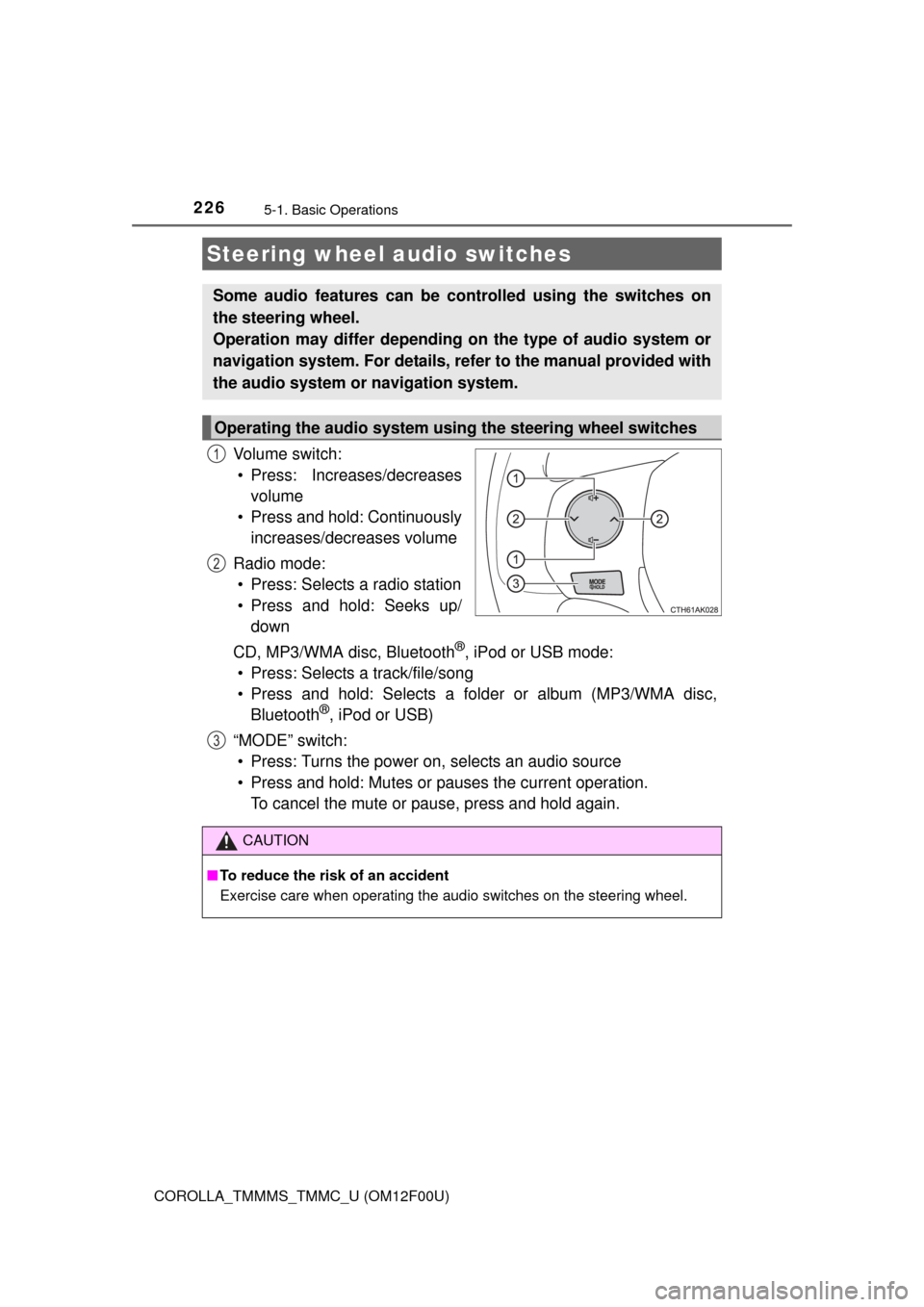
Vo l u m e s w i t c h :• Press: Increases/decreases volume
• Press and hold: Continuously increases/decreases volume
Radio mode: • Press: Selects a radio station
• Press and hold: Seeks up/ down
CD, MP3/WMA disc, Bluetooth
®, iPod or USB mode:
• Press: Selects a track/file/song
• Press and hold: Selects a folder or album (MP3/WMA disc, Bluetooth
®, iPod or USB)
“MODE” switch: • Press: Turns the power on, selects an audio source
• Press and hold: Mutes or pauses the current operation. To cancel the mute or pause, press and hold again.
Steering wheel audio switches
Some audio features can be c ontrolled using the switches on
the steering wheel.
Operation may differ depending on the type of audio system or
navigation system. For details, refer to the manual provided with
the audio system or navigation system.
Operating the audio system using the steering wheel switches
1
2
3
CAUTION
■ To reduce the risk of an accident
Exercise care when operating the audio switches on the steering wheel.
Page 285 of 612
2855-11. Basic Operations (Multimedia system)
5
Audio system
COROLLA_TMMMS_TMMC_U (OM12F00U)
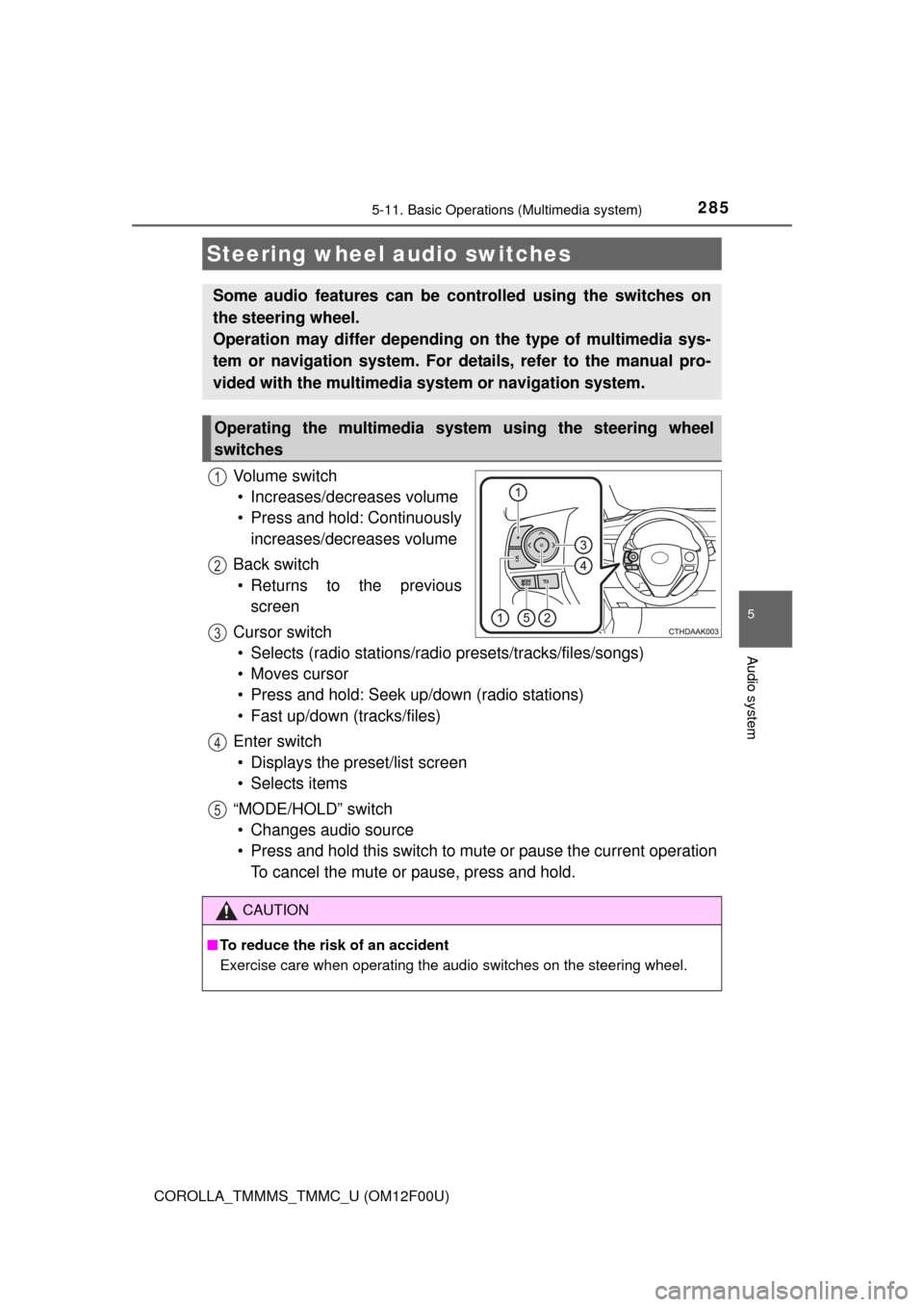
Vo l u m e s w i t c h• Increases/decreases volume
• Press and hold: Continuously increases/decreases volume
Back switch • Returns to the previous screen
Cursor switch • Selects (radio stations/radio presets/tracks/files/songs)
• Moves cursor
• Press and hold: Seek up/down (radio stations)
• Fast up/down (tracks/files)
Enter switch • Displays the preset/list screen
• Selects items
“MODE/HOLD” switch • Changes audio source
• Press and hold this switch to mute or pause the current operation To cancel the mute or pause, press and hold.
Steering wheel audio switches
Some audio features can be c ontrolled using the switches on
the steering wheel.
Operation may differ depending on the type of multimedia sys-
tem or navigation system. For de tails, refer to the manual pro-
vided with the multimedia system or navigation system.
Operating the multimedia system using the steering wheel
switches
1
12
3
4
5
CAUTION
■ To reduce the risk of an accident
Exercise care when operating the audio switches on the steering wheel.
Page 398 of 612
398
COROLLA_TMMMS_TMMC_U (OM12F00U)
6-3. Using the storage features
List of storage features
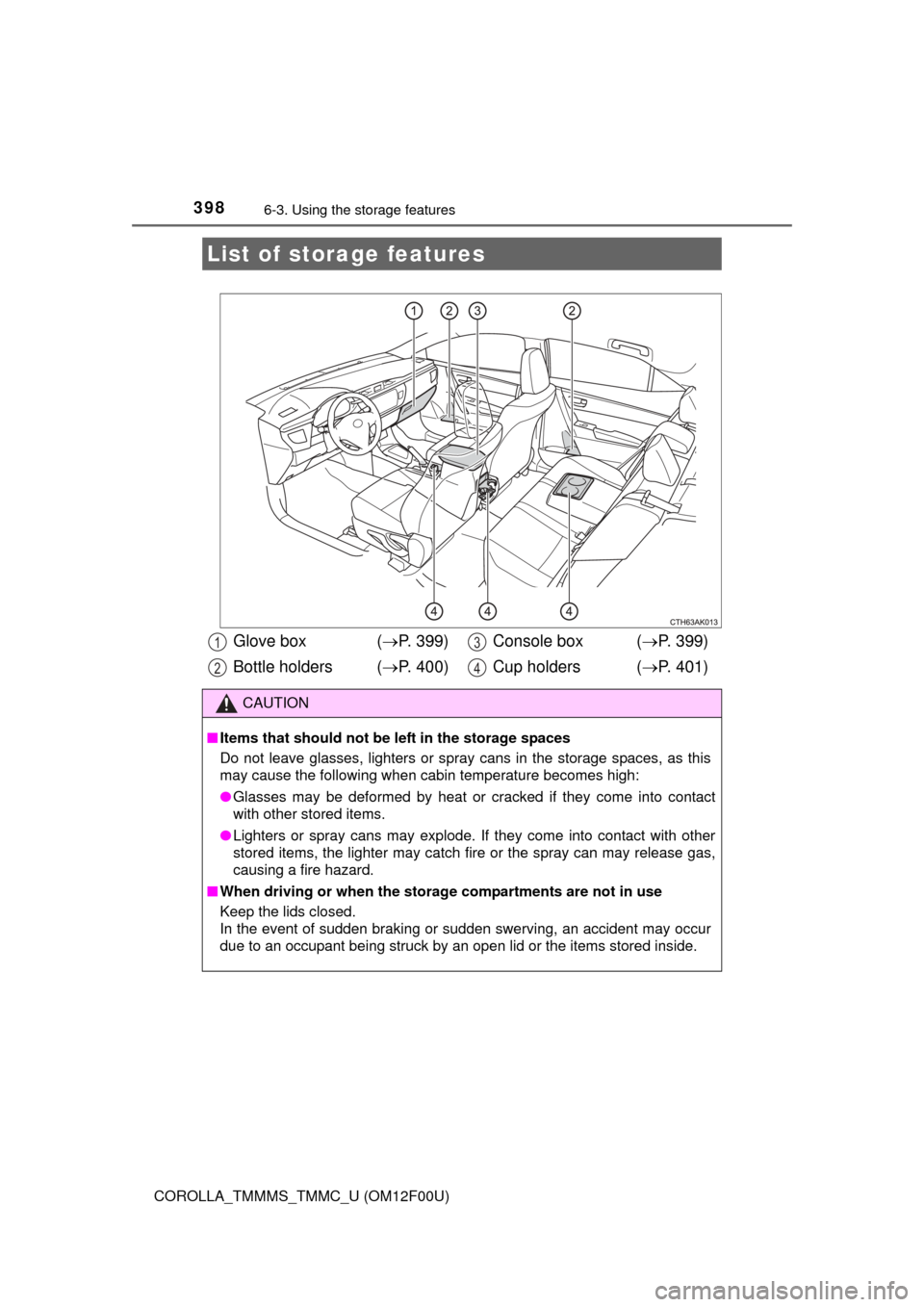
Glove box ( P. 399)
Bottle holders ( P. 400) Console box (
P. 399)
Cup holders ( P. 401)
CAUTION
■Items that should not be left in the storage spaces
Do not leave glasses, lighters or spray cans in the storage spaces, as this
may cause the following when cabin temperature becomes high:
● Glasses may be deformed by heat or cracked if they come into contact
with other stored items.
● Lighters or spray cans may explode. If they come into contact with other
stored items, the lighter may catch fire or the spray can may release gas,
causing a fire hazard.
■ When driving or when the storag e compartments are not in use
Keep the lids closed.
In the event of sudden braking or sudden swerving, an accident may occur
due to an occupant being struck by an open lid or the items stored inside.
1
2
3
4
Page 400 of 612
4006-3. Using the storage features
COROLLA_TMMMS_TMMC_U (OM12F00U)■
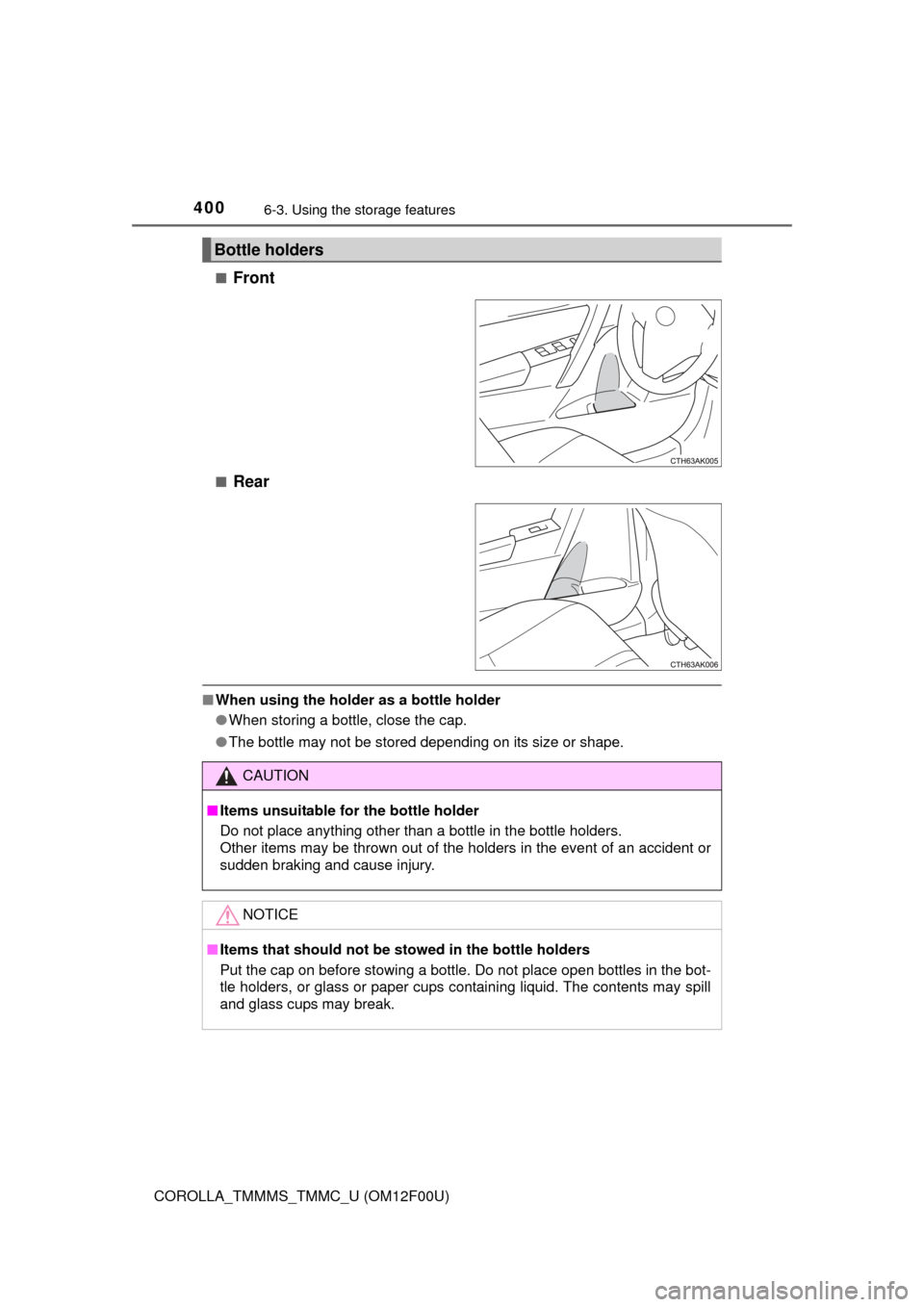
Front
■Rear
■
When using the holder as a bottle holder
●When storing a bottle, close the cap.
● The bottle may not be stored depending on its size or shape.
Bottle holders
CAUTION
■Items unsuitable for the bottle holder
Do not place anything other than a bottle in the bottle holders.
Other items may be thrown out of the holders in the event of an accident or
sudden braking and cause injury.
NOTICE
■Items that should not be st owed in the bottle holders
Put the cap on before stowing a bottle. Do not place open bottles in the bot-
tle holders, or glass or paper cups containing liquid. The contents may spill
and glass cups may break.
Page 402 of 612
4026-3. Using the storage features
COROLLA_TMMMS_TMMC_U (OM12F00U)
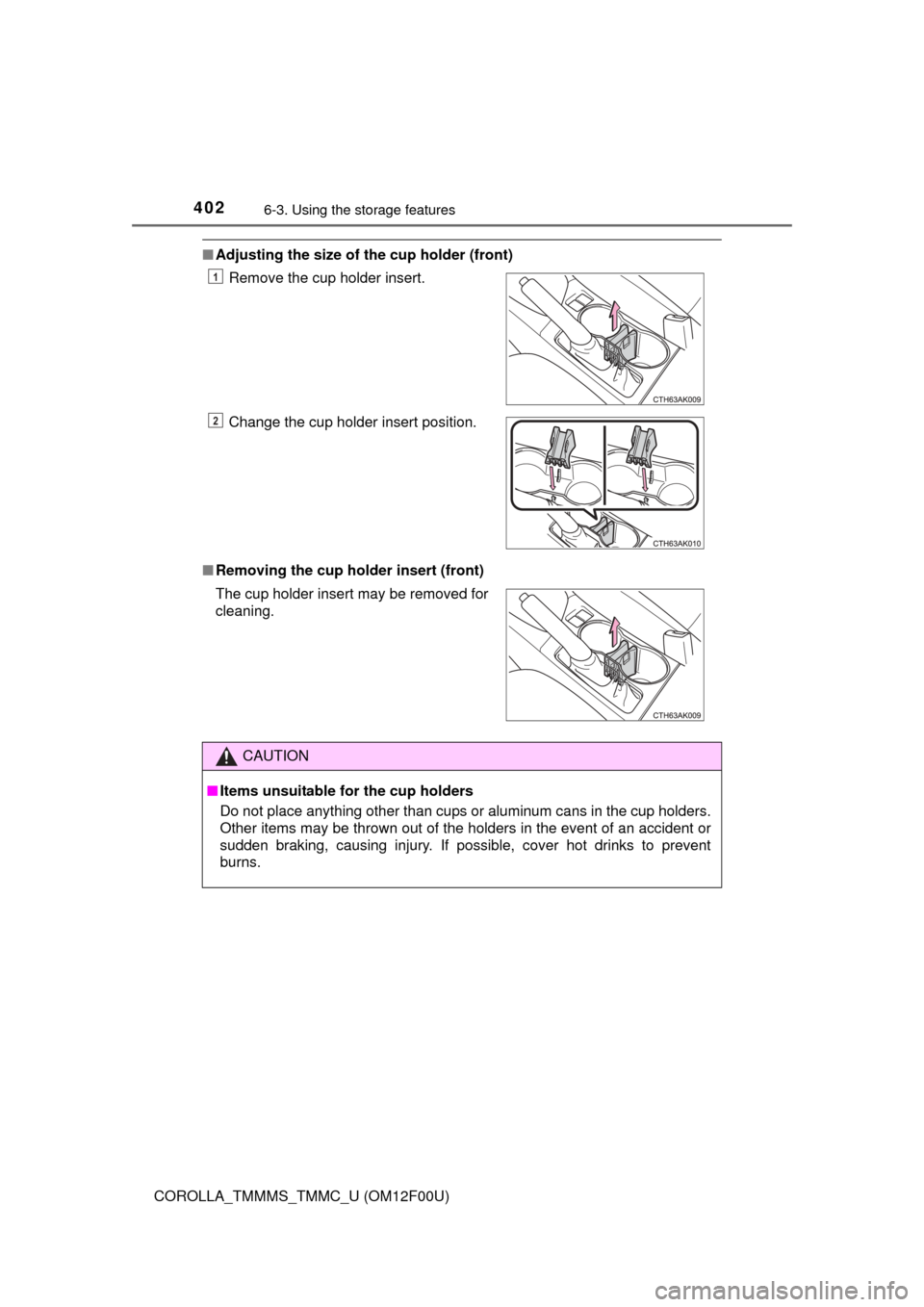
■Adjusting the size of the cup holder (front)
■ Removing the cup holder insert (front)Remove the cup holder insert.
Change the cup holder insert position.
The cup holder insert may be removed for
cleaning.
CAUTION
■ Items unsuitable for the cup holders
Do not place anything other than cups or aluminum cans in the cup holders.
Other items may be thrown out of the holders in the event of an accident or
sudden braking, causing injury. If possible, cover hot drinks to prevent
burns.
1
2
Page 418 of 612

4187-1. Maintenance and care
COROLLA_TMMMS_TMMC_U (OM12F00U)
■Shampooing the carpets
There are several commercial foaming-type cleaners available. Use a sponge
or brush to apply the foam. Rub in overlapping circles. Do not use water.
Wipe dirty surfaces and let them dry. Excellent results are obtained by keep-
ing the carpet as dry as possible.
■ Seat belts
Clean with mild soap and lukewarm water using a cloth or sponge. Also
check the belts periodically for excessive wear, fraying or cuts.
CAUTION
■Water in the vehicle
● Do not splash or spill liquid in the vehicle.
Doing so may cause electrical components etc. to malfunction or catch
fire.
● Do not get any of the SRS components or wiring in the vehicle interior wet.
(P. 35)
An electrical malfunction may cause the airbags to deploy or not function
properly, resulting in death or serious injury.
■ Cleaning the interior (especially instrument panel)
Do not use polish wax or polish cleaner. The instrument panel may reflect
off the windshield, obstructing the driver’s view and leading to an accident,
resulting in death or serious injury.