phone TOYOTA COROLLA 2016 11.G Navigation Manual
[x] Cancel search | Manufacturer: TOYOTA, Model Year: 2016, Model line: COROLLA, Model: TOYOTA COROLLA 2016 11.GPages: 294, PDF Size: 3.42 MB
Page 276 of 294
276
COROLLA_14CY_Navi_U
3. SETUP
1. Entune App Suite SETTINGS
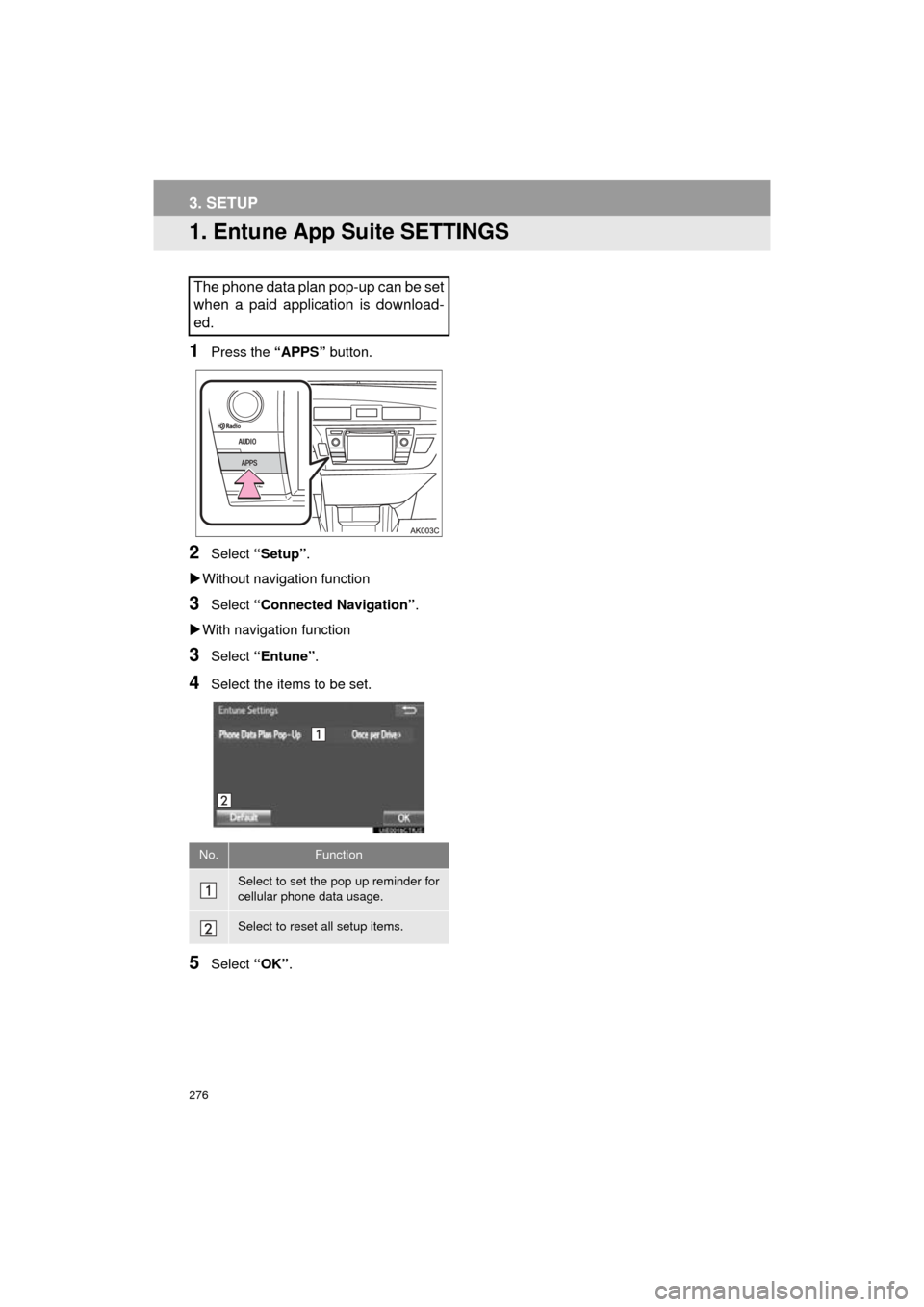
1Press the “APPS” button.
2Select “Setup” .
Without navigation function
3Select “Connected Navigation” .
With navigation function
3Select “Entune” .
4Select the items to be set.
5Select “OK”.
The phone data plan pop-up can be set
when a paid application is download-
ed.
No.Function
Select to set the pop up reminder for
cellular phone data usage.
Select to reset all setup items.
Page 278 of 294
278
ALPHABETICAL INDEX
COROLLA_14CY_Navi_U
A
AAC.......................................................... 95
AM............................................................ 77
APPS button ............................................ 12
“Apps” screen........................................... 14
AUDIO button........................................... 12
Audio settings ........................................ 118
AUX........................................................ 113
B
Bluetooth®................................................ 42
Profiles ................................................. 44
Registering a Bluetooth
® audio
player ................................................ 43
Registering a Bluetooth
® phone ........... 42
Bluetooth® audio .................................... 107
Connecting a Bluetooth® device ........ 112
Listening to Bluetooth® audio ............. 112
Bluetooth® phone................................... 158
Bluetooth® phone message function ..... 172
C
Calling on the Bluetooth® phone............ 162
Casual speech recognization ................. 136
CD ............................................................ 95
Playing an audio CD............................. 97
Playing an MP3/WMA/AAC disc........... 97
Command list ......................................... 137
D
Data services settings ............................ 145
Setting download methods ................. 145
Destination search screen...................... 213
Driver settings .......................................... 63
E
Editing route ........................................... 235
Adding destinations ............................ 236
Deleting destinations .......................... 236
Detour setting ..................................... 238
Reordering destinations...................... 236
Selecting route type ............................ 237
Setting route preferences ................... 237
Emergency ............................................. 222
Entering letters and numbers/ list screen operation ............................. 37
Entering letters and numbers ............... 37
Entune App Suite ................................... 269
Entering keyword operation ................ 274
Linking Entune App Suite and navigation function ................... 273
Page 279 of 294
279
COROLLA_14CY_Navi_U
F
FM radio................................................... 77
G
General settings....................................... 57
GPS (Global Positioning System) .......... 259Limitations of the navigation system ............ .......................... ...... 259
H
HOME button ........................................... 12
“Home” screen ......................................... 16
Home screen operation ........................... 36
I
Initial screen............................................. 32
Internet radio............................................ 94
iPod........................................................ 102
iPod audio .......................................... 106
iPod video .......................................... 106
K
Keyboard ................................................. 37
M
Maintenance ............................................ 64
Map database version and covered area ...................................... 261
Map screen information ......................... 206
Displaying information about the icon where the cursor is set ...... 208
Standard map icons ........................... 209
Map screen operation ............................ 201
Adjusting location in small increments ...................................... 205
Current position display ...................... 201
Map scale ........................................... 201
Orientation of the map ........................ 202
Screen scroll operation....................... 205
Switching the map mode .................... 203
Memory points settings .......................... 240
Deleting previous destinations ........... 248
Setting up address book..................... 244
Setting up areas to avoid.................... 246
Setting up home ................................. 241
Setting up preset destinations ............ 242
Microphone ............................................ 130
MP3.......................................................... 95
N
Navigation .............................................. 197
Page 280 of 294
280
ALPHABETICAL INDEX
COROLLA_14CY_Navi_U
O
Operating information ............................ 120CD player and disc ............................. 121
Error messages .................................. 128
File information ................................... 124
iPod .................................................... 123
Radio .................................................. 120
Terms ................................................. 127
Overview buttons ..................................... 12
P
Phonebook ............................................. 164
Phone/message settings........................ 177
“Contact/Call History Settings” screen ............................................. 179
“Messaging Settings” screen .............. 187
“Phone Display Settings” screen ........ 188
Phone/message settings screen ........ 177
“Sound Settings” screen ..................... 178
PWR/VOL button ..................................... 12
R
Rear view monitor system ...................... 148
Receiving doppler weather information .......................................... 142
Receiving on the Bluetooth
® phone ....... 168
Incoming calls ..................................... 168
Receiving traffic map information ........... 210
Registering home ..................................... 22
Registering preset destinations ................ 24
Registering/connecting Bluetooth
®
device ................................................... 42
Certification........................................... 46
Profiles.................................................. 44
Registering a Bluetooth
® audio player
for the first time ................................. 43
Registering a Bluetooth
® phone
for the first time ................................. 42
Route guidance screen .......................... 229
During freeway driving ........................ 231
Route overview ................................... 230
Screen for route guidance .................. 229
Turn list screen ................................... 233
Turn-by-turn arrow screen .................. 233
When approaching intersection .......... 232
Route trace............................................. 208
Page 281 of 294
281
COROLLA_14CY_Navi_U
S
Satellite Radio.......................................... 88
Screen adjustment ................................... 40
Search operation ................................... 215Searching by address ........................ 217
Searching by address book................ 221
Searching by coordinates................... 224
Searching by emergency ................... 222
Searching by intersection and freeway ........................................... 222
Searching by map .............................. 224
Searching by point of interest............. 218
Searching from previous destinations .................................... 221
Selecting search area ........................ 216
Setting home as destination ............... 216
Setting preset destinations as destination ................................. 216
Setting Bluetooth
® details ........................ 49
“Bluetooth* Setup” screen .................... 49
Connecting a Bluetooth
® device .......... 52
Deleting a Bluetooth® device ............... 51
Editing the Bluetooth® device
information ........................................ 54
Registering a Bluetooth
® device .......... 50
“System Settings” screen ..................... 55
Setting home as the destination .............. 27
“Setup” screen ......................................... 20
Starting route guidance.......................... 225
Steering switches................................... 115
T
Talking on the Bluetooth® phone ........... 169
Incoming call waiting .......................... 171
Touch screen gestures ............................ 34
Touch screen operation ........................... 35
Traffic information .................................. 210
Traffic settings........................................ 253
Auto avoid traffic................................. 254
My traffic routes .................................. 255
Screen for traffic settings.................... 253
Troubleshooting ..................................... 189
TUNE/SCROLL button ............................. 12
Typical voice guidance prompts............. 234
U
USB/AUX port .......................................... 75
USB memory............................................ 98
Playing a USB audio .......................... 101
V
Voice command system ......................... 130
Voice settings........................................... 62
W
WMA ........................................................ 95
X
XM Satellite Radio ................................... 88Displaying the radio ID ......................... 92
How to subscribe to an XM Satellite Radio ....................... 90
If the satellite radio tuner malfunctions...................................... 93
Presetting a channel............................. 92
Selecting a channel from the list .......... 92
*:Bluetooth is a registered trademark of Bluetooth SIG, Inc.