Speed TOYOTA COROLLA 2016 11.G User Guide
[x] Cancel search | Manufacturer: TOYOTA, Model Year: 2016, Model line: COROLLA, Model: TOYOTA COROLLA 2016 11.GPages: 620, PDF Size: 9.12 MB
Page 85 of 620

852. Instrument cluster
2
Instrument cluster
COROLLA_TMMMS_TMMC_U (OM12J84U)n
Driving range
Displays the estimated maximum distance that can be driven with
the quantity of fuel remaining.
• This distance is computed based on your average fuel consumption. As
a result, the actual distance that can be driven may differ from that dis-
played.
• When only a small amount of fuel is added to the tank, the display may
not be updated.
When refueling, turn the engine switch off. If the vehicle is refueled with-
out turning the engine switch off, the display may not be updated.
n
Average vehicle speed
Displays the average vehicle speed since the engine was last
started.
nElapsed time
Displays the elapsed time since the engine was started.
nCustomization
Language and Eco Driving Indicator Light settings can be changed.
( P. 86)
nEco Driving Indicator Zone Di splay (except vehicles with a
manual transmission)
P. 9 3
Page 87 of 620
872. Instrument cluster
2
Instrument cluster
COROLLA_TMMMS_TMMC_U (OM12J84U)n
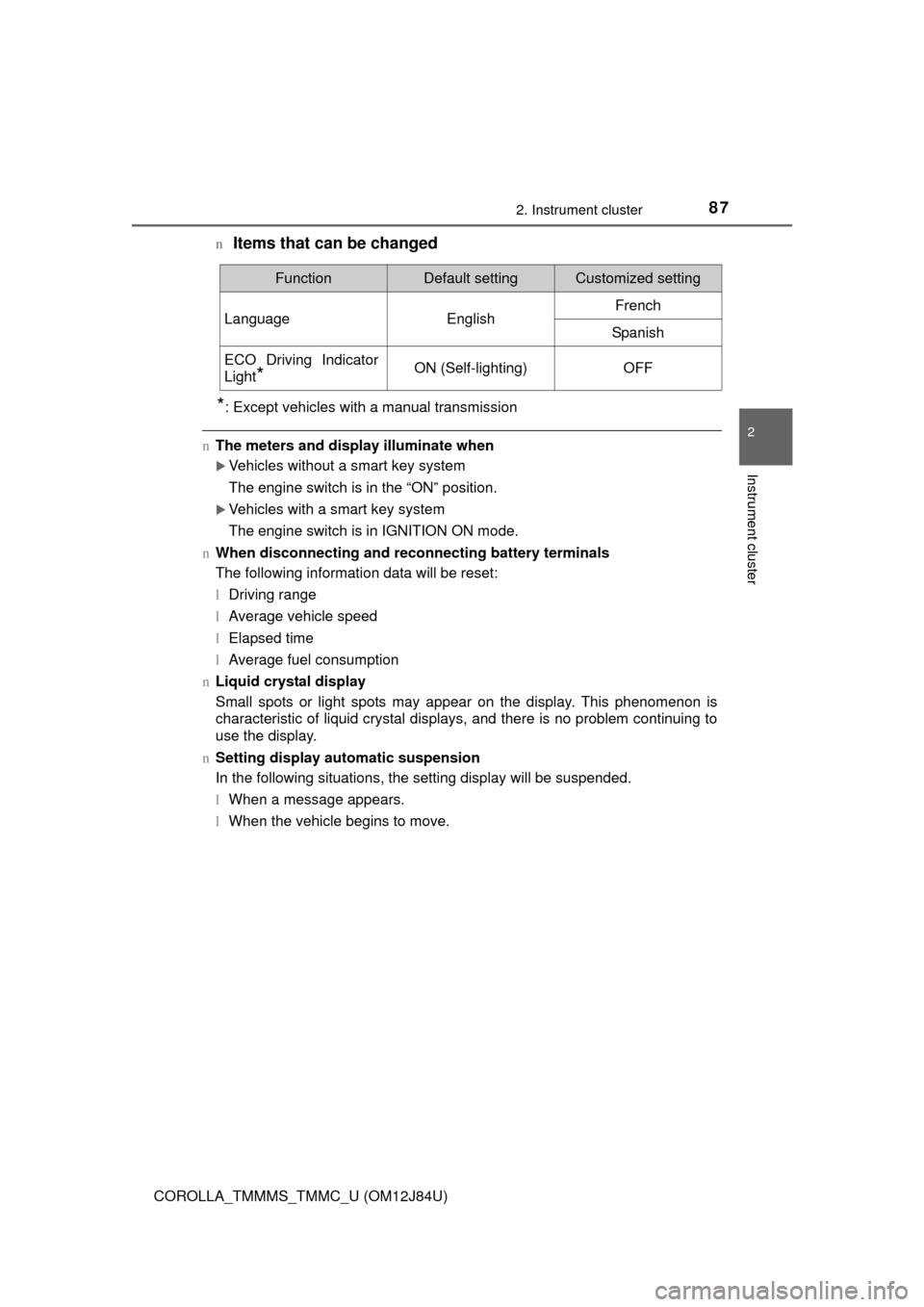
Items that can be changed
*: Except vehicles with a manual transmission
n
The meters and display illuminate when
Vehicles without a smart key system
The engine switch is in the “ON” position.
Vehicles with a smart key system
The engine switch is in IGNITION ON mode.
n When disconnecting and reco nnecting battery terminals
The following information data will be reset:
l Driving range
l Average vehicle speed
l Elapsed time
l Average fuel consumption
n Liquid crystal display
Small spots or light spots may appear on the display. This phenomenon is
characteristic of liquid crystal displays, and there is no problem continuing to
use the display.
n Setting display automatic suspension
In the following situations, the setting display will be suspended.
lWhen a message appears.
l When the vehicle begins to move.
FunctionDefault settingCustomized setting
LanguageEnglishFrench
Spanish
ECO Driving Indicator
Light
*ON (Self-lighting)OFF
Page 88 of 620

882. Instrument cluster
COROLLA_TMMMS_TMMC_U (OM12J84U)
CAUTION
nThe display at low temperatures
Allow the interior of the vehicle to warm up before using the display. At
extremely low temperatures, the display monitor may respond slowly, and
display changes may be delayed.
For example, there is a lag between the driver’s shifting and the new gear
number appearing on the display. This lag could cause the driver to down-
shift again, causing rapid and excessive engine braking and possibly an
accident resulting in death or injury.
n Cautions during setting up the display
As the engine needs to be running during setting up the display, ensure that
the vehicle is parked in a place with adequate ventilation. In a closed area
such as a garage, exhaust gases including harmful carbon monoxide (CO)
may collect and enter the vehicle. This may lead to death or a serious
health hazard.
NOTICE
nTo prevent damage to the engine and its components
lDo not let the indicator needle of the tachometer enter the red zone, which
indicates the maximum engine speed.
l The engine may be overheating if the engine coolant temperature gauge
are in the red zone. In this case, immediately stop the vehicle in a safe
place, and check the engine after it has cooled completely. (P. 543)
Page 90 of 620

902. Instrument cluster
COROLLA_TMMMS_TMMC_U (OM12J84U)
Average vehicle speed
Elapsed time
Range
Previous fuel consumption
per minute
Current fuel consumption
Reset the trip information
data
“Past Record” screen appears
Vehicles without a smart key system:
Average fuel consumption for the past 15 minutes is divided by color
into past averages and averages attained since the engine switch was
last turned to the “ON” position. Use the displayed average fuel con-
sumption as a reference.
Vehicles with a smart key system:
Average fuel consumption for the past 15 minutes is divided by color
into past averages and averages attained since the engine switch was
last turned to IGNITION ON mode. Use the displayed average fuel
consumption as a reference.
This image is an example only.
1
2
3
4
5
6
7
Page 93 of 620
932. Instrument cluster
2
Instrument cluster
COROLLA_TMMMS_TMMC_U (OM12J84U)
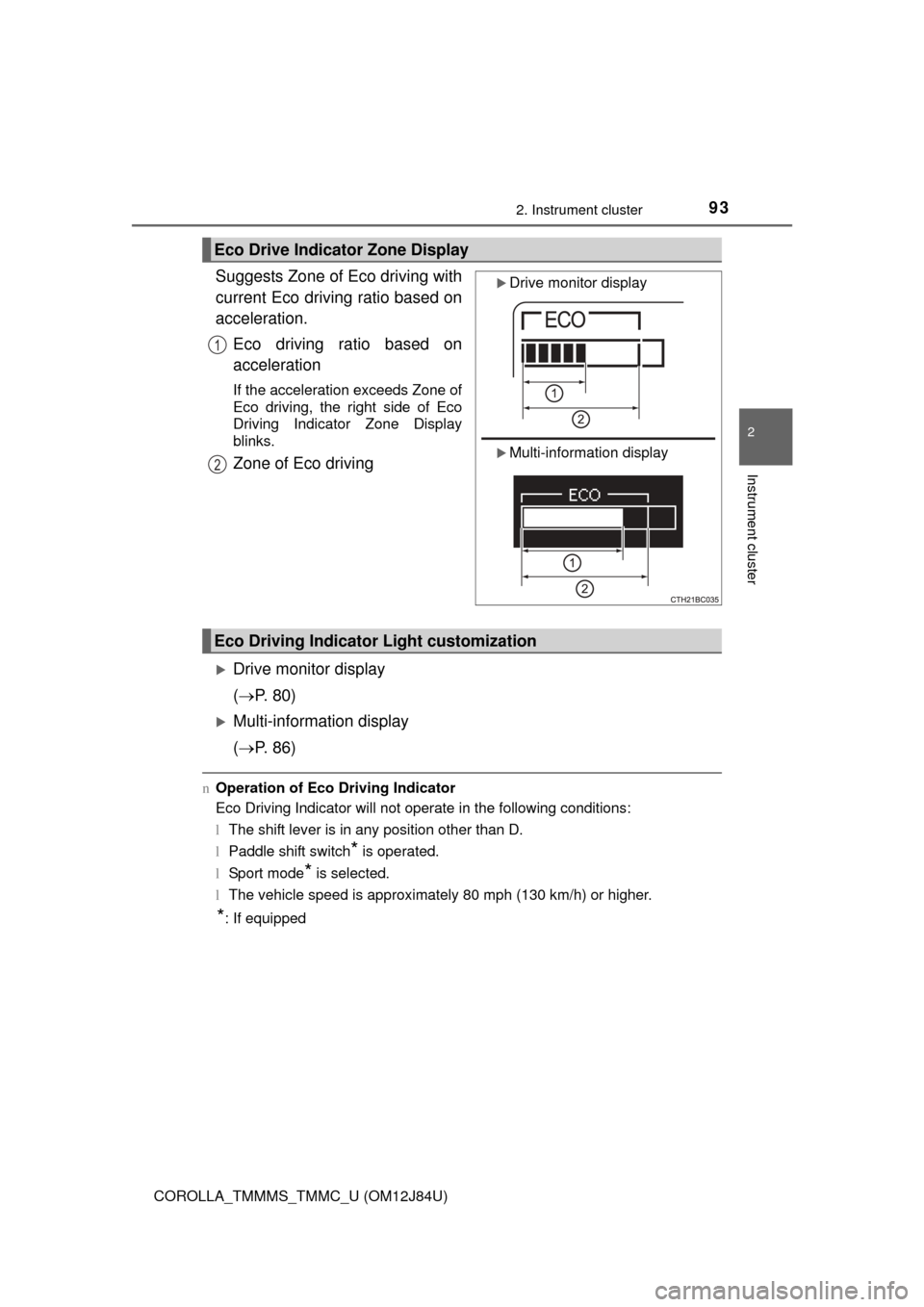
Suggests Zone of Eco driving with
current Eco driving ratio based on
acceleration.Eco driving ratio based on
acceleration
If the acceleration exceeds Zone of
Eco driving, the right side of Eco
Driving Indicator Zone Display
blinks.
Zone of Eco driving
Drive monitor display
( P. 80)
Multi-information display
( P. 86)
nOperation of Eco Driving Indicator
Eco Driving Indicator will not operate in the following conditions:
lThe shift lever is in any position other than D.
l Paddle shift switch
* is operated.
l Sport mode
* is selected.
l The vehicle speed is approximately 80 mph (130 km/h) or higher.
*: If equipped
Eco Drive Indicator Zone Display
Drive monitor display
Multi-information display
1
2
Eco Driving Indicator Light customization
Page 106 of 620
1063-2. Opening, closing and locking the doors
COROLLA_TMMMS_TMMC_U (OM12J84U)
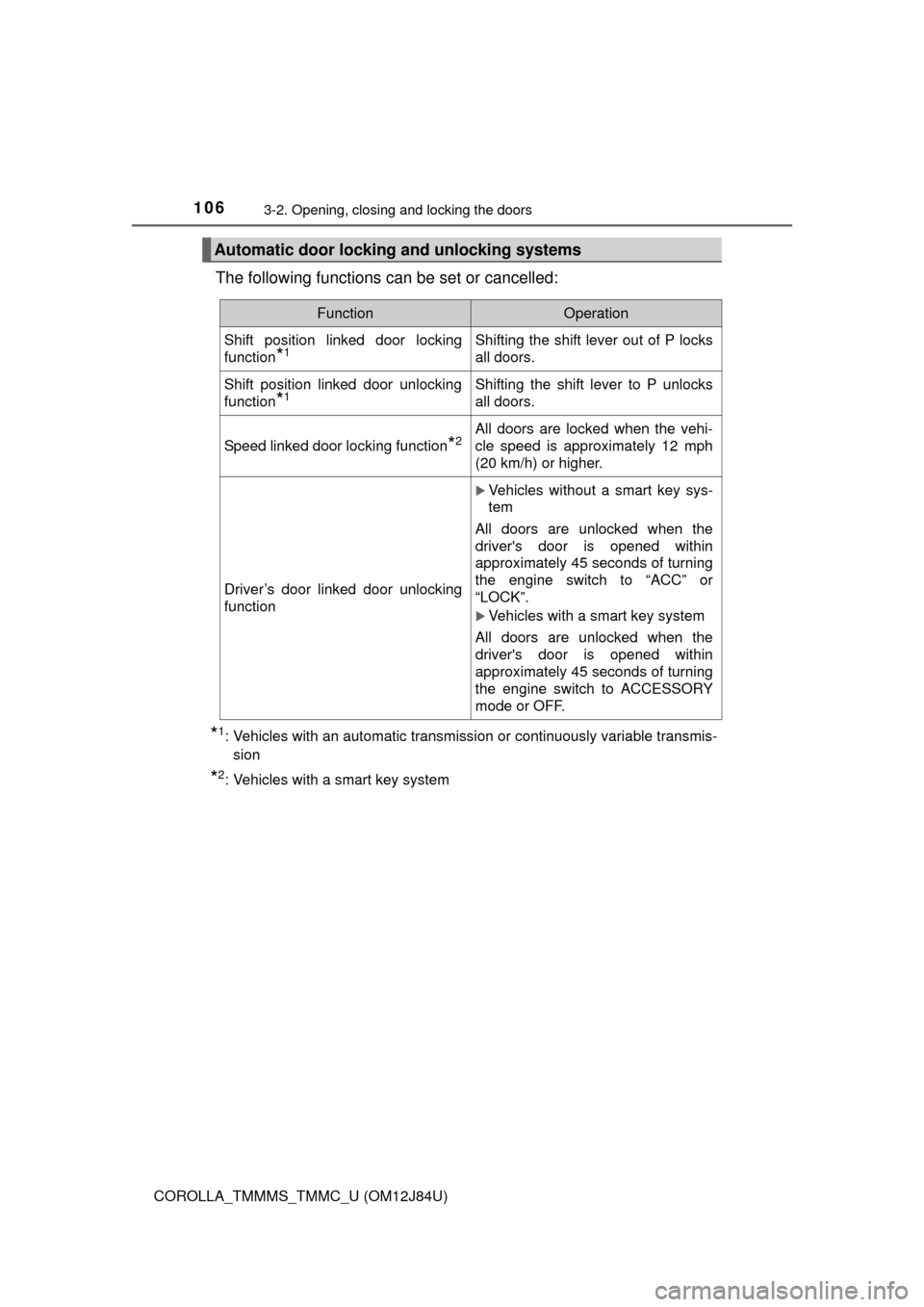
The following functions can be set or cancelled:
*1: Vehicles with an automatic transmission or continuously variable transmis-sion
*2: Vehicles with a smart key system
Automatic door lockin g and unlocking systems
FunctionOperation
Shift position linked door locking
function
*1Shifting the shift lever out of P locks
all doors.
Shift position linked door unlocking
function
*1Shifting the shift lever to P unlocks
all doors.
Speed linked door locking function*2All doors are locked when the vehi-
cle speed is approximately 12 mph
(20 km/h) or higher.
Driver’s door linked door unlocking
function
Vehicles without a smart key sys-
tem
All doors are unlocked when the
driver's door is opened within
approximately 45 seconds of turning
the engine switch to “ACC” or
“LOCK”.
Vehicles with a smart key system
All doors are unlocked when the
driver's door is opened within
approximately 45 seconds of turning
the engine switch to ACCESSORY
mode or OFF.
Page 107 of 620
1073-2. Opening, closing and locking the doors
3
Operation of each component
COROLLA_TMMMS_TMMC_U (OM12J84U)n
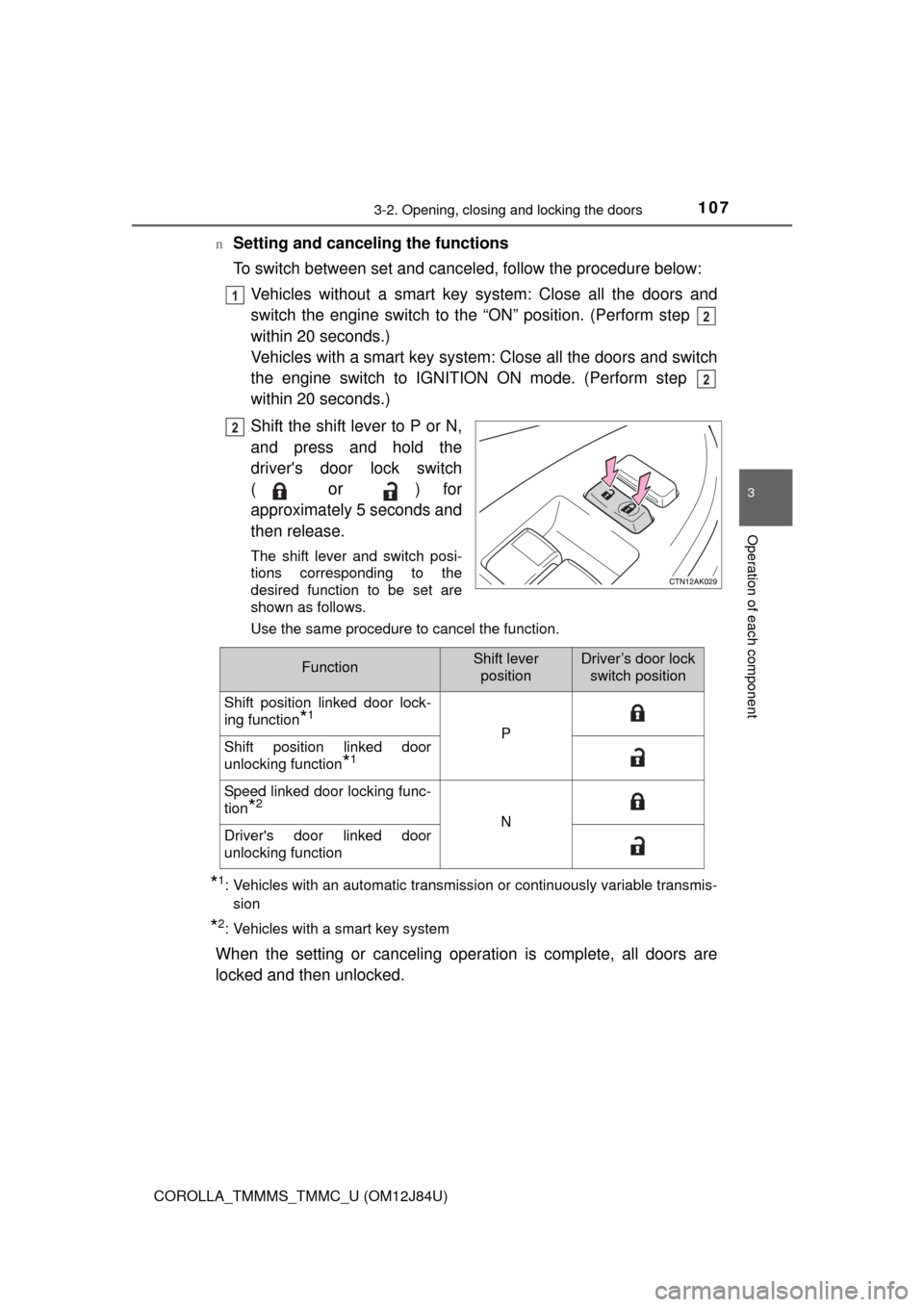
Setting and canceling the functions
To switch between set and canceled, follow the procedure below:
Vehicles without a smart key sy stem: Close all the doors and
switch the engine switch to the “ON” position. (Perform step
within 20 seconds.)
Vehicles with a smart key system: Close all the doors and switch
the engine switch to IGNITION ON mode. (Perform step
within 20 seconds.)
Shift the shift lever to P or N,
and press and hold the
driver's door lock switch
(
or ) for
approximately 5 seconds and
then release.
The shift lever and switch posi-
tions corresponding to the
desired function to be set are
shown as follows.
Use the same procedure to cancel the function.
*1: Vehicles with an automatic transmission or continuously variable transmis- sion
*2: Vehicles with a smart key system
When the setting or canceling operation is complete, all doors are
locked and then unlocked.
1
2
2
2
FunctionShift leverpositionDriver’s door lock switch position
Shift position linked door lock-
ing function
*1
PShift position linked door
unlocking function
*1
Speed linked door locking func-
tion
*2
NDriver's door linked door
unlocking function
Page 149 of 620
1494-1. Before driving
4
Driving
COROLLA_TMMMS_TMMC_U (OM12J84U)
nWhen starting off on an uphill
The hill-start assist control will activate. ( P. 215)
n Driving in the rain
lDrive carefully when it is raining, because visibility will be reduced, the win-
dows may become fogged-up, and the road will be slippery.
l Drive carefully when it starts to rain, because the road surface will be espe-
cially slippery.
l Refrain from high speeds when driving on an expressway in the rain,
because there may be a layer of water between the tires and the road sur-
face, preventing the steering and brakes from operating properly.
n Engine speed while driving (except vehicles with a manual transmis-
sion)
In the following conditions, the engine speed may become high while driving.
This is due to automatic up-shifting control or down-shifting implementation to
meet driving conditions. It does not indicate sudden acceleration.
l The vehicle is judged to be driving uphill or downhill
l When the accelerator pedal is released
l When the brake pedal is depressed while sport mode is selected (if
equipped)
l When the brake pedal is depressed suddenly and vehicle speed is reduced
sharply (continuously variable transmission)
n Breaking in your new Toyota
To extend the life of the vehicle, observing the following precautions is recom-
mended:
lFor the first 186 miles (300 km):
Avoid sudden stops.
l For the first 621 miles (1000 km):
• Do not drive at extremely high speeds.
• Avoid sudden acceleration.
• Do not drive continuously in low gears.
• Do not drive at a constant speed for extended periods.
n Operating your vehicle in a foreign country
Comply with the relevant vehicle registration laws and confirm the availability
of the correct fuel. ( P. 552)
CAUTION
Observe the following precautions.
Failure to do so may result in death or serious injury.
nWhen starting the vehicle (except veh icles with a manual transmission)
Always keep your foot on the brake pedal while stopped with the engine
running. This prevents the vehicle from creeping.
Page 150 of 620

1504-1. Before driving
COROLLA_TMMMS_TMMC_U (OM12J84U)
CAUTION
Observe the following precautions.
Failure to do so may result in death or serious injury.
nWhen driving the vehicle
lDo not drive if you are unfamiliar with the location of the brake and ac\
cel-
erator pedals to avoid depressing the wrong pedal.
• Accidentally depressing the accelerator pedal instead of the brake
pedal will result in sudden acceleration that may lead to an accident.
• When backing up, you may twist your body around, leading to a diffi- culty in operating the pedals. Make sure to operate the pedals properly.
• Make sure to keep a correct driving posture even when moving the
vehicle only slightly. This allows you to depress the brake and accelera-
tor pedals properly.
• Depress the brake pedal using your right foot. Depressing the brake
pedal using your left foot may delay response in an emergency, result-
ing in an accident.
l Do not drive the vehicle over or stop the vehicle near flammable materials.
The exhaust system and exhaust gases can be extremely hot. These hot
parts may cause a fire if there is any flammable material nearby.
l During normal driving, do not turn off the engine. Turning the engine off
while driving will not cause loss of steering or braking control, but the
power assist to these systems will be lost. This will make it more difficult to
steer and brake, so you should pull over and stop the vehicle as soon as it
is safe to do so.
However, in the event of an emergency, such as if it becomes impossible
to stop the vehicle in the normal way: P. 489
l Use engine braking (downshift) to maintain a safe speed when driving
down a steep hill.
Using the brakes continuously may cause the brakes to overheat and lose
effectiveness. ( P. 176, 178, 180, 184)
l Do not adjust the display, the positions of the steering wheel, the seat, or
the inside or outside rear view mirrors while driving.
Doing so may result in a loss of vehicle control.
l Always check that all passengers’ arms, heads or other parts of their body
are not outside the vehicle.
l Do not drive in excess of the speed limit. Even if the legal speed limit per-
mits it, do not drive over 85 mph ( 140 km/h) unless your vehicle has high-
speed capability tires. Driving over 85 mph (140 km/h) may result in tire
failure, loss of control and possible injury. Be sure to consult a tire dealer
to determine whether the tires on y our vehicle are high-speed capability
tires or not before driving at such speeds.
Page 151 of 620

1514-1. Before driving
4
Driving
COROLLA_TMMMS_TMMC_U (OM12J84U)
CAUTION
Observe the following precautions.
Failure to do so may result in death or serious injury.
nWhen driving on slippery road surfaces
lSudden braking, acceleration and steering may cause tire slippage and
reduce your ability to control the vehicle.
l Sudden acceleration, engine braking due to shifting, or changes in engine
speed could cause the vehicle to skid.
l After driving through a puddle, lightly depress the brake pedal to make
sure that the brakes are functioning properly. Wet brake pads may prevent
the brakes from functioning properly. If the brakes on only one side are wet
and not functioning properly, steering control may be affected.
n When shifting the shift lever
lExcept vehicles with a manual transmission: Do not let the vehicle roll
backward while the shift lever is in a driving position, or roll forward while
the shift lever is in R.
Doing so may cause the engine to stall or lead to poor brake and steering
performance, resulting in an accident or damage to the vehicle.
l Except vehicles with a manual transmission: Do not shift the shift lever to
P while the vehicle is moving.
Doing so can damage the transmission and may result in a loss of vehicle
control.
l Do not shift the shift lever to R while the vehicle is moving forward.
Doing so can damage the transmission and may result in a loss of vehicle
control.
l Do not shift the shift lever to a driving position while the vehicle is moving
backward.
Doing so can damage the transmission and may result in a loss of vehicle
control.
l Moving the shift lever to N while the vehicle is moving will disengage the
engine from the transmission. Engine braking is not available when N is
selected.
l Except vehicles with a manual transmission: Be careful not to shift the shift
lever with the accelerator pedal depressed. Shifting the shift lever to a
gear other than P or N may lead to unexpected rapid acceleration of the
vehicle that may cause an accident and result in death or serious injury.