USB TOYOTA COROLLA 2016 11.G User Guide
[x] Cancel search | Manufacturer: TOYOTA, Model Year: 2016, Model line: COROLLA, Model: TOYOTA COROLLA 2016 11.GPages: 620, PDF Size: 9.12 MB
Page 260 of 620

2605-5. Using an external device
COROLLA_TMMMS_TMMC_U (OM12J84U)
CAUTION
nCaution while driving
Do not connect USB memory or operate the controls.
NOTICE
nTo prevent damage to USB memory
lDo not leave USB memory in the vehi cle. The temperature inside the vehi-
cle may become high, resulting in damage to the device.
l Do not push down on or apply unnecessary pressure to the USB memory
while it is connected.
l Do not insert foreign objects into the port.
Page 293 of 620
2935-11. Basic Operations (Multimedia system)
5
Audio system
COROLLA_TMMMS_TMMC_U (OM12J84U)n
iPod
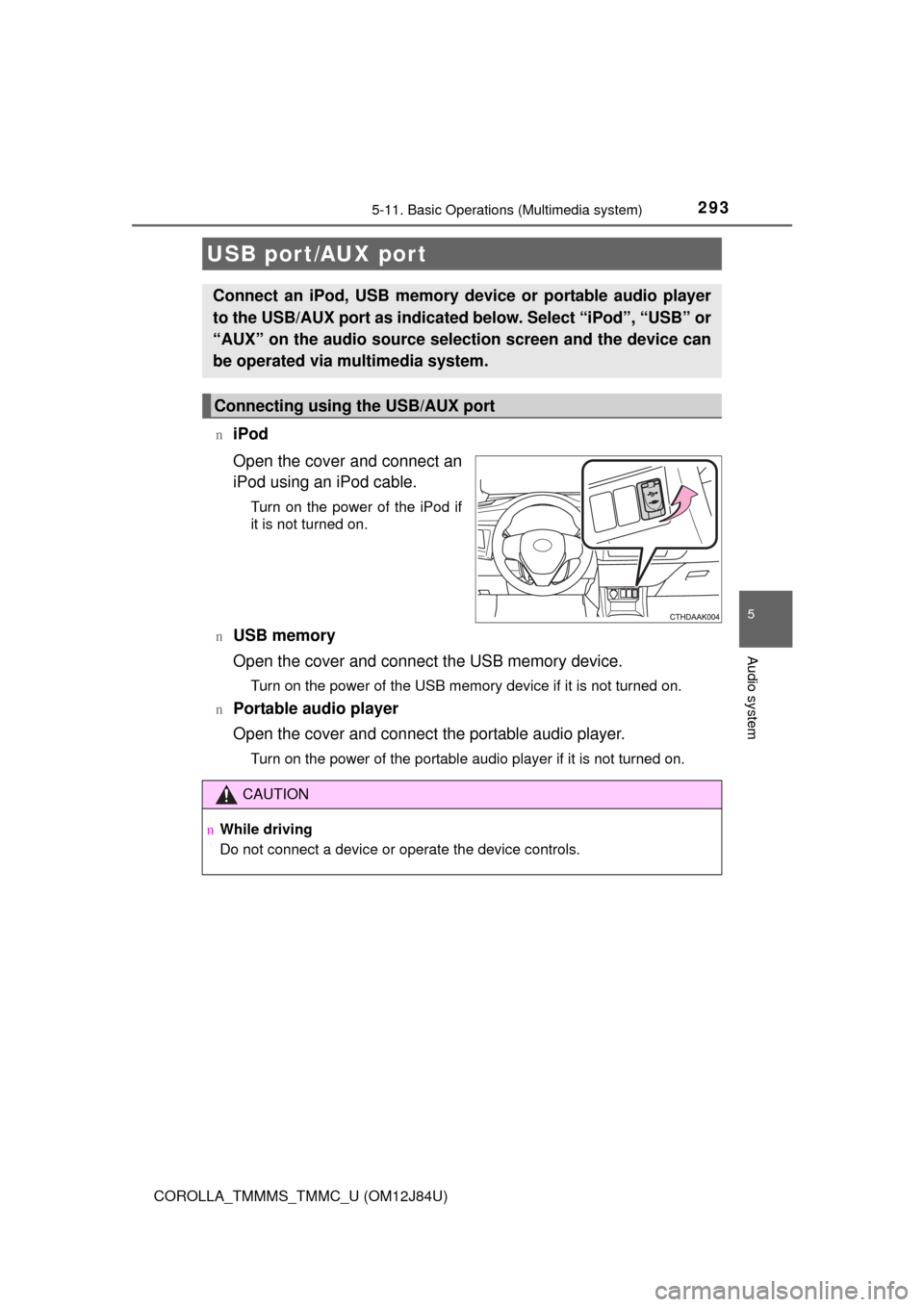
Open the cover and connect an
iPod using an iPod cable.
Turn on the power of the iPod if
it is not turned on.
n
USB memory
Open the cover and connect the USB memory device.
Turn on the power of the USB memory device if it is not turned on.
n
Portable audio player
Open the cover and connect the portable audio player.
Turn on the power of the portable audio player if it is not turned on.
USB port/AUX port
Connect an iPod, USB memory device or portable audio player
to the USB/AUX port as indicated below. Select “iPod”, “USB” or
“AUX” on the audio sour ce selection screen and the device can
be operated via multimedia system.
Connecting using the USB/AUX port
CAUTION
n While driving
Do not connect a device or operate the device controls.
Page 305 of 620
3055-13. Using the Multimedia system
5
Audio system
COROLLA_TMMMS_TMMC_U (OM12J84U)n
Selecting a track/file/song
Press the “
” or “ ” button on “SEEK/TRAC K” or turn the “TUNE/
SCROLL” knob to select the desired track/file/song number.
To fast-forward or reverse, press and hold the “ ” or “” button on
“SEEK/TRACK”.
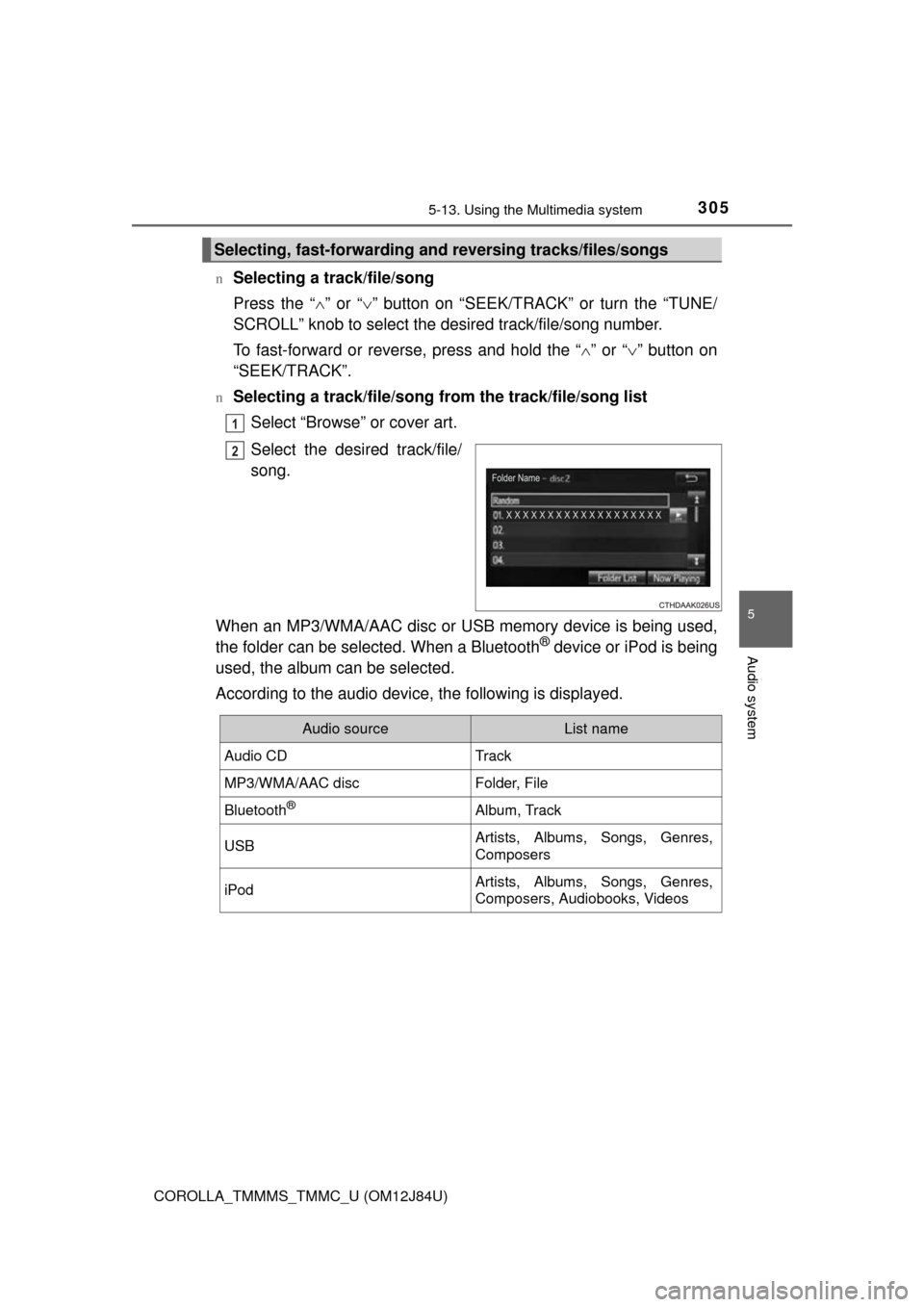
nSelecting a track/file/song from the track/file/song list
Select “Browse” or cover art.
Select the desired track/file/
song.
When an MP3/WMA/AAC disc or USB memory device is being used,
the folder can be selected. When a Bluetooth
® device or iPod is being
used, the album can be selected.
According to the audio device, the following is displayed.
Selecting, fast-forwarding a nd reversing tracks/files/songs
1
2
Audio sourceList name
Audio CDTrack
MP3/WMA/AAC discFolder, File
Bluetooth®Album, Track
USBArtists, Albums, Songs, Genres,
Composers
iPodArtists, Albums, Songs, Genres,
Composers, Audiobooks, Videos
Page 320 of 620
3205-16. Using an external device (Multimedia system)
COROLLA_TMMMS_TMMC_U (OM12J84U)
P. 2 9 3
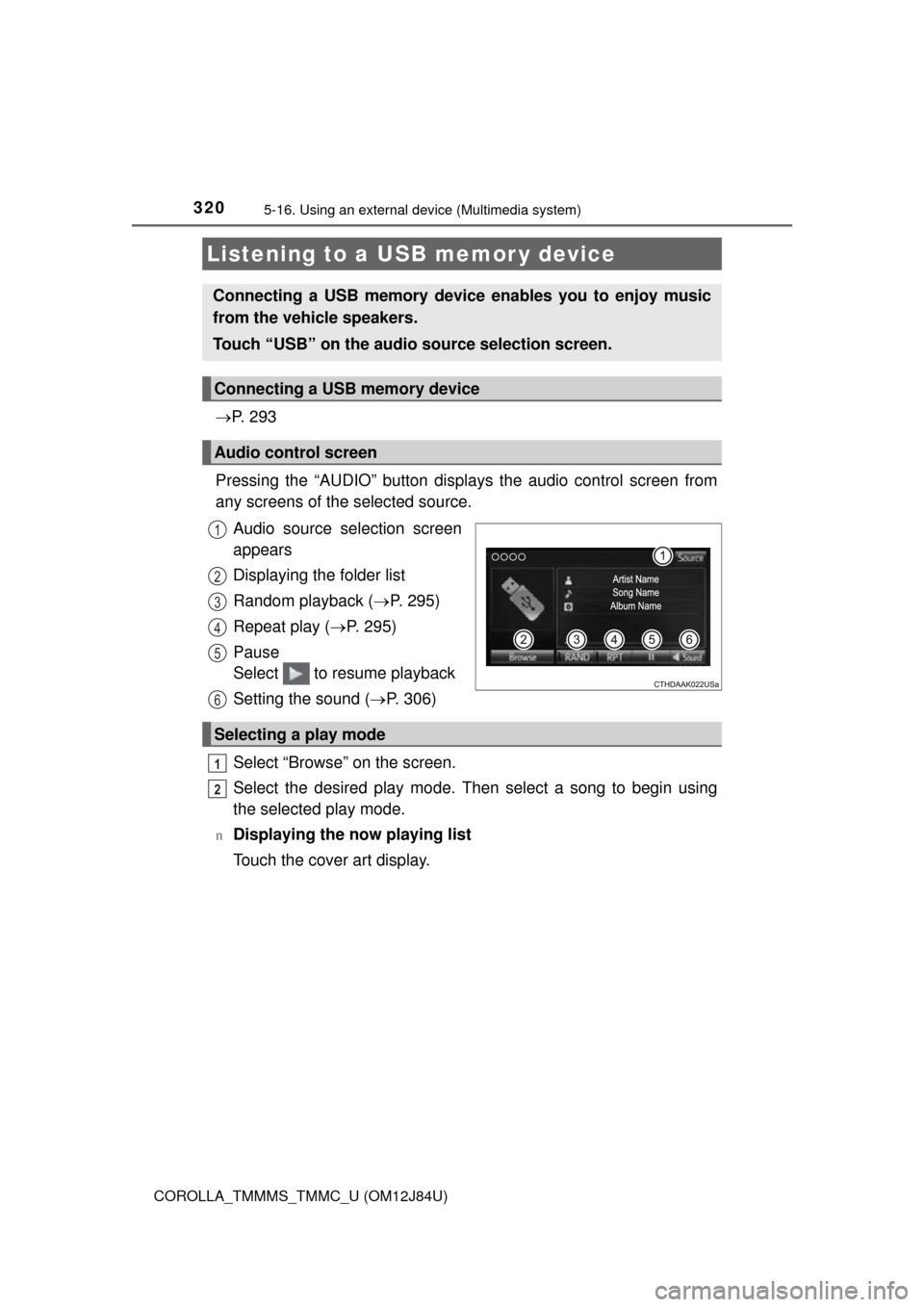
Pressing the “AUDIO” button disp lays the audio control screen from
any screens of the selected source.
Audio source selection screen
appears
Displaying the folder list
Random playback ( P. 295)
Repeat play ( P. 295)
Pause
Select to resume playback
Setting the sound ( P. 306)
Select “Browse” on the screen.
Select the desired play mode. Then select a song to begin using
the selected play mode.
nDisplaying the now playing list
Touch the cover art display.
Listening to a USB memor y device
Connecting a USB memory device enables you to enjoy music
from the vehicle speakers.
Touch “USB” on the audio source selection screen.
Connecting a USB memory device
Audio control screen
1
2
3
4
5
6
Selecting a play mode
1
2
Page 321 of 620
3215-16. Using an external device (Multimedia system)
5
Audio system
COROLLA_TMMMS_TMMC_U (OM12J84U)
nUSB memory functions
lDepending on the USB memory device that is connected to the system, the
device itself may not be operable and certain functions may not be avail-
able. If the device is inoperable or a function is unavailable due to a mal-
function (as opposed to a system specification), disconnecting the device
and reconnecting it may resolve the problem.
l If the USB memory device still does not begin operation after being discon-
nected and reconnected, format the memory.
n Error messages for USB memory
n USB memory
lCompatible devices
USB memory device that can be used for MP3, WMA and AAC playback.
l Compatible device formats
The following device format can be used:
• USB communication format: USB2.0 HS (Mbps) and FS (12 Mbps)
• File system format: FAT16/32 (Windows)
• Correspondence class: Mass storage class
MP3, WMA and AAC files written to a device with any format other than
those listed above may not play correctly, and their file names and folder
names may not be displayed correctly.
Items related to standards and limitations are as follows:
• Maximum directory hierarchy: 8 levels
• Maximum number of folders in a device: 3000 (including the root)
• Maximum number of files in a device: 9999
• Maximum number of files per folder: 255
l MP3, WMA and AAC files
MP3 (MPEG Audio LAYER 3) is a standard audio compression format.
Files can be compressed to approximately 1/10 of their original size usi\
ng
MP3 compression.
WMA (Windows Media Audio) is a Mi crosoft audio compression format. This
format compresses audio data to a size smaller than that of the MP3 format.
AAC is short for Advanced Audio Coding and refers to an audio compression
technology standard used with MPEG2 and MPEG4.
MP3, WMA and AAC file and media/formats compatibility are limited.
MessageCause/Correction procedures
“Connection error. Please
consult your Owner’s Man-
ual for instructions on how
to connect the USB device.”
This indicates a problem with the USB mem-
ory device or its connection.
“No music files found.”This indicates that no MP3/WMA/AAC files
are included on the USB memory device.
Page 323 of 620
3235-16. Using an external device (Multimedia system)
5
Audio system
COROLLA_TMMMS_TMMC_U (OM12J84U)l
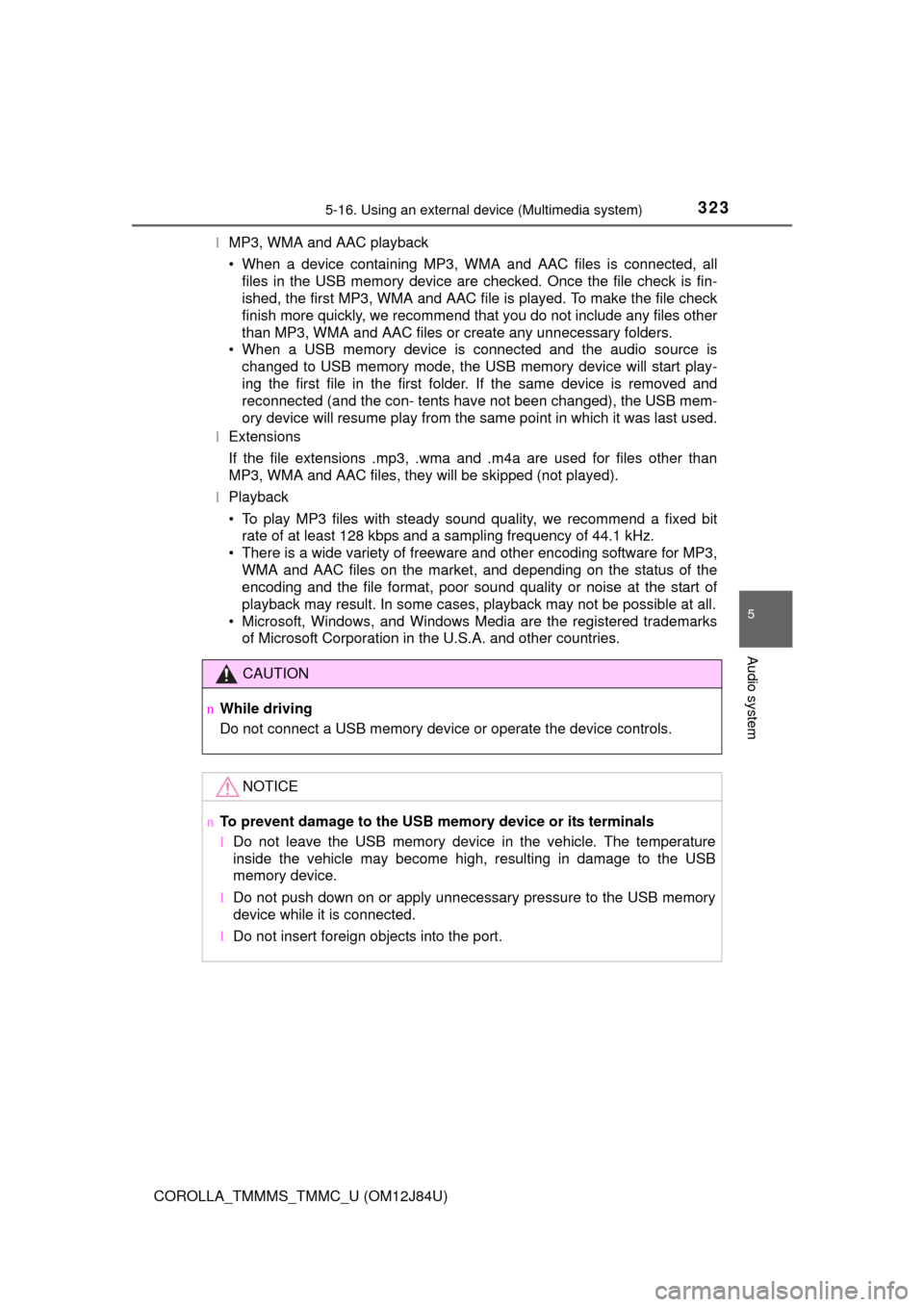
MP3, WMA and AAC playback
• When a device containing MP3, WMA and AAC files is connected, all
files in the USB memory device are checked. Once the file check is fin-
ished, the first MP3, WMA and AAC file is played. To make the file check
finish more quickly, we recommend that you do not include any files other
than MP3, WMA and AAC files or create any unnecessary folders.
• When a USB memory device is connected and the audio source is
changed to USB memory mode, the USB memory device will start play-
ing the first file in the first folder. If the same device is removed and
reconnected (and the con- tents have not been changed), the USB mem-
ory device will resume play from the same point in which it was last used.
l Extensions
If the file extensions .mp3, .wma and .m4a are used for files other than
MP3, WMA and AAC files, they will be skipped (not played).
l Playback
• To play MP3 files with steady sound quality, we recommend a fixed bit
rate of at least 128 kbps and a sampling frequency of 44.1 kHz.
• There is a wide variety of freeware and other encoding software for MP3, WMA and AAC files on the market, and depending on the status of the
encoding and the file format, poor sound quality or noise at the start of
playback may result. In some cases, playback may not be possible at all.\
• Microsoft, Windows, and Windows Media are the registered trademarks of Microsoft Corporation in the U.S.A. and other countries.
CAUTION
nWhile driving
Do not connect a USB memory device or operate the device controls.
NOTICE
nTo prevent damage to the USB memory device or its terminals
lDo not leave the USB memory device in the vehicle. The temperature
inside the vehicle may become high, resulting in damage to the USB
memory device.
l Do not push down on or apply unnecessary pressure to the USB memory
device while it is connected.
l Do not insert foreign objects into the port.
Page 606 of 620

606
COROLLA_TMMMS_TMMC_U (OM12J84U)
Alphabetical index
Alphabetical index
A/C .................................... 386, 392Air conditioning filter ............. 467
ABS (Anti-lock Brake System)...... 215Function ................................ 215
Warning light ......................... 499
Air conditioning filter .............. 467
Air conditioning system ............................ 386, 392Air conditioning filter ............. 467
Airbags ....................................... 34
Airbag operating conditions .... 41
Airbag precautions for your child .............................. 36
Airbag warning light .............. 499
Correct driving posture ........... 26
Curtain shield airbag operating conditions ............................. 41
Curtain shield airbag precautions ........................... 39
General airbag precautions .... 36
Locations of airbags................ 34
Modification and disposal of airbags ............... 40
Side airbag operating conditions ............................. 41
Side airbag precautions .......... 36
Side and curtain shield airbags
operating conditions ............. 41
Side and curtain shield airbags
precautions ........................... 36
SRS airbags............................ 34
Alarm .......................................... 68
Anchor brackets ........................ 57 Antennas
(smart key system) ............... 115
Anti-lock Brake System (ABS) ...................................... 215Function ................................ 215
Warning light......................... 499
Assist grips .............................. 412
Audio input
*................... 234, 293
Audio system
*......................... 228
Antenna ................................ 238
Audio input............................ 234
AUX port/USB port ..................................... 234
Bluetooth
® audio .................. 262
CD player.............................. 239
iPod ...................................... 248
MP3/WMA disc ..................... 239
Optimal use .......................... 235
Portable music player ........... 234
Radio .................................... 237
Steering wheel audio switch ................................. 233
USB memory ........................ 255
Automatic light control system.................................... 190
Automatic transmission ......... 176 If the shift lever
cannot be shifted from P .... 534
AUX port
*......................... 234, 293
A
Page 613 of 620
613Alphabetical index
COROLLA_TMMMS_TMMC_U (OM12J84U)
MaintenanceDo-it-yourself maintenance ... 434
General maintenance ........... 429
Maintenance data ................. 550
Maintenance
requirements ...................... 426
Resetting the reminder light or message indicating
maintenance is required ..... 427
Malfunction indicator lamp ..... 499
Manual air conditioning system .................................... 386
Manual transmission ............... 184
Master warning light................ 500
Meter ..................................... 77, 82 Drive monitor display .............. 77
Indicators ................................ 75
Meters ............................... 77, 82
Multi-information display ......... 82
Warning lights ......................... 73
Mirrors Inside rear view mirror .......... 133
Outside rear view mirror defoggers ................... 387, 395
Outside rear view mirrors...... 135
Vanity mirrors........................ 409
Mobile Assistant
*.................... 383
Moon roof ................................. 141 Jam protection function......... 142
Operation .............................. 141
MP3 disc
*......................... 239, 309
Multi-information display .......... 82 Customizing vehicle
features ................................ 86
Drive monitor .......................... 84
Switching the display .............. 82
Trip information ....................... 84
Warning message ................. 510 Multimedia system
*................ 290
Audio input............................ 293
AUX port/USB
port ..................................... 293
Bluetooth
® audio .................. 341
CD player.............................. 309
iPod ...................................... 315
MP3/WMA disc ..................... 309
Optimal use .......................... 306
Portable music player ........... 293
Radio .................................... 307
Steering wheel audio switch ................................. 292
USB memory ........................ 320
M
*: For vehicles with a navigation system or Entune Audio Plus, refer to
the “NAVIGATION AND MULTIMEDIA SYSTEM OWNER'S MANUAL”.
Page 618 of 620

618Alphabetical index
COROLLA_TMMMS_TMMC_U (OM12J84U)
USB port*......................... 234, 293
Vanity mirrors .......................... 409
Vehicle data recording ................ 9
Vehicle identification number ................................... 550
Vehicle Stability Control
(VSC) ...................................... 215
Voice command system
*....... 381
VSC
(Vehicle Stabilit y Control) .... 215 Warning buzzers
Brake system ....... ................. 498
Downshifting ......................... 183
Electric power steering ......... 499
Key reminder ........ 166, 503, 513
Open door............................. 500
Open moon roof.................... 512
Open trunk ............................ 510
Seat belt reminder ................ 500
Warning lights ........................... 73 ABS ...................................... 499
Brake system ....... ................. 498
Charging system................... 498
Cruise control ....................... 500
High engine coolant temperature ........................ 498
Low engine oil pressure........ 498
Low fuel level ........................ 500
Low windshield washer fluid..................................... 500
Maintenance required reminder ............................. 501
Malfunction indicator lamp .... 499
Master warning light ............. 500
Open door............................. 500
Seat belt reminder light......... 500
Slip indicator ......................... 499
Smart key system ................. 499
SRS ...................................... 499
Tire pressure ........................ 500
U
V
W