key TOYOTA COROLLA 2016 11.G Repair Manual
[x] Cancel search | Manufacturer: TOYOTA, Model Year: 2016, Model line: COROLLA, Model: TOYOTA COROLLA 2016 11.GPages: 620, PDF Size: 9.12 MB
Page 173 of 620
1734-2. Driving procedures
4
Driving
COROLLA_TMMMS_TMMC_U (OM12J84U)n
Electronic key battery depletion
P. 9 9
n Conditions affecting operation
P. 1 1 9
n Notes for the entry function
P. 120
n If the engine does not start
lThe engine immobilizer system may not have been deactivated. ( P. 66)
Contact your Toyota dealer.
l Vehicles with a continuously variable transmission: Check that the shift lever
is securely set in P. The engine may not start if the shift lever is displaced
out of P.
Vehicles with a drive monitor display
The smart key system indicator light (green) will flash quickly.
Vehicles with a multi-information display
“SHIFT TO P POSITION TO START” will be displayed on the multi-informa-
tion display.
n Steering lock
After turning the engine switch off and opening and closing the doors, the
steering wheel will be locked due to the steering lock function. Operating the
engine switch again automatically cancels the steering lock.
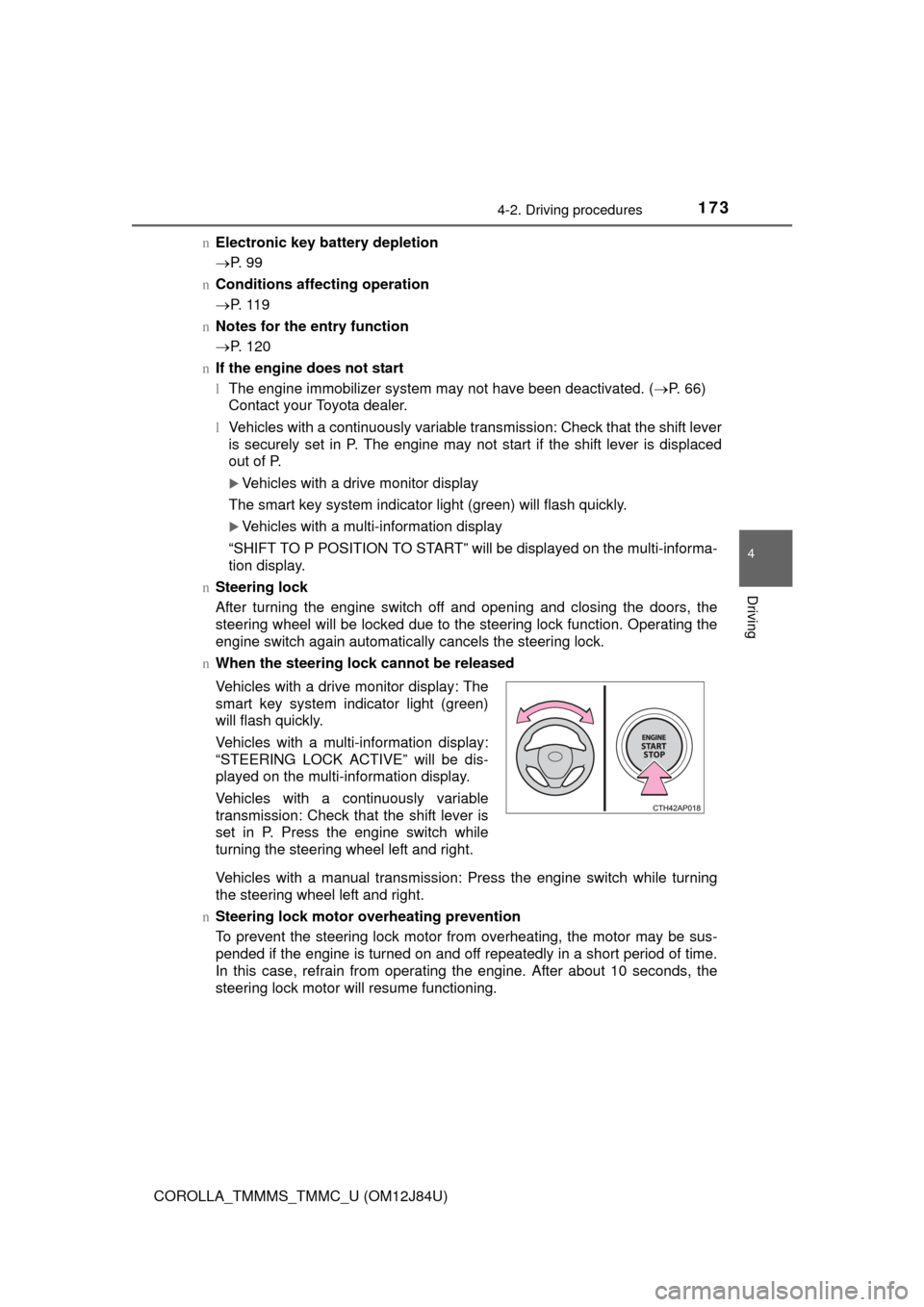
n When the steering lock cannot be released
Vehicles with a manual transmission: Press the engine switch while turning
the steering wheel left and right.
n Steering lock motor overheating prevention
To prevent the steering lock motor from overheating, the motor may be sus-
pended if the engine is turned on and off repeatedly in a short period of time.
In this case, refrain from operating the engine. After about 10 seconds, the
steering lock motor will resume functioning. Vehicles with a drive monitor display: The
smart key system indicator light (green)
will flash quickly.
Vehicles with a multi-information display:
“STEERING LOCK ACTIVE” will be dis-
played on the multi-information display.
Vehicles with a continuously variable
transmission: Check that the shift lever is
set in P. Press the engine switch while
turning the steering wheel left and right.
Page 174 of 620

1744-2. Driving procedures
COROLLA_TMMMS_TMMC_U (OM12J84U)n
When the smart key system indicator light flashes in yellow (vehicles
with a drive monitor display)
The system may be malfunctioning. Have the vehicle inspected by your
Toyota dealer immediately.
n When “CHECK SMART KEY SYSTEM” will be displayed on the multi-
information display (vehicles with a multi-information display)
The system may be malfunctioning. Have the vehicle inspected by your
Toyota dealer immediately.
n If the electronic key battery is depleted
P. 469
n Operation of the engine switch
lWhen operating the engine switch, one short, firm press is enough. If the
switch is pressed improperly, the engine may not start or the engine switch
mode may not change. It is not necessary to press and hold the switch.
l If attempting to restart the engine immediately after turning the engine
switch off, the engine may not start in some cases. After turning the engine
switch off, please wait a few seconds before restarting the engine.
n If the smart key system has been deactivated in a customized setting
P. 535
CAUTION
nWhen starting the engine
Always start the engine while sitting in the driver’s seat. Do not depress the
accelerator pedal while starting the engine under any circumstances.
Doing so may cause an accident resulting in death or serious injury.
n Caution while driving
If engine failure occurs while the vehicle is moving, do not lock or open the
doors until the vehicle reaches a safe and complete stop. Activation of the
steering lock in this circumstance may lead to an accident, resulting in
death or serious injury.
n Stopping the engine in an emergency
If you want to stop the engine in an emergency while driving the vehicle,
press and hold the engine switch for more than 2 seconds, or press it briefly
3 times or more in succession. ( P. 489)
However, do not touch the engine switch while driving except in an emer-
gency. Turning the engine off while driving will not cause loss of steering or
braking control, but the power assist to these systems will be lost. This will
make it more difficult to steer and brake, so you should pull over and stop
the vehicle as soon as it is safe to do so.
Page 175 of 620
1754-2. Driving procedures
4
Driving
COROLLA_TMMMS_TMMC_U (OM12J84U)
NOTICE
nTo prevent battery discharge
lDo not leave the engine switch in ACCESSORY or IGNITION ON mode
for long periods of time without the engine running.
l Vehicles with a drive monitor display:
If the smart key system indicator light (green) is illuminated, the engine
switch is not off. When exiting the vehicle, always check that the engine
switch is off.
l Vehicles with a multi-information display:
If “POWER ON” is displayed on the multi-information display, the engine
switch is not off. When exiting the vehicle, always check that the engine
switch is off.
l Vehicles with a continuously variable transmission:
Do not stop the engine when the shift lever is in a position other than P. If
the engine is stopped in another shift lever position, the engine switch will
not be turned off but instead be turned to ACCESSORY mode. If the vehi-
cle is left in ACCESSORY mode, battery discharge may occur.
n When starting the engine
lDo not race a cold engine.
l If the engine becomes difficult to star t or stalls frequently, have your vehi-
cle checked by your Toyota dealer immediately.
n Symptoms indicating a malfunction with the engine switch
If the engine switch seems to be operating somewhat differently than usual,
such as the switch sticking slightly, there may be a malfunction. Contact
your Toyota dealer immediately.
Page 178 of 620
1784-2. Driving procedures
COROLLA_TMMMS_TMMC_U (OM12J84U)
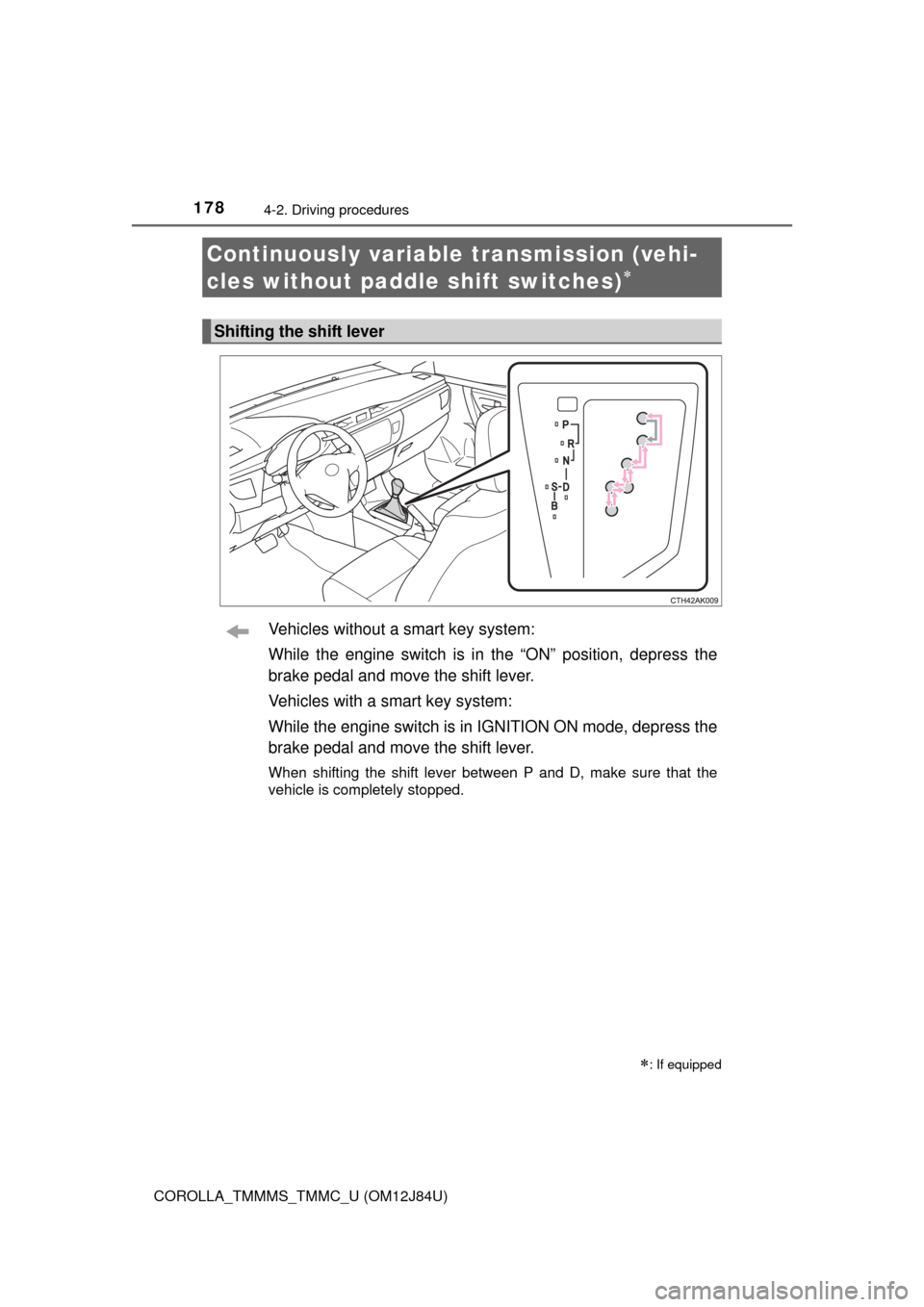
Vehicles without a smart key system:
While the engine switch is in the “ON” position, depress the
brake pedal and move the shift lever.
Vehicles with a smart key system:
While the engine switch is in IGNITION ON mode, depress the
brake pedal and move the shift lever.
When shifting the shift lever between P and D, make sure that the
vehicle is completely stopped.
Continuously variable transmission (vehi-
cles without paddle shift switches)
: If equipped
Shifting the shift lever
Page 180 of 620
1804-2. Driving procedures
COROLLA_TMMMS_TMMC_U (OM12J84U)
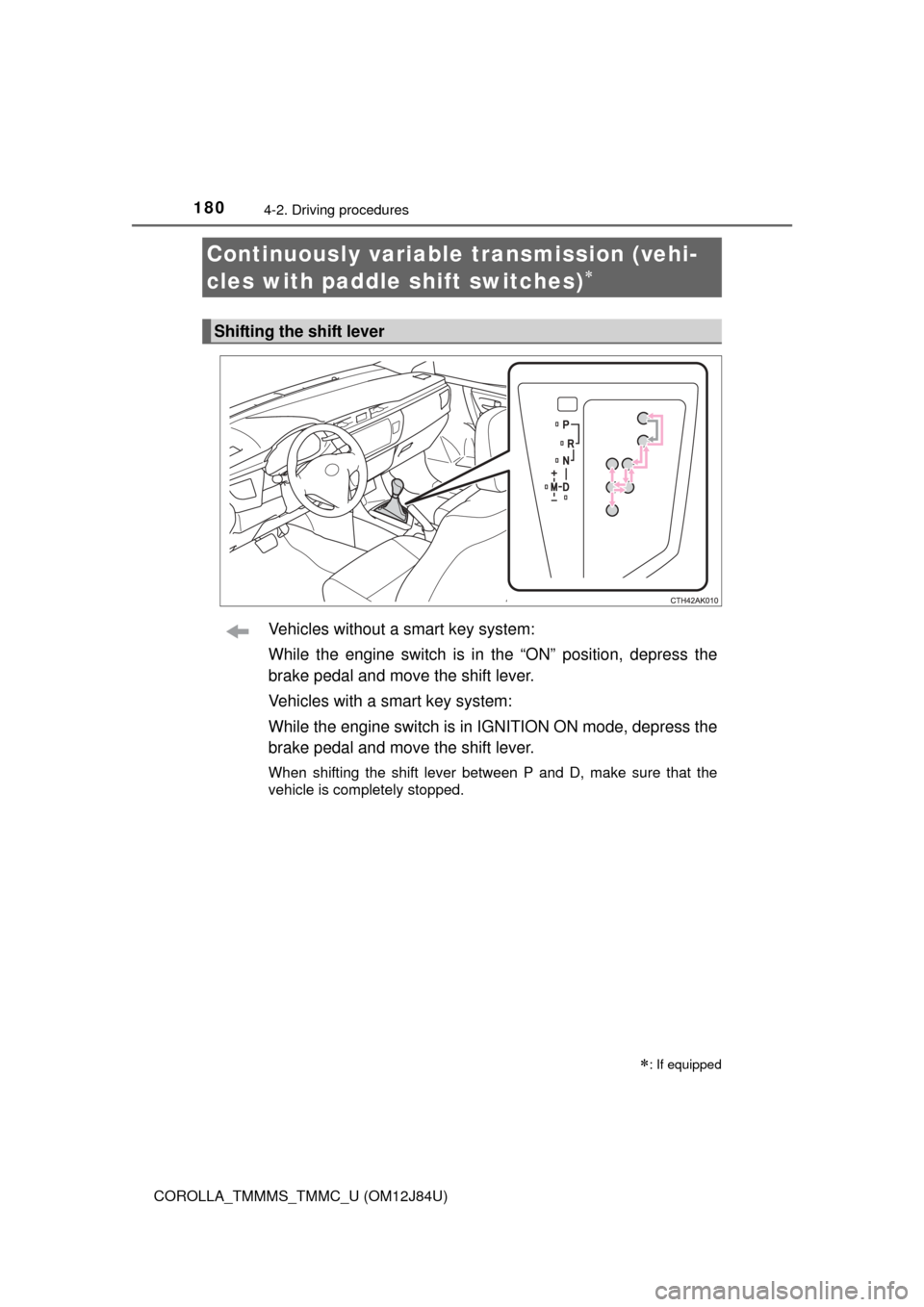
Vehicles without a smart key system:
While the engine switch is in the “ON” position, depress the
brake pedal and move the shift lever.
Vehicles with a smart key system:
While the engine switch is in IGNITION ON mode, depress the
brake pedal and move the shift lever.
When shifting the shift lever between P and D, make sure that the
vehicle is completely stopped.
Continuously variable transmission (vehi-
cles with paddle shift switches)
: If equipped
Shifting the shift lever
Page 186 of 620
1864-2. Driving procedures
COROLLA_TMMMS_TMMC_U (OM12J84U)
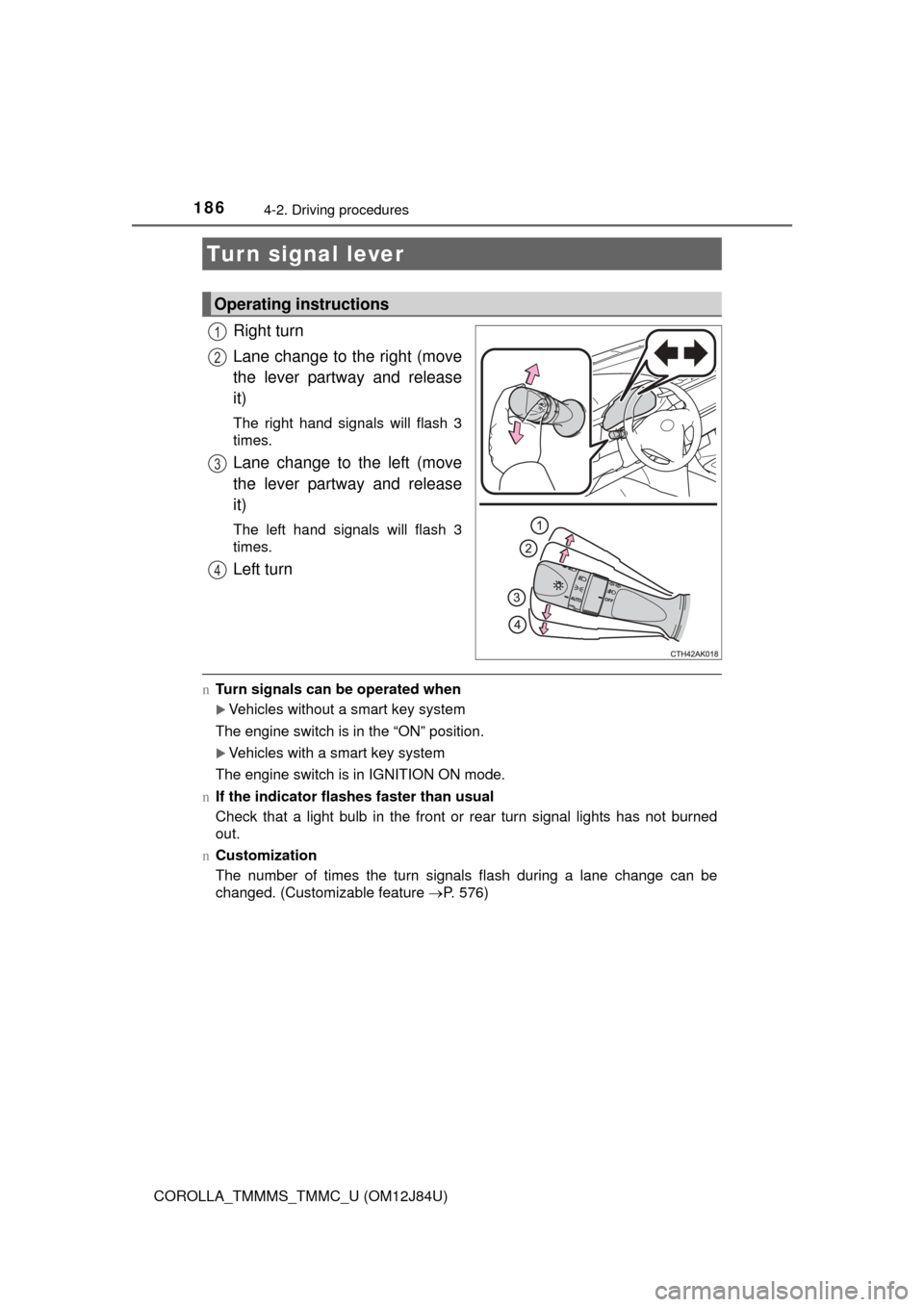
Right turn
Lane change to the right (move
the lever partway and release
it)
The right hand signals will flash 3
times.
Lane change to the left (move
the lever partway and release
it)
The left hand signals will flash 3
times.
Left turn
nTurn signals can be operated when
Vehicles without a smart key system
The engine switch is in the “ON” position.
Vehicles with a smart key system
The engine switch is in IGNITION ON mode.
n If the indicator flashes faster than usual
Check that a light bulb in the front or rear turn signal lights has not burned
out.
n Customization
The number of times the turn signals flash during a lane change can be
changed. (Customizable feature P. 576)
Turn signal lever
Operating instructions
1
2
3
4
Page 190 of 620
1904-3. Operating the lights and wipers
COROLLA_TMMMS_TMMC_U (OM12J84U)
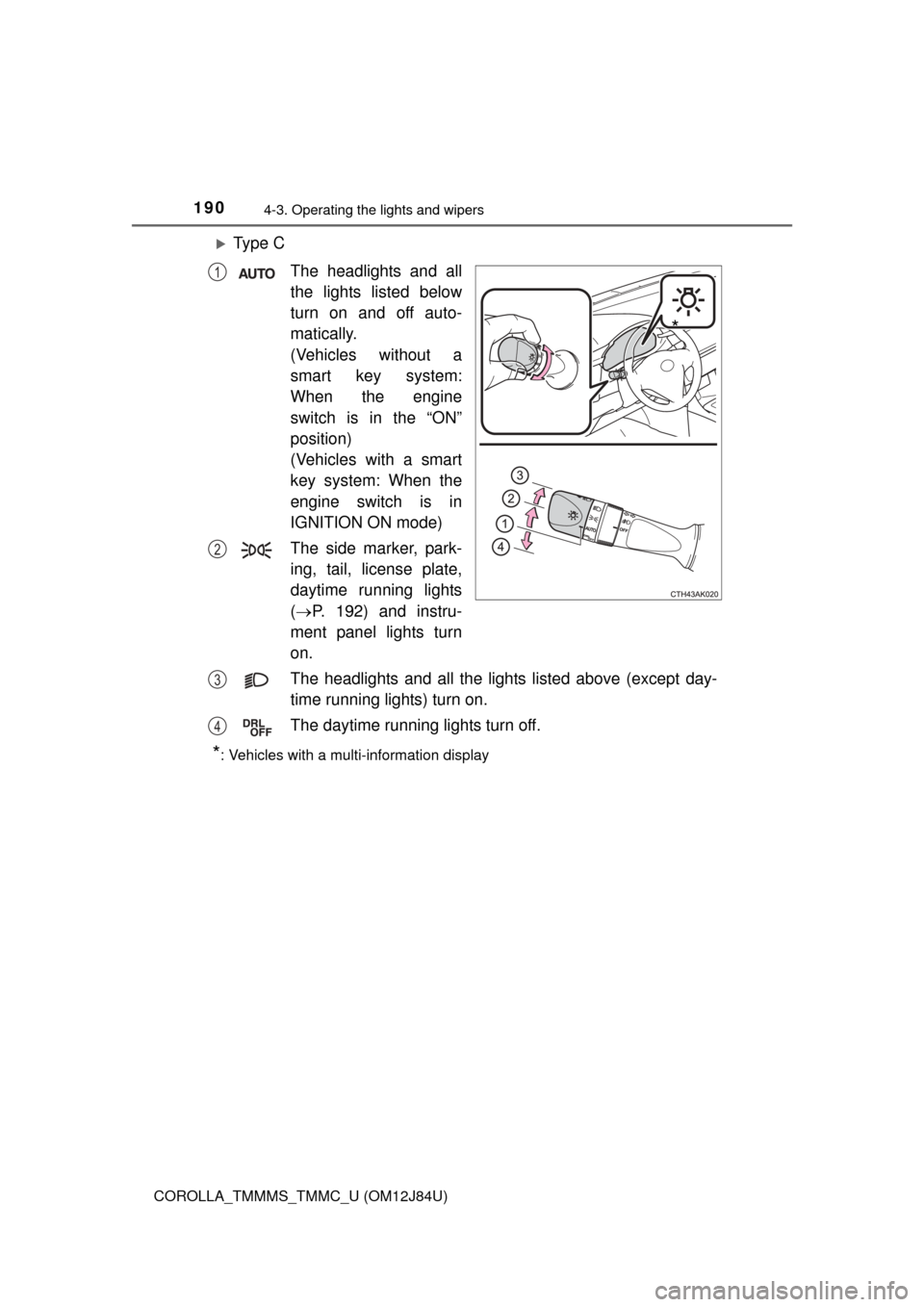
Ty p e CThe headlights and all
the lights listed below
turn on and off auto-
matically.
(Vehicles without a
smart key system:
When the engine
switch is in the “ON”
position)
(Vehicles with a smart
key system: When the
engine switch is in
IGNITION ON mode)
The side marker, park-
ing, tail, license plate,
daytime running lights
( P. 192) and instru-
ment panel lights turn
on.
The headlights and all the lights listed above (except day-
time running lights) turn on.
The daytime running lights turn off.
*: Vehicles with a multi-information display
*
1
2
3
4
Page 191 of 620
1914-3. Operating the lights and wipers
4
Driving
COROLLA_TMMMS_TMMC_U (OM12J84U)
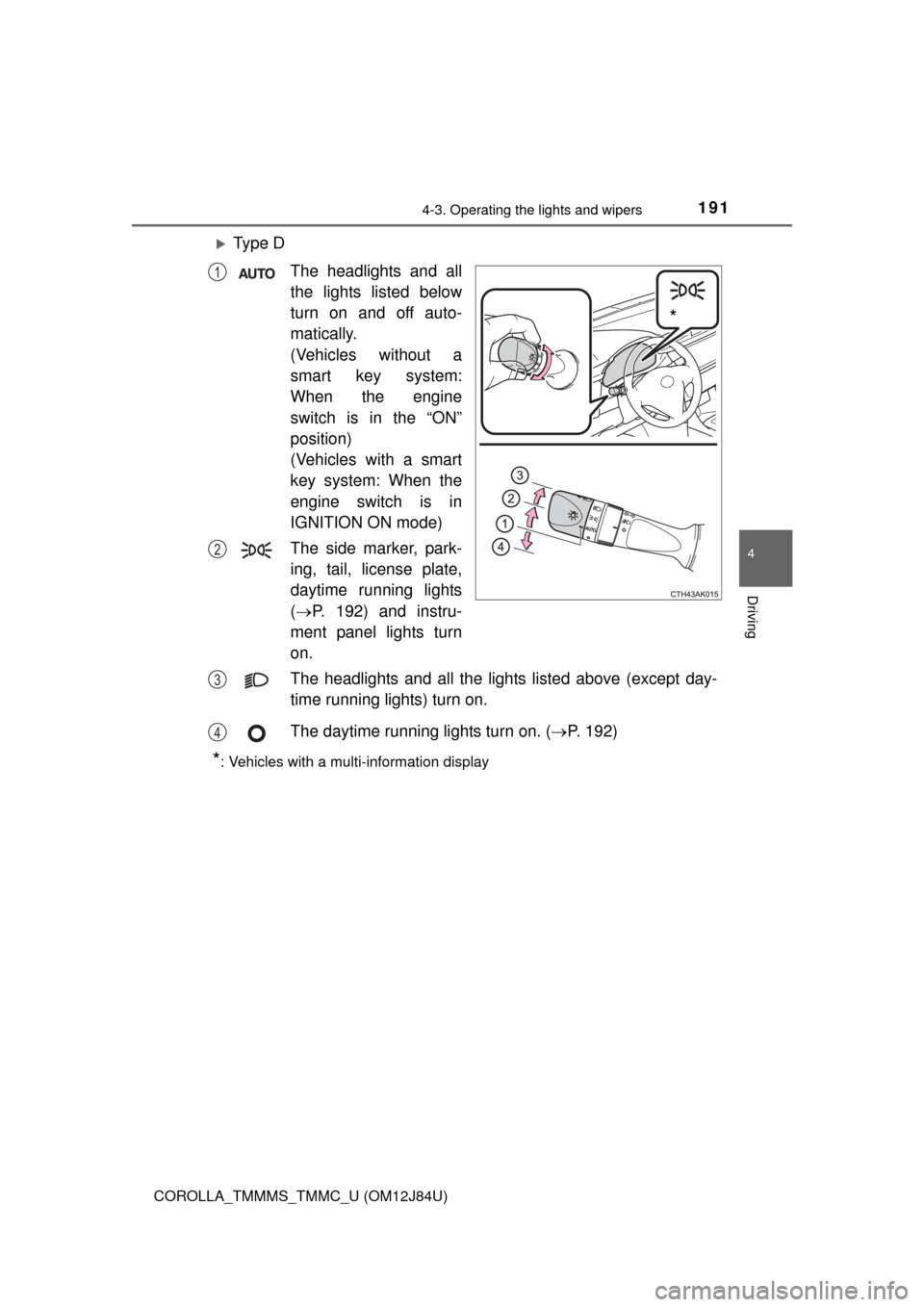
Ty p e DThe headlights and all
the lights listed below
turn on and off auto-
matically.
(Vehicles without a
smart key system:
When the engine
switch is in the “ON”
position)
(Vehicles with a smart
key system: When the
engine switch is in
IGNITION ON mode)
The side marker, park-
ing, tail, license plate,
daytime running lights
( P. 192) and instru-
ment panel lights turn
on.
The headlights and all the lights listed above (except day-
time running lights) turn on.
The daytime running lights turn on. ( P. 192)
*: Vehicles with a multi-information display
*
1
2
3
4
Page 193 of 620
1934-3. Operating the lights and wipers
4
Driving
COROLLA_TMMMS_TMMC_U (OM12J84U)n
Automatic light off system
Vehicles without a smart key system
l When the headlights are on: The headlights and tail lights turn off 30 sec-
onds after the engine switch is turned to the “ACC” or “LOCK” position and a
door is opened and closed. (Vehicles with a wireless remote control: The
lights turn off immediately if on the key is pressed after all the doors
are locked.)
l When only the tail lights are on: The tail lights turn off automatically if the
engine switch is turned to the “ACC” or “LOCK” position and the driver’s
door is opened.
To turn the lights on again, turn the engine switch to “ON” position, or turn the
light switch off once and then back to or .
If any of the doors or trunk lid is kept open, the lights automatically turn off
after 20 minutes.
Vehicles with a smart key system
l When the headlights are on: The headlights and tail lights turn off 30 sec-
onds after the engine switch is turned to ACCESSORY mode or turned off
and a door is opened and closed. (The lights turn off immediately if on
the key is pressed after all the doors are locked.)
l When only the tail lights are on: The tail lights turn off automatically if the
engine switch is turned to ACCESSORY mode or turned off and the driver’s
door is opened.
To turn the lights on again, turn the engine switch to IGNITION ON mode, or
turn the light switch off once and then back to or .
If any of the doors or trunk lid is kept open, the lights automatically turn off
after 20 minutes.
n Light reminder buzzer
Vehicles without a smart key system
A buzzer sounds when the engine switch is turned to “LOCK” position and the
driver's door is opened while the lights are turned on.
Vehicles with a smart key system
A buzzer sounds when the engine switch is turned off or turned to ACCES-
SORY mode and the driver's door is opened while the lights are turned on.
Page 194 of 620
1944-3. Operating the lights and wipers
COROLLA_TMMMS_TMMC_U (OM12J84U)n
Battery-saving function
In the following conditions, the headlights and the other remaining lights will
go off automatically after 20 minutes in order to prevent the vehicle battery
from being discharged:
lThe headlights and/or tail lights are on.
l Vehicles without a smart key system: The engine switch is in the “ACC” or
“LOCK” position.
l Vehicles with a smart key system: The engine switch is turned to ACCES-
SORY mode or turned off.
This function will be canceled in any of the following situations:
l Vehicles without a smart key system: When the engine switch is turned to
the “ON” position.
l Vehicles with a smart key system: When the engine switch is turned to IGNI-
TION ON mode.
l When the light switch is operated
l When the door or trunk is opened or closed
n Customization
Settings (e.g. light sensor sensitivity) can be changed.
(Customizable features: P. 576)
NOTICE
nTo prevent battery discharge
Do not leave the lights on longer than necessary when the engine is not
running.