radio TOYOTA COROLLA 2019 (in English) Owner's Manual
[x] Cancel search | Manufacturer: TOYOTA, Model Year: 2019, Model line: COROLLA, Model: TOYOTA COROLLA 2019Pages: 608, PDF Size: 10.15 MB
Page 284 of 608
284
COROLLA_TMMMS_TMMC_U
5-3. Using Entune Audio
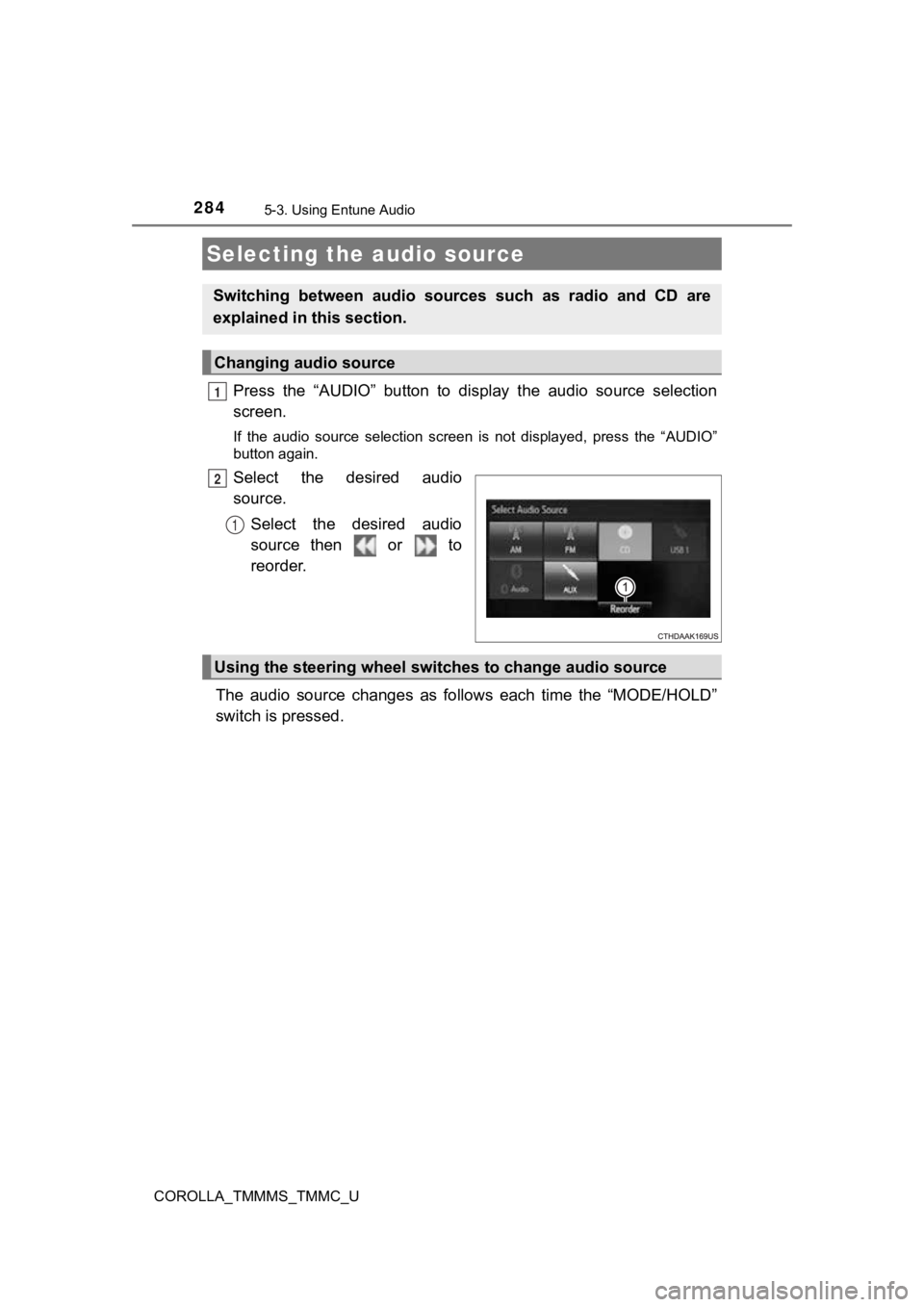
Press the “AUDIO” button to display the audio source selection
screen.
If the audio source selection screen is not displayed, press the “AUDIO”
button again.
Select the desired audio
source.
Select the desired audio
source then or to
reorder.
The audio source changes as follows each time the “MODE/HOLD”
switch is pressed.
Selecting the audio source
Switching between audio sources such as radio and CD are
explained in t his section.
Changing audio source
1
2
1
Using the steering wheel switches to change audio source
Page 288 of 608
288
COROLLA_TMMMS_TMMC_U
5-4. Using the radio
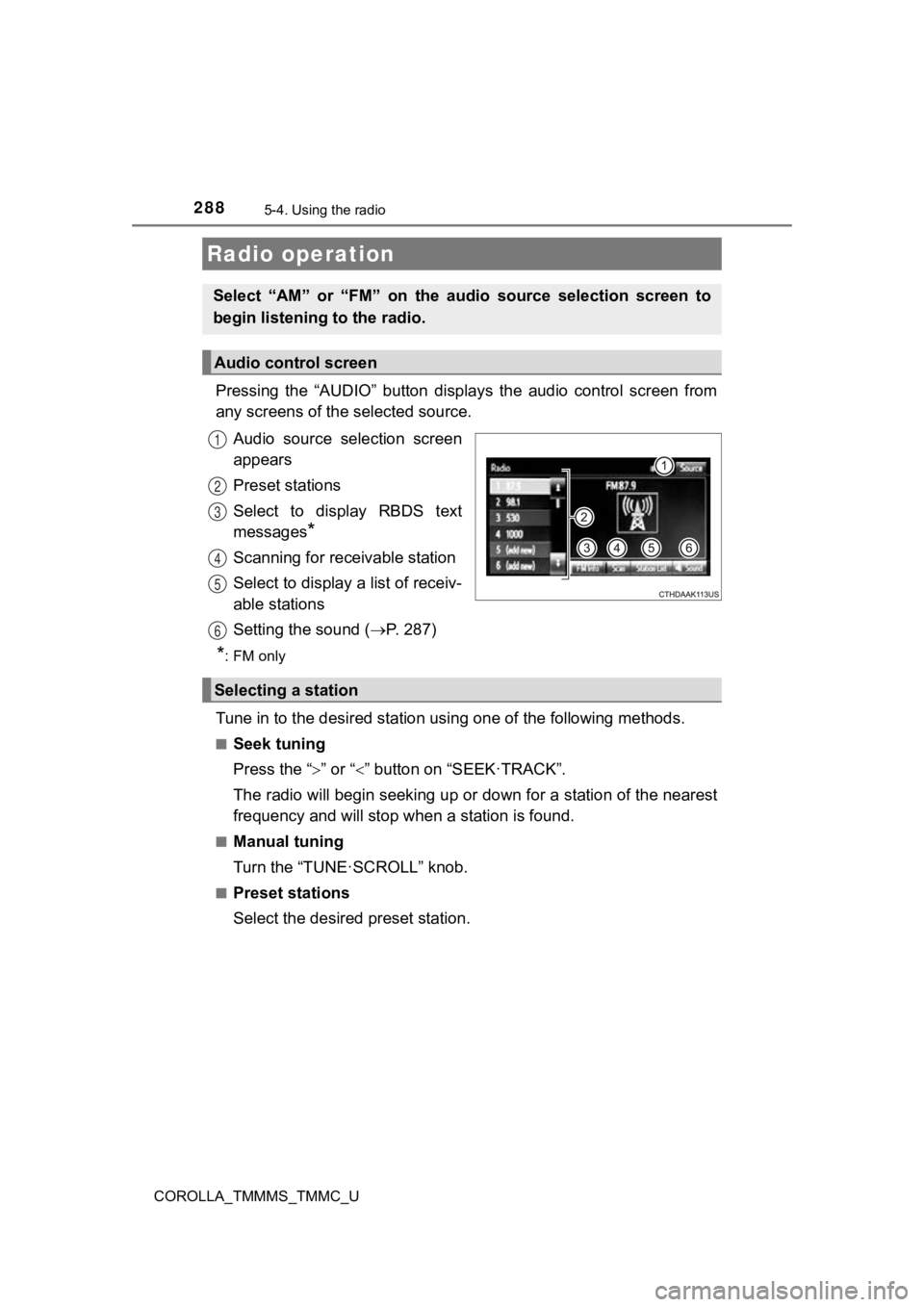
Pressing the “AUDIO” button displays the audio control screen from
any screens of the selected source.
Audio source selection screen
appears
Preset stations
Select to display RBDS text
messages
*
Scanning for receivable station
Select to display a list of receiv-
able stations
Setting the sound ( P. 2 8 7 )
*:FM only
Tune in to the desired station us ing one of the following methods.
■Seek tuning
Press the “” or “” button on “SEEK·TRACK”.
The radio will begin seeking up or down for a station of the ne arest
frequency and will stop when a station is found.
■Manual tuning
Turn the “TUNE·SCROLL” knob.
■Preset stations
Select the desired preset station.
Radio operation
Select “AM” or “FM” on the audio source selection screen to
begin listening to the radio.
Audio control screen
1
2
3
4
5
6
Selecting a station
Page 289 of 608
2895-4. Using the radio
5
Audio system
COROLLA_TMMMS_TMMC_U
Search for desired stations by turning the “TUNE·SCROLL” knob or
pressing the “ ” or “” button on “SEEK·TRACK”.
Select “(add new)”.
To change the preset station to a different one, select and hol d the preset
station.
Select “Yes”.
Select “OK” after setting the new preset station.
■Refreshing the station list
Select “Refresh” on the “Station List” screen.
To cancel the refresh, select “Cancel Refresh”.
■Reception sensitivity
●Maintaining perfect radio reception at all times is difficult d ue to the continu-
ally changing position of the antenna, differences in signal strength and sur-
rounding objects, such as trains, transmitters, etc.
● The radio antenna is mounted inside the rear window. To maintai n clear
radio reception, do not attach metallic window tinting or other metallic
objects to the antenna wire mounted inside the rear window.
Setting station presets
1
2
3
4
1
Page 306 of 608
306
COROLLA_TMMMS_TMMC_U
5-7. Connecting Bluetooth®
■About Bluetooth®
Preparations to use wireless communica-
tion
The following can be performed using Bluetooth® wireless com-
munication:
■A portable audio player can be operated and listened to via
Entune Audio
■Hands-free phone calls can be made via a cellular phone
In order to use wireless communication, register and connect a
Bluetooth
® device by performing the following procedures.
The Bluetooth® word mark and logos are
registered trademarks owned Bluetooth
SIG, Inc. and any use of such marks by
Fujitsu Ten Limited is under license.
Other trademarks and trade names are
those of their respective owners.
WARNING
■ Certifications for the Bluetooth
FCC ID: BABFT0077A
● CAUTION: Radio Frequency Radiation Exposure
This equipment complies with FCC radiation exposure limits set forth for
uncontrolled equipment and meets the FCC radio frequency (RF) Expo-
sure Guidelines.
This equipment has very low levels of RF energy that it deemed to comply
without maximum permissive exposure evaluation (MPE). But it is desir-
able that it should be installed and operated with at least 20c m and more
between the radiator and person's body in normal use position.
• Co-location: This transmitter must not be co-located or operated in con- junction with any other antenna or transmitter.
• This device complies with part 15 of the FCC Rules. Operation is sub-
ject to the following two conditions: (1) This device may not c ause
harmful interference, and (2) this device must accept any inter ference
received, including interference that may cause undesired opera tion.
Page 307 of 608

3075-7. Connecting Bluetooth®
5
Audio system
COROLLA_TMMMS_TMMC_U
WARNING
●FCC WARNING:
Changes or modifications not expressly approved by the party responsi-
ble for compliance could void the user's authority to operate the equip-
ment.
● IC: 2024B-FT0077A
• This device complies with Industry Canada’s licence-exempt RSS s.
Operation is subject to the following two conditions: (1) This device may
not cause interference; and (2) This device must accept any int erfer-
ence, including interference that may cause undesired operation of the
device.
● CAUTION: Radio Frequency Radiation Exposure
This equipment complies with IC radiation exposure limits set f orth for
uncontrolled equipment and meets RSS-102 of the IC radio freque ncy
(RF) Exposure rules.
This equipment has very low levels of RF energy that it deemed to comply
without maximum permissive e xposure evaluation (MPE).
But it is desirable that it should be installed and operated with at least
20cm and more between the radiator and person's body (excluding
extremities: hands, wrists, feet and ankles).
● IC: 2024B-FT0077A
• Le présent appareil est conforme aux CNR d'Industrie Canada ap pli-
cables aux appareils radio exempts de licence. L'exploitation e st autori-
sée aux deux conditions suivantes : (1) l'appareil ne doit pas produire
de brouillage; (2) l'utilisateur de l'appareil doit accepter to ut brouillage
radioélectrique subi, même si le brouillage est susceptible d'en compro-
mettre le fonctionnement.
● ATTENTION: l'exposition aux rayonnements radiofréquence
- Cet équipement se conforme aux limites d’exposition aux radia tions éta-
blies par Industrie Canada pour un environnement non contrôlé a insi
qu’aux directives d’exposition aux fréquences radioélectriques (RF)
émises par Industrie Canada dans la norme CNR-102. Cet équipeme nt
émet un niveau d’énergie RF faible à un point tel qu’il se conf orme sans
devoir effectuer d’évaluation d’exposition maximum admissible ( EMA).
Lorsque l’équipement est utilisé, il est toutefois souhaitable de laisser au
moins 20cm entre l’antenne et le corps (à l’exception des extré mités :
mains, poignets, pieds et chevilles).
Page 358 of 608
3585-10. Bluetooth®
COROLLA_TMMMS_TMMC_U■
Reconnecting the portable audio player
If the portable audio player is disconnected due to poor reception when the
engine switch is in the “ACC” or “ON” position (vehicles withou t a smart key
system) or ACCESSORY or IGNITION ON mode (vehicles with a smart key
system), the system automatically reconnects the portable audio player.
If you have switched off the portable audio player yourself, fo llow the instruc-
tions below to reconnect:
● Select the portable audio player again
● Enter the portable audio player
■ When you sell your car
Be sure to delete your personal data. ( P. 280)
WARNING
■While driving
Do not use the portable audio player, cellular phone or connect a device to
the Bluetooth
® system.
■ Caution regarding interfer ence with electronic devices
● Your audio unit is fitted with Bluetooth
® antennas. People with implantable
cardiac pacemakers, cardiac resynchronization therapy-pacemaker s or
implantable cardioverter defibrillators should maintain a reaso nable dis-
tance between themselves and the Bluetooth
® antennas. The radio waves
may affect the operation of such devices.
● Before using Bluetooth
® devices, users of any electrical medical device
other than implantable cardiac pacemakers, cardiac resynchroniz ation
therapy-pacemakers or implantable cardioverter defibrillators should con-
sult the manufacturer of the device for information about its o peration
under the influence of radio waves. Radio waves could have unex pected
effects on the operation of such medical devices.
NOTICE
■ When leaving the vehicle
Do not leave your portable audio player or cellular phone in th e vehicle. The
inside of the vehicle may become hot, causing damage to the por table
audio player or cellular phone.
Page 401 of 608
4016-4. Other interior features
6
Interior features
COROLLA_TMMMS_TMMC_U
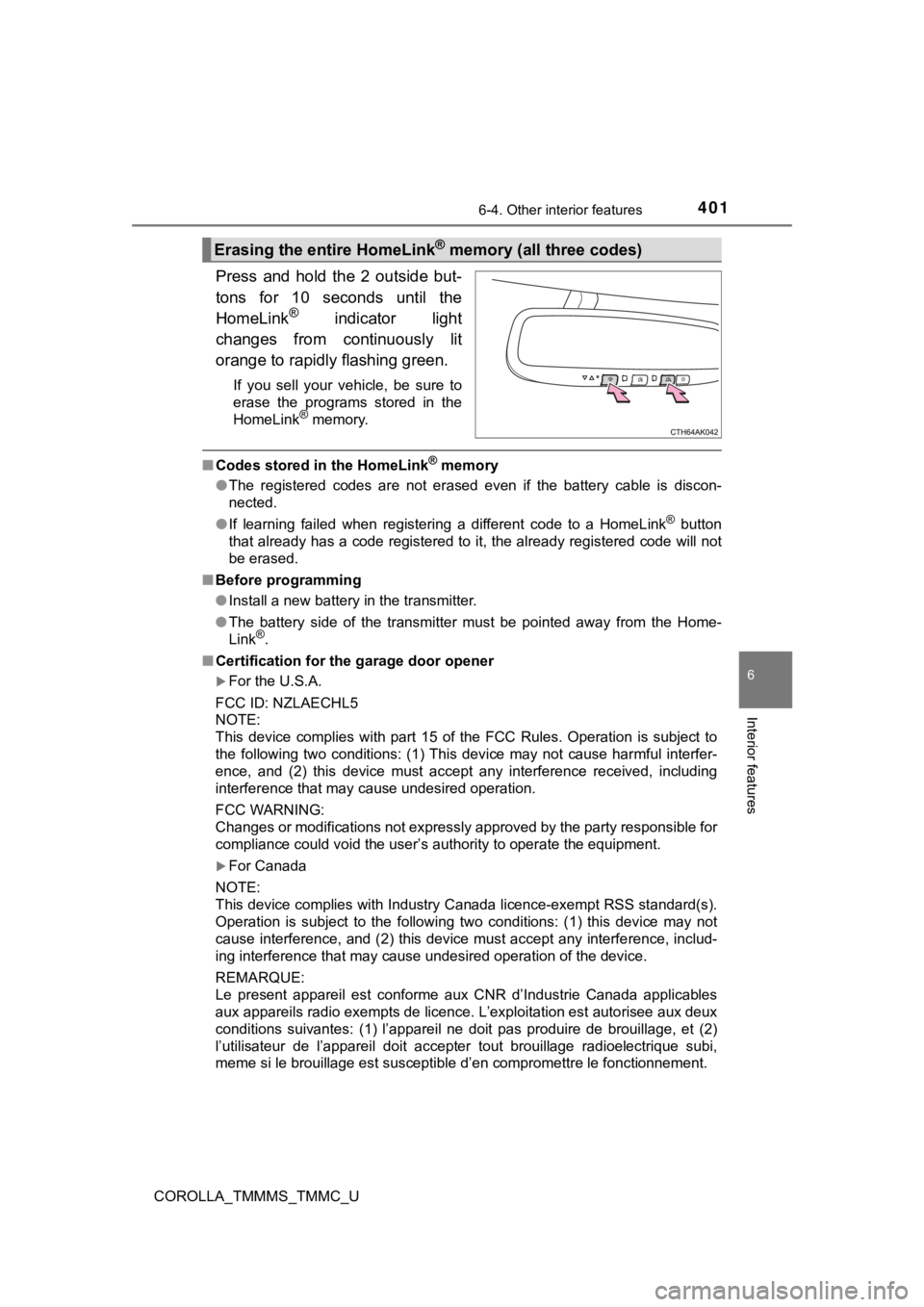
Press and hold the 2 outside but-
tons for 10 seconds until the
HomeLink
® indicator light
changes from continuously lit
orange to rapidly flashing green.
If you sell your vehicle, be sure to
erase the programs stored in the
HomeLink
® memory.
■ Codes stored in the HomeLink® memory
● The registered codes are not erased even if the battery cable i s discon-
nected.
● If learning failed when registering a different code to a HomeL ink
® button
that already has a code registered to it, the already registere d code will not
be erased.
■ Before programming
●Install a new battery in the transmitter.
● The battery side of the transmitter must be pointed away from t he Home-
Link
®.
■ Certification for the garage door opener
For the U.S.A.
FCC ID: NZLAECHL5
NOTE:
This device complies with part 15 of the FCC Rules. Operation is subject to
the following two conditions: (1) This device may not cause har mful interfer-
ence, and (2) this device must accept any interference received, including
interference that may cause undesired operation.
FCC WARNING:
Changes or modifications not expressly approved by the party re sponsible for
compliance could void the user’s authority to operate the equip ment.
For Canada
NOTE:
This device complies with Industry Canada licence-exempt RSS standard(s).
Operation is subject to the following two conditions: (1) this device may not
cause interference, and (2) this device must accept any interfe rence, includ-
ing interference that may cause undesired operation of the devi ce.
REMARQUE:
Le present appareil est conforme aux CNR d’Industrie Canada app licables
aux appareils radio exempts de licence. L’exploitation est auto risee aux deux
conditions suivantes: (1) l’appareil ne doit pas produire de brouillage, et (2)
l’utilisateur de l’appareil doit accepter tout brouillage radio electrique subi,
meme si le brouillage est susceptible d’en compromettre le fonctionnement.
Erasing the entire HomeLink® memory (all three codes)
Page 445 of 608

4457-3. Do-it-yourself maintenance
7
Maintenance and care
COROLLA_TMMMS_TMMC_U■
If you press the tire pressure warning reset switch accidentall
y (vehi-
cles with a tire pressure warning system)
If initialization is performed, adjust the tire inflation press ure to the speci-
fied level and initialize the tire pressure warning system again.
■When initialization of the tire pressure warning system has fai led
(vehicles with a tire pressure warning system)
Initialization can be completed i n a few minutes. However, in the following
cases, the settings have not been record ed and the system will not oper-
ate properly. If repeated attempts to record tire inflation pre ssure settings
are unsuccessful, have the vehicl e inspected by your Toyota dealer.
●When operating the tire pressure warning reset switch, the tire pressure
warning light does not blink 3 times.
●After driving for a certain period of time since the initializa tion has been
completed, the warning light comes on after blinking for 1 minute.
■Tire pressure warning system certification
For the U.S.A.
FCC ID: HYQ23AAK FCC ID: PAXPMVC010
NOTE:
This device complies with part 15 of the FCC Rules. Operation is subject
to the following two conditions: (1) This device may not cause harmful
interference, and (2) this device must accept any interference received,
including interference that ma y cause undesired operation.
FCC WARNING:
Changes or modifications not expressly approved by the party re sponsi-
ble for compliance could void the user’s authority to operate t he equip-
ment.
For Canada
NOTE:
Operation is subject to the follo wing two conditions: (1) this device may
not cause interference, and (2) this device must accept any int erference,
including interference that may cause undesired operation of th e device.
NOTE:
L’utilisation de ce dispositif es t autorisée seulement aux deux conditions
suivantes : (1) il ne doit pas pr oduire de brouillage, et (2) l’utilisateur du
dispositif doit être prêt à a ccepter tout brouillage radioélect rique reçu,
même si ce brouillage est suscept ible de compromettre le fonctionne-
ment du dispositif.
Page 485 of 608
4858-2. Steps to take in an emergency
8
When trouble arises
COROLLA_TMMMS_TMMC_U■
When a tire is replaced with a s
pare tire (vehicles with a tire pressure
warning system)
The compact spare tire is not equipped with a tire pressure war ning valve
and transmitter. If a tire goes flat, the tire pressure warning light will not
turn off even though the flat tire has been replaced with the s pare tire.
Replace the spare tire with the repaired tire and adjust the ti re inflation
pressure. The tire pressure war ning light will go off after a few minutes.
■Conditions that the tire pressure warning system may not functi on
properly (vehicles with a tir e pressure warning system)
The tire pressure warning syst em will be disabled in the follow ing condi-
tions:
(When the condition becomes normal, the system will work properly.)
●If tires not equipped with tire pressure warning valves and tra nsmitters
are used
●If the ID code on the tire pressure warning valves and transmit ters is not
registered in the tire pr essure warning computer
●If the tire inflation pressure is 73 psi (500 kPa, 5.1 kgf/cm2 or bar) or
higher
The tire pressure warning system may be disabled in the followi ng condi-
tions:
(When the condition becomes normal, the system will work properly.)
●If electronic devices or facilitie s using similar radio wave frequencies are
nearby
●If a radio set at similar frequen cy is in use in the vehicle
●If a window tint that affects the radio wave signals is installed
●If there is a lot of snow or ice on the vehicle, in particular around the
wheels or wheel housings
●If non-genuine Toyota wheels are used (Even if you use Toyota wheels,
the tire pressure warning system may not work properly with som e types
of tires.)
●If tire chains are used
■If the tire pressure warning light frequently comes on after bl inking
for 1 minute (vehicles with a t ire pressure warning system)
If the tire pressure warning light frequently comes on after bl inking for 1
minute when the engine switch is turned on, have it checked by your
Toyota dealer.
■ Warning buzzer
In some cases, the buzzer may not be heard because of noisy pla ce or an
audio sound.
■ Electric power steering system wa rning light (warning buzzer)
When the battery charge becomes insufficient or the voltage tem porarily
drops, the electric power steering system warning light may com e on and the
warning buzzer may sound.
Page 558 of 608
5589-1. Specifications
COROLLA_TMMMS_TMMC_U
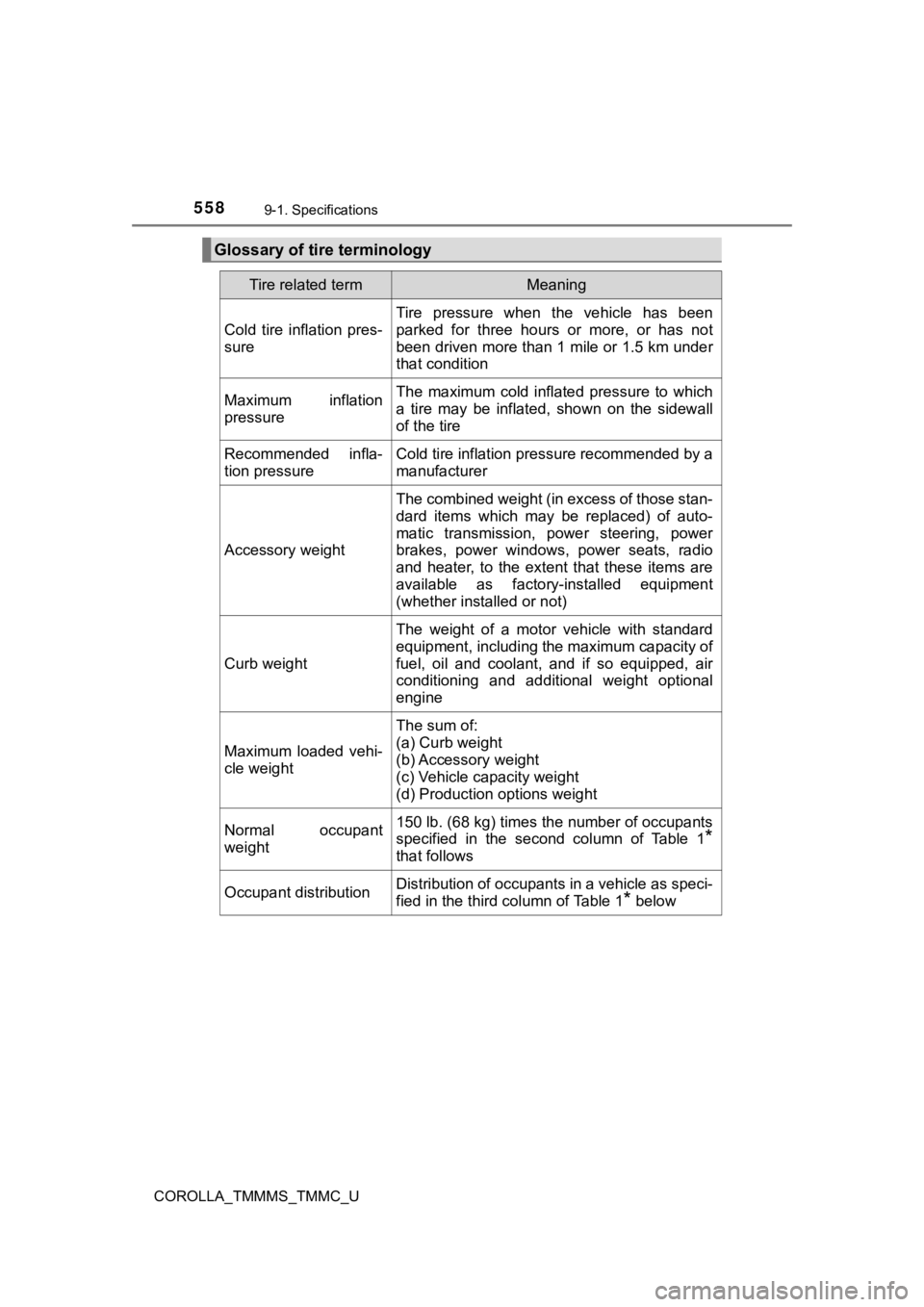
Glossary of tire terminology
Tire related termMeaning
Cold tire inflation pres-
sure
Tire pressure when the vehicle has been
parked for three hours or more, or has not
been driven more than 1 mile or 1.5 km under
that condition
Maximum inflation
pressureThe maximum cold inflated pressure to which
a tire may be inflated, shown on the sidewall
of the tire
Recommended infla-
tion pressureCold tire inflation pressure recommended by a
manufacturer
Accessory weight
The combined weight (in excess of those stan-
dard items which may be replaced) of auto-
matic transmission, power steering, power
brakes, power windows, power seats, radio
and heater, to the extent that these items are
available as factory-installed equipment
(whether installed or not)
Curb weight
The weight of a motor vehicle with standard
equipment, including the maximum capacity of
fuel, oil and coolant, and if so equipped, air
conditioning and additional weight optional
engine
Maximum loaded vehi-
cle weight
The sum of:
(a) Curb weight
(b) Accessory weight
(c) Vehicle capacity weight
(d) Production options weight
Normal occupant
weight150 lb. (68 kg) times the number of occupants
specified in the second column of Table 1
*
that follows
Occupant distributionDistribution of occupants in a vehicle as speci-
fied in the third column of Table 1
* below