light TOYOTA COROLLA 2019 (in English) Service Manual
[x] Cancel search | Manufacturer: TOYOTA, Model Year: 2019, Model line: COROLLA, Model: TOYOTA COROLLA 2019Pages: 608, PDF Size: 10.15 MB
Page 88 of 608
882. Instrument cluster
COROLLA_TMMMS_TMMC_U
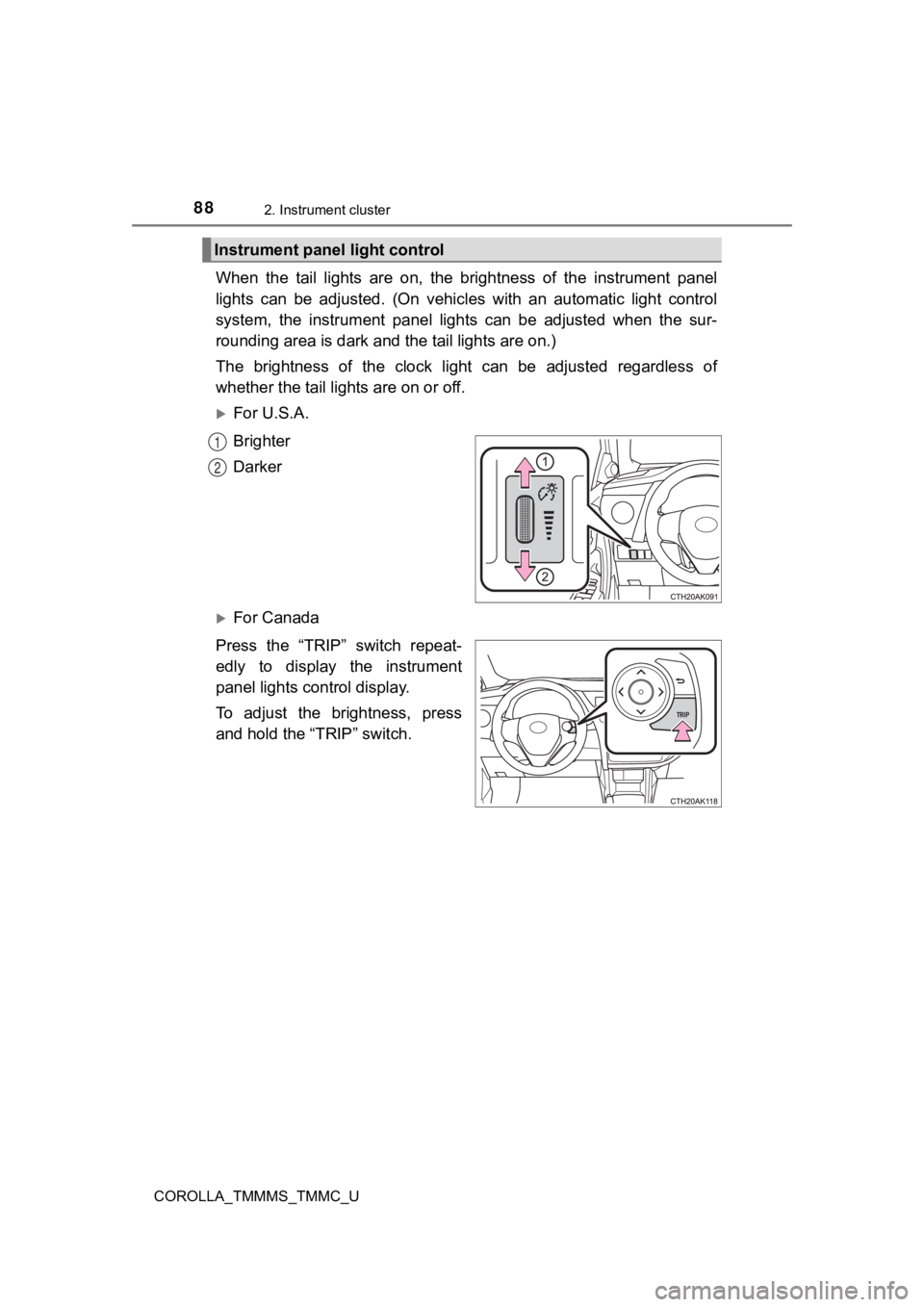
When the tail lights are on, the brightness of the instrument panel
lights can be adjusted. (On vehicles with an automatic light co ntrol
system, the instrument panel lights can be adjusted when the su r-
rounding area is dark and the tail lights are on.)
The brightness of the clock ligh t can be adjusted regardless of
whether the tail lights are on or off.
For U.S.A.
Brighter
Darker
For Canada
Press the “TRIP” switch repeat-
edly to display the instrument
panel lights co ntrol display.
To adjust the brightness, press
and hold the “TRIP” switch.
Instrument panel light control
1
2
Page 93 of 608

932. Instrument cluster
2
Instrument cluster
COROLLA_TMMMS_TMMC_U■
Changing the settings
Select using the meter control switch.
Select an item and then set it with the center button.
■Customizable items
●LDA (Lane Departure Alert with steering control)
P. 2 2 6
● LDA (Lane Departure Alert with steering control) vehicle sway
warning
P. 2 2 7
● PCS (Pre-Collision System)
P. 2 1 4
● Language
Select to change the language displayed on the multi-informatio n
display.
● Units
Select to change the unit of measure displayed on the multi-inf or-
mation display.
● Drive information 1/ Drive information 2
Select to select up to 2 items that will be displayed on a Driv e
information screen.
● Eco driving indicator light
Select to activate/deactivate the Eco Driving Indicator Light.
(
P. 9 9 )
● Pop-up display
Select to set the following pop-up displays, which may appear i n
some situations, on/off. • Route guidance display of the navigation system-linked sys-
tem (if equipped)
• Incoming call disp lay of the hands-free phone system
● Accent color
Select to change the accent colors on the screen, such as the
cursor color.
Settings display
1
2
Page 94 of 608

942. Instrument cluster
COROLLA_TMMMS_TMMC_U
●Maintenance sy stem (U.S.A.)
Select to reset the message after the required maintenance is
performed. (
P. 415)
● Initialization
Registered or changed meter settings will be deleted or returne d
to their default setting.
■ Pop-up display
In some situations, such as when a switch operation is performe d, a pop-up
display, such as the operating dynamic radar cruise control swi tch, will be
temporarily displayed on the multi-information display.
The pop-up display function can be set on/off.
■ Setting display automatic cancelation
In the following situations, a setting display in which the settings can be
changed through the meter control switches will automatically b e turned off.
● When a warning message appears while the setting display is dis played
● When the vehicle begins to move while the setting display is displayed
■ Liquid crystal display
Small spots or light spots may appear on the display. This phen omenon is
characteristic of liquid crystal displays, and there is no prob lem continuing to
use the display.
Page 98 of 608
982. Instrument cluster
COROLLA_TMMMS_TMMC_U■
Past record
Entune Audio
Press the “CAR” button.
If the “Trip Information” screen is displayed, select “Past Rec ord”.
Entune Audio Plus or Entune Premium Audio
Press the “APPS” button.
Touch “Eco” on the “Apps” screen.
If the “Trip Information” screen is displayed, select “Past Record”.
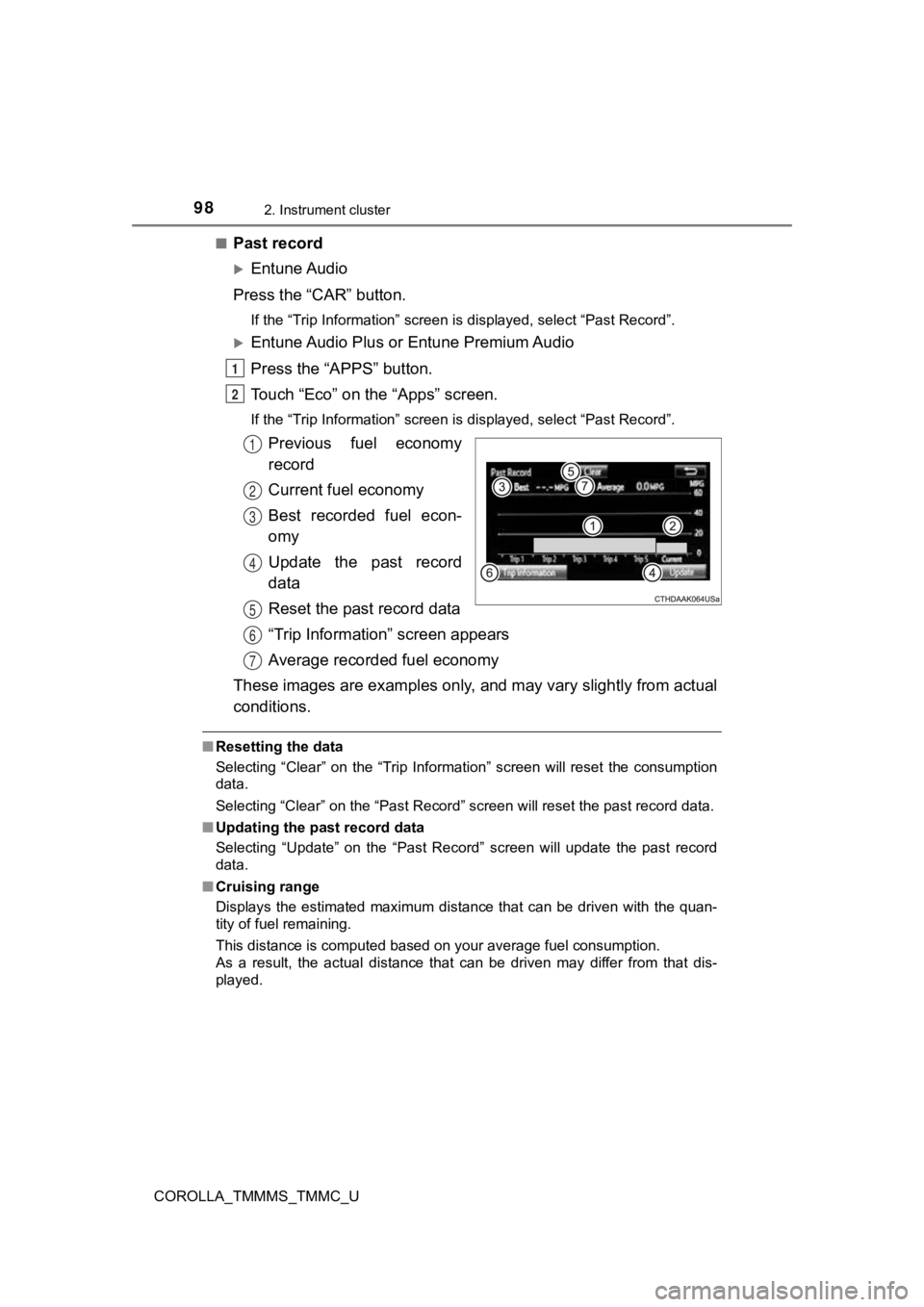
Previous fuel economy
record
Current fuel economy
Best recorded fuel econ-
omy
Update the past record
data
Reset the past record data
“Trip Information” screen appears
Average recorded fuel economy
These images are examples only, and may vary slightly from actual
conditions.
■ Resetting the data
Selecting “Clear” on the “Trip Information” screen will reset t he consumption
data.
Selecting “Clear” on the “Past Record” screen will reset the pa st record data.
■ Updating the past record data
Selecting “Update” on the “Past Record” screen will update the past record
data.
■ Cruising range
Displays the estimated maximum distance that can be driven with the quan-
tity of fuel remaining.
This distance is computed based on your average fuel consumptio n.
As a result, the actual distance that can be driven may differ from that dis-
played.
1
2
1
2
3
4
5
6
7
Page 99 of 608

992. Instrument cluster
2
Instrument cluster
COROLLA_TMMMS_TMMC_U
During Eco-friendly acceleration
operation (Eco driving), Eco Driv-
ing Indicator Light will turn on.
When the acceleration exceeds
Zone of Eco driving, and when the
vehicle is stopped, the light turns
off.
Eco Driving Indicator (vehicles with a con-
tinuously variable transmission)
Eco Drive Indicator Light
Monochrome display
Color display
Page 100 of 608
1002. Instrument cluster
COROLLA_TMMMS_TMMC_U
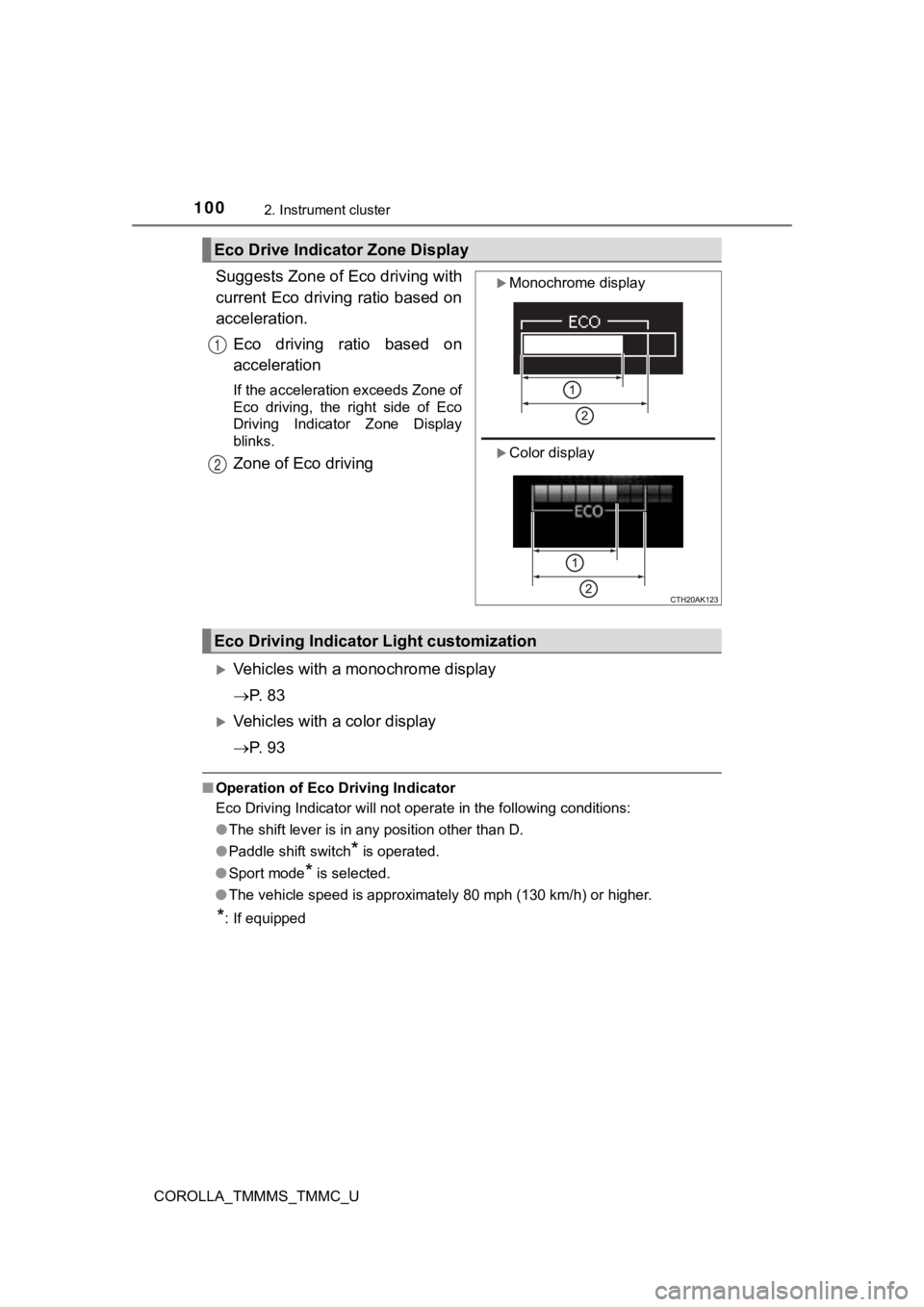
Suggests Zone of Eco driving with
current Eco driving ratio based on
acceleration.Eco driving ratio based on
acceleration
If the acceleration exceeds Zone of
Eco driving, the right side of Eco
Driving Indicator Zone Display
blinks.
Zone of Eco driving
Vehicles with a monochrome display
P. 8 3
Vehicles with a color display
P. 9 3
■Operation of Eco Driving Indicator
Eco Driving Indicator will not operate in the following conditi ons:
● The shift lever is in any position other than D.
● Paddle shift switch
* is operated.
● Sport mode
* is selected.
● The vehicle speed is approximately 80 mph (130 km/h) or higher.
*: If equipped
Eco Drive Indica tor Zone Display
Monochrome display
Color display
1
2
Eco Driving Indicato r Light customization
Page 104 of 608

1043-1. Key information
COROLLA_TMMMS_TMMC_U
■Panic mode (with a wireless remote control function)
Vehicles without a smart key system
Vehicles with a smart key system
■ If you lose your keys
New genuine keys can be made by your Toyota dealer using the ot her key
(vehicles without a smart key system) or mechanical key (vehicles with a
smart key system) and the key number stamped on your key number plate.
Keep the plate in a safe place such as your wallet, not in the vehicle.
■ When riding in an aircraft
When bringing a key with wireless remote control function onto an aircraft,
make sure you do not press any button on the key while inside t he aircraft
cabin. If you are carrying the key in your bag etc., ensure tha t the buttons are
not likely to be pressed accidentally. Pressing a button may cause the key to
emit radio waves that could interfere with the operation of the aircraft. When is pressed for longer than
about one second, an alarm will sound
intermittently and the vehicle lights will
flash to deter any person from trying to
break into or damage your vehicle.
To stop the alarm, press any button on the
wireless remote control.
When is pressed for longer than
about one second, an alarm will sound
intermittently and the vehicle lights will
flash to deter any person from trying to
break into or damage your vehicle.
To stop the alarm, press any button on the
electronic key.
Page 115 of 608
1153-2. Opening, closing and locking the doors
3
Operation of each component
COROLLA_TMMMS_TMMC_U
■Switching the door unlock func tion (vehicles with a smart key system)
It is possible to set which doors the entry function unlocks using the wireless
remote control.
Turn the engine switch off.
When the indicator light on the key surface is not on, press and hold ,
or for approximately 5 seconds while pressing and holding
.
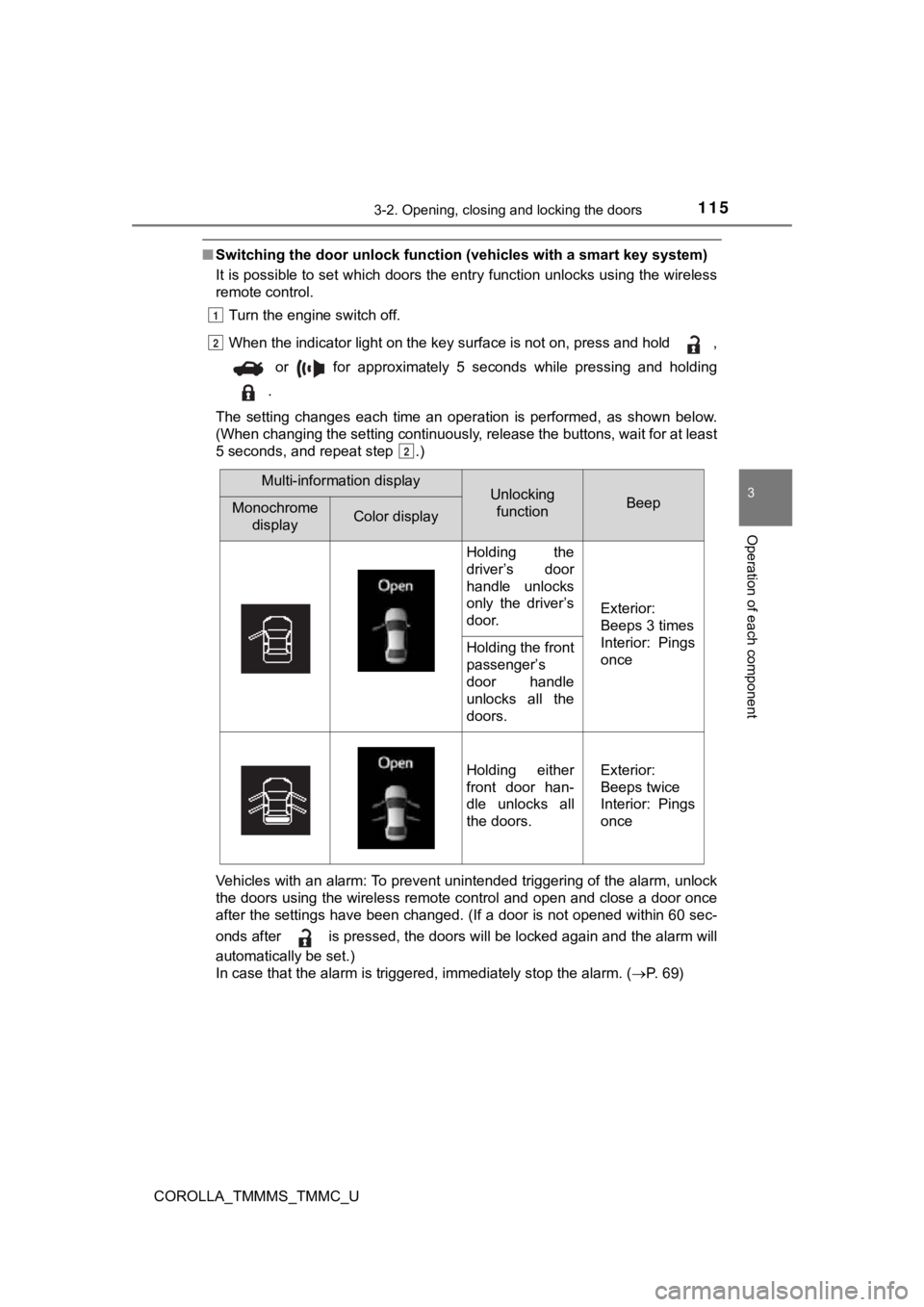
The setting changes each time an operation is performed, as sho wn below.
(When changing the setting continuously, release the buttons, w ait for at least
5 seconds, and repeat step .)
Vehicles with an alarm: To prevent unintended triggering of the alarm, unlock
the doors using the wireless remote control and open and close a door once
after the settings have been changed. (If a door is not opened within 60 sec-
onds after is pressed, the doors will be locked again and the alarm will
automatically be set.)
In case that the alarm is triggered, immediately stop the alarm . ( P. 69)
1
2
2
Multi-information displayUnlocking
functionBeepMonochrome displayColor display
Holding the
driver’s door
handle unlocks
only the driver’s
door.
Exterior:
Beeps 3 times
Interior: Pings
once
Holding the front
passenger’s
door handle
unlocks all the
doors.
Holding either
front door han-
dle unlocks all
the doors.Exterior:
Beeps twice
Interior: Pings
once
Page 119 of 608
1193-2. Opening, closing and locking the doors
3
Operation of each component
COROLLA_TMMMS_TMMC_U
■Operation signal (with a wirel ess remote control function)
A buzzer sounds to indicate that the trunk has been opened.
■ Tr u n k l i g h t
The trunk light turns on when the trunk is opened.
■ Function to prevent th e trunk being locked with the electronic key inside
(vehicles with a smart key system)
● When all doors are being locked, closing the trunk lid with the electronic key
left inside the trunk will sound an alarm.
In this case, the trunk lid can be opened by pressing the trunk release but-
ton on the trunk lid.
● Even when the spare electronic key is put in the trunk with all the doors
locked, the key confinement prevention function can be activated so the
trunk can be opened. In order to prevent theft, take all electr onic keys with
you when leaving the vehicle.
● Even when the electronic key is put in the trunk with all the d oors are locked,
the key may not be detected depending on the places and the sur rounding
radio wave conditions. In this case, the key confinement preven tion function
cannot be activated, causing the doors to lock when the trunk i s closed.
Make sure to check where the key is before closing the trunk.
● The key confinement prevention function cannot be activated if any one of
the doors is unlocked. In this case, open the trunk using the t runk opener.
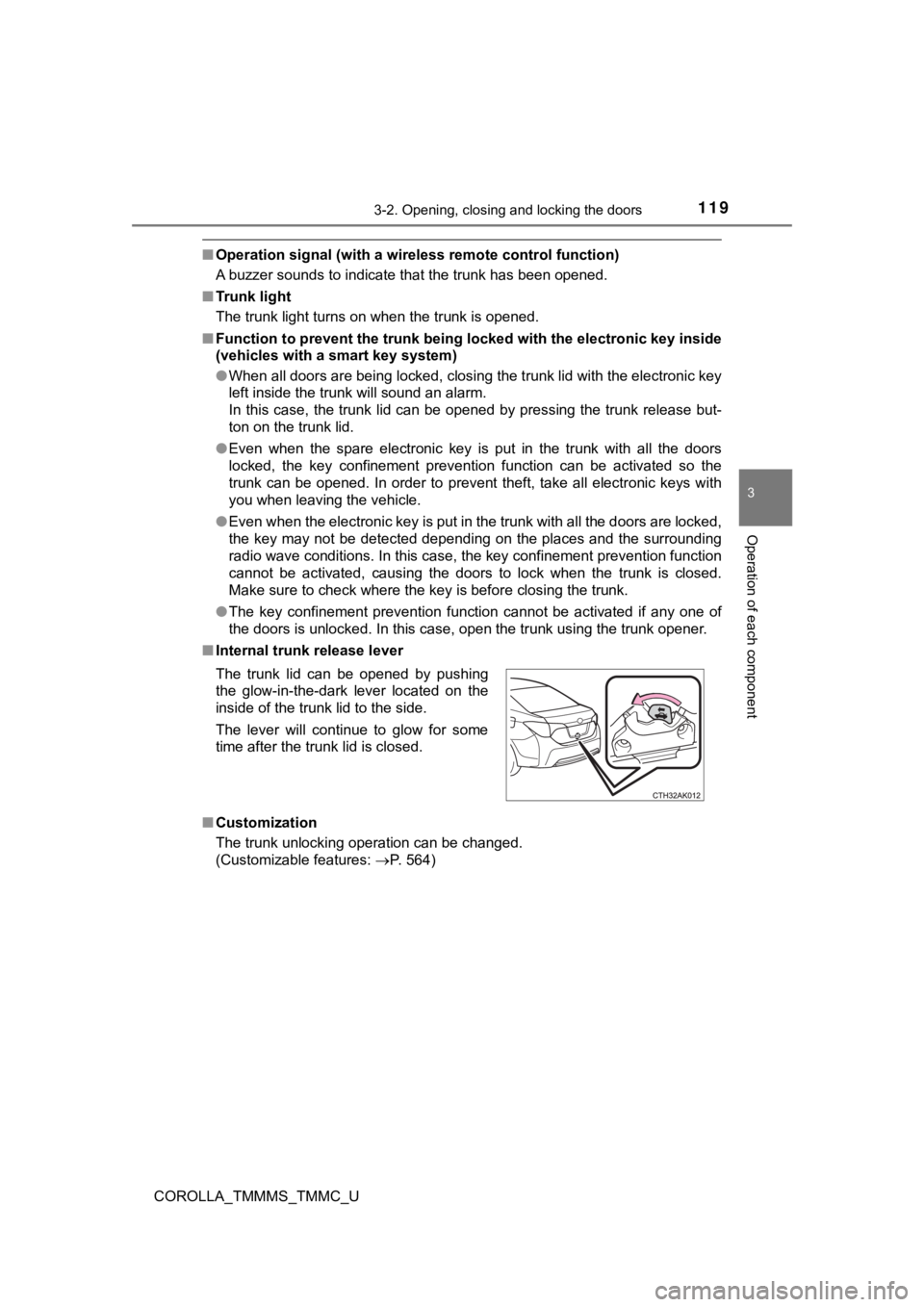
■ Internal trunk release lever
■ Customization
The trunk unlocking operation can be changed.
(Customizable features: P. 564)
The trunk lid can be opened by pushing
the glow-in-the-dark lever located on the
inside of the trunk lid to the side.
The lever will continue to glow for some
time after the trunk lid is closed.
Page 121 of 608
1213-2. Opening, closing and locking the doors
3
Operation of each component
COROLLA_TMMMS_TMMC_U
WARNING
■Using the trunk
Observe the following precautions.
Failure to do so may cause parts of the body to be caught, resu lting in seri-
ous injury.
● Remove any heavy loads, such as snow and ice, from the trunk li d before
opening it. Failure to do so may cause the trunk lid to suddenl y shut again
after it is opened.
● When opening or closing the trunk lid, thoroughly check to make sure the
surrounding area is safe.
● If anyone is in the vicinity, make sure they are safe and let t hem know that
the trunk is about to open or close.
● Use caution when opening or closing the trunk lid in windy weat her as it
may move abruptly in strong wind.
● Do not attach any accessories other than genuine Toyota parts t o the trunk
lid. Such additional weight on the trunk lid may cause the lid to suddenly
shut again after it is opened.
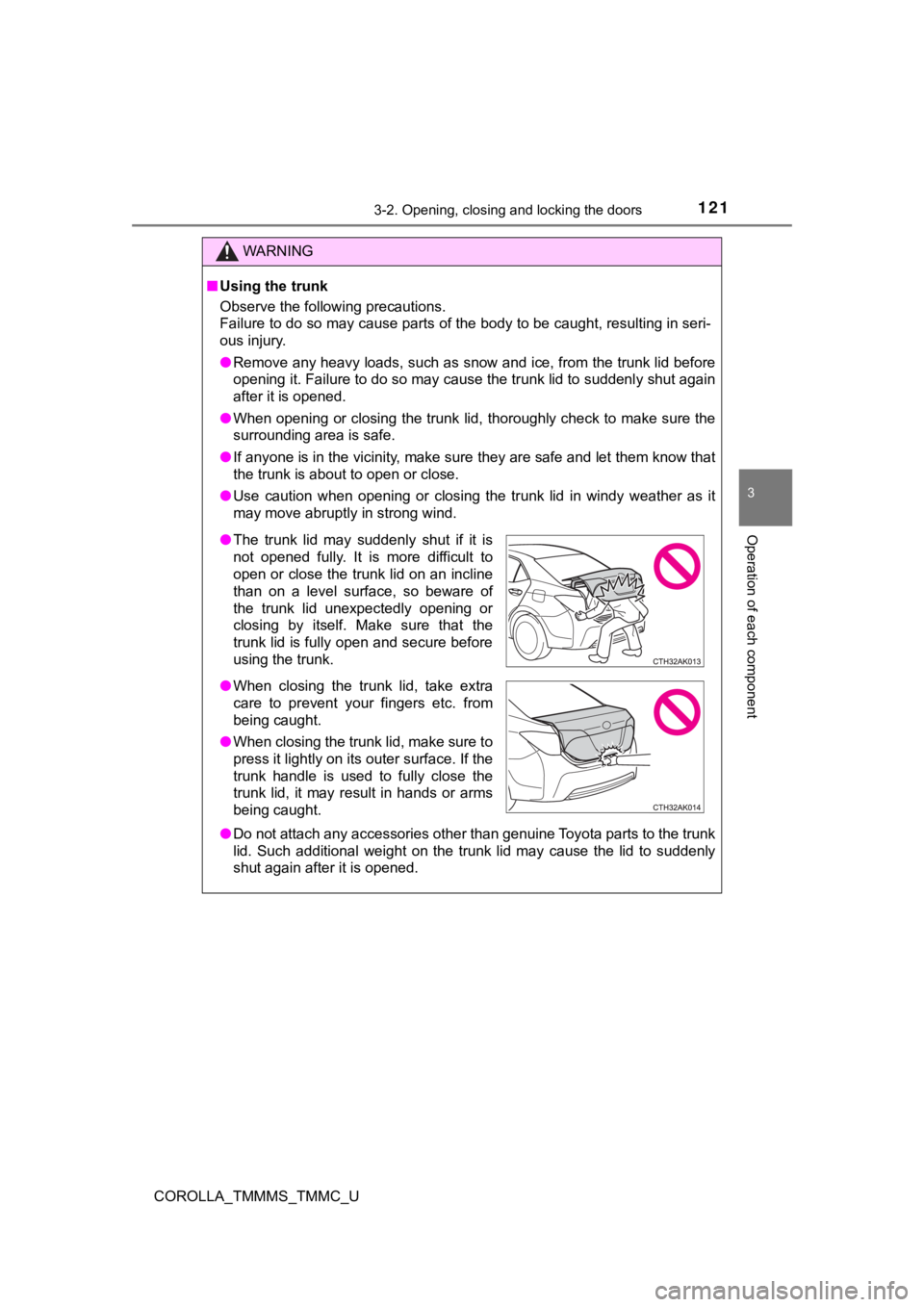
● The trunk lid may suddenly shut if it is
not opened fully. It is more difficult to
open or close the trunk lid on an incline
than on a level surface, so beware of
the trunk lid unexpectedly opening or
closing by itself. Make sure that the
trunk lid is fully open and secure before
using the trunk.
● When closing the trunk lid, take extra
care to prevent your fingers etc. from
being caught.
● When closing the trunk lid, make sure to
press it lightly on its outer surface. If the
trunk handle is used to fully close the
trunk lid, it may result in hands or arms
being caught.